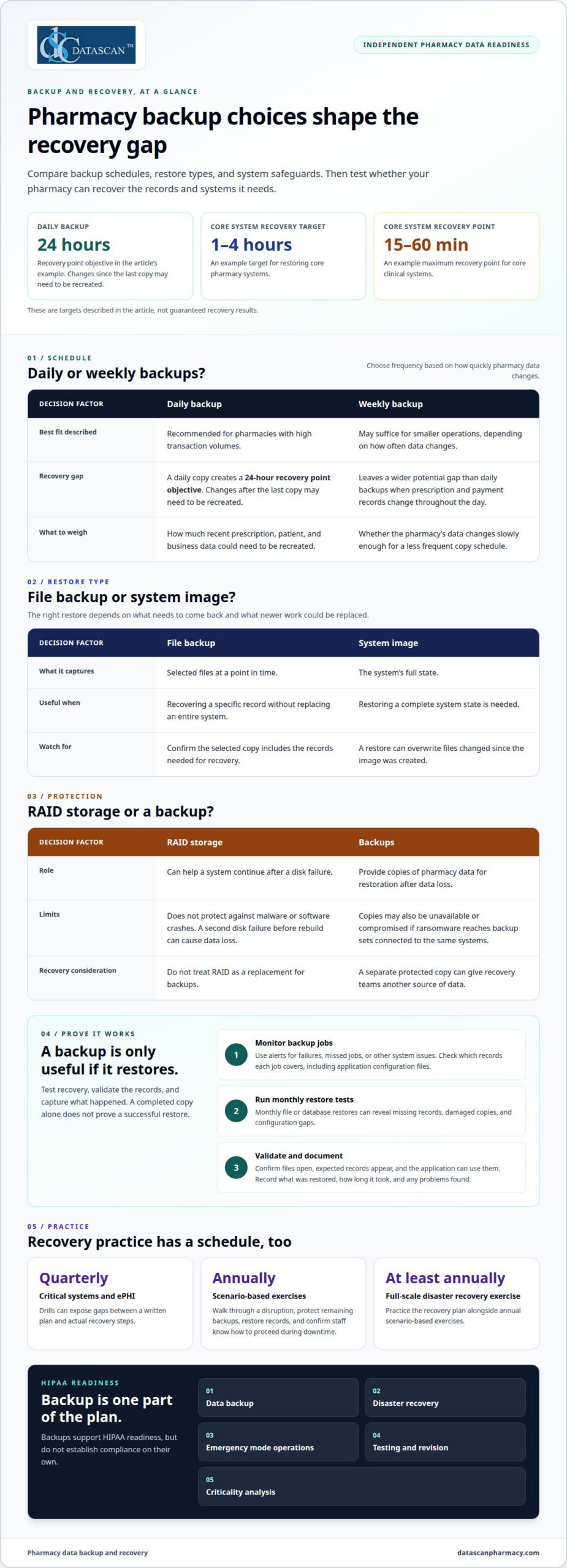
A backup is more than an IT safeguard: pharmacy data backup and recovery solutions can support HIPAA readiness by helping protect patient information and restore access after an outage. HIPAA contingency planning covers data backup, disaster recovery, emergency mode operations, testing and revision, and criticality analysis. A backup plan matters, but it is only one part of the work.
Pharmacy owners know that losing access to records and systems can disrupt daily operations. The practical questions are whether backups can be restored when needed and whether encryption and access controls help protect the data they contain.
This article explains how backups and recovery work, what HIPAA readiness involves, and how to assess recovery priorities, backup frequency, security safeguards, and restore testing. You’ll have a clearer basis for choosing an approach that fits your pharmacy’s systems and daily needs.
Key Takeaways
- Build a recovery plan around the pharmacy systems and records that matter most to daily operations.
- Include restore testing and validation so you know whether backed-up data can be recovered when needed.
- Use backups as one part of HIPAA contingency planning, alongside emergency operations and regular plan review.
- Look for safeguards such as encryption, restricted access, and protected copies to reduce exposure if an account or system is compromised.
- Choose backup frequency and recovery priorities based on how often your pharmacy data changes and how long operations can tolerate disruption.
Why is software data backup important for my pharmacy?
Backups give your pharmacy a way to restore prescription, patient, and business records after ransomware or a disaster. For pharmacies with high transaction volumes, daily backups may reduce the gap between saved copies. Weekly backups may suit smaller operations, depending on how often data changes.
How can pharmacies prepare for ransomware and disasters?
Ransomware is malicious software that can block access to pharmacy systems and records, while fires or floods can damage local equipment and storage. Both risks can interrupt prescription processing, so recovery planning needs to account for more than hardware failure.
In 2023, the Akira ransomware group claimed healthcare victims and demanded ransoms of up to $4 million. If ransomware reaches backup sets connected to the same systems, those copies may also become unavailable or compromised. A separate protected copy can give recovery teams another source of data.
Recovery exercises test whether staff can restore systems and resume essential work. Quarterly drills for critical systems and ePHI can expose gaps between a written plan and actual recovery steps. Scenario-based exercises involving IT, security, clinical, and compliance teams should take place annually, alongside at least annual full-scale disaster recovery exercises.
During an exercise, teams can walk through a ransomware scenario: identify affected systems, protect remaining backups, restore records, and confirm staff know how to proceed during downtime. Pharmacies that handle compounding workflows can also consider how a disruption affects those records and processes, including compounding pharmacy workflows.
How often should pharmacies back up their data?
Backup risk includes both how often copies are created and whether an incident can reach them. A daily backup creates a 24-hour recovery point objective, meaning changes made after the last copy may need to be recreated. That gap matters for prescriptions, patient information, and business transactions.
Set backup frequency according to how quickly data changes. Daily backups are recommended for pharmacies with high transaction volumes, while weekly backups may suffice for smaller operations. If prescription and payment records change throughout the day, a weekly schedule leaves a wider potential gap than daily backups.
RAID storage can help a system continue after a disk failure, but it does not replace backups. RAID does not protect against malware or software crashes. A degraded RAID array also remains vulnerable: a second disk failure can cause data loss before the array is rebuilt.
Monitor backups and use alerts to flag failures, missed jobs, or other system issues. A backup that silently stops running offers no dependable recovery point. Review which records each job covers, including application configuration files, so a restored system has the information it needs to operate.
What are Backup and Recovery Solutions?
A backup is a copy of pharmacy data; recovery is the process of restoring access after a failure. A sound approach defines what gets restored, in what order, and how teams validate recovered records before resuming clinical and business work.
How do you restore data, files, and system images?
Restoration brings backed-up files or a complete system image back into use after data loss. A file backup captures selected files at a point in time, which can help recover a specific record without replacing an entire system.
An image backup captures the system’s full state, but restoring it can overwrite files changed since the image was created. That distinction matters if a pharmacy needs one recent file rather than a full system rollback. Recovery planning should identify which backup type contains the needed data and what newer work a restore could replace.
Clinical restoration order also matters. A pharmacy can prioritize the systems needed to access prescription records and resume essential dispensing work, then restore supporting business functions. For example, restoring a payment record alone won’t restore the application or system needed to use it. Core clinical systems may target recovery within 1-4 hours, with a recovery point of no more than 15-60 minutes.
How do you test and validate restores?
A restore test checks whether a backup can be recovered and whether its data is usable. It turns a scheduled backup from an assumption into a tested recovery method. Monthly file or database restores can reveal missing records, damaged copies, and configuration gaps before a real failure forces the issue.
Validation should confirm that restored files open, expected records appear, and the relevant application can use them. For a prescription database, check record integrity and confirm that users can access the information needed for their work. A completed copy alone does not prove a successful restore.
Keep test results connected to the backup schedule. Record which data was restored, how long it took, and any problems found. If an image restore replaces newer files, document that consequence as part of the test. Repeat testing after system or backup-setting changes, since an earlier success may not reflect the current setup.
A useful recovery plan connects each system to its backup type, restoration priority, and validation step. That gives the team a clear sequence during an outage instead of forcing staff to guess which copy to use. If you’re reviewing how pharmacy technology supports daily operations, talk with our team about your pharmacy software workflow.
Can a backup system help with HIPAA compliance?
Yes. Backups support HIPAA readiness, but they do not establish compliance on their own. HIPAA contingency planning covers data backup, disaster recovery, emergency mode operations, testing and revision, and criticality analysis. Retention periods depend on record type and applicable federal and state rules, so set schedules by category and jurisdiction.
How does a backup program support regulatory compliance?
A pharmacy backup program supports compliance by helping protect patient information and restore access after data loss. Automatic backups can reduce reliance on staff remembering manual tasks, while frequency should reflect how often records change and applicable compliance needs. Documenting backup schedules and recovery tests also connects technical safeguards to continuity planning.
Retention and backup serve different purposes. A retention schedule defines how long a pharmacy keeps a record; a backup copy supports recovery after failure or loss. For each record category, identify applicable federal and state requirements, then set a retention schedule that preserves required records beyond routine backup rotation.
Other frameworks may apply to specific records. The FDA identifies 21 CFR Part 11 as covering electronic records and signatures in pharmaceutical compliance. A pharmacy handling those records should distinguish preservation requirements from operational backups, so routine rotation does not remove records that must remain available.
ISO 27001 alignment can help organize security controls alongside HIPAA planning. Map backup access, protection, monitoring, and recovery evidence to the relevant framework controls. Treat the mapping as a way to identify shared safeguards, not as proof that meeting one framework automatically satisfies the other.
What should a healthcare contingency plan include?
Healthcare contingency planning sets out how an organization will protect data and continue essential operations during an outage. Under HIPAA, the plan covers backup, disaster recovery, emergency mode operations, testing and revision, and criticality analysis. Each part has a distinct role: backups preserve data, while emergency procedures guide work during system downtime.
A pharmacy can connect each critical system to a recovery action. For example, a plan can identify where prescription records are backed up, who coordinates restoration, and how staff access information during an outage. Criticality analysis helps prioritize systems according to their role in patient care and business continuity.
Testing and revision keep the plan aligned with actual infrastructure. A scheduled exercise can expose unclear responsibilities, missing recovery steps, or records staff cannot access during emergency mode. Update the plan after system changes, then record revised procedures and test results for the next review.
How do encryption, immutability, and access controls protect pharmacy backups?
Encryption protects backup data from unauthorized use, immutability helps prevent copies from being changed or deleted, and access controls limit who can manage them. These safeguards address distinct risks: exposure during transfer or storage, ransomware tampering, and misuse of accounts with backup privileges.
How should pharmacy backups be encrypted?
Encryption converts readable backup data into protected form, making it harder to use if someone gains access without authorization. Encrypt backup data in transit and at rest with AES-256 or an equivalent method. Applying protection at both stages secures records as they move to storage and while they remain there.
Consider a backup moving from a pharmacy system to a separate repository. Encryption in transit protects the copy during transfer; encryption at rest protects stored files. Keep encryption keys separate from the data they unlock, and limit key access to authorized roles. If the same compromised account can access both a backup and its keys, encryption may offer less protection during an attack.
Review how the backup process handles encryption throughout the data path. Include scheduled copies, database exports, and removable media. An unprotected export can become a weak point even when the primary backup set is encrypted. Document how each copy is protected so staff can identify gaps during a security review.
What makes a pharmacy backup immutable?
An immutable backup is designed to resist alteration or deletion during its protected period. This separation matters when ransomware attempts to encrypt or erase accessible copies. For highly critical systems, use weekly air-gapped copies written to WORM storage or a physically isolated repository.
Air-gapping separates a copy from routine network access, while WORM means write once, read many. These approaches make it harder for malware on connected systems to change every recovery copy. They complement, but do not replace, restore testing and secure account management.
Decide which data needs this added layer based on its role in pharmacy operations and the impact of losing it. Document the copy’s location and restoration process so authorized staff can find it during recovery without reconnecting it to compromised systems prematurely.
How should pharmacies control access to backups?
Backup access controls define who can view, restore, alter, or delete copies. Restricting permissions reduces the chance that one compromised account can affect pharmacy records and their recovery source.
Assign access according to job responsibilities. For example, staff who restore files may not need permission to delete backup sets or change retention settings. Use separate administrative access for backup management, and review permissions when roles change. Remove access that no longer supports a current responsibility.
Monitor backup activity and set alerts for failures or unexpected changes. A failed scheduled job, unusual deletion attempt, or sudden access change can signal a problem. Document who responds and how they protect remaining copies. Review vendor security and recovery documentation to understand how access, encryption, and restoration work together.
How do you choose a pharmacy backup solution?
Pharmacies can choose scheduled file or database backups, system images, local storage, offsite copies, or a hybrid approach. Local backups remain at the pharmacy, offsite copies are stored separately, and hybrid approaches use both. Each option affects how records are accessed and which disruptions the pharmacy can recover from.
Compare pharmacy data backup and recovery solutions by the systems covered, the data each copy contains, and the steps required to restore it. The right fit depends on pharmacy workflows, transaction volume, access controls, and how much downtime the business can manage.
What backup options are available to pharmacies?
Options include scheduled file copies, database-aware backups, system images, and disaster recovery plans. A file copy can help recover selected records, while an image captures a broader system state. Match each type to a practical need, such as retrieving a document or restoring an application after equipment failure.
Set recovery priorities around the systems that support dispensing and business operations. A pharmacy may need its prescription database available before routine processing can resume. Database-aware backups paired with log shipping or continuous backup can support recovery point objectives of 5 to 15 minutes for Tier 0 and Tier 1 healthcare systems. Consider the acceptable data gap alongside the time required to restore each system.
Automation can reduce reliance on staff remembering each backup. Include application configuration files in your coverage plan, since data files alone may not restore the settings needed to use an application. Monitoring matters, too. Pharmacy data backup and recovery solutions should make it possible to identify a failed job before staff need a recovery copy.
How do local, offsite, and hybrid backups differ?
Local backups store copies on equipment at the pharmacy. Staff can access them directly, but a fire, flood, or theft could affect production systems and nearby copies together. Offsite backups separate copies from the pharmacy’s premises. A hybrid approach combines local and offsite storage, giving the pharmacy different recovery paths.
Consider how each option would work during a specific disruption. A local copy may be useful if remote access is unavailable, while an offsite copy can provide another source after damage at the pharmacy. A hybrid design uses both, but staff still need documented access procedures and a tested restoration process.
Before choosing, map each option to likely events, such as a failed workstation, damaged server, or building outage. Then identify the records and configuration files each copy protects. Pharmacy data backup and recovery solutions are useful only when staff can locate the right copy and restore it through a clear process.
To discuss how pharmacy systems and workflows fit into your operational planning, contact our team.
How can Datascan Pharmacy Software support your pharmacy?
Datascan Pharmacy Software helps independent pharmacies manage daily operations with pharmacy management software, point of sale, a patient mobile app, and delivery tools. Include these systems in your inventory of essential applications when planning backup priorities and recovery procedures.
Start by identifying which pharmacy workflows depend on each system and what staff need to resume work after an outage. This helps your pharmacy coordinate its software environment with its separate backup and recovery plan, without confusing operational tools with backup safeguards.
If you’re reviewing how your pharmacy systems fit into daily operations, contact Datascan Pharmacy Software to discuss your needs.
How can you make recovery planning part of your next systems review?
Your next step is to connect recovery priorities with the pharmacy systems your team relies on each day. Map the workflows that matter, identify the applications that support them, and make sure your backup plan accounts for those dependencies. This provides a clearer basis for evaluating pharmacy data backup and recovery solutions as your operations change.
Datascan Pharmacy Software supports pharmacy operations with Datascan Pharmacy Management Software, Datascan Point of Sale (POS), and the MobileScripts Patient Mobile App. These offerings address different parts of the pharmacy workflow, so consider how each fits your operational environment when reviewing continuity needs.
A practical recovery plan should fit the way your pharmacy works, not add unnecessary complexity. If you’re ready to discuss how your systems and workflows fit into that planning, start a conversation with Datascan Pharmacy Software. You can take the next step with a clearer path forward.
Frequently Asked Questions
What are the benefits of offsite backups?
Offsite backups keep a recovery copy separate from the pharmacy’s premises, which can help if a local event damages equipment and nearby storage. For example, a fire could affect both a pharmacy’s systems and copies stored in the same building. A remote copy provides another recovery option, but staff still need a clear process for accessing it and restoring the applications that use the data.
What happens if I lose my pharmacy data?
Data loss can leave staff unable to access prescription, patient, or business records until systems are restored. The impact depends on which data is affected and whether a usable backup exists. Follow the pharmacy’s response plan, determine which systems and records are unavailable, and restore from an appropriate copy. Then validate the recovered information before relying on it for dispensing, billing, or other daily work.
How much do pharmacy backup and recovery solutions cost?
Costs depend on factors such as data volume, retention needs, backup frequency, recovery priorities, storage approach, and support requirements. A solution covering several systems and longer retention needs may differ from one protecting a smaller set of records. Pricing depends on the pharmacy’s requirements and is provided after a quote request. Compare the full scope, including setup, ongoing storage, restore support, and testing needs.
What are the HIPAA requirements for pharmacy data backups and disaster recovery?
A pharmacy should connect these elements in a written plan. For example, identify which records and systems support essential work, how staff access necessary information during an outage, and how recovery procedures are tested and updated. A backup alone does not address every part of contingency planning.
How do pharmacies protect backups from ransomware and data breaches?
Pharmacies can reduce exposure by encrypting backup data, limiting administrative access, monitoring backup activity, and keeping a protected copy separate from routine system access. For example, if an employee account is compromised, restricted permissions can limit its ability to delete recovery copies. Alerts for failed backup jobs or unexpected changes can also help staff spot problems before they need a restore.
How can a pharmacy restore data and resume operations after an outage or cyberattack?
Use the recovery plan to contain the incident, identify affected systems, and select a backup copy that predates the disruption. Restore the systems needed for essential pharmacy work, then confirm that records and application functions are usable. Record what was restored and any data that needs reconciliation. Staff can then resume affected workflows in a controlled order instead of switching systems without a clear recovery sequence.
What should pharmacies look for when comparing backup vendors and service-level agreements?
Compare each vendor’s supported backup types, restoration process, security controls, monitoring, retention options, and recovery responsibilities. Review how the agreement defines response and restoration commitments, exclusions, escalation procedures, and customer access to backup data. Ask how the vendor handles a failed backup job and what information the pharmacy receives. These details clarify who does what during an outage and where responsibilities lie.
How should pharmacies test backup recovery and disaster recovery plans?
Test more than whether a backup job reports success. Restore representative files or databases, confirm records open correctly, and check that the pharmacy application can use them. Include a scenario where a key system is unavailable, then assess whether assigned staff can follow recovery procedures and communicate responsibilities. Document failures, missing dependencies, and corrective actions, then update the plan so the next exercise tests those changes.

Article by
Sarah Callioras
Sarah Callioras is Vice President at Datascan Pharmacy Software, bringing nearly 25 years of experience across independent pharmacy operations and pharmacy technology. Since joining Datascan in 2016, she has played a key role in driving business growth, strengthening client relationships, and supporting independent pharmacies through innovative software solutions. With a strong background in pharmacy operations, business development, and strategic leadership, Sarah is passionate about helping independent pharmacies succeed in an evolving healthcare landscape.
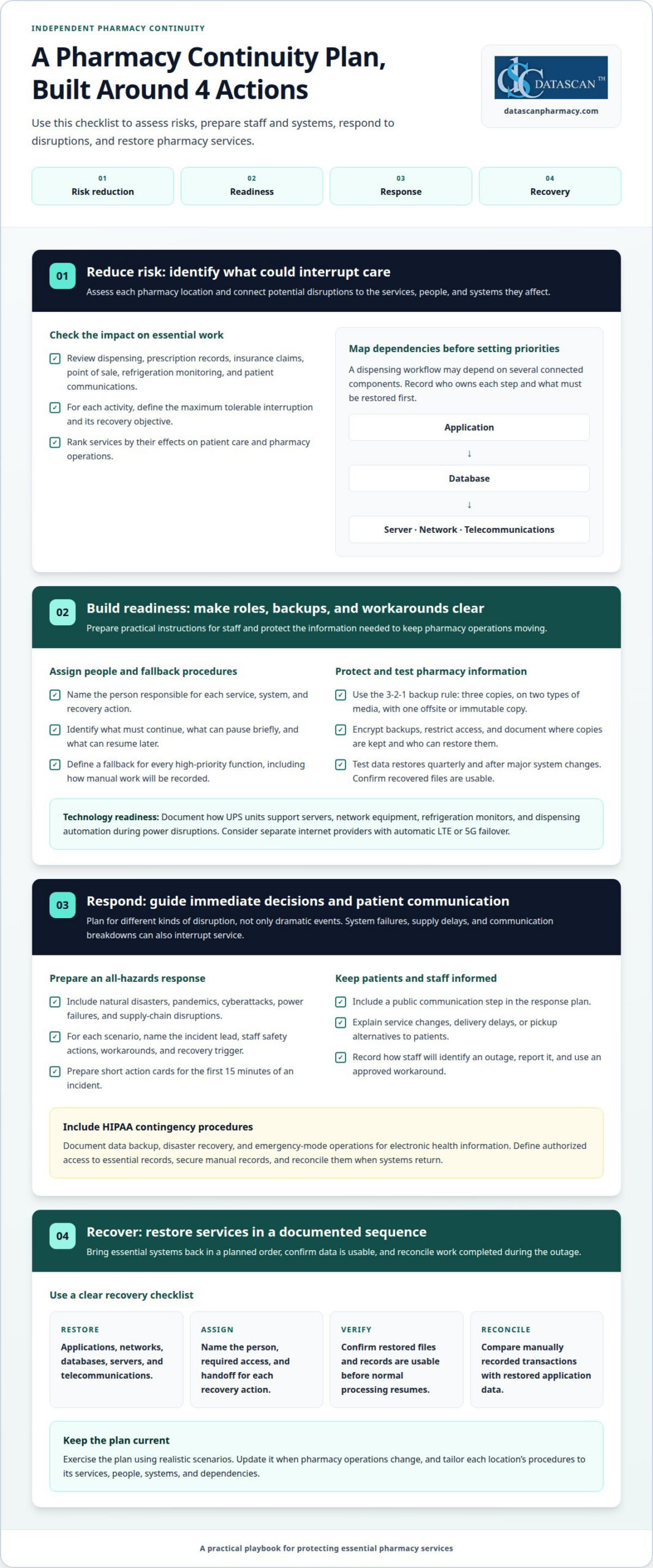
A pharmacy continuity plan should cover four areas: risk reduction, readiness, response, and recovery. A practical approach to creating a business continuity plan for a pharmacy starts by assessing the risks each location faces, then explains how staff will protect essential services, communicate during an outage, and restore operations. Each premises needs a current plan tailored to its services, people, and dependencies.
It’s easy to focus on dramatic events, but disruptions can also start with system failures, supply delays, or communication breakdowns. The plan should clarify what happens next, who takes action, and how patients will be kept informed.
This guide covers the main steps, from assessing threats and protecting information to coordinating with suppliers and other partners. You’ll also learn how to choose realistic continuity exercise scenarios, test your response, and update the plan when pharmacy operations change. The aim is a practical playbook, not a document left untouched on a shelf.
Key Takeaways
- Map recovery steps for pharmacy applications, networks, databases, servers, and telecommunications so staff know which systems to restore first.
- Build response and recovery procedures around realistic disruptions, clear staff roles, and patient communication.
- Protect pharmacy information with controlled access, secure backups, and practical data-restoration testing.
- Keep partner contacts and coordination steps easy to find, including procedures for suppliers and other essential services.
- Use business continuity standards, including ISO 22301:2019(F), cited by the International Organization for Standardization, to help structure and improve your plan.
What should a pharmacy business continuity plan contain?
Creating a business continuity plan for a pharmacy starts with assessing risks, ranking essential services, and defining recovery steps. The planning effort and costs depend on the premises, systems, backup power needs, data, and recovery objectives. After documenting responsibilities, system recovery, data protection, and staff actions, test the plan.
-
Assess business impact and set recovery objectives
List pharmacy activities, then assess how each could be affected by a disruption. Consider dispensing, prescription records, insurance claims, point of sale, refrigeration monitoring, and patient communications. For each activity, define the maximum tolerable interruption and recovery objective. These measures help prioritize threats instead of treating every application or task as equally urgent.
Connect each objective to its dependencies. Dispensing, for example, may rely on an application, database, server, network, and telecommunications. Record who is responsible for each dependency and what must be restored first. Avoid setting targets that overlook a failed connection or unavailable data source.
-
Prioritize services for recovery
Rank services by their effects on patient care and pharmacy operations. Identify which functions must continue during an outage, which can pause briefly, and which can resume later. A pharmacy might prioritize safe access to prescription information and dispensing workflows before restoring routine reporting.
Assign each service a recovery objective and connect it to the necessary systems and staff. Document a fallback for every high-priority function. Avoid a priority list that names services but leaves their dependencies or manual alternatives undefined.
-
Plan recovery for technology systems
Document the recovery sequence for applications, networks, databases, servers, and telecommunications. Name the person responsible for each action, the access they need, and the handoff to the next task. A pharmacy application cannot support staff if its database or network connection remains unavailable.
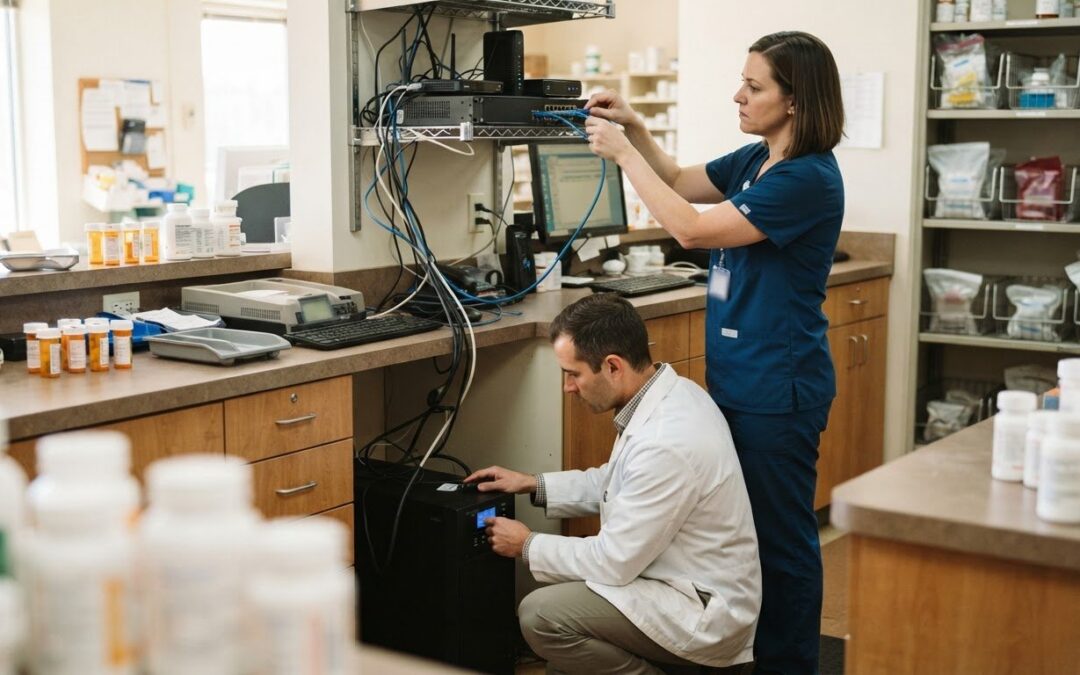
Plan how UPS units will support servers, network equipment, refrigeration monitors, and dispensing automation during power disruptions. Consider separate internet providers with automatic LTE or 5G failover. Record how staff will identify an outage, report it, and use an approved workaround.
-
Plan data backup and reconciliation
Use the 3-2-1 backup rule: keep three copies of data on two types of media, with one offsite or immutable copy. Encrypt backups and restrict access. Document where copies reside, who can restore them, and how staff will confirm recovered files are usable.
Test data restores quarterly and after major system changes. Include a process for reconciling work completed during an outage. Staff can record transactions handled manually, then compare those records with restored application data before normal processing resumes.
- Organize the plan around four actions: risk reduction, readiness, response, and recovery. Risk reduction addresses preventable threats; readiness assigns roles, supplies, and contact methods. Response guides immediate decisions, while recovery restores services and reconciles records. When creating a business continuity plan for a pharmacy, tailor each action to the premises, its services, people, and dependencies. Exercise the plan and update it when operations change.
Business continuity planning for disruptions
Build a disruption plan around an all-hazards response, HIPAA contingency planning, and safe temporary suspension. In the United States, include HIPAA Security contingency planning and identify applicable state pharmacy and emergency requirements for each location.
-
Plan for all-hazards disruptions
List the threats that could interrupt your pharmacy, then pair each with a response. Include natural disasters, pandemics, cyberattacks, power failures, and supply-chain disruptions. Avoid planning around just one dramatic event: a network outage can disrupt prescription processing as sharply as a severe storm.
For each scenario, name the incident lead, staff safety actions, workarounds, and recovery trigger. Prepare action cards for the first 15 minutes, when staff need short, clear instructions. Include employee well-being and a public communication step, such as telling patients about delivery delays or pickup alternatives.
-
Prepare HIPAA contingency plans
Document HIPAA Security contingency procedures for protecting and restoring electronic health information. Include data backup, disaster recovery, and emergency-mode operations, and assign a role to each procedure. State how authorized staff will access essential records if the usual system becomes unavailable.
Describe how to secure records during manual work and reconcile them after systems return. Restrict access to staff who need it, and keep a record of decisions made during the outage. Train employees during onboarding and annual refreshers so everyone knows where to find the procedures.
-
Plan for temporary suspension
Write a temporary suspension procedure for a site that cannot safely provide services. Name who decides to pause operations, who informs employees, and how patients receive clear instructions. Include a patient-facing message explaining the reason for closure, expected service changes, delivery delays, and alternative pickup arrangements.
Record how the pharmacy will protect prescription records, medications, and essential equipment while closed. Define reopening conditions, such as restored access, safe premises, and available staff. Keep a separate checklist for communicating the closure and resumption to relevant public and healthcare partners.
-
Identify applicable emergency requirements
Map federal and state requirements to each pharmacy location. Include HIPAA contingency planning, then identify the state pharmacy-board rules and emergency directives relevant to closure, patient records, and resuming service. Requirements can differ by jurisdiction, so do not apply one state’s procedures to every site.
Assign a plan owner to record the applicable authority, requirement, and notification route. Keep those details with the emergency contacts, and update them when a location or operating procedure changes. During a tabletop exercise, test who makes notifications and what information staff need to provide.
Protect pharmacy information by defining access, documenting incident steps, and planning for supplier outages. The October 2026 NCSC guidance for disruptive cyber attacks advises identifying critical services, involving suppliers, planning secure rebuilding, and testing workarounds.
-
Assess cybersecurity and information governance
Map the systems and information your pharmacy needs to keep operating. Include dispensing applications, prescription records, payment services, email, and network access. For each item, document its business owner, approved users, supplier, and recovery dependencies. This inventory helps identify which services an incident could affect first.
Set clear access and handling rules for each record type. For example, limit prescription information to staff who need it for their assigned duties. Document how staff should report suspected access, system changes, or missing data. Keep procedures in a secure, accessible location so the incident lead can find them when normal systems are disrupted.
Review the inventory when the pharmacy changes systems, suppliers, or workflows. A new payment terminal or email service can create a dependency the existing plan misses. Keep a dated update log, name the person responsible for each revision, and use the current copy in continuity exercises.
-
Prevent phishing disruptions
Train staff to pause before opening unexpected links or sharing credentials. Use pharmacy-specific examples, such as an email imitating a wholesaler invoice or a message requesting urgent prescription information. Tell employees how to report suspicious messages without forwarding sensitive patient details.
Document the response sequence: report the message, alert the designated incident lead, and preserve the email for review. Staff should not reply, open attachments, or enter passwords through message links. If someone has already interacted with a suspicious message, record what happened and which account or device may be affected.
Use onboarding and refresher sessions to practice the reporting route. A short exercise can ask staff to identify a false supplier request and explain whom they would notify. Keep the exercise focused on safe decisions, not blame. This encourages early reporting during a real disruption.
-
Plan for supplier and cyber disruptions
List the suppliers that support critical pharmacy operations, including technology, telecommunications, payment processing, and medication distribution. Record each supplier’s role, internal contact owner, and the service that depends on it. Identify alternatives for critical supplies, such as diversified wholesalers or a secondary courier.
For cyber incidents, define how the pharmacy will isolate affected systems, communicate with suppliers, and safely restore essential services. Include secure rebuilding steps and test workarounds before staff need them. For example, a paper process for recording transactions should explain how staff capture activity and reconcile it after recovery.
Ask each service owner to keep supplier details current and include key partners in exercises. Test scenarios where email is unavailable or a supplier cannot process orders. Record gaps, assign an owner to each corrective action, and update the continuity document after the exercise.
Keep partner contacts, emergency-mode procedures, and closure actions together in one accessible plan. During an outage, staff need to know whom to notify, which services can continue, and how patients will receive clear instructions.
- Build a contact directory for each pharmacy location. Include staff leads, nearby healthcare partners, utilities, suppliers, delivery services, technology providers, and local emergency management contacts. Record each contact’s role, preferred communication method, and an alternate route if the main channel fails. Assign a named staff owner to update the directory when people or partners change.
Set a notification order for incidents. For example, the incident lead can first confirm staff safety, then contact the affected supplier, and then share service changes with patients. Keep a short message template ready for delivery delays, temporary closure, or alternative pickup arrangements.
- Write emergency-mode procedures for staffing shortages, supply interruptions, and facility closures. Name who can pause operations, reassign available staff, contact a backup supplier, and communicate service changes. Include safe manual dispensing and verification steps, with an independent double-check for high-alert medications.
Identify which operations can continue with available staff and supplies, and which must stop. Keep a closure checklist covering site safety, securing records and medications, staff notification, patient messaging, and reopening decisions. Community Pharmacy England lists an emergency closure checklist for community pharmacies dated August 2022.
Use the checklist as a prompt, then adapt the actions to the pharmacy’s layout, services, and local contacts. During an exercise, have staff follow the closure sequence without relying on the manager’s memory.
- Document how staff will protect medication storage during a power outage. Use UPS units to support refrigeration monitors, and assign someone to record readings and outage actions. Define who decides whether affected stock remains usable, and keep it separate until that decision is made according to the pharmacy’s applicable procedures.
Include controlled substances, prescription records, and emergency dispensing in the written workflow. State who can access secured stock, how staff record each action, and how they preserve prescription information during system downtime. Require verification and reconciliation of manual records before normal processing resumes.
For emergency dispensing, identify the approved decision-maker, documentation process, and applicable jurisdictional procedures. Avoid improvising exceptions during a stressful incident.
- Map local emergency resources and reporting routes for each location. Record contacts for emergency management, fire response, utilities, public health, and relevant pharmacy authorities. Identify which situations require notification, who makes it, and what operational details staff should provide.
Keep the current contact sheet with the emergency closure checklist and staff call tree. Test both during an exercise, including a scenario where the pharmacy loses internet and telephone service. Provide an alternate communication method, then update the plan when a contact or reporting route changes.
Business continuity management standards
A business continuity standard gives pharmacy planning a repeatable structure, not a substitute for location-specific decisions. Use it to connect risks, recovery priorities, assigned actions, exercises, and review records.
- Use ISO 22301:2019(F) as a reference point. The International Organization for Standardization identifies it as the standard for business continuity management systems. Apply its management-system perspective to pharmacy operations, then tailor procedures to your premises, services, staff, and technology dependencies.
Do not treat a standard’s name as proof that your plan works. Your pharmacy still needs clear responsibilities, practical workarounds, and evidence that staff can follow them during a disruption.
- Set the plan’s scope before drafting procedures. List the pharmacy location, services, operating dependencies, and people included. For example, map how dispensing relies on staff, prescription information, a functioning network, and supplier access.
Record exclusions and interfaces, too. If a delivery partner, payment service, or external technology provider supports an essential activity, document the relationship and the contact owner. A defined scope prevents the plan from overlooking work that happens outside the pharmacy.
- Turn the risk assessment into controlled actions. For each disruption, document its possible effects, the service at risk, the response owner, and the recovery objective. Include scenarios such as a cyber incident, power loss, supplier interruption, or facility closure.
Connect each action to evidence. A completed exercise report, updated contact list, or restoration record shows what staff actually did. Keep the report concise enough for the pharmacy manager to identify open actions and assign an owner.
- Build a usable template around the decisions staff must make. Include activation criteria, role assignments, communication routes, workarounds, escalation steps, and recovery checks. Keep key instructions accessible if the pharmacy network or usual document system becomes unavailable.
Use consistent labels for versions, owners, and approval dates. Store an accessible copy with the emergency materials, and control who can change the master document. Staff should be able to find the current procedure without searching through old drafts.
- Test the management system through exercises and review. Choose a scenario that tests real dependencies, such as network failure during dispensing or a supplier outage affecting a critical item. Ask participants to follow the written actions instead of relying on memory.
After the exercise, record what worked, where the template caused confusion, and which actions need revision. Assign each correction to an owner and track it to completion. Update the plan after exercises, incidents, or material changes to premises, services, staff, systems, and suppliers.
Datascan Pharmacy Software
Datascan Pharmacy Software offers technology that can be incorporated into continuity planning. Map the systems your team relies on, the services they support, and the manual steps staff would use during an outage. Datascan Pharmacy Management Software and Datascan Point of Sale (POS) support core pharmacy and retail workflows, while MobileScripts Patient Mobile App and Datascan Mobile Delivery App support patient communication and delivery operations.
Consider these tools when documenting which workflows need attention during disruptions and how staff will resume them. A continuity plan still needs defined responsibilities, backups, recovery steps, and exercises tailored to your pharmacy. If you’re reviewing how your pharmacy systems fit into the plan, contact Datascan Pharmacy Software to discuss your needs.
Make Your Next Continuity Step Count
Creating a business continuity plan for a pharmacy gives your team a practical way to prepare for operational changes. Next, connect the plan to the systems staff use every day, then decide which workflows need review as your pharmacy evolves.
Datascan Pharmacy Software offers Datascan Pharmacy Management Software, Datascan Point of Sale (POS), and the MobileScripts Patient Mobile App. Consider how these tools fit into your pharmacy’s documented workflows and continuity priorities. A useful conversation starts with your goals, current processes, and the services your team needs to support.
When you’re ready to discuss how your pharmacy technology fits into your plans, contact Datascan Pharmacy Software. You can take the next step at a pace that works for your team.
Frequently Asked Questions
What scenarios should a pharmacy continuity exercise include?
Include scenarios that require staff to make decisions with incomplete information, such as a supplier delay coinciding with a sudden increase in patient demand. Add realistic developments during the exercise: a key manager is unavailable, a patient needs an urgent update, or an initial workaround fails. These changes reveal whether staff can adapt their judgment, not just follow a prepared script.
Why is that important?
A continuity exercise gives pharmacy staff a safe place to uncover practical friction before an actual emergency. For example, a staff member may know a procedure exists but not know where to find it during a busy shift. Discussing that gap after a simulation helps turn a general concern into a specific improvement, such as clearer instructions or a more workable handoff between shifts.
What should a pharmacy business continuity plan include?
Include a clear plan owner, approval process, version history, and instructions for accessing the current copy. Add decision points that tell staff when to escalate an issue rather than continue with an unsuitable workaround. For example, define who can pause a workflow if the available information is incomplete. These governance details help staff use the plan consistently, even when leadership is not immediately available.
How do pharmacies assess operational risks and prioritize critical services?
Compare each risk’s likelihood with its consequences for patient service, staff safety, and the pharmacy’s ability to operate. Then consider how quickly those consequences could escalate. A brief interruption to a nonessential administrative task may have a different effect from losing information needed for a patient’s prescription. Use these distinctions to rank risks and focus attention on the most serious exposures.
What pharmacy records, systems, and data need backup and recovery plans?
Beyond patient and transaction records, consider the information needed to rebuild system access and resume routine work. Examples include application configuration details, user access records, operating procedures, and current supplier contact information. Identify who can retrieve each item and how staff can tell whether it is current. This broader view helps prevent restoring data while overlooking the instructions or settings needed to use it.
How can pharmacies communicate with patients, prescribers, suppliers, and regulators during an interruption?
Make each message useful to its recipient: state which service is affected, what action is available, and when the pharmacy expects to share another update. For example, a patient notice can explain whether to wait for a callback or use an alternative pickup arrangement. Keep messages factual and avoid including sensitive patient details in broad communications. Record important conversations so the next shift can follow up.
How often should a pharmacy test and update its continuity plan?
Use changes and exercise findings to decide when a review is due, rather than relying only on a calendar reminder. A new service, a changed staff role, or a tabletop exercise that exposes confusion can each prompt a focused update. Track who owns each revision and tell affected employees what changed. A short briefing after an update helps prevent staff from relying on superseded instructions.
Article by
Sarah Callioras
Sarah Callioras is Vice President at Datascan Pharmacy Software, bringing nearly 25 years of experience across independent pharmacy operations and pharmacy technology. Since joining Datascan in 2016, she has played a key role in driving business growth, strengthening client relationships, and supporting independent pharmacies through innovative software solutions. With a strong background in pharmacy operations, business development, and strategic leadership, Sarah is passionate about helping independent pharmacies succeed in an evolving healthcare landscape.