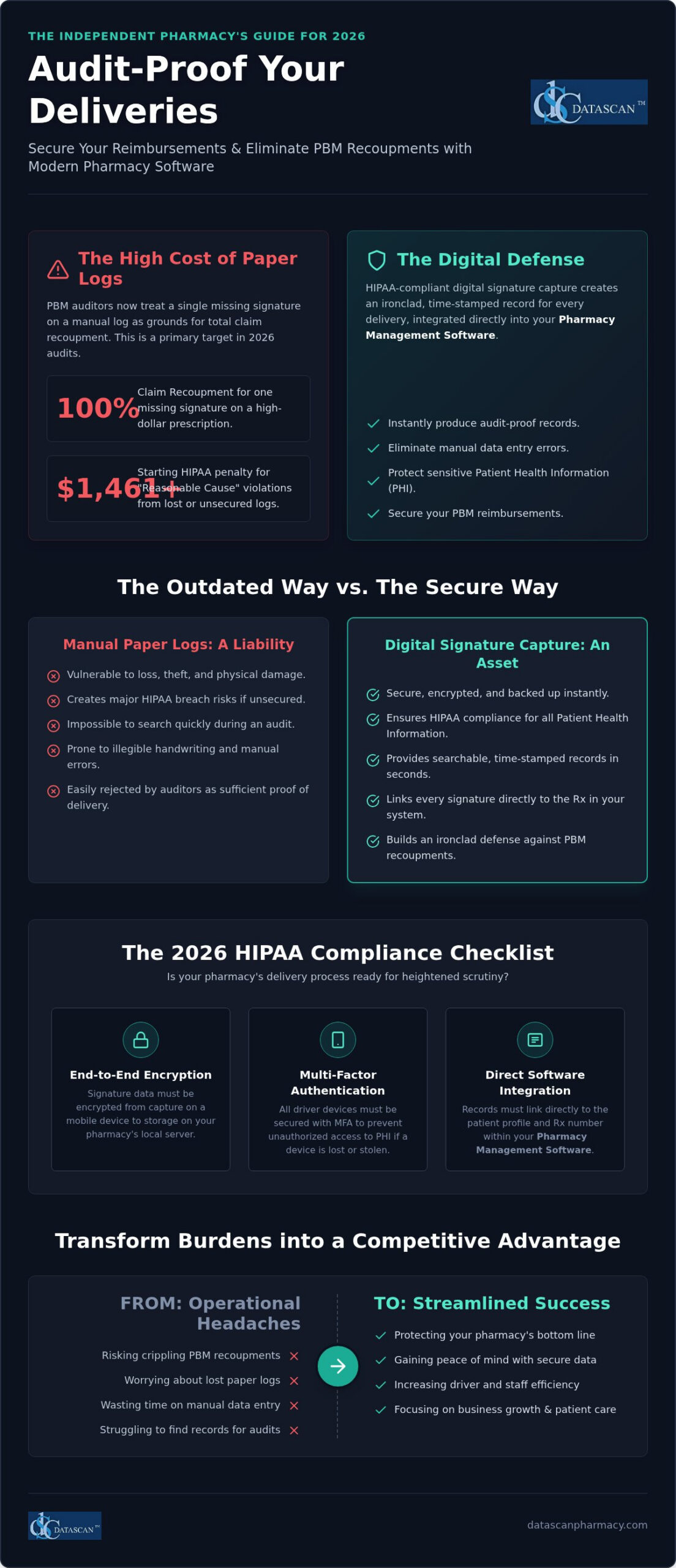
A single missing signature on a manual delivery log can result in the total recoupment of a high-dollar claim during a PBM audit; it’s a financial risk your independent pharmacy simply can’t afford in 2026. To secure your business, you must implement a system for HIPAA compliant delivery signature capture that links every prescription directly to an encrypted, time-stamped record within your pharmacy management software. This strategy ensures you aren’t just meeting privacy standards but are also building an ironclad defense against auditors who no longer accept basic delivery confirmations as proof of service.
We know the pressure of maintaining profitability while managing a mobile workforce is intense, especially with 2026 HIPAA civil penalties for “Reasonable Cause” violations starting at $1,461 and climbing quickly. It’s frustrating when drivers lose paper logs or when you worry about a lost device compromising patient data. This article will show you how to transform these operational burdens into a streamlined, paperless success. You’ll learn how to implement a modern delivery system that improves driver efficiency and stores audit-proof records directly in your Pharmacy Software, giving you the freedom to focus on growth instead of administrative headaches.
Key Takeaways
Protect your pharmacy from total claim recoupments by replacing vulnerable paper logs with an audit-proof digital signature system.
Identify the mandatory 2026 requirements for HIPAA compliant delivery signature capture, including essential encryption standards for mobile devices.
Streamline your daily operations by integrating secure delivery workflows directly into your Datascan Pharmacy Management Software.
Increase driver efficiency and reduce administrative errors using a dedicated mobile delivery app designed specifically for independent pharmacies.
Transform complex compliance burdens into a competitive advantage that secures your reimbursements and frees up valuable time for business growth.
What is HIPAA compliant delivery signature capture?
HIPAA compliant delivery signature capture is the process of securely recording a patient’s acknowledgment of receipt for prescriptions using encrypted digital tools that protect Protected Health Information (PHI). It’s a critical safeguard that replaces outdated paper logs with a verifiable, digital chain of custody. By using this technology, independent pharmacies ensure that every signature is inextricably linked to a specific Rx number and patient profile within their pharmacy management software. This creates an ironclad record that protects your reimbursements during aggressive PBM audits.
The transition from paper logs to digital mobile delivery applications isn’t just about convenience; it’s about survival in a landscape of increasing regulatory scrutiny. In 2026, a simple scribble on a clipboard is no longer enough to satisfy auditors. A truly compliant system requires end-to-end encryption during the transmission of the signature from the driver’s device back to the pharmacy’s local server. This ensures that the data remains protected according to the standards set by the Health Insurance Portability and Accountability Act (HIPAA). Without this level of security, your pharmacy is vulnerable to both HIPAA violations and PBM recoupments.
Why is digital signature capture better than paper logs?
Paper logs are a massive liability for any community pharmacy. If a driver leaves a clipboard in an unlocked vehicle or accidentally loses a log sheet, you’ve potentially triggered a major HIPAA breach. Beyond the security risks, paper is notoriously difficult to manage. Digital capture through a dedicated mobile delivery app allows for:
Immediate, searchable records that can be produced instantly during an unannounced audit.
Significant reduction in manual data entry errors that occur when staff try to transcribe messy handwriting.
Protection against physical damage, such as water stains or tears, which can make paper logs unreadable and useless for defense.
What patient data is considered PHI during delivery?
It’s vital to remember that a delivery route contains a high volume of sensitive data. Patient names, home addresses, and prescription numbers are all classified as PHI. Even the signature itself is a legal acknowledgment that must be handled with the same security as a medical record. To meet 2026 standards, any device used by your drivers must be secured with multi-factor authentication (MFA). This prevents unauthorized access if a device is lost or stolen, ensuring that your pharmacy stays compliant while keeping patient data out of the wrong hands.
How does secure signature capture protect your pharmacy from PBM audits?
Secure signature capture is your primary defense against PBM auditors who treat a single missing signature as grounds for 100% recoupment of a claim’s ingredient cost and dispensing fee. In 2026, PBM audits have shifted focus from clinical accuracy to administrative technicalities, specifically targeting “missing proof of delivery” to claw back profits from independent pharmacies. Implementing a system for HIPAA compliant delivery signature capture ensures that every transaction is backed by ironclad, digital evidence that satisfies even the most aggressive auditor.
By integrating these tools directly into your pharmacy management software, you remove the “low-hanging fruit” that auditors typically exploit. When an auditor demands proof, you don’t need to dig through dusty boxes of paper logs; you can generate a comprehensive report in seconds. These digital records include the signature, a precise timestamp, and metadata that aligns with the HIPAA Security Rule, proving that your pharmacy maintains total control over patient data from the bench to the doorstep.
How does missing delivery documentation impact your pharmacy’s bottom line?
PBMs treat delivery records as a strict condition of payment, which means they use technical flaws in your documentation to justify taking thousands of dollars back. Digital timestamps and GPS coordinates provide vital secondary layers of proof that complement the patient’s signature, making it nearly impossible for an auditor to claim a medication wasn’t delivered. Our integrated pharmacy management software automates this defense by linking every delivery record to the original prescription transaction in real-time. A robust digital record should always include:
The unique prescription (Rx) number.
The date and exact time of the delivery.
The name and signature of the recipient.
GPS coordinates verified at the moment of capture.
Can technology help mitigate DIR fees and improve efficiency?
Streamlining your logistics isn’t just about audit protection; it’s about reclaiming your time and improving your pharmacy’s star ratings. When your delivery process is automated and paperless, your staff spends less time on manual data entry and more time on clinical services that drive profitability. Leveraging the right technology for improving star ratings alongside a secure delivery workflow gives independent pharmacies a powerful edge in competing with mail-order giants while protecting their reimbursements. If you’re ready to secure your workflow and stop audit losses, contact our team to see how we can help you optimize your business.
What is the HIPAA compliance checklist for pharmacy delivery software?
To achieve HIPAA compliant delivery signature capture in 2026, your system must include end-to-end encryption, unique driver credentials, and real-time integration with your central pharmacy database. Your delivery tool needs to function as a secure extension of your pharmacy management software, ensuring that patient data is never vulnerable to interception or unauthorized access. Use this checklist to evaluate your current or future delivery system:
Encryption: Ensure AES-256 encryption is active for data at rest and in transit for all patient information handled on mobile devices.
Automatic Syncing: Signatures must flow directly back to the patient profile without manual intervention, eliminating the risk of lost records or manual entry errors.
Audit Trails: Every driver needs a distinct account to maintain a clear record of who handled which prescription and the exact time of the transaction.
Remote Wipe: Your system must allow you to clear all sensitive data from a device instantly if it’s lost or stolen during a route.
Why is a Business Associate Agreement (BAA) necessary?
You can’t legally share patient data with a software vendor without a signed BAA in place. This document is a legal contract that binds the vendor to the same HIPAA privacy and security standards that you follow as a healthcare provider. Generic, non-healthcare e-sign tools often fail this compliance step because they refuse to sign these agreements, leaving your pharmacy liable for any potential breaches. As a dedicated partner to the independent community, Datascan provides the legal and technical framework required to keep your pharmacy compliant, ensuring your audit defense is built on a solid foundation.
What are the technical requirements for mobile delivery devices?
The hardware your drivers carry into the field must be as secure as the terminals inside your pharmacy. This starts with enforcing multi-factor authentication (MFA) for every login, which is a critical defense against modern hacking trends. Adhering to the Digital Signature Standard ensures that the signatures you capture are legally binding, tamper-evident, and verifiable during a PBM audit. Finally, data should never be stored locally on the device longer than necessary; once a delivery is confirmed and synced to your local server, the PHI should be purged from the mobile unit to minimize the risk of exposure.
How do you implement a secure mobile delivery workflow?
A secure mobile delivery workflow connects your pharmacy management system directly to the patient’s doorstep through an encrypted, verifiable chain of command. By integrating HIPAA compliant delivery signature capture into your workflow software, you ensure that every transaction is documented and stored without the risks associated with manual paper logs. This streamlined approach turns a complex logistical challenge into a repeatable, audit-ready process that protects your bottom line.
To implement this successfully, your pharmacy should follow these five essential steps:
Step 1: Integrate your delivery module with your internal workflow software to ensure data flows seamlessly between the fill station and the driver’s device.
Step 2: Assign prescriptions to specific routes and drivers within the system; this maintains a clear record of who is responsible for each medication at any given time.
Step 3: Drivers use the mobile app to scan the package barcode at the doorstep, which confirms the driver is handing the correct medication to the correct patient.
Step 4: Capture the digital signature and any required co-payments at the point of delivery, ensuring the system records the transaction as a completed, paid event in real-time.
Step 5: The system performs an automatic upload of the signature record to the patient profile for permanent storage, making it instantly retrievable for future audits.
Training your delivery team for compliance
Your drivers are the face of your pharmacy and must be trained to handle PHI with the same care as your in-store technicians. They need to understand that they aren’t just delivering “packages”; they are handling legal documents and sensitive medical information. Best practices include verifying the recipient’s identity without announcing the medication name aloud and maintaining privacy during every interaction. If a patient is not home or refuses to sign, drivers must follow a secure re-delivery protocol that keeps the PHI protected within the delivery vehicle rather than leaving it on a porch or with a neighbor.
Optimizing routes to save time and fuel
Route optimization within your delivery app does more than just save on fuel costs. It gives pharmacy owners back their most valuable asset: time. By automating the delivery sequence, your drivers can complete more stops in less time, while real-time tracking allows your store staff to provide accurate updates to patients. This level of efficiency helps independent pharmacies compete with larger chains while maintaining the personal touch their communities expect. For a deeper dive into maximizing store-wide productivity, read our Pharmacy Workflow Optimization Guide. If you’re ready to secure your delivery operations, contact our support team today for a personalized demonstration.
How does Datascan’s mobile delivery app streamline your pharmacy operations?
Datascan’s mobile delivery app streamlines your workflow by providing a direct, secure bridge between your field drivers and your local pharmacy management system. This specialized tool allows independent pharmacies to achieve HIPAA compliant delivery signature capture while eliminating the friction of manual data entry and fragmented record-keeping. By automating the documentation process, you transform a high-risk operational burden into a streamlined success that protects your reimbursements.
Unlike one-size-fits-all corporate software, our solution is built specifically for the unique pressures of the independent pharmacy owner. We act as the “Champion of the Independent,” delivering technology that prioritizes your profitability by reducing labor costs and shielding you from aggressive PBM audit risks. If a driver encounters a technical hurdle during a late-afternoon route, our US-based support team ensures you get a real person on the phone immediately, not a generic chatbot or an outsourced help desk. This level of accountability is essential for maintaining a reliable delivery service that your community can trust.
Seamless integration with POS and management systems
Efficiency is born from deep integration, and our mobile app ensures that every signature captured in the field appears instantly within your Datascan Point of Sale system. There is no need for complex syncing or reliance on external servers; the app maintains a direct, secure connection to your pharmacy’s local server to keep your data under your own roof. This real-time visibility doesn’t just protect you during audits; it also forms a core part of effective pharmacy patient retention strategies by ensuring your staff can provide accurate, up-to-the-minute delivery status updates to your patients whenever they call.
Future-proofing your pharmacy with Datascan
With a history spanning more than 40 years, Datascan has evolved alongside the independent pharmacy industry, providing stable and innovative solutions that venture-backed corporations simply cannot match. As a family-owned vendor, we are directly accountable to your success, and our longevity proves our commitment to building future-proof tools that help you thrive despite shifting PBM demands. We invite you to see how our mobile delivery app can transform your operations and secure your reimbursements. Schedule a demo today to experience the power of a system designed for the way you actually do business.
Secure Your Pharmacy’s Future with Audit-Proof Delivery
Transitioning to a high-efficiency digital workflow is no longer optional for independent pharmacies facing aggressive PBM audits in 2026. By implementing HIPAA compliant delivery signature capture, you effectively eliminate the risk of total claim recoupments caused by missing or illegible paper logs. This technology doesn’t just protect your hard-earned revenue; it streamlines your entire mobile operation, freeing up your time to focus on patient care and clinical growth. You deserve a system that works as hard as you do to protect your bottom line.
Since 1981, Datascan has remained a family-owned and operated partner to community pharmacies across the country. Our mobile solutions provide direct integration with the Datascan Pharmacy Management System and offer industry-leading, US-based technical support to ensure your drivers always have the help they need. You have the power to overcome PBM challenges and build a more profitable, efficient business for your community. See how Datascan’s Mobile Delivery App can audit-proof your pharmacy and schedule a demo today!
Frequently Asked Questions
Is a digital signature as legally binding as a pen-and-paper signature?
Digital signatures are just as legally binding as traditional ink signatures thanks to the ESIGN Act and the Uniform Electronic Transactions Act. These digital records offer superior protection for your business because they create a tamper-evident record linked to a specific transaction. When integrated with your pharmacy software, these signatures provide a verifiable audit trail that manual logs cannot match. This ensures you meet federal standards while protecting your reimbursements from technical recoupments.
Does HIPAA require a signature for every single prescription delivery?
HIPAA requires a good faith effort to obtain an acknowledgment of receipt for the Notice of Privacy Practices. While the regulation is the foundation, PBM contracts are the primary reason you need a signature for every delivery. PBMs treat a signed delivery log as a strict condition of payment. If you do not have a signature stored in your pharmacy management software, auditors will often claw back the entire cost of the claim.
What happens if my delivery driver loses the mobile device containing patient signatures?
If a driver loses a device, you should immediately initiate a remote wipe through your security management tools. Because a secure mobile delivery app syncs data directly to your local pharmacy management software, the patient signatures are not lost. They are already safely stored on your local server. Multi-factor authentication prevents unauthorized users from accessing any PHI on the lost device, keeping your pharmacy compliant and your patient data protected.
Can I use a standard tablet for HIPAA compliant signature capture?
You can use a standard tablet, but it must be configured with specific safeguards to be compliant. This includes full-disk encryption, phishing-resistant multi-factor authentication, and a secure connection to your pharmacy system software. The hardware itself is just a tool; the compliance comes from the secure application and the administrative policies you implement. Generic tablets without these protections should never be used to handle sensitive patient information or capture signatures.
How long does a pharmacy need to keep delivery signature records for audits?
HIPAA mandates that pharmacies retain compliance-related documentation for at least six years. However, PBMs often have their own lookback periods that can extend beyond that timeframe. It is best practice to store your digital records indefinitely within your pharmacy management software. Since these records do not take up physical space like paper logs, keeping them for the long term is a low-cost way to ensure you are always ready for an audit.
Do PBMs accept digital signatures as proof of delivery?
PBMs absolutely accept digital signatures and often prefer them for their accuracy and metadata. A digital signature captured through a secure app includes a timestamp and GPS coordinates that provide a level of proof paper logs cannot offer. Using a digital system helps you overcome reimbursement challenges by providing the gold standard of proof that auditors look for in 2026, making your records much harder to dispute during a review.
What is the difference between an e-signature and a digital signature under HIPAA?
An e-signature is a general term for an electronic mark, while a digital signature is a specific, encrypted type of e-signature. For HIPAA compliant delivery signature capture, the system uses cryptographic keys to ensure the signature is authentic and has not been altered. This high level of security is what makes digital signatures acceptable for protecting sensitive healthcare data and satisfying the technical requirements of the HIPAA Security Rule.
How can I capture signatures if the patient is not at home during the delivery?
You should not leave the medication if a patient is not home; instead, the driver must return the prescription to the pharmacy. Leaving PHI on a porch is a significant security risk and fails to provide the proof of delivery required by PBMs. Your delivery app should allow the driver to mark the delivery as attempted and return the item to the pharmacy workflow, where it can be rescheduled for a time when the patient is available.
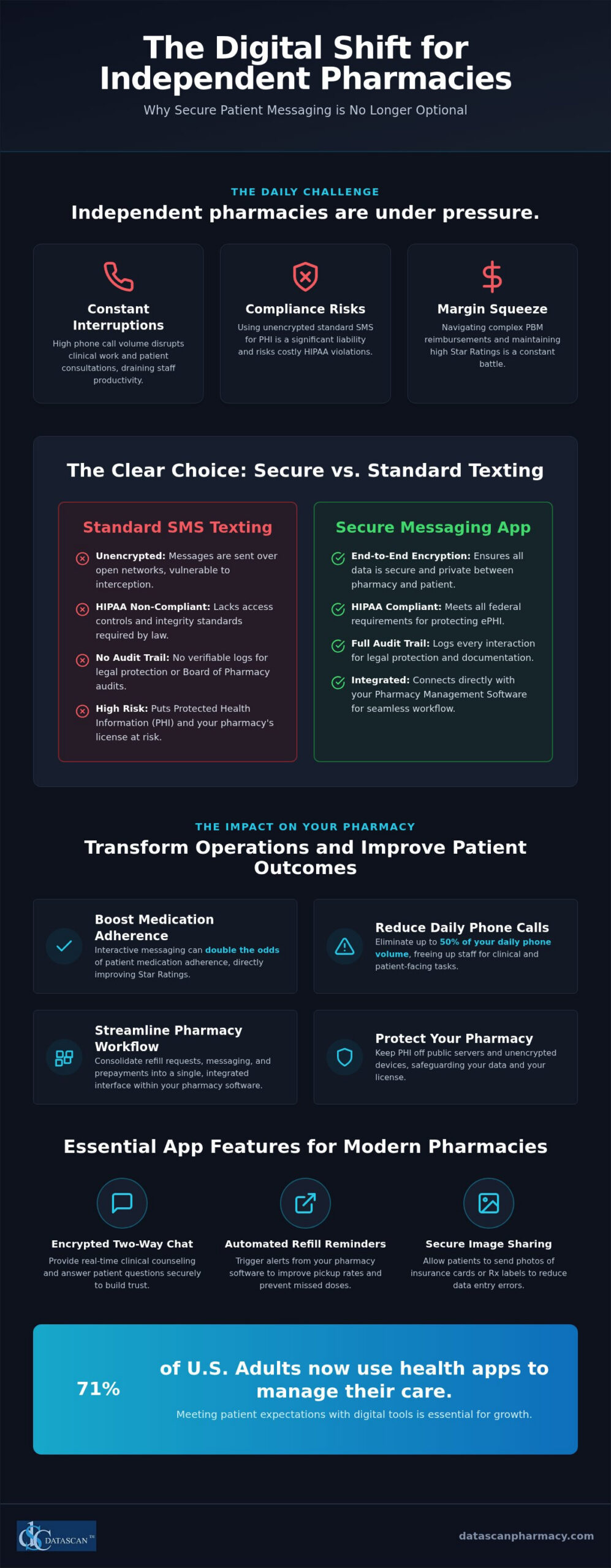
How many times today has a ringing phone interrupted a critical clinical review or a patient consultation? A secure messaging with patients app provides a direct, HIPAA-compliant channel that integrates with your pharmacy management software to eliminate up to half of your daily phone volume while driving higher prescription pickup rates. As we move through 2026, 71% of adults now rely on health apps to manage their care, making digital engagement a requirement for any independent pharmacy looking to protect its margins against predatory PBM practices.
We understand the pressure you’re under to maintain high adherence scores while managing a lean staff and navigating complex reimbursement models. It’s frustrating to watch your team lose hours to manual outreach when you know that interactive messaging can double the odds of patient medication adherence. You need a solution that empowers your staff rather than adding to their workload. This guide explores how to implement secure messaging that safeguards your data, satisfies the latest HIPAA Security Rule updates, and transforms your Pharmacy Software into a measurable profit driver for your pharmacy.
Key Takeaways
Protect your pharmacy from costly HIPAA violations by replacing unencrypted standard SMS with a platform that keeps PHI off public servers.
Discover how a secure messaging with patients app integrates directly into your pharmacy software to eliminate manual data entry and save hours of staff phone time.
Improve PBM reimbursements and Star Ratings by leveraging automated digital touchpoints to boost medication adherence and patient pickup rates.
Streamline your daily workflow by consolidating refill requests, two-way messaging, and co-pay prepayments into a single, locally-hosted interface.
Learn how to launch the MobileScripts app and effectively train your staff to drive patient adoption at the point of sale.
What is a secure messaging with patients app for pharmacies?
A secure messaging with patients app is a HIPAA-compliant platform that enables pharmacy staff to exchange encrypted text, images, and documents with patients via a dedicated mobile application. Unlike standard consumer messaging, these tools ensure that Protected Health Information (PHI) is never stored on unencrypted devices or public servers. By integrating this technology directly into your locally-hosted pharmacy management software, you bridge the gap between the dispensing counter and the patient’s smartphone; this reduces phone call volume without sacrificing the high-touch care that defines independent pharmacy.
The core concept of secure messaging relies on end-to-end encryption to protect sensitive data from unauthorized access. For a community pharmacy, this means you can discuss specific dosages or co-pay amounts with total confidence. Modern pharmacy software now includes these digital extensions because they provide a centralized hub for communication. This eliminates the need for staff to juggle multiple devices or worry about the security of a patient’s personal data in an unmanaged, unencrypted environment.
Is regular texting HIPAA compliant for pharmacies?
Standard SMS is fundamentally unencrypted, which makes it a significant liability for any independent pharmacy. Because basic text messages are sent over open cellular networks, they are vulnerable to interception and lack the necessary “access control” required by federal law. HIPAA mandates strict integrity and authentication standards that standard phone messaging simply cannot meet. With the 2026 updates to the HIPAA Security Rule requiring mandatory encryption and multi-factor authentication (MFA) for accessing ePHI, relying on standard SMS is no longer a viable option. When you use a dedicated secure messaging with patients app, every interaction is logged within a full audit trail. This documentation is critical for legal protection and during Board of Pharmacy audits, as it proves that your staff followed all privacy protocols.
What features should a pharmacy messaging app have?
The right tool must do more than just send text; it needs to enhance your operational efficiency and integrate with your existing workflow. Look for these essential features in your MobileScripts patient app:
Encrypted two-way chat: This allows your pharmacists to provide clinical counseling and answer medication questions in real-time, which builds immense patient trust.
Automated refill reminders: These should trigger directly from the patient profile in your pharmacy software, ensuring patients never miss a dose while improving your prescription pickup rates.
Secure image sharing: Staff can request photos of new insurance cards or prescription labels, which reduces errors and saves your team from making multiple follow-up phone calls.
Why should independent pharmacies use secure messaging instead of standard texting?
Independent pharmacies should use a secure messaging with patients app because it provides a verifiable audit trail and end-to-end encryption that standard SMS simply cannot offer. While basic texting is convenient, it leaves your business vulnerable to HIPAA violations and lacks the clinical documentation required by the Board of Pharmacy. Using a secure platform ensures that every communication is logged directly within your pharmacy management software, protecting your license while eliminating the “phone tag” that drains hours of staff productivity each day. Standard texting is a liability. By moving to an encrypted channel, you ensure that Protected Health Information (PHI) stays between you and your patient.
Beyond legal safety, integrated apps improve data accuracy by pulling patient information directly from your locally-hosted system. This prevents manual entry errors and ensures that staff are always messaging the correct individual. In 2026, 71% of U.S. adults are already using health-related apps; providing a professional, branded interface builds significant trust. It proves your pharmacy is a forward-thinking leader capable of delivering the digital convenience patients expect from national chains, but with the personal touch of a family-owned business. Modern patients don’t just want a text; they want a secure health partner.
How does messaging reduce pharmacist burnout?
Messaging allows your team to handle patient queries in batches during natural lulls in the workflow rather than being constantly interrupted by a ringing phone. As we’ve explored in our guide on reducing pharmacist burnout with technology, automation is the most effective way to reclaim your time when using high-performance pharmacy software. By using standardized templates for “Prescription Ready” or “Insurance Issue” notifications, your staff can clear a queue of notifications in minutes. This shift from reactive phone management to proactive digital communication significantly lowers stress levels across the pharmacy counter. It lets your pharmacists focus on patients, not phone lines.
Can messaging help with pharmacy patient retention?
Direct, secure communication is one of the most effective pharmacy patient retention strategies available today. Research on Medication Adherence with Pharmacist Apps shows that interactive digital tools can double the odds of adherence, creating better health outcomes that keep patients coming back. Automated “Thank You” messages or personalized health tips keep your brand top-of-mind without requiring extra manual effort. If you’re ready to modernize your patient engagement, it’s time to reach out to our support team to see how we can help your pharmacy thrive.
How does a pharmacy management system integrate with secure messaging?
True integration of a secure messaging with patients app means your team never has to leave their primary workspace to communicate with a patient. Instead of toggling between browser tabs or separate mobile devices, the messaging window lives directly inside your locally-hosted pharmacy management software. This seamless connection ensures that patient data, including contact details and medication history, syncs automatically; this eliminates the tedious task of manually typing phone numbers or names into a secondary application. When a patient submits a request through the app, it doesn’t just sit in an email inbox. It drops directly into your workflow software queue, allowing your technicians to process refills with the same speed and accuracy as a traditional call-in, but without the time-consuming phone conversation.
Why is a standalone messaging app a mistake?
Implementing a standalone messaging tool often creates “data silos” where critical patient communication is entirely disconnected from their clinical record. This fragmentation forces your staff into a cycle of double data entry, which significantly increases the risk of transcription errors and wastes precious minutes that should be spent on patient care. Beyond the safety risks, standalone apps are frequently neglected during peak hours. When a messaging platform isn’t part of the primary filling screen, staff often forget to check it, leading to delayed responses that frustrate patients and damage the trust you’ve worked hard to build as a community leader.
What does seamless workflow integration look like?
In a truly optimized environment, digital communication feels like a natural extension of the dispensing process. Here is how a fully integrated secure messaging with patients app functions on a daily basis:
Filling Screen Notifications: A subtle alert appears on the technician’s filling screen the moment a patient sends a message, ensuring no query goes unanswered.
Real-Time Verification Chat: The pharmacist can reply to a patient’s clinical question while simultaneously verifying their prescription, all within the same software window.
Automatic Archiving: Every exchange is automatically saved and timestamped within the patient’s permanent electronic record for future reference and audit compliance.
Direct Workflow Entry: Refill requests and insurance card images move instantly from the patient’s phone to the appropriate stage of your customizable workflow.
Can secure messaging improve PBM reimbursements and patient adherence?
A secure messaging with patients app directly improves PBM reimbursements by boosting Star Ratings and reducing abandoned prescriptions through proactive, documented clinical interventions. Pharmacy Benefit Managers (PBMs) increasingly tie reimbursement rates to Star Ratings, which are heavily influenced by Proportion of Days Covered (PDC) scores. By using an encrypted platform to conduct “medication synchronization” check-ins, your pharmacy ensures patients remain adherent to their therapy. This digital engagement allows you to resolve insurance “prior authorization” delays in minutes rather than days, preventing patients from walking away from the counter. Ultimately, maximizing filled scripts through better communication is the most effective way to drive higher pharmacy gross profit while protecting your business from predatory PBM contract terms.
How does messaging help fight back against PBMs?
Documenting every patient outreach provides your pharmacy with concrete proof of clinical intervention, which is essential for defending your revenue during aggressive PBM audits. Direct messaging reduces “abandoned at counter” rates; these are a major drain on independent pharmacy revenue that often goes unaddressed. When you have a secure, direct line to your patients, you can also promote high-margin clinical services like immunizations or point-of-care testing. This allows you to shift your profit model away from low-margin dispensing and toward the professional services that PBMs find harder to commoditize. It turns your pharmacy software into a weapon for financial independence.
Improving Star Ratings through digital engagement
Automated reminders ensure that patients never “forget” to request a refill, which is the single most common cause of poor adherence scores. Education delivered via a secure messaging with patients app helps patients understand their therapy and manage side effects, significantly reducing the likelihood of therapy discontinuation. In the regulatory environment of 2026, higher Star Ratings are often the only path to lower DIR fees and improved contract terms. Understanding how to leverage the right technology for improving star ratings is essential for protecting your reimbursements and staying competitive. By leveraging digital engagement, you prove your clinical value to the network while improving the health of your community. if you’re ready to protect your margins and reclaim your time, contact our team today to see how MobileScripts integrates with your daily workflow.
How do I set up the MobileScripts patient app for my pharmacy?
Setting up a secure messaging with patients app is a straightforward operational upgrade that starts with activating the integrated module in your existing system and training your team to invite patients at the counter. By following a structured implementation plan, you can transition from chaotic phone interruptions to a streamlined, digital-first workflow that protects your margins and patient data. Because our technology is locally hosted rather than cloud-based, you maintain total control over your database during the entire rollout process.
Step 1: Activate the MobileScripts patient mobile app module within your Datascan system to enable the secure communication bridge.
Step 2: Train your staff on how to send secure invitations to patients during the checkout process at the Datascan Point of Sale (POS) to drive immediate adoption.
Step 3: Use the provided marketing materials, including counter displays and bag stuffers, to let patients know they can now text the pharmacy securely.
Step 4: Monitor the incoming message queue as part of your standard daily workflow, treating digital queries with the same clinical priority as a walk-in consultation.
Promoting your new app to patients
To maximize adoption, include a QR code on every prescription label that links directly to the app store download. This ensures that the moment a patient looks at their medication, they have an immediate path to secure communication. You should also consult our pharmacy mobile app promotion guide for advanced strategies on patient acquisition and engagement. When patients are hesitant about digital health tools, explain the security benefits. Emphasize that unlike standard texting, this app is built for HIPAA compliance, ensuring their sensitive ePHI never touches a public server.
Managing the transition to digital messaging
Start with a “soft launch” to a small group of loyal patients to refine your internal response workflow before a full-scale rollout. This phase allows your team to get comfortable with the interface without being overwhelmed by a high volume of messages. It’s also vital to set clear expectations for response times by using automated “away” messages for after-hours queries. If you encounter any technical hurdles during the setup, leverage the U.S.-based support from your pharmacy software vendor. This personalized assistance is a hallmark of being a champion of the independent; we ensure your technology works for you, not the other way around.
Future-Proof Your Pharmacy with Integrated Digital Engagement
Independent pharmacies face immense pressure from PBMs and staffing shortages, but technology offers a clear path to operational freedom. By centralizing communication within your pharmacy management software, you eliminate the constant interruption of phone calls and protect your business from HIPAA liability. A secure messaging with patients app serves as a vital clinical bridge, ensuring that your interventions are documented and your patient adherence scores remain high. This isn’t just about sending texts; it’s about building a resilient foundation for your community pharmacy.
Datascan has been a family-owned leader in this industry since 1981, providing the U.S.-based support and specialized tools needed to drive independent pharmacy profitability. Our MobileScripts platform offers the seamless integration you need to streamline workflows and improve patient trust without the headaches of standalone systems. It’s time to stop letting phone tag dictate your day and start empowering your team with modern, secure tools that protect your time and your bottom line.
Is secure messaging with patients actually required by HIPAA?
While HIPAA doesn’t explicitly name specific apps, it mandates that any electronic transmission of Protected Health Information (PHI) must include encryption, access control, and integrity safeguards. A secure messaging with patients app fulfills these federal requirements by ensuring data is encrypted end to end and never stored on public servers. Standard SMS lacks these protections, making it nearly impossible to remain compliant with the strict 2026 HIPAA Security Rule updates without a dedicated, secure platform.
How much does a pharmacy messaging app typically cost?
Pricing for patient engagement tools varies based on the depth of integration with your pharmacy software and the specific feature set your business requires. Most vendors offer these digital tools as a monthly subscription or a bundled addition to your existing management system. Because these platforms are designed to reduce staff labor and improve reimbursements, most independent owners find that the operational savings and increased prescription volume quickly offset the recurring licensing and usage fees.
Can patients send pictures of their insurance cards through the app?
Patients can securely upload and send images of insurance cards, prescription labels, or medical documents directly through the MobileScripts interface. This feature is a massive time-saver for your staff, as it eliminates the need for manual data entry from blurry faxes or verbal phone descriptions. Once a patient sends an image, it is accessible within your Datascan system, allowing your team to update profiles and resolve billing issues before the patient ever arrives.
Does my pharmacy software need to be cloud-based for messaging to work?
Your pharmacy management software does not need to be cloud-based to support secure digital messaging. Datascan provides a locally-hosted system that maintains your database on-site while securely bridging to the MobileScripts app via encrypted communication channels. This hybrid approach gives you the best of both worlds; you get the security and control of a local server with the modern, mobile convenience patients expect from a high-tech pharmacy experience without relying on external cloud providers.
What happens if a patient doesn’t want to use an app for messaging?
While digital adoption is high, some patients will always prefer traditional communication methods like phone calls or in-person consultations. Your pharmacy can continue to serve these individuals manually while moving the majority of your volume to a digital channel. By shifting even a portion of your patients to a secure messaging with patients app, you free up significant time for your staff to provide more focused, high-touch care to those who aren’t comfortable using mobile technology.
Can I use secure messaging to handle compounding pharmacy questions?
Secure messaging is an ideal tool for the specialized needs of a compounding pharmacy because it allows for detailed, asynchronous communication. Patients often have complex questions about application methods, storage, or flavorings that are easier to address via text than a rushed phone call. The app allows your pharmacists to send detailed instructions or educational documents that the patient can reference later. All these clinical interactions are archived, ensuring your compounding practice remains fully documented.
How does secure messaging improve my pharmacy’s Star Ratings?
Your Star Ratings depend heavily on medication adherence metrics, specifically the Proportion of Days Covered (PDC). Secure messaging allows you to send automated refill reminders and conduct medication synchronization check-ins that keep patients on track with their therapy. By reducing the number of forgotten refills and addressing side-effect concerns through two-way chat, you improve patient outcomes. These clinical improvements lead directly to higher ratings, which can result in lower DIR fees and better PBM contracts.
Will secure messaging increase the amount of work for my pharmacy technicians?
Secure messaging actually reduces the total workload for technicians by replacing time-consuming phone calls with quick, digital exchanges. Instead of being interrupted by a ringing phone, your team can manage a queue of incoming messages during natural lulls in their workflow. This allows for better batch processing of refill requests and insurance updates. When communication is integrated into your pharmacy software, it becomes a streamlined task that helps your staff work more efficiently throughout the day. For pharmacies that also offer delivery services, pairing this digital communication strategy with a system for HIPAA compliant delivery signature capture ensures that every prescription handoff is fully documented and protected against PBM audit recoupments.
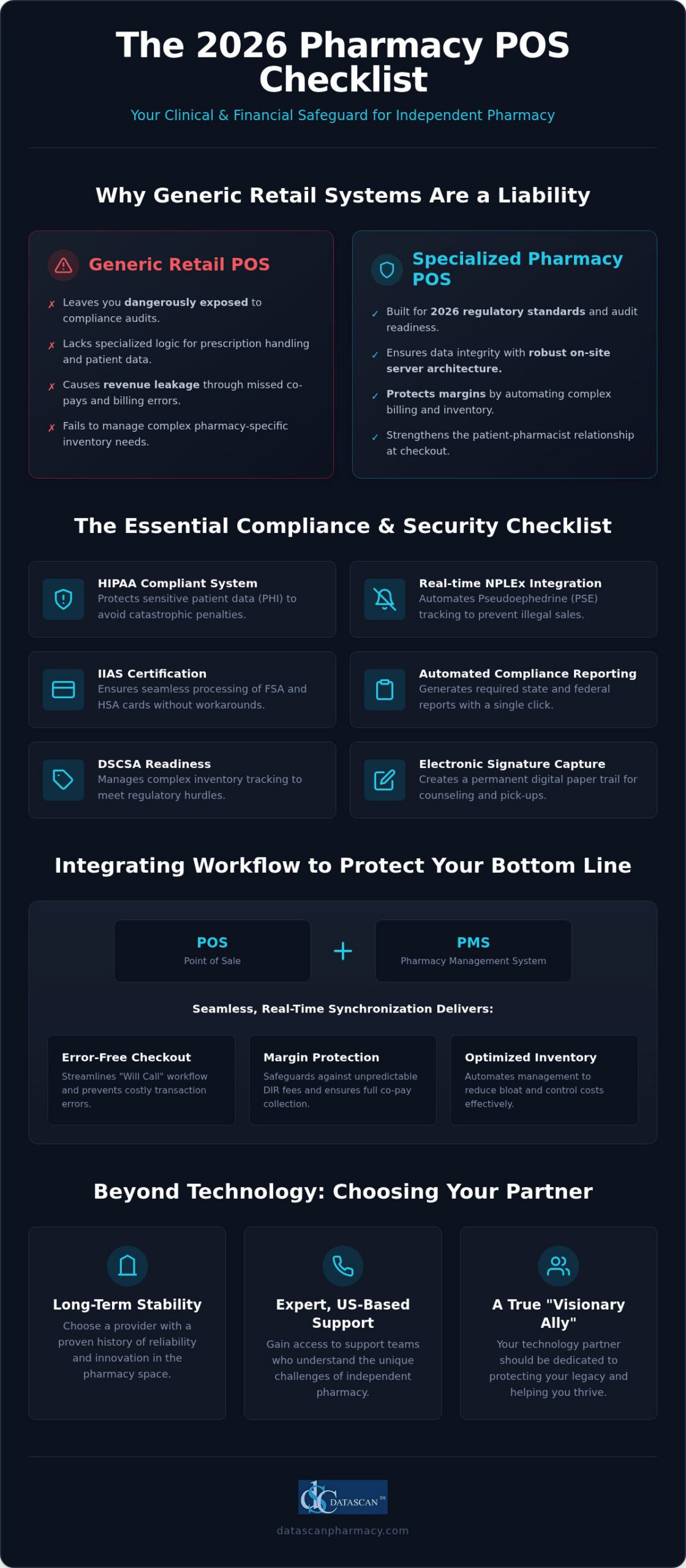
In 2026, your retail pharmacy POS is no longer just a place to process transactions; it’s the primary clinical and financial safeguard standing between your independent business and total margin erosion. You’ve likely felt the crushing weight of shrinking reimbursements and those unpredictable DIR fees that eat into your bottom line before the patient even leaves the store. It’s a frustrating reality where inventory bloat and complex regulatory hurdles like DSCSA can make even a successful day feel like an uphill battle. We understand that as an independent pharmacist, you’re looking for more than just a tool; you’re looking for a partner that protects your legacy.
This checklist will reveal the critical features and compliance standards your hipaa compliant pharmacy pos system must meet to protect your margins and simplify patient care. By the end of this guide, you’ll know exactly how to achieve a streamlined checkout process and automated inventory management through a seamless integration between your POS and pharmacy management system. We’ll explore the essential technical requirements and real-time tracking capabilities that turn operational burdens into a modern, high-performance workflow built for the future of independent pharmacy.
Key Takeaways
Understand why generic retail systems leave you vulnerable to audits and why a specialized POS hub is mandatory for 2026 regulatory standards.
Secure your patient data and maintain strict regulatory readiness by choosing a hipaa compliant pharmacy pos system that utilizes robust on-site server architecture.
Streamline your “Will Call” workflow and prevent costly checkout errors through seamless synchronization between your POS and Datascan Pharmacy Management Software.
Safeguard your margins against rising DIR fees by leveraging automated inventory management and specialized billing tools for compounding and 340B programs.
Evaluate your technology partners based on long-term stability and the availability of expert, US-based support teams that understand the independent pharmacy landscape.
Beyond the Cash Register: Why Retail Pharmacies Need Specialized POS Technology
A retail pharmacy POS isn’t just a place to swipe cards; it’s the nerve center where clinical data, financial precision, and regulatory mandates converge. In 2026, the front counter has evolved into a high-acuity touchpoint. Patients now expect clinical consultations and specialized services right at the point of purchase, moving the pharmacy far beyond simple pill dispensing. Generic retail systems designed for coffee shops or boutiques leave independent pharmacies dangerously exposed to audits because they lack the specialized logic required for prescription handling. We believe your technology should act as a Visionary Ally, transforming these complex operational burdens into streamlined successes that protect your legacy.
Choosing a system built specifically for this niche industry is the only way to safeguard your margins against corporate consolidation. While big-box chains have massive IT budgets, independent pharmacies need a partner that understands their specific pressures. A specialized system doesn’t just record a sale. It validates the transaction against clinical records and ensures that every interaction strengthens the patient-pharmacist relationship. This level of specialization is what allows the “underdog” to not only survive but thrive in a competitive market. Furthermore, as you expand your digital footprint to attract new patients, staying informed on the foundational online growth strategies established by experts like 216digital ensures your pharmacy remains visible in an increasingly crowded local search environment.
The High Stakes of Pharmacy Compliance
Regulations don’t take a day off, and neither should your software. Every transaction involving a patient record must occur within a hipaa compliant pharmacy pos system to ensure data integrity and avoid the catastrophic penalties associated with data breaches. Specialized systems automate the heavy lifting by integrating directly with NPLEx for real-time Pseudoephedrine (PSE) tracking, which prevents illegal sales before they’re finalized. These tools also capture and store electronic signatures for counseling and prescription pick-ups, creating a permanent digital paper trail. This ensures that when auditors arrive, you have every necessary record at your fingertips, turning a high-stress event into a routine verification.
The Profitability Gap in Independent Pharmacy
Profitability in 2026 lives or dies at the checkout line. If your software doesn’t communicate fluently with your Pharmacy management system, you’re likely leaking revenue through missed co-pays and unbilled clinical services. By utilizing the Datascan Point of Sale, you close this gap through real-time synchronization that identifies billing opportunities and ensures every dollar owed is collected. The front-end is your primary area for margin growth this year. Your POS serves as the final line of defense against uncollected co-pays and lost inventory, ensuring that your hard work actually translates into bottom-line results.
The Essential Compliance & Security Checklist for Pharmacy POS Systems
Maintaining regulatory readiness in 2026 requires a shift from passive record-keeping to active, real-time data fortification. Your pharmacy isn’t just a retail storefront; it’s a healthcare facility handling highly sensitive protected health information (PHI). A hipaa compliant pharmacy pos system must act as your digital sentry, ensuring that every transaction meets the rigorous standards of federal law while protecting your business from the financial devastation of a data breach. Beyond simple encryption, your system needs to manage the complex interplay of Inventory Information Approval System (IIAS) requirements to ensure seamless processing of FSA and HSA cards, which helps you capture every possible sale without manual workarounds.
Mandatory Regulatory Integrations
Regulatory bodies don’t accept “system downtime” as an excuse for non-compliance. To stay ahead of audits, your checklist must include these non-negotiable features:
Real-time NPLEx Integration: Automated tracking of Pseudoephedrine (PSE) sales ensures you never exceed legal limits and prevents illicit transactions before they are finalized.
Automated Compliance Reporting: Your system should generate state and federal reports with a single click, removing the risk of human error during manual data entry.
Secure Electronic Signature Capture: Capturing signatures for HIPAA acknowledgments and PMP requirements must be integrated directly into the checkout flow to ensure a complete audit trail.
Data Ownership and System Reliability
While many vendors push remote hosting models, we believe independent pharmacies deserve the stability of physical data ownership. A locally-hosted database provides zero-downtime reliability, ensuring your registers stay open even if your internet connection fails. This architecture is a cornerstone of meeting the HIPAA Security Rule, as it keeps your patient data within your four walls rather than on a distant server you don’t control. By utilizing the Datascan Point of Sale, you benefit from end-to-end encryption for credit card processing that functions without external dependencies, securing your finances and your patients’ trust simultaneously.
Internal security is just as vital as external protection. Robust user permission levels allow you to restrict access to sensitive financial data or inventory adjustments based on employee roles. This granular control is your best defense against internal shrinkage and accidental data exposure. If you’re ready to fortify your operations against the complexities of 2026, it’s time to reach out to our team for a personalized compliance assessment. Protecting your legacy starts with choosing a system that values your independence as much as you do.
Workflow Integration: Why Your POS and Pharmacy Management Software Must Speak
A POS system is only as powerful as its communication with your central Datascan Pharmacy Management Software. If these systems don’t share a single source of truth, you risk dispensing errors and wasted labor hours that your independent pharmacy simply can’t afford. A hipaa compliant pharmacy pos system ensures that patient profiles are updated instantly across your entire operation, eliminating the friction of manual data entry and protecting sensitive information. This real-time synchronization means that a change in a patient’s record at the pharmacy counter is reflected immediately at the register, maintaining the high standards required for HIPAA compliance in the pharmacy.
Safety remains the cornerstone of patient care, and barcode scanning at the register serves as your final line of defense. By scanning the prescription at the point of sale, the system verifies that the correct medication is being handed to the correct patient. This simple yet critical step prevents catastrophic dispensing errors that could damage your reputation and threaten your license. We believe your technology should empower your staff to work with total confidence, knowing the system is actively preventing mistakes before they happen. To see how integrated pharmacy pos software workflows can eliminate the gap between your front-end and back-end operations, explore our in-depth guide on mastering these systems in 2026.
The Will Call Management Checklist
Efficiency at the front counter starts with a robust Will Call workflow. Your POS should offer specialized features that go beyond simple transaction recording to optimize the patient experience. Use this checklist to evaluate your current system’s capabilities:
Prescription Batching: The ability to link multiple prescriptions for the same patient under a single barcode for faster, more professional checkouts.
Real-time Status Updates: Knowing exactly where a prescription is in the workflow—whether it’s filled, verified, or ready for pickup—directly from the register terminal.
Automated Return to Stock: System-generated alerts for unclaimed prescriptions after a set period, ensuring your shelves stay clear and your inventory remains accurate.
Inventory Synchronization Best Practices
Profitability in 2026 relies on lean, precise inventory management that reacts to sales data in real time. Your POS should trigger automatic reordering from your wholesalers based on actual sales, preventing both stockouts and the “inventory bloat” that ties up your cash flow. A unified database for front-end and back-end items is essential for maintaining a clear picture of your pharmacy’s financial health. If you operate multiple locations, your system must provide multi-store inventory visibility, allowing you to transfer stock between sites and optimize your assets across the entire enterprise. This level of optimization turns your inventory from a liability into a competitive advantage.
Profitability Features: Protecting Margins and Retaining Patients
In 2026, protecting your independent pharmacy’s bottom line requires a strategic shift from simple sales to clinical profitability. A modern hipaa compliant pharmacy pos system does more than process payments; it serves as a sophisticated financial engine that handles complex compounding solutions and specialized billing tasks that generic systems ignore. By integrating these high-margin services directly into your checkout flow, you ensure that every custom medication is billed accurately and every clinical service is captured. This level of detail is vital for maintaining the financial health of your business while staying within the strict boundaries of healthcare regulations.
Pharmacists often struggle with shrinking reimbursements, but the right technology helps you fight back by turning every interaction into a value-added opportunity. Unlike big-box retailers, your loyalty programs should focus on clinical outcomes rather than just commercial volume. For example, your system can identify nutrient depletion, where certain medications strip the body of essential vitamins, and prompt staff to suggest supplements at the register. This approach doesn’t just increase your basket size; it improves patient outcomes and reinforces your role as a trusted advisor. Achieving this level of performance depends on having truly integrated pharmacy pos software that unifies your clinical and retail data into a single, actionable workflow.
The Margin Protection Checklist
To survive the current economic climate, you need visibility into every transaction. Your POS should provide these essential tools to keep your business lean and profitable:
Real-time Margin Analysis: View profitability by product category to identify underperforming stock and optimize your front-end mix.
DIR Fee Tracking: Automated estimation of DIR fees at the point of sale prevents end-of-quarter financial surprises.
340B Management Tools: Contract pharmacies need these tools to ensure compliance and maximize reimbursement without manual reconciliation.
Patient Retention and Engagement
Keeping patients loyal means meeting them where they are. Integration with a patient mobile app allows for seamless pick-up notifications that drive foot traffic back into your store. Additionally, managing delivery logistics via an electronic delivery system ensures that even your homebound patients receive top-tier service. A truly hipaa compliant pharmacy pos system also ensures that these retention efforts never compromise patient privacy. By offering customizable loyalty points that reward health-conscious purchases, you build a community of patients who value your expertise over a chain’s convenience. If you’re ready to see how these profitability features can transform your business, contact our team today for a personalized walkthrough.
Selecting Your Partner: Why Support and Longevity Matter in Pharmacy Tech
Choosing a technology partner in 2026 is one of the most consequential decisions you’ll make for your independent pharmacy. While a feature list provides a baseline, the true value of a hipaa compliant pharmacy pos system lies in the company standing behind it. In an era of aggressive corporate consolidation, many software vendors have become distant entities prioritizing shareholder returns over pharmacist success. Selecting a family-owned partner that has been operational since 1981 provides a level of stability and accountability that massive corporations simply can’t replicate. You aren’t just buying software; you’re securing a visionary ally dedicated to your long-term growth.
Immediate, expert assistance is non-negotiable when your registers are down or a compliance audit is underway. We’ve seen the frustration that occurs when pharmacies are forced to deal with offshore call centers that don’t understand the nuances of the US healthcare market. US-based support teams ensure that you’re speaking with experts who understand your specific pressures and can provide immediate troubleshooting. This support structure is why the Datascan Point of Sale remains the logical choice for independent owners who refuse to be treated like just another ticket number in a corporate queue.
Vendor Evaluation Checklist
Before signing any contract, you must look past the sales pitch to evaluate the vendor’s actual track record. Use these questions to separate the true partners from the mere providers:
Market Longevity: How long has the company been serving the independent pharmacy market specifically? Look for decades of experience, not just years.
Support Accessibility: Is the support team located in the US and available during your most critical pharmacy hours?
Innovation History: Does the company have a documented history of consistent, innovative feature updates that respond to market trends?
The Implementation and Migration Process
A seamless transition is vital to ensuring your pharmacy doesn’t skip a beat during a system upgrade. You must demand a comprehensive data migration plan that guarantees no patient history or clinical record is lost in the move. High-touch training for your staff is equally important, as even the most powerful hipaa compliant pharmacy pos system is useless if your team doesn’t know how to leverage its full potential. Your partner should also provide a clear roadmap for future developments, such as e-care plans and enhanced clinical modules. This forward-thinking approach ensures that your technology remains a competitive advantage rather than a legacy burden, allowing you to focus on what matters most: your patients. To further support their wellness journey, you might suggest they check out BioNavs for personalized metabolic and longevity coaching.
The landscape of independent pharmacy in 2026 demands more than just endurance; it requires a proactive shift toward specialized technology that treats your front counter as a clinical hub. You’ve seen how a generic register isn’t enough to protect you from audits or shrinking margins. A true hipaa compliant pharmacy pos system must integrate deeply with your management software to automate compliance and capture every missed billing opportunity. This level of synchronization is what transforms a simple transaction into a safeguarded clinical interaction.
Choosing a partner is about more than a feature list; it’s about finding an ally that shares your values. At Datascan, we’ve been family-owned and operated since 1981, providing the specialized US-based support you need to navigate mission-critical operations with confidence. We’ve built our tools specifically for independent pharmacy success, ensuring you have the precision and speed to thrive against corporate competition. Don’t let outdated systems hold your business back. It’s time to Empower your independent pharmacy with Datascan POS solutions and take control of your financial future. Your legacy is worth protecting, and we’re here to help you lead the way.
Frequently Asked Questions
What is a retail pharmacy POS system?
It’s a specialized transaction hub that bridges the gap between retail sales and clinical pharmacy management. Unlike standard registers, it handles prescription pick-ups, pseudoephedrine tracking, and electronic signatures while maintaining health data security. It acts as the final clinical check before a patient leaves the store, ensuring that patient records and financial data remain synchronized and accurate within a single, secure environment that prioritizes patient safety.
Can I use a regular retail POS for my pharmacy?
No, using a generic retail system leaves your independent pharmacy vulnerable to massive compliance failures and audit penalties. Regular systems don’t have the specialized logic to track NPLEx data, manage “Will Call” bins, or capture required HIPAA signatures. A specialized hipaa compliant pharmacy pos system is mandatory because it understands the complex regulatory nuances of the healthcare industry, protecting your license and your bottom line from avoidable errors.
How does a pharmacy POS help with HIPAA compliance?
A pharmacy POS secures Protected Health Information (PHI) by using encrypted local databases and strictly controlled user access levels. It automates the capture of electronic signatures for privacy acknowledgments and keeps a permanent, auditable digital paper trail of every patient interaction. This ensures that your staff follows federal guidelines during every transaction, significantly reducing the risk of data breaches or accidental disclosures of sensitive patient medical history.
What is IIAS and why does my pharmacy need it?
IIAS stands for Inventory Information Approval System, a technical standard that allows your POS to automatically identify FSA and HSA eligible items. Without it, you can’t accept these health-related payment cards for over-the-counter products, which frustrates patients and leads to lost sales. Implementing IIAS ensures your pharmacy can process these transactions seamlessly, capturing revenue from patient healthcare spending accounts while meeting strict IRS requirements for substantiation at the register.
Does a pharmacy POS integrate with insurance billing?
Yes, a specialized POS system communicates directly with your pharmacy management software to pull the exact co-pay amounts determined during the adjudication process. This prevents manual entry errors at the register and ensures you collect the correct amount from the patient. It also helps track uncollected co-pays, acting as a financial safeguard that ensures your hard-earned insurance reimbursements aren’t undermined by losses at the point of sale.
How does inventory management work in a pharmacy POS?
Inventory management works through real-time synchronization between front-end sales and back-end stock levels. When an item is scanned at the register, the system immediately decrements your inventory and can trigger automatic reorders from wholesalers based on your custom par levels. This prevents both stockouts and inventory bloat, ensuring your cash flow isn’t tied up in stagnant products while keeping your most profitable items on the shelves for your patients.
Why is US-based support important for pharmacy software?
US-based support is critical because pharmacy operations are time-sensitive and governed by complex domestic regulations. When a register goes down or an auditor walks in, you don’t have time to explain US pharmacy law to an offshore call center. Having a team of experts who understand the American healthcare landscape ensures faster resolution times and higher accuracy, keeping your pharmacy operational and compliant during high-stakes situations where every second counts.
Can a POS system help reduce DIR fees?
While a POS cannot eliminate DIR fees entirely, it helps mitigate their impact by providing real-time tracking and estimation at the point of sale. By identifying high-DIR transactions and monitoring patient adherence through your hipaa compliant pharmacy pos system, you can make more informed decisions to protect your margins. This visibility allows you to adjust your business strategy and avoid the “clawback” surprises that often cripple independent pharmacy finances.