Improving prescription pickup workflow starts with making the work visible and clarifying who owns each handoff. That helps teams spot why patients arrive before prescriptions are ready and where staff are repeating status checks, rather than simply asking everyone to move faster.
If pickup interruptions pull your team away from dispensing and patient care, a predictable process can help reduce avoidable delays without making speed more important than accuracy or service. The first step is to trace delays back to where they begin, not just focus on the wait at the counter.
This guide shows how to map staff handoffs, build a repeatable pickup process, and identify where technology can reduce manual coordination. Pharmacy management software and customizable workflow tools can help independent pharmacies organize work around their own processes. The goal is a more dependable pickup experience that gives your team more room to focus on patient care.
Key Takeaways
- Trace pickup delays from patient arrival back to prescription readiness and staff handoffs to find where bottlenecks begin.
- Map each step across counter and drive-thru pickup to clarify shared tasks, channel-specific steps, and ownership.
- Improve coordination by removing avoidable waits and clarifying staff roles, not by skipping accuracy checks or patient-care steps.
- Test one change at a time and review practical measures, such as repeat lookups or status inquiries.
- Use pharmacy management software and customizable workflow tools to support coordination while keeping staff judgment central.
What makes prescription pickup workflow break down in independent pharmacies?
Prescription pickup workflow is the sequence connecting prescription readiness, patient arrival, required verification, the medication handoff, and completion of the pickup. A delay at the counter may begin earlier, when readiness is unclear, an update doesn’t reach the right person, or the next step has no clear owner.
The visible wait isn’t always where the problem started. A team can protect time for accurate processing and patient care while removing avoidable pauses, such as searching for a prescription with an unclear status or repeating a check because information wasn’t passed along. Improving the workflow means addressing those process gaps, not rushing work that requires professional attention.
Where do prescription pickup delays usually begin?
Look upstream from the pickup counter. Common sources include unclear readiness, incomplete communication, repeated searches, and competing staff responsibilities. Because pharmacy work includes dispensing and patient care, pickup depends on coordinated steps across the team, not only the moment a patient arrives.
For example, a patient arrives while a technician is helping someone else. A colleague checks the prescription, but the available information doesn’t show whether it’s ready or who owns the remaining work. The delay appears at pickup, but the cause may be an earlier status update or an unassigned task. Trace the sequence before changing the counter routine.
Why do clear handoffs matter at pickup?
As work moves between dispensing, support, and pickup staff, responsibility can become unclear. If each person assumes someone else will share a status change or handle the next step, work can stall. AHRQ’s Patient Safety Network identifies handoffs as points where clear communication matters for continuity; its overview of handoffs and signouts offers relevant context for designing reliable transitions.
Define each handoff plainly: who passes the work, what information the next person needs, and who takes responsibility for moving it forward. When a prescription moves from dispensing toward pickup, make the next role and required status clear. Predictable coordination helps staff serve patients without encouraging rushed checks.
Independent pharmacies can use a workflow map to identify gaps across counter and drive-thru service, then align responsibilities with the steps staff actually perform. Datascan customizable workflow tools support processes designed around a pharmacy’s needs, helping structure coordination while leaving professional judgment with pharmacy staff.
How should a pharmacy map the prescription pickup workflow?
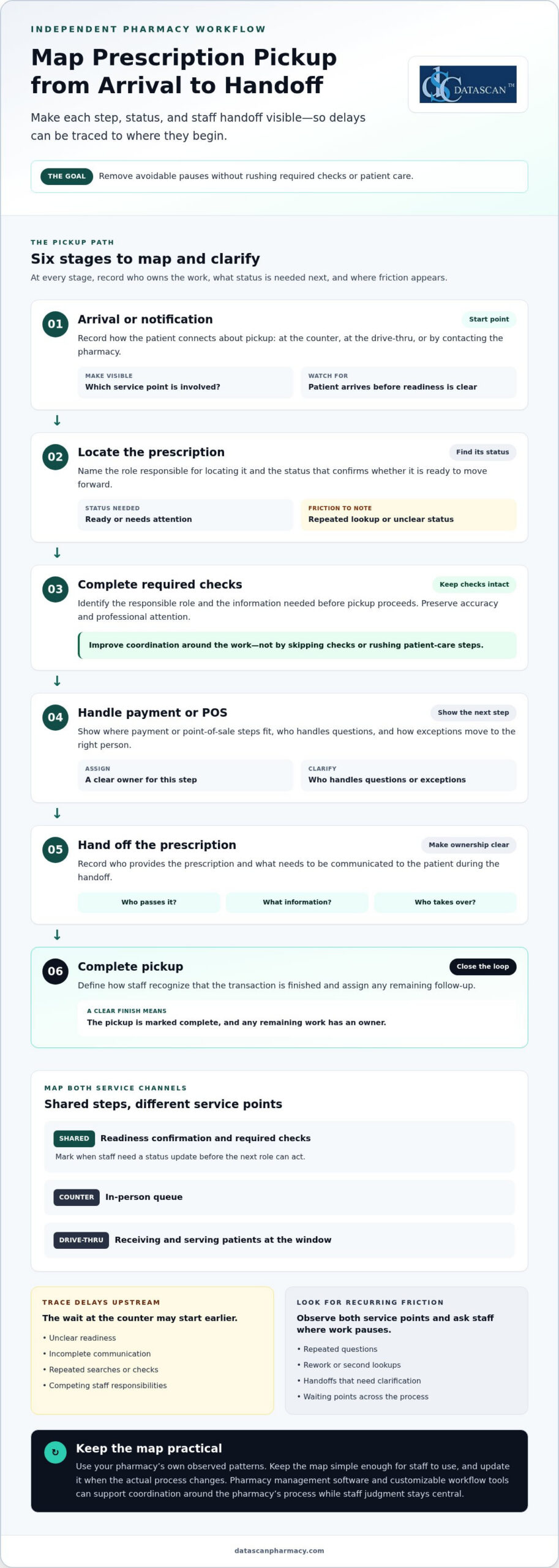
Map pickup from patient arrival or notification through the final handoff. For every step, record its owner, the status needed to proceed, and any friction. Include counter and drive-thru service so the map reflects how work moves across the pharmacy, not just through one channel.
What stages belong on a prescription pickup workflow map?
Start with the patient-facing journey, then add the staff actions behind it. Focus dispensing details on the status needed at pickup, and connect those steps to your pharmacy management software, which supports the broader prescription workflow.
- Arrival or notification: Record whether the patient arrives at the counter, uses the drive-thru, or contacts the pharmacy about pickup.
- Locate the prescription: Note who finds it and what status confirms it is ready to move forward.
- Complete required checks: Identify the responsible role and the information needed before pickup can proceed. Keep required checks intact.
- Handle payment or POS: Show where payment or point-of-sale steps fit, and who handles questions or exceptions.
- Hand off the prescription: Record who provides it to the patient and what needs to be communicated during the handoff.
- Complete pickup: Define how staff recognize that the transaction is finished and assign any remaining follow-up.
Some steps are shared across channels, such as confirming readiness and completing required checks. Others differ: counter pickup involves an in-person queue, while drive-thru work includes receiving and serving patients at the window. Map the channels side by side and mark each point where staff need a status update before the next role can act.
Use a simple working template. Add a row for each stage, then fill in the owner, the status needed, the friction observed, and a possible improvement.
| Stage |
Owner |
Status needed |
Friction point |
Proposed improvement |
| Locate prescription |
Assigned role |
Ready or needs attention |
Repeated lookup |
Clarify status and handoff |
| Patient handoff |
Pickup role |
Checks complete |
Unclear next step |
Define handoff ownership |
How can a team identify recurring pickup bottlenecks?
Observe representative shifts at both service points and note repeated questions, rework, and waiting points. Ask staff which handoffs most often need clarification or a second lookup. Existing operational records can add context; use your pharmacy’s own patterns rather than imposing an unsupported benchmark.
As the team maps each step, improving prescription pickup workflow becomes a practical exercise in spotting where work pauses and making ownership visible. Keep the map simple enough for staff to use, and update it when the actual process changes.
How can pharmacies improve pickup speed without compromising accuracy?
Choose an intervention based on the friction you observe. A written handoff may address uncertainty about who acts next, while a process change may eliminate an unnecessary repeat lookup. Pharmacy management software can support connected operational workflows, but the pharmacy’s process design should determine what needs coordination, and staff judgment should guide each patient interaction.
| Intervention |
Suitable bottleneck |
Expected workflow effect |
Watch-out |
| Clarify handoff ownership |
Staff aren’t sure who handles the next step |
Makes responsibility and the next action easier to identify |
Keep role expectations clear when the usual owner is occupied |
| Standardize status communication |
Repeated questions or searches for prescription status |
Helps staff locate relevant information with less back-and-forth |
Don’t treat a status update as a substitute for required checks |
| Define an exception path |
Unusual cases interrupt the usual pickup sequence |
Gives staff a consistent way to route work that needs attention |
Allow for individual circumstances rather than forcing every case into one path |
| Align workflow tools with the process |
Manual coordination makes handoffs harder to follow |
Supports a workflow designed around the pharmacy’s operations |
Technology should support staff, not make decisions in their place |
Which workflow changes reduce avoidable waiting?
Make the next action clear at each transition. Staff should know who receives a task and what information signals that it can move forward. If team members repeatedly check the same status, review whether the information is easy to locate and communicated consistently. For exceptions, define how staff route the case for attention while preserving the flexibility to handle individual needs.
When can pharmacy management software support pickup coordination?
Software is useful when the team needs a more structured way to support its operational workflow. First decide what the process requires, then consider how pharmacy management software and customizable workflow tools fit that design. Datascan’s pharmacy workflow optimization software supports this approach: align workflow tools with the pharmacy’s chosen processes rather than expecting technology to replace staff judgment. Improving prescription pickup workflow is a deliberate operational effort, not a push to rush every transaction.
How can a pharmacy test and refine a better pickup process?
Test one change at a time: choose a specific friction point, trial a practical adjustment, gather staff and patient feedback, then refine the process based on what happened. Use a few pharmacy-defined measures and the same observation method before and during the trial. This helps the team judge whether coordination improved without setting arbitrary targets or assuming a particular result.
- Select one friction point. Choose an observable issue, such as repeat status inquiries or a handoff that often needs clarification.
- Describe the change. Specify what staff will do differently, which roles are involved, and how exceptions will be handled during the trial.
- Observe the process. Use the same method used to document the original issue, and note where the revised step helps or creates a new pause.
- Review and refine. Consider staff feedback, patient comments, and patient-care needs before deciding whether to keep, adjust, or stop the change.
What should a pharmacy measure during a workflow pilot?
Track a small set of signs connected to the chosen friction point, such as repeat lookups, unclear handoffs, status inquiries, or patient questions. Observe the workflow consistently before and during the trial so the comparison is useful. Pair those observations with staff feedback and patient-care considerations. Fewer interruptions matter only if the process still supports appropriate attention and service.
Keep the record simple. For each observation, note the step involved, what happened, whether rework or clarification was needed, and any relevant feedback. Use existing operational records where they help explain a pattern, but don’t treat a single busy shift as proof that a change succeeded or failed. Look for a practical explanation of what the team experienced.
How can pharmacy teams make a workflow change stick?
Explain the reason for the change in plain language and make each role’s responsibility clear. Invite staff to flag exceptions or new friction during the trial, then revise steps that don’t fit the pharmacy’s actual work. A concise reference covering the agreed process, status cues, and follow-up owner gives staff something useful to rely on during busy shifts.
Close the loop by documenting what changed, what the team observed, and who owns the next review. If the workflow needs further adjustment, assign follow-up rather than leaving the decision open-ended. Customizable workflow tools can support a process shaped around a pharmacy’s operations, while the team remains responsible for evaluating how it works in practice. Improving prescription pickup workflow is an ongoing cycle of observation and refinement, not a one-time instruction.
For support connecting your pharmacy’s workflow goals with technology, talk with Datascan about your workflow needs.
How can pharmacy technology support a more reliable pickup workflow?
Pharmacy technology can support a reliable pickup process when it reflects how the pharmacy handles prescriptions, staff responsibilities, and handoffs. It should help organize operational work, not replace staff judgment or change the attention required for patient care. Start with the workflow: identify where information or coordination is needed, then assess how pharmacy management software and customizable workflow tools can support that process.
What should independent pharmacies look for in workflow technology?
Start with practical fit, not a long list of features. Compare the tool with the stages and responsibilities your team has mapped, including where staff need relevant prescription information to take the next step. Consider how it fits with the pharmacy’s existing system and processes. Technology is most useful when it supports work staff already need to coordinate, without creating another disconnected task or source of uncertainty.
- Workflow alignment: Can the tool support the pharmacy’s actual pickup stages and role assignments?
- Operational fit: Does it relate to the pharmacy’s existing system and everyday processes?
- Staff usability: Can team members understand how it supports their work without obscuring who owns a handoff?
- Patient engagement: Could a patient-facing option support refill engagement as part of the broader pickup experience?
These questions keep the evaluation grounded in needs the pharmacy has already identified, such as repeated status inquiries or unclear transitions. They also help pharmacy owners focus technology discussions on operational priorities instead of assuming a system will resolve every bottleneck on its own. In any operational environment, selecting the right workflow automation platform Grenada businesses rely on or choosing pharmacy-specific software requires that same focus on structured handoffs and practical usability.
How can Datascan support pharmacy workflow improvement?
Datascan Pharmacy Management Software and customizable workflow tools help pharmacies organize their operational processes. Use your pickup stages and handoffs to evaluate how these tools fit the workflow. Consider pharmacy management software in light of the needs your team has identified, rather than treating software as a substitute for process design or professional judgment.
Patient refill engagement may also be part of the pickup picture. The MobileScripts Patient Mobile App gives pharmacies a tool for patient engagement around refills. An app alone does not resolve readiness gaps or staff handoffs: the operational process still needs clear ownership, and the pharmacy team remains central to managing individual needs.
For independent pharmacy owners balancing daily operations with patient care, improving prescription pickup workflow is an opportunity to use technology purposefully: support coordination, reduce avoidable manual effort, and preserve staff time for work that needs their attention. Talk with Datascan about your pharmacy’s workflow needs and explore how pharmacy management software and customizable workflow tools fit your process.
Make your next workflow change count
A pickup process shouldn’t depend on staff remembering unwritten workarounds. Turn what your team learns into a clear, repeatable approach, then adjust it as patient needs and pharmacy operations evolve. Improving prescription pickup workflow is an ongoing commitment to smoother coordination, not a demand to rush care.
Technology can support that commitment by helping your pharmacy align operational tools with the process your team has designed. Datascan is family-owned and operated and provides U.S.-based support as part of its service model. That support can help independent pharmacy owners consider how workflow technology fits their daily operations and priorities.
Talk with Datascan about improving your pharmacy workflow and explore a practical next step for your team. Make pickup more predictable while keeping attentive, patient-centered care at the heart of the process.
Frequently Asked Questions
How can a pharmacy reduce prescription pickup wait times?
Set realistic pickup expectations when patients request a prescription, based on what the pharmacy can reliably communicate. If a patient plans to visit, explain how they can check readiness before leaving home using the pharmacy’s established communication options. Improving prescription pickup workflow also means noticing whether a particular day, request type, or service channel repeatedly creates uncertainty, then addressing that pattern rather than treating every wait as the same problem.
Can pharmacy software help staff coordinate prescription pickup?
Yes. Pharmacy software can support consistent operations when staff use it as a shared reference for the information it contains. Pharmacy management software and customizable workflow tools can fit into a pharmacy’s process design. Owners can also review available operational records to spot recurring sources of pickup friction. Software should support the team’s chosen approach, while staff remain responsible for interpreting information and responding to each patient’s circumstances.
What should a pharmacy do when a patient arrives before a prescription is ready?
First, find out whether the patient has a time-sensitive concern, such as being close to running out of a medication, and involve the pharmacist when clinical judgment is needed. Then explain the next available options clearly and respectfully, without promising a completion time the team can’t support. A brief, private conversation can help staff understand the patient’s immediate concern and determine an appropriate next step.
How can patients request prescription refills before pickup?
Patients can request refills through the channels their pharmacy provides, including the MobileScripts Patient Mobile App. They should provide the information requested by the channel and flag any changes to their medication routine. The app supports patient refill engagement. Patients should still follow the pharmacy’s instructions to understand whether a refill request has been processed and is ready for pickup.
Does medication synchronization affect prescription pickup workflow?
It can help coordinate refill timing for a patient’s medications, but synchronization doesn’t mean every prescription will be filled or ready on the same day. The pharmacy must account for each medication’s refill timing and the patient’s individual circumstances. A discussion with the pharmacy team can clarify which medications may be coordinated and what the patient should expect for pickup, avoiding assumptions based only on a shared refill schedule.
How can a pharmacy improve pickup workflow without adding more staff?
Review how the existing team divides attention during pickup periods. For example, note whether routine questions repeatedly pull the same staff member away from another task, then consider a clear way to route those questions without disrupting essential work. Reviewing recurring interruptions can help owners decide whether a process adjustment or clearer task prioritization would make better use of current capacity without compromising prescription checks or patient care.
Should pharmacies use the same pickup process at the counter and drive-thru?
Keep patient-care standards consistent, but tailor service details to each channel. The counter may be better suited to a conversation that needs privacy or more explanation, while the drive-thru offers a different way to serve patients who use that option. Give staff a clear way to move a conversation to a more appropriate setting when needed, so convenience doesn’t come at the expense of a patient’s ability to ask questions.

Article by
Sarah Callioras
Sarah Callioras is Vice President at Datascan Pharmacy Software, bringing nearly 25 years of experience across independent pharmacy operations and pharmacy technology. Since joining Datascan in 2016, she has played a key role in driving business growth, strengthening client relationships, and supporting independent pharmacies through innovative software solutions. With a strong background in pharmacy operations, business development, and strategic leadership, Sarah is passionate about helping independent pharmacies succeed in an evolving healthcare landscape.

What if a smoother prescription pickup didn’t require adding another complicated task to an already busy shift? Pharmacy will-call automation works best when prescription organization, pickup communication, and staff workflow are treated as connected but distinct needs.
It’s frustrating when staff have to search for prescriptions, piece together pickup status, or manage uncollected orders while patients wait. Automation can help by making it easier to organize finished prescriptions and follow consistent steps from storage to handoff, while clear communication helps patients know when to collect them.
This guide explains the different parts of will-call automation, how to spot a practical workflow improvement, and what to consider when evaluating pharmacy management software. You’ll also see how configurable workflows can help independent pharmacies create consistent daily processes and free staff time for patient care and other priorities. With PBM reimbursement pressures adding to the demands on pharmacy owners, the right technology should support more organized operations without creating unnecessary complexity.
About the author: Datascan Pharmacy Software provides pharmacy management software and customizable workflow capabilities for independent and retail pharmacies.
Key Takeaways
- Pharmacy will-call automation combines related but distinct elements: prescription organization, pickup communication, and staff workflow.
- Map each handoff from prescription completion to pickup so staff know who manages staging, status updates, and exceptions.
- Compare manual pickup steps with physical organization and status-based communication to pinpoint where bottlenecks occur.
- Roll out workflow changes in phases: observe the current process, identify friction points, then assign clear responsibilities.
- Pharmacy management software and customizable workflows can support more consistent daily processes without replacing professional judgment.
What Is Pharmacy Will-Call Automation, and Which Pickup Problems Can It Address?
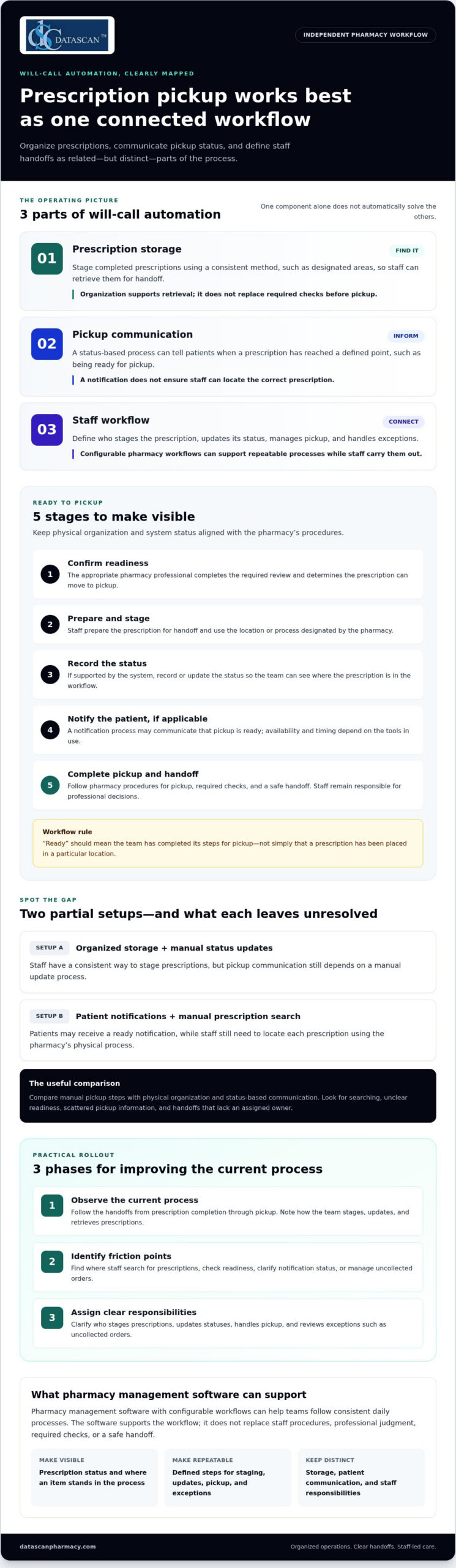
Pharmacy will-call automation uses systems or defined processes to support the pickup of completed prescriptions. It can include tools for organizing prescription storage, sending patients status-based notifications, or guiding staff through preparation and handoff. These parts work together, but they aren’t the same thing.
For example, a pharmacy might use designated, organized storage while staff update pickup status manually. Another pharmacy might notify patients when prescriptions are ready but rely on staff to locate each bag. Thinking of will-call as a workflow, rather than a single device or notification, helps independent pharmacies identify which part needs attention.
- Pickup storage helps staff organize completed prescriptions so they can be retrieved for handoff.
- Patient notification communicates a relevant pickup status through a chosen process or system.
- Staff workflow connects prescription completion, staging, status updates, and pickup responsibilities.
These distinctions matter because buying or adopting one component doesn’t automatically address the others. A storage method won’t tell a patient a prescription is ready, and a notification won’t ensure staff can quickly find the correct prescription. Broader pharmacy automation can involve mechanical processes for handling and distributing medications, but a pharmacy’s will-call process also depends on clear staff procedures.
Will-call organization helps staff find prescriptions; notification automation tells patients when pickup is ready.
What does pharmacy will-call automation include?
Organized storage is one possible component. Prescriptions can be staged according to a consistent method, such as designated areas or another system the team can follow. The purpose is to make retrieval more orderly, not to replace the checks staff perform before handing a prescription to a patient.
Status-based notifications are a separate component. They communicate that a prescription has reached a defined point in the process, such as being ready for pickup. Staff procedures connect the steps: who stages the prescription, who updates its status, and who handles the pickup or an exception. Configurable pharmacy workflow software can support repeatable processes, while staff remain responsible for carrying them out.
Why do pharmacies automate the will-call process?
During a busy shift, staff may spend time searching for a prescription, checking whether it’s ready, or clarifying whether a patient has already been notified. These tasks can interrupt other work, particularly when pickup information is spread across separate notes or when team members use different handoff habits.
A more defined process can make responsibilities and prescription status easier to follow. For instance, if a bag is staged but its status hasn’t been updated, the workflow should make clear who completes that step. If a prescription remains uncollected, the team should know who reviews its status and what procedure to follow. The right approach depends on the pharmacy’s existing process, but clarifying these handoffs may reduce avoidable searching and uncertainty without promising specific time savings or error elimination.
How Does an Automated Pharmacy Will-Call Workflow Move from Ready to Pickup?
A will-call workflow moves a completed prescription through preparation, staging, any applicable patient notification, and pickup. Pharmacy will-call automation can make the process easier to follow, but the exact system actions depend on the tools in use. Pharmacists and staff remain responsible for professional decisions, required checks, and a safe handoff.
A clear sequence also makes it easier to see where an item stands. A system record might show a status, while physical organization helps staff locate the prescription. Those signals need to align with the pharmacy’s procedures: “ready” should mean the team has completed its steps for pickup, not simply that a prescription has been placed in a particular location.
What happens after a prescription is marked ready?
Once the prescription is complete and the pharmacy’s checks are finished, staff prepare it for pickup according to established procedures. Depending on the pharmacy’s setup, the team may use physical organization, system records, or both to keep the prescription identifiable and retrievable. A notification may also be part of the workflow, but it’s a separate action whose availability and timing depend on the tools being used.
- Confirm readiness: The appropriate pharmacy professional completes the required review and determines that the prescription can move to pickup.
- Prepare and stage: Staff prepare the prescription for handoff and place it in the location or process designated by the pharmacy.
- Record the status: If the system supports it, staff record or update the relevant status so the team can understand where the prescription is in the workflow.
- Notify the patient, if applicable: A notification process may communicate that pickup is ready. The pharmacy’s procedures should clarify who initiates or oversees that step.
These steps can be handled through a mix of technology and staff action. A status display, for example, is only useful if staff know what each status means and keep it current. Configurable pharmacy workflow software can support consistent processes, while the pharmacy defines staff responsibilities and safeguards.
How should staff complete the pickup handoff?
At pickup, staff should follow a consistent method to locate the prescription, confirm it’s the correct item for the intended patient, and complete the pharmacy’s handoff process. Avoid relying on a shelf location or a ready status alone as proof that the prescription is appropriate to release. Staff must follow the pharmacy’s established dispensing and privacy safeguards.
After the handoff, the designated staff member should update the pickup status according to pharmacy procedures, if the tools support that action. This keeps the record aligned with what happened and helps colleagues distinguish prescriptions that are still waiting from those already collected. If the patient doesn’t collect the prescription, staff should follow the pharmacy’s process for reviewing its status rather than assuming that a notification or elapsed time resolves the item.
Before adopting a new workflow, map who handles each transition and how exceptions are managed. If you’re considering how configurable pharmacy workflows could support your team’s process, talk with Datascan about your workflow needs.
Will-Call Automation vs. Manual Pickup: What Should Your Pharmacy Compare?
Will-call automation supports pharmacy staff; it doesn’t replace professional judgment or patient care. The right comparison isn’t simply “manual versus automated.” Look at the specific bottleneck: finding staged prescriptions, repeating patient outreach, or keeping the team aligned on status and handoffs. A process may combine staff-led steps with physical organization or technology, depending on the pharmacy’s needs.
Choose automation based on the bottleneck, not the label. Before comparing approaches, consider which tasks take staff attention, what information they can see, and what procedures or tools each approach depends on.
Does will-call automation replace pharmacy staff?
No. Staff remain responsible for pharmacy-specific review, dispensing safeguards, and patient interactions. Automation may support repetitive coordination, such as organizing pickup information or handling a defined notification step, but it doesn’t take over professional responsibilities. It also shouldn’t be treated as a guarantee of accuracy, compliance, or labor savings. The pharmacy’s procedures and staff oversight still matter.
Compare each approach against the work it supports:
Staff tasks and visibility
Useful when the existing pickup volume and process are manageable through staff-led steps.
Staff locate prescriptions, communicate status, and coordinate handoffs using the pharmacy’s current procedures. Visibility depends on how consistently the team records and shares updates.
Clear task ownership and consistent communication between team members.
Addresses difficulty locating prescriptions that have already been staged for pickup.
Staff follow an organized storage method to retrieve the correct item. Physical organization can improve visibility of where an item is staged, but doesn’t by itself notify patients or confirm pickup status.
A consistent method for staging and retrieving prescriptions, plus staff adherence to it.
Status-based notification
May help with repetitive patient outreach tied to a defined prescription status.
A notification process communicates a status to patients. Staff still need to manage prescription preparation, exceptions, and the pickup handoff.
Accurate status updates and a clear process for initiating or overseeing notifications.
Which will-call approach fits which operational need?
Match the change to the friction your team observes. If staff spend time searching for staged items, improve physical organization. If repeated outreach takes attention away from other work, assess whether status-based notifications fit the workflow. If people aren’t sure who updates status or handles exceptions, clarify the process first. Pharmacy will-call automation works best when its role is specific and staff responsibilities remain clear.
A pharmacy management software workflow may support consistent staff processes, but the fit depends on how the pharmacy uses its tools. For independent pharmacies, customizable pharmacy workflows can help align repeatable steps with daily operations without confusing software coordination with professional judgment.
How Can an Independent Pharmacy Plan a Will-Call Automation Rollout?
Plan a will-call rollout in phases: observe how pickup works now, identify the recurring bottleneck, define the change you want, then test it with staff before expanding. This keeps pharmacy will-call automation focused on a real operational need instead of adding tools or steps that don’t solve the problem.
Start with a short workflow review during representative shifts. Note where staff pause to locate prescriptions, verify pickup status, communicate with patients, or clarify who owns the next step. Look for patterns across the process, while keeping occasional exceptions separate so they don’t drive a broad change the pharmacy rarely needs.
How do you identify the right process to automate?
Choose a focused problem first. For example, if prescriptions are usually staged correctly but staff regularly have to ask whether a patient was notified, the main issue may be status ownership rather than storage. If the team knows an item is ready but takes time finding it, physical organization may deserve attention before notification changes.
Use observations and staff feedback to define what should improve. A useful goal is specific and practical, such as making pickup status easier for the team to interpret or clarifying who updates it. Avoid assuming that a particular automation type will fix every friction point.
How do you prepare staff and systems?
Document the current steps, then map the proposed process from prescription readiness through pickup. At each handoff, name the role responsible, the status information staff need, and what happens if the usual path doesn’t apply. Review how pharmacy management software and other workflow tools fit into those steps, without assuming that every tool performs the same actions.
Before expanding the change, test it with a defined workflow and gather input from the staff using it. Check whether responsibilities are clear, status information stays aligned with the work completed, and exceptions have a practical path. If a step creates confusion or extra work, adjust the process and test again. Pharmacy workflow optimization software can support repeatable processes, but the team’s feedback helps determine whether the workflow fits daily operations.
- Observe: Follow the existing pickup process and note recurring delays, repeated checks, or unclear handoffs.
- Prioritize: Select one high-friction issue and describe the intended change in plain language.
- Map: Document staff roles, status ownership, system touchpoints, and exception handling.
- Test: Try the defined process with the team and collect feedback on what works and what needs adjustment.
- Refine: Update the workflow before considering whether to apply it more broadly.
A phased approach helps independent pharmacies make deliberate changes while protecting the responsibilities and patient care at the center of pickup. To discuss how pharmacy software and configurable workflows can support your operational goals, connect with the Datascan team.
How Can Pharmacy Management Software Support a More Consistent Will-Call Workflow?
Pharmacy management software can help organize operational information and support repeatable workflows, giving staff a clearer framework for completing routine steps. It should complement pharmacy procedures, not be mistaken for physical pickup equipment or a substitute for staff judgment. The right setup depends on how the pharmacy manages its work and which tools it uses.
For will-call, consistency matters at the points where work moves between people or stages. Staff need to understand what information guides the next step, who is responsible for it, and how the pharmacy handles exceptions. Software may support that broader workflow, while the pharmacy’s procedures define how the team uses it.
What should pharmacy management software contribute to will-call operations?
Look for ways software can support a shared, repeatable process without assuming it includes a specific notification, kiosk, or storage function. A pharmacy can map its own procedures around how work is prepared, how staff communicate status, and how pickup is handled. The goal is to reduce ambiguity in everyday coordination, not to automate professional review or patient-facing responsibilities.
Customizable workflow is valuable because independent pharmacies may have different staffing patterns, service mix, and operating practices. A process that fits one pharmacy may not fit another. Configurable steps can help a team align routine work with its own procedures, while staff remain responsible for following safeguards and responding to exceptions. Physical storage equipment serves a different role: it organizes where prescriptions are placed and retrieved. Software workflow support and storage may complement each other, but one does not automatically provide the other. When coordinating both domains, automation specialists like J3 Automated Systems illustrate how physical environments and business processes can be purposefully integrated.
How can Datascan support an independent pharmacy’s broader workflow?
Datascan Pharmacy Software serves independent and retail pharmacies with pharmacy management software and customizable workflow capabilities. Used thoughtfully, a pharmacy management system can be part of a broader effort to make daily work more consistent, including how the team defines and follows pickup-related steps. It shouldn’t be described as a specific will-call notification or storage solution.
Pharmacy owners also need a technology partner that understands independent pharmacy operations. Datascan is family-owned and was founded in 1981, and it offers U.S.-based technical support. That experience provides relevant context as pharmacies consider how software fits their operating needs. For a broader view of the platform, explore Datascan pharmacy management software.
As you assess your process, identify the steps that need clearer ownership, more consistent information, or a better fit with your existing workflow. Then consider how configurable pharmacy management software can support those needs alongside your team’s established procedures. A practical discussion starts with how your pharmacy works today and what you want to improve.
Discuss your pharmacy workflow with Datascan
Make Your Next Workflow Improvement Count
Your next step doesn’t have to be a major technology overhaul. Choose one pickup task that regularly interrupts the team, define what a smoother process would look like, and use that goal to guide decisions about pharmacy will-call automation. A focused improvement can give your staff a practical starting point while keeping patient care and professional judgment at the center.
As you plan, consider how pharmacy management software and customizable workflows could support the way your independent pharmacy operates. Datascan brings experience serving pharmacies and a personal approach to helping owners think through their technology needs.
Start a conversation about your pharmacy’s workflow, and take the next step toward a process that works better for your team and patients.
Frequently Asked Questions
What is pharmacy will-call automation?
Pharmacy will-call automation uses technology or structured processes to help manage prescription pickup. It may support organizing completed prescriptions, tracking their status, or communicating pickup readiness to patients. These are separate functions: organized storage helps staff retrieve an item, while a notification communicates information to a patient. A pharmacy can improve one part of will-call without automating every part of the pickup process.
How does an automated pharmacy will-call system work?
The process generally starts after the pharmacy completes its required prescription review and marks the item ready for pickup. Staff then prepare and stage it using the pharmacy’s process. If the tools support it, a status update may prompt patient communication. At pickup, staff follow established procedures to confirm the correct handoff and record the outcome. Clear status definitions help prevent a “ready” label from being mistaken for “collected.”
Does pharmacy will-call automation replace pharmacy staff?
No. Automation can support coordination, but pharmacy staff remain responsible for professional review, dispensing safeguards, and patient interaction. For example, a system may help organize routine information, while a pharmacist or staff member addresses a question about a prescription or an exception to the usual process. Technology doesn’t guarantee accuracy, compliance, or labor savings. Its role is to support the pharmacy’s procedures, not replace staff judgment.
Can pharmacy will-call automation work with pharmacy management software?
It may, but compatibility depends on the software and other tools involved. Before changing a workflow, map what information needs to move between systems, such as a prescription’s readiness or pickup status, and identify who keeps that information current. Pharmacy management software can support consistent operations, but specific will-call functions vary. Avoid assuming that separate storage, messaging, or pickup tools automatically share information with the pharmacy system.
What is the difference between a pharmacy pickup kiosk and will-call notification automation?
A pickup kiosk is a physical interface intended to support the patient pickup experience; its exact functions depend on the system. Will-call notification automation communicates information about pickup readiness through a notification process. One concerns the pickup point, while the other concerns patient communication. Neither term alone explains how prescriptions are staged, how staff oversee the handoff, or how the pharmacy handles exceptions.
How can an independent pharmacy decide what part of will-call to automate?
Start with the recurring bottleneck, not a product category. Notice whether staff most often search for staged prescriptions, check unclear statuses, repeat patient outreach, or pause because handoff ownership is uncertain. Separate routine friction from unusual exceptions, then choose one process to improve first. Define what should become clearer or easier for staff, test the change, and use their feedback to decide whether to adjust or expand it.
Article by
Sarah Callioras
Sarah Callioras is Vice President at Datascan Pharmacy Software, bringing nearly 25 years of experience across independent pharmacy operations and pharmacy technology. Since joining Datascan in 2016, she has played a key role in driving business growth, strengthening client relationships, and supporting independent pharmacies through innovative software solutions. With a strong background in pharmacy operations, business development, and strategic leadership, Sarah is passionate about helping independent pharmacies succeed in an evolving healthcare landscape.
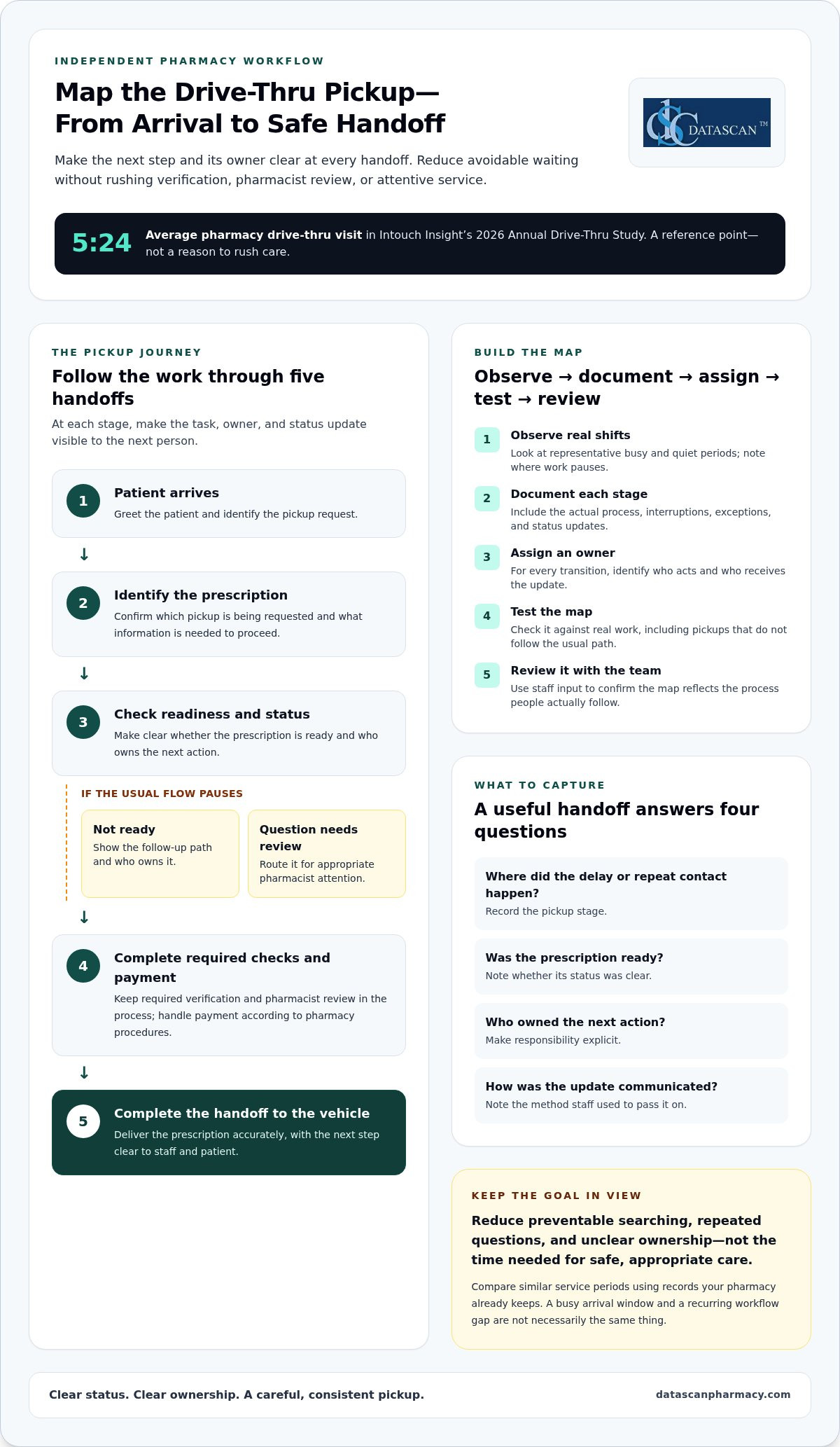
Drive-thru pharmacy workflow efficiency improves when staff can see what needs to happen next and who owns each handoff. The goal is not to rush every transaction. It is to reduce avoidable waiting while preserving careful, personal service. Intouch Insight’s 2026 Annual Drive-Thru Study puts the average pharmacy drive-thru visit at 5 minutes and 24 seconds, but speed matters only when patients still receive attentive service.
If staff repeatedly check prescription status, search for pickup information, or clarify who handles the next step, small delays can add up. Independent pharmacy owners already have plenty to manage, so finding bottlenecks should lead to practical changes, not another complicated project.
This guide explains how to map each handoff, identify avoidable waiting, and create a repeatable process from arrival through pickup. It also shows how to assess Pharmacy management software against your team’s actual responsibilities and workflow, including whether customizable workflow tools can support the way you work. The aim is a smoother drive-thru experience for patients and a more manageable process for staff, without treating speed as a substitute for care.
About the author: Datascan Pharmacy Software focuses on pharmacy technology and operational workflows for independent and retail pharmacies.
Key Takeaways
- Trace the pickup journey from arrival to handoff to find delays caused by unclear status, ownership, or extra steps.
- Map the process by observing, documenting, assigning responsibility, testing, and reviewing it with the team.
- Compare workflow changes by their intended benefit, possible trade-offs, and the measures your team can track consistently.
- Test one defined change, assign an owner, and explain the process to the staff it affects.
- Assess Pharmacy management software against documented stages and staff responsibilities, including how customizable workflow fits your pickup process.
What slows down drive-thru pharmacy workflow efficiency?
Drive-thru pharmacy workflow efficiency depends on coordinated preparation, clear status communication, and reliable pickup handoffs. A delay may become visible at the window but begin earlier: a prescription is not ready, its status is unclear, or staff do not know who should take the next step.
Drive-thru workflow efficiency is the pharmacy’s ability to move a pickup from patient arrival to a safe, accurate handoff through coordinated tasks and clear status updates. Depending on the pharmacy’s procedures and the pickup, the process may include greeting the patient, identifying the pickup request, checking prescription status, completing required verification and pharmacist review, handling payment, and delivering the prescription to the vehicle.
Not every pause is avoidable. Verification, pharmacist review, and patient questions need the time required for safe and appropriate care. Focus instead on waiting caused by preventable searching, repeated questions, unclear ownership, or tasks that could have been handled before arrival. Pharmacy automation is one broad approach to organizing pharmacy tasks. The Pharmacy Automation overview provides context, but drive-thru handoffs still need to fit the pharmacy’s own process.
Where do drive-thru prescription pickup delays begin?
Look for where a pickup stops moving, not just how long the line is. A queue can grow because several patients arrive together. A processing bottleneck may occur when prescriptions are not ready. A communication bottleneck may show up when staff repeatedly ask whether an order is complete or who is handling it.
Observe the process and use records your pharmacy already keeps. Note when the queue grows, which pickup stages are still in progress, and where staff pause to find information or clarify responsibility. Compare similar service periods rather than relying on assumed industry benchmarks. This helps distinguish a busy arrival window from a recurring workflow gap.
- Is the prescription ready when the patient arrives?
- Can the staff member at the window identify its current status?
- Does the next person know what action will move the pickup forward?
Which handoffs shape the patient pickup experience?
Follow each transition: intake to dispensing, dispensing to final checks, final checks to payment, and payment to vehicle-side service. At every stage, identify who owns the task, what status they communicate, and who receives the update. If ownership is unclear, two people may repeat work while another necessary step waits.
For example, a window staff member may need to confirm whether a prescription has cleared its final check. If that status has not been communicated, the staff member may leave the patient waiting while asking a colleague, even though the prescription is complete. A consistent handoff makes the next action clear without skipping verification or rushing pharmacist review.
How should a pharmacy map its drive-thru pickup workflow?
Map the pickup by observing what happens, documenting each stage, assigning responsibility, testing the map against real shifts, and reviewing it with the team. This gives staff a shared view of how information passes from one person to another, including what happens when a pickup does not follow the usual path.
Observe the work, document each step, assign an owner, test the map, and review it with the team. Keep the map practical. It should reflect the process staff actually follow, including interruptions and exceptions, rather than an idealized version. Record what the patient needs to know, what staff need to know, and how each update reaches the next person.
What should a drive-thru workflow map include?
Start with patient arrival and continue through prescription identification, readiness confirmation, payment, and completed handoff. At each transition, note the responsible role, the information needed to proceed, and the communication method staff use, such as a direct conversation or an available pharmacy system. Mark decision points where the request needs clarification or a question should be routed for appropriate review.
Show exceptions without letting them obscure the usual flow. For example, include a separate path for a prescription that is not ready and another for a question requiring pharmacist attention. These paths help staff see what to do next and who owns the follow-up, while preserving the pharmacy’s established verification and review steps.
How can pharmacy teams identify recurring bottlenecks?
Observe representative busy and quiet periods, then compare what changes and what stays the same. One shift may offer a useful clue, but it should not define the whole operation. Ask team members where they wait for information, repeat a contact, or feel unsure about who owns the next action. Their input can help distinguish recurring process friction from temporary demand or an unusual pickup.
Capture observations in a simple log. Detailed tracking that staff cannot maintain is less useful than consistent notes. Include:
- The stage where a delay or repeat contact occurred.
- Whether the prescription was ready and its status was clear.
- Which role owned the next action and how it was communicated.
- Whether the pickup was completed or needed follow-up.
Review the notes with the staff who handle each handoff. Confirm that the map reflects their actual responsibilities, then revise unclear steps before using it to assess changes. This groundwork also helps you decide whether pharmacy workflow software aligns with documented stages and responsibilities. A clear map is a practical starting point for improving drive-thru pharmacy workflow efficiency without asking staff to guess or skip necessary checks.
Datascan’s customizable workflow can be considered against your documented process. Discuss your pharmacy workflow with Datascan.
Which drive-thru workflow changes improve efficiency without sacrificing care?
The most useful changes address a specific point of friction, such as unclear role ownership, delayed status updates, disorganized queue handling, or a process staff manage outside their pharmacy system. Compare options against the process your team has documented. Judge drive-thru pharmacy workflow efficiency by both service flow and reliable, careful handoffs. Results depend on the pharmacy’s process and level of demand, so no change guarantees faster service.
| Change |
Intended benefit |
Trade-off |
Measure to review |
| Clarify role ownership |
Reduce uncertainty about who takes the next action. |
Responsibilities may need to flex during busy periods. |
Repeat contacts and handoffs with unclear ownership. |
| Standardize status communication |
Help staff share pickup status consistently. |
A new communication step needs to fit existing work. |
Time spent locating status or asking for updates. |
| Organize queue handling |
Make the order and status of waiting pickups easier to follow. |
Unexpected arrivals and exceptions can disrupt the sequence. |
Waits, incomplete pickups, and queue interruptions. |
| Review workflow software support |
Align system use with documented tasks and responsibilities. |
Configuration will not resolve an unclear process by itself. |
Manual workarounds and repeated data or status checks. |
Should a pharmacy change the process or the software first?
Document the current process before deciding whether software configuration is needed. Start with low-disruption adjustments, such as clarifying ownership or agreeing on a consistent status update. If staff still rely on workarounds because the system does not align with the intended steps, consider a system-level change. Customizable pharmacy workflow software can support a defined process, but it should not be used to hide unclear responsibilities.
How can teams balance pickup speed with prescription accuracy?
Keep verification and appropriate pharmacist review visible in the workflow instead of treating them as obstacles to remove. Define how staff route questions that need pharmacist attention, and make sure routine handoffs do not bypass that path. A well-designed process supports the right review at the right stage while reducing avoidable searching and repeated questions.
Review service flow alongside signs of rework, such as repeated status checks, incomplete pickups, or handoffs that need correction. Treat privacy, prescription accuracy, and appropriate pharmacist involvement as non-negotiable when weighing a proposed change. If a faster step creates confusion or weakens a necessary check, revise the process rather than accepting that trade-off.
How can you test and improve drive-thru pharmacy workflow efficiency?
Test one clearly defined change against a consistent baseline, then review both the patient experience and the work required to complete each pickup. A small, measured pilot helps your team see whether a change reduces friction without creating new handoff problems or weakening necessary checks.
Start with measures staff can collect reliably using existing records or straightforward observations. Define what each measure means before comparing periods. For example, decide which events start and end an arrival-to-handoff measurement, and what counts as a repeat contact. Clear definitions make comparisons more useful and help prevent a busy shift from being mistaken for a process change.
Which measures can reveal drive-thru workflow friction?
Choose a small set that reflects both flow and completeness. Consider arrival-to-handoff time, repeat contacts, unresolved status questions, rework, and pickups that need follow-up. Record the same measures across comparable operating periods, and note unusual demand or exceptions that could affect interpretation. Without a comparable baseline and documented observation period, treat apparent improvement as an observation, not a proven result.
- Arrival to handoff: Use the same start and end points each time.
- Repeat contacts: Record when staff or patients need to ask again about status or next steps.
- Rework and incomplete pickups: Note corrections, repeated actions, or cases that require follow-up.
- Staff observations: Capture where the process felt unclear or required a workaround.
How should a pharmacy run a workflow pilot?
Choose one bottleneck the team can describe clearly, such as uncertainty about who communicates a status update. Assign an owner to explain the change, collect observations, and lead the review. Keep the adjustment limited so staff can distinguish its effects from other process changes, and explain what is changing before the pilot begins.
- State the problem and the specific change being tested.
- Tell affected staff what to do differently and who owns the next step.
- Observe the process during the agreed review period and record exceptions.
- Discuss results with staff, then continue, adjust, or stop the change.
Review more than timing. Ask whether patients received clear updates, handoffs were complete, staff knew who owned follow-up, and the change introduced extra steps elsewhere. If exceptions increased or staff needed frequent workarounds, revise the approach before expanding it. Do not assume a result will hold under every demand pattern. Record the conditions in which you observed it.
For broader process ideas, the Pharmacy Workflow Optimization Software: The 2026 Efficiency Guide can complement a local pilot. Pharmacy management software and workflow configuration should support the responsibilities your team has defined, not replace clear ownership. Datascan’s customizable pharmacy workflow is one option to assess against your documented process.
Use your workflow map and pilot observations to guide a discussion about configuration. Talk with Datascan about your workflow.
How can pharmacy management software support a better drive-thru workflow?
Pharmacy management software can support drive-thru pickup when its workflows align with the pharmacy’s documented stages, staff responsibilities, and patient-service priorities. Evaluate how the system fits the work your team already does rather than assuming software alone will resolve delays or improve drive-thru pharmacy workflow efficiency.
Use your workflow map as an evaluation tool. Follow a pickup through its stages and consider whether staff can access the prescription status information they need, understand who owns the next handoff, and complete payment within the pharmacy’s established process. Datascan Pharmacy Management Software includes customizable workflow capabilities, which can help align system configuration with a pharmacy’s way of working. The setup should support clear responsibilities, not create steps that staff must work around.
What should pharmacy management software support in a pickup workflow?
Assess the system against your actual pickup tasks. Consider prescription status visibility, defined staff handoffs, and whether point-of-sale steps fit the pharmacy’s existing process. Also plan how team members will learn the configured workflow and how you will review it after implementation. These considerations connect software decisions to day-to-day responsibilities rather than evaluating features in isolation.
For example, if the map shows staff often pausing to find out whether a prescription is ready, identify what information the relevant team members need and where they expect to find it. Then discuss how the system and staff process can support that need. Avoid assuming a particular display, alert, or drive-thru function exists unless it is part of the software being evaluated. A useful assessment ties each requirement to a real task and a clear owner.
Review point-of-sale steps just as practically. Consider where payment belongs in the pickup sequence, what information staff need at that stage, and how the process handles exceptions. Datascan Point of Sale is part of the broader set of tools pharmacies can consider alongside pharmacy management software. Review how the pieces fit your operation rather than treating a single feature as a substitute for a coherent workflow.
For a closer look at the broader system, explore Datascan Pharmacy Management Software. As you plan implementation, turn requirements into a straightforward pharmacy software implementation plan: identify the workflow being addressed, determine which staff responsibilities are affected, plan team training, and decide how to assess whether the configured process fits actual work. Keep the plan tied to your pharmacy’s own requirements.
How can independent pharmacies take the next step?
Bring your workflow map, recurring bottlenecks, and pilot observations to a software discussion. These materials connect system requirements to patient service and operational priorities, and help distinguish a configuration need from a process issue. Start with the handoff that most often causes confusion.
Datascan’s customizable workflow can be discussed in relation to your pharmacy’s documented needs. Discuss your pharmacy workflow with Datascan.
Make your next workflow decision with confidence
Treat drive-thru pharmacy workflow efficiency as an ongoing operational priority, not a one-time fix. As your team tests changes, record what you adjusted and what staff observed. That history can help you make future decisions with more confidence and keep the pickup process aligned with the way your pharmacy works.
If your next step involves technology, bring your documented workflow and priorities into the discussion. Datascan is a family-owned company that has supported independent and retail pharmacies across the United States since 1981, with pharmacy management software and customizable workflow capabilities. Focus on a practical fit for your operation, not change for its own sake.
Use your documented process to decide what to improve and what support you need. Start a conversation about your pharmacy’s workflow.
Frequently Asked Questions
How can a pharmacy reduce drive-thru wait times?
Improving drive-thru pharmacy workflow efficiency starts with tracing a pickup from arrival to handoff, noting where work pauses, and testing one targeted adjustment at a time. Separate ready prescriptions from cases needing follow-up so different situations are not blended in the same comparison. Use the pharmacy’s own baseline across comparable periods, and keep identity checks, prescription verification, and pharmacist review intact. The aim is less friction, not a promised wait-time result.
What should a drive-thru pharmacy workflow include?
A useful drive-thru workflow covers patient arrival, request and prescription identification, readiness confirmation, payment, routing of questions that need attention, and completed handoff. Assign an owner to each transition and define the status information the next person needs. For example, identify a pickup as awaiting readiness confirmation rather than relying on memory or a second conversation. Adapt the sequence to the pharmacy’s roles, systems, and established operating procedures.
Can pharmacy software improve drive-thru workflow efficiency?
Yes. Pharmacy management software can support drive-thru work when its configuration reflects the pharmacy’s documented stages and staff roles. Assess whether staff can access needed information at the right point, whether handoffs make sense across roles, and how exceptions are handled. Software does not replace staff training, a clear process, or professional judgment. Test the fit with a representative pickup scenario to see whether the system supports the team’s actual workflow.
How should a pharmacy measure drive-thru efficiency?
Track a small, repeatable set of measures, such as arrival-to-handoff time, repeat contacts, unresolved status questions, and corrections or other rework. Define the start, end, and counting rules before collecting data, then compare similar operating periods against a baseline. Note factors such as unusual volume or exception cases so they do not distort interpretation. No single number describes the whole patient experience, so review measures alongside accurate handoffs and appropriate care.
How can a pharmacy handle prescriptions that are not ready at drive-thru pickup?
Create a separate path for a pickup that is not ready: confirm its current status, explain the next step to the patient, and assign a staff owner to follow through. Record what triggered the exception and whether the patient needed another contact, so the team can spot recurring causes. If the interaction raises a clinical question, route it through the pharmacy’s established process for pharmacist attention rather than improvising an answer.
What is the difference between drive-thru workflow efficiency and faster service?
Drive-thru workflow efficiency means coordinating a pickup with less avoidable friction. Faster service refers only to elapsed time. A shorter visit is not a success if the patient leaves without clear information, staff repeat work, or verification is rushed. Review how smoothly tasks move alongside handoff completeness and rework. This broader view helps the pharmacy improve operations without making speed the only measure that matters.
Article by
Sarah Callioras
Sarah Callioras is Vice President at Datascan Pharmacy Software, bringing nearly 25 years of experience across independent pharmacy operations and pharmacy technology. Since joining Datascan in 2016, she has played a key role in driving business growth, strengthening client relationships, and supporting independent pharmacies through innovative software solutions. With a strong background in pharmacy operations, business development, and strategic leadership, Sarah is passionate about helping independent pharmacies succeed in an evolving healthcare landscape.