Pharmacy profit maximization tools help independent pharmacy owners organize business information, manage workflows, and make better-informed decisions. They can support operational improvements, but they cannot guarantee financial results or change payer terms.
Independent pharmacy owners face reimbursement changes while managing daily operations and patient care. When time is limited, choose technology that addresses a specific business priority rather than adding another system to oversee.
This guide explains how to evaluate pharmacy tools against your needs, improve visibility into business decisions, and assess how pharmacy management software, point-of-sale tools, and patient engagement technology can fit your workflows.
About the author: Datascan Pharmacy Software publishes practical guidance on pharmacy operations and technology for independent pharmacies.
Key Takeaways
Separate technology from business strategy and payer decisions: tools can improve visibility and support action, but they can’t change reimbursement terms.
Match pharmacy profit maximization tools to a specific priority, such as management visibility, transaction workflows, patient engagement, or delivery operations.
Compare options by how well they fit your workflows, support staff adoption, and provide information relevant to your decisions.
Introduce a tool in manageable steps: choose one problem, record a baseline, train users, and review results at a pace your team can sustain.
Assess pharmacy management software, POS, patient app, and delivery tools as parts of an operational toolkit aligned with your pharmacy’s priorities.
What tools can help an independent pharmacy protect profitability?
Profit maximization tools help pharmacy owners understand business activity and decide where to focus. For an independent pharmacy, that may involve using pharmacy software to organize business information and support decisions about reimbursement, staff workflows, inventory, front-end sales, and patient relationships. These tools provide operational support and information for review. They don’t replace business strategy, professional judgment, or changes to payer terms.
Think of profitability as a management discipline, not a software feature. Owners set priorities, assess trade-offs, and decide what action makes sense. A report is useful when it helps answer a business question or improve a workflow. For example, if staff repeatedly encounter delays in the same process, identify which step is causing the delay, who handles it, and what change could make the process easier to follow. That gives the team a specific issue to address instead of another dashboard to check without a next step.
Which pharmacy business problems should a profit tool address?
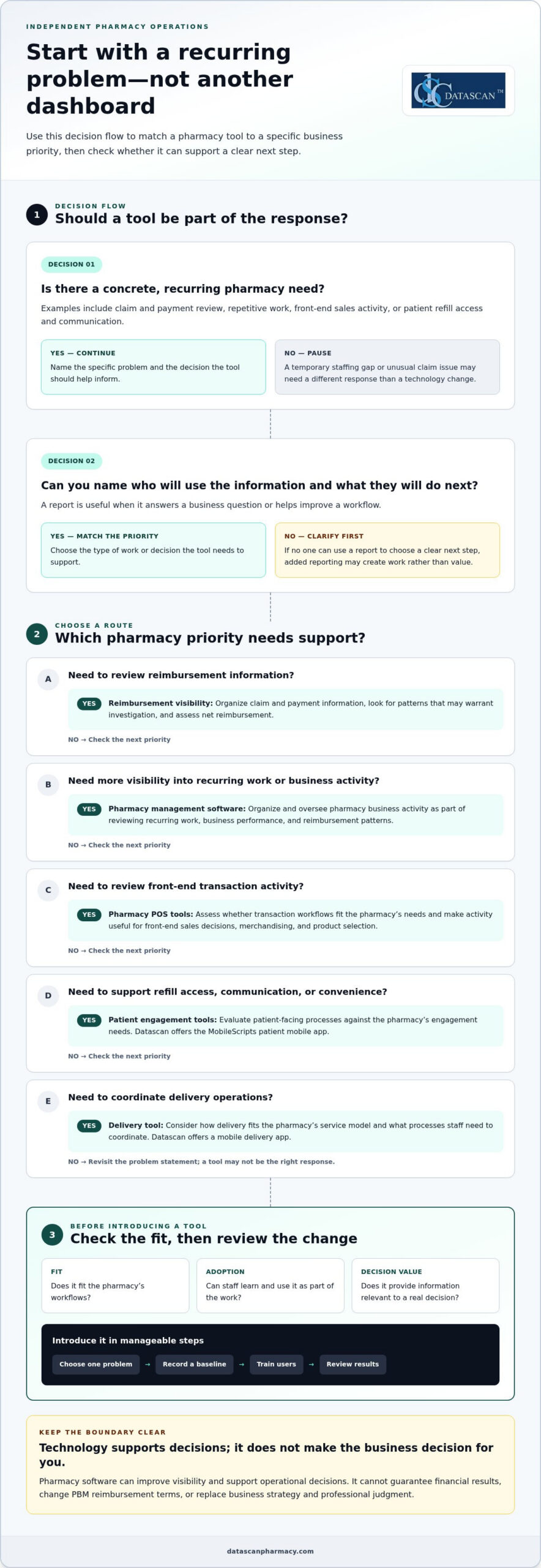
Start with a concrete, recurring need. Pharmacy profit maximization tools are most useful when they connect a known problem to a practical decision, such as:
Reimbursement visibility: Organize claim and payment information for review. Look for patterns that may warrant investigation and assess net reimbursement.
Time-consuming work: Identify repetitive tasks or workflow bottlenecks that may benefit from a more consistent process.
Front-end sales: Review transaction activity to inform decisions about merchandising and the products the pharmacy carries.
Patient retention: Assess whether refill access, communication, and other patient-facing processes support continuity and convenience.
Separate ongoing patterns from one-off disruptions. A recurring workflow bottleneck may call for a process or technology change, while a temporary staffing gap or unusual claim issue may require a different response. Before adopting a tool, define the decision it should support and who will act on the information. If no one can use a report to choose a clear next step, additional reporting may add work rather than value.
Can pharmacy software directly increase profit?
Pharmacy software can support visibility and operational decisions, but it can’t guarantee a financial result. A pharmacy can review processes, organize available business information, and decide how to manage inventory or staff workflows. Software alone can’t set PBM reimbursement terms, change a contract, or control every external factor affecting a claim.
Pharmacy profit tools help owners understand performance and guide controllable business decisions; they don’t guarantee profit or determine payer reimbursement. Keep that distinction in mind when evaluating pharmacy management software. A pharmacy management system supports core pharmacy operations. This pharmacy management system overview provides a general explanation of the category. The right tool should fit the pharmacy’s work and provide information owners can use, while leaving financial decisions and payer negotiations in human hands.
Which pharmacy profit maximization tools support each business priority?
The right tools depend on what the pharmacy needs to understand or improve. Group pharmacy profit maximization tools by business priority, then identify the information or workflow that would help the owner make a decision. For reimbursement concerns, the priority is to track and review claim and payment information, not to expect software to change a PBM’s terms or payment decisions.
Management visibility: Pharmacy management software helps organize and oversee pharmacy business activity. Use it as part of a review of recurring work, business performance, and reimbursement patterns.
Transaction workflows: Pharmacy POS tools support front-end transactions. Assess whether POS processes fit the pharmacy’s needs and make activity relevant to front-end sales decisions easier to review.
Patient engagement: Patient-facing tools can support goals for refill access, communication, and convenience. Datascan offers the MobileScripts patient mobile app; assess it against the pharmacy’s specific engagement needs.
Delivery operations: Datascan offers a mobile delivery app. Consider how delivery fits the pharmacy’s service model and what processes staff need to coordinate.
What can pharmacy management software help owners oversee?
Pharmacy management software is an operational system, not a substitute for the owner’s judgment. Use it as part of a broader review of the questions that matter to the business: Where is staff time going? Which recurring processes need attention? What reimbursement patterns should the pharmacy investigate? Datascan provides pharmacy management software for pharmacies evaluating these operational needs.
How can patient-facing and delivery tools support pharmacy priorities?
Patient engagement and delivery are separate priorities, so assess them separately. For patient-facing tools, define what the pharmacy wants to make easier for patients, such as accessing refill services. For delivery operations, identify the coordination needs involved. Datascan offers MobileScripts and a mobile delivery app. Evaluate each against a specific need, rather than assuming a particular financial result.
These categories can work together as an operational toolkit, but each should have a clear purpose. A pharmacy POS tool addresses transaction workflows, while a patient app supports a different part of the pharmacy experience. Focus reviews on information tied to a priority, so owners can spend less time collecting data without a defined use and more time making decisions.
How should you compare pharmacy profit tools, and what can’t they fix?
Compare pharmacy profit maximization tools by the business decision they support, how well they fit existing workflows, whether staff can use them consistently, and whether their reporting leads to action. No software can rewrite a PBM contract or guarantee higher reimbursement. A tool can help organize information for review, but the pharmacy still needs to interpret it and decide what to do.
Business need
Tool category
Decision supported
Limitation
Review reimbursement patterns
Pharmacy management software or a financial reporting process
Which claims or payment patterns warrant investigation or follow-up?
It cannot set payer terms or determine the final outcome of a reimbursement review.
Reduce time spent on recurring tasks
Workflow or pharmacy management software
Which processes need attention, clarification, or a more consistent approach?
Results depend on staff adoption and whether the workflow fits daily practice.
Understand front-end activity
Point-of-sale tools
What transaction activity should inform front-end business decisions?
Information alone doesn’t decide what to stock, promote, or change.
Support patient-facing or delivery operations
Patient engagement or delivery tools
Which patient services or operational processes should the pharmacy review?
A tool can support a process, but it can’t guarantee retention, revenue, or labor savings.
Which questions help determine whether a tool fits your pharmacy?
Start with the recurring task or decision you want to support. Identify who will use the tool, what information they need, and how the pharmacy will review and act on it. Then separate essential capabilities from features that don’t address the problem. A good fit should be apparent in the day-to-day workflow, not just in a product demonstration or a long list of reports.
For financial review, define the measure you want to understand before comparing systems. The guide to calculating pharmacy gross profit can help frame that measurement, but a software report is not a complete financial analysis. Useful reporting should answer a specific question, such as whether a recurring pattern merits further review, rather than create work with no clear next step.
Can software solve low PBM reimbursements?
No. Pharmacy software cannot set PBM reimbursement terms or promise that a payer will increase payment. It may help a pharmacy organize relevant information and identify items for review, but contract terms, payer decisions, and follow-up remain outside the software’s control. The Federal Trade Commission’s staff report on pharmacy benefit managers offers broader context on PBMs and their role in prescription drug markets.
Keep the evaluation grounded in decisions your team can make, workflows it can sustain, and information it can use. That gives owners a practical basis for comparing options and tracking financial performance, without confusing better visibility with control over reimbursement.
How can a pharmacy introduce profit tools without adding work?
Introduce pharmacy profit maximization tools in a focused sequence: choose one recurring problem, record a baseline, select a tool, train the people who will use it, and review whether it supports the original need. Starting with one issue helps protect staff time and gives the owner a clearer basis for deciding whether to continue, adjust, or expand the tool’s use.
Choose one problem. Define a specific issue, such as a recurring workflow delay or a reimbursement review task that takes time to complete.
Document a baseline. Record how the current process works and what measure reflects the problem before making a change.
Select a tool. Focus on capabilities tied to the stated need, not features that add complexity without supporting the intended decision.
Train the users. Explain the purpose of the tool and how it fits into the affected workflow.
Review the results. Set a manageable, consistent cadence to check whether the tool is being used and supports the original business question.
What should you measure before adopting a tool?
Choose measures that reflect the problem, such as time spent on a task, transaction patterns, or completion of a defined review process. Record the measurement period and information source so a later comparison is meaningful. Keep observations separate from conclusions: a change after implementation doesn’t, by itself, prove that the tool caused a financial result or improved profitability.
Keep the review cadence small enough to sustain. Set a recurring time to check the selected measure and note questions for follow-up, rather than adding a new daily reporting task. The right interval depends on the workflow and the pharmacy’s capacity. Consistency matters more than a complicated review routine. If the information isn’t helping the team decide what to do next, simplify the measure or revisit the use case.
How do you make adoption manageable for a busy pharmacy team?
Begin with the staff members and workflow directly affected by the selected use case. Set a practical training and feedback process before expanding: show users the intended task, give them a way to flag friction, and agree on who will review the feedback. This keeps adoption connected to daily work instead of making the entire team responsible for a new process at once.
Workflow planning should account for how a task moves through the pharmacy and where staff need clarity. Datascan’s customizable workflow is one option to evaluate as part of that planning. Keep the review focused on the original problem, such as whether the defined process is easier to follow, rather than assuming a tool has improved profit.
Use this measured approach to decide whether a tool fits your pharmacy’s priorities and capacity. Learn more about how Datascan’s pharmacy software can support your workflow needs by visiting the Datascan contact page.
How can Datascan pharmacy software fit into a profitability strategy?
Datascan pharmacy software fits into a broader profitability strategy when each offering is matched to a pharmacy’s priorities and implementation plan. The goal isn’t to expect software to guarantee financial results. It’s to choose operational tools that fit the work the pharmacy wants to support, from management processes to point-of-sale, patient engagement, and delivery.
Which Datascan tools align with common pharmacy priorities?
Start with the need the pharmacy has already identified. Datascan’s offerings address different categories of work, so choose based on the pharmacy’s workflows and priorities:
Front-end transactions: Datascan Point of Sale (POS) supports transaction workflows.
Patient engagement: MobileScripts Patient Mobile App supports patient-facing engagement needs.
Delivery operations: Datascan Mobile Delivery App supports delivery operations.
Workflow needs: Datascan customizable workflow can be configured around the pharmacy’s day-to-day processes.
These categories address different needs, so a pharmacy doesn’t have to treat them as one all-or-nothing decision. If the immediate priority is a particular workflow, start there. If the pharmacy is considering broader changes, map the affected processes and users before deciding which tools to introduce and in what order. This keeps implementation focused and helps owners assess whether a tool fits the work it is meant to support.
Datascan is a family-owned company that has operated since 1981 and provides U.S.-based technical support. These details describe the company and its support model; they aren’t evidence of a particular financial outcome. For an independent pharmacy managing time pressure and reimbursement concerns, technology decisions should still be grounded in specific operational needs, staff readiness, and a realistic plan for reviewing how the tools are used.
What is a practical next step for an independent pharmacy?
Before discussing software, write down three things: the priority you want to address, how the current process works, and what operational improvement you want to evaluate. For example, identify a recurring task that takes time, describe how staff handle it now, and define what a more manageable process would look like. This gives the conversation a practical starting point without assuming a particular financial result.
Bring those priorities to a conversation about fit and implementation. Datascan’s offerings can be matched to the pharmacy’s needs, with the focus on selecting an appropriate starting point rather than adding tools without a clear purpose. Discuss your pharmacy software needs with Datascan and take the next step with a clear view of the work you want to support.
Keep Your Pharmacy’s Priorities in Focus
Your next move doesn’t have to be a major technology overhaul. Choose the business question that matters most right now, then use it to guide how you assess pharmacy profit maximization tools. As reimbursement pressures, workflows, and patient needs shift, revisit whether your technology still supports the decisions your pharmacy needs to make.
Start with your priorities, not a promise of guaranteed results. Share the workflow or business need you want to address, and explore the pharmacy software options that fit that goal. Start a conversation about your pharmacy’s priorities with Datascan.
Independent pharmacies are strongest when their technology choices serve the people and work at the heart of the business. Take the next step with purpose, and keep building on what makes your pharmacy distinct.
Frequently Asked Questions
What are pharmacy profit maximization tools?
Pharmacy profit maximization tools are systems and resources that help owners understand business activity and decide where to focus attention. They can include pharmacy management software, point-of-sale systems, patient engagement tools, and delivery tools. A pharmacy reviewing front-end activity, for example, may need a different tool than one assessing a recurring operational task. These tools can inform decisions, but they can’t guarantee profit or control payer terms.
Can pharmacy management software improve profitability?
Pharmacy management software can support operational visibility and decision-making, depending on its capabilities and how the pharmacy uses it. Start by stating a measurable business question, such as whether a defined task is being completed as intended. Then assess whether the software offers relevant information or workflow support. Treat the result as evidence of support for that process, not proof that the software alone increased profitability.
Can technology help independent pharmacies respond to PBM reimbursement pressure?
Technology can’t set PBM contract terms or guarantee better reimbursement. It may help owners organize business information for review and decide what issues call for follow-up, but the pharmacy must assess the situation and determine next steps. For broader U.S. context on PBMs and pharmacy markets, see the Federal Trade Commission’s staff report on pharmacy benefit managers.
How do I know whether a pharmacy profit tool is working?
Define the problem and record a relevant baseline before putting a tool into use. Compare the same measure over a consistent period, using the same data source where possible. Note other changes that may affect the result, such as a workflow adjustment or staffing change. Then ask whether the tool helped the team make a useful decision or complete the process. A change alongside tool use doesn’t prove the tool caused it.
What should an independent pharmacy look for in pharmacy software?
Look for a fit with your actual workflows, the business questions you need to answer, staff adoption needs, and the support process. Separate essential capabilities from optional features by linking each requirement to a pharmacy task. Identify who will use a function and what decision it should inform. There’s no single feature set for every independent pharmacy, so assess the system in the context of your operations.
Can pharmacy software save owners time?
It can support more organized workflows, but whether that saves time depends on the task, implementation, and staff adoption. Pick a repetitive process and document how it currently works, including who handles each step and where delays or extra effort arise. Then assess whether the software’s capabilities address that process. Don’t assume a tool will reduce workload by a specific amount before your team evaluates it in practice.
Should a pharmacy choose one tool or an integrated software suite?
The better fit depends on your pharmacy’s priorities, existing processes, and how its operational needs relate to one another. A suite may bring related functions together, while separate tools may address narrower requirements. Compare both approaches by workflow fit, information needs, and usability for the staff involved. Consider the work required to introduce and maintain each option, and don’t assume either structure guarantees stronger financial results.
An effective automated prescription refill workflow organizes routine administrative steps, such as capturing requests and tracking what needs to happen next, while keeping pharmacists in control of clinical decisions. It should make routine work easier to coordinate and send requests that need authorization, more information, or individual attention to staff for review.
That balance matters in independent pharmacies, where reminders, status checks, prescriber follow-up, and pickup updates can pull staff away from patients and daily operations. Automation should reduce avoidable sorting, not create another queue of exceptions. Each request needs a visible status, a clear owner, and an appropriate next step.
This guide shows how to map the refill process from identifying a possible need through pickup, decide which repeatable tasks are suitable for automation, and make exceptions visible to the right people. Pharmacy management software can help organize refill work within broader operations, while MobileScripts gives patients a digital way to submit refill requests. The aim is a more consistent process that helps staff focus on work requiring their attention.
Key Takeaways
Build an automated prescription refill workflow around clear handoffs, so every request has a visible next step from intake to pickup.
Set routing rules for routine administrative work, and send clinical questions and unresolved exceptions to staff.
Map your current process, assign responsibility for each stage, and track open requests and unresolved exceptions to guide improvements.
Use pharmacy management software and customizable workflow tools to organize refill work around your pharmacy’s operations.
MobileScripts gives patients a digital option for submitting prescription refill requests.
What is an automated prescription refill workflow?
An automated prescription refill workflow is a coordinated process for managing potential refill needs, patient requests, review, preparation, and updates. It gives each request a defined status and next step, helping pharmacy staff distinguish work that can proceed from work that needs attention.
Automation can support repeatable administrative tasks, such as capturing a request or organizing follow-up. It does not determine whether a prescription is appropriate to refill, authorize it, or replace pharmacist review. This is also different from automatic dispensing, which refers to dispensing medication through an automated process or equipment.
A connected workflow matters in independent pharmacies because requests may arrive through different channels and require different follow-up. If a request needs more information or prescriber authorization, the process should make that work visible rather than treating the request as ready for preparation. Industry data indicates that pharmacists spend approximately one-third of their day on administrative tasks, including claims, inventory, and reports. Organizing recurring work can help teams see where time and attention are going, without suggesting that automation removes professional responsibilities.
Which steps belong in a prescription refill workflow?
A typical workflow starts by identifying a possible refill need, then capturing the patient’s request and checking its status. The pharmacy team determines whether the request can move forward or needs more information or authorization. When appropriate, it proceeds to preparation and pharmacist review, followed by communication with the patient about readiness or the next step. The CMS electronic prescribing information provides context on electronic prescribing standards, one part of the broader prescription process.
The route depends on the request. If authorization is needed, for example, the next action may involve the prescriber rather than prescription preparation. Recording who owns that follow-up and what response is pending helps staff understand why a request is waiting and what needs to happen next.
What can automation do, and what should staff still review?
Automation can help organize routine coordination, but staff need a clear way to identify requests that require attention. A practical division looks like this:
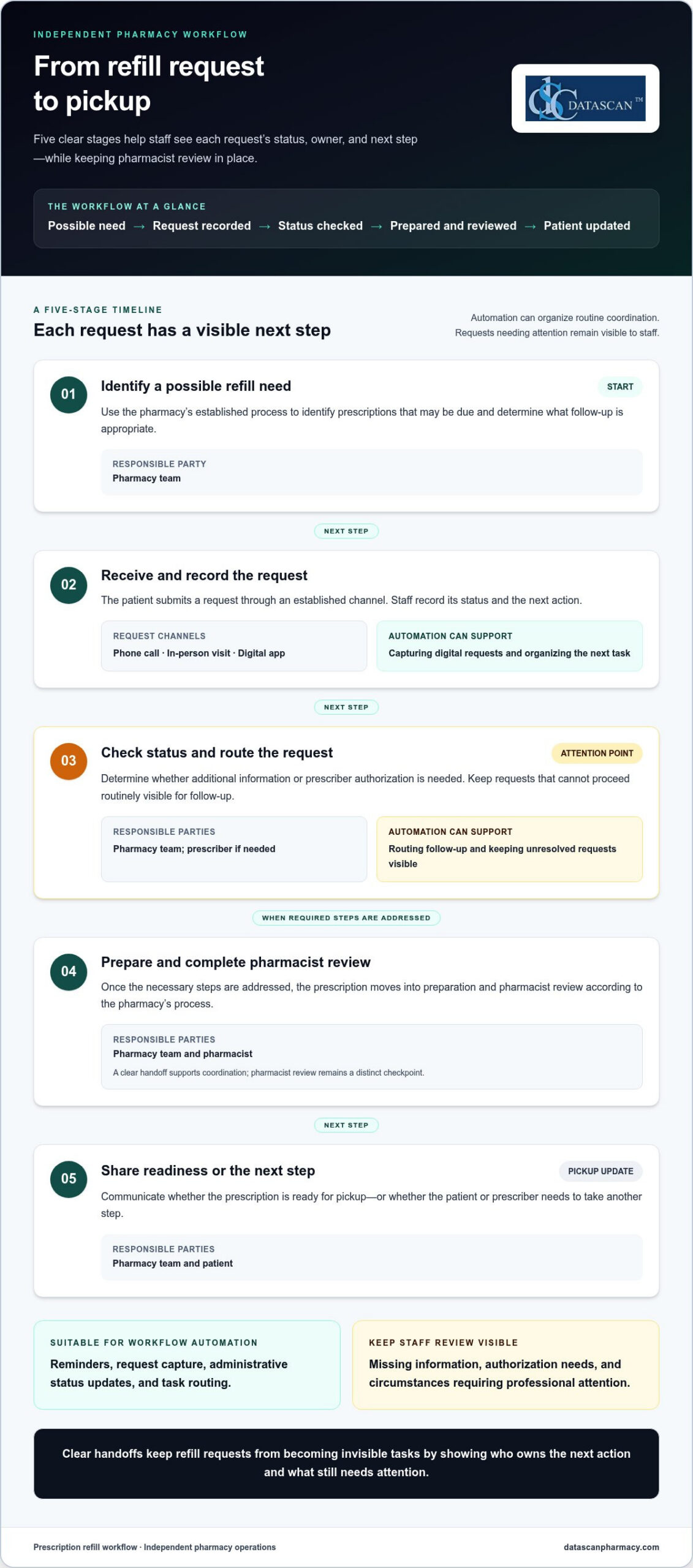
Automation can support: reminders, request capture, administrative status updates, and task routing.
Staff should review: missing information, authorization needs, and circumstances requiring professional attention.
Pharmacist review remains a distinct checkpoint. Pharmacy management software can help organize refill work within broader operations, while the pharmacy defines its roles and review process. The result should make routine tasks easier to coordinate without hiding exceptions or shifting clinical judgment to automation.
How does an automated prescription refill workflow move from request to pickup?
An automated prescription refill workflow moves a request through clear stages: identify a possible refill need, capture the patient’s request, determine what must happen next, prepare the prescription when appropriate, complete pharmacist review, and communicate readiness or another next step. The patient, pharmacy team, prescriber, and pharmacy management software may each have a role, depending on the request.
Identify a possible refill need. The pharmacy team uses its established process to identify prescriptions that may be due and determine what follow-up is appropriate.
Receive and record the request. A patient submits a request through an established channel, such as a phone call, an in-person visit, or a digital app. Staff record the request, its status, and the next action.
Check status and route the request. Staff determine whether additional information or prescriber authorization is needed. Requests that cannot proceed routinely stay visible for follow-up.
Prepare and review. Once the necessary steps are addressed, the prescription moves into preparation and pharmacist review according to the pharmacy’s process.
Share readiness or next steps. The pharmacy communicates whether the prescription is ready for pickup or whether the patient or prescriber needs to take another step.
Clear handoffs keep refill requests from becoming invisible tasks by showing who owns the next action and what still needs attention.
Workflow stage
Responsible party
Automation opportunity
Request intake
Patient and pharmacy team
Capture digital requests and organize the next task
Status and authorization check
Pharmacy team; prescriber if needed
Route follow-up and keep unresolved requests visible
Preparation and review
Pharmacy team and pharmacist
Make the handoff to preparation clear; retain pharmacist review
Pickup update
Pharmacy team and patient
Share a status update or explain the next step
How should a pharmacy handle a refill request?
Start with the pharmacy’s established intake channels, and make sure each request has a recorded status and next action. Check the prescription’s status before moving it forward. If information or authorization is needed, assign that follow-up to the appropriate staff member or prescriber. Keep requests that cannot follow the routine path visible and give each one an owner, so they do not disappear into a general queue.
How do teams coordinate filling, review, and pickup communication?
When a request is ready to proceed, staff hand it into prescription preparation, followed by pharmacist review. A status update should tell the team and patient what has happened and what comes next, without implying that a request is ready before it is. For digital intake, the MobileScripts prescription refill app gives patients a way to submit refill requests. Pharmacy management software can help organize refill work within broader operations.
Use the workflow as a shared operating map, not as a promise that every request follows the same path. A pharmacy can tailor handoffs to its staffing and processes while keeping requests that need individual attention visible.
Can automated refills work without bypassing pharmacist oversight?
Yes. A refill workflow can automate routine coordination while keeping pharmacist review and clinical judgment separate from administrative processing. Automation can make requests easier to sort, assign, and track. It should not decide whether a prescription is clinically appropriate or remove the pharmacist’s review checkpoint.
The goal is not to make every request follow an identical path. It is to create a reliable routine route and a visible way to handle requests that need attention. Standardized routing can reduce uncertainty about where work goes next, but rigid rules may send unusual requests down the wrong path. Staff need enough visibility to recognize when a request does not fit the routine process.
Three elements work together:
Standardized routing gives routine requests a predictable next step, while still allowing for exceptions.
Staff visibility shows what is waiting and who owns the next action. A status label alone, however, does not resolve a stalled request.
Exception handling directs requests needing attention to staff, with clear ownership and follow-through.
Small process gaps can undo the benefits. If a patient submits a request through more than one channel, duplicate work may appear unless staff can identify and reconcile the requests. If ownership is unclear, a request awaiting information or authorization can sit without follow-up. And if exceptions are routed out of sight, automation can hide work instead of organizing it.
Which refill requests should be routed for staff review?
Route a request for staff review when information is missing, authorization is needed, or its status prevents it from following the routine path. An exception queue or another visible task process can make these requests easier to monitor, but the process needs a named owner for review and resolution. Staff should be able to see what is blocked, what action is pending, and whether follow-up remains open.
How can a pharmacy keep automation transparent to its team?
Make each stage understandable to the people who use it. Document what each status means, who takes the next action, and how staff should handle incomplete, stalled, or duplicate requests. Train the team on those definitions, then review process issues together. If a request repeatedly lands in the wrong place, refine the routing rather than adding a step that conceals the underlying problem.
A practical automated prescription refill workflow makes responsibility visible from intake through review and follow-up. It supports staff by reducing avoidable sorting and status checks while preserving a deliberate pause for pharmacist judgment. Pharmacy management software and customizable workflow tools can help organize tasks around a pharmacy’s processes, but clear ownership and staff oversight remain essential.
How can an independent pharmacy implement and improve its refill workflow?
Start with the way refill work actually moves through your pharmacy, then make focused changes based on where staff time and requests get stuck. A deliberate process helps independent pharmacies use technology to organize operations without expecting software to solve every business pressure.
What should a pharmacy map before changing its refill process?
Document how requests arrive, where their status is recorded, and how work moves between roles. Mark authorization, missing information, preparation, pharmacist review, and patient communication as distinct handoffs. This makes it easier to see where work pauses and what needs attention before you change the process.
Use a practical implementation sequence:
Map the current process. Follow a request from intake to its final update, noting the channels and handoffs involved.
Identify repeated tasks. Separate recurring administrative work from decisions that require professional review.
List common exceptions. Note where requests wait for information, authorization, or staff follow-up.
Assign owners. Define responsibility for each stage and for requests that cannot proceed as planned.
Test a focused change. Adjust one part of the process, explain the change to staff, and review what happens.
For pharmacies facing PBM reimbursement pressure, a refill workflow will not change reimbursement terms. It can help organize routine work and reduce avoidable administrative friction, giving leaders more room to monitor pharmacy operations and focus on financial decisions. Staff feedback matters: a bottleneck may come from unclear responsibilities or a difficult handoff, not a software setting. Ask the team where work pauses and which steps trigger repeat checks.
How can pharmacy management software support consistent refill work?
Pharmacy management software can help organize information and workflow within broader pharmacy operations, giving a pharmacy a system to support its chosen processes. Consider how staff will use the system to see work in progress and coordinate daily operations.
Different pharmacies have different staffing and operating processes, so workflow configuration should fit the way each team works. Datascan’s customizable workflow offering supports that effort. Pharmacies planning how to shape their processes can use pharmacy workflow software information as context for configuration around their needs.
Define measures before judging a change. Track open requests, unresolved exceptions, requests waiting for authorization, and requests without a recorded next action. Compare those measures over time with your own starting point rather than an assumed industry benchmark. Review the results with staff, then refine confusing handoffs or role assignments. Small, deliberate adjustments can make refill work more consistent and help the team protect time for other pharmacy operations.
How can Datascan help pharmacies organize refill workflows?
Datascan helps pharmacies organize refill work through pharmacy management software and customizable workflow tools. MobileScripts gives patients a digital way to submit prescription refill requests. These offerings can support a clearer process, while the pharmacy defines its handoffs and staff retain responsibility for review and clinical decisions.
Where do pharmacy management software and patient refill tools fit?
Pharmacy management software provides an operational foundation for organizing pharmacy work. For refill requests, the aim is to make the process easier for the team to manage within broader operations, with clear responsibility for follow-up and review. MobileScripts adds a patient-facing intake option by supporting prescription refill requests. It gives patients a way to submit requests, while pharmacy staff manage later steps according to the pharmacy’s process.
Each pharmacy’s staffing and operating processes are different, so workflow configuration should reflect how the team handles requests, handoffs, and exceptions. Datascan’s customizable workflow offering can support pharmacies seeking processes suited to their operations. Learn about pharmacy workflow software when considering how workflow configuration fits into the broader refill process.
Technology can help bring structure to the work, but it does not replace decisions about who reviews requests, how exceptions are handled, or what staff communicate to patients. A useful system supports a process the pharmacy has deliberately designed rather than assuming every request should move in the same way.
What should a pharmacy discuss when planning its refill workflow?
Begin with the current process, not a software feature list. Describe where requests come in, how staff record them, where handoffs occur, and which situations most often interrupt routine processing. That context makes the discussion specific to the pharmacy’s actual workload.
Request channels: How do patients submit requests today, and where do staff bring those requests together?
Handoffs: Where does work pass between the patient, pharmacy team, pharmacist, and prescriber?
Bottlenecks: Which steps lead to repeat status checks, delayed follow-up, or confusion about what happens next?
Exceptions: What types of requests need additional information, authorization, or staff attention?
Ownership: How should staff see who owns each open task and what action is due next?
These details give a workflow conversation a practical starting point and help pharmacy leaders focus on changes that address real friction. Datascan is family-owned, has operated since 1981, and provides U.S.-based support. For independent pharmacies balancing refill coordination with daily operations, that experience and support can be part of the conversation about organizing work around the team’s needs.
Use the Datascan contact page to discuss your pharmacy’s workflow and the processes you want your team to manage more clearly.
Make your refill workflow easier to sustain
A refill process should keep working as your pharmacy’s daily demands shift. Treat your automated prescription refill workflow as an operating practice to revisit, not a one-time setup. As staffing patterns, request channels, or recurring bottlenecks change, review whether each step still has a clear owner and whether exceptions remain visible to the people responsible for resolving them.
Ongoing attention helps technology stay aligned with the way your team works. Pharmacy software and customizable workflows can support consistency, but staff insight is essential for spotting friction that a configuration change alone will not fix. Small, deliberate adjustments can help protect time for patient care and the many other responsibilities involved in running an independent pharmacy.
Choose one point in the refill process your team wants to make clearer, then use it to guide your next workflow conversation. Talk with Datascan about your refill workflow and explore a practical next step for your pharmacy. Shape the process around the work that matters most to your team.
Frequently Asked Questions
Can prescription refills be automated?
Yes. Pharmacies can automate selected administrative tasks, such as capturing incoming requests or organizing reminders. A request that needs additional information, authorization, or individual attention should remain visible for staff follow-up. For example, a pharmacy can use a consistent status for requests waiting on a response, making them easier to distinguish from work that can move to the next operational step.
How does an automated prescription refill workflow work?
An automated prescription refill workflow coordinates request intake, status tracking, task handoffs, preparation, review, and patient updates. A request might arrive digitally, be recorded for the pharmacy team, and then be routed for follow-up if something is needed before processing continues. Clear status information helps staff recognize whether a request is progressing, waiting on someone, or ready for its next step.
Does automated refill processing replace pharmacist review?
No. Automation can help organize administrative work, but it does not replace a pharmacist’s professional judgment. A pharmacy should make review responsibilities clear and ensure staff can tell when a request needs pharmacist attention. For example, an automated notification may tell staff that a request needs review, but the notification is not a clinical assessment or approval.
What happens if a prescription has no refills remaining?
The pharmacy team should treat the request as needing follow-up rather than assuming it can proceed as a routine refill. Staff can identify that no refills remain, determine the appropriate next action, and communicate what the patient should expect. A clear record of the pending action helps the team track the request while waiting for the information or response needed to proceed.
Can patients request refills through a pharmacy app?
Yes. Patients can submit refill requests through a pharmacy app that supports this function. MobileScripts, Datascan’s patient mobile app, supports prescription refill requests. The app gives patients a digital way to send a request to the pharmacy; it does not mean every later step is automatically completed. Pharmacy staff still manage the request according to the pharmacy’s process.
How can an independent pharmacy measure whether its refill workflow is improving?
Choose measures that answer practical questions about the work, such as how many requests remain open, how many are waiting on follow-up, and which types of exceptions recur. Compare results with the pharmacy’s own starting point and review them with staff. If a measure changes, ask what happened in the workflow before drawing conclusions. The purpose is to find process friction, not chase an unsupported benchmark.
About the author: This guide is published by Datascan Pharmacy Software, which provides pharmacy management software for independent and retail pharmacies.
Automated inventory reordering for pharmacy works best when routine replenishment follows clear rules and pharmacists stay in control of exceptions and purchasing decisions. Automation should reduce repetitive work, not turn every reorder into an order no one has reviewed.
If your team spends valuable time checking shelves and repeating purchase orders, small inefficiencies can quickly add up. When PBM reimbursements pressure margins, excess stock can tie up cash, while a poorly timed reorder can leave essential items unavailable.
This guide explains how to build a practical approach: set reorder rules around actual demand, purchasing priorities, and stock levels; identify items that need pharmacist review; and assess how pharmacy management software fits your inventory, purchasing, and dispensing workflow. You’ll also learn what to look for in software so your team can reduce manual tasks, protect working capital, and make informed decisions without handing over control. The goal is a replenishment process that supports the realities of an independent pharmacy and gives owners and pharmacists more time for work that needs their attention.
Key Takeaways
Automated inventory reordering for pharmacy can guide routine replenishment while leaving exceptions and purchasing decisions under pharmacist oversight.
Review on-hand counts, dispensing history, pending orders, and supplier lead times before setting reorder rules.
Separate routine items from products that need closer individual review to reduce the risk of unsuitable orders.
Start with a manageable group of routine items, test the process, and refine the rules before expanding.
Compare pharmacy software based on inventory visibility, configurable rules, exception handling, workflow fit, reporting, training, and support.
What does automated inventory reordering for a pharmacy actually do?
Automated inventory reordering for a pharmacy uses inventory records and pharmacy-defined rules to guide replenishment. It can identify products that may need to be reordered and prepare a recommendation or reorder list. Whether the system only suggests an order or submits one without staff review depends on the software and how the pharmacy sets up its process.
The goal is to reduce routine stock checking while supporting product availability and keeping purchasing oversight with the pharmacy team. For independent pharmacies managing tight budgets and reimbursement pressure, a useful process makes replenishment more deliberate. Staff can focus on items that need review instead of repeatedly checking every product. Pharmacy automation covers a range of tasks, including inventory management. The right level of automation depends on the pharmacy’s workflow and purchasing decisions.
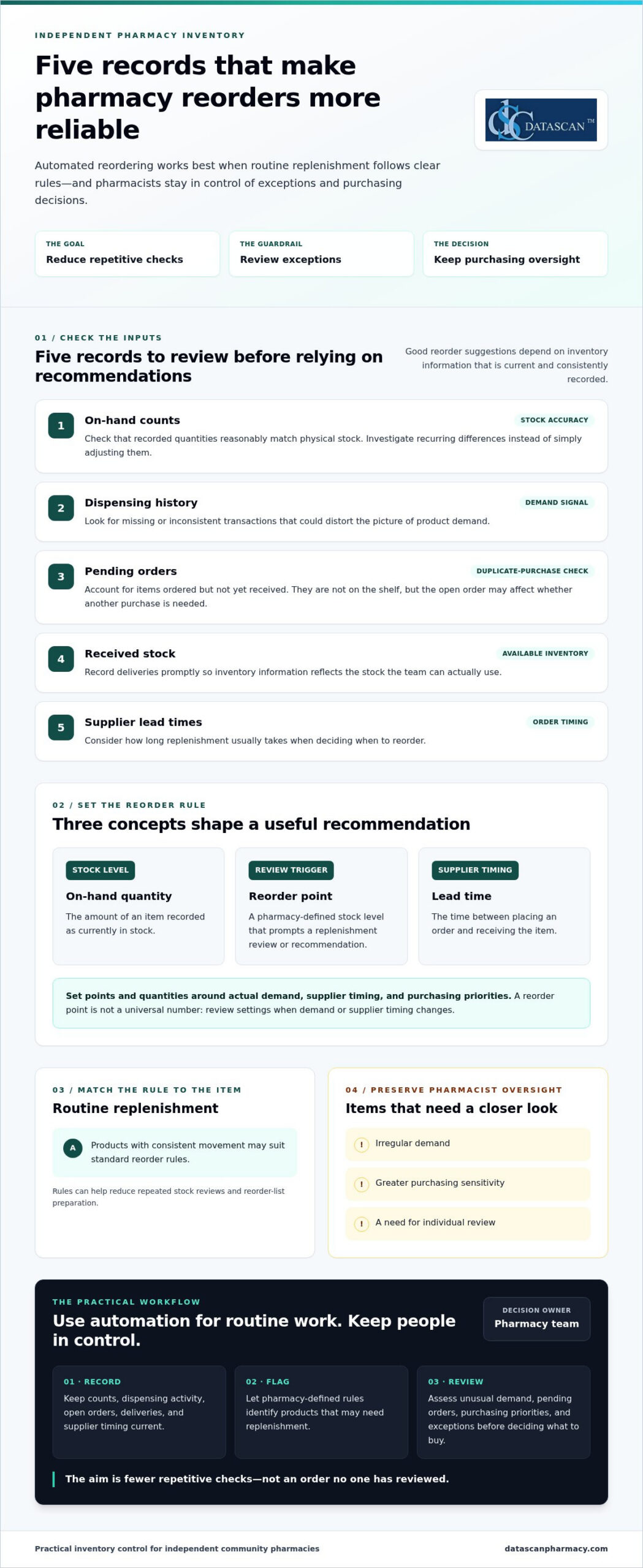
Three terms help explain how the process works:
On-hand quantity: The amount of an item recorded as currently in stock.
Reorder point: The stock level set to prompt a replenishment review or recommendation.
Lead time: The time between placing an order and receiving the item. Supplier lead times help inform when to reorder.
How is an automated reorder recommendation created?
Pharmacy software can compare recorded stock with a threshold set by the pharmacy. When an item reaches or falls below its reorder point, the system may flag it for replenishment. Dispensing history helps the team assess demand, while supplier lead times inform when to reorder and what quantity may be appropriate. Recommendations are only as useful as their inputs, so counts and transactions need to be recorded and updated consistently.
What pharmacy tasks can automation reduce?
Replenishment rules can reduce repeated stock reviews, reorder-list preparation, and routine follow-up on items flagged for purchase. They don’t replace professional judgment. Staff still need to assess unusual demand, pending orders, purchasing priorities, and other exceptions before deciding what to buy. The practical benefit is fewer repetitive checks competing for attention, giving pharmacists and owners more room to manage daily operations and focus on work that requires their expertise. Pharmacy management software should support this broader workflow rather than create another disconnected task.
What data and reorder rules does a pharmacy need before automating?
Before automating replenishment, a pharmacy needs reliable inventory records and reorder rules that reflect its demand and purchasing practices. This matters for independent pharmacies managing cash carefully while PBM reimbursements can pressure margins or arrive later than acquisition costs. Reordering too much may tie up funds the pharmacy needs elsewhere; ordering too little can put routine availability at risk. Review the underlying data first, then decide which products suit routine replenishment and which call for closer review.
Which inventory records affect reorder accuracy?
Start with the quantity recorded on hand and whether dispensing activity is entered consistently. Compare system counts with physical stock, and investigate recurring differences instead of simply adjusting them. Review open purchase orders too. An item already ordered but not received isn’t available on the shelf, but the pending order may affect whether another purchase is needed. Record deliveries promptly so inventory information reflects stock the team can actually use.
Before relying on automated inventory reordering for pharmacy workflows, review these inputs:
On-hand counts: Check that recorded quantities reasonably match physical stock.
Dispensing history: Look for missing or inconsistent transactions that could distort the picture of demand.
Pending orders: Account for items ordered but not yet received to help avoid duplicate purchases.
Received stock: Record deliveries so available inventory is represented accurately.
Supplier lead times: Consider how long replenishment usually takes when planning order timing.
Resolve recurring discrepancies before using recommendations to guide purchasing. Reliable records help the pharmacy judge whether a proposed quantity suits real demand and current purchasing priorities, rather than committing cash based on incomplete information.
How should a pharmacy set reorder points and quantities?
A reorder point is a pharmacy-defined trigger for reviewing replenishment, not a universal number for every product. Set it by considering demand, supplier lead time, and the pharmacy’s preferred ordering cadence. Determine quantities with purchasing priorities in mind, balancing availability with cash committed to stock. Review settings when demand or supplier timing changes rather than assuming an old threshold still fits.
Routine products with consistent movement may suit standard rules. Items with irregular demand, greater purchasing sensitivity, or a need for individual oversight may warrant staff review. This distinction helps teams reduce repetitive checks while applying extra care to purchases that could have a greater effect on cash flow, especially when reimbursement pressure makes working capital important.
Pharmacy management software is part of the wider process for recording information and coordinating daily work. Datascan’s pharmacy management software is designed for independent and retail pharmacies and includes customizable workflow capabilities.
Can automated pharmacy reordering create unwanted orders?
Yes. Automated pharmacy reordering can create unsuitable recommendations or orders when inventory records are inaccurate, reorder rules are outdated, or unusual conditions go unreviewed. Automation is most useful for consistent, routine decisions. The process should also make exceptions visible so staff can apply purchasing judgment before an order affects cash flow or stock availability.
A reorder recommendation and a submitted order are different levels of automation. In a recommendation-only workflow, software flags items for staff to review and approve. A workflow that submits orders automatically can reduce more manual steps, but it also makes clear approval rules and exception handling especially important. Neither approach is right for every product or pharmacy. The choice depends on how much purchasing control the team wants to retain and how dependable its inventory information is.
Which reorder recommendations deserve staff review?
Staff review is valuable when a recommendation doesn’t match what the team knows about current conditions. Common prompts include an unexpected change in dispensing demand, a stock count that doesn’t match what’s on the shelf, or a supplier issue that could affect an open order. Products with irregular or highly variable use may also need closer attention, since a short-term change can make past demand a poor guide to the next purchase.
Pharmacist oversight isn’t a failure of automation. It’s a deliberate control that lets software handle repeatable work while experienced staff assess exceptions, purchasing priorities, and the risk of tying up cash in unnecessary stock.
How can a pharmacy balance automation and purchasing control?
Start by defining staff responsibilities. Decide who reviews recommendations, who can approve or submit orders, and how the team records the reason for an override or unusual purchase. Then assess whether the software and workflow support controls such as approval thresholds, an exception queue, and periodic checks of reorder rules.
For routine items, a team may find that recommendations requiring approval offer a practical balance: they reduce repetitive list-building while keeping a person between a suggestion and a purchase. Automatic submission may suit a narrower set of well-understood orders, provided the pharmacy has clear limits and a process for exceptions. Revisit that choice as demand, supplier reliability, and purchasing priorities change.
Purchasing discipline also connects to gross profit. A reorder should support availability without ignoring the financial effect of buying more than the pharmacy can use efficiently. Reviewing inventory decisions alongside gross profit calculations helps owners consider both the need to keep products available and the cash committed to stock. With automated inventory reordering for pharmacy, the aim isn’t to remove judgment. It’s to focus that judgment where it matters most.
How can a pharmacy implement automated reordering step by step?
Implement automated reordering gradually: document how orders are handled now, validate inventory records, define pharmacy-specific rules, test recommendations on routine items, and refine the process before expanding. Assign clear responsibility for reviewing recommendations and exceptions so automation reduces repetitive work without weakening purchasing oversight.
Map the current process. Record how staff check stock, build reorder lists, account for pending orders, and follow up on deliveries. Note where tasks are repeated or handoffs create delays.
Review inventory records. Check recorded on-hand quantities against physical stock, and look for recurring discrepancies in dispensing or receiving records. Correct the underlying process where possible before using recommendations to guide orders.
Define rules and responsibility. Set reorder triggers and quantities based on each item’s demand, supplier lead time, and your purchasing preferences. Name who reviews recommendations, handles exceptions, and approves changes to the rules.
Test a manageable group. Begin with routine items that have relatively consistent demand. Keep staff involved and compare recommendations with recent dispensing and purchasing activity before relying on them.
Refine, then expand. Adjust rules when recommendations don’t fit actual conditions. Broaden the process only when the team understands how the workflow handles exceptions and pending orders.
What should a pharmacy test before expanding automation?
Check whether recommendations make sense alongside recent dispensing and purchasing activity. Review how pending orders, stock corrections, and exceptions appear to staff, and ask the people responsible for inventory and purchasing where the process is unclear or adds work. Track measures that matter to your pharmacy, such as staff effort, product availability, and purchasing exceptions. Set a local baseline and review the same indicators as the process changes.
How does pharmacy management software fit the process?
Pharmacy management software should fit the way your team records inventory, shares purchasing information, and hands off routine tasks. Evaluate how clearly staff can view relevant information and whether the system fits the workflow you mapped. Datascan’s pharmacy management software is designed for independent and retail pharmacies, with customizable workflow capabilities.
Keep the rollout practical: make responsibilities clear, capture staff feedback, and revisit the rules as purchasing needs change. To discuss your pharmacy workflow and software needs, connect with Datascan.
How should you choose pharmacy software for automated reordering?
Choose pharmacy software that helps your team see inventory clearly, manage repeatable work efficiently, and retain control over purchasing decisions. For an independent pharmacy facing PBM reimbursement pressure, an effective operational workflow can help staff make informed purchasing decisions and avoid tying up cash unnecessarily. Compare systems against your actual processes and the controls your team needs.
What to evaluate
Questions to ask
Why it matters
Inventory visibility
Can staff quickly understand stock information and related purchasing tasks?
Clearer visibility can reduce time spent hunting for information and support informed buying.
Configurable workflow
Can the process reflect the pharmacy’s ordering routines and priorities?
A fit with daily work can reduce duplicate effort and keep purchasing decisions grounded in the pharmacy’s needs.
Exception handling
Can staff identify recommendations or situations that need individual review?
Oversight helps the team respond thoughtfully to unusual conditions and protect purchasing discipline.
Integration fit
How does the system fit with existing pharmacy processes and information flows?
Better fit may help avoid disconnected tasks and repeated data handling.
Reporting, training, and support
Can staff understand the reports, learn the workflow, and access ongoing support?
Practical tools and support matter when owners and pharmacists have limited time to manage operations.
What questions reveal whether a system fits your pharmacy?
Ask how staff will find inventory information, handle purchasing tasks, and review exceptions during a busy day. Consider whether reports make it easier to understand purchasing activity and whether the workflow avoids adding manual steps. For pharmacies managing PBM reimbursement pressure, purchasing visibility can support more deliberate decisions about cash committed to inventory. Training and ongoing support also matter because a process is only useful if the team can apply it consistently.
Datascan Pharmacy Management Software is designed for independent and retail pharmacies, with customizable workflow capabilities to support broader operational needs. Explore the pharmacy management software overview as part of your evaluation.
What should the next step be for an independent pharmacy?
Write down how orders are handled today, where staff time is going, which purchasing decisions need oversight, and how reimbursement pressure affects inventory priorities. Bring those needs into a focused discussion about your pharmacy’s workflow and software requirements with Datascan. Discuss your pharmacy workflow with Datascan.
Build a Reordering Process That Works for Your Pharmacy
Effective automated inventory reordering for pharmacy operations isn’t about handing purchasing decisions to software. It’s about using accurate inventory records and pharmacy-specific rules to handle repeatable tasks, while keeping staff involved when demand shifts, records don’t match, or an order needs closer review.
Start with reliable stock information, set reorder points around your pharmacy’s demand and purchasing practices, then test the process with routine items before expanding. Clear staff responsibilities and regular reviews help keep recommendations useful, protect purchasing oversight, and reduce time spent on repetitive checks.
Pharmacy management software should fit the way your team works across inventory and daily operations. Datascan is a family-owned pharmacy software company operating since 1981, with U.S.-based support and customizable workflow capabilities. These features give independent pharmacies a way to consider software in the context of their broader workflow and operational needs.
Ready to explore how your pharmacy’s ordering process and software needs fit together? Discuss your pharmacy workflow with Datascan. A practical, well-managed process can give your team more room to focus on the work that needs its expertise.
Frequently Asked Questions
What is automated inventory reordering for a pharmacy?
Automated inventory reordering for a pharmacy uses inventory records and pharmacy-defined rules to flag products for replenishment. Depending on the workflow, software may suggest an order for staff review or submit an order automatically. These are different levels of automation, so pharmacies should define which products need approval. The Pharmacy automation overview provides general background on the subject.
How does pharmacy inventory reordering software decide what to reorder?
Software can compare recorded stock with a pharmacy-set reorder point, then use dispensing history and supplier lead times to inform a recommendation. Pending orders and received stock also affect the inventory picture. The pharmacy sets its own thresholds and purchasing practices. Recommendations depend on accurate, consistently updated records, and staff should review exceptions when actual conditions don’t match the information or rules the software is using.
Can automated reordering place orders without pharmacist approval?
It depends on the software and the pharmacy’s configured workflow. A recommendation-only process leaves the order for staff to review, while another process may submit orders automatically. Pharmacies should decide who reviews exceptions and approves purchases, and which products require closer oversight. Automatic submission may reduce manual steps, but clear limits and a process for addressing unusual demand or supplier issues help preserve purchasing control.
What data does a pharmacy need for automated reordering?
A pharmacy needs current on-hand counts, consistently recorded dispensing activity, pending purchase orders, received stock, and supplier lead times. It also needs reorder points and quantities based on its demand and purchasing practices. Review recurring record mismatches before relying on recommendations. For example, account for a purchase that has been placed but not received so staff can make an informed decision about whether another order is needed.
How can automated reordering help an independent pharmacy save time?
Automated reordering can reduce repeated stock checks, manual preparation of reorder lists, and routine follow-up on replenishment needs. This can free pharmacy staff to focus on exceptions and other daily operational responsibilities. It doesn’t eliminate professional purchasing judgment: staff still need to assess unusual demand, discrepancies, and products that require individual review. The goal is to make suitable routine tasks more consistent, not to automate every purchasing decision.
What should I look for in pharmacy management software for reordering?
Look for clear inventory visibility, configurable workflows, understandable reporting, and a practical way for staff to review recommendations and exceptions. Also consider how the software fits existing processes, plus training and ongoing support. Datascan Pharmacy Management Software is designed for independent and retail pharmacies and includes customizable workflow capabilities.
Author information: This FAQ is published by Datascan Pharmacy Software, a family-owned pharmacy software company operating since 1981. The company provides pharmacy management software for independent and retail pharmacies and U.S.-based support. No individual author credentials are stated here.