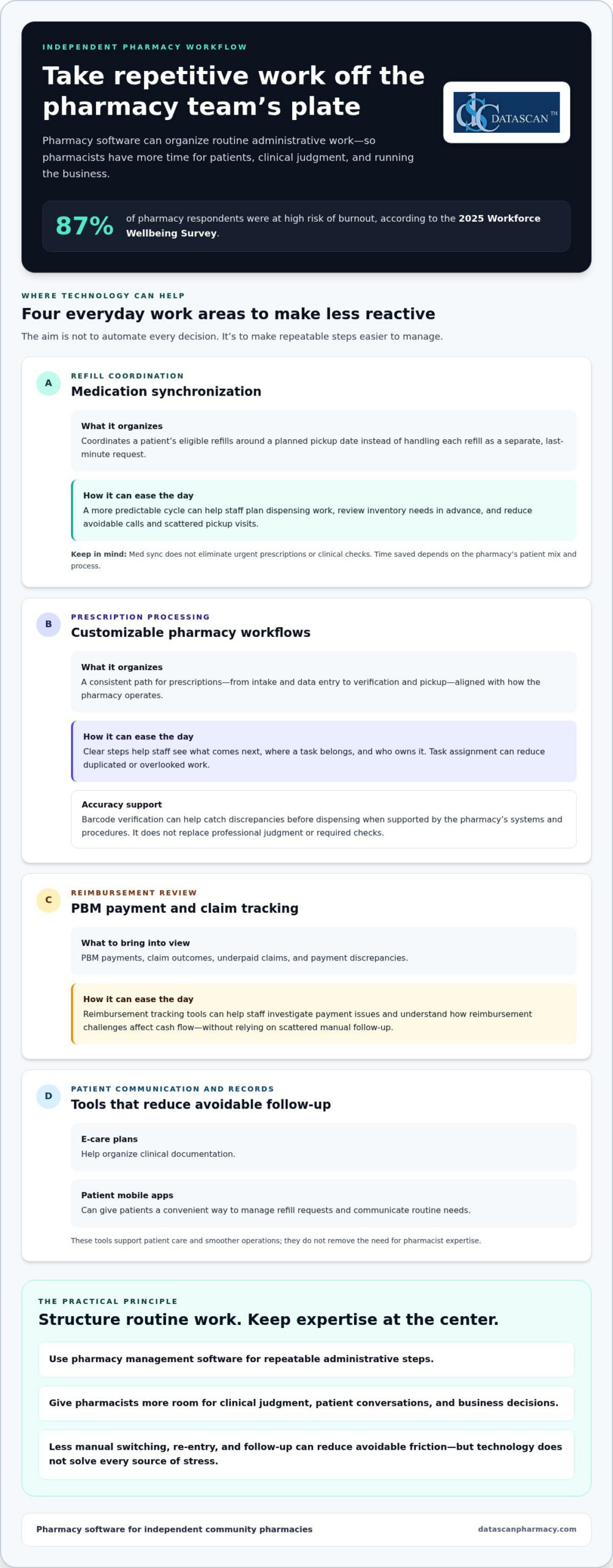
Pharmacist burnout isn’t solved by asking an already stretched team to move faster. Reducing pharmacist burnout with technology starts with taking repetitive administrative work off the team’s plate, from tracking PBM reimbursements and DIR fees to managing manual dispensing steps. The 2025 Workforce Wellbeing Survey found that 87% of pharmacy respondents were at high risk of burnout, underscoring the need for practical relief in independent pharmacies.
If claim issues, paperwork, and workflow bottlenecks keep interrupting your day, you’re not alone. These demands take time away from patient care and running a profitable business. Pharmacy management software can organize reimbursement tracking and support customized workflows, while pharmacy software can reduce avoidable manual tasks and help daily operations run more smoothly.
This guide explains how to use technology to ease administrative strain, get a clearer view of reimbursement challenges, and give your team more time to focus on patients. You’ll also learn how Datascan’s pharmacy management software and customizable workflows can support a more efficient operation and help independent pharmacy owners protect their margins and work-life balance.
Key Takeaways
Reducing pharmacist burnout with technology starts by identifying repetitive tasks that pharmacy management software can simplify or automate.
Medication synchronization and customizable workflows can help make daily operations more organized and less reactive.
Use reimbursement tracking tools to review PBM payments, investigate underpaid claims, and understand their effect on cash flow.
Introduce new technology in manageable steps, starting with the workflow pressure your pharmacy most needs to address.
A pharmacy software partner experienced in serving independent pharmacies can provide support tailored to workflow needs.
How can technology reduce pharmacist burnout in 2026?
Technology can reduce pharmacist burnout by streamlining repetitive administrative work, including prescription processing, inventory tasks, and PBM reimbursement tracking. Less manual follow-up and data entry can leave pharmacists more time for patient care and decisions that require their expertise.
The pressure is real. The 2025 Workforce Wellbeing Survey found that 87% of pharmacy respondents were at high risk of burnout. For independent pharmacies, frequent interruptions and financial uncertainty can make routine tasks feel relentless. Better operational efficiency won’t address every source of stress, but reducing avoidable friction can give the team more control over its day.
What are the main causes of pharmacist fatigue today?
Some of the biggest time drains are easy to overlook: re-entering information, checking claim status, handling dispensing clarifications, and switching between systems to answer routine questions. Each task may be small on its own, but repeated interruptions break concentration and make it harder to keep work moving accurately.
PBM reimbursement uncertainty adds another layer of strain. Reviewing claim outcomes and investigating payment discrepancies takes staff time away from patients and business management. Manual entry can also lead to mistakes that need correction. It isn’t the only source of technical errors, but reducing unnecessary rekeying can remove one avoidable point of friction.
How does modern pharmacy software provide immediate relief?
Pharmacy management software brings operational information and workflows together, helping a team spend less time switching tasks and searching for details. Depending on the system and its configuration, automation can support repeatable steps in prescription processing, inventory management, and claims workflows. Pharmacy automation covers technologies designed to handle medication-related processes, showing how routine work can be structured to rely less on manual effort.
Centralized workflows can also ease the mental load. Rather than keeping every pending task in mind, staff can follow a consistent process to see what needs attention and move work forward. Datascan’s pharmacy management software is designed for independent pharmacies and includes customizable workflows that can fit the way a pharmacy operates. U.S.-based support gives pharmacy teams a knowledgeable point of contact for technical questions.
In 2026, the practical goal isn’t to automate every decision. It’s to use pharmacy software for repeatable administrative steps so pharmacists can focus on clinical judgment, patient conversations, and running the business. That makes reducing pharmacist burnout with technology an operational priority, not just a technology project.
Which pharmacy software features automate the most time-consuming tasks?
The most useful pharmacy software features reduce repetitive work across refill coordination, prescription processing, patient communication, and clinical documentation. Medication synchronization can make refill timing more predictable, while customizable workflows help staff follow a process that fits the pharmacy’s needs.
These tools can support patient care as well as smoother operations. The National Consensus Conference on Pharmacist Well-Being recommends workflow and technology solutions that make patient-centered care more efficient and help decrease pharmacist burden. For independent pharmacies, reducing pharmacist burnout with technology means choosing features that remove friction from work the team already does.
How does medication synchronization save hours every week?
Medication synchronization, or med sync, coordinates a patient’s eligible refills around a planned pickup date. Instead of handling each refill as a separate, last-minute request, the pharmacy can prepare for a more organized cycle and communicate with patients ahead of time. This can make workload easier to anticipate and help reduce avoidable calls and scattered pickup visits. The time saved depends on the pharmacy’s patient mix and process.
Upcoming refill schedules can also help the team plan dispensing work and review inventory needs in advance. Med sync doesn’t eliminate urgent prescriptions or clinical checks, but it can make routine refills less reactive and help smooth busy periods.
Can customizable workflows really improve pharmacy efficiency?
Yes. A customizable workflow can reflect how prescriptions move through a specific pharmacy, from intake and data entry to verification and pickup. Clear, consistent steps help staff understand what comes next and where each task belongs. Datascan’s customizable pharmacy workflow software lets independent pharmacies align software processes with their operational needs.
Barcode verification and task assignment can also be useful workflow approaches when supported by a pharmacy’s systems and procedures. Verification steps can help staff catch discrepancies before dispensing, while clear task ownership reduces the chance that work is duplicated or overlooked. These tools support accuracy, but they don’t replace professional judgment or required checks.
Other features can reduce follow-up work. E-care plans help organize clinical documentation, while patient mobile apps can give patients a convenient way to manage refill requests and communicate routine needs. When these functions are part of a coordinated pharmacy management software workflow, staff can spend less time chasing information and more time assisting patients. Explore Datascan’s workflow software to see how customized processes can fit day-to-day pharmacy operations.
How does technology help pharmacists manage PBM reimbursements and DIR fees?
Pharmacy management software helps independent pharmacies organize claim and reimbursement information so staff can spot payment discrepancies, track trends, and spend less time on manual reconciliation. It won’t determine whether a PBM payment is correct or guarantee a successful dispute, but clear records make it easier to identify claims that need review and understand how reimbursement issues affect cash flow.
When reducing pharmacist burnout with technology, the financial workflow matters as much as the dispensing workflow. Switching repeatedly between claim details, payment records, and spreadsheets adds administrative work and makes it harder to see patterns. A consistent process can help owners review reimbursement performance without relying on memory or scattered notes.
How can you identify underpaid claims automatically?
Start by comparing claim-level payment information with the reimbursement you expected under the applicable terms. Pharmacy management software can organize reimbursement data, and Datascan provides tools for PBM reimbursement tracking. Where available, reports or alerts can flag claims that appear below cost or differ from expected amounts, giving the team a starting point for investigation instead of requiring a manual review of every claim.
Reviewing results alongside acquisition costs and other relevant expenses also gives owners a clearer view of prescription-level gross profit. Consistent calculations support better business decisions, but they depend on accurate, complete inputs.
What role does data play in PBM reform advocacy?
Well-organized records can help turn individual payment concerns into a clearer view of recurring patterns. Pharmacy owners can review reimbursement trends, DIR fee information, and claim documentation to understand financial pressures on the business and support conversations with PBMs or policymakers. Digital records can also make audit preparation more orderly by keeping relevant claim information easier to retrieve. They don’t guarantee an audit outcome, but consistent recordkeeping can reduce last-minute searching.
Track: Review reimbursement and fee data regularly instead of waiting until bookkeeping becomes urgent.
Compare: Identify claims that appear inconsistent with expected reimbursement and document details for follow-up.
Retain: Keep relevant claim records organized so staff can retrieve them when questions or audits arise.
Technology can also reduce operational strain beyond reimbursement work. An Agency for Healthcare Research and Quality summary reports that robotic dispensing improves staff satisfaction in the study it discusses, illustrating how automation may support efficiency and the work environment. For independent pharmacies, a practical next step is to make reimbursement data easier to review and act on with pharmacy software tools that fit the team’s processes.
What are the best strategies for implementing technology without adding more stress?
Introduce pharmacy technology in manageable phases. Start with a high-friction task and give staff time to learn the new process before adding another change. A clear purpose, practical training, and dependable support can make implementation a workflow improvement rather than another burden. This step-by-step approach makes reducing pharmacist burnout with technology more achievable for an independent pharmacy.
Start with a short implementation plan:
Choose one pain point: Identify a recurring task, such as handling refill requests or coordinating delivery.
Explain the benefit: Show staff how the change is intended to reduce interruptions or repetitive work.
Train with real tasks: Let team members practice the workflow they’ll use during a normal shift.
Review and adjust: Gather staff feedback, resolve snags, and decide what to introduce next.
Prioritize tools that address a visible source of workload. For example, the MobileScripts patient mobile app gives patients a way to request prescription refills through a mobile app, which can reduce reliance on phone calls for that task. Make sure staff understand how requests enter the pharmacy’s routine and who handles them.
How do you choose a pharmacy software vendor that supports your team?
Look for a partner that understands independent pharmacy operations and provides support your staff can use. Datascan is family-owned and has served pharmacies since 1981, with long-term U.S.-based support. During a pharmacy software conversion, plan how existing workflows will map to the new system, how staff will learn their roles, and how questions will be handled during the transition. Set clear internal points of contact so staff know where to raise issues.
Training should explain why the change is happening, not just which buttons to click. When staff understand how a tool fits their daily work, they can give useful feedback and build confidence using it.
How can mobile apps reduce the burden on your front-end staff?
Mobile refill requests can move routine requests into a structured process, freeing front-end staff to focus on in-person service and calls that need personal attention. Automated texts or push notifications may also reduce status-check calls when a pharmacy’s systems support those functions and the communication process is configured appropriately. Set expectations with patients about which requests the app handles and how the pharmacy follows up.
Delivery tools can help organize off-site patient needs by keeping delivery-related tasks within a defined workflow. Introduce these tools one at a time, monitor how they affect the team’s day, and refine the process before expanding their use. This keeps technology focused on practical relief, not change for its own sake.
Why is a family-owned pharmacy software vendor the best partner for reducing staff stress?
A family-owned pharmacy software vendor can offer a personal, accountable relationship alongside tools built for independent pharmacy operations. That matters because technology should fit the realities of your business, including how your team works, which reimbursement details you need to track, and the support you rely on when questions arise. Reducing pharmacist burnout with technology is easier when the system fits the pressures community pharmacies face.
Datascan has been family-owned since 1981 and provides long-term U.S.-based support. Its pharmacy management software is designed for independent pharmacies, with customizable workflows and tools that support PBM reimbursement tracking. Together, these capabilities can help owners address operational friction and the time-consuming work of understanding pharmacy finances.
What makes Datascan different from large corporate vendors?
Independent pharmacies need a technology partner that recognizes their business priorities, not just prescription volume. Datascan focuses on independent pharmacy operations with pharmacy management software that brings pharmacy workflows and business tools into the operational picture. U.S.-based support gives pharmacy teams a knowledgeable resource for system questions, while a family-owned approach emphasizes personal accountability and a lasting relationship.
Software can’t remove every source of stress or guarantee profitability. It can help owners organize workflows, track reimbursement information, and make better-informed decisions about how staff time is used. Those capabilities support a pharmacy’s work to serve patients while managing the business behind that care.
How do you get started with a less stressful pharmacy management system?
Begin with the problems that interrupt your team most often. Identify a workflow bottleneck, a recurring administrative task, or a reimbursement process that takes too much manual review. Then map how the task moves through the pharmacy, who handles each step, and what a better process should accomplish. This gives your team a practical basis for evaluating software and planning a transition.
Set priorities: Choose the first workflow to improve rather than changing every process at once.
Involve staff: Ask the people doing the work where delays, duplicate steps, or unclear handoffs occur.
Plan training: Give staff time to learn the updated process and raise questions.
Review the results: Check whether the change reduces friction before introducing another adjustment.
A good partnership connects technology decisions to the pharmacy’s actual needs. With a clear implementation plan, staff input, and support grounded in independent pharmacy operations, pharmacy software can become a practical tool for building a more manageable workday.
Give Your Pharmacy Team More Room to Thrive
Reducing pharmacist burnout with technology starts with practical changes: streamline repetitive workflows, make PBM reimbursement information easier to review, and introduce new tools in manageable steps. The right pharmacy management software can give staff more time while giving owners a clearer view of operations and profitability.
Technology works best when it fits the people using it. Datascan has been family-owned and operated since 1981, with long-term U.S.-based support and tools for independent pharmacies, including pharmacy management software, point-of-sale, mobile patient apps, and delivery tools. That combination gives pharmacy owners a knowledgeable partner as they improve workflows and reduce administrative strain.
You don’t have to overhaul every process at once. Start with one pressure point, involve your team, and build from there. Schedule a demo to explore Datascan Pharmacy Software for your workflow and see how the right tools can support a more efficient pharmacy. A less stressful workday is a practical goal, and your team can take the first step toward it.
Frequently Asked Questions
How does pharmacy management software specifically reduce daily stress?
Pharmacy management software can reduce daily stress by organizing routine tasks and limiting repeated manual steps. Depending on its features and configuration, it may support prescription processing, inventory tasks, refill coordination, and reimbursement tracking in a more consistent workflow. That can mean fewer interruptions to search for information or re-enter details. Reducing pharmacist burnout with technology works best when tools address specific pressure points without adding unnecessary steps.
Can automation help my pharmacy survive low PBM reimbursements?
Automation can’t change a PBM’s reimbursement terms or guarantee that a pharmacy will overcome low payments. It can help owners review claim and payment information, identify possible discrepancies, and keep reimbursement records organized for follow-up. Pharmacy management software with PBM reimbursement tracking can make it easier to see patterns and understand their effect on the business. Use those insights alongside accurate cost and financial records to guide decisions.
Is it difficult to switch to a new pharmacy software system?
A pharmacy software conversion takes planning, but a phased approach can make the transition more manageable. Identify essential workflows, involve staff who use them every day, and schedule time for training and questions. Before the transition, clarify how information and processes will be handled, what staff need to learn, and where they can get support. Introducing changes in stages helps the team adjust without trying to learn everything at once.
Do I need expensive hardware to reduce pharmacist burnout?
Not necessarily. Start by identifying whether the biggest time drain comes from software workflows, manual processes, or equipment needs. Pharmacy management software can support efficiencies such as organizing tasks and tracking reimbursements, but hardware requirements depend on the system and the pharmacy’s setup. Don’t assume buying new equipment is the first step. Define the workflow problem you want to solve, then determine what tools are needed to address it.
How does medication synchronization software work to save time?
Medication synchronization coordinates eligible prescription refills around a planned schedule for each patient. Instead of processing every routine refill as a separate, last-minute request, the pharmacy can prepare for upcoming fills and communicate with patients ahead of time. Pharmacy management software can help staff organize this work and anticipate routine dispensing needs. The process can make workloads more predictable, though urgent prescriptions and clinical checks still require attention as they arise.
What should I look for in a pharmacy software vendor to ensure long-term support?
Look for a vendor with experience serving independent pharmacies, clear support channels, and software that can accommodate your workflows. Consider how staff get help with technical questions and how feedback about daily operations informs improvements. Datascan Pharmacy Software is family-owned and operated since 1981, with long-term U.S.-based support. A continuing relationship with a knowledgeable support team can help your pharmacy address questions as its operational needs evolve.
Can technology help with pharmacy staff retention?
Technology can support staff retention by reducing avoidable administrative friction and making routine work more manageable, but it can’t guarantee that employees will stay. Consider tools that address frustrations your team identifies, such as repeated data entry, scattered workflows, or frequent refill-status calls. Involve staff in choosing what to improve and review whether the change helps. A more workable day can contribute to a supportive workplace alongside other retention efforts.
About the author: Datascan Pharmacy Software is a family-owned pharmacy management software provider founded in 1981. The company supports independent and retail pharmacies with pharmacy management software, point-of-sale tools, patient mobile apps, and delivery tools.
What if coordinating a family’s prescriptions didn’t require combining their medical records? Managing family prescriptions in one profile should mean using a shared workflow for refill timing and pickup while keeping each person’s prescriptions and medication history separate. That distinction helps families stay organized without creating identity or record mix-ups.
Families may want one convenient way to track several people’s refill needs. Pharmacy teams may want fewer repeat calls about prescription status and pickup. But a household connection must never blur who a prescription belongs to or who is authorized to access information. The goal is coordination with clear, patient-by-patient identification.
This guide explains how independent and community pharmacies can handle family prescription requests, refills, and pickup while maintaining accurate records. It also covers what to consider when evaluating pharmacy management software and patient-facing mobile tools, including why family-profile and authorization capabilities should be confirmed before they’re promised. About the author: Datascan Pharmacy Software is a family-owned pharmacy software provider serving independent and retail pharmacies since 1981.
Key Takeaways
Coordinate household refill and pickup needs through a shared process, not a merged clinical record.
Keep each person’s prescriptions and medication history distinct, and confirm access before sharing patient information.
Compare staff-assisted, patient-initiated, and technology-supported workflows to find a practical fit for your pharmacy.
Use clear steps for intake, identity checks, documentation, and escalation so staff can handle family requests consistently.
When evaluating pharmacy management software for managing family prescriptions in one profile, verify its family-specific features rather than assuming they’re included.
How can a pharmacy manage family prescriptions in one profile?
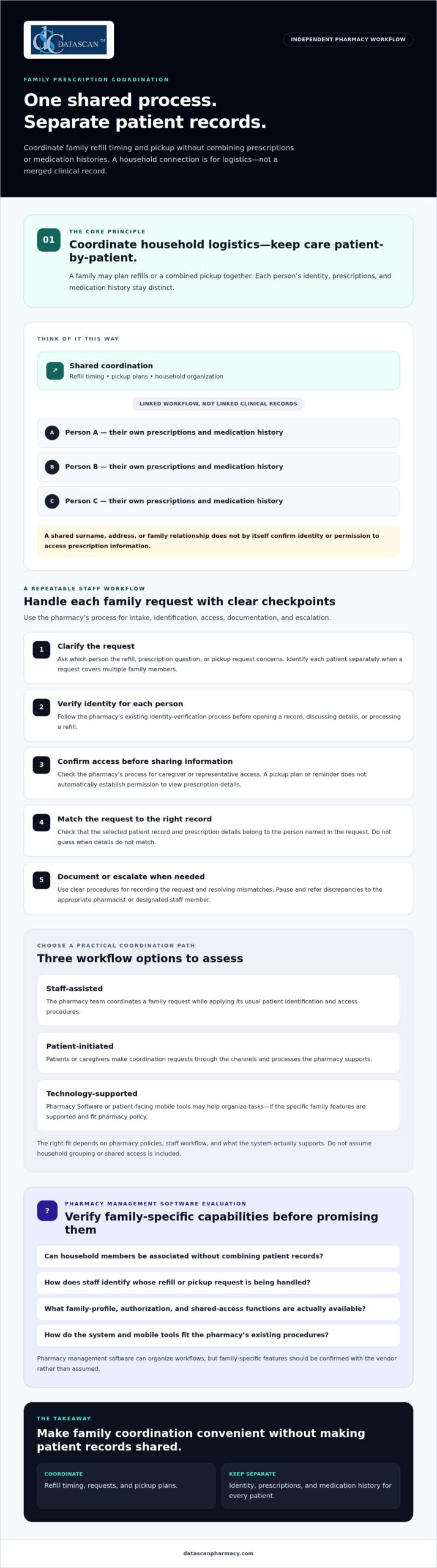
A pharmacy can coordinate family prescriptions through a shared process while keeping a distinct patient record for each person. “One profile” should mean an organized way to manage household logistics, such as refill timing or pickup plans. It should not mean a single clinical record that combines prescriptions and medication histories.
Families may ask for coordination when several prescriptions need attention around the same time or one caregiver is planning a pharmacy visit for more than one person. A clear process helps staff respond consistently and explain what can be coordinated. Because available options depend on pharmacy policies and Pharmacy Software, staff should check what the system supports rather than assume it offers household grouping or shared access.
What does one family prescription profile actually mean?
A coordination view may link household members for practical tasks while preserving a separate profile for each patient. For example, a caregiver might plan a combined pickup, but each person’s prescriptions and medication history remain tied to that individual. This keeps medication information from being confused with a relative’s and supports patient-specific work.
Think of it as a shared calendar, not a merged chart. Coordinating logistics is also different from reviewing a person’s full medication regimen. Pharmacists assessing an individual’s medicines may draw on principles of comprehensive medication management, which focus on that patient’s medication profile. A family coordination feature should not blur that patient-specific work.
Who benefits from coordinated family prescription management?
Parents may want to plan children’s refills together, following the pharmacy’s procedures and applicable requirements. An adult helping a relative may coordinate a pickup or send a reminder, but that alone doesn’t establish permission to access the relative’s prescription details. The pharmacy should explain what the person can do and what steps are needed before sharing information.
For community pharmacies, a defined coordination process makes requests easier to handle without relying on memory or informal assumptions. Pharmacy management software can organize workflows, but staff should verify any family-specific functions with the vendor. Ask whether the system can associate household members without combining records, and how staff identify whose refill or pickup request they’re handling. A pharmacy can review its pharmacy management software workflow options while confirming that any family-profile capability is supported.
How can pharmacies coordinate prescriptions without mixing patient records?
Use each patient’s identity as the organizing principle. Keep profiles, prescriptions, and medication histories separate, even when a family coordinates refill timing or pickup. A shared errand is a logistics arrangement, not automatic permission to view or discuss every family member’s prescription information.
This distinction matters at the counter and during routine phone calls. If a caregiver asks about several prescriptions, staff should identify the specific patient for each request and follow the pharmacy’s process before opening a record, discussing details, or processing a refill. Don’t infer identity or access from a shared surname, address, or family relationship.
How should staff verify each family member’s identity?
Apply the pharmacy’s existing identity-verification process to every patient and interaction. Before viewing or discussing a prescription, confirm which person the request concerns. Before processing it, check that the selected record and prescription details match that patient.
If names, dates, or other identifying details don’t match, pause and escalate the discrepancy to the appropriate pharmacist or designated staff member. Guessing can attach a request to the wrong record. A written procedure should clarify who resolves mismatches and when a request must wait for more information.
How should pharmacies handle caregiver access and consent?
Document how staff determine whether a caregiver or representative may receive information or act on a patient’s behalf. A family relationship alone shouldn’t be treated as universal access permission. Shared pickup plans and refill reminders also don’t, by themselves, establish authorization to access prescription records.
Privacy and consent requirements can depend on the circumstances and applicable guidance. Pharmacy leadership should review current authoritative sources and the pharmacy’s policies, then train staff on what to verify, what to document, and when to ask a pharmacist for direction. A software setting is not a substitute for a clear process.
Pharmacists can contribute to coordinated care while preserving patient-by-patient accountability. The American Academy of Family Physicians discusses pharmacists’ role in team-based care and collaborative practice agreements; that care-team role is distinct from permission to access a relative’s records. For independent pharmacies, thoughtful pharmacy workflow software may help staff follow consistent steps. Verify the system’s capabilities and align its use with approved procedures. That is the practical foundation for managing family prescriptions in one profile without merging patient records.
Which family prescription workflow works best for an independent pharmacy?
The best workflow fits your pharmacy’s staffing, patient preferences, and existing systems while keeping every patient’s record distinct. An independent pharmacy can start with staff-assisted coordination, invite patients to initiate requests, or use technology to support parts of the process. These approaches can also be combined.
Compare the options against your pharmacy’s needs. Whichever approach you choose, tie each request to the correct patient record.
Workflow
Convenience
Staff effort
Record accuracy
Software dependency
Staff-assisted
Helpful for families who prefer direct support from the pharmacy.
May require more manual follow-up.
Relies on consistent intake and patient identification.
Can begin with existing procedures.
Patient-initiated
Lets patients contact the pharmacy about their own prescriptions.
Staff still need to verify and process each request.
Supported by handling each request under the correct patient record.
Depends on the available request channels.
Technology-supported
May make refill steps or communication easier to organize.
Depends on how well the tool fits the pharmacy’s process.
Requires clear patient identification and separate records.
Requires software or an app with the needed functions.
When is staff-assisted coordination the right starting point?
Staff-assisted coordination is a practical option when families need help planning refills or pickups and the pharmacy wants to establish a clear process before adding technology. Staff can record coordination preferences according to pharmacy policy, then document and process each patient’s request separately.
Repeated calls to clarify status, pickup plans, or whose prescription a request concerns may indicate that the intake process needs review. Look for avoidable follow-ups and unclear handoffs, then adjust the steps before adding tools.
When can pharmacy software or a patient app help?
Pharmacy management software may help organize the workflow, but don’t assume it offers household profiles or shared access. Ask the vendor how the system handles separate patient records, refill requests, communication, and staff review. Medication synchronization may help coordinate refill timing when it fits patients’ needs and the pharmacy’s workflow. Confirm how it would work in practice.
A patient-facing app may offer another channel for refill communication, but verify its current functions before presenting it as a family coordination tool. Datascan offers the MobileScripts Patient Mobile App, though family-profile capabilities should be confirmed before making claims about them. Pharmacies can review this guide to pharmacy management software and assess which features support their intended process.
How do you set up a safe family prescription coordination process?
Set up a repeatable workflow that handles the family’s coordination request while verifying and documenting each patient’s needs separately. Clear steps help staff manage requests consistently, reduce avoidable follow-up, and know when to pause for a pharmacist or manager.
Receive the request. Ask which family members the caller or visitor wants to coordinate and what they’re requesting, such as refill planning or pickup coordination. Don’t assume the request includes access to prescription information.
Verify each patient. Follow the pharmacy’s established identity-check process before accessing or processing an individual’s prescription. If details conflict or identity is uncertain, stop and escalate rather than guessing.
Clarify the coordination requested. Confirm which logistics the pharmacy can coordinate under its procedures. Refer questions about caregiver access, consent, or unclear authority to the pharmacist or designated lead.
Document appropriately. Record the request, relevant communication preferences, and any permission details only as pharmacy policy allows. Keep each patient’s identity and prescription information distinguishable.
Coordinate and follow up. Handle each prescription through the appropriate patient record, explain the next steps, and route unresolved questions to the responsible staff member.
What should the pharmacy document when a family requests coordination?
Use the pharmacy’s established documentation process to record what the family wants coordinated and which patient each request concerns. Document communication preferences or permission details only when policy allows, and avoid notes that imply broader access than has been confirmed. Documentation should help the next staff member without replacing identity checks.
How can staff make the process repeatable?
Create a short checklist covering intake, identity verification, coordination, documentation, and patient communication. Train staff to pause and escalate uncertain identity, consent, or prescription details rather than merging or correcting records based on assumptions. Assign a pharmacist or designated lead to resolve exceptions and clarify the procedure.
Keep the process practical for a busy independent pharmacy. Ask staff which steps cause uncertainty, and note recurring patient questions, repeat calls, and handoff problems. Review those patterns with the team and adjust the checklist when pharmacy needs or software workflows change. Rather than setting an arbitrary performance target, focus on whether the process is clear, consistently followed, and preserves separate patient records.
For broader guidance on structuring pharmacy tasks, review this resource on pharmacy workflow optimization. A well-designed process can make managing family prescriptions in one profile more orderly, but confirm that software features fit the pharmacy’s approved procedures. To discuss workflow options for your pharmacy, contact Datascan.
Can pharmacy management software support family prescription coordination?
Yes, pharmacy management software may support parts of family prescription coordination, but pharmacies should confirm family-specific functions with the vendor. Software can help organize routine workflows while staff continue to follow procedures that keep each patient’s records distinct.
Technology can also help independent pharmacy teams organize day-to-day work amid PBM reimbursement pressures. A clearer refill workflow may free staff time for owners and managers to review reimbursement information and consider changing PBM requirements. Software doesn’t change a PBM’s payment terms, so evaluate workflow tools for the operational support they actually provide.
What should a pharmacy ask a software vendor?
Ask for a walkthrough using realistic scenarios, such as coordinating separate refill requests or planning a pickup for multiple household members. Confirm how the system handles:
Identity and records: How does it distinguish each patient?
Workflow and permissions: What coordination and communication functions are supported, and what staff steps are required?
Documentation and exceptions: How are actions recorded, and what happens when details don’t match?
Practical fit: What implementation, training, and support details should your pharmacy plan for?
Datascan serves independent and retail pharmacies with pharmacy management software. Its platform includes medication synchronization and e-care plans, and the MobileScripts Patient Mobile App may provide a patient communication channel. These offerings may be relevant to pharmacy workflows, but confirm current capabilities, including any family-specific functions, before relying on them. When reviewing Datascan’s pharmacy management software, assess how its demonstrated features fit your processes and operational priorities.
Start with the coordination problem your team wants to solve, then verify how the system supports it without merging individual patient records. Talk with Datascan about your pharmacy workflow and the capabilities your team should evaluate.
Build a family coordination workflow your team can trust
Managing family prescriptions in one profile works best when the workflow coordinates refill and pickup needs without combining individual patient records. Clear identity checks, documented procedures, and defined staff responsibilities help families stay organized while keeping each person’s prescription information distinct.
Choose a process your pharmacy can follow consistently, whether it’s staff-assisted, patient-initiated, or supported by technology. Pharmacy management software, medication synchronization, e-care plans, and patient apps may support parts of the workflow, but confirm specific family coordination and access features before relying on them. Tools should fit your procedures and help staff manage routine tasks without adding uncertainty.
Datascan has served independent and retail pharmacies as a family-owned business since 1981, with U.S.-based support for pharmacy clients. If you’re reviewing your processes or software fit, discuss your pharmacy workflow with Datascan. With a clear process and suitable technology, your team can make prescription coordination more convenient while protecting accurate individual records.
Frequently Asked Questions
Can a pharmacy put multiple family members’ prescriptions in one profile?
A pharmacy can coordinate a household’s prescription needs, but it should keep each person’s patient record, prescriptions, and medication history distinct. “One profile” may mean a household coordination view, if the pharmacy’s system supports one, rather than a merged clinical record. Ask what the pharmacy’s software and procedures allow, since family grouping and shared access aren’t available or handled the same way everywhere.
How can a pharmacy coordinate family refills without mixing up patients?
Have staff identify the specific patient for every refill request, verify the matching record, and process each prescription separately. A shared pickup plan can help coordinate logistics, but it shouldn’t replace patient identification or the pharmacy’s established procedures. If a name or other detail doesn’t match, staff should pause and ask a pharmacist or designated team member to resolve it rather than guess.
Can one family member manage another person’s prescriptions?
A family member may be able to help coordinate tasks such as pickup or refill reminders, but the relationship alone shouldn’t be treated as automatic permission to access prescription details. The pharmacy should follow its procedures for confirming what information can be shared and what actions the person can take. For online accounts, check the pharmacy’s current authorization process and applicable guidance before assuming access is available.
Does medication synchronization help families manage prescriptions together?
Medication synchronization may help coordinate the refill timing of a patient’s eligible prescriptions, which can make planning easier. It doesn’t combine family members’ records or automatically synchronize prescriptions across a household. The pharmacy should review each patient’s needs and determine whether the process fits their prescriptions and workflow. Ask how synchronization would affect refill requests, patient communication, and pickup planning before relying on it for family coordination.
What should an independent pharmacy look for in software for family prescription management?
Evaluate whether pharmacy management software supports the workflow you need while preserving separate patient records. Ask the vendor to demonstrate identity handling, refill processing, communication, documentation, permissions, and exception steps. Also consider staff usability, training, and support. Datascan Pharmacy Software serves independent and retail pharmacies; confirm directly whether its current capabilities fit your family coordination needs before making a decision.
Can a pharmacy mobile app manage prescriptions for an entire family?
Some patient apps may support refill communication, but family profiles, delegated access, and household-level prescription management depend on the app’s specific functions. Don’t assume one account can manage everyone’s prescriptions. Ask the pharmacy or app provider how individual patients are identified, what access options exist, and what authorization steps apply. Datascan offers the MobileScripts Patient Mobile App, but confirm its current family-related capabilities before relying on them.
How can pharmacies reduce staff time spent coordinating family prescriptions?
Use a consistent intake and follow-up process, assign responsibility for unclear requests, and document coordination according to pharmacy procedures. Clear patient identification and communication steps can help limit repeated questions and avoidable handoffs. Pharmacy management software may organize parts of the workflow, but confirm that its features match the pharmacy’s process. Review recurring patient questions and staff feedback to find practical improvements without assuming a particular tool will eliminate follow-up.
What if the problem isn’t that you need new pharmacy software, but that your current system no longer fits the way your pharmacy works? Switching from Computer-Rx is worth considering when specific workflow limitations, changing business needs, or support gaps affect daily operations, not simply because another vendor makes bigger promises.
It’s understandable to hesitate. A pharmacy management software change can affect dispensing, staff routines, and patient service, so the decision takes more than a polished demo. This guide will help you assess whether a switch is justified, compare options against your pharmacy’s needs, and prepare questions for a productive vendor conversation.
We’ll cover how to document workflow friction, evaluate tools that may help your team manage day-to-day work and review PBM reimbursement information, and ask vendors about conversion, training, and support before you commit. The goal isn’t to rush you away from Computer-Rx. It’s to help you choose pharmacy software based on fit for your independent pharmacy and the operations you need to support.
About the author: Datascan Pharmacy Software is a family-owned U.S. pharmacy software provider founded in 1981. Its offerings include pharmacy management software and related tools for pharmacy operations.
Key Takeaways
Consider switching from Computer-Rx when documented pharmacy needs no longer fit your current system, rather than reacting to sales claims alone.
Investigate recurring workflow problems by checking whether they stem from software, staffing, procedures, training, or third-party processes.
Compare pharmacy management software options against the same requirements for workflows, reporting, usability, support, training, and conversion.
Reduce transition uncertainty by confirming data scope, responsibilities, timing, staff training, and contingency plans with a prospective vendor.
Evaluate Datascan as one possible fit for your independent pharmacy, considering its pharmacy software suite, U.S.-based support, and family-owned history since 1981.
Why are independent pharmacies considering switching from Computer-Rx?
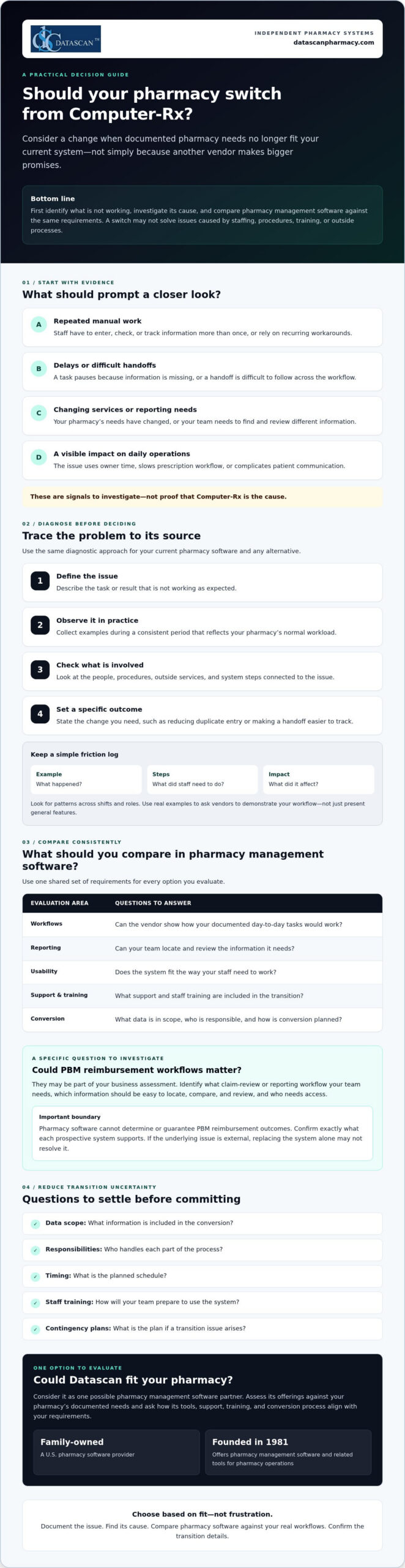
A switch is worth evaluating when your documented pharmacy needs no longer match your current system. That doesn’t mean Computer-Rx is necessarily causing a problem. First, ask whether your pharmacy management software supports the way your team works today and the services you may need to provide next.
For an independent pharmacy, the pressure points are often practical. Are staff repeating manual steps to complete routine tasks? Do workarounds take time away from prescription workflow or patient communication? Have your services or reporting needs changed? Is it difficult for your team to find and review information relevant to reimbursement? Treat these as questions to investigate, not assumptions about Computer-Rx.
A pharmacy software switch is a needs-and-fit decision, not a reaction to dissatisfaction alone. A pharmacy management system supports key pharmacy activities, but whether a different system can address a specific concern depends on its cause and the capabilities you need.
What problems should I document before changing pharmacy software?
Ask staff to record recurring friction when it happens. Note a specific example, the steps involved, and what the issue affects. A short log can help you distinguish a system limitation from a training gap, an unclear procedure, or an outside process your software doesn’t control.
Manual steps and workarounds: What does staff have to enter, check, or track more than once?
Delays: Where does a task pause, and what information or handoff is missing?
Impact: Does the issue use owner time, slow prescription workflow, or complicate patient communication?
Look for patterns across shifts and roles. A clear record makes it easier to ask vendors to demonstrate how they would handle your actual workflow, rather than relying on a general feature presentation.
Could PBM reimbursement challenges be part of the decision?
They may be part of your business assessment, but pharmacy software can’t determine or guarantee PBM reimbursement outcomes. Instead, identify the claim-review or reporting workflow your team needs. Which information must be easy to locate, compare, and review, and who needs access to it? Then confirm exactly what each prospective system supports. For broader financial context, consult a pharmacy gross profit guide alongside your software evaluation.
Keep the decision grounded in evidence. If the root cause is staffing, process design, or an external reimbursement issue, replacing the system alone may not resolve it. If your documented needs point to a genuine mismatch, you’ll be better prepared to compare alternatives based on fit, not frustration.
How do I tell whether my current pharmacy system is the real problem?
Use a simple diagnostic before deciding that changing pharmacy management software is the answer: define the issue, observe it, identify dependencies, and set a specific desired outcome. This helps separate a software constraint from problems caused by staffing, procedures, training, or third-party processes.
Define the issue: Describe the task or result that isn’t working as expected.
Observe it: Collect examples during a consistent period that reflects your pharmacy’s normal workload.
Identify dependencies: Check which people, procedures, external services, or system steps are involved.
Set an outcome: State what needs to change, such as reducing duplicate entry or making a handoff easier to track.
A recurring workaround is evidence to investigate, not proof a vendor is at fault. As you assess switching from Computer-Rx, use the same diagnostic criteria for your current system and any alternative. The Health IT Playbook also offers broader guidance on technology selection and implementation that can inform your planning.
Which pharmacy workflows should I review first?
Map prescription intake, dispensing, verification, pickup, and refill communication at a high level. Then examine reporting and front-end tasks, noting where information is re-entered, a handoff stalls, or staff need a workaround. Check whether each process fits your pharmacy’s service mix and daily workload. Review POS, delivery, or patient-app needs only if they’re relevant to your operations.
How can I measure whether a workflow needs to change?
Choose a defined observation period and track the same measures throughout it. Keep the measures practical and consistent:
How often staff repeat a task or enter the same information more than once.
Where handoffs occur and whether they require follow-up.
Which steps staff identify as sources of friction, with a brief example.
How often a task needs rework and what happened immediately before it.
Use your own baseline rather than a vendor’s generalized benchmark. Compare systems using the same definitions and workflow examples, and don’t attribute financial or clinical outcomes to software without evidence. If you want to explore whether another workflow approach fits your needs, you can discuss your pharmacy’s requirements with Datascan.
What should I compare before choosing a Computer-Rx alternative?
Compare each pharmacy management software option against the same written requirements, not the size of its feature list. The best-fit pharmacy software is the one that meets your documented operational requirements and supports the work your team needs to do.
Build a short scorecard from your pharmacy’s priorities, then ask each vendor to demonstrate the same real tasks. For broader system context, review this guide to pharmacy management software as part of your research.
Area to compare
Questions to ask
Required workflows
Can you show how the system handles the tasks we identified, including our service needs?
Usability
Can staff complete common tasks in a clear, repeatable way? Show us the steps, not just a feature overview.
Reporting and data
Which reports and data are included? Can we review examples relevant to our operations and claim-review process?
Support
When is support available, how do we contact the team, and what is the escalation process?
Training
Who provides training, what does it cover, and what responsibilities fall to our staff?
Conversion
What data can be transferred, who is responsible for each step, and what should we plan for?
Which questions should I ask a pharmacy software vendor?
Bring your workflow examples to the demonstration and ask the vendor to walk through them with you. Confirm which data, reports, and integrations are included, and request written clarification for anything that affects your requirements. Ask who handles implementation, staff training, and ongoing support. Before deciding, verify the proposed scope, responsibilities, and timing.
How should I compare support and workflow flexibility?
Support models differ, so confirm availability and escalation paths directly with each vendor rather than assuming they match your needs. Ask whether the system can accommodate your operating model and what changes, if any, that would involve. Don’t assume customization is available or included. Consider workflow software only if task coordination is a documented need, and ask the vendor to demonstrate how it would address that need.
To keep the comparison fair, score each vendor against your requirements using the same scale, such as whether a need is met, partly met, or not met. Add notes from demonstrations and written answers. If switching from Computer-Rx remains under consideration, this process gives your team a clear basis for comparing alternatives and discussing trade-offs before committing.
How can I reduce the risk of switching pharmacy software?
Changing a core pharmacy management system takes planning and should never be treated as risk-free. Before committing, agree with the selected vendor on what the conversion covers, who owns each task, when key steps are expected, how staff will prepare, and what the pharmacy will do if an issue arises.
Put the plan in writing and make sure it reflects your pharmacy’s actual workflow. Clarify how the vendor will communicate progress, who can answer questions, and how concerns will be escalated. A contingency plan should identify who makes decisions if a critical step is delayed or information needs additional review. These discussions won’t remove every uncertainty, but they can make responsibilities and next steps clearer.
What should I confirm about pharmacy software conversion?
Ask which patient, prescription, inventory, and historical records can be transferred, and which information may need separate handling. Confirm who is responsible for preparing, transferring, and reviewing data, as well as the review points and escalation path. Before relying on the new system, use a pharmacy-approved checklist to validate the information your team considers critical.
Don’t assume that “conversion included” means every record or workflow is covered. Ask the vendor to define the scope and identify any dependencies or decisions required from your pharmacy. Record the answers alongside the agreed timing so staff know what to expect and whom to contact with questions.
How should I prepare staff for a system change?
List the roles involved and the tasks each person will need to practice, such as intake, dispensing, verification, pickup, refill communication, or reporting. Agree with the vendor on the training scope and timing, then set a clear process for staff to raise questions and escalate problems. A dedicated implementation roadmap can help organize these responsibilities. Confirm its details with the vendor.
As you plan for switching from Computer-Rx, involve staff who perform the day-to-day work. They can flag role-specific needs and identify where a change may affect patient communication or routine handoffs. Set expectations for how updates will be shared, who will coordinate decisions, and how unresolved issues will be tracked during the transition.
Use the vendor conversation to test whether the proposed conversion, training, and support plan matches your pharmacy’s requirements. Datascan provides pharmacy management software and U.S.-based support. Ask its team to clarify the scope and responsibilities relevant to your situation. Review your conversion and training requirements with Datascan as part of your vendor evaluation.
Could Datascan be the right next pharmacy management software partner?
Datascan is one option for independent pharmacies to evaluate, not an automatic fit for every operation. The company has been family-owned and operated since 1981, provides U.S.-based support, and offers a pharmacy software suite. Whether it’s right for your pharmacy depends on how well its capabilities and proposed support meet your documented needs.
As you consider switching from Computer-Rx, compare Datascan using the same workflows and vendor questions you’re using for other options. Bring concrete examples from your pharmacy, such as how staff manage dispensing, communicate with patients, review reports, or coordinate front-end tasks. Ask the team to explain what the software supports and confirm any conversion, training, or support details directly rather than assuming they’re included.
What does Datascan offer independent pharmacies?
Pharmacy management software is Datascan’s core offering, with related tools available for pharmacy operations. Depending on your requirements, ask about its POS, MobileScripts patient mobile app, mobile delivery app, compounding pharmacy software, and customizable workflow capabilities. Start with the Datascan pharmacy management software overview, then discuss which offerings are relevant to your operation. If workflow coordination is a priority, review its workflow software and ask how it aligns with your specific tasks.
For example, a pharmacy that relies on delivery or patient refill communication may want to evaluate those tools, while a pharmacy with compounding needs can ask about the compounding software. The goal is to assess fit for your service mix, not to adopt features that don’t address an identified need.
What is a practical next step before deciding?
Prepare a concise vendor brief before a conversation. Include recurring pain points, priority workflows, relevant reporting needs, and questions about conversion responsibilities, training, and ongoing support. Ask Datascan to respond to those requirements and clarify the proposed scope. This gives you a practical basis for comparing its pharmacy management software with your other options.
Make Your Next Pharmacy Software Decision With Confidence
Switching from Computer-Rx is worth evaluating when documented operational needs no longer fit your current pharmacy management software. Before you decide, identify what’s causing workflow friction, compare vendors against the same pharmacy-defined requirements, and confirm conversion, training, and support responsibilities directly.
Technology can help organize pharmacy work and make key information easier for your team to review, but it can’t guarantee PBM reimbursement outcomes or resolve issues outside the system. Ground your decision in your pharmacy’s service needs, staff workflows, and patient care priorities.
Datascan is one option to assess. It’s family-owned and operated since 1981, provides U.S.-based support, and offers pharmacy management software and related operational tools. Ask how its capabilities align with your requirements, then verify the details that matter to your pharmacy.
To discuss your requirements and take the next step with a clear set of questions, contact Datascan about your pharmacy software needs. A careful evaluation can help you move forward with confidence, whether you switch or stay.
Frequently Asked Questions
Why are pharmacies switching from Computer-Rx?
Pharmacies may consider switching when their documented needs no longer fit their current system. Possible reasons to investigate include recurring workarounds, delays in daily tasks, changing service needs, or difficulty reviewing reports relevant to reimbursement. These are questions for each pharmacy to assess, not proof of a Computer-Rx shortcoming. Before deciding, check whether the cause is the software, staff training, procedures, or an external process.
Is switching from Computer-Rx difficult?
Switching can be complex because pharmacy management software supports core operations, and a change requires planning. The level of effort depends on the conversion scope, the pharmacy’s workflows, and the vendor’s process. Before committing, ask what data can be transferred, who handles each task, how staff training is planned, and how issues will be escalated. Build a contingency plan with the vendor rather than assuming the transition will be risk-free.
How do I compare Computer-Rx with another pharmacy system?
Compare both systems against the same written requirements from your pharmacy. Prioritize the workflows your team uses, usability, reporting, support availability, training, and conversion responsibilities. Ask each vendor to demonstrate the same real tasks, such as intake, dispensing, refill communication, or reporting. Confirm in writing which data, reports, and integrations are included. A shared scorecard helps your team focus on fit instead of counting features.
What data should I ask about before a pharmacy software conversion?
Ask which patient, prescription, inventory, and historical records can be transferred, and which information may need separate handling. Confirm who prepares, transfers, and reviews the data, what validation steps your pharmacy should complete, and how exceptions will be escalated. Request a written description of the conversion scope and responsibilities. Use a pharmacy-approved checklist to verify critical information before your team relies on the new system.
Will changing pharmacy software improve PBM reimbursements?
Changing software can’t determine or guarantee PBM reimbursement outcomes. It may be useful to assess whether a system supports the reporting or claim-review workflows your pharmacy needs to examine reimbursement. Identify the information your team needs to review, then ask vendors to demonstrate how their system handles that workflow. Also consider broader financial factors, since reimbursement challenges can involve processes and decisions outside the pharmacy software itself.
How long does it take to switch pharmacy management software?
There isn’t one timeline that applies to every pharmacy. The schedule depends on factors such as the agreed conversion scope, data handling, staff training, and the vendor’s implementation plan. Ask for proposed milestones, what your team must complete before each one, and how changes or delays will be communicated. Get the expected timing and responsibilities in writing, and avoid relying on a general estimate that doesn’t reflect your pharmacy’s needs.
What should I ask Datascan before switching from Computer-Rx?
Ask Datascan to explain how its pharmacy management software fits your required workflows, which related operational tools match your service needs, and what data conversion, training, and support would involve. Confirm responsibilities and proposed timing directly with the team. You can review Datascan’s pharmacy management software overview, then compare the information with your documented requirements and confirm any details relevant to your pharmacy directly with Datascan.