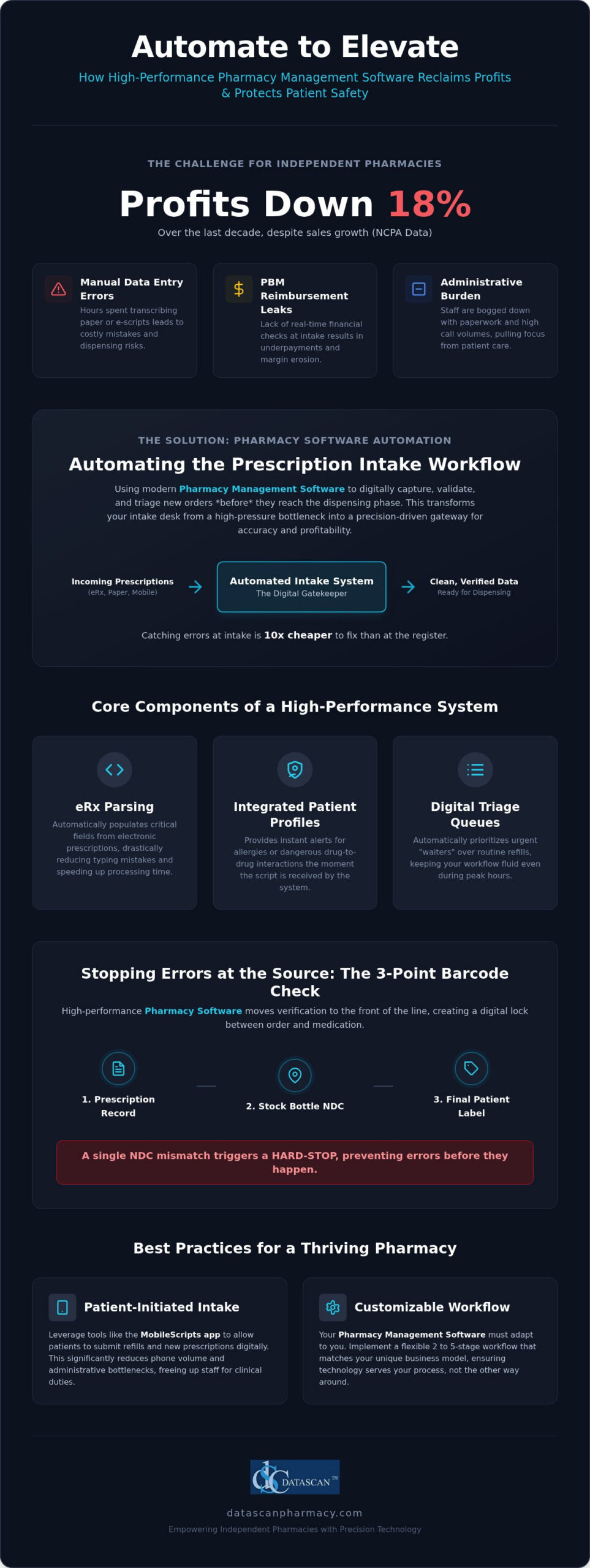
Did you know that while independent pharmacy sales have grown, actual profits plummeted by 18% over the last decade according to NCPA data? Automating prescription intake workflow is the most effective way to reverse this trend by stopping manual errors and PBM revenue leaks at the front door. By leveraging high-performance pharmacy management software, you can transform a high-pressure intake desk into a precision-driven gateway that protects your margins. This strategic shift isn’t just about technology; it’s about reclaiming your role as a clinical provider rather than an administrative clerk.
It’s exhausting to watch your staff drown in repetitive paperwork while the fear of dispensing errors during peak hours keeps you up at night. You believe your pharmacy should be a place for patient care, not a battleground for PBM administrative burdens. This guide promises to show you exactly how to streamline your intake process to eliminate errors and boost your bottom line. We’ll explore how customizable workflows and integrated mobile tools can free up your time for MTM services and clinical consultations, ensuring your business thrives in the 2026 landscape.
Key Takeaways
- Discover how automating prescription intake workflow uses advanced pharmacy software to digitally capture and triage orders, eliminating the risks associated with manual data entry.
- Learn why a 3-point barcode verification process at the intake stage is your best defense against dispensing errors before they reach the filling station.
- Find out how to stop PBM reimbursement leaks by performing real-time financial checks at the start of your workflow using modern pharmacy management software.
- See how patient-initiated intake tools like the MobileScripts app can significantly reduce phone volume and administrative bottlenecks.
- Understand the importance of a customizable 2 to 5-stage workflow that allows your pharmacy software to adapt to your unique business model.
What is automating prescription intake workflow in a modern pharmacy?
Automating the prescription intake workflow is the process of using pharmacy management software to digitally capture, validate, and triage new orders before they reach the dispensing phase. It serves as the definitive foundation for a secure and profitable pharmacy operation. In the past, technicians spent hours manually transcribing data from paper or messy e-scripts, a process ripe for human error. Today, modern Pharmacy Automation technology acts as a sophisticated gatekeeper. By intelligently parsing incoming orders, the software filters out the administrative clutter of free-text notes and incomplete data that often causes bottlenecks. This ensures that your staff only interacts with clean, verified information, allowing them to focus on clinical patient care rather than tedious data entry.
Why is the intake stage the most critical part of the pharmacy workflow?
The intake stage is the single most important point in your pharmacy because it dictates the accuracy of everything that follows. Industry data suggests that errors caught during intake are 10x cheaper to fix than those identified at the register. When data is clean from the start, you eliminate the time-wasting cycle of insurance rejections and frustrated patients. Clean intake data also streamlines downstream tasks like automated delivery routing and PBM reimbursement tracking, which are vital for maintaining your margins. For a comprehensive look at how this impacts your entire business, see our guide on Pharmacy Workflow Optimization Software: The 2026 Efficiency Guide.
What are the components of an automated intake system?
An effective system relies on several integrated features within your Pharmacy Software to maintain high standards of precision. A high-performance system typically includes:
- eRx Parsing: This feature auto-populates critical fields from electronic prescriptions, which drastically reduces the risk of typing mistakes and speeds up processing time.
- Integrated Patient Profiles: These provide instant alerts for allergies or dangerous drug-to-drug interactions the moment the script is received into the system.
- Digital Triage Queues: These help your team manage the “rush” by automatically prioritizing urgent “waiters” over routine refills, keeping your workflow fluid even during peak hours.
This level of organization ensures your independent pharmacy operates with the same technical prowess as the largest chains. By utilizing advanced pharmacy management software, you don’t just fill scripts faster; you build a more resilient business that is protected against the common pitfalls of manual processing.
How does barcode verification in dispensing process improve intake accuracy?
Barcode verification improves intake accuracy by creating a digital lock between the physician’s order and the physical medication pulled from your shelf. By integrating this technology into your automating prescription intake workflow, you ensure that “wrong drug” errors are stopped at the source rather than relying on a final check to catch mistakes. This proactive approach uses your pharmacy software to validate every movement, protecting your patients and reducing your liability.
Most legacy systems treat barcode scanning as a final safety net. However, high-performance Pharmacy management software shifts this verification to the front of the line. It utilizes a rigorous 3-point check that validates the prescription record, the manufacturer’s stock bottle, and the final patient label in real-time. If there is even a single digit mismatch in the NDC (National Drug Code), the system triggers a hard-stop. This prevents the technician from proceeding until the discrepancy is resolved. It stops errors early. This level of precision ensures that human fatigue or distractions don’t lead to a dangerous dispensing error during peak hours.
The step-by-step barcode verification workflow
A streamlined digital workflow replaces manual guesswork with a repeatable, high-velocity process. Your team should follow these three essential steps:
- Step 1: Scan the incoming hard copy or the digital e-prescription record to lock in the required NDC within the system.
- Step 2: Scan the manufacturer’s NDC barcode on the stock bottle during the pull to verify the physical product matches the digital order.
- Step 3: Scan the final printed patient label before bagging to confirm the right medication is in the right container for the right patient.
Why manual verification is no longer sufficient in 2026
Human eyes are naturally susceptible to “look-alike, sound-alike” (LASA) drug errors. This is especially true when volume is high. A study published by the National Center for Biotechnology Information (NCBI) found that adopting automated barcode verification systems can reduce medication dispensing error rates from 3.87 to 0 per 100,000 dispensations. Manual checks aren’t enough. By removing the guesswork, you build a culture of safety that protects your pharmacy’s reputation.
Beyond safety, this level of automation is a major time saver. Some industry professionals report that barcode scanning at the intake level reduces manual verification time by up to 40% by eliminating the need for repetitive visual data re-checks. This allows your team to move through the queue with much higher velocity. If you are ready to modernize your safety protocols, reach out to our team to see how our software can safeguard your practice.
How can intake automation help independent pharmacies fight low PBM reimbursements?
Intake automation protects your margins by performing real-time financial audits on every prescription before it enters the filling process. By identifying underpaid claims with advanced pharmacy software, you stop financial losses at the point of entry rather than discovering them weeks later in a reconciliation report. This proactive approach is essential for survival in an era where PBM reimbursement cuts continue to eat into your bottom line.
Independent pharmacies are under siege. Data from the NCPA shows that while sales have increased, profits fell by 18% over the last decade. A major hidden cost in this equation is the labor spent processing prescriptions that result in a net loss. When you implement an automating prescription intake workflow, your system acts as a financial watchdog. It performs a “pre-edit” on every claim, flagging those where the reimbursement doesn’t cover the acquisition cost plus the cost to dispense. This allows you to address the issue immediately. Instead of wasting resources on loss-making scripts, your staff can pivot to high-margin clinical services like compounding or Medication Therapy Management (MTM) powered by integrated medication therapy management software.
Identifying underpaid claims before the label prints
Modern Pharmacy management software doesn’t just process orders; it analyzes them for profitability. The system can flag estimated DIR fees and low-reimbursement scripts at the intake stage. This gives your pharmacists the opportunity to suggest therapeutic alternatives that offer better margins while still meeting the patient’s clinical needs. By catching these issues before the label prints, you save on the costs of vials, labels, and, most importantly, your staff’s time. It’s about working smarter to ensure every dispensed medication contributes to your pharmacy’s financial health.
Automating the Prior Authorization (PA) process
Nothing kills pharmacy efficiency like the “PA bottleneck.” When a script requires prior authorization, patients often abandon the medication due to delays, which directly impacts your retention rates. Intake automation software detects the need for a PA instantly and can automatically initiate contact with the prescribing physician. Integrated doctor portals speed up this communication, ensuring the PA is handled quickly and documented accurately. This keeps the automating prescription intake workflow moving and ensures you don’t lose the sale to a PBM-owned mail-order competitor. By automating these administrative hurdles, you reclaim the time needed to run your business and care for your patients.
What are the best practices for automating your pharmacy workflow in 2026?
Success in automating prescription intake workflow starts with a comprehensive needs assessment to pinpoint exactly where your team loses the most time. Whether your pharmacy is struggling with high phone call volumes or long queues at the drop-off window, your software should be configured to target those specific friction points. Datascan offers customizable workflow options ranging from 2 to 5 stages, allowing you to build a process that mirrors your physical layout. By implementing this multi-stage verification, you can separate intake, filling, and clinical review into distinct, manageable steps. This structure allows you to train staff on an “Exception-Based Workflow” where they only intervene when the software flags a clinical or financial discrepancy, significantly increasing your overall throughput and reducing pharmacist burnout.
Moving patients to digital intake channels
The most efficient way to handle intake is to let the patient initiate the process. By encouraging your community to use the MobileScripts patient app, you move refill requests away from the telephone and directly into your Pharmacy management software. This digital transition reduces data entry errors because the patient’s own input populates the request. Additionally, you should prioritize Medication Synchronization (Med Sync). This practice bundles a patient’s intake tasks into one predictable monthly event, which helps you manage staff levels and reclaim time for high-value clinical services like those enabled by medication therapy management software that automates patient identification and e-care plan documentation. To take this further, learn how to pair these tools with a dedicated pharmacy app for prescription refills that handles patient requests in real-time and eliminates the manual data entry that leads to pharmacist burnout.
Setting up a ‘Paperless’ intake station
Eliminating physical clutter is a hallmark of a modern, efficient pharmacy. You should utilize high-speed scanners to digitize any paper prescriptions or hard copies the moment they arrive at the counter. This ensures that every document is instantly part of a secure, digital record that is easy to audit. Integrating an Electronic Delivery System and Signature Capture further streamlines this by removing the need for paper logs. These digital trails are essential for defending against PBM audits and ensuring your business remains compliant without sacrificing speed. If you want to see how these tools fit your specific business model, contact our team today to explore our customizable workflow options.
Why is a customizable pharmacy management system critical for your business?
A customizable pharmacy management system is critical because it ensures that your technology adapts to your specific physical layout and staffing levels rather than forcing your team into a rigid, one-size-fits-all process. Automating prescription intake workflow effectively requires this granular flexibility to maximize efficiency without creating new bottlenecks. By utilizing Pharmacy management software that offers adaptable configurations, you can build a defensive barrier against PBM reimbursement cuts while maintaining the high-energy environment of a growing community pharmacy. Unlike many modern systems, Datascan provides a locally hosted solution that ensures uninterrupted intake during internet outages, providing a level of reliability that off-site systems simply cannot match.
Every pharmacy has a unique “DNA” that dictates how scripts should flow from the drop-off window to the final bag. Our Datascan customizable workflow allows you to choose between 2, 3, 4, or 5-stage setups. This means you can design a process that mirrors your staff count and daily script volume. If you are running a high-volume location, a more complex stage setup provides the necessary checks and balances to prevent errors. Conversely, a smaller shop might benefit from a leaner approach. This adaptability ensures that your Pharmacy Software remains a tool for growth rather than an operational hurdle.
Tailoring the workflow to your staff’s expertise
The ability to scale your workflow is essential as your business evolves. A 2-stage workflow serves a small-staffed rural pharmacy perfectly by keeping the process fast and direct. As your volume grows, you can transition to a 5-stage workflow, which provides the rigorous check-and-balance system needed for high-volume retail locations. Our software allows you to “toggle” specific features on or off, giving you the power to refine your automating prescription intake workflow without needing to overhaul your entire system. This empowers your technicians to work at the top of their licenses while the software handles the heavy lifting of data validation.
The Datascan difference: Family-owned advocacy
We believe that independent pharmacies deserve an ally that understands their specific financial pressures. Unlike the generic call centers of larger vendors, Datascan provides US-based, award-winning technical support delivered by experts who know your business by name. We are fiercely loyal to our client base and remain a visionary ally in the fight for PBM reform and fair reimbursements. Our commitment to your profitability is woven into every feature we build, from real-time financial audits to patient-centric mobile tools. Don’t settle for a rigid system that limits your potential. Schedule a demo of Datascan’s customizable workflow software today and take the first step toward a more efficient, profitable future.
Take Control of Your Pharmacy’s Future
Success in 2026 requires more than just filling prescriptions; it demands a strategic defense against shrinking margins and administrative burnout. By automating prescription intake workflow, you transform your front-end operations into a high-precision filter that catches errors and stops underpaid PBM claims before they impact your bottom line. We’ve explored how customizable 2 to 5-stage workflows and integrated mobile tools empower your team to focus on clinical services that drive growth. This isn’t just about speed; it’s about building a resilient business that isn’t vulnerable to internet outages or generic support centers.
Datascan has been family-owned and operated since 1981, providing independent pharmacies with the visionary tools they need to thrive. Our award-winning US-based technical support is here to ensure your software works for you, not the other way around. With no cloud-based downtime risks, you can trust that your intake process remains uninterrupted even when the unexpected happens. It’s time to reclaim your time and protect your profits. Streamline your pharmacy today with Datascan’s customizable workflow software.
Frequently Asked Questions
How does automating prescription intake reduce dispensing errors?
It eliminates manual data entry risks by using eRx parsing and digital validation. By capturing clean data early, you prevent downstream errors that occur when technicians misread paper scripts. Using high-performance pharmacy management software ensures every order is triaged and checked against integrated patient profiles for interactions. This proactive approach stops mistakes before they reach the filling station, protecting patients and reducing your liability during peak hours.
Can automated pharmacy software help me identify underpaid PBM claims?
Yes, modern pharmacy software performs real-time financial audits during the intake process to flag claims that fall below your acquisition cost. It identifies estimated DIR fees and low reimbursements immediately, allowing your staff to address financial losses before the label prints. This advocacy tool is essential for independent pharmacies fighting PBM reform issues. By automating the pre-edit process, you protect your margins and ensure every dispensed script contributes to your bottom line.
Do I need expensive robots to automate my pharmacy workflow?
No, true automation is driven by your pharmacy management software, not just physical robotics. While robots handle the end-stage filling, automating prescription intake workflow focuses on the digital capture and triage of orders. You can achieve significant efficiency gains through software features like barcode verification, digital triage queues, and patient apps. These tools streamline your business without the massive floor space or capital investment required for high-cost mechanical dispensing hardware.
What is the difference between a 3-stage and 5-stage pharmacy workflow?
The difference lies in the number of verification checkpoints your prescriptions pass through before reaching the patient. A 3-stage setup typically covers intake, filling, and a final check, which is ideal for smaller pharmacies. A 5-stage workflow adds granular steps like clinical review and secondary verification, providing the rigorous oversight needed for high-volume retail locations. Datascan offers these customizable options so you can adapt your software to match your specific staffing levels and volume.
Is automated pharmacy software hard for staff to learn?
Modern pharmacy management software is designed with intuitive interfaces that mirror the natural flow of a community pharmacy. While any new system requires a transition period, an exception-based workflow actually simplifies daily tasks by only requiring staff intervention when the software flags a problem. This reduces the cognitive load on your team and prevents burnout. US-based technical support and professional training ensure your staff becomes proficient quickly, turning complex operations into streamlined successes.
How does barcode verification work during the intake process?
Barcode verification works by creating a digital link between the physician’s order and the physical stock bottle pulled from your shelf. During intake, the software locks in the required NDC from the eRx. When a technician pulls a medication, they must scan the manufacturer barcode to ensure an exact match. If there is a discrepancy, the pharmacy system triggers a hard-stop, preventing the error from moving forward to the filling or labeling stage.
Why is US-based support important for pharmacy management systems?
US-based support is critical because it connects you with experts who understand the specific regulatory and PBM pressures of the American healthcare market. When you encounter a technical issue or a billing bottleneck, you need a partner who can provide immediate, professional assistance without language barriers or time zone delays. Datascan is family-owned and operated, offering award-winning support that acts as a visionary ally for independent pharmacy owners who need reliable, expert guidance.
Can I automate the intake of veterinary or compounding prescriptions?
Yes, specialized pharmacy software includes modules specifically designed to handle the unique requirements of compounding and veterinary orders. These systems automate the intake of complex formulas and pet-specific data, ensuring that dosing and ingredient lists are captured accurately from the start. By digitizing these specialized scripts, you reduce the manual paperwork involved in specialty pharmacy services and free up your time to focus on high-margin clinical patient care.
 Kevin Minassian is the President of Datascan Software. Under his leadership, the company rapidly expanded to provide pharmacy management software on a national level. Over the last 15+ years, he has ensured that Datascan has continuously evolved to offer innovative solutions for independent pharmacies while still offering world-class customer support. He is passionate about helping independent pharmacies to remain competitive, achieve success, and offer the very best service to their communities.