A pharmacy inventory count shouldn’t compete with dispensing and patient care. The best way to do pharmacy cycle counting is to count small, prioritized groups on a repeatable schedule, then investigate each mismatch before changing the inventory record. This keeps the work manageable and helps staff understand why counts differ instead of treating adjustments as a routine shortcut.
A full inventory count can put daily operations under pressure, while inconsistent counting practices make records harder to trust. A steady cycle-counting process offers a practical alternative: focus on selected inventory, assign clear responsibilities, and make reconciliation part of every count. Pharmacy management software can support the broader operational workflow, while written procedures help staff apply the same standards from one count to the next.
This guide explains how to choose a counting approach, set a schedule, and document results. You’ll also learn how to investigate common discrepancies before making changes and build a repeatable process suited to an independent or community pharmacy.
Key Takeaways
The best way to do pharmacy cycle counting is to count manageable portions on a recurring, documented schedule.
Define what to count, who counts it, who reviews results, and who can approve record changes.
Use scheduled, rotating, or exception-based counts to match inventory priorities and pharmacy workflows.
Before adjusting a record, recount the item, confirm its identity, and review relevant receiving or dispensing records.
Pharmacy management software and customizable workflows can help organize operational information and clarify staff responsibilities.
What is the best way to do pharmacy cycle counting?
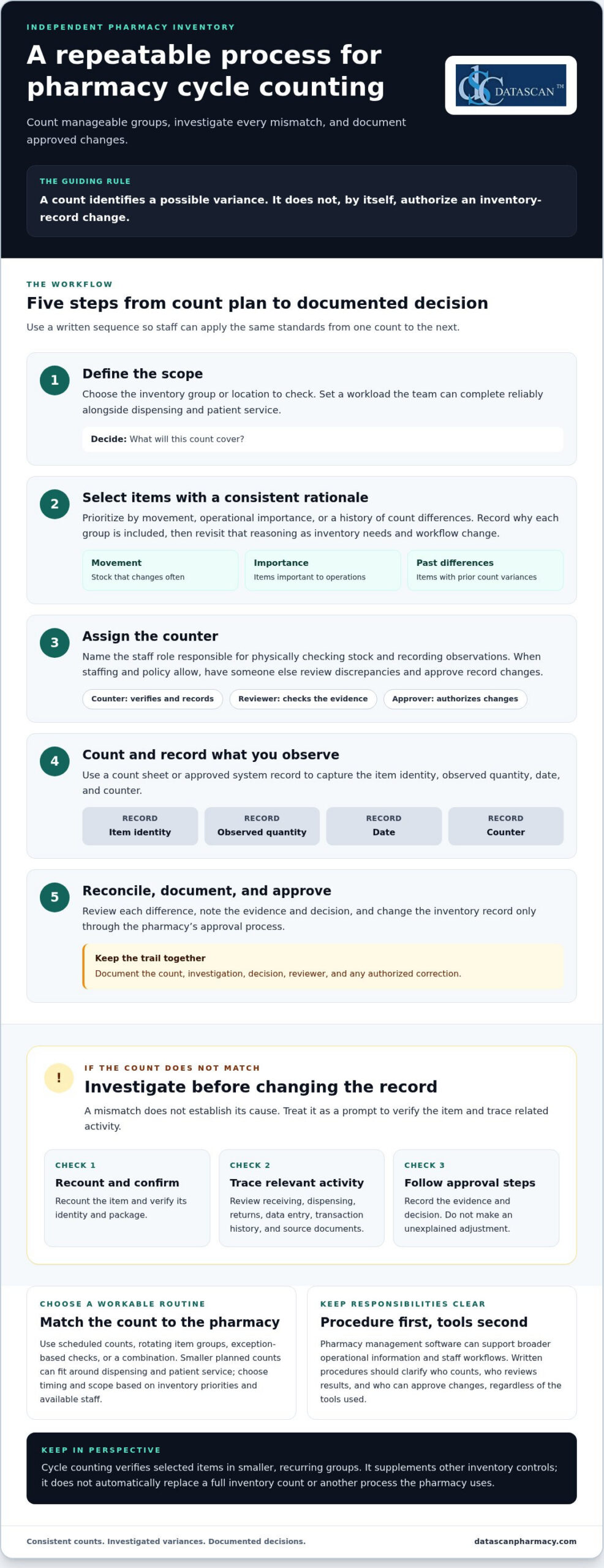
The best way to do pharmacy cycle counting is to verify manageable portions of inventory on a recurring, documented schedule. Rather than relying only on a broad count of all stock at one time, staff check selected items, compare the physical quantity with the inventory record, and investigate differences. A cycle count is a repeatable way to verify parts of inventory.
A count identifies a possible variance; it doesn’t authorize an immediate change to the record. First confirm that staff counted the right product and package. Then review the discrepancy and follow the pharmacy’s approval process. Document the count, investigation, decision, and any authorized correction. Separating these steps helps prevent an unexplained mismatch from becoming an inaccurate adjustment.
Keep the routine suited to your pharmacy. Choose items and timing based on your inventory profile, operational priorities, and available staff. Accurate, accessible inventory records won’t change PBM reimbursement terms, but a consistent process can reduce uncertainty about stock and time spent resolving avoidable inventory questions. That gives independent pharmacies more room to review broader business pressures, including reimbursement performance, alongside daily operations.
How is pharmacy cycle counting different from a full inventory count?
A full inventory count aims to check a broad range of stock, while cycle counting verifies selected items in smaller, recurring groups. Breaking the work into scheduled tasks distributes effort across normal operations instead of concentrating it in one large counting event. Cycle counting supplements other inventory controls; it doesn’t automatically replace a full count or any other process the pharmacy uses.
Why do pharmacy inventory records develop discrepancies?
Receiving, dispensing, returns, and data entry are useful places to start an investigation. A mismatch could involve a transaction that was entered incorrectly, recorded late, or associated with the wrong item, but the count alone can’t establish what happened. Check relevant transaction history and source documents before deciding how to resolve a variance.
A count reveals a variance, but it doesn’t establish its cause. Treat each difference as a prompt to verify the item and trace related activity, not as proof of a particular error. Consistent documentation helps staff follow the same process and maintain a more dependable operational picture.
How do you set up a pharmacy cycle-counting process?
Set up cycle counting by defining the scope, choosing items, assigning a counter, recording the physical count, reviewing differences, and documenting approved changes. A written sequence gives staff a consistent method and helps keep inventory checks manageable alongside dispensing and patient service.
Define the scope. Decide which inventory group or location the count will cover, then choose a workload the team can complete reliably.
Select items. Use a consistent rationale, such as movement, operational importance, or previous discrepancies.
Assign a counter. Identify the staff role responsible for physically checking stock and recording observations.
Count and record. Use a count sheet or approved system record to capture the item identity, observed quantity, date, and counter.
Reconcile and document. Review any difference, note the supporting evidence and decision, and change records only through the pharmacy’s approval process.
Choose a scope that fits both the inventory and the shift. A high-movement group may need closer attention because stock changes often, while a smaller group may suit a busy period when staff capacity is limited. Document the selection logic so the next count is planned consistently rather than chosen at random.
Which pharmacy items should you count first?
Prioritize items based on how often they move, their operational importance, or a history of count differences. There’s no universal order or frequency that fits every pharmacy. Record why each group is included, then revisit that rationale as inventory needs and workflow change. This makes the schedule easier to maintain and explain.
Who should count, review, and approve inventory changes?
Assign a named role to perform each physical count and record observations. When staffing and policy allow, have someone other than the counter review a discrepancy and approve any record change. Document who reviewed it and what evidence informed the decision, such as relevant transaction records. For additional context, see the University of Illinois College of Veterinary Medicine’s guidance on controlled substance cycle counts.
Pharmacy management software can support broader inventory and staff workflows, but written procedures should make responsibilities clear regardless of the tools used. For a wider look at system considerations, explore this guide to pharmacy management software.
Should pharmacies use scheduled, rotating, or exception-based cycle counts?
Pharmacies can combine scheduled counts, rotating item groups, and exception-based checks. Smaller planned counts distribute work around dispensing and patient service, while a clear owner helps ensure counts don’t disappear during a busy shift. The best way to do pharmacy cycle counting is to choose an approach that fits your workload and inventory priorities, then apply it consistently.
Approach
Purpose
Operational advantage
Limitation
Scheduled
Set aside planned time to count selected stock.
Makes counting a regular task that staff can plan around.
A count may be delayed if dispensing demands take priority.
Rotating
Assign different inventory groups to successive counting periods.
Spreads coverage across the inventory instead of concentrating effort in one event.
Groups can be missed if the rotation isn’t tracked and owned.
Exception-based
Review an item after a recorded mismatch or workflow concern.
Directs attention to a specific issue as it arises.
It’s reactive and can’t replace planned coverage.
These methods work well together. For example, a pharmacy can use a rotating plan for routine coverage and add an exception count when a mismatch or process concern warrants review. Set frequency according to the pharmacy’s inventory profile and staff capacity, rather than assuming one interval suits every operation. A brief, predictable count window can help avoid peak dispensing activity, but consistent ownership matters more than the calendar alone.
When does a rotating count schedule make sense?
A rotation makes sense when counting all selected inventory at once would be difficult to fit into daily operations. Divide stock into identifiable groups, assign each group to a planned counting period, and track completion. Set the timing according to the pharmacy’s priorities and available staff. A written rotation reduces the chance that quieter or less visible groups are repeatedly overlooked.
When should a pharmacy investigate an exception?
Use a recorded mismatch or a concern about a stock-handling step as a reason to review the item. Confirm its identity and recount it, then check relevant receiving, dispensing, return, and adjustment records before deciding what the difference means. Guidance on investigating inventory discrepancies reinforces the value of a consistent review process.
An exception is a reason to investigate, not proof of loss or error. Record what prompted the review, what information was checked, and what action was approved. This helps staff respond promptly without jumping to conclusions or making unsupported inventory changes.
How do you investigate and resolve pharmacy cycle-count discrepancies?
Before changing an inventory record, recount the stock, verify the item’s identity, and review relevant transaction history. A mismatch is a reason to investigate, not proof of theft, a dispensing error, or a compliance failure. Following the same review steps each time helps independent and community pharmacies resolve differences carefully and keep the process clear for staff.
What should staff check before adjusting an inventory record?
Start by confirming the product and package using the pharmacy’s usual identification process. If the count is uncertain, recount before proceeding. Then compare the observed quantity with the recorded quantity and review records that could explain a difference, including receiving, dispensing, returns, and prior adjustments where applicable.
Look for transactions that may be unposted, delayed, duplicated, or recorded incorrectly. Treat these as possibilities to check, not assumptions about the cause. Follow the pharmacy’s documented approval process before making a correction, and have another authorized person review the finding when policy and staffing allow.
How should a pharmacy document a count variance?
Keep a clear record of what was counted and how the pharmacy resolved the difference. The documentation should capture:
Count date and item identifier
System quantity and observed quantity
Investigation steps and relevant supporting records
Reviewer and authorized disposition, including any approved correction
Preserve the audit trail according to the pharmacy’s established procedures. If similar variances recur, summarize the pattern and review the relevant workflow. Repeated differences may point to a handoff or recordkeeping step that needs attention; they aren’t automatic evidence of wrongdoing. Clear task ownership helps staff know who counts, who reviews, and who approves changes. A structured pharmacy workflow can support that role clarity alongside the broader inventory process.
The best way to do pharmacy cycle counting is to make each variance traceable from the first observation through the final decision. That discipline helps the team correct records only when supported by review, rather than adjusting first and searching for an explanation later. For help thinking through pharmacy workflow needs, talk with the Datascan team.
How can pharmacy management software support cycle counting?
Pharmacy management software can help organize inventory information and staff workflows, but it should support a process your team has defined, not replace one. The best way to do pharmacy cycle counting is still to set clear priorities, assign responsibility, review differences, and document decisions. Choose tools based on how well they fit those steps and the pace of dispensing.
What should pharmacy owners look for in software-supported counting?
Start with the pharmacy’s actual inventory and review process. Consider whether staff can access the inventory records they need, understand who owns each task, and distinguish a count observation from an approved correction. The goal is a clear path from selecting an item to reviewing its count, not simply a longer list of software features.
Turn each need into a workflow question before evaluating systems:
Which inventory information do counters and reviewers need to see?
How will staff record the observed quantity and compare it with the inventory record?
Who reviews a variance, and who is authorized to approve a correction?
How can counting fit around dispensing and other daily responsibilities?
Then assess whether the system and its configured workflows support those answers. For example, if staff need clearer handoffs, define who passes a variance to a reviewer and how the review is documented. A configurable pharmacy workflow can help organize operational responsibilities without making inventory decisions on the team’s behalf.
How can an independent pharmacy make the process sustainable?
Keep the starting scope manageable. Assign an owner, establish a recurring review of completed counts and unresolved differences, and adjust the routine when staffing, inventory movement, or observed discrepancy patterns change. A process that is too large for the team to maintain won’t provide dependable oversight. Build around the pharmacy’s real workload, then refine it as the team identifies handoffs or recordkeeping that need attention.
Use pharmacy management software as part of the broader operating picture, alongside written procedures and staff accountability. Datascan provides pharmacy management software and customizable workflows for independent and retail pharmacies. To assess fit, document your current counting steps, the information staff use, and where reviews or handoffs slow down. The pharmacy management software overview can help you consider how a system fits into your workflow.
About the author: Datascan Pharmacy Software is a family-owned and operated pharmacy software company serving independent and retail pharmacies since 1981, with U.S.-based support.
Make Inventory Accuracy a Repeatable Part of Your Workflow
The best way to do pharmacy cycle counting is to make it small enough to sustain and disciplined enough to trust. Set a recurring schedule that fits your inventory and staffing, assign clear responsibility for each count, and investigate differences before approving record changes. A consistent process turns count results into useful information without letting inventory work overwhelm dispensing and patient service.
Pharmacy management software can support the organization of inventory information and staff workflows, while clear procedures keep review and approval responsibilities transparent. The right approach should fit how your pharmacy operates and adapt as staffing, inventory movement, and process needs change.
Datascan has been family-owned and operated since 1981, providing pharmacy management software, customizable workflows, and U.S.-based support for independent and retail pharmacies. Discuss pharmacy management software for your workflow and consider how a system can support your team’s operational priorities. A manageable process, applied consistently, can help your pharmacy build greater confidence in its inventory records over time.
Frequently Asked Questions
How often should a pharmacy do cycle counts?
Set a frequency that fits your inventory, operational priorities, and available staff. Items with frequent movement or previous discrepancies may warrant more attention than other stock, but there isn’t one schedule that suits every pharmacy. Document which items are counted and when, then review whether the routine is manageable and useful. Adjust the plan when inventory patterns, staffing, or observed count differences change.
Which pharmacy inventory items should be cycle counted first?
Start with items prioritized by movement, operational importance, or a history of count differences. For example, a pharmacy might select frequently dispensed products for closer review because their inventory changes often. The right starting group depends on the pharmacy’s stock and workload. Write down why items were selected so staff can apply the same logic consistently and revise priorities as needs change.
What should staff do when a pharmacy cycle count does not match the system?
Recount the item and confirm its identity before changing the inventory record. Then review relevant transaction history and source documents, such as receiving, dispensing, return, or adjustment records, as applicable. Record the observed and system quantities, the investigation, the reviewer, and the approved disposition. A mismatch is a prompt to investigate, not proof of theft, a dispensing error, or another specific cause.
Can pharmacy cycle counting replace a full inventory count?
Cycle counting shouldn’t automatically be treated as a replacement for a full inventory count or other inventory controls. It checks selected stock in smaller groups, while a full count provides broader coverage. Pharmacies should maintain their established counting and recordkeeping procedures and use cycle counts as an additional way to review inventory during normal operations. The right combination depends on the pharmacy’s policies and applicable requirements.
How can a pharmacy do cycle counts without disrupting dispensing?
Keep each count focused on a manageable group and plan the work around staffing and dispensing demands. Assign a clear owner, define which items are included, and record the count using a consistent process. A rotation can spread effort across planned counting periods instead of concentrating it in one event. If patient care needs take priority, track postponed counts and assign a new time so they aren’t forgotten.
Can pharmacy management software help with cycle counting?
Pharmacy management software can help organize inventory information and staff workflows, but it should support a documented counting and review process rather than replace it. Evaluate whether staff can access relevant records, understand task ownership, and follow the pharmacy’s approval process for corrections. Match software considerations to actual workflow needs, including how counts fit around dispensing. Evaluate specific system capabilities against the steps your pharmacy needs to carry out.
Automated inventory reordering for pharmacy works best when routine replenishment follows clear rules and pharmacists stay in control of exceptions and purchasing decisions. Automation should reduce repetitive work, not turn every reorder into an order no one has reviewed.
If your team spends valuable time checking shelves and repeating purchase orders, small inefficiencies can quickly add up. When PBM reimbursements pressure margins, excess stock can tie up cash, while a poorly timed reorder can leave essential items unavailable.
This guide explains how to build a practical approach: set reorder rules around actual demand, purchasing priorities, and stock levels; identify items that need pharmacist review; and assess how pharmacy management software fits your inventory, purchasing, and dispensing workflow. You’ll also learn what to look for in software so your team can reduce manual tasks, protect working capital, and make informed decisions without handing over control. The goal is a replenishment process that supports the realities of an independent pharmacy and gives owners and pharmacists more time for work that needs their attention.
Key Takeaways
Automated inventory reordering for pharmacy can guide routine replenishment while leaving exceptions and purchasing decisions under pharmacist oversight.
Review on-hand counts, dispensing history, pending orders, and supplier lead times before setting reorder rules.
Separate routine items from products that need closer individual review to reduce the risk of unsuitable orders.
Start with a manageable group of routine items, test the process, and refine the rules before expanding.
Compare pharmacy software based on inventory visibility, configurable rules, exception handling, workflow fit, reporting, training, and support.
What does automated inventory reordering for a pharmacy actually do?
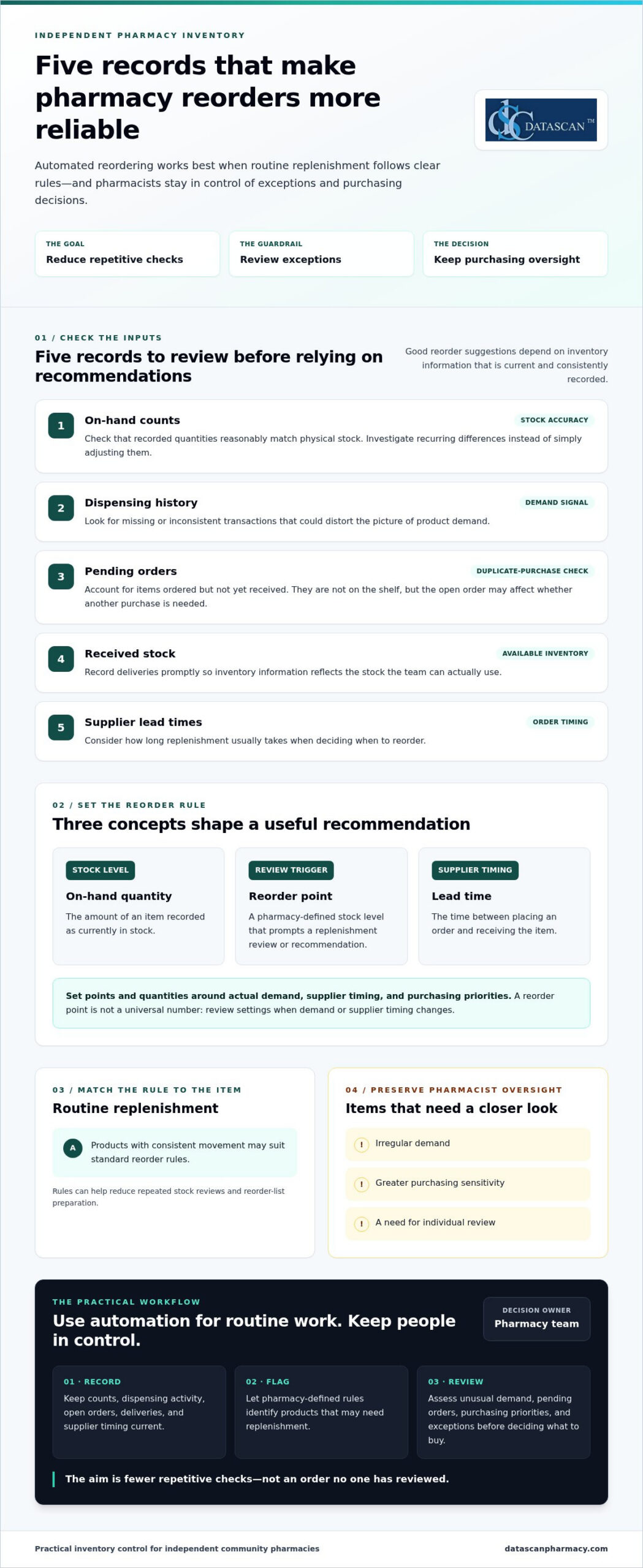
Automated inventory reordering for a pharmacy uses inventory records and pharmacy-defined rules to guide replenishment. It can identify products that may need to be reordered and prepare a recommendation or reorder list. Whether the system only suggests an order or submits one without staff review depends on the software and how the pharmacy sets up its process.
The goal is to reduce routine stock checking while supporting product availability and keeping purchasing oversight with the pharmacy team. For independent pharmacies managing tight budgets and reimbursement pressure, a useful process makes replenishment more deliberate. Staff can focus on items that need review instead of repeatedly checking every product. Pharmacy automation covers a range of tasks, including inventory management. The right level of automation depends on the pharmacy’s workflow and purchasing decisions.
Three terms help explain how the process works:
On-hand quantity: The amount of an item recorded as currently in stock.
Reorder point: The stock level set to prompt a replenishment review or recommendation.
Lead time: The time between placing an order and receiving the item. Supplier lead times help inform when to reorder.
How is an automated reorder recommendation created?
Pharmacy software can compare recorded stock with a threshold set by the pharmacy. When an item reaches or falls below its reorder point, the system may flag it for replenishment. Dispensing history helps the team assess demand, while supplier lead times inform when to reorder and what quantity may be appropriate. Recommendations are only as useful as their inputs, so counts and transactions need to be recorded and updated consistently.
What pharmacy tasks can automation reduce?
Replenishment rules can reduce repeated stock reviews, reorder-list preparation, and routine follow-up on items flagged for purchase. They don’t replace professional judgment. Staff still need to assess unusual demand, pending orders, purchasing priorities, and other exceptions before deciding what to buy. The practical benefit is fewer repetitive checks competing for attention, giving pharmacists and owners more room to manage daily operations and focus on work that requires their expertise. Pharmacy management software should support this broader workflow rather than create another disconnected task.
What data and reorder rules does a pharmacy need before automating?
Before automating replenishment, a pharmacy needs reliable inventory records and reorder rules that reflect its demand and purchasing practices. This matters for independent pharmacies managing cash carefully while PBM reimbursements can pressure margins or arrive later than acquisition costs. Reordering too much may tie up funds the pharmacy needs elsewhere; ordering too little can put routine availability at risk. Review the underlying data first, then decide which products suit routine replenishment and which call for closer review.
Which inventory records affect reorder accuracy?
Start with the quantity recorded on hand and whether dispensing activity is entered consistently. Compare system counts with physical stock, and investigate recurring differences instead of simply adjusting them. Review open purchase orders too. An item already ordered but not received isn’t available on the shelf, but the pending order may affect whether another purchase is needed. Record deliveries promptly so inventory information reflects stock the team can actually use.
Before relying on automated inventory reordering for pharmacy workflows, review these inputs:
On-hand counts: Check that recorded quantities reasonably match physical stock.
Dispensing history: Look for missing or inconsistent transactions that could distort the picture of demand.
Pending orders: Account for items ordered but not yet received to help avoid duplicate purchases.
Received stock: Record deliveries so available inventory is represented accurately.
Supplier lead times: Consider how long replenishment usually takes when planning order timing.
Resolve recurring discrepancies before using recommendations to guide purchasing. Reliable records help the pharmacy judge whether a proposed quantity suits real demand and current purchasing priorities, rather than committing cash based on incomplete information.
How should a pharmacy set reorder points and quantities?
A reorder point is a pharmacy-defined trigger for reviewing replenishment, not a universal number for every product. Set it by considering demand, supplier lead time, and the pharmacy’s preferred ordering cadence. Determine quantities with purchasing priorities in mind, balancing availability with cash committed to stock. Review settings when demand or supplier timing changes rather than assuming an old threshold still fits.
Routine products with consistent movement may suit standard rules. Items with irregular demand, greater purchasing sensitivity, or a need for individual oversight may warrant staff review. This distinction helps teams reduce repetitive checks while applying extra care to purchases that could have a greater effect on cash flow, especially when reimbursement pressure makes working capital important.
Pharmacy management software is part of the wider process for recording information and coordinating daily work. Datascan’s pharmacy management software is designed for independent and retail pharmacies and includes customizable workflow capabilities.
Can automated pharmacy reordering create unwanted orders?
Yes. Automated pharmacy reordering can create unsuitable recommendations or orders when inventory records are inaccurate, reorder rules are outdated, or unusual conditions go unreviewed. Automation is most useful for consistent, routine decisions. The process should also make exceptions visible so staff can apply purchasing judgment before an order affects cash flow or stock availability.
A reorder recommendation and a submitted order are different levels of automation. In a recommendation-only workflow, software flags items for staff to review and approve. A workflow that submits orders automatically can reduce more manual steps, but it also makes clear approval rules and exception handling especially important. Neither approach is right for every product or pharmacy. The choice depends on how much purchasing control the team wants to retain and how dependable its inventory information is.
Which reorder recommendations deserve staff review?
Staff review is valuable when a recommendation doesn’t match what the team knows about current conditions. Common prompts include an unexpected change in dispensing demand, a stock count that doesn’t match what’s on the shelf, or a supplier issue that could affect an open order. Products with irregular or highly variable use may also need closer attention, since a short-term change can make past demand a poor guide to the next purchase.
Pharmacist oversight isn’t a failure of automation. It’s a deliberate control that lets software handle repeatable work while experienced staff assess exceptions, purchasing priorities, and the risk of tying up cash in unnecessary stock.
How can a pharmacy balance automation and purchasing control?
Start by defining staff responsibilities. Decide who reviews recommendations, who can approve or submit orders, and how the team records the reason for an override or unusual purchase. Then assess whether the software and workflow support controls such as approval thresholds, an exception queue, and periodic checks of reorder rules.
For routine items, a team may find that recommendations requiring approval offer a practical balance: they reduce repetitive list-building while keeping a person between a suggestion and a purchase. Automatic submission may suit a narrower set of well-understood orders, provided the pharmacy has clear limits and a process for exceptions. Revisit that choice as demand, supplier reliability, and purchasing priorities change.
Purchasing discipline also connects to gross profit. A reorder should support availability without ignoring the financial effect of buying more than the pharmacy can use efficiently. Reviewing inventory decisions alongside gross profit calculations helps owners consider both the need to keep products available and the cash committed to stock. With automated inventory reordering for pharmacy, the aim isn’t to remove judgment. It’s to focus that judgment where it matters most.
How can a pharmacy implement automated reordering step by step?
Implement automated reordering gradually: document how orders are handled now, validate inventory records, define pharmacy-specific rules, test recommendations on routine items, and refine the process before expanding. Assign clear responsibility for reviewing recommendations and exceptions so automation reduces repetitive work without weakening purchasing oversight.
Map the current process. Record how staff check stock, build reorder lists, account for pending orders, and follow up on deliveries. Note where tasks are repeated or handoffs create delays.
Review inventory records. Check recorded on-hand quantities against physical stock, and look for recurring discrepancies in dispensing or receiving records. Correct the underlying process where possible before using recommendations to guide orders.
Define rules and responsibility. Set reorder triggers and quantities based on each item’s demand, supplier lead time, and your purchasing preferences. Name who reviews recommendations, handles exceptions, and approves changes to the rules.
Test a manageable group. Begin with routine items that have relatively consistent demand. Keep staff involved and compare recommendations with recent dispensing and purchasing activity before relying on them.
Refine, then expand. Adjust rules when recommendations don’t fit actual conditions. Broaden the process only when the team understands how the workflow handles exceptions and pending orders.
What should a pharmacy test before expanding automation?
Check whether recommendations make sense alongside recent dispensing and purchasing activity. Review how pending orders, stock corrections, and exceptions appear to staff, and ask the people responsible for inventory and purchasing where the process is unclear or adds work. Track measures that matter to your pharmacy, such as staff effort, product availability, and purchasing exceptions. Set a local baseline and review the same indicators as the process changes.
How does pharmacy management software fit the process?
Pharmacy management software should fit the way your team records inventory, shares purchasing information, and hands off routine tasks. Evaluate how clearly staff can view relevant information and whether the system fits the workflow you mapped. Datascan’s pharmacy management software is designed for independent and retail pharmacies, with customizable workflow capabilities.
Keep the rollout practical: make responsibilities clear, capture staff feedback, and revisit the rules as purchasing needs change. To discuss your pharmacy workflow and software needs, connect with Datascan.
How should you choose pharmacy software for automated reordering?
Choose pharmacy software that helps your team see inventory clearly, manage repeatable work efficiently, and retain control over purchasing decisions. For an independent pharmacy facing PBM reimbursement pressure, an effective operational workflow can help staff make informed purchasing decisions and avoid tying up cash unnecessarily. Compare systems against your actual processes and the controls your team needs.
What to evaluate
Questions to ask
Why it matters
Inventory visibility
Can staff quickly understand stock information and related purchasing tasks?
Clearer visibility can reduce time spent hunting for information and support informed buying.
Configurable workflow
Can the process reflect the pharmacy’s ordering routines and priorities?
A fit with daily work can reduce duplicate effort and keep purchasing decisions grounded in the pharmacy’s needs.
Exception handling
Can staff identify recommendations or situations that need individual review?
Oversight helps the team respond thoughtfully to unusual conditions and protect purchasing discipline.
Integration fit
How does the system fit with existing pharmacy processes and information flows?
Better fit may help avoid disconnected tasks and repeated data handling.
Reporting, training, and support
Can staff understand the reports, learn the workflow, and access ongoing support?
Practical tools and support matter when owners and pharmacists have limited time to manage operations.
What questions reveal whether a system fits your pharmacy?
Ask how staff will find inventory information, handle purchasing tasks, and review exceptions during a busy day. Consider whether reports make it easier to understand purchasing activity and whether the workflow avoids adding manual steps. For pharmacies managing PBM reimbursement pressure, purchasing visibility can support more deliberate decisions about cash committed to inventory. Training and ongoing support also matter because a process is only useful if the team can apply it consistently.
Datascan Pharmacy Management Software is designed for independent and retail pharmacies, with customizable workflow capabilities to support broader operational needs. Explore the pharmacy management software overview as part of your evaluation.
What should the next step be for an independent pharmacy?
Write down how orders are handled today, where staff time is going, which purchasing decisions need oversight, and how reimbursement pressure affects inventory priorities. Bring those needs into a focused discussion about your pharmacy’s workflow and software requirements with Datascan. Discuss your pharmacy workflow with Datascan.
Build a Reordering Process That Works for Your Pharmacy
Effective automated inventory reordering for pharmacy operations isn’t about handing purchasing decisions to software. It’s about using accurate inventory records and pharmacy-specific rules to handle repeatable tasks, while keeping staff involved when demand shifts, records don’t match, or an order needs closer review.
Start with reliable stock information, set reorder points around your pharmacy’s demand and purchasing practices, then test the process with routine items before expanding. Clear staff responsibilities and regular reviews help keep recommendations useful, protect purchasing oversight, and reduce time spent on repetitive checks.
Pharmacy management software should fit the way your team works across inventory and daily operations. Datascan is a family-owned pharmacy software company operating since 1981, with U.S.-based support and customizable workflow capabilities. These features give independent pharmacies a way to consider software in the context of their broader workflow and operational needs.
Ready to explore how your pharmacy’s ordering process and software needs fit together? Discuss your pharmacy workflow with Datascan. A practical, well-managed process can give your team more room to focus on the work that needs its expertise.
Frequently Asked Questions
What is automated inventory reordering for a pharmacy?
Automated inventory reordering for a pharmacy uses inventory records and pharmacy-defined rules to flag products for replenishment. Depending on the workflow, software may suggest an order for staff review or submit an order automatically. These are different levels of automation, so pharmacies should define which products need approval. The Pharmacy automation overview provides general background on the subject.
How does pharmacy inventory reordering software decide what to reorder?
Software can compare recorded stock with a pharmacy-set reorder point, then use dispensing history and supplier lead times to inform a recommendation. Pending orders and received stock also affect the inventory picture. The pharmacy sets its own thresholds and purchasing practices. Recommendations depend on accurate, consistently updated records, and staff should review exceptions when actual conditions don’t match the information or rules the software is using.
Can automated reordering place orders without pharmacist approval?
It depends on the software and the pharmacy’s configured workflow. A recommendation-only process leaves the order for staff to review, while another process may submit orders automatically. Pharmacies should decide who reviews exceptions and approves purchases, and which products require closer oversight. Automatic submission may reduce manual steps, but clear limits and a process for addressing unusual demand or supplier issues help preserve purchasing control.
What data does a pharmacy need for automated reordering?
A pharmacy needs current on-hand counts, consistently recorded dispensing activity, pending purchase orders, received stock, and supplier lead times. It also needs reorder points and quantities based on its demand and purchasing practices. Review recurring record mismatches before relying on recommendations. For example, account for a purchase that has been placed but not received so staff can make an informed decision about whether another order is needed.
How can automated reordering help an independent pharmacy save time?
Automated reordering can reduce repeated stock checks, manual preparation of reorder lists, and routine follow-up on replenishment needs. This can free pharmacy staff to focus on exceptions and other daily operational responsibilities. It doesn’t eliminate professional purchasing judgment: staff still need to assess unusual demand, discrepancies, and products that require individual review. The goal is to make suitable routine tasks more consistent, not to automate every purchasing decision.
What should I look for in pharmacy management software for reordering?
Look for clear inventory visibility, configurable workflows, understandable reporting, and a practical way for staff to review recommendations and exceptions. Also consider how the software fits existing processes, plus training and ongoing support. Datascan Pharmacy Management Software is designed for independent and retail pharmacies and includes customizable workflow capabilities.
Author information: This FAQ is published by Datascan Pharmacy Software, a family-owned pharmacy software company operating since 1981. The company provides pharmacy management software for independent and retail pharmacies and U.S.-based support. No individual author credentials are stated here.
Managing charge accounts for patients works best when clear account terms and a consistent process are backed by an organized pharmacy management software and POS workflow. Link charges, payments, and statements to the correct patient or facility account so staff can review balances without reconstructing them from paper records.
Flexible payment options can support patient convenience, but poorly tracked balances create collection and reconciliation work. That risk grows when staff record transactions in separate ledgers or spreadsheets, especially while independent pharmacies are managing reimbursement pressure and tight operating margins. A consistent process makes charge accounts easier to oversee and helps keep account activity visible.
This guide explains how to set account terms, monitor balances, prepare statements, and follow up on overdue payments. It also covers how pharmacy management software can connect point-of-sale activity with patient ledgers and reduce duplicate entry. About the author: Datascan Pharmacy Software is a family-owned pharmacy software company founded in 1981, serving independent and retail pharmacies with pharmacy management software and related tools.
Key Takeaways
Set clear eligibility rules and payment terms so staff and patients know how charge accounts work.
Use integrated pharmacy management software to reduce duplicate entry and make account balances easier to review.
Review balances regularly and send timely statements to keep receivables organized and support follow-up.
Offer convenient payment options and use patient app notifications to remind customers about outstanding balances.
Connect pharmacy software with POS to simplify charge tracking and reduce manual recordkeeping.
What is a pharmacy charge account and why is it important?
Managing charge accounts for patients means maintaining an internal credit ledger in your pharmacy management software. Approved patients or care facilities can receive prescriptions or over-the-counter (OTC) items and pay later, while the account records purchases, payments, and the remaining balance. This can offer payment flexibility while keeping each transaction organized.
A charge account, sometimes called a “house account,” differs from a standard retail transaction. A retail customer pays at checkout. With a house account, the pharmacy records the sale against an approved patient or facility account for later payment. The balance becomes part of the pharmacy’s accounts receivable, so staff need a reliable way to track charges and payments.
Independent pharmacies may use charge accounts for long-term care (LTC) facilities and established retail patients who value a familiar way to manage purchases. A ledger in pharmacy management software can connect each charge to the right account, rather than leaving staff to match receipts with handwritten notes later. Pharmacy management software can keep account activity in one consistent record for staff to review.
How do charge accounts build patient loyalty?
Flexible billing can make purchases easier for elderly patients, caregivers, and facility staff who may prefer not to carry cash or settle every purchase at the register. Clear account records and predictable statements help make the arrangement feel professional and straightforward. For a community pharmacy, that convenience can reinforce a relationship built on knowing patients and making routine transactions easier.
The benefit is more than credit. A structured account process can help patients continue using a familiar local pharmacy while giving the pharmacy a clear way to record and manage outstanding balances.
What are the common risks of manual account management?
Paper slips and separate spreadsheets can lead to missed sales, duplicate entries, or balances recorded under the wrong patient. When transaction details are scattered across records, staff spend time reconciling the register with individual ledgers instead of helping customers.
Manual records also make it harder to review aging balances and follow up consistently. A clear ledger and itemized statements give patients a record of charges and payments, including details they may need to organize personal paperwork during tax season. Paper receipts may be manageable at first, but become harder to reconcile as account activity grows.
How do you set up an efficient patient charge account system?
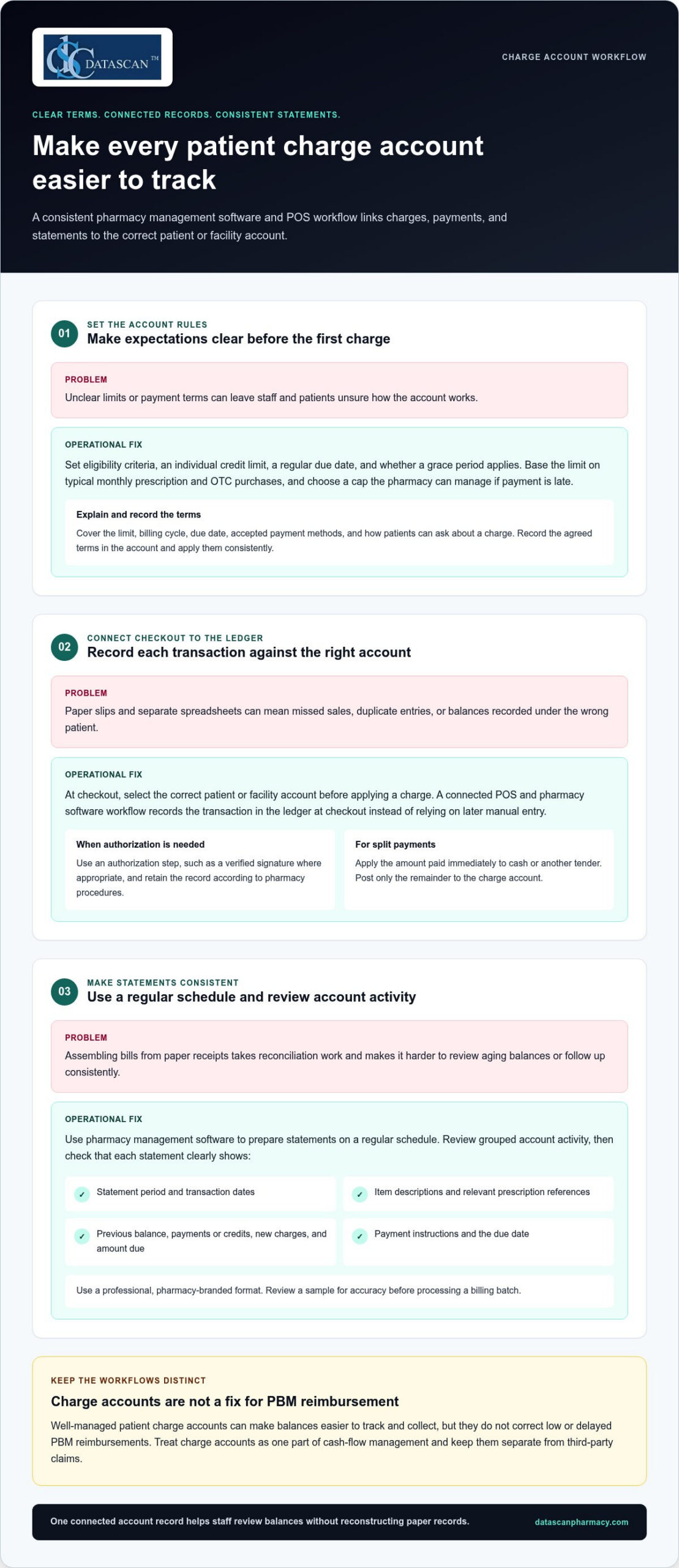
Build the process around clear account rules and one connected ledger. Set eligibility criteria, payment terms, and individual credit limits. Then ensure each charge entered at the register updates the patient’s account in your pharmacy management software. This pharmacy-specific workflow reduces duplicate entry and gives staff a consistent way to review balances and prepare statements.
Step 1: How should you set credit limits and payment terms?
Set each limit with the patient’s or facility’s typical monthly prescription and OTC purchases in mind, and choose a cap your pharmacy can manage if payment is late. Decide on a regular due date and whether to allow a grace period, then apply those terms consistently. At sign-up, explain the limit, billing cycle, due date, accepted payment methods, and how patients can ask about a charge. Record the agreed terms in the account.
Step 2: How do you link POS transactions to the patient ledger?
At checkout, staff should select the correct patient or facility account before applying a charge. Use an authorization step, such as a verified signature where appropriate, and retain the record according to your pharmacy’s procedures. A connected POS and pharmacy software workflow records the transaction against the ledger at checkout instead of relying on a later manual entry. For split payments, apply the amount paid immediately to cash or another tender and post only the remainder to the charge account.
Step 3: How can you make monthly statements consistent?
Use pharmacy management software to prepare statements on a regular schedule. Review grouped account activity rather than assembling each bill from paper receipts. Before sending a statement, check that it clearly shows:
Statement period and transaction dates
Item descriptions and relevant prescription references
Previous balance, payments or credits, new charges, and amount due
Payment instructions and the due date
Use a professional, pharmacy-branded format so patients can identify the statement and understand what they owe. Review a sample for accuracy before processing a billing batch. An integrated pharmacy management software system can support a more consistent account workflow, reducing time spent reconciling records and leaving staff more time to help patients.
How does managing charge accounts impact pharmacy profitability?
Well-managed patient charge accounts can make balances easier to track and collect, but they don’t correct low or delayed PBM reimbursements. They are one part of cash-flow management and should be kept separate from third-party claims. Managing charge accounts for patients through an organized pharmacy software workflow can reduce manual bookkeeping, while other pharmacy management software tools can help teams process claims and review reimbursement activity.
Keep these financial streams distinct. Patient charge accounts record amounts patients or facilities owe your pharmacy. PBM claims track amounts due from third-party payers under reimbursement terms. Technology can help organize both, but review PBM claim and payment records separately from patient receivables to identify processing issues, payment delays, or differences that need follow-up. Charge account collections are not a substitute for PBM reform or a solution to inadequate reimbursement.
How can structured billing support cash flow?
A consistent statement cycle gives patients and facilities a regular reminder to review and pay balances. Aging reports help staff spot overdue accounts and follow up under pharmacy policy before balances become harder to collect. For high-copay medications, an account may record a patient’s responsibility for later payment, but set clear limits and monitor outstanding balances. Until collected, a charge is a receivable, not available cash.
Technology can also support a separate reimbursement workflow. Pharmacy teams can use claim-processing and financial reporting tools to organize payer activity, compare submitted claims with payment records, and flag items for review. These tools don’t determine whether a PBM reimbursement is fair, but organized data can help staff investigate discrepancies and make informed business decisions. Consider sales and product margins as well as collections when evaluating profitability.
How can automation reduce administrative burnout?
Manual posting may require staff to enter and verify transactions in multiple records. Integrated POS and pharmacy management software can connect patient charges, payments, and credits to account records, reducing duplicate work and making discrepancies easier to investigate. Separate claims workflows can help staff manage reimbursement information without mixing payer activity into patient ledgers.
Automation doesn’t guarantee a specific time saving or cash-flow result. It can reduce routine data-entry steps and make financial information easier to review. That can give pharmacists and owners more room to focus on patient care and business decisions instead of reconstructing account histories by hand.
What are the best practices for collecting payments on charge accounts?
Make payment easy, follow up consistently, and handle overdue balances respectfully. Offer practical payment choices, send clear reminders, and review account activity regularly. Pharmacy management software and a patient-facing app can help organize the work, but keep payment terms and communication consistent across channels.
Offer options that suit different preferences, such as paying in-store, mailing a check, or using a digital payment method your pharmacy accepts. Explain how to identify the account and where to send payment so staff can post it accurately. If your POS system supports card-on-file payments, consider offering the option with clear patient authorization and appropriate safeguards. Don’t assume every patient wants the same method.
How can digital tools support faster collections?
A patient app can make balance communication easier to access. MobileScripts can support payment notifications, prompting patients to review an outstanding balance or statement. Learn about the patient-facing tool through the MobileScripts patient app. Avoid promising that a balance appears in real time or that a specific statement alert is available unless that function is part of your configured workflow.
Set a routine for reviewing new charges, payments, credits, and declined transactions. If a charge is declined or an account reaches its limit, pause additional charges under your policy. Explain the situation privately and professionally, and tell the patient what steps are available. A consistent response helps staff avoid awkward surprises at checkout.
How should staff follow up on overdue accounts?
Use a calm, predictable sequence rather than waiting until a balance becomes difficult to resolve. For example, schedule a friendly reminder when an account reaches 15 days past due, then review the account and document each follow-up. The reminder should identify the balance and explain how to pay without disclosing sensitive account details to the wrong person.
Train staff on when to move an account from routine pharmacy-led follow-up to a formal collection process, and apply the same written criteria consistently. Keep conversations focused on resolving the balance while preserving the patient relationship. Review aging reports regularly to see which balances need attention and whether follow-up is keeping pace.
Managing charge accounts for patients works best when payment options, reminders, and escalation steps form one repeatable workflow. Use pharmacy software to keep account activity organized, and make app-based notifications part of a broader, considerate follow-up process.
How can Datascan Pharmacy Management Software automate your charge accounts?
Datascan connects pharmacy management software and POS charge account tools so staff can track balances at the register, apply credit limits, and generate statements without maintaining a separate manual ledger. This integrated workflow helps independent pharmacies organize account activity and reduce duplicate recordkeeping. For busy owners, the practical benefit is clearer account information and fewer billing steps to manage by hand.
With Datascan Point of Sale working alongside pharmacy management software, staff can associate a charge with the relevant patient account during checkout. The balance can then be tracked as part of the pharmacy’s account workflow, rather than reconstructed later from receipts or separate spreadsheets. Staff also have a consistent place to review account activity when a patient asks about a charge.
How does the workflow support independent pharmacies?
Charge account needs differ across community pharmacies. A pharmacy may manage individual retail accounts as well as facility accounts, each with different purchasing patterns and billing routines. Datascan’s customizable workflow features let pharmacies shape processes around how their teams handle account activity. Credit limits help staff keep agreed account boundaries visible at the register.
Statement generation supports a more structured billing cycle than assembling bills manually. Pharmacies can use a consistent statement process and review balances as part of routine follow-up. The goal is not to replace staff judgment, but to give the team organized records for answering questions, checking payments, and identifying accounts that need attention.
What makes Datascan a long-term pharmacy software partner?
Datascan has been family-owned since 1981 and provides US-based support. That history matters to independent owners looking for pharmacy software grounded in the day-to-day realities of community pharmacy operations. Integrated POS and pharmacy management tools bring related workflows together, while customizable options help pharmacies align the system with their established processes.
Technology can’t resolve PBM reimbursement challenges on its own, but it can reduce the operational work surrounding patient accounts. By bringing charge tracking and pharmacy transactions into a coordinated workflow, Datascan helps staff spend less time reconciling records and more time supporting patients and running the business.
Make Charge Account Management Work for Your Pharmacy
Patient charge accounts can support loyalty and give patients more flexibility, but they need clear terms, consistent follow-up, and accurate records. Managing charge accounts for patients is easier when pharmacy management software connects account activity with POS transactions, reducing manual reconciliation and keeping balances visible.
Set individual limits and payment expectations, use a regular statement cycle, and offer convenient ways to pay. Automated account tracking can give your team more time for patient care and daily pharmacy operations, while clearer reporting helps you monitor outstanding balances.
Datascan brings pharmacy software and POS together to support a more connected charge account workflow. Family-owned and operated since 1981, Datascan also provides US-based technical support for its pharmacy tools.
Is it legal for pharmacies to charge interest on patient accounts?
It depends on the credit arrangement and the laws that apply, so don’t assume interest can be added automatically. Under the federal Truth in Lending Act’s Regulation Z, certain consumer-credit arrangements may be covered when a creditor regularly extends credit and the agreement includes a finance charge or requires more than four installments. See the Regulation Z definition of a creditor. State requirements may also apply. Get legal guidance before setting interest or installment terms.
How do I handle charge accounts for nursing homes or assisted living facilities?
Use a separate facility account with written billing terms, designated contacts, and a clear process for approving and documenting purchases. Reconcile account activity with invoices and recorded payments, and organize resident-level details according to your pharmacy’s procedures. These are practical controls, not a substitute for reviewing the facility agreement or applicable privacy and billing requirements with qualified advisers.
What is the difference between a patient credit and a charge account?
A patient credit generally represents an amount available to the patient or owed back to them, such as an overpayment recorded on the account. A charge account tracks purchases the patient or an authorized organization has agreed to pay later. Pharmacy systems may use different labels, so define each term in your policies and make sure staff can distinguish credits, charges, payments, and adjustments in the ledger.
Can I manage charge accounts without separate accounting software like QuickBooks?
Pharmacy management software with integrated charge-account tracking can record account transactions without requiring staff to maintain a separate manual ledger. That doesn’t necessarily replace the accounting system your pharmacy uses for broader books, tax records, and financial reporting. The IRS recommends keeping business records that support income and expenses; see its small-business recordkeeping guidance. Establish a process for reconciling pharmacy records with your accounting workflow.
How often should I send out pharmacy charge account statements?
Choose a statement schedule your pharmacy can maintain consistently, and explain it when the account is opened. A monthly cycle is one practical option, but it isn’t a universal requirement for every pharmacy or account. Make the billing period, transactions, payments or credits, balance, due date, and payment instructions easy to understand. Review account activity between statement runs so staff can follow up according to your written policy.
What should I do if a patient passes away with an outstanding balance?
Pause routine reminders, document the account, and handle communications with care. Don’t assume a relative is personally responsible simply because they’re family. Identify an appropriate estate representative if one is involved, and get legal guidance before deciding whom to contact or how to pursue the balance. The Consumer Financial Protection Bureau explains how a deceased person’s debts may be handled through an estate in its guidance on debts after someone dies.
How does integrated POS software prevent internal theft on charge accounts?
Integrated POS software doesn’t guarantee that theft will be prevented, but it can make account activity easier to review by connecting transactions to patient records. Pair that visibility with pharmacy-defined controls: restrict who can adjust balances, document account changes, and regularly reconcile POS activity with payments and ledger entries. Investigate discrepancies consistently and follow your organization’s procedures for access and review.
Can I set different credit limits for different types of patients?
Yes. A pharmacy can set different limits for individual patient and facility accounts as part of a consistent credit policy. Base each limit on expected account use and your pharmacy’s ability to manage unpaid balances, then record the limit and terms in the account. Review them periodically and explain what happens if a purchase would exceed the limit. Pharmacy management software can help staff see balances while processing charges.
Expired stock is easier to control with a repeatable workflow than with a rushed cleanup. Managing expired pharmacy stock starts with consistent rotation and scheduled checks, so staff can spot approaching dates before products become a loss.
Independent pharmacies often have limited time for manual checks, and inconsistent routines can leave expired products on the shelf or tie up inventory. A clear process helps staff identify items nearing expiration, separate expired products from usable stock, and track follow-up.
This guide covers practical ways to prevent avoidable expirations, handle expired medicines consistently, and improve inventory visibility. It explains how to build stock rotation into everyday work, assign clear steps for expired products, and review inventory records. Pharmacy management software may support the process when it has the functions your team needs, but it works alongside staff procedures and pharmacy judgment.
Key Takeaways
Managing expired pharmacy stock works best as a repeatable process for preventing, identifying, separating, and resolving expired inventory.
Build expiration checks into purchasing, receiving, storage, and routine inventory reviews. Document discrepancies according to pharmacy procedures.
When staff find expired products, separate them from usable stock, record the finding, and choose next steps based on the product, supplier terms, pharmacy policy, and applicable requirements.
Track expired removals, near-expiration findings, unresolved actions, and inventory adjustments to see where the process needs attention.
When assessing pharmacy management software, confirm that it supports the inventory visibility and workflow your team needs, including any date capture or reporting functions.
What does managing expired pharmacy stock involve?
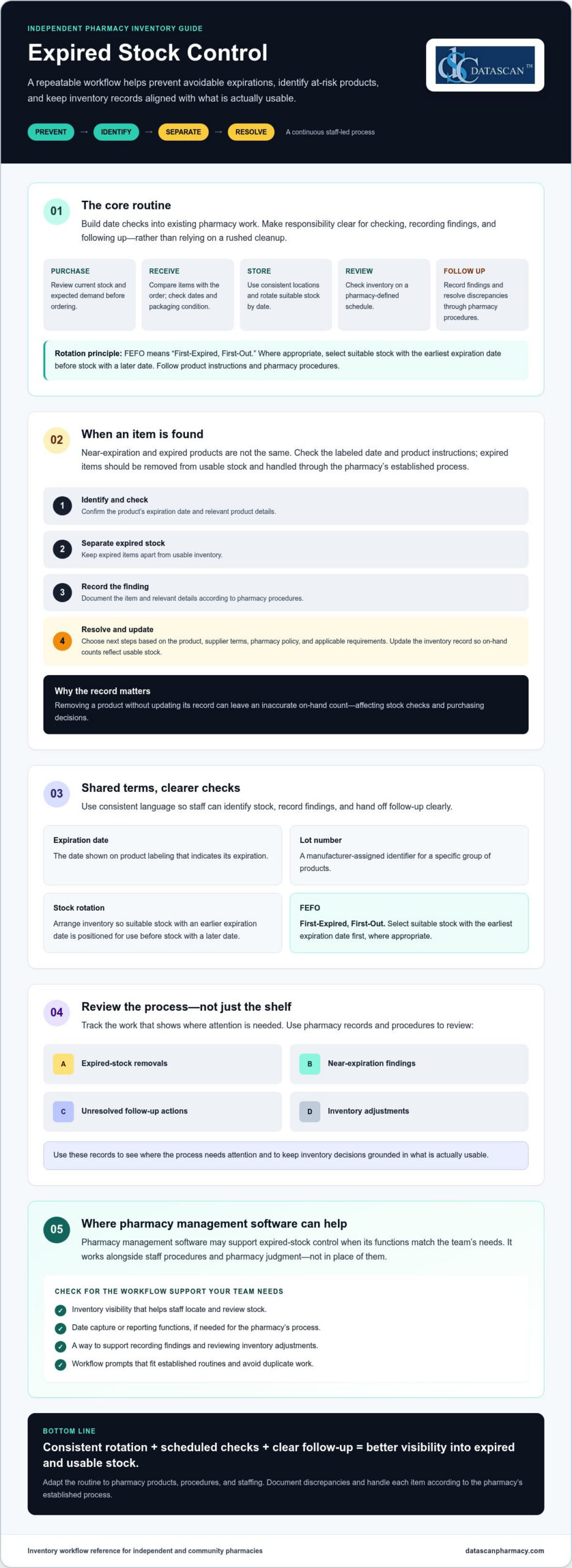
Managing expired pharmacy stock means identifying products that are nearing or past their expiration date, preventing avoidable expirations through routine stock control, separating expired items from usable inventory, and resolving them according to pharmacy procedures. Near-expiration and expired products are not the same. A product nearing expiration may still be usable if its date and product instructions allow, while an expired item should be removed from usable stock and handled through the pharmacy’s established process.
This work supports orderly shelves and reliable inventory records. If staff remove a product but don’t update its record, the on-hand count may remain inaccurate. That can lead to purchasing decisions based on stock that is no longer available for use, extra checks for the next staff member, and avoidable write-offs that weigh on pharmacy margins. A consistent process makes each item’s status and next step easier to see.
Why does expired pharmacy stock create an operational problem?
Expired products take up space and can distort inventory records until they’re identified, separated, and accounted for. For example, if staff find a package past its date during a shelf check but don’t adjust the inventory record, another team member may assume it is available when checking stock or placing an order. Searching shelves for date-sensitive items can also interrupt routine work. Clear roles for checking and recording findings help avoid repeated checks and keep inventory decisions grounded in what’s actually usable.
What do expiration date, lot number, and FEFO mean?
These terms help staff organize and review products consistently:
Expiration date: The date shown on a product’s labeling that indicates its expiration. For background on the topic, see this overview of drug expiration and disposal.
Lot number: A manufacturer-assigned identifier for a specific group of products. Recording it can help staff distinguish one group from another when reviewing stock or investigating a product-related issue.
Stock rotation: Arranging inventory so suitable stock with an earlier expiration date is positioned for use before stock with a later date.
FEFO: “First-Expired, First-Out.” Where appropriate, staff select suitable stock with the earliest expiration date first, rather than relying only on the order products arrived.
FEFO can help reduce avoidable expirations, but it doesn’t replace checking the product itself. Follow product-specific instructions and pharmacy procedures when deciding whether an item is suitable for use. These definitions give the team a shared starting point. The next step is to build them into purchasing, receiving, storage, and review routines.
How can a pharmacy prevent stock from expiring?
Preventing expirations takes a connected process across purchasing, receiving, storage, review, and follow-up. Set a pharmacy-defined review schedule and incorporate date checks into existing work. This helps staff spot approaching expirations without creating a duplicate inventory task. The FDA explains how expiration dates are established, which can help staff understand why checking the labeled date and following product instructions matter. See its FDA guidelines on expiration dates.
How should staff check stock when orders arrive?
At receiving, compare each product with the order and follow the pharmacy’s receiving procedures. Check dates and packaging condition before placing items into stock. Record product or lot details when the pharmacy’s process calls for them. If an item arrives short-dated, damaged, or inconsistent with the order, document the discrepancy and follow the pharmacy’s escalation process, including applicable wholesaler terms.
How can teams build expiration checks into daily work?
Make the routine clear enough for staff to complete consistently during an existing inventory task. Assign responsibility for checking, recording findings, and resolving follow-up items. Use consistent storage locations and rotate suitable products so earlier-expiring stock is easier to find. A checklist or completion prompt within an established routine can help prevent missed steps without asking staff to repeat the same work elsewhere.
Use this five-part workflow as a starting point, then adapt it to your pharmacy’s products, procedures, and staffing:
1. Purchase thoughtfully. Review current stock and expected demand before ordering. Consider whether the order quantity is realistic given the pharmacy’s ability to use the products before their expiration dates.
2. Check at receipt. Compare received items with the order, inspect dates and condition, and document discrepancies according to pharmacy procedures.
3. Store and rotate. Keep products in consistent locations and position suitable stock with the earliest expiration date so it will be selected first. Don’t rely only on delivery order.
4. Review on a set schedule. Choose a review frequency based on your pharmacy’s inventory and workflow. Check designated areas, flag approaching dates, and record findings so another team member can see what needs attention.
5. Follow through. Assign an owner to each finding and document the outcome, such as an inventory adjustment or another step under pharmacy policy. Close the loop instead of leaving flagged items unresolved.
Consistent routines make managing expired pharmacy stock less dependent on memory. If you’re assessing whether pharmacy management software could support your inventory workflow, confirm which relevant functions are available before relying on them. Staff procedures and pharmacy judgment remain essential.
What should staff do with expired pharmacy stock?
Staff should identify expired products, remove them from usable inventory, document the finding, and assign a clear next step. Return, disposal, and recordkeeping depend on the product, supplier terms, pharmacy policy, and applicable requirements. Follow the pharmacy’s procedures and verify current federal and state guidance rather than applying one disposal rule to every item.
General workflow: Identify the expired item, separate it from stock available for dispensing or sale, record and reconcile it according to pharmacy procedures, then confirm and complete the appropriate return or disposal process. This is an operational guide, not legal advice.
How should a pharmacy separate expired products from usable inventory?
Move expired items to a designated, clearly controlled area consistent with pharmacy procedures. Keep them physically apart from usable stock, and use the pharmacy’s established method to ensure they can’t be selected for dispensing or sale. Make the area and process clear to staff, including who may access the items and who is responsible for follow-up.
Record enough information for the team to identify and resolve each item. Depending on pharmacy procedures, that may include the product, quantity, expiration date, lot number, date found, and assigned action. Then reconcile the removal against inventory records. If an item leaves the shelf but the on-hand count stays unchanged, staff may continue to rely on an inaccurate count when checking availability or making purchasing decisions.
Can expired medicines be returned or must they be disposed of?
Some products may be eligible for return, but eligibility can vary with supplier terms and the product’s circumstances. Check those terms and document the decision according to pharmacy policy. If return isn’t an option, don’t assume one disposal method applies to every medicine. Confirm product-specific steps with current authoritative guidance and the appropriate federal or state source for your situation.
The Specialist Pharmacy Service offers a practical reference on best practices for expired stock, including stock-control considerations. It’s a UK resource, so use it for general workflow ideas, not as guidance on U.S. requirements. For U.S. handling decisions, verify current requirements with the relevant authorities and follow your pharmacy’s procedures.
Identify: Confirm the item is expired and note its location.
Separate: Remove it from usable inventory and place it in the designated controlled area.
Document: Record the details and reconcile the inventory record using pharmacy procedures.
Assign and close: Determine whether return or disposal is appropriate, assign an owner, and record the completed action.
Clear ownership keeps managing expired pharmacy stock from becoming a shelf-side reminder that no one follows up. Consistent records also help the team distinguish items awaiting action from inventory that remains available for use.
How can a pharmacy measure and improve its expired-stock process?
Measure the process with consistent records, clear definitions, and a regular review period. Track expired removals, near-expiration findings, unresolved follow-up, and inventory adjustments. Use the patterns to review purchasing and staff procedures. Accurate inventory records can add context to business decisions and stock write-offs, but they don’t replace analysis of other financial pressures.
Which indicators help reveal recurring expiration problems?
Review findings by product or category and compare them with available purchase, on-hand, and removal records. Repeated findings can prompt a closer look at order quantities, demand, storage, or review routines, but they don’t prove a single cause. Keep definitions consistent, such as what counts as a near-expiration finding, and compare the same types of records over the same review period.
Expired removals: Items taken out of usable inventory and recorded as expired.
Near-expiration findings: Products flagged for follow-up under the pharmacy’s own criteria.
Unresolved actions: Findings still awaiting review, return consideration, or another next step.
Inventory adjustments: Changes made to align recorded quantities with stock status.
Manual checks and software-supported visibility can both contribute to oversight. Manual logs may suit a simpler workflow, while a system may make records easier to review if it captures the right information. Compare options by asking whether staff can find relevant data, record findings consistently, assign follow-up, and review unresolved items. Keep inventory measures distinct from other financial figures unless your system and review process explicitly connect them.
What should pharmacy software do to support stock oversight?
Before relying on technology, confirm whether it can capture relevant dates, support the pharmacy’s review process, and report inventory exceptions in a useful format. Ask the vendor to demonstrate each function. Don’t assume expiration alerts, lot-level records, or automated rotation are included. Pharmacy management software may support inventory visibility when the needed functions are confirmed, but it doesn’t replace staff procedures or pharmacy judgment.
Use the findings to make a focused process change, then review the same indicators again using consistent definitions and periods. If a product category repeatedly appears in near-expiration checks, examine its purchasing and storage records before changing the routine. This gives the team a clearer basis for managing expired pharmacy stock without drawing unsupported conclusions about the cause of financial results.
To discuss how your pharmacy’s workflow and inventory records could be assessed, contact Datascan.
How can pharmacy management software support better expired-stock control?
Pharmacy management software may support expired-stock control by making relevant inventory information easier to record, review, and act on, but capabilities vary by system. Before relying on software, confirm that it can handle the dates, reports, and review steps your pharmacy needs. Better-organized inventory work may help staff spend less time searching through records and more time on day-to-day operations. Technology doesn’t replace staff procedures or pharmacy judgment.
What questions should owners ask about inventory features?
Ask a vendor to demonstrate tasks your team would actually perform rather than relying on a general feature description. Confirm whether staff can:
Record expiration dates and search for them later.
Include date information in inventory reports.
Identify items for review and document what staff did next.
Use the system in a way that fits the pharmacy’s existing procedures.
Also ask how implementation, staff training, and support work, and what responsibilities remain with the pharmacy team. Don’t assume alerts, lot-level tracking, or automated stock rotation are included. Datascan offers pharmacy management software and customizable workflows, but specific expiration-tracking functions should be verified directly before making them part of your process.
How can a pharmacy assess whether its current process is working?
Set a pharmacy-defined review interval and compare recurring expired removals, stock discrepancies, and staff feedback with the pharmacy’s written procedures and operational priorities. If staff repeatedly need to search for dates or resolve unclear records, identify where the process breaks down before changing it. Consistent definitions and review periods make comparisons more useful and help owners see whether a workflow change addresses the original issue.
Software fit is about more than a feature checklist. Consider whether staff can use the system consistently, whether its reports support the pharmacy’s review routine, and whether the workflow accommodates how the team assigns and closes follow-up. A system that matches your process may help organize work, while an awkward or unverified function can add steps. Learn more about pharmacy workflow optimization software as you consider where workflow flexibility may fit your broader operations.
Managing expired pharmacy stock remains a team responsibility. Use technology only for functions you’ve confirmed, and keep inventory reviews aligned with pharmacy procedures. Datascan can discuss how its software and customizable workflows may fit your pharmacy’s operations.
Make Expiration Control Part of the Routine
Managing expired pharmacy stock is easier to sustain when it’s built into everyday inventory work. Check dates as products arrive, rotate suitable stock so earlier-expiring items aren’t overlooked, and give staff a consistent process for separating, recording, and following up on expired items.
Then review recurring removals, near-expiration findings, unresolved actions, and inventory adjustments using consistent definitions. These records can help your team spot patterns and make more informed purchasing and workflow decisions. Pharmacy management software may support inventory visibility, but confirm that any date capture or reporting functions you need are available before relying on them.
Datascan is a family-owned company operating since 1981, with U.S.-based support, pharmacy management software, and customizable workflows. If you’re evaluating how technology could fit your pharmacy’s procedures, discuss your pharmacy’s workflow and software needs. A clear process, supported by suitable tools and team ownership, helps keep inventory decisions organized.
Frequently Asked Questions
How often should a pharmacy check for expired stock?
Set a repeatable review schedule that fits your pharmacy’s inventory volume, staffing, and written procedures. There is no universal frequency established here, so assign responsibility for completing and documenting checks rather than relying on memory. Review whether your process identifies products before they expire, then adjust the schedule based on what your records show. Confirm any applicable requirements with authoritative sources.
What should a pharmacy do when it finds expired medication?
Follow the pharmacy’s written process to identify and separate the product from usable stock, update relevant records, and assign a next step. Return eligibility and disposal instructions can depend on the product, supplier terms, and applicable requirements. Don’t assume one method applies to every medicine. For managing expired pharmacy stock, follow pharmacy policy and confirm current handling guidance with authoritative sources.
Can expired medications be returned to a wholesaler?
Sometimes, but return eligibility depends on the supplier’s terms and the product’s circumstances. Check the applicable return policy and document the decision according to pharmacy procedures. If a return isn’t available, confirm the appropriate next step using current authoritative guidance and your pharmacy’s policy. Avoid assuming all expired products follow the same return or disposal process.
How can a pharmacy prevent medication from expiring on the shelf?
Build expiration checks into receiving, storage, and routine inventory reviews. Check dates when orders arrive, rotate suitable products so earlier-expiring stock isn’t overlooked, and monitor items approaching their dates under a pharmacy-defined schedule. If the same products repeatedly appear in reviews, examine purchasing patterns and stock records. Assign staff responsibility and keep documentation consistent, while following product instructions and pharmacy policy.
What does FEFO mean in pharmacy inventory management?
FEFO means “first-expired, first-out.” Where appropriate, it guides staff to use suitable stock with the earliest expiration date before stock with later dates. Consistent storage and rotation make earlier-expiring products easier to identify and less likely to be overlooked. FEFO doesn’t override product instructions, pharmacy procedures, or other factors that affect whether a product is suitable for use.
Can pharmacy software track expiration dates?
Some pharmacy systems may offer inventory functions related to dates or reporting, but capabilities vary by product and configuration. Ask the vendor whether expiration dates can be recorded, searched, reviewed, and included in reports. Request a demonstration of how staff would flag an item and document follow-up. Don’t assume a specific feature is available until the vendor confirms it for the system you’re evaluating.
How does expired pharmacy stock affect profitability?
Products removed after expiration represent inventory that can’t be sold or dispensed, which can affect purchasing decisions and gross profit. The impact depends on the pharmacy’s products, purchasing practices, return eligibility, and records, so generic loss estimates may not reflect your situation. Track removals consistently, look for recurring patterns, and review purchasing and stock practices with the appropriate team to identify potential process changes.
About the Author
Author: Datascan Pharmacy Software. Family-owned and operating since 1981, Datascan Pharmacy Software serves independent and retail pharmacies with pharmacy management software and related tools, and provides U.S.-based support. The company’s experience serving pharmacies informs its perspective on pharmacy operations. This article offers general workflow information, not legal advice.
To discuss how Datascan’s pharmacy management software and customizable workflows could fit your pharmacy’s needs, contact Datascan.
A higher sales total doesn’t always mean a healthier bottom line. Tracking pharmacy sales data accurately means looking beyond revenue to understand what prescriptions and front-end purchases contribute after costs and reimbursement adjustments. If details are spread across prescription, point-of-sale, and payment workflows, getting that picture can take time away from running the pharmacy and caring for patients.
It’s easy to mistake sales activity for profitability, especially when PBM reimbursements put pressure on prescription margins. The right metrics can show where revenue is coming from, flag changes that deserve attention, and support more informed operational decisions. You don’t need to track every number. You need a focused set that answers practical questions.
This guide covers which sales metrics independent pharmacies can monitor, how to interpret prescription and front-end results differently, and why revenue alone doesn’t tell the whole story. It also explains what to consider when evaluating pharmacy management software and POS tools for organizing reports and reducing manual work. Reporting capabilities vary, so confirm that a system supports the views your pharmacy needs.
Key Takeaways
Use tracking pharmacy sales data to guide specific business decisions, not just to collect numbers.
Start with a small set of measures, including sales volume, transaction counts, category mix, and average transaction value.
Compare sales, reimbursement, gross profit, and cash received separately to avoid mistaking higher revenue for stronger financial health.
Build a recurring review routine with clear responsibility for gathering reports, checking definitions, and recording follow-up actions.
When evaluating pharmacy management software and POS tools, check report clarity, category definitions, access, training, and support.
What does tracking pharmacy sales data actually tell you?
Tracking pharmacy sales data means consistently collecting and reviewing sales measures to guide business decisions. It shows what’s moving through prescription and front-end workflows, but recorded sales activity alone doesn’t tell you how much the pharmacy earned, how much cash it received, or how PBM reimbursement affected a prescription’s final economics.
Sales data records what was sold and for how much. Profit reflects what remains after relevant costs and expenses. That distinction matters. A rise in sales can mean more activity, but it doesn’t automatically mean stronger margins or cash flow. A useful measure, often called a key performance indicator (KPI), connects information to a decision. For a foundational explanation, see this overview of a performance indicator.
Independent pharmacies need a manageable view of prescription and front-end transactions because they represent different kinds of sales activity. Reviewing them with consistent definitions can help owners identify what changed and where a closer look is needed, without treating one sales total as the whole financial picture.
Which pharmacy sales categories should you track?
Start by separating prescription-related activity from front-end and over-the-counter transactions. Set clear category definitions, then use them consistently across staff and reporting periods. For example, decide which transaction types belong in each category before comparing one month with another. Consistent definitions make comparisons more meaningful and reduce the risk of mistaking a reporting change for a real change in sales.
Why can sales totals differ from pharmacy profitability?
A sales total doesn’t account for the cost of acquiring products or the pharmacy’s operating expenses. Prescription economics can also be affected by PBM reimbursement, which may differ from the initial transaction amount. Keep these measures distinct when reviewing results:
Sales: The value recorded for products or services sold.
Reimbursement: The amount associated with a prescription claim under the applicable payment arrangement.
Gross profit: Sales revenue minus the related cost of goods sold, before other operating expenses.
Cash received: Money collected or paid to the pharmacy, which may not match sales recorded for the same period.
These figures answer different questions, so don’t use one as a substitute for another. For a deeper look at margin calculations, consult a pharmacy gross profit guide and confirm that the method fits your accounting approach.
Which pharmacy sales metrics should you track first?
Start with a short list of measures that can inform a decision, rather than collecting every available data point. Tracking pharmacy sales data is most useful when each metric answers a practical question: Did transaction activity change? Which categories contributed to sales? Where does a shift need investigation?
A practical starting checklist: track sales volume, transaction counts, category mix, and average transaction value, then review each measure in the context of prescription or front-end activity.
Sales volume: The total sales recorded for a chosen period or category.
Transaction counts: The number of sales transactions completed during that period.
Category mix: How recorded sales are distributed among categories, such as prescriptions, over-the-counter products, and other front-end items.
Average transaction value: Sales volume divided by the number of transactions for the same period and category.
Keep definitions and date ranges consistent. Otherwise, a change in how staff classify transactions or a report groups categories can look like a real shift in business activity. These measures describe sales patterns. Pair them with relevant cost and reimbursement information before drawing conclusions about margins.
How should you track prescription sales?
Review prescription transaction activity alongside available reimbursement information for those claims. Where records allow, keep the gross transaction amount separate from the amount ultimately received, and note timing or adjustments that may affect the comparison. If a measure changes unexpectedly, flag it for follow-up and check the underlying records before treating a single result as a trend.
How should you track front-end pharmacy sales?
For front-end and over-the-counter sales, review transaction counts and sales by useful product categories. Compare equivalent periods and record context, such as a promotion or operating change, that could affect results. This helps distinguish a broad change in shopping activity from a shift limited to one category. For further POS considerations, explore Datascan’s pharmacy point-of-sale tools.
Prescription and front-end measures answer different questions, so avoid forcing them into one interpretation. A change in prescription activity calls for a look at claim and reimbursement context. A front-end category shift may prompt a closer review of product mix or transaction patterns. Choose a few measures your team can define consistently, review them regularly, and use unusual movements to guide the next investigation.
Can sales data alone show whether your pharmacy is doing well?
No. Higher sales don’t automatically mean higher profit or stronger cash flow. Sales show the value of recorded activity, while reimbursement, acquisition costs, expenses, and payment timing help explain what that activity means financially. Tracking pharmacy sales data alongside these related measures gives owners a more useful basis for investigating prescription performance.
What is the difference between sales, reimbursement, and profit?
Each measure answers a different business question. Keep them distinct in reports and conversations so a change in one isn’t mistaken for a change in another.
Measure
What it tells you
Question for the owner
Sales
Recorded value of transactions
What activity was recorded?
Reimbursement
Payment associated with prescription claims
What was paid or is expected for those claims?
Gross profit
Sales revenue minus related cost of goods sold
What remains before other operating expenses?
Cash received
Payments collected during a period
What money came in, and when?
For example, a prescription transaction can appear in sales records before its payment arrives. Its recorded amount also doesn’t show the related acquisition cost or final gross profit on its own. Comparing sales and reimbursement information can help you identify questions to investigate, but it doesn’t establish the reason for a difference. For detailed margin calculations, use a consistent gross profit method and confirm that it matches your accounting approach.
How can you spot a change that needs investigation?
Compare equivalent periods and confirm that report definitions haven’t changed. Then review the context before drawing a conclusion:
Check whether the transaction mix shifted between prescription and front-end activity.
Confirm that you’re comparing the same dates, categories, and reporting basis.
Note timing differences and known operational changes that could affect the comparison.
Refer possible reimbursement discrepancies to your pharmacy’s established review process.
A change is a prompt to ask questions, not proof of a trend or error. Pharmacy management software may help organize information for review, but verify which reports and fields are available in your configuration. If you’re assessing whether Datascan tools fit your reporting needs, you can discuss your requirements with the team.
How do you build a practical pharmacy sales review routine?
A practical review routine makes tracking pharmacy sales data repeatable without turning it into another major task. Choose a consistent review period, assign responsibility for gathering and checking reports, and end each review with a clear follow-up owner. Keep the process focused on a few measures tied to current business priorities.
What steps should a pharmacy take to review sales data?
Choose the measures. Select a short list that helps answer current questions, such as whether sales activity changed or which categories need a closer look.
Assign report gathering. Name a team member to collect relevant reports from pharmacy management and POS workflows. If information comes from separate sources, note where each figure came from rather than assuming the reports are combined.
Check the reporting basis. Confirm the dates, transaction categories, and definitions before comparing results. Make sure the current report uses the same basis as the prior period.
Review changes with context. Look for differences in transaction mix, workflow, product mix, or reporting setup that could explain a change. Record known operational events alongside the results.
Document the next step. For each meaningful finding, write down the finding, a question to resolve, and the person responsible for following up.
The routine works best when responsibilities are clear. The person gathering reports doesn’t need to make every business decision, but they should know who will validate definitions, review unusual results, and close the loop on questions. A brief written record helps the team see whether an issue is recurring or specific to one review period.
How can you avoid misleading comparisons?
Compare equivalent periods and transaction categories, and don’t treat a difference as a trend until you’ve checked the underlying records. If reporting definitions or workflow changed, document that before drawing conclusions. A change in transaction mix may also shift the total even when activity within a particular category is steady. Investigate incomplete or inconsistent records before acting, and route possible reimbursement discrepancies through the pharmacy’s established review process.
Pharmacy management software and POS tools may help organize information from their respective workflows, but confirm which reports, fields, and review options are available in your pharmacy’s configuration. A simple, consistent process can make reports easier to interpret and preserve time for daily operations. Discuss your pharmacy reporting needs to explore what information your current setup can support.
How can pharmacy management software make sales tracking easier?
Pharmacy management software and POS tools may make sales reviews easier by organizing information from prescription and front-end workflows. This can reduce the need to gather figures manually from separate sources. The practical value depends on the available reports and configuration, so verify specific capabilities rather than assuming every system combines data or automates reporting.
Use these criteria to evaluate whether a system will support your tracking process:
Report clarity: Can your team understand what each total includes and leaves out?
Category definitions: Are prescription, front-end, and other transaction categories clearly defined?
Access: Can the people responsible for reviewing the information find the reports they need?
Training: Is guidance available so staff can apply report definitions consistently?
Support: Can you get help with reporting questions, and what support is available?
Datascan offers pharmacy management software and Datascan Point of Sale. Review the pharmacy management software overview as you consider how software and POS tools might fit your operation. Treat technology as a way to assess and organize information, not as a guarantee of improved margins, reimbursement outcomes, or cash flow.
What should you ask a pharmacy software vendor about sales reporting?
Ask which prescription and front-end sales reports are available in the configuration you’re considering. Find out how each report defines totals, time periods, categories, and adjustments, and whether reports can be reviewed together or need to be compared separately. Confirm what training and U.S.-based support are available for reporting questions. Ask the vendor to walk through relevant workflows so your team can judge whether the reports answer its actual business questions.
When is it time to improve your current tracking process?
Repeated manual consolidation, unclear category definitions, or reports the team rarely uses can signal that the process needs attention. Before comparing alternatives, identify the decisions your current setup doesn’t support and the information needed to make them. Then verify specific product claims directly, including which reports and fields are available for your pharmacy’s configuration.
A focused review of those needs can help you evaluate Pharmacy Software against the work your team actually does, rather than choosing based on broad promises. Talk with Datascan about sales tracking and discuss the reports and workflows you need to assess.
Turn pharmacy sales reports into confident decisions
Tracking pharmacy sales data works best when you focus on a few consistent measures and connect each one to a decision. Review prescription and front-end activity in context, and keep sales separate from reimbursement, gross profit, and cash received. A simple, recurring review routine can help your team spot changes worth investigating without adding unnecessary reporting work.
Pharmacy management software and point-of-sale tools may help organize information across workflows, but confirm that the reports and definitions fit your pharmacy’s needs. Datascan is a family-owned pharmacy software company founded in 1981, offering pharmacy management software and point-of-sale tools for independent and retail pharmacies, along with U.S.-based technical support.
Ready to explore how your reporting process could better support day-to-day decisions? Talk with Datascan about tracking pharmacy sales data. With clear measures and a practical review process, you can build a stronger understanding of your pharmacy’s business and take the next step with confidence.
Frequently Asked Questions
What is the best way to track pharmacy sales data?
Choose a small set of measures, define them consistently, and review them on a regular schedule. Start with sales volume, transaction counts, category mix, and average transaction value. Separate prescription activity from front-end sales, then compare equivalent periods. Assign someone to gather the reports and record questions or follow-up actions so tracking pharmacy sales data supports decisions rather than creating work without a clear purpose.
Which sales metrics should an independent pharmacy monitor?
Independent pharmacies can begin with sales volume, transaction counts, category mix, and average transaction value. Review prescription and front-end results separately because they reflect different types of activity. For prescription transactions, consider reimbursement information where available. For front-end sales, category and transaction patterns can help show what is changing. Choose measures tied to real business questions, and keep definitions consistent across reports and review periods.
Can pharmacy sales data show whether the pharmacy is profitable?
Sales data alone can’t establish profitability. Sales show recorded transaction activity, but profit calculations also require related product costs and, for net profit, operating expenses. Reimbursement and cash received answer different questions: a recorded sale may not match the amount or timing of payment. Review these measures together using the appropriate records and accounting method before judging financial performance. Higher sales by themselves don’t prove higher profit or stronger cash flow.
How often should a pharmacy review sales data?
Review sales data on a recurring schedule your team can maintain and that fits the decisions you need to make. The right cadence depends on your operation and priorities. Use consistent periods for comparisons, assign responsibility for gathering and checking reports, and document unusual changes or follow-up actions. More frequent reviews may help with time-sensitive questions, while broader comparisons can provide context. Note schedule changes so reporting periods remain clear.
How do PBM reimbursements affect pharmacy sales tracking?
PBM reimbursement information adds context to prescription sales, but it shouldn’t be treated as interchangeable with recorded sales or cash received. A transaction amount, reimbursement amount, and payment timing may represent different views of the same prescription activity. Review these figures separately where records allow, and follow your pharmacy’s established process to investigate possible discrepancies. Sales reports can help identify questions, but may not explain the cause of a reimbursement difference on their own.
Can pharmacy management software track prescription and front-end sales together?
It depends on the software and the pharmacy’s configuration. Pharmacy management software and point-of-sale tools may organize information from prescription and front-end workflows, but don’t assume reports combine those figures or use matching definitions. Ask which reports are available, what each total includes, and whether the relevant results can be reviewed together. Confirm the answer for your specific setup before relying on a combined view for comparisons or business decisions.
What should I ask a pharmacy software vendor about sales reports?
Ask which prescription and front-end sales reports are available in your configuration and how each report defines totals, categories, dates, and adjustments. Find out whether figures can be compared across workflows and how staff can access the reports. Also ask what training and technical support are available for reporting questions. Request a walkthrough using workflows relevant to your pharmacy, then check whether the reports answer the decisions your team needs to make.
About the author: Datascan Pharmacy Software is a family-owned pharmacy software company founded in 1981. It provides pharmacy management software and point-of-sale tools for independent and retail pharmacies, along with U.S.-based technical support.