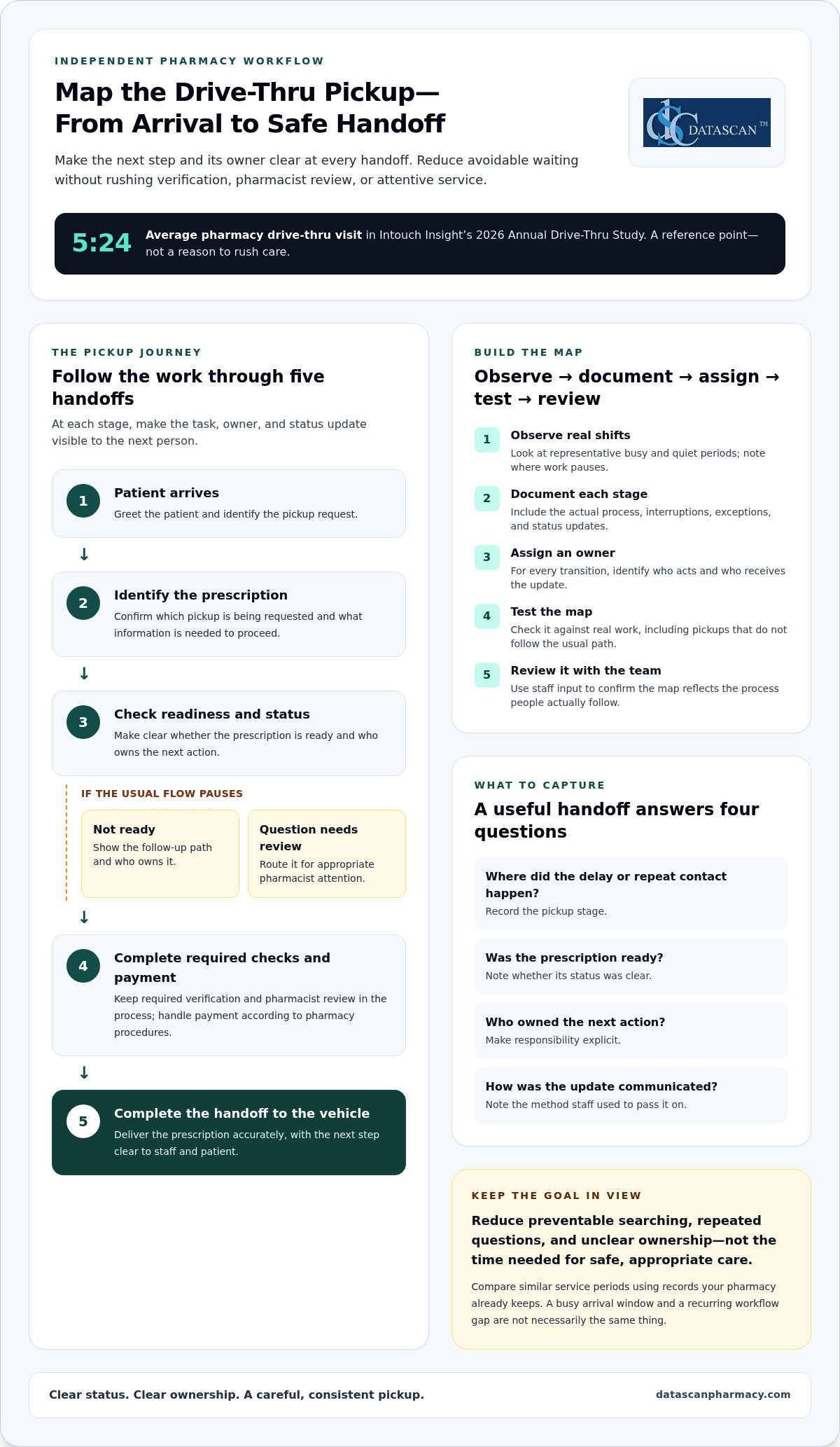
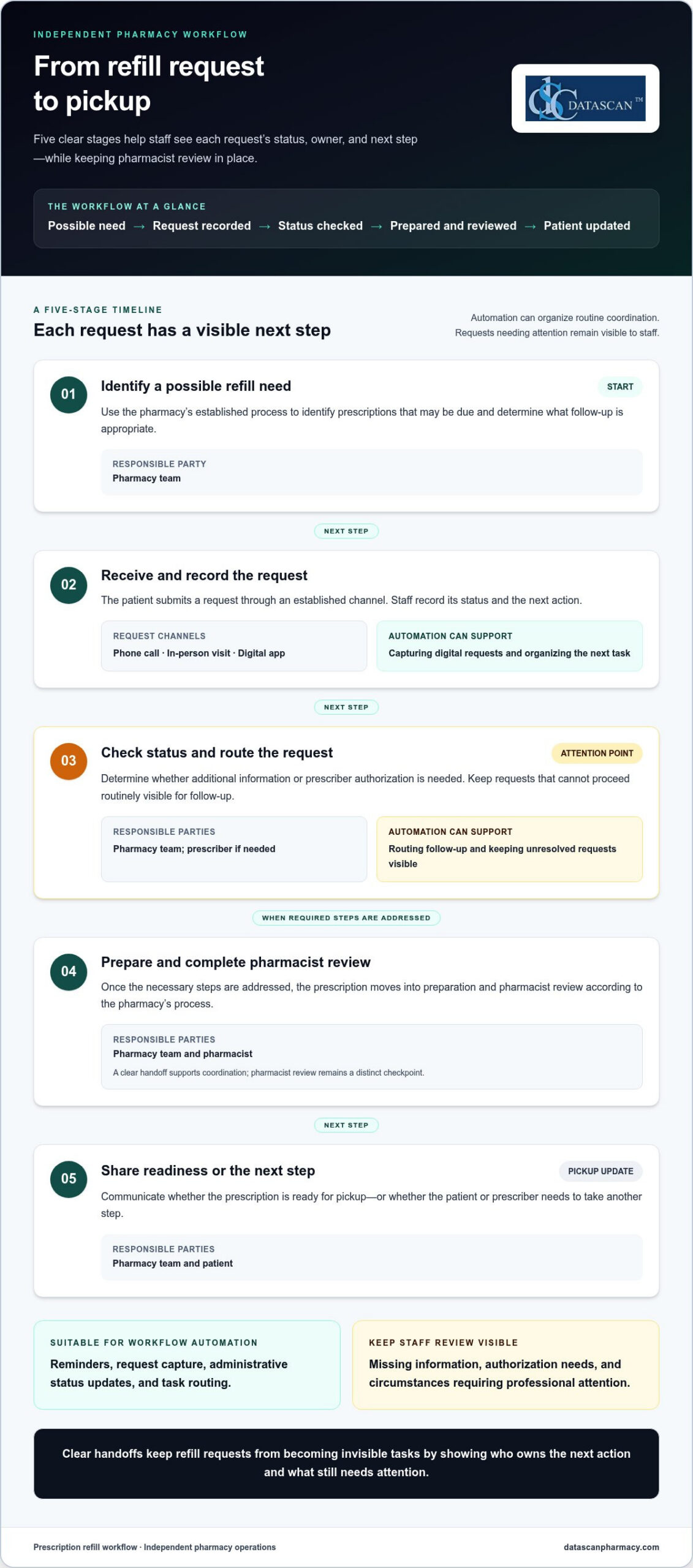
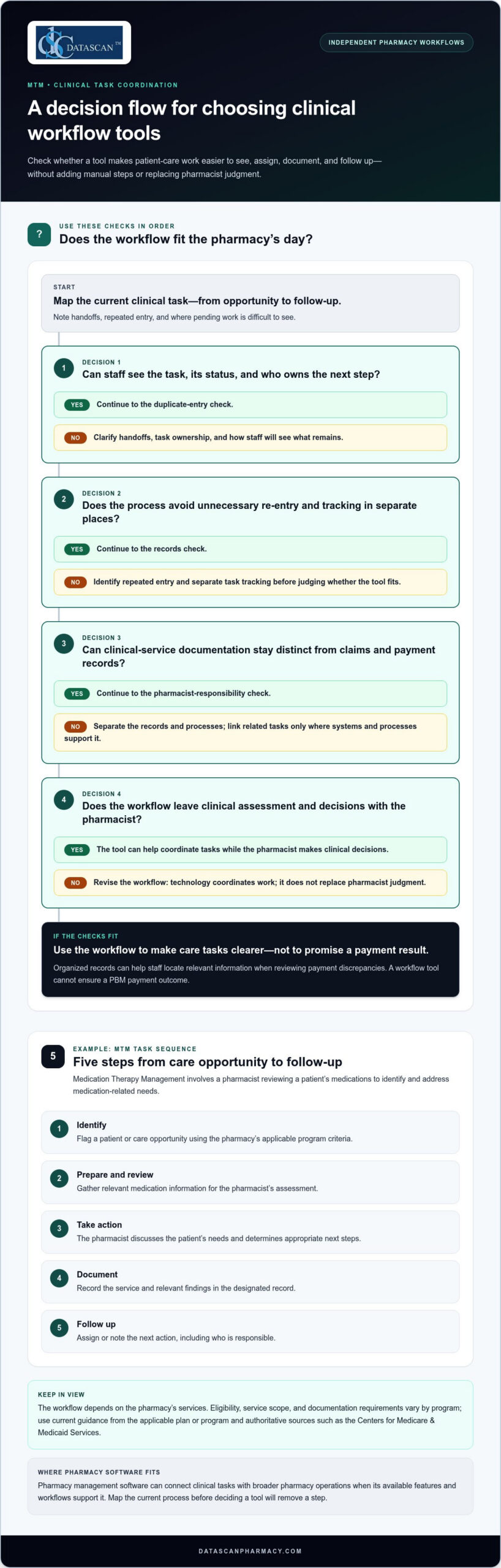
Drive-thru pharmacy workflow efficiency improves when staff can see what needs to happen next and who owns each handoff. The goal is not to rush every transaction. It is to reduce avoidable waiting while preserving careful, personal service. Intouch Insight’s 2026 Annual Drive-Thru Study puts the average pharmacy drive-thru visit at 5 minutes and 24 seconds, but speed matters only when patients still receive attentive service.
If staff repeatedly check prescription status, search for pickup information, or clarify who handles the next step, small delays can add up. Independent pharmacy owners already have plenty to manage, so finding bottlenecks should lead to practical changes, not another complicated project.
This guide explains how to map each handoff, identify avoidable waiting, and create a repeatable process from arrival through pickup. It also shows how to assess Pharmacy management software against your team’s actual responsibilities and workflow, including whether customizable workflow tools can support the way you work. The aim is a smoother drive-thru experience for patients and a more manageable process for staff, without treating speed as a substitute for care.
About the author: Datascan Pharmacy Software focuses on pharmacy technology and operational workflows for independent and retail pharmacies.
Key Takeaways
Trace the pickup journey from arrival to handoff to find delays caused by unclear status, ownership, or extra steps.
Map the process by observing, documenting, assigning responsibility, testing, and reviewing it with the team.
Compare workflow changes by their intended benefit, possible trade-offs, and the measures your team can track consistently.
Test one defined change, assign an owner, and explain the process to the staff it affects.
Assess Pharmacy management software against documented stages and staff responsibilities, including how customizable workflow fits your pickup process.
What slows down drive-thru pharmacy workflow efficiency?
Drive-thru pharmacy workflow efficiency depends on coordinated preparation, clear status communication, and reliable pickup handoffs. A delay may become visible at the window but begin earlier: a prescription is not ready, its status is unclear, or staff do not know who should take the next step.
Drive-thru workflow efficiency is the pharmacy’s ability to move a pickup from patient arrival to a safe, accurate handoff through coordinated tasks and clear status updates. Depending on the pharmacy’s procedures and the pickup, the process may include greeting the patient, identifying the pickup request, checking prescription status, completing required verification and pharmacist review, handling payment, and delivering the prescription to the vehicle.
Not every pause is avoidable. Verification, pharmacist review, and patient questions need the time required for safe and appropriate care. Focus instead on waiting caused by preventable searching, repeated questions, unclear ownership, or tasks that could have been handled before arrival. Pharmacy automation is one broad approach to organizing pharmacy tasks. The Pharmacy Automation overview provides context, but drive-thru handoffs still need to fit the pharmacy’s own process.
Where do drive-thru prescription pickup delays begin?
Look for where a pickup stops moving, not just how long the line is. A queue can grow because several patients arrive together. A processing bottleneck may occur when prescriptions are not ready. A communication bottleneck may show up when staff repeatedly ask whether an order is complete or who is handling it.
Observe the process and use records your pharmacy already keeps. Note when the queue grows, which pickup stages are still in progress, and where staff pause to find information or clarify responsibility. Compare similar service periods rather than relying on assumed industry benchmarks. This helps distinguish a busy arrival window from a recurring workflow gap.
Is the prescription ready when the patient arrives?
Can the staff member at the window identify its current status?
Does the next person know what action will move the pickup forward?
Which handoffs shape the patient pickup experience?
Follow each transition: intake to dispensing, dispensing to final checks, final checks to payment, and payment to vehicle-side service. At every stage, identify who owns the task, what status they communicate, and who receives the update. If ownership is unclear, two people may repeat work while another necessary step waits.
For example, a window staff member may need to confirm whether a prescription has cleared its final check. If that status has not been communicated, the staff member may leave the patient waiting while asking a colleague, even though the prescription is complete. A consistent handoff makes the next action clear without skipping verification or rushing pharmacist review.
How should a pharmacy map its drive-thru pickup workflow?
Map the pickup by observing what happens, documenting each stage, assigning responsibility, testing the map against real shifts, and reviewing it with the team. This gives staff a shared view of how information passes from one person to another, including what happens when a pickup does not follow the usual path.
Observe the work, document each step, assign an owner, test the map, and review it with the team. Keep the map practical. It should reflect the process staff actually follow, including interruptions and exceptions, rather than an idealized version. Record what the patient needs to know, what staff need to know, and how each update reaches the next person.
What should a drive-thru workflow map include?
Start with patient arrival and continue through prescription identification, readiness confirmation, payment, and completed handoff. At each transition, note the responsible role, the information needed to proceed, and the communication method staff use, such as a direct conversation or an available pharmacy system. Mark decision points where the request needs clarification or a question should be routed for appropriate review.
Show exceptions without letting them obscure the usual flow. For example, include a separate path for a prescription that is not ready and another for a question requiring pharmacist attention. These paths help staff see what to do next and who owns the follow-up, while preserving the pharmacy’s established verification and review steps.
How can pharmacy teams identify recurring bottlenecks?
Observe representative busy and quiet periods, then compare what changes and what stays the same. One shift may offer a useful clue, but it should not define the whole operation. Ask team members where they wait for information, repeat a contact, or feel unsure about who owns the next action. Their input can help distinguish recurring process friction from temporary demand or an unusual pickup.
Capture observations in a simple log. Detailed tracking that staff cannot maintain is less useful than consistent notes. Include:
The stage where a delay or repeat contact occurred.
Whether the prescription was ready and its status was clear.
Which role owned the next action and how it was communicated.
Whether the pickup was completed or needed follow-up.
Review the notes with the staff who handle each handoff. Confirm that the map reflects their actual responsibilities, then revise unclear steps before using it to assess changes. This groundwork also helps you decide whether pharmacy workflow software aligns with documented stages and responsibilities. A clear map is a practical starting point for improving drive-thru pharmacy workflow efficiency without asking staff to guess or skip necessary checks.
Which drive-thru workflow changes improve efficiency without sacrificing care?
The most useful changes address a specific point of friction, such as unclear role ownership, delayed status updates, disorganized queue handling, or a process staff manage outside their pharmacy system. Compare options against the process your team has documented. Judge drive-thru pharmacy workflow efficiency by both service flow and reliable, careful handoffs. Results depend on the pharmacy’s process and level of demand, so no change guarantees faster service.
Change
Intended benefit
Trade-off
Measure to review
Clarify role ownership
Reduce uncertainty about who takes the next action.
Responsibilities may need to flex during busy periods.
Repeat contacts and handoffs with unclear ownership.
Standardize status communication
Help staff share pickup status consistently.
A new communication step needs to fit existing work.
Time spent locating status or asking for updates.
Organize queue handling
Make the order and status of waiting pickups easier to follow.
Unexpected arrivals and exceptions can disrupt the sequence.
Waits, incomplete pickups, and queue interruptions.
Review workflow software support
Align system use with documented tasks and responsibilities.
Configuration will not resolve an unclear process by itself.
Manual workarounds and repeated data or status checks.
Should a pharmacy change the process or the software first?
Document the current process before deciding whether software configuration is needed. Start with low-disruption adjustments, such as clarifying ownership or agreeing on a consistent status update. If staff still rely on workarounds because the system does not align with the intended steps, consider a system-level change. Customizable pharmacy workflow software can support a defined process, but it should not be used to hide unclear responsibilities.
How can teams balance pickup speed with prescription accuracy?
Keep verification and appropriate pharmacist review visible in the workflow instead of treating them as obstacles to remove. Define how staff route questions that need pharmacist attention, and make sure routine handoffs do not bypass that path. A well-designed process supports the right review at the right stage while reducing avoidable searching and repeated questions.
Review service flow alongside signs of rework, such as repeated status checks, incomplete pickups, or handoffs that need correction. Treat privacy, prescription accuracy, and appropriate pharmacist involvement as non-negotiable when weighing a proposed change. If a faster step creates confusion or weakens a necessary check, revise the process rather than accepting that trade-off.
How can you test and improve drive-thru pharmacy workflow efficiency?
Test one clearly defined change against a consistent baseline, then review both the patient experience and the work required to complete each pickup. A small, measured pilot helps your team see whether a change reduces friction without creating new handoff problems or weakening necessary checks.
Start with measures staff can collect reliably using existing records or straightforward observations. Define what each measure means before comparing periods. For example, decide which events start and end an arrival-to-handoff measurement, and what counts as a repeat contact. Clear definitions make comparisons more useful and help prevent a busy shift from being mistaken for a process change.
Which measures can reveal drive-thru workflow friction?
Choose a small set that reflects both flow and completeness. Consider arrival-to-handoff time, repeat contacts, unresolved status questions, rework, and pickups that need follow-up. Record the same measures across comparable operating periods, and note unusual demand or exceptions that could affect interpretation. Without a comparable baseline and documented observation period, treat apparent improvement as an observation, not a proven result.
Arrival to handoff: Use the same start and end points each time.
Repeat contacts: Record when staff or patients need to ask again about status or next steps.
Rework and incomplete pickups: Note corrections, repeated actions, or cases that require follow-up.
Staff observations: Capture where the process felt unclear or required a workaround.
How should a pharmacy run a workflow pilot?
Choose one bottleneck the team can describe clearly, such as uncertainty about who communicates a status update. Assign an owner to explain the change, collect observations, and lead the review. Keep the adjustment limited so staff can distinguish its effects from other process changes, and explain what is changing before the pilot begins.
State the problem and the specific change being tested.
Tell affected staff what to do differently and who owns the next step.
Observe the process during the agreed review period and record exceptions.
Discuss results with staff, then continue, adjust, or stop the change.
Review more than timing. Ask whether patients received clear updates, handoffs were complete, staff knew who owned follow-up, and the change introduced extra steps elsewhere. If exceptions increased or staff needed frequent workarounds, revise the approach before expanding it. Do not assume a result will hold under every demand pattern. Record the conditions in which you observed it.
For broader process ideas, the Pharmacy Workflow Optimization Software: The 2026 Efficiency Guide can complement a local pilot. Pharmacy management software and workflow configuration should support the responsibilities your team has defined, not replace clear ownership. Datascan’s customizable pharmacy workflow is one option to assess against your documented process.
How can pharmacy management software support a better drive-thru workflow?
Pharmacy management software can support drive-thru pickup when its workflows align with the pharmacy’s documented stages, staff responsibilities, and patient-service priorities. Evaluate how the system fits the work your team already does rather than assuming software alone will resolve delays or improve drive-thru pharmacy workflow efficiency.
Use your workflow map as an evaluation tool. Follow a pickup through its stages and consider whether staff can access the prescription status information they need, understand who owns the next handoff, and complete payment within the pharmacy’s established process. Datascan Pharmacy Management Software includes customizable workflow capabilities, which can help align system configuration with a pharmacy’s way of working. The setup should support clear responsibilities, not create steps that staff must work around.
What should pharmacy management software support in a pickup workflow?
Assess the system against your actual pickup tasks. Consider prescription status visibility, defined staff handoffs, and whether point-of-sale steps fit the pharmacy’s existing process. Also plan how team members will learn the configured workflow and how you will review it after implementation. These considerations connect software decisions to day-to-day responsibilities rather than evaluating features in isolation.
For example, if the map shows staff often pausing to find out whether a prescription is ready, identify what information the relevant team members need and where they expect to find it. Then discuss how the system and staff process can support that need. Avoid assuming a particular display, alert, or drive-thru function exists unless it is part of the software being evaluated. A useful assessment ties each requirement to a real task and a clear owner.
Review point-of-sale steps just as practically. Consider where payment belongs in the pickup sequence, what information staff need at that stage, and how the process handles exceptions. Datascan Point of Sale is part of the broader set of tools pharmacies can consider alongside pharmacy management software. Review how the pieces fit your operation rather than treating a single feature as a substitute for a coherent workflow.
For a closer look at the broader system, explore Datascan Pharmacy Management Software. As you plan implementation, turn requirements into a straightforward pharmacy software implementation plan: identify the workflow being addressed, determine which staff responsibilities are affected, plan team training, and decide how to assess whether the configured process fits actual work. Keep the plan tied to your pharmacy’s own requirements.
How can independent pharmacies take the next step?
Bring your workflow map, recurring bottlenecks, and pilot observations to a software discussion. These materials connect system requirements to patient service and operational priorities, and help distinguish a configuration need from a process issue. Start with the handoff that most often causes confusion.
Treat drive-thru pharmacy workflow efficiency as an ongoing operational priority, not a one-time fix. As your team tests changes, record what you adjusted and what staff observed. That history can help you make future decisions with more confidence and keep the pickup process aligned with the way your pharmacy works.
If your next step involves technology, bring your documented workflow and priorities into the discussion. Datascan is a family-owned company that has supported independent and retail pharmacies across the United States since 1981, with pharmacy management software and customizable workflow capabilities. Focus on a practical fit for your operation, not change for its own sake.
Improving drive-thru pharmacy workflow efficiency starts with tracing a pickup from arrival to handoff, noting where work pauses, and testing one targeted adjustment at a time. Separate ready prescriptions from cases needing follow-up so different situations are not blended in the same comparison. Use the pharmacy’s own baseline across comparable periods, and keep identity checks, prescription verification, and pharmacist review intact. The aim is less friction, not a promised wait-time result.
What should a drive-thru pharmacy workflow include?
A useful drive-thru workflow covers patient arrival, request and prescription identification, readiness confirmation, payment, routing of questions that need attention, and completed handoff. Assign an owner to each transition and define the status information the next person needs. For example, identify a pickup as awaiting readiness confirmation rather than relying on memory or a second conversation. Adapt the sequence to the pharmacy’s roles, systems, and established operating procedures.
Can pharmacy software improve drive-thru workflow efficiency?
Yes. Pharmacy management software can support drive-thru work when its configuration reflects the pharmacy’s documented stages and staff roles. Assess whether staff can access needed information at the right point, whether handoffs make sense across roles, and how exceptions are handled. Software does not replace staff training, a clear process, or professional judgment. Test the fit with a representative pickup scenario to see whether the system supports the team’s actual workflow.
How should a pharmacy measure drive-thru efficiency?
Track a small, repeatable set of measures, such as arrival-to-handoff time, repeat contacts, unresolved status questions, and corrections or other rework. Define the start, end, and counting rules before collecting data, then compare similar operating periods against a baseline. Note factors such as unusual volume or exception cases so they do not distort interpretation. No single number describes the whole patient experience, so review measures alongside accurate handoffs and appropriate care.
How can a pharmacy handle prescriptions that are not ready at drive-thru pickup?
Create a separate path for a pickup that is not ready: confirm its current status, explain the next step to the patient, and assign a staff owner to follow through. Record what triggered the exception and whether the patient needed another contact, so the team can spot recurring causes. If the interaction raises a clinical question, route it through the pharmacy’s established process for pharmacist attention rather than improvising an answer.
What is the difference between drive-thru workflow efficiency and faster service?
Drive-thru workflow efficiency means coordinating a pickup with less avoidable friction. Faster service refers only to elapsed time. A shorter visit is not a success if the patient leaves without clear information, staff repeat work, or verification is rushed. Review how smoothly tasks move alongside handoff completeness and rework. This broader view helps the pharmacy improve operations without making speed the only measure that matters.
A dashboard won’t improve patient care on its own. Pharmacy data analytics for patient outcomes is useful when prescription and workflow information helps your team identify a follow-up opportunity and take a practical next step.
Independent pharmacy owners know that consistent care takes time, and operational reports don’t always show whether patients are getting the follow-up they need. Prescription and clinical information can also be scattered across daily work, leaving little time to look for patterns. Pharmacy management software can help organize information used in care workflows, making it easier for a busy team to review.
This article explains how to connect pharmacy data with patient-care questions, interpret findings carefully, and turn useful patterns into manageable actions. About the author: The Datascan Pharmacy Software team focuses on pharmacy management software and operational workflows for independent and retail pharmacies.
Key Takeaways
Connect a specific care question to measures your team can review and act on.
Compare dispensing and refill records, medication synchronization activity, care-plan documentation, and patient feedback, while considering the limits of each source.
Separate baseline, process, and patient-outcome measures so completed tasks aren’t mistaken for improved health.
Build a repeatable review cycle around actionable exceptions and your team’s capacity.
Use pharmacy management software and customizable workflows to organize review and follow-up, not as proof of clinical impact.
What does pharmacy data analytics for patient outcomes actually measure?
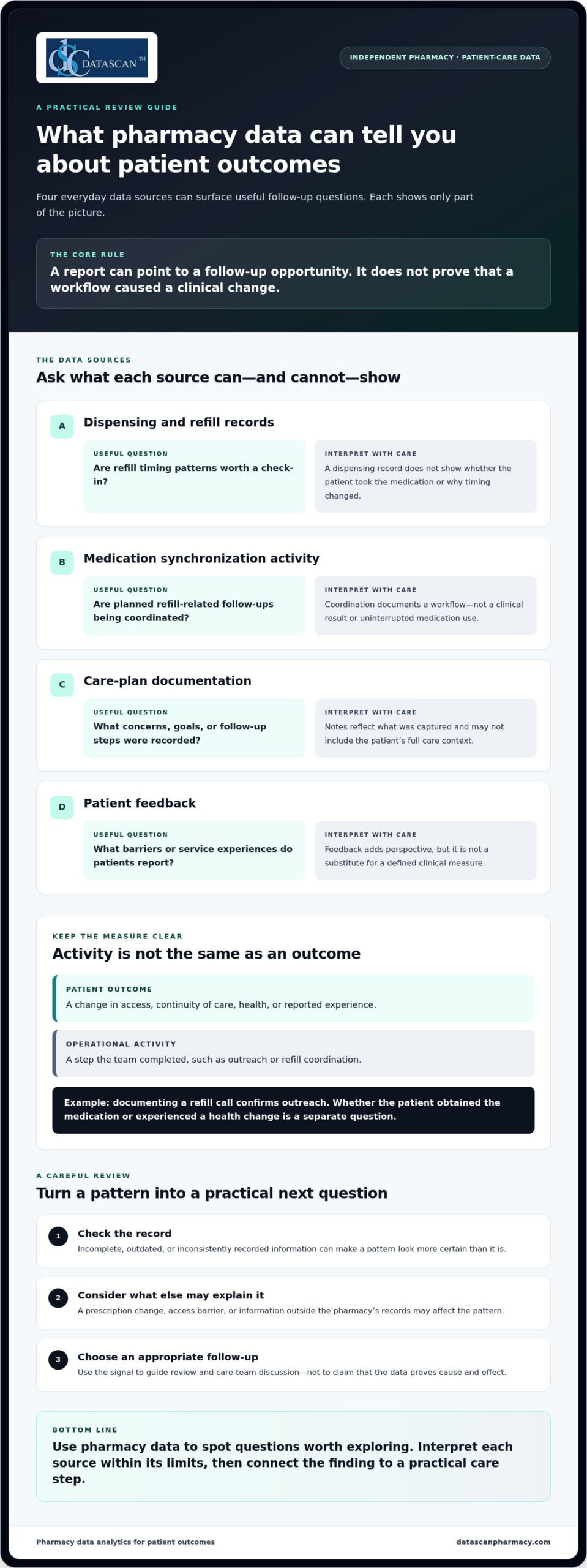
Pharmacy data analytics for patient outcomes connects information a pharmacy already handles to practical questions about care, follow-up, and patient experience. It can help an independent pharmacy identify where a patient may need attention. A report is a starting point for review, not proof that a particular service caused a clinical change.
Outcome measures describe a change in a patient’s health, medication access, continuity of care, or reported experience. Pharmacy activity measures describe work the team completed, such as outreach or refill coordination. Both can be useful, but an activity shouldn’t be presented as an outcome.
This work uses pharmacy information to support healthcare decisions. For clinical measures, consult the Pharmacy Quality Alliance’s measure resources and other appropriate clinical guidance to understand how a measure is defined and what it captures. Pharmacy management software can organize information used in established workflows, but a measure’s meaning depends on its definition, the information available, and the patient’s circumstances. A pharmacy management software system can support those workflows; it doesn’t independently prove cause and effect.
Which patient outcomes can a community pharmacy reasonably examine?
Start with areas the pharmacy can observe or document: whether a patient was able to obtain medication, whether refills appear consistent over time, whether planned follow-up took place, and how patients describe their experience. These indicators can flag a need for a closer look. Dispensing records alone, however, may not explain why a prescription wasn’t filled or whether a patient took the medication.
For clinical measures, use a validated definition and interpret results in the appropriate clinical context. Some long-term health outcomes depend on information outside the pharmacy’s view, so routine operational data may not show the full picture.
How are patient outcomes different from operational metrics?
An operational metric shows whether a step occurred. A patient-level measure asks whether something about the patient’s access, continuity, health, or experience changed. Operational indicators can point to useful follow-up opportunities, but completing a task doesn’t establish that the patient’s condition improved.
For example, a record that staff contacted a patient about a refill documents outreach. Whether the patient obtained the medication, continued treatment, or experienced a health change is a separate question that may require additional information and context.
Interpret findings cautiously. If patients who received follow-up show a different pattern later, that association can guide the team’s next question, but it doesn’t establish that follow-up caused the difference. Other factors may be involved, including a prescription change, access barriers, or information the pharmacy doesn’t hold.
For a useful review, label each measure as a patient outcome, a process measure, or a contextual indicator. This helps owners and staff discuss what the data shows, what it can’t show, and what follow-up may be appropriate, without mistaking a completed workflow step for better care.
What pharmacy data can help you understand patient outcomes?
Useful pharmacy data can come from routine dispensing, refill coordination, documented care-plan activity, and patient feedback. Together, these sources can help an independent pharmacy identify questions for follow-up, but each offers only part of the picture. Pharmacy data analytics for patient outcomes is most useful when the source, question, and limits of interpretation are clear.
Data quality affects how confidently a result can be interpreted. Incomplete, outdated, or inconsistently recorded information can make a pattern look more certain than it is. Before drawing conclusions, check what the record captures and what may be missing.
Data source
Possible question
Interpretation caveat
Dispensing and refill records
Are there refill timing patterns that may warrant a check-in?
A record shows dispensing activity, not whether the patient took the medication or why timing changed.
Medication synchronization activity
Are planned refill-related follow-ups being coordinated?
Coordination documents a workflow, not a clinical result or uninterrupted medication use.
Care-plan documentation
What concerns, goals, or follow-up steps were recorded?
Documentation reflects what was captured and may not include the patient’s full care context.
Patient feedback
What barriers or service experiences do patients report?
Feedback adds perspective, but isn’t a substitute for a defined clinical measure.
Can dispensing and refill patterns reveal follow-up needs?
They can point to a question worth asking, but they don’t establish adherence or health status. A refill later than expected might prompt staff to review the record or follow up. Timing can also reflect a prescription change, supply on hand, access issues, or a patient’s circumstances. Medication synchronization can help coordinate refill timing and related follow-up; the activity itself doesn’t prove that treatment continued.
How can care plans and patient feedback add context?
Care-plan notes can show what was discussed, what follow-up was planned, and whether a concern was documented alongside prescription information. Patient feedback can add another useful signal, such as a reported difficulty obtaining medication or understanding a process. Consider these sources together, while keeping feedback distinct from validated clinical measures and recognizing that documentation may not capture every interaction.
Information may be spread across systems or recorded differently by team members. First establish which records are available and how consistently they’re maintained. Access and use also depend on the pharmacy’s workflows and applicable requirements. Tie each measure to a defined question, then check whether the records contain the details needed to answer it.
For example, if the question is whether refill coordination is happening as intended, distinguish a record of planned contact from a patient-reported barrier or clinical measure. That separation helps avoid treating missing documentation as proof that care did or didn’t occur. A clear, manageable workflow can help the team capture follow-up consistently. Discuss pharmacy workflow needs in the context of your day-to-day processes.
How do you analyze pharmacy data without confusing activity with better outcomes?
Use a simple sequence: define a care question, choose a measure, check the data, interpret the pattern, and decide what action is appropriate. This keeps pharmacy data analytics for patient outcomes focused on decisions your team can make instead of reports without a clear purpose.
Define one question. Tie it to a specific care priority, such as whether a follow-up process is reaching the patients it is intended to reach.
Select a measure. Specify exactly what will be counted, for whom, and from which records.
Review data quality. Check whether records are complete, consistent, and relevant to the question.
Interpret the pattern. Compare like with like, and document changes in patients, prescriptions, or workflows that could affect the result.
Choose an action. Decide whether the finding calls for follow-up, a workflow adjustment, or more information before drawing a conclusion.
Keep three measure types distinct. A baseline measure describes the starting point for comparison. A process measure records an activity, such as a documented outreach attempt. A patient-outcome measure describes a defined patient-level result. A process measure may help explain how care was delivered, but it doesn’t substitute for an outcome measure.
Which measure should a pharmacy choose first?
Choose one care question that matters to the pharmacy and can be answered with information the team can reliably review. Define the measure in plain terms, including its data source and the population it describes. If staff can’t interpret the result or connect it to a reasonable next step, the indicator may add reporting work without helping care decisions.
How can you interpret trends responsibly?
Use consistent time periods and definitions when comparing results. Note missing records, changes in documentation, and workflow adjustments, since these can affect what appears in the data. For clinical measures, follow the measure’s published specification and appropriate clinical guidance rather than creating a local definition that looks similar but counts something different.
A before-and-after change alone cannot prove that a pharmacy action caused the difference. A trend may be associated with an intervention, but other explanations can include a change in patient mix, a therapy change, or incomplete records. The data can help identify a pattern, but it can’t isolate cause and effect by itself.
Consider a pharmacy reviewing a follow-up process over time. If documented contacts increase, that may show a change in recorded activity. It doesn’t establish that patients had better access or a different clinical result. Check whether the patient-level measure was defined and captured consistently, and whether other changes could explain the pattern.
When the meaning or clinical significance of a measure is unclear, avoid overinterpreting it. Consult an appropriate clinical expert or the authoritative source that defines the measure. Pharmacy software can help teams organize information within existing work, but careful definitions and sound judgment are what make the analysis useful.
How can an independent pharmacy turn analytics into patient-care action?
Turn analytics into action by building a small, repeatable review cycle around work your team already does. Choose a care question, review only the information needed to answer it, assign appropriate follow-up, and check whether the process is useful before expanding it. Pharmacy data analytics for patient outcomes should lead to a manageable decision, not another report competing with patient care.
A practical review cycle can look like this:
Select a priority. Choose a care process the pharmacy wants to understand, such as whether planned follow-up is reaching the intended patients.
Review actionable exceptions. Focus on records that may need attention rather than scanning every metric. Confirm the information before treating an exception as a care need.
Assign responsibility. Make clear who reviews the information, who handles appropriate follow-up, and where the action is documented.
Assess the workflow. Consider whether the review led to a useful next step and whether the team can sustain it with available capacity.
Keep documentation focused on the decision and action. Limit access to patient information according to appropriate team responsibilities and applicable privacy requirements. For practical ways to align review steps with daily pharmacy work, consider pharmacy workflow optimization.
How can you fit a data review into a busy pharmacy day?
Start with a small set of defined measures linked to existing care processes, then assign review and follow-up within the team’s current responsibilities. A brief, consistent review is more manageable than adding a reporting task with no clear owner. Before expanding, check whether the information led to a useful action and whether the process fits the pharmacy’s capacity.
Customizable workflows and pharmacy management software can help organize information around established responsibilities. Medication synchronization and e-care plans can support consistent follow-up processes, but they don’t guarantee clinical results. The pharmacy still needs a clear purpose for each review and a practical way to document the next step.
How can analytics support PBM-related patient-care decisions?
Keep reimbursement analysis separate from patient-outcome measurement. Reimbursement records can help the owner understand financial performance, while care measures address questions about patient access, follow-up, or experience. The two areas can overlap operationally because financial pressure may constrain the time or resources available for care activities, but assess that connection locally rather than assuming it.
For example, a reimbursement review may help identify a business concern, while a separate care review tracks whether planned follow-up is taking place. Keeping the questions distinct makes both analyses easier to interpret. Pharmacy software can support organized workflows, but it can’t establish that a reimbursement change caused a patient outcome or that an operational adjustment improved care.
Choose an analytics workflow that fits your team’s care priorities and daily responsibilities. Talk with Datascan about pharmacy workflow needs and how software can support a more manageable review process.
How can pharmacy management software support patient-outcome analytics?
Pharmacy management software can support patient-outcome analytics by organizing operational information within established pharmacy workflows, helping staff document care activity and identify records for review. It provides structure for the process, not a clinical conclusion. Pharmacists still interpret information, apply professional judgment, and decide what follow-up is appropriate.
For independent pharmacies, that distinction matters. A useful system should support the path from information to action without turning analytics into a separate administrative burden. Dispensing details, refill coordination, and documented care-plan activity may inform a review, while the pharmacy team determines what the information means for an individual patient. Data alone can’t establish that a workflow caused a particular outcome.
What should pharmacy management software contribute to an analytics process?
Look for practical support in three areas: organized information staff can use in their work, visibility into relevant workflow steps, and consistent documentation of follow-up. These features can help a team review its process more reliably. Software should assist the pharmacist’s judgment, not replace clinical expertise or turn an operational record into a clinical assessment.
Before adding a measure, connect it to a clear workflow question. Can the team locate the information needed for review? Is follow-up documented consistently? Does the result point to an action the team can take? If those links aren’t clear, adding more reports may create work without improving the decision process. A customizable workflow can help align review responsibilities and documentation with the pharmacy’s operations.
Datascan’s pharmacy management software is designed for independent and retail pharmacies. Its software suite includes medication synchronization and e-care plans, which can support organized refill coordination and consistent follow-up processes. These are workflow supports, not guarantees of improved adherence or other clinical outcomes.
How can Datascan help independent pharmacies connect insight with action?
Datascan provides pharmacy software for independent and retail pharmacies. Its customizable workflows can help align information review and follow-up with how a pharmacy team works, while medication synchronization and e-care plans support care processes. The pharmacy team remains responsible for interpreting information and choosing appropriate next steps.
Datascan is a family-owned company founded in 1981 and offers U.S.-based support. Its experience provides context for its focus on pharmacy operations, but software features don’t prove that a particular intervention produced a patient outcome. Keep measures clearly defined and use the system to support a careful review process.
When evaluating how software fits an analytics process, consider whether it can support the questions your team wants to answer, the information it needs to review, and the follow-up steps it can reasonably sustain. A conversation about your pharmacy’s workflows can help clarify what an organized process could look like. The goal is not more data for its own sake, but useful information that supports sound decisions and patient care.
Choose one patient-care question to act on
Your next step doesn’t need to be a large analytics project. Choose one patient-care question that matters to your pharmacy, decide what information would help answer it, and identify who can review the finding and determine a reasonable next step. A focused starting point keeps pharmacy data analytics for patient outcomes connected to real decisions instead of adding another task without a clear purpose.
As your approach develops, keep the process grounded in your team’s capacity. The right pharmacy management software should support how your pharmacy organizes information and follow-up, while leaving clinical interpretation and care decisions with your pharmacy professionals.
Can pharmacy data analytics prove that a pharmacy service improved patient health?
No. Pharmacy data analytics for patient outcomes can show changes or relationships in defined measures, but it can’t establish on its own that a service caused a health result. A measure may shift after a new follow-up process begins while other factors also change. Document what was introduced, check for competing explanations, and use appropriate clinical evidence before making claims about impact.
What patient outcomes can an independent pharmacy track?
The right measure depends on the care question and the information the pharmacy can reliably access. A pharmacy might select a defined measure related to medication access, continuity, or patient-reported experience, then specify which patients and records it covers. Use a validated definition where available, and state any limits clearly. A dispensing record alone, for example, can’t confirm how a patient used the medication.
How can pharmacy analytics help identify patients who may need follow-up?
Analytics can help surface records for review, such as a refill workflow that appears interrupted or a planned follow-up without documented completion. Treat these as prompts, not diagnoses. A staff member should verify the record, consider relevant context such as a changed prescription, and follow the pharmacy’s established process to decide whether outreach is appropriate. A flag should guide professional review, not automatically trigger a clinical conclusion.
What is the difference between a pharmacy process measure and a patient outcome?
A process measure records what the pharmacy team did, while a patient outcome describes a defined result for the patient. For instance, documenting that a medication review was completed measures an activity; a separately defined patient-level measure is needed to assess a result. Tracking both can help show whether a service was delivered and what happened afterward, but one measure shouldn’t substitute for the other.
Does pharmacy management software automatically improve patient outcomes?
No. Pharmacy management software can support organized records and repeatable workflows, but its presence doesn’t guarantee a clinical result. A system may help staff track a planned follow-up, while the pharmacy team still needs to assess the patient’s situation and determine an appropriate response. Evaluate software by how it supports a defined care process, not by assuming a feature itself improves health.
How can a pharmacy use analytics without adding too much staff workload?
Start with one question tied to a process the team already performs, and choose information that can be reviewed within existing responsibilities. Assign a clear owner to check exceptions and record the outcome of that review. If the information doesn’t lead to a decision or useful follow-up, simplify the measure or stop collecting it. Expand only after the initial process proves practical for the team.
How should a pharmacy protect patient information when reviewing analytics?
Use established pharmacy privacy and security procedures, limit access according to team roles, and review information only for an appropriate purpose. Before setting up a new report or review process, identify where its information comes from, who will see it, and how findings will be recorded. Requirements depend on the activity and applicable rules, so use current authoritative guidance and the pharmacy’s compliance resources for decisions about specific obligations.
A proof of delivery app for pharmacy should give staff a clear, retrievable record of delivery status and help them know when follow-up is needed. If it creates a disconnected record or duplicates existing work, it can add tasks instead of saving time.
That distinction matters when pharmacy teams are balancing patient service, daily operations, and pressure on reimbursements. Paper records and unclear delivery status can lead to avoidable follow-up. A tool that doesn’t fit your pharmacy’s workflow can leave staff managing yet another system.
This guide explains how to assess delivery documentation, workflow fit, and the way delivery tools work alongside pharmacy management software. You’ll find practical questions to use when comparing options and learn how Datascan’s pharmacy-focused delivery tools fit into the evaluation. Author bio: Datascan Pharmacy Software provides pharmacy management software and delivery tools for independent and retail pharmacies.
Key Takeaways
A proof of delivery app for pharmacy should document delivery status and help staff review it. It is not the same as route planning or patient communication.
Map each delivery step, from preparation to driver handoff and pharmacy follow-up, to identify where a tool fits your current process.
Compare workflow fit, status visibility, record access, staff usability, and how the app relates to your pharmacy management software.
Before adopting an app, define staff responsibilities, training needs, exception handling, and who needs access to delivery records.
Review how Datascan’s Mobile Delivery App and Electronic Delivery System fit into pharmacy delivery management.
What Does a Proof of Delivery App for Pharmacy Need to Prove?
A proof-of-delivery app records delivery completion and helps pharmacy staff review a delivery’s status. Its core purpose is to make the handoff easier to account for. Staff should be able to see whether a delivery is complete or needs follow-up without piecing together events from scattered notes, calls, or messages.
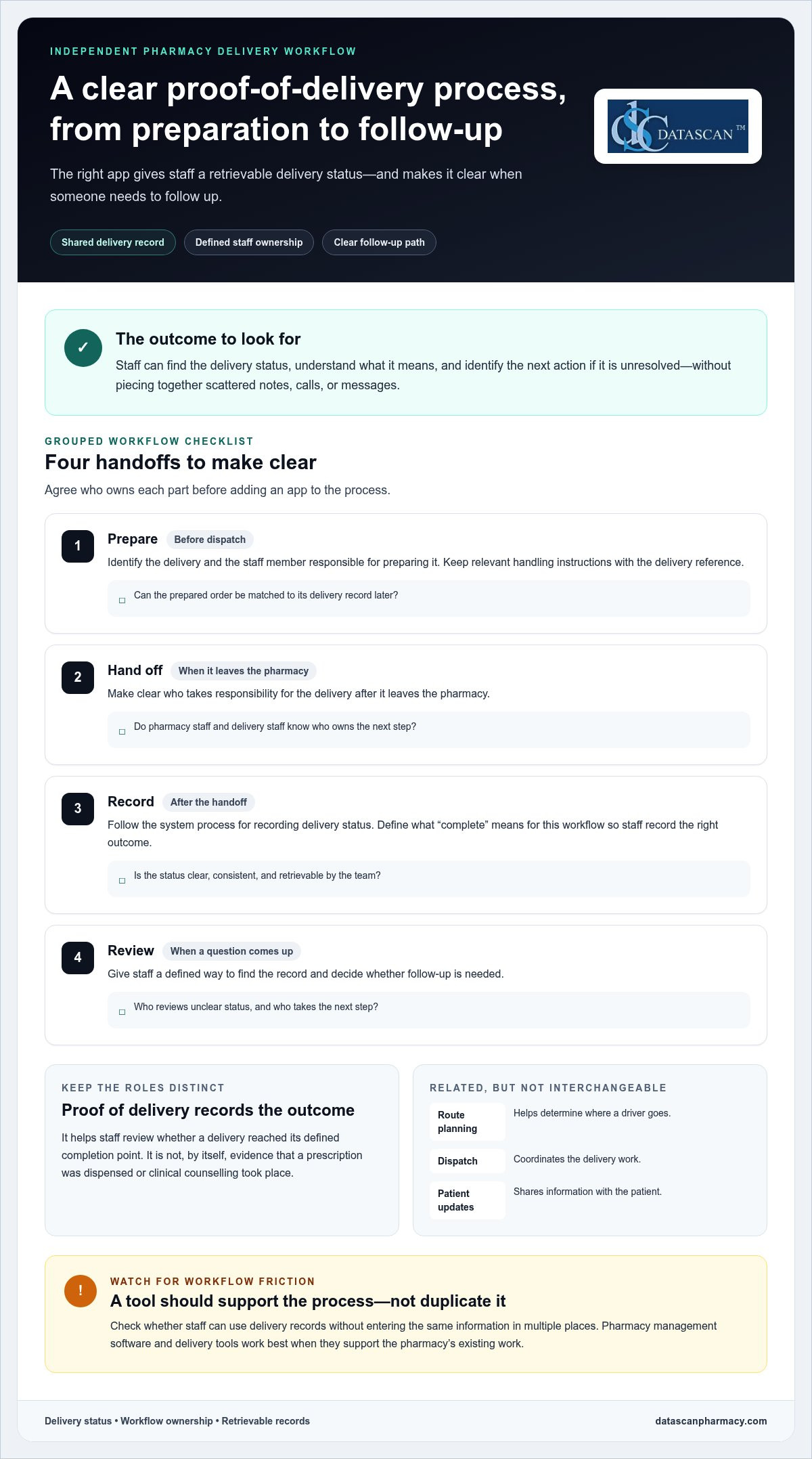
That purpose is narrower than general delivery logistics. Route planning helps determine where a driver goes; dispatch coordinates the work; patient communication shares updates. Delivery proof records the outcome of the handoff. A tool may combine some of these functions, but they aren’t interchangeable. A planned route doesn’t show that a delivery was completed, and a message to a patient doesn’t, by itself, establish the delivery outcome.
Use a practical test: can staff find a clear delivery status, understand what it means, and identify the next action when the status is unresolved? A useful process gives pharmacy staff and drivers a consistent handoff and gives the team a shared reference when questions arise. Pharmacy management software and delivery tools work best when they support the way the pharmacy already handles prescriptions and delivery work. Datascan’s Electronic Delivery System is part of its pharmacy delivery technology.
What counts as proof of delivery in a pharmacy?
Proof of delivery (POD) is a record showing that a delivery reached its intended completion point. The evidence included depends on the system and the pharmacy’s process, so don’t assume that every app captures the same information. For general background on the term and its electronic use, see Proof of delivery (POD).
Keep the meaning precise. A delivery confirmation concerns the delivery handoff. On its own, it doesn’t prove that a prescription was dispensed or that clinical counselling took place. Those are separate pharmacy activities. Define what “complete” means for each delivery workflow so staff record the right status without treating one event as evidence of another.
Why do independent pharmacies need delivery visibility?
When staff can’t tell whether a delivery is complete, a routine patient question can trigger several manual checks. Someone may need to find a paper note, call a driver, or ask a colleague what happened. A visible, retrievable delivery record gives the team a shared reference for follow-up and helps distinguish unresolved deliveries from completed ones.
Pharmacy proof of delivery is a retrievable record that shows whether a prescription delivery reached its defined completion point. For an independent pharmacy, that clarity can support a more organized handoff and make status checks easier to manage. It doesn’t replace route planning, dispensing records, or patient counselling.
How Does a Pharmacy Proof of Delivery App Fit the Delivery Workflow?
A pharmacy proof of delivery app fits between preparing an order for delivery and reviewing what happened after the driver handoff. It works best when staff know who prepares the delivery, who records its status, and who handles exceptions. Define those responsibilities first so the app supports the pharmacy’s process instead of creating a parallel set of tasks.
Think of the workflow as a chain of handoffs. The pharmacy identifies the delivery, assigns responsibility for the next step, records the status after the handoff, and uses that record to guide follow-up. The app can give staff a shared place to review delivery information, but the pharmacy still needs to decide who updates the record and acts on it. Software alone can’t resolve unclear ownership.
Where should delivery information enter the workflow?
Start before dispatch, when staff identify which order is going out and note any handling instructions relevant to that delivery. Prescription-processing details belong in the pharmacy’s established process. Delivery staff need a consistent reference that connects the prepared order to its delivery record. Using the same reference at preparation, handoff, and review makes it easier to match a record to the delivery later.
This is where the wider system matters. Pharmacy management software supports core pharmacy operations, while the delivery process needs to connect clearly to the work staff already do. Review how pharmacy management software fits into your operating process, then map delivery handoffs around your team’s actual responsibilities.
Prepare: Identify the delivery and the staff member responsible for preparing it.
Hand off: Make clear who takes responsibility for the delivery after it leaves the pharmacy.
Record: Follow the system process for recording the delivery status.
Review: Give pharmacy staff a defined way to find the record and decide whether follow-up is needed.
These steps define workflow ownership, not a promise that an app automates each task. During evaluation, check whether staff can use the app’s records without entering the same information in multiple places. The aim is a dependable handoff, not extra data entry for its own sake.
What should happen when delivery status needs follow-up?
Set an exception process before the team starts using a new tool. Staff should know how to identify a delivery with an unclear status, who reviews the available record, and who takes the next step. Define when an unresolved item moves from routine review to a designated supervisor or manager.
Keep reference details consistent across preparation, handoff, and review. If the pharmacy uses different labels or identifiers at each stage, staff may struggle to match a delivery record to the order they’re checking. A short written procedure can establish who records the status, how the team finds the record, and where to document the outcome of follow-up.
Delivery status records also serve a different purpose from supply-chain traceability. The FDA’s Drug Supply Chain Security Act (DSCSA) information addresses drug supply-chain security, not the pharmacy’s delivery workflow. To discuss how delivery tools fit into pharmacy operations, visit Datascan’s contact page.
Which Proof of Delivery App Features Matter Most to a Pharmacy?
The most useful features are those that support your delivery workflow and make delivery status and records easy for staff to review. Compare tools against real tasks, not the length of a feature list. A capability is valuable when it addresses an operational need without adding unnecessary steps.
Use this table to focus your evaluation:
Evaluation area
What to assess
Why it matters
Workflow fit
Can staff use the tool within the steps they already follow?
A natural fit can reduce workarounds and duplicate handling.
Delivery status visibility
Can staff find and understand the available status?
Clear status helps the team respond to questions and identify items needing review.
Record access
Can the appropriate staff locate delivery information when needed?
Accessible records can support organized follow-up and internal review.
Staff usability
Can pharmacy staff and drivers follow a repeatable process?
A usable process is easier to apply consistently.
System fit
How does the delivery tool relate to pharmacy management software and existing work?
A considered fit can limit disconnected steps.
How can I assess delivery records and visibility?
Evaluate the record from a staff member’s perspective. Can they locate a delivery, interpret its status, and review the available information efficiently? Ask to see a typical pharmacy delivery workflow in a product demonstration. Confirm specific capabilities rather than inferring them from labels. Timestamps, signatures, and location data are product-specific details to verify, not assume.
Retrievable delivery information may also help staff organize an internal review when a PBM reimbursement question involves delivery documentation. It can give the team relevant information to examine, but it doesn’t determine whether a claim qualifies for reimbursement or guarantee a particular result. Assess how easily staff can find the records they need, and keep documentation review within your pharmacy’s established process.
How do I judge usability and pharmacy system fit?
Test the process with the people who will use it: staff preparing deliveries, drivers handling them, and team members reviewing records. Look for a simple, repeatable sequence that doesn’t rely on undocumented steps. Evaluate delivery tools in the context of your actual pharmacy workflows and pharmacy management software.
A proof of delivery app for pharmacy should help staff complete necessary work with clear roles and usable records. Prioritize capabilities that address a known gap rather than adding features without an operational purpose. Assess delivery documentation separately from any specific PBM reimbursement or review criteria your pharmacy follows.
Can a Proof of Delivery App Improve Accountability Without Adding Staff Work?
Yes, if the app fits the responsibilities your team already has. A proof of delivery app for pharmacy can make delivery work easier to review, but unclear ownership or duplicate entry can add steps instead of reducing them. Before choosing a tool, test how it works for the people preparing deliveries, handling handoffs, and reviewing exceptions.
Clear delivery ownership gives staff a defined way to record, review, and act on delivery information. That can make it easier to handle status questions without repeatedly chasing updates. Accountability comes from a clear process, not from adding software alone.
What should a pharmacy test before choosing an app?
Walk through representative situations with the staff who will use the tool. Include a routine delivery, a failed handoff, and a patient or staff member asking for a status update. At each point, note who records the information, who can find it, and who decides what happens next. This reveals workflow gaps that a feature list may not show.
Staff roles: Identify who prepares a delivery, records its status, reviews unresolved items, and handles follow-up.
Training: Determine what drivers and pharmacy staff need to learn to complete their part consistently.
Exceptions: Agree on how the team handles a failed handoff, incomplete status, or record that needs clarification.
Record access: Establish which staff need to locate delivery information and how they’ll use it during follow-up.
Product capabilities: List open questions and verify specific functions instead of assuming they’re included based on a feature name.
Use the same scenarios to compare your current process with the proposed one. Note repeated entry, unclear handoffs, or steps that depend on informal messages. The aim isn’t to eliminate every staff action. It’s to see whether the app makes necessary work clearer without creating avoidable workarounds.
How can a pharmacy introduce delivery technology smoothly?
Begin with a written workflow that shows who owns each step and where staff turn when an exception occurs. Orient the team to that process before relying on the tool, then apply the same procedure consistently. Broader pharmacy workflow optimization can help show how delivery tasks fit into pharmacy operations.
After introducing the process, gather staff feedback on points that cause confusion or extra handling. Clarify responsibilities or steps as needed, and make sure the people responsible for follow-up can access the records they need. A small, repeatable process is more useful than a complicated workflow that only one team member understands.
Datascan’s pharmacy software and delivery tools are designed for pharmacy operations. Learn more about discussing your pharmacy’s delivery workflow on Datascan’s contact page.
How Can Datascan Support Pharmacy Delivery Management?
Datascan supports pharmacy delivery management with the Datascan Mobile Delivery App and Electronic Delivery System. These tools are designed for pharmacy operations. Evaluate their fit against your team’s real workflow: how deliveries are prepared, how responsibility is handed off, and how staff review delivery records. This helps you assess how delivery technology can complement pharmacy management software rather than become a disconnected task.
Where do Datascan’s delivery tools fit?
The Datascan Mobile Delivery App provides mobile delivery tracking, while the Electronic Delivery System offers electronic delivery tools. Pharmacies can evaluate these delivery-focused options alongside pharmacy management software. Focus on how the tools relate to your operation’s needs and the capabilities that matter to your delivery process.
As you assess records and workflow, consider how the Electronic Delivery System relates to the way your team handles delivery information. Compare the tools with your evaluation criteria: workflow fit, status visibility, record access, staff usability, and system fit. Focus on your pharmacy’s needs and distinguish demonstrated functions from assumptions based on a product name or feature label.
Delivery management is one part of the broader pharmacy operation. Pharmacy management software supports the wider environment in which staff prepare and manage pharmacy work, while delivery tools address delivery-related processes. Reviewing both together can help identify where a consistent workflow may support accountability and reduce unnecessary staff follow-up. Keep responsibilities clear for tasks your team still needs to perform.
What is the next step for evaluating fit?
Prepare a short outline of your current process before discussing options. Note the steps from delivery preparation through handoff and record review, identify the staff roles involved, and list common situations that require follow-up. Bring questions about how delivery records are accessed and which product capabilities matter to your operation. This keeps the discussion focused on your team’s needs rather than a generic feature checklist.
Datascan has served pharmacies since 1981 as a family-owned and operated company, and U.S.-based technical support is part of its offering. This is relevant context for independent and community pharmacies considering technology for day-to-day operations, including the time demands placed on owners and staff.
A proof of delivery app for pharmacy should be evaluated within the full delivery workflow, with clear roles and useful records at the center. Datascan’s pharmacy software and delivery tools offer a pharmacy-focused option to consider as you compare workflows. Bring your delivery steps, staff responsibilities, and key questions to the conversation.
Turn your evaluation into a clear picture of how delivery work should move through your pharmacy. Identify where staff need better visibility, which records they must be able to review, and what responsibilities belong to each team member. This gives you a practical basis for deciding whether a proof of delivery app for pharmacy will support your operation or add another task to manage.
Keep the goal focused: give your team a dependable way to understand delivery status and act on unresolved issues, while protecting time for the work only pharmacy staff can do. A thoughtful workflow discussion can connect delivery tools with the way your pharmacy already operates.
A proof of delivery app for pharmacy use records delivery outcomes for staff to review. It helps answer an operational question: what information is recorded about this handoff? On its own, it doesn’t establish that a prescription was dispensed correctly or that counselling occurred. Before selecting an app, define what your pharmacy considers a completed delivery and how staff will use the record during a patient inquiry or internal review.
How does a pharmacy proof of delivery app work?
A pharmacy delivery app gives staff and drivers a process for associating a delivery with its status and reviewing the available record. For example, if a patient calls about an order, staff can use the pharmacy’s chosen reference to locate the delivery information and determine whether further investigation is needed. The exact steps and captured details depend on the product, so build your workflow around demonstrated capabilities.
What should I look for in a pharmacy delivery app?
Look for a tool that addresses a specific need in your operation, such as finding a delivery record or clarifying who handles an unresolved status. Test common tasks with the people who will use the system: have a staff member locate a sample record, explain its status, and identify the next action. Verify specific evidence and functions rather than assuming they come with a feature label.
Can a proof of delivery app help reduce delivery follow-up work?
It can help staff answer some status questions using a retrievable record, but follow-up is still needed when information is missing or an exception requires investigation. Consider which delivery questions your team receives and what information staff need to resolve them. This gives you a practical way to assess whether a proposed process could make routine inquiries easier to handle, without assuming every follow-up will disappear.
Does a pharmacy delivery app need to integrate with pharmacy management software?
System fit depends on how your pharmacy handles delivery information. Determine whether staff can follow the workflow without unnecessary duplicate entry or confusing references. During evaluation, trace one delivery through the systems your team uses and note where information is created, reviewed, and retrieved. Assess the workflow and any direct integration claims against product-specific information.
How can a pharmacy introduce a delivery app without disrupting staff workflows?
Prepare staff before changing the routine: document the current process, explain who owns each delivery step, and show how the team will handle an exception. Use representative scenarios in orientation, such as a routine handoff and a delivery that needs follow-up. Invite staff to flag unclear steps, then refine the written procedure. A shared reference helps team members apply the process consistently across shifts.
Is a proof of delivery app the same as pharmacy route optimization software?
No. A proof of delivery app focuses on recording delivery outcomes and making available records reviewable. Route optimization software focuses on planning or organizing travel between stops. A product may offer both types of capability, but one doesn’t automatically mean the other is included. Decide whether your pharmacy needs delivery documentation, route planning, or both, then assess each capability against its operational purpose.
Patient engagement shouldn’t become one more task your team can’t sustain. To understand how to increase patient engagement in a pharmacy, pair useful conversations with repeatable workflows and communication channels that fit patients and staff.
That can be difficult when the counter is busy, outreach time is limited, and generic messages don’t reflect what a patient needs. Engagement doesn’t mean contacting everyone the same way or adding manual steps. Pharmacy management software can help organize routine processes, while medication synchronization, e-care plans, and a patient mobile app can support relevant communication. Technology should make room for better pharmacist conversations, not replace them.
This guide explains how to build patient relationships around practical needs, choose channels your community will use, and create workflows your team can maintain alongside daily pharmacy work. It also covers how to assess whether outreach is useful, so engagement becomes part of patient care rather than another disconnected initiative.
Key Takeaways
Build engagement around patient needs with clear, respectful conversations that invite questions and check understanding.
Choose in-person, phone, or digital outreach based on the message and what works for each patient.
Make engagement manageable by starting with one patient need and a simple, assigned workflow.
Follow up consistently and review whether your outreach helps patients take part in their care.
Use pharmacy management software, medication synchronization, e-care plans, and patient-facing tools to support consistent interactions without replacing personal care.
What does patient engagement mean in a pharmacy, and why does it matter?
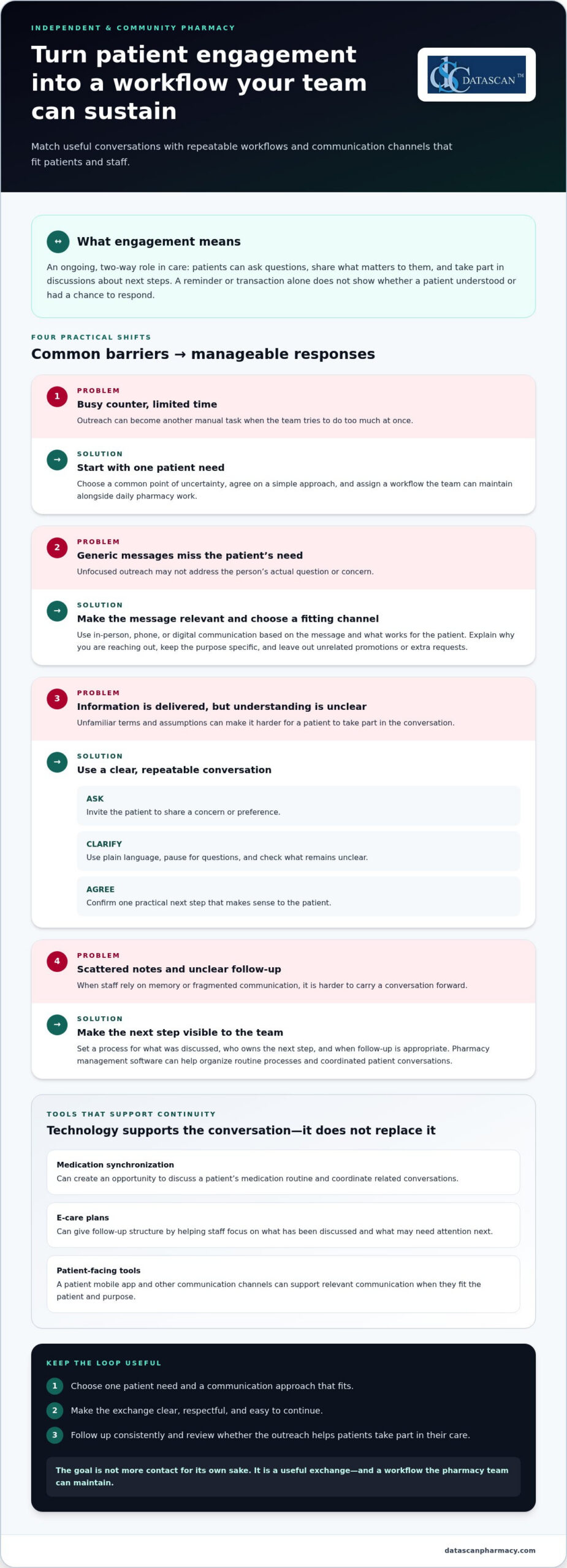
Patient engagement is an ongoing, two-way role in a person’s care. In a pharmacy, it means patients can ask questions, share what matters to them, and take part in discussions about next steps. A reminder or transaction can provide information, but it doesn’t show whether the patient understood it or had a chance to respond.
Meaningful participation depends on communication patients can understand and use. The Agency for Healthcare Research and Quality’s Health Literacy Universal Precautions Toolkit recommends making health information easier to understand and act on. Pharmacy teams can apply this by using plain language, inviting questions, and checking whether instructions are clear instead of assuming information has landed because it was delivered.
Engagement can make pharmacy interactions more responsive and understandable, but it doesn’t guarantee a clinical outcome. In independent and community pharmacies, trust and continuity matter to the day-to-day relationship. Patients should feel able to raise a concern, receive a clear answer, and know how to continue the conversation. That makes an interaction useful, not just efficient.
What does patient engagement look like at a community pharmacy?
It can happen during a brief interaction. A patient asks how to follow a prescription’s directions; a staff member listens, explains the relevant information in clear terms, and asks what questions remain. At a later visit, the patient may raise a related concern. Recognizing this as part of an ongoing conversation helps staff respond with context instead of treating every visit as an unrelated transaction. The goal is a clear exchange, not a longer conversation for its own sake.
What gets in the way of patient engagement?
Limited staff time, fragmented communication, and generic outreach can make interactions less relevant. Unfamiliar terms or unclear next steps can also create friction. These barriers don’t mean patients are unwilling to participate. They show where the pharmacy can make communication more accessible and coordinated.
Independent pharmacies need processes that fit the pace of daily operations. When staff have to reconstruct previous conversations from scattered notes or repeat manual coordination, continuity gets harder. Pharmacy management software can support organized workflows, while pharmacy staff provide the judgment and personal attention that make engagement meaningful.
How can a pharmacy build stronger patient engagement?
Build engagement around a patient’s immediate needs, then make the next interaction easy to continue. Start by identifying a common point of uncertainty, such as understanding prescription directions or coordinating a medication routine, and shape communication around it. This is more useful than launching several disconnected outreach tactics at once. To increase patient engagement in a pharmacy, make each interaction clear, respectful, and relevant to the person receiving it.
How can pharmacists make everyday conversations more engaging?
Open-ended questions give patients room to share what matters. Try, “What questions do you have about your medications?” or “What would make this easier to manage?” Explain information in plain language, pause for questions, and don’t assume silence means understanding. Before the conversation ends, agree on one clear next step, such as when the patient will follow up or what to do if another question comes up.
A short, repeatable conversation can help staff keep the exchange focused:
Ask: Invite the patient to describe a concern or preference.
Clarify: Explain the relevant information in familiar language and check what remains unclear.
Agree: Confirm a practical next step that makes sense to the patient.
The aim isn’t to use a script word for word. It’s to make space for the patient’s perspective, even during a brief interaction. Respectful questions also help staff avoid sending information that doesn’t address the person’s actual concern.
How can personalized pharmacy services support ongoing engagement?
Medication synchronization can create an opportunity to discuss a patient’s medication routine and coordinate related conversations. E-care plans can provide structure for relevant follow-up, helping staff focus on what has been discussed and what may need attention next. Neither guarantees a particular result; both can support purposeful, continued communication when used in a way that fits the patient.
Keep outreach specific to its purpose. A message about a planned check-in should explain why you’re contacting the patient and give them a simple way to respond or ask for clarification. Avoid adding unrelated promotions or packing several requests into one message. Clear communication respects the patient’s time and helps staff keep follow-up focused.
Consistency also depends on whether the team can carry an interaction forward without relying on memory or scattered notes. A defined process can help staff know what was discussed, who owns the next step, and when follow-up is appropriate. Pharmacy workflow software can support organized processes and coordinated patient conversations.
To strengthen engagement without stretching the team, choose one patient need, agree on a shared approach, and refine it as staff learn what questions come up. Related pharmacy patient retention strategies can connect consistent, patient-centered interactions with the broader goal of maintaining lasting relationships.
Will patient engagement add work, or can technology make it manageable?
Patient engagement can add work if every reminder, follow-up, and patient question becomes a separate manual task. Technology can help organize repeatable steps and keep communication connected, but it can’t replace trust built through thoughtful conversation. For an independent pharmacy, the goal is to use digital tools where they fit and protect staff time for interactions that need human attention.
Different channels suit different needs. Choose based on the patient’s preference, the purpose of the contact, and whether a response or conversation is needed.
Channel
Patient fit and access
Staff effort and continuity
In-person conversation
Useful when a patient wants to ask questions directly or discuss a concern during a visit.
Requires staff time in the moment; a clear process for documenting next steps can support continuity.
Phone outreach
Offers direct interaction for questions that may need clarification or discussion.
Takes staff time to place and manage calls; a consistent follow-up record helps the team stay coordinated.
Patient-facing digital tools
Can offer another way to access pharmacy communication for patients who prefer digital channels.
Can support routine touchpoints, while personal questions may still call for a staff conversation.
Which engagement channel fits different patient needs?
Use in-person or phone contact when a patient’s question needs discussion, clarification, or a chance to explain preferences. A patient app may suit someone who prefers digital access for routine interactions. The MobileScripts patient app can be one option in a broader approach, not a replacement for staff contact. Match the channel to the interaction instead of assuming one method works for everyone.
How can pharmacy management software reduce disconnected work?
When staff rely on separate reminders, notes, and handoffs, it takes extra effort to see what has already happened and what needs attention. Pharmacy management software can support repeatable processes and help keep routine work organized. It doesn’t decide what a patient needs or provide empathy; pharmacy staff bring the judgment and personal communication. An organized system can help make that attention easier to sustain.
As you consider how to increase patient engagement in a pharmacy, identify which steps are routine and which need a personal response. Use technology to support consistency around routine work, then reserve staff attention for questions, preferences, and follow-up that benefit from direct interaction. Pharmacy management software can help connect pharmacy processes while the team keeps the patient relationship at the center.
How can a pharmacy put patient engagement into a sustainable workflow?
A sustainable patient engagement workflow gives each interaction a clear purpose, an owner, and a next step. Start with one recurring patient need, try a practical approach, and review whether the process is useful before expanding it. This keeps outreach from becoming a collection of disconnected tasks competing with daily pharmacy operations.
How should a pharmacy start an engagement workflow?
Ask the team to identify a recurring patient need that fits the pharmacy’s services. Choose a suitable communication approach and decide who will handle the next step. Keep the first workflow straightforward: staff should know what action to take and where to record its status. Review the process together and adjust it when a handoff or instruction creates friction.
Choose a need. Select one recurring situation patients ask about or need help coordinating.
Select an approach. Pick a communication channel and a clear purpose for the interaction.
Assign ownership. Identify who initiates outreach, handles responses, and records follow-up.
Follow up. Complete the agreed next step and note whether it happened or remains outstanding.
Review and refine. Discuss what worked, where the process stalled, and what should change before continuing.
For example, if the team chooses a recurring need related to medication synchronization, define how staff will explain the service, who will respond to patient questions, and how agreed follow-up will be tracked. Start with that process instead of launching several initiatives at once. A manageable beginning gives the team room to learn without adding unnecessary coordination.
What should a pharmacy measure to review engagement?
Track measures the team can observe: whether planned outreach was completed, whether a patient responded, and whether agreed follow-up is still open or finished. These measures show where the workflow is moving or getting stuck; they aren’t proof of a clinical result. Pair them with staff feedback and, where appropriate, patient comments to understand whether the interaction felt clear and useful.
Keep the review focused. If outreach is often incomplete, examine whether ownership is clear or the steps are too cumbersome. If patients respond but still need the same clarification, reconsider the message or next step. Avoid setting an arbitrary target before the pharmacy understands its own workflow. The goal is practical improvement, not reporting that consumes the time the process is meant to protect.
Pharmacy management software and configurable workflows can help organize task ownership and follow-up details, reducing avoidable manual coordination. Pharmacy workflow software can support repeatable processes while staff remain responsible for personal judgment and patient communication. As you refine the process, ask whether each step makes the patient interaction clearer or simply adds work.
How can pharmacy management software support patient engagement?
Pharmacy management software can support consistent patient-facing workflows while helping independent pharmacy owners manage a demanding operation. That matters as PBM reimbursement pressures and reforms shape pharmacy finances. Technology can help organize routine work, but it can’t change a PBM contract or guarantee better reimbursement. Its practical value is reducing disconnected manual steps, giving owners and staff more time to focus on patient care and review business pressures.
What can Datascan tools contribute to patient-facing pharmacy workflows?
Datascan Pharmacy Management Software supports pharmacy operations, and its customizable workflow capabilities can help organize routine processes. Reducing avoidable coordination can give pharmacy owners more room to assess operational needs, including reimbursement pressures. The software doesn’t determine reimbursement terms or replace financial review. The team remains responsible for understanding its circumstances and deciding how to respond.
Patient-facing tools can support a pharmacy’s engagement approach. MobileScripts is a patient mobile app, and medication synchronization and e-care plans are supported features that can help structure patient interactions and follow-up. These tools don’t guarantee a particular patient response, clinical outcome, or financial result. They support pharmacy processes while staff provide the judgment and communication patients need.
For example, a pharmacy can use a consistent workflow to coordinate an engagement activity and organize follow-up, while staff handle patient questions and next steps. Owners can also use time spent less on manual coordination to review operational challenges, including PBM reimbursement concerns. Technology can support that work, but it doesn’t replace a careful review of pharmacy finances.
What is a practical next step for an independent pharmacy?
Choose one engagement workflow the team wants to make easier, then identify the manual handoffs or repeated tasks that slow it down. Consider how simplifying that process could give staff more time for patient communication and owners more capacity to focus on business priorities, including reimbursement pressures. A specific workflow makes it easier to discuss the pharmacy’s needs, staff capacity, and patient communication goals.
Datascan’s pharmacy management software and workflow tools support pharmacy operations, while the team remains at the center of patient relationships. Start a technology conversation with the work your pharmacy needs to manage, not an expectation that software alone will resolve PBM reimbursement challenges.
Stronger patient engagement doesn’t require a sweeping change. Choose one interaction your team wants to make easier, then consider how workflows and tools can support it without taking the human element out of care. That focused first step gives your pharmacy a practical way to build on what already works.
Datascan is a family-owned company that has operated since 1981, with U.S.-based support for independent and retail pharmacies. If you’re considering how to increase patient engagement in a pharmacy, bring one workflow or patient communication goal into the conversation. A useful starting point is one that fits your team’s capacity and the ways your patients prefer to connect.
What is the difference between patient engagement and patient satisfaction?
Patient satisfaction reflects how a patient evaluates an experience, while engagement describes their involvement in care-related conversations and decisions. Someone might be pleased with a quick, friendly visit without asking questions or discussing next steps. Engagement involves taking part, such as sharing a concern or confirming a plan. Pharmacies can gather patient feedback to understand the experience and consider whether interactions give people a meaningful opportunity to participate.
How can a small pharmacy improve patient engagement with limited staff?
A small pharmacy can focus its effort on a specific patient need instead of trying to contact everyone. For example, the team might identify a common question at prescription pickup and prepare a clear way to address it. Make the handoff visible so another staff member can continue if the person who started the conversation becomes busy. This keeps engagement connected to routine work rather than creating a separate outreach task for every concern.
Can a pharmacy app replace conversations with a pharmacist?
No. An app can provide a digital way to interact with the pharmacy, but it can’t replace a pharmacist’s professional judgment or a conversation tailored to a patient’s question. A routine request may suit a digital tool, while uncertainty about medication directions may need direct discussion. Make it clear how patients can reach the pharmacy team when they need help, and treat digital access as one part of patient communication.
How often should a pharmacy contact patients about their care?
There isn’t one contact schedule that fits every patient or purpose. Base timing on why the pharmacy is reaching out, any next step agreed with the patient, and their communication preferences. Before sending another message, consider whether it adds useful information or simply repeats an earlier contact. Asking patients which channel they prefer can help staff tailor future communication and avoid unnecessary outreach.
What should pharmacy staff do when a patient does not respond to outreach?
A lack of response doesn’t explain why a patient hasn’t replied. The message may have been missed, the channel may not suit them, or they may not need help at that time. Avoid repeated contact without a clear purpose. For routine outreach, staff can note the status and offer another way to connect during a later interaction. If the matter needs timely attention, follow the pharmacy’s established procedures for that situation.
How can a pharmacy tell whether its patient engagement efforts are useful?
Review more than the number of messages sent. Consider whether patients responded, whether staff completed the intended follow-up, and whether feedback suggests the communication was clear. For example, if patients continue to ask what action to take, the message may need revision. Review one engagement effort at a time and use staff observations alongside patient comments to decide what to change. Activity counts alone don’t show whether outreach was useful.
About the author: This FAQ was prepared by the Datascan Pharmacy Software editorial team, which focuses on pharmacy management software and tools for independent and retail pharmacies.
An effective automated prescription refill workflow organizes routine administrative steps, such as capturing requests and tracking what needs to happen next, while keeping pharmacists in control of clinical decisions. It should make routine work easier to coordinate and send requests that need authorization, more information, or individual attention to staff for review.
That balance matters in independent pharmacies, where reminders, status checks, prescriber follow-up, and pickup updates can pull staff away from patients and daily operations. Automation should reduce avoidable sorting, not create another queue of exceptions. Each request needs a visible status, a clear owner, and an appropriate next step.
This guide shows how to map the refill process from identifying a possible need through pickup, decide which repeatable tasks are suitable for automation, and make exceptions visible to the right people. Pharmacy management software can help organize refill work within broader operations, while MobileScripts gives patients a digital way to submit refill requests. The aim is a more consistent process that helps staff focus on work requiring their attention.
Key Takeaways
Build an automated prescription refill workflow around clear handoffs, so every request has a visible next step from intake to pickup.
Set routing rules for routine administrative work, and send clinical questions and unresolved exceptions to staff.
Map your current process, assign responsibility for each stage, and track open requests and unresolved exceptions to guide improvements.
Use pharmacy management software and customizable workflow tools to organize refill work around your pharmacy’s operations.
MobileScripts gives patients a digital option for submitting prescription refill requests.
What is an automated prescription refill workflow?
An automated prescription refill workflow is a coordinated process for managing potential refill needs, patient requests, review, preparation, and updates. It gives each request a defined status and next step, helping pharmacy staff distinguish work that can proceed from work that needs attention.
Automation can support repeatable administrative tasks, such as capturing a request or organizing follow-up. It does not determine whether a prescription is appropriate to refill, authorize it, or replace pharmacist review. This is also different from automatic dispensing, which refers to dispensing medication through an automated process or equipment.
A connected workflow matters in independent pharmacies because requests may arrive through different channels and require different follow-up. If a request needs more information or prescriber authorization, the process should make that work visible rather than treating the request as ready for preparation. Industry data indicates that pharmacists spend approximately one-third of their day on administrative tasks, including claims, inventory, and reports. Organizing recurring work can help teams see where time and attention are going, without suggesting that automation removes professional responsibilities.
Which steps belong in a prescription refill workflow?
A typical workflow starts by identifying a possible refill need, then capturing the patient’s request and checking its status. The pharmacy team determines whether the request can move forward or needs more information or authorization. When appropriate, it proceeds to preparation and pharmacist review, followed by communication with the patient about readiness or the next step. The CMS electronic prescribing information provides context on electronic prescribing standards, one part of the broader prescription process.
The route depends on the request. If authorization is needed, for example, the next action may involve the prescriber rather than prescription preparation. Recording who owns that follow-up and what response is pending helps staff understand why a request is waiting and what needs to happen next.
What can automation do, and what should staff still review?
Automation can help organize routine coordination, but staff need a clear way to identify requests that require attention. A practical division looks like this:
Automation can support: reminders, request capture, administrative status updates, and task routing.
Staff should review: missing information, authorization needs, and circumstances requiring professional attention.
Pharmacist review remains a distinct checkpoint. Pharmacy management software can help organize refill work within broader operations, while the pharmacy defines its roles and review process. The result should make routine tasks easier to coordinate without hiding exceptions or shifting clinical judgment to automation.
How does an automated prescription refill workflow move from request to pickup?
An automated prescription refill workflow moves a request through clear stages: identify a possible refill need, capture the patient’s request, determine what must happen next, prepare the prescription when appropriate, complete pharmacist review, and communicate readiness or another next step. The patient, pharmacy team, prescriber, and pharmacy management software may each have a role, depending on the request.
Identify a possible refill need. The pharmacy team uses its established process to identify prescriptions that may be due and determine what follow-up is appropriate.
Receive and record the request. A patient submits a request through an established channel, such as a phone call, an in-person visit, or a digital app. Staff record the request, its status, and the next action.
Check status and route the request. Staff determine whether additional information or prescriber authorization is needed. Requests that cannot proceed routinely stay visible for follow-up.
Prepare and review. Once the necessary steps are addressed, the prescription moves into preparation and pharmacist review according to the pharmacy’s process.
Share readiness or next steps. The pharmacy communicates whether the prescription is ready for pickup or whether the patient or prescriber needs to take another step.
Clear handoffs keep refill requests from becoming invisible tasks by showing who owns the next action and what still needs attention.
Workflow stage
Responsible party
Automation opportunity
Request intake
Patient and pharmacy team
Capture digital requests and organize the next task
Status and authorization check
Pharmacy team; prescriber if needed
Route follow-up and keep unresolved requests visible
Preparation and review
Pharmacy team and pharmacist
Make the handoff to preparation clear; retain pharmacist review
Pickup update
Pharmacy team and patient
Share a status update or explain the next step
How should a pharmacy handle a refill request?
Start with the pharmacy’s established intake channels, and make sure each request has a recorded status and next action. Check the prescription’s status before moving it forward. If information or authorization is needed, assign that follow-up to the appropriate staff member or prescriber. Keep requests that cannot follow the routine path visible and give each one an owner, so they do not disappear into a general queue.
How do teams coordinate filling, review, and pickup communication?
When a request is ready to proceed, staff hand it into prescription preparation, followed by pharmacist review. A status update should tell the team and patient what has happened and what comes next, without implying that a request is ready before it is. For digital intake, the MobileScripts prescription refill app gives patients a way to submit refill requests. Pharmacy management software can help organize refill work within broader operations.
Use the workflow as a shared operating map, not as a promise that every request follows the same path. A pharmacy can tailor handoffs to its staffing and processes while keeping requests that need individual attention visible.
Can automated refills work without bypassing pharmacist oversight?
Yes. A refill workflow can automate routine coordination while keeping pharmacist review and clinical judgment separate from administrative processing. Automation can make requests easier to sort, assign, and track. It should not decide whether a prescription is clinically appropriate or remove the pharmacist’s review checkpoint.
The goal is not to make every request follow an identical path. It is to create a reliable routine route and a visible way to handle requests that need attention. Standardized routing can reduce uncertainty about where work goes next, but rigid rules may send unusual requests down the wrong path. Staff need enough visibility to recognize when a request does not fit the routine process.
Three elements work together:
Standardized routing gives routine requests a predictable next step, while still allowing for exceptions.
Staff visibility shows what is waiting and who owns the next action. A status label alone, however, does not resolve a stalled request.
Exception handling directs requests needing attention to staff, with clear ownership and follow-through.
Small process gaps can undo the benefits. If a patient submits a request through more than one channel, duplicate work may appear unless staff can identify and reconcile the requests. If ownership is unclear, a request awaiting information or authorization can sit without follow-up. And if exceptions are routed out of sight, automation can hide work instead of organizing it.
Which refill requests should be routed for staff review?
Route a request for staff review when information is missing, authorization is needed, or its status prevents it from following the routine path. An exception queue or another visible task process can make these requests easier to monitor, but the process needs a named owner for review and resolution. Staff should be able to see what is blocked, what action is pending, and whether follow-up remains open.
How can a pharmacy keep automation transparent to its team?
Make each stage understandable to the people who use it. Document what each status means, who takes the next action, and how staff should handle incomplete, stalled, or duplicate requests. Train the team on those definitions, then review process issues together. If a request repeatedly lands in the wrong place, refine the routing rather than adding a step that conceals the underlying problem.
A practical automated prescription refill workflow makes responsibility visible from intake through review and follow-up. It supports staff by reducing avoidable sorting and status checks while preserving a deliberate pause for pharmacist judgment. Pharmacy management software and customizable workflow tools can help organize tasks around a pharmacy’s processes, but clear ownership and staff oversight remain essential.
How can an independent pharmacy implement and improve its refill workflow?
Start with the way refill work actually moves through your pharmacy, then make focused changes based on where staff time and requests get stuck. A deliberate process helps independent pharmacies use technology to organize operations without expecting software to solve every business pressure.
What should a pharmacy map before changing its refill process?
Document how requests arrive, where their status is recorded, and how work moves between roles. Mark authorization, missing information, preparation, pharmacist review, and patient communication as distinct handoffs. This makes it easier to see where work pauses and what needs attention before you change the process.
Use a practical implementation sequence:
Map the current process. Follow a request from intake to its final update, noting the channels and handoffs involved.
Identify repeated tasks. Separate recurring administrative work from decisions that require professional review.
List common exceptions. Note where requests wait for information, authorization, or staff follow-up.
Assign owners. Define responsibility for each stage and for requests that cannot proceed as planned.
Test a focused change. Adjust one part of the process, explain the change to staff, and review what happens.
For pharmacies facing PBM reimbursement pressure, a refill workflow will not change reimbursement terms. It can help organize routine work and reduce avoidable administrative friction, giving leaders more room to monitor pharmacy operations and focus on financial decisions. Staff feedback matters: a bottleneck may come from unclear responsibilities or a difficult handoff, not a software setting. Ask the team where work pauses and which steps trigger repeat checks.
How can pharmacy management software support consistent refill work?
Pharmacy management software can help organize information and workflow within broader pharmacy operations, giving a pharmacy a system to support its chosen processes. Consider how staff will use the system to see work in progress and coordinate daily operations.
Different pharmacies have different staffing and operating processes, so workflow configuration should fit the way each team works. Datascan’s customizable workflow offering supports that effort. Pharmacies planning how to shape their processes can use pharmacy workflow software information as context for configuration around their needs.
Define measures before judging a change. Track open requests, unresolved exceptions, requests waiting for authorization, and requests without a recorded next action. Compare those measures over time with your own starting point rather than an assumed industry benchmark. Review the results with staff, then refine confusing handoffs or role assignments. Small, deliberate adjustments can make refill work more consistent and help the team protect time for other pharmacy operations.
How can Datascan help pharmacies organize refill workflows?
Datascan helps pharmacies organize refill work through pharmacy management software and customizable workflow tools. MobileScripts gives patients a digital way to submit prescription refill requests. These offerings can support a clearer process, while the pharmacy defines its handoffs and staff retain responsibility for review and clinical decisions.
Where do pharmacy management software and patient refill tools fit?
Pharmacy management software provides an operational foundation for organizing pharmacy work. For refill requests, the aim is to make the process easier for the team to manage within broader operations, with clear responsibility for follow-up and review. MobileScripts adds a patient-facing intake option by supporting prescription refill requests. It gives patients a way to submit requests, while pharmacy staff manage later steps according to the pharmacy’s process.
Each pharmacy’s staffing and operating processes are different, so workflow configuration should reflect how the team handles requests, handoffs, and exceptions. Datascan’s customizable workflow offering can support pharmacies seeking processes suited to their operations. Learn about pharmacy workflow software when considering how workflow configuration fits into the broader refill process.
Technology can help bring structure to the work, but it does not replace decisions about who reviews requests, how exceptions are handled, or what staff communicate to patients. A useful system supports a process the pharmacy has deliberately designed rather than assuming every request should move in the same way.
What should a pharmacy discuss when planning its refill workflow?
Begin with the current process, not a software feature list. Describe where requests come in, how staff record them, where handoffs occur, and which situations most often interrupt routine processing. That context makes the discussion specific to the pharmacy’s actual workload.
Request channels: How do patients submit requests today, and where do staff bring those requests together?
Handoffs: Where does work pass between the patient, pharmacy team, pharmacist, and prescriber?
Bottlenecks: Which steps lead to repeat status checks, delayed follow-up, or confusion about what happens next?
Exceptions: What types of requests need additional information, authorization, or staff attention?
Ownership: How should staff see who owns each open task and what action is due next?
These details give a workflow conversation a practical starting point and help pharmacy leaders focus on changes that address real friction. Datascan is family-owned, has operated since 1981, and provides U.S.-based support. For independent pharmacies balancing refill coordination with daily operations, that experience and support can be part of the conversation about organizing work around the team’s needs.
Use the Datascan contact page to discuss your pharmacy’s workflow and the processes you want your team to manage more clearly.
Make your refill workflow easier to sustain
A refill process should keep working as your pharmacy’s daily demands shift. Treat your automated prescription refill workflow as an operating practice to revisit, not a one-time setup. As staffing patterns, request channels, or recurring bottlenecks change, review whether each step still has a clear owner and whether exceptions remain visible to the people responsible for resolving them.
Ongoing attention helps technology stay aligned with the way your team works. Pharmacy software and customizable workflows can support consistency, but staff insight is essential for spotting friction that a configuration change alone will not fix. Small, deliberate adjustments can help protect time for patient care and the many other responsibilities involved in running an independent pharmacy.
Choose one point in the refill process your team wants to make clearer, then use it to guide your next workflow conversation. Talk with Datascan about your refill workflow and explore a practical next step for your pharmacy. Shape the process around the work that matters most to your team.
Frequently Asked Questions
Can prescription refills be automated?
Yes. Pharmacies can automate selected administrative tasks, such as capturing incoming requests or organizing reminders. A request that needs additional information, authorization, or individual attention should remain visible for staff follow-up. For example, a pharmacy can use a consistent status for requests waiting on a response, making them easier to distinguish from work that can move to the next operational step.
How does an automated prescription refill workflow work?
An automated prescription refill workflow coordinates request intake, status tracking, task handoffs, preparation, review, and patient updates. A request might arrive digitally, be recorded for the pharmacy team, and then be routed for follow-up if something is needed before processing continues. Clear status information helps staff recognize whether a request is progressing, waiting on someone, or ready for its next step.
Does automated refill processing replace pharmacist review?
No. Automation can help organize administrative work, but it does not replace a pharmacist’s professional judgment. A pharmacy should make review responsibilities clear and ensure staff can tell when a request needs pharmacist attention. For example, an automated notification may tell staff that a request needs review, but the notification is not a clinical assessment or approval.
What happens if a prescription has no refills remaining?
The pharmacy team should treat the request as needing follow-up rather than assuming it can proceed as a routine refill. Staff can identify that no refills remain, determine the appropriate next action, and communicate what the patient should expect. A clear record of the pending action helps the team track the request while waiting for the information or response needed to proceed.
Can patients request refills through a pharmacy app?
Yes. Patients can submit refill requests through a pharmacy app that supports this function. MobileScripts, Datascan’s patient mobile app, supports prescription refill requests. The app gives patients a digital way to send a request to the pharmacy; it does not mean every later step is automatically completed. Pharmacy staff still manage the request according to the pharmacy’s process.
How can an independent pharmacy measure whether its refill workflow is improving?
Choose measures that answer practical questions about the work, such as how many requests remain open, how many are waiting on follow-up, and which types of exceptions recur. Compare results with the pharmacy’s own starting point and review them with staff. If a measure changes, ask what happened in the workflow before drawing conclusions. The purpose is to find process friction, not chase an unsupported benchmark.
About the author: This guide is published by Datascan Pharmacy Software, which provides pharmacy management software for independent and retail pharmacies.
Clinical services work best when their workflows fit the pharmacy’s day instead of adding another layer of manual tasks. Pharmacist clinical workflow tools help organize medication therapy management (MTM), documentation, and patient follow-up alongside daily pharmacy operations.
For independent pharmacists, dispensing, staffing, and reimbursement pressures can leave little time to coordinate care consistently. The goal is not simply to add software. It is to make patient-care tasks easier to see, assign, and complete within the pharmacy’s existing processes.
This article explains which clinical workflow steps technology can support, how to compare tools, and how pharmacy management software with customizable workflows can help bring clinical and operational tasks together.
About the author: Datascan Pharmacy Software is a family-owned pharmacy software company serving independent and retail pharmacies since 1981, with U.S.-based technical support.
Key Takeaways
Separate clinical-care workflows from dispensing, inventory, and retail tasks, then identify where handoffs need attention.
Use pharmacist clinical workflow tools to track care opportunities, assign next steps, and organize documentation without replacing clinical judgment.
Compare tools by task visibility, documentation, follow-up, and how well they fit your pharmacy’s actual processes.
Map the current process, identify points of friction, define requirements, then test and review a focused workflow change.
Consider how pharmacy management software and customizable workflows can connect clinical tasks with broader pharmacy operations.
Pharmacist clinical workflow tools organize patient-care tasks, documentation, and follow-up. Pharmacy management software can also help connect this work with broader pharmacy operations. For independent pharmacies facing pressure on pharmacist time and reimbursement, organized records make it easier to review completed work and locate relevant information. Software does not determine payment or guarantee reimbursement.
Clinical workflows are distinct from dispensing, inventory, and front-end retail workflows, even when they interact. A pharmacy management system supports pharmacy operations broadly, while clinical workflows structure care activities such as medication reviews and follow-up. PBM reform discussions have also drawn attention to PBM practices and their effects on pharmacies. The Federal Trade Commission’s report on pharmacy benefit managers provides context for that scrutiny.
Which pharmacy tasks count as clinical workflow?
A clinical workflow can begin with identifying a patient-care opportunity and continue through preparation for a medication review, service documentation, and follow-up. The steps depend on the services your pharmacy provides. Make task ownership and status visible so staff can coordinate handoffs and see what remains. Keep clinical-service documentation distinct from claims and payment records, while linking related tasks where your systems and processes support it.
Identify: Flag a care opportunity for attention.
Review: Prepare relevant information for the pharmacist.
Document: Record the service and relevant details.
Coordinate: Assign the next action and its owner.
Technology can coordinate tasks, but the pharmacist remains responsible for clinical assessment and decisions. For reimbursement review, organized records can help staff locate relevant transactions or documentation when examining payment discrepancies. The information available depends on the pharmacy’s systems and workflow, and no workflow tool can ensure a PBM payment outcome.
How do MTM and e-care plans fit into the workflow?
Medication Therapy Management (MTM) is a pharmacist service that includes reviewing a patient’s medications to identify and address medication-related needs. Depending on the pharmacy’s services and applicable program requirements, the workflow may include preparation, review, documentation, care-plan updates, and follow-up. Medication synchronization and e-care plans are also useful activities to include when mapping patient-care tasks alongside routine operations. Define the steps around the services your pharmacy provides, then assess whether technology makes those steps clearer without requiring unnecessary entry or mixing clinical documentation with reimbursement reconciliation.
How can clinical workflow tools support MTM without adding more manual work?
Clinical workflow tools make MTM tasks easier to see and coordinate, but they do not make clinical decisions for the pharmacist. Their value depends on how well they fit the pharmacy’s process. If staff must re-enter information or track tasks in separate places, the technology can add work instead of reducing it.
What are the main steps in an MTM workflow?
Medication Therapy Management (MTM) involves a pharmacist reviewing a patient’s medications to identify and address medication-related needs. A practical workflow might include these steps:
Identify: Flag a patient or care opportunity using the pharmacy’s applicable program criteria.
Prepare and review: Gather relevant medication information for the pharmacist’s assessment.
Take action: The pharmacist discusses the patient’s needs and determines appropriate next steps.
Document: Record the service and relevant findings in the designated record.
Follow up: Assign or note the next action, including who is responsible.
Eligibility, service scope, and documentation requirements vary by program. Use current guidance from the applicable plan or program and authoritative sources, such as the Centers for Medicare & Medicaid Services, when defining your process.
Where can technology reduce workflow friction?
Look for repeated handoffs, follow-ups that are easy to overlook, and records staff must search for across separate systems. A visible task sequence can show what is pending, what has been documented, and where a handoff is needed. Pharmacy management software can reduce duplicate entry when its workflow and available features support using information across connected tasks. Map the current process before deciding that a tool will eliminate a step.
For independent pharmacies, pharmacy workflow software provides a configurable structure for organizing operational tasks. The aim is clearer coordination, with the pharmacist retaining responsibility for clinical assessment and decisions.
How should pharmacies discuss PBM-related clinical work?
Keep clinical-service documentation distinct from prescription claims adjudication and payment reconciliation. An MTM service record supports the pharmacy’s documentation process, but it does not establish that a PBM will pay a particular amount or reimburse the service. PBM reimbursement pressures make careful organization valuable. Pharmacist clinical workflow tools coordinate tasks, not reimbursement outcomes.
Review whether each step has a clear owner, whether information is entered more than once, and how the team sees pending follow-up. Make changes only where the software’s capabilities support them, then confirm that the revised process still meets the relevant program’s requirements.
Which clinical workflow tools should an independent pharmacy compare?
Compare pharmacist clinical workflow tools against real tasks in your pharmacy, not the length of a feature list. Check whether staff can see pending work, record care activities, coordinate follow-up, adapt the process to your services, and avoid entering the same information in multiple places.
What to compare
What it means in practice
Workflow visibility
Can staff tell which clinical tasks are pending, in progress, or ready for a handoff?
Documentation
Can the team record the service and its next action consistently?
Follow-up
Is it clear what needs to happen next and who is responsible?
Customization
Can the workflow reflect the pharmacy’s actual services and division of work?
System fit
Does clinical work connect sensibly with pharmacy operations, patient communication, and existing records, or does it create duplicate entry?
Does the tool fit the pharmacy’s clinical services?
Start with services you provide or plan to organize, such as MTM, medication synchronization, and care-plan activities. Separate essential needs, such as recording a completed review or assigning follow-up, from optional functions. A tool should support your process without requiring staff to maintain a parallel workflow. For broader context on pharmacy management software, see Datascan’s pharmacy management software.
Can staff see and coordinate the work?
Trace a task from its starting point to the next action. Can the right team member identify what is waiting, understand their responsibility, and see whether follow-up remains open? Consider how the clinical process intersects with dispensing and patient communication, while keeping those workflows distinct where needed. Review the steps in the system itself rather than relying on a feature label to explain how they work.
What evidence should support a tool’s claims?
Evaluate the tool using a representative pharmacy workflow, such as identifying a care opportunity, documenting the pharmacist’s action, and recording follow-up. Check that claims about documentation or program requirements align with current authoritative guidance. Watch for repeated information entry and confirm that staff can follow the task sequence clearly.
Choose the tool that fits your pharmacy’s clinical workflow, not the one with the longest feature list. This keeps the comparison grounded in daily operations and your team’s needs.
How can a pharmacy map and improve its clinical workflow?
Map the clinical process your team follows before changing software or adding steps. A practical review shows where ownership is unclear, information is entered more than once, or follow-up stalls. Use those findings to focus pharmacist clinical workflow tools on real operational needs. Keep the plan workable for your staff and the time you can give it.
How do you map the current clinical process?
Choose one service, such as an MTM review or care-plan follow-up, and write down each step from identifying the patient-care task through completing the next action. Include handoffs between the pharmacist and other team members. Keep the map simple enough to reflect a normal workday, not just an ideal process.
Record who starts the task and what prompts it.
Note what information staff need and where they document it.
Mark repeated entry, unclear ownership, and delayed next steps.
Show how the team records completion or assigns follow-up.
Use only the information needed for the review, and follow your pharmacy’s procedures for protecting patient information. A workflow map should clarify the process without becoming an informal record containing unnecessary patient details.
How should a pharmacy test a workflow change?
Define the problem before selecting a solution. If follow-up tasks are often left unclear, for example, test a change that makes responsibility and status easier to track. Decide what you will observe in advance, such as whether each task has an owner and whether the next action is documented. Avoid arbitrary time-saving targets or assuming a change worked without pharmacy-specific evidence.
Get feedback from the staff who use the process, including team members managing dispensing alongside clinical services. If a new step creates extra entry or interrupts work at a busy point in the day, revise it. The goal is a process the team can follow consistently, not a more elaborate workflow diagram.
When should a pharmacy revisit its workflow?
Review the process when services, staffing, or operating needs change, or when recurring issues show that the current steps no longer fit. Pharmacy management software with customizable workflow capabilities can help align task sequences with the way your pharmacy works. Let the process guide the configuration, not the other way around. Keep this review focused on clinical tasks rather than broader software-conversion decisions.
How can Datascan pharmacy management software support clinical workflows?
Datascan pharmacy management software includes customizable workflow capabilities that pharmacies can assess against their clinical services, staff responsibilities, and daily processes. Use those capabilities to consider whether a workflow can reflect how your team handles tasks. Software does not make clinical decisions or guarantee a particular result.
What should a pharmacy look for in customizable workflow?
Start with the process you mapped: what initiates a task, who handles each step, what needs documenting, and how follow-up is assigned. Then assess whether a workflow can be adapted to those needs without adding unnecessary steps or duplicate entry. A pharmacy providing MTM, medication synchronization, or care-plan services may have different coordination needs from a pharmacy offering a different mix of services.
Datascan offers pharmacy workflow software with customizable workflow capability. Use your pharmacy’s process as the reference point when considering how that capability fits your team’s work.
How does pharmacy management software fit clinical services?
Clinical tasks take place alongside dispensing and other pharmacy operations, so consider how a system fits into the broader management process. Datascan’s pharmacy management software serves independent and retail pharmacies. Medication synchronization and e-care plans are relevant activities to include in a workflow discussion. Map the steps your pharmacy needs for each activity, including documentation and follow-up, rather than assuming a particular sequence or outcome.
Compare the system with the criteria established earlier: whether staff can understand pending work, record necessary information, coordinate next steps, and avoid needless re-entry. Consider how the workflow fits available staff capacity. For independent pharmacy owners balancing dispensing, operations, and reimbursement pressures, a clear, practical process matters more than added complexity.
What is the next step for evaluating fit?
Bring a specific workflow challenge to the discussion, such as unclear task ownership, fragmented follow-up, or repeated documentation. Include the staff roles involved, the steps you want to support, and the information the team needs to record. A focused conversation makes it easier to assess how Datascan’s customizable workflow aligns with your pharmacy’s processes, without presuming a clinical or reimbursement result.
Effective pharmacist clinical workflow tools make patient-care tasks easier to organize while keeping clinical judgment in the pharmacist’s hands. Start by mapping your current process, then compare tools by task visibility, documentation, follow-up, and fit with your pharmacy’s services and staffing.
For independent pharmacies balancing patient care with daily operations and PBM pressures, the right workflow supports coordination without promising reimbursement or adding unnecessary steps. Datascan pharmacy management software includes customizable workflow capabilities, which your team can assess against the processes it needs to manage. Datascan has been family-owned and operated since 1981, with U.S.-based technical support.
A focused conversation can clarify your workflow priorities and system-fit questions. Talk with Datascan about your pharmacy’s clinical workflow and the processes your team wants to support. Start with the way your pharmacy works today.
Frequently Asked Questions
What are pharmacist clinical workflow tools?
Pharmacist clinical workflow tools organize patient-care tasks, including identifying a care opportunity, preparing for a medication review, documenting the service, and coordinating follow-up. They are distinct from dispensing, inventory, and retail workflows, though pharmacy management software may support both clinical and operational work. These tools help staff coordinate tasks; pharmacists retain responsibility for clinical judgment. For a broader overview of MTM in Medicare, see Medicare’s description of Medication Therapy Management programs.
How can pharmacy software support medication therapy management?
Pharmacy software can organize the administrative steps around Medication Therapy Management (MTM), a medication review service for eligible Medicare Part D enrollees. A pharmacy might use a workflow to track preparation, document the review, and record follow-up. Program details and eligibility criteria can vary, so use current guidance. Medicare explains MTM program basics, while CMS provides program requirements for Part D sponsors.
Can workflow tools help independent pharmacies save pharmacist time?
Workflow tools can reduce avoidable effort when they make tasks visible and help prevent unnecessary duplicate entry. A clear process, for example, can show who owns a follow-up and whether documentation remains to be completed. The effect depends on the pharmacy’s process and the tool’s actual capabilities. Review the workflow with staff, identify repeated steps, and assess changes using your pharmacy’s own observations rather than assuming a particular time saving.
What should an independent pharmacy look for in clinical workflow software?
Look for support for your services and daily processes: visible pending tasks, consistent documentation, clear follow-up ownership, customization, and fit with broader pharmacy operations. Test the system using a representative task, such as moving from a care opportunity to a documented next action. Check whether staff must re-enter information or switch between disconnected processes. Prioritize a workflow your team can use, and verify program requirements against current CMS or payer guidance.
How do clinical workflows relate to PBM reimbursement?
Clinical workflows organize care tasks and service documentation. They do not determine prescription claims adjudication or guarantee PBM reimbursement. Keep clinical-service records distinct from claims processing and payment reconciliation. PBM contract and payment practices are separate from documenting patient care. The Federal Trade Commission’s report on pharmacy benefit managers provides context on PBM practices, but software cannot promise a payment amount or change contract terms.
Can pharmacy management software support e-care plans and medication synchronization?
Pharmacy management software can help organize workflows related to patient-care activities and routine pharmacy operations. Datascan identifies e-care plans and medication synchronization among its feature areas. The workflow should reflect the pharmacy’s services and operating process, including the tasks staff need to coordinate. For Medicare MTM, use current Medicare program information and applicable sponsor guidance rather than assuming one documentation process applies to every service.
How can a pharmacy tell whether a workflow tool is adding extra steps?
Trace a real task from start to finish and note each handoff, information entry, and staff action. Repeatedly entering the same details, tracking status elsewhere, or unclear responsibility for the next step can signal extra work. Ask staff where the process feels duplicated or confusing, then compare the actual workflow with the intended one. Review changes against applicable documentation procedures and program guidance, including current CMS guidance for Medicare Part D MTM where relevant.