A higher sales total doesn’t always mean a healthier bottom line. Tracking pharmacy sales data accurately means looking beyond revenue to understand what prescriptions and front-end purchases contribute after costs and reimbursement adjustments. If details are spread across prescription, point-of-sale, and payment workflows, getting that picture can take time away from running the pharmacy and caring for patients.
It’s easy to mistake sales activity for profitability, especially when PBM reimbursements put pressure on prescription margins. The right metrics can show where revenue is coming from, flag changes that deserve attention, and support more informed operational decisions. You don’t need to track every number. You need a focused set that answers practical questions.
This guide covers which sales metrics independent pharmacies can monitor, how to interpret prescription and front-end results differently, and why revenue alone doesn’t tell the whole story. It also explains what to consider when evaluating pharmacy management software and POS tools for organizing reports and reducing manual work. Reporting capabilities vary, so confirm that a system supports the views your pharmacy needs.
Key Takeaways
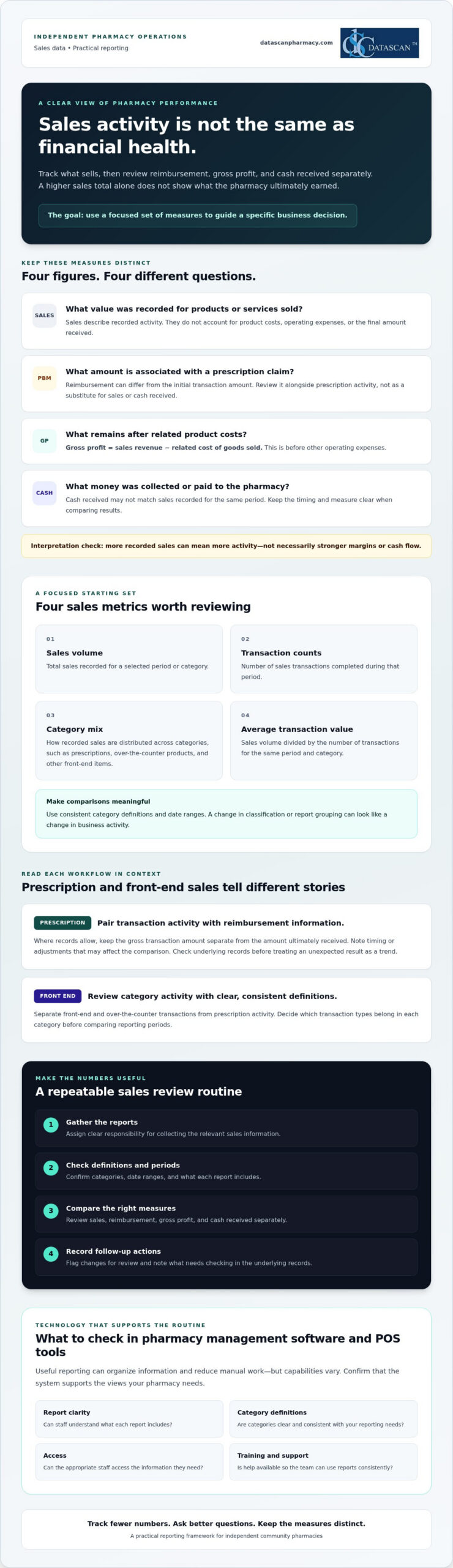
Use tracking pharmacy sales data to guide specific business decisions, not just to collect numbers.
Start with a small set of measures, including sales volume, transaction counts, category mix, and average transaction value.
Compare sales, reimbursement, gross profit, and cash received separately to avoid mistaking higher revenue for stronger financial health.
Build a recurring review routine with clear responsibility for gathering reports, checking definitions, and recording follow-up actions.
When evaluating pharmacy management software and POS tools, check report clarity, category definitions, access, training, and support.
What does tracking pharmacy sales data actually tell you?
Tracking pharmacy sales data means consistently collecting and reviewing sales measures to guide business decisions. It shows what’s moving through prescription and front-end workflows, but recorded sales activity alone doesn’t tell you how much the pharmacy earned, how much cash it received, or how PBM reimbursement affected a prescription’s final economics.
Sales data records what was sold and for how much. Profit reflects what remains after relevant costs and expenses. That distinction matters. A rise in sales can mean more activity, but it doesn’t automatically mean stronger margins or cash flow. A useful measure, often called a key performance indicator (KPI), connects information to a decision. For a foundational explanation, see this overview of a performance indicator.
Independent pharmacies need a manageable view of prescription and front-end transactions because they represent different kinds of sales activity. Reviewing them with consistent definitions can help owners identify what changed and where a closer look is needed, without treating one sales total as the whole financial picture.
Which pharmacy sales categories should you track?
Start by separating prescription-related activity from front-end and over-the-counter transactions. Set clear category definitions, then use them consistently across staff and reporting periods. For example, decide which transaction types belong in each category before comparing one month with another. Consistent definitions make comparisons more meaningful and reduce the risk of mistaking a reporting change for a real change in sales.
Why can sales totals differ from pharmacy profitability?
A sales total doesn’t account for the cost of acquiring products or the pharmacy’s operating expenses. Prescription economics can also be affected by PBM reimbursement, which may differ from the initial transaction amount. Keep these measures distinct when reviewing results:
Sales: The value recorded for products or services sold.
Reimbursement: The amount associated with a prescription claim under the applicable payment arrangement.
Gross profit: Sales revenue minus the related cost of goods sold, before other operating expenses.
Cash received: Money collected or paid to the pharmacy, which may not match sales recorded for the same period.
These figures answer different questions, so don’t use one as a substitute for another. For a deeper look at margin calculations, consult a pharmacy gross profit guide and confirm that the method fits your accounting approach.
Which pharmacy sales metrics should you track first?
Start with a short list of measures that can inform a decision, rather than collecting every available data point. Tracking pharmacy sales data is most useful when each metric answers a practical question: Did transaction activity change? Which categories contributed to sales? Where does a shift need investigation?
A practical starting checklist: track sales volume, transaction counts, category mix, and average transaction value, then review each measure in the context of prescription or front-end activity.
Sales volume: The total sales recorded for a chosen period or category.
Transaction counts: The number of sales transactions completed during that period.
Category mix: How recorded sales are distributed among categories, such as prescriptions, over-the-counter products, and other front-end items.
Average transaction value: Sales volume divided by the number of transactions for the same period and category.
Keep definitions and date ranges consistent. Otherwise, a change in how staff classify transactions or a report groups categories can look like a real shift in business activity. These measures describe sales patterns. Pair them with relevant cost and reimbursement information before drawing conclusions about margins.
How should you track prescription sales?
Review prescription transaction activity alongside available reimbursement information for those claims. Where records allow, keep the gross transaction amount separate from the amount ultimately received, and note timing or adjustments that may affect the comparison. If a measure changes unexpectedly, flag it for follow-up and check the underlying records before treating a single result as a trend.
How should you track front-end pharmacy sales?
For front-end and over-the-counter sales, review transaction counts and sales by useful product categories. Compare equivalent periods and record context, such as a promotion or operating change, that could affect results. This helps distinguish a broad change in shopping activity from a shift limited to one category. For further POS considerations, explore Datascan’s pharmacy point-of-sale tools.
Prescription and front-end measures answer different questions, so avoid forcing them into one interpretation. A change in prescription activity calls for a look at claim and reimbursement context. A front-end category shift may prompt a closer review of product mix or transaction patterns. Choose a few measures your team can define consistently, review them regularly, and use unusual movements to guide the next investigation.
Can sales data alone show whether your pharmacy is doing well?
No. Higher sales don’t automatically mean higher profit or stronger cash flow. Sales show the value of recorded activity, while reimbursement, acquisition costs, expenses, and payment timing help explain what that activity means financially. Tracking pharmacy sales data alongside these related measures gives owners a more useful basis for investigating prescription performance.
What is the difference between sales, reimbursement, and profit?
Each measure answers a different business question. Keep them distinct in reports and conversations so a change in one isn’t mistaken for a change in another.
Measure
What it tells you
Question for the owner
Sales
Recorded value of transactions
What activity was recorded?
Reimbursement
Payment associated with prescription claims
What was paid or is expected for those claims?
Gross profit
Sales revenue minus related cost of goods sold
What remains before other operating expenses?
Cash received
Payments collected during a period
What money came in, and when?
For example, a prescription transaction can appear in sales records before its payment arrives. Its recorded amount also doesn’t show the related acquisition cost or final gross profit on its own. Comparing sales and reimbursement information can help you identify questions to investigate, but it doesn’t establish the reason for a difference. For detailed margin calculations, use a consistent gross profit method and confirm that it matches your accounting approach.
How can you spot a change that needs investigation?
Compare equivalent periods and confirm that report definitions haven’t changed. Then review the context before drawing a conclusion:
Check whether the transaction mix shifted between prescription and front-end activity.
Confirm that you’re comparing the same dates, categories, and reporting basis.
Note timing differences and known operational changes that could affect the comparison.
Refer possible reimbursement discrepancies to your pharmacy’s established review process.
A change is a prompt to ask questions, not proof of a trend or error. Pharmacy management software may help organize information for review, but verify which reports and fields are available in your configuration. If you’re assessing whether Datascan tools fit your reporting needs, you can discuss your requirements with the team.
How do you build a practical pharmacy sales review routine?
A practical review routine makes tracking pharmacy sales data repeatable without turning it into another major task. Choose a consistent review period, assign responsibility for gathering and checking reports, and end each review with a clear follow-up owner. Keep the process focused on a few measures tied to current business priorities.
What steps should a pharmacy take to review sales data?
Choose the measures. Select a short list that helps answer current questions, such as whether sales activity changed or which categories need a closer look.
Assign report gathering. Name a team member to collect relevant reports from pharmacy management and POS workflows. If information comes from separate sources, note where each figure came from rather than assuming the reports are combined.
Check the reporting basis. Confirm the dates, transaction categories, and definitions before comparing results. Make sure the current report uses the same basis as the prior period.
Review changes with context. Look for differences in transaction mix, workflow, product mix, or reporting setup that could explain a change. Record known operational events alongside the results.
Document the next step. For each meaningful finding, write down the finding, a question to resolve, and the person responsible for following up.
The routine works best when responsibilities are clear. The person gathering reports doesn’t need to make every business decision, but they should know who will validate definitions, review unusual results, and close the loop on questions. A brief written record helps the team see whether an issue is recurring or specific to one review period.
How can you avoid misleading comparisons?
Compare equivalent periods and transaction categories, and don’t treat a difference as a trend until you’ve checked the underlying records. If reporting definitions or workflow changed, document that before drawing conclusions. A change in transaction mix may also shift the total even when activity within a particular category is steady. Investigate incomplete or inconsistent records before acting, and route possible reimbursement discrepancies through the pharmacy’s established review process.
Pharmacy management software and POS tools may help organize information from their respective workflows, but confirm which reports, fields, and review options are available in your pharmacy’s configuration. A simple, consistent process can make reports easier to interpret and preserve time for daily operations. Discuss your pharmacy reporting needs to explore what information your current setup can support.
How can pharmacy management software make sales tracking easier?
Pharmacy management software and POS tools may make sales reviews easier by organizing information from prescription and front-end workflows. This can reduce the need to gather figures manually from separate sources. The practical value depends on the available reports and configuration, so verify specific capabilities rather than assuming every system combines data or automates reporting.
Use these criteria to evaluate whether a system will support your tracking process:
Report clarity: Can your team understand what each total includes and leaves out?
Category definitions: Are prescription, front-end, and other transaction categories clearly defined?
Access: Can the people responsible for reviewing the information find the reports they need?
Training: Is guidance available so staff can apply report definitions consistently?
Support: Can you get help with reporting questions, and what support is available?
Datascan offers pharmacy management software and Datascan Point of Sale. Review the pharmacy management software overview as you consider how software and POS tools might fit your operation. Treat technology as a way to assess and organize information, not as a guarantee of improved margins, reimbursement outcomes, or cash flow.
What should you ask a pharmacy software vendor about sales reporting?
Ask which prescription and front-end sales reports are available in the configuration you’re considering. Find out how each report defines totals, time periods, categories, and adjustments, and whether reports can be reviewed together or need to be compared separately. Confirm what training and U.S.-based support are available for reporting questions. Ask the vendor to walk through relevant workflows so your team can judge whether the reports answer its actual business questions.
When is it time to improve your current tracking process?
Repeated manual consolidation, unclear category definitions, or reports the team rarely uses can signal that the process needs attention. Before comparing alternatives, identify the decisions your current setup doesn’t support and the information needed to make them. Then verify specific product claims directly, including which reports and fields are available for your pharmacy’s configuration.
A focused review of those needs can help you evaluate Pharmacy Software against the work your team actually does, rather than choosing based on broad promises. Talk with Datascan about sales tracking and discuss the reports and workflows you need to assess.
Turn pharmacy sales reports into confident decisions
Tracking pharmacy sales data works best when you focus on a few consistent measures and connect each one to a decision. Review prescription and front-end activity in context, and keep sales separate from reimbursement, gross profit, and cash received. A simple, recurring review routine can help your team spot changes worth investigating without adding unnecessary reporting work.
Pharmacy management software and point-of-sale tools may help organize information across workflows, but confirm that the reports and definitions fit your pharmacy’s needs. Datascan is a family-owned pharmacy software company founded in 1981, offering pharmacy management software and point-of-sale tools for independent and retail pharmacies, along with U.S.-based technical support.
Ready to explore how your reporting process could better support day-to-day decisions? Talk with Datascan about tracking pharmacy sales data. With clear measures and a practical review process, you can build a stronger understanding of your pharmacy’s business and take the next step with confidence.
Frequently Asked Questions
What is the best way to track pharmacy sales data?
Choose a small set of measures, define them consistently, and review them on a regular schedule. Start with sales volume, transaction counts, category mix, and average transaction value. Separate prescription activity from front-end sales, then compare equivalent periods. Assign someone to gather the reports and record questions or follow-up actions so tracking pharmacy sales data supports decisions rather than creating work without a clear purpose.
Which sales metrics should an independent pharmacy monitor?
Independent pharmacies can begin with sales volume, transaction counts, category mix, and average transaction value. Review prescription and front-end results separately because they reflect different types of activity. For prescription transactions, consider reimbursement information where available. For front-end sales, category and transaction patterns can help show what is changing. Choose measures tied to real business questions, and keep definitions consistent across reports and review periods.
Can pharmacy sales data show whether the pharmacy is profitable?
Sales data alone can’t establish profitability. Sales show recorded transaction activity, but profit calculations also require related product costs and, for net profit, operating expenses. Reimbursement and cash received answer different questions: a recorded sale may not match the amount or timing of payment. Review these measures together using the appropriate records and accounting method before judging financial performance. Higher sales by themselves don’t prove higher profit or stronger cash flow.
How often should a pharmacy review sales data?
Review sales data on a recurring schedule your team can maintain and that fits the decisions you need to make. The right cadence depends on your operation and priorities. Use consistent periods for comparisons, assign responsibility for gathering and checking reports, and document unusual changes or follow-up actions. More frequent reviews may help with time-sensitive questions, while broader comparisons can provide context. Note schedule changes so reporting periods remain clear.
How do PBM reimbursements affect pharmacy sales tracking?
PBM reimbursement information adds context to prescription sales, but it shouldn’t be treated as interchangeable with recorded sales or cash received. A transaction amount, reimbursement amount, and payment timing may represent different views of the same prescription activity. Review these figures separately where records allow, and follow your pharmacy’s established process to investigate possible discrepancies. Sales reports can help identify questions, but may not explain the cause of a reimbursement difference on their own.
Can pharmacy management software track prescription and front-end sales together?
It depends on the software and the pharmacy’s configuration. Pharmacy management software and point-of-sale tools may organize information from prescription and front-end workflows, but don’t assume reports combine those figures or use matching definitions. Ask which reports are available, what each total includes, and whether the relevant results can be reviewed together. Confirm the answer for your specific setup before relying on a combined view for comparisons or business decisions.
What should I ask a pharmacy software vendor about sales reports?
Ask which prescription and front-end sales reports are available in your configuration and how each report defines totals, categories, dates, and adjustments. Find out whether figures can be compared across workflows and how staff can access the reports. Also ask what training and technical support are available for reporting questions. Request a walkthrough using workflows relevant to your pharmacy, then check whether the reports answer the decisions your team needs to make.
About the author: Datascan Pharmacy Software is a family-owned pharmacy software company founded in 1981. It provides pharmacy management software and point-of-sale tools for independent and retail pharmacies, along with U.S.-based technical support.
Reconciling PBM payments means checking claim-level payment details against remittance records, bank deposits, and the contract terms that apply. A deposit can look reasonable overall while individual claims are short-paid or missing, so comparing those records is more informative than relying on a lump-sum total.
That comparison can take time. Claim records and payment statements may use different references or cover different periods, and unexplained differences need investigation. A consistent method helps your team distinguish items that warrant follow-up from routine timing differences or documented adjustments.
This guide explains how to match claims to payments, check amounts against contract details, investigate common discrepancies, and document findings. It also covers how to prioritize variances so your team can focus its effort where it is most useful.
A repeatable workflow makes the work easier to manage. Pharmacy management software can support organized pharmacy operations, while clear procedures help reduce repetitive administrative work. The goal is a process that fits your pharmacy, not an assumption that software automatically detects or resolves PBM payment issues.
Author bio: The Datascan Pharmacy Software editorial team covers pharmacy operations and software for independent and retail pharmacies.
Key Takeaways
Compare claim records, remittance information, deposits, and the contract terms that apply to understand what was paid.
When reconciling PBM payments, treat differences as items to review, not automatic proof of recoverable underpayments.
Prioritize discrepancies by amount, recurrence, available documentation, contract relevance, and any applicable filing deadlines.
Use a repeatable process to gather records, match claims, investigate variances, document findings, and track follow-up.
Review whether your pharmacy management software and workflows can help organize reconciliation records and reduce repetitive administrative work.
What does reconciling PBM payments mean for a pharmacy?
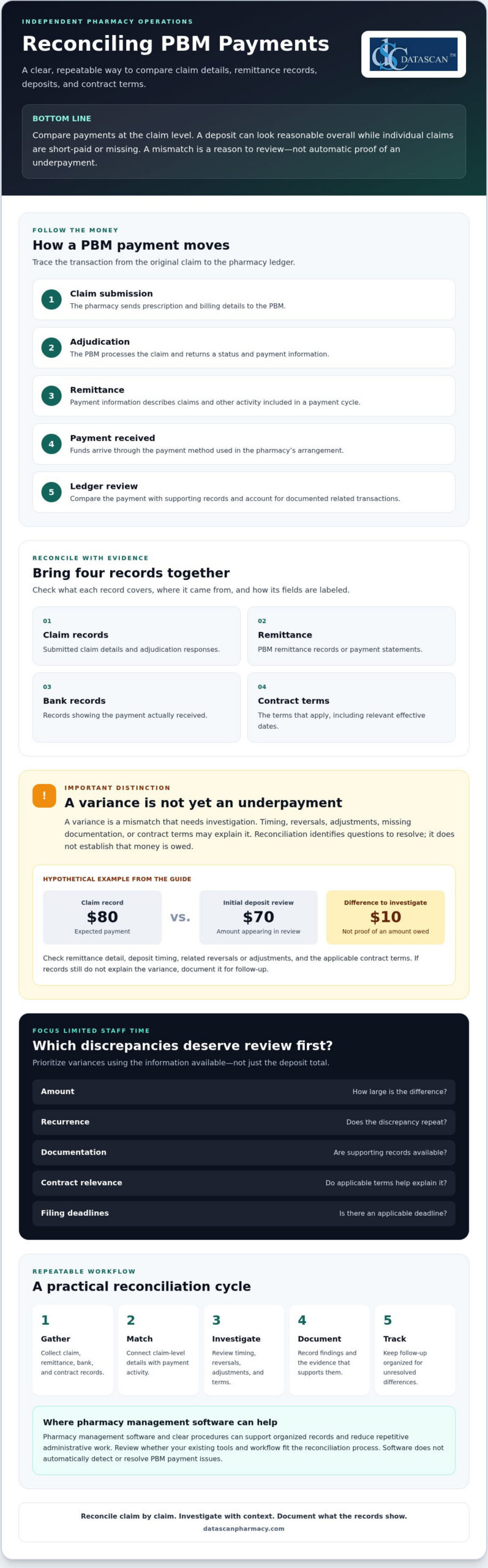
Reconciling PBM payments means comparing the money received with claim-level records and the PBM contract terms that apply. The goal is to find differences that need review, not to assume every mismatch is an error or that every amount can be recovered.
Payment information develops across several stages. At adjudication, the pharmacy receives a response showing how the claim processed and the payment information calculated at that point. Remittance information later describes payment activity, while the bank deposit confirms the cash received. Reversals, adjustments, or other transactions may affect the amount ultimately deposited. For background on the role of a Pharmacy Benefit Manager (PBM), see the Federal Trade Commission’s interim staff report on prescription drug middlemen, which examines PBMs’ role in the prescription drug supply chain.
A deposit total alone may not show how individual claims contributed to the payment. Comparing the underlying records supports cash-flow monitoring, gross profit review, and reliable documentation for questions or follow-up. It also helps pharmacy owners direct limited staff time toward differences with a reasonable basis for investigation.
Which records should a pharmacy compare?
Gather the records available through your pharmacy and PBM arrangements. Formats and access vary, so confirm where each record comes from, what period it covers, and how its fields are labeled.
Submitted claim details and adjudication responses
PBM remittance records or payment statements
Bank records showing the payment received
Relevant contract terms, including the effective dates that apply to the claims under review
Keeping these sources organized through a defined process or with pharmacy management software can make it easier to trace a difference back to the supporting records.
What is the difference between a payment variance and an underpayment?
A variance is a mismatch that needs investigation. It becomes a potential underpayment only after the pharmacy checks whether timing, a reversal, an adjustment, missing documentation, or applicable contract terms explain the difference. Reconciliation identifies questions to resolve. It does not establish that money is owed.
Hypothetical example: A claim record shows an expected payment of $80, while an initial deposit review appears to show $70. Before treating the $10 difference as an underpayment, check the remittance detail, deposit timing, any related reversal or adjustment, and the contract terms that apply. If the records still do not explain the variance, document it for follow-up.
How does a PBM payment move from claim to pharmacy deposit?
A PBM payment generally moves through five stages: the pharmacy submits a claim, receives an adjudication response, gets remittance information, receives payment, and reviews the transaction in its ledger. Following that sequence helps staff connect the original claim to the money received instead of trying to explain a deposit total in isolation.
Claim submission: The pharmacy sends prescription and billing details to the PBM.
Adjudication: The PBM processes the claim and returns a status and payment information.
Remittance: The PBM provides details about claims and other payment activity included in a payment cycle.
Payment: Funds arrive through the payment method used in the pharmacy’s arrangement.
Ledger review: Staff compare the payment with supporting records and account for related transactions where documented.
The sequence can become less straightforward when a claim is reversed and rebilled, an adjustment appears later, or records cover different processing periods. A claim may appear in one report while its related transaction appears elsewhere. Files, timing, and terminology depend on the PBM and pharmacy arrangements, so use the pharmacy’s actual records rather than assuming every payer follows the same format.
What claim and remittance fields help with matching?
Use the strongest matching details available in both records. These may include a prescription or claim reference, service date, claim status, paid amount, and adjustment details. Compare claim-level activity rather than relying on the remittance total. Check the field names, file formats, and available information in your pharmacy’s PBM and payment records, since labels and data availability can differ.
Why may a remittance total differ from a bank deposit?
A mismatch between a remittance and a deposit is a signal to investigate, not a diagnosis. Payment timing, grouped transactions, reversals, adjustments, or incomplete records may explain the difference. Check whether the records cover the same payment period and whether a transaction is recorded separately before concluding that a claim-level variance remains unresolved.
For example, activity on a remittance may settle on a different banking date than expected. Compare the remittance date, payment reference, deposit record, and any associated claim changes. Track timing differences separately from unresolved variances to keep the follow-up list focused.
For Medicare Part D transactions, confirm current payment and price-concession interpretations against applicable CMS guidance before applying them to a reconciliation process. Policy details can affect how records are understood, so do not rely on an outdated summary.
A defined workflow can make these checks easier to repeat. If you’re reviewing whether your pharmacy software and processes support organized payment records, you can discuss your workflow with Datascan.
Which PBM payment discrepancies should a pharmacy investigate first?
Not every difference is an underpayment, and not every variance needs the same immediate effort. Prioritize items that are large, recurring, supported by clear records, connected to a specific contract term, or approaching an applicable filing or dispute deadline. This gives your team a consistent way to focus its review without treating an unexplained amount as proof that the PBM owes money.
For each item, compare the expected reimbursement with the contract terms that apply to the claim, including the relevant effective date, and check the documented claim facts. Do not apply one PBM’s reimbursement method to another. When reconciling PBM payments, keep unresolved items distinct from differences your records explain.
Potential issue
Possible explanation
Next verification step
Payment appears missing
It may be included in a different payment period or linked to another transaction record.
Search by available claim references and service date, then compare the related remittance and deposit records.
Repeated difference for similar claims
A contract term, fee schedule, or processing detail may affect the calculation.
Check the claim facts and applicable contract language, then compare other claims processed under the same terms.
Apparent MAC pricing mismatch
The applicable list, effective date, or claim details may not match the comparison being made.
Verify the relevant MAC terms, effective date, and claim information before treating the difference as an error.
Negative amount or adjustment
A reversal, rebill, or other adjustment may be recorded separately.
Look for a related transaction and confirm whether the records support the adjustment.
Could the difference come from a reversal, adjustment, or timing issue?
Check whether a related reversal, rebill, or adjustment appears under a separate reference or in another payment period. Match transaction references and service dates where your records allow. If the records explain the difference, document the reason and close the review item. If they do not, keep it open and note what information is missing.
How can contract terms help identify a potential underpayment?
Use the contract and applicable fee schedule to determine the reimbursement terms for the claim. Check the effective date and any relevant MAC provisions. A MAC comparison is a prompt to review, not proof of an error on its own. Confirm that the claim facts and contract terms support the comparison, and assess each PBM arrangement separately.
For efficient follow-up, record the amount or pattern being reviewed, the supporting documents, the contract provision checked, any applicable deadline, and the next action. This audit trail helps staff return to open questions without restarting the investigation.
How can a pharmacy reconcile PBM payments consistently?
Use the same sequence each cycle: gather records, match claims, flag variances, investigate, document findings, and follow up. Choose a review period your pharmacy can maintain with its available records and staff time. A steady process helps surface exceptions while keeping the workload manageable.
What should a PBM payment reconciliation checklist include?
Define the period under review, then collect the claim, remittance, deposit, and contract records that apply. Match transactions using identifiers available in your files, and set exceptions aside for review rather than manually rechecking every item. A checklist can help keep each cycle consistent:
Gather: Collect records for the chosen review period and confirm they cover the same activity.
Match: Compare claims with remittance details and payments received.
Flag: Separate unmatched transactions or unexplained variances from items that reconcile.
Investigate: Check supporting records and applicable contract terms.
Document and follow up: Record evidence, assign responsibility, and track each item to a documented outcome.
For each variance, maintain a log with the claim identifier, amount, evidence reviewed, assigned owner, current status, next action, and resolution. Pharmacy management software and a well-defined workflow may help organize operational records, but confirm what your system can support rather than assuming it performs PBM reconciliation automatically.
How should a pharmacy document and follow up on a discrepancy?
Retain relevant claim and remittance evidence according to your pharmacy’s recordkeeping procedures. Use the PBM’s documented inquiry or appeal process, and verify any applicable submission deadlines before sending a request. Track the submission date, supporting documents, responses, next steps, and final outcome. Do not mark an item resolved until the records support that conclusion.
Reviewing payment variances alongside gross profit calculations can give owners broader context for profitability decisions. Use your pharmacy’s established gross profit method and records to connect reimbursement review with the wider financial picture.
Can pharmacy management software make PBM payment reconciliation easier?
Pharmacy management software may support a more organized reconciliation workflow by helping staff keep relevant operational records and review steps in order. Capabilities vary by product and configuration. Before relying on software for reconciling PBM payments, confirm exactly what data it can access, display, or export. Do not assume it automatically matches PBM payments or identifies underpaid claims unless the vendor verifies that capability. Much like utilizing insurance discovery software for healthcare to streamline coverage verification in clinical billing, pharmacy platforms should be evaluated on the specific reimbursement and reporting tasks they actually support.
Evaluate how the software fits your existing process. Ask the vendor:
Which claim details, payment records, and adjustment information can users access or export?
Can staff document exceptions, assign follow-up responsibility, and track an item’s status?
Are reports or audit trails available for the information your pharmacy needs to review?
Can the vendor demonstrate the relevant functions using your pharmacy’s actual reconciliation workflow?
Bring representative records and explain how your team reviews a payment, flags a variance, and records its resolution. A demonstration can show where the software may support the process and where staff may still need separate records or steps.
How can Datascan fit into a pharmacy operations discussion?
Datascan Pharmacy Management Software is part of Datascan’s offerings for independent and retail pharmacies, alongside customizable workflows. These offerings can be discussed in the context of how your pharmacy organizes operations, but their availability alone does not confirm PBM reconciliation, claim matching, payment exports, or underpayment detection. Ask which specific functions are available for your needs and verify them directly.
For broader process ideas, consult a pharmacy workflow optimization guide and consider how clear responsibilities and consistent steps could fit your team. Then compare that process with the capabilities your current software vendor confirms, so expectations reflect what the system can actually do.
Make PBM payment review part of a stronger pharmacy workflow
Reliable reconciling PBM payments starts with a clear comparison: connect claim details to remittance records, deposits, and the contract terms that apply. Investigate variances based on their evidence and urgency, and document each finding and next step. A repeatable process keeps payment questions visible without treating every difference as an error.
Pharmacy management software and well-designed workflows can support organized operations, but confirm which records and functions your system actually provides. Datascan offers pharmacy management software and customizable workflows for independent and retail pharmacies. The company has been family-owned and operated since 1981, with U.S.-based technical support.
Your reconciliation process should fit the way your pharmacy works. Discuss your pharmacy workflow with Datascan and explore whether your current tools and processes support the organized review your team needs. Clear records and practical steps help you approach payment questions with greater confidence while keeping your focus on serving patients.
Frequently Asked Questions
What does reconciling PBM payments mean?
Reconciling PBM payments means comparing what the pharmacy received with claim-level records and the contract terms that apply. Staff review submitted claims, adjudication responses, remittance details, deposits, and related adjustments to identify differences that need attention. A variance is a prompt to investigate, not proof of an error or recoverable amount. The purpose is to understand payment activity, document findings, and follow up on unresolved questions.
How do pharmacies identify PBM underpayments?
Compare each claim’s documented facts and adjudication details with payment and remittance records, then check the contract terms and effective date that apply. Look for missing payments, unexplained shortfalls, or recurring differences, and rule out timing, reversals, and adjustments first. Prioritize items based on amount, recurrence, supporting evidence, contract relevance, and any applicable filing deadline. A mismatch alone does not establish that a PBM underpaid a claim.
How often should a pharmacy reconcile PBM payments?
Set a recurring review period that fits your pharmacy’s records, payment cycles, and available staff time. Consistency is key: a defined schedule helps prevent unreviewed transactions from accumulating and makes open items easier to track. Decide who owns the review, which records they will gather, and how they will document exceptions. Reassess the schedule if payment timing, record availability, or staffing changes make the process difficult to maintain.
Why does a PBM remittance amount differ from a pharmacy deposit?
A remittance total may differ from a bank deposit because the records reflect different timing or transaction groupings. Reversals, rebills, later adjustments, or incomplete records can also affect what appears in each source. First confirm that the remittance and bank records cover the same payment activity, then trace available references and dates. Keep a timing difference separate from an unresolved claim-level variance until supporting records explain the mismatch.
What records does a pharmacy need to reconcile PBM payments?
Gather submitted claim details, adjudication responses, PBM remittance records, bank deposits, and the relevant contract terms, including their effective dates. Keep related reversal, rebill, and adjustment details available when they apply. Files, labels, and data fields vary by PBM and pharmacy arrangement, so confirm which records your pharmacy can access. Matching identifiers, service dates, statuses, and amounts can help connect activity across sources.
Can pharmacy management software help with PBM payment reconciliation?
Pharmacy management software may support organized records and repeatable workflows, but capabilities depend on the specific system and configuration. Ask your vendor what claim, payment, and adjustment information users can access or export, and whether they can document exceptions and assign follow-up. Do not assume software automatically reconciles PBM payments or identifies underpaid claims unless the vendor confirms those functions. Verify capabilities with a demonstration based on your pharmacy’s process.
What should a pharmacy do when a PBM payment discrepancy remains unresolved?
Keep the discrepancy open and document the claim identifier, amount, records reviewed, contract terms checked, assigned owner, and next action. Follow the PBM’s documented inquiry or appeal process, and verify any applicable deadline before submitting supporting evidence. Track the submission, responses, and outcome under your pharmacy’s recordkeeping procedures. Do not assume a recovery is guaranteed. Close the item only when the records support a clear resolution.
What if coordinating a family’s prescriptions didn’t require combining their medical records? Managing family prescriptions in one profile should mean using a shared workflow for refill timing and pickup while keeping each person’s prescriptions and medication history separate. That distinction helps families stay organized without creating identity or record mix-ups.
Families may want one convenient way to track several people’s refill needs. Pharmacy teams may want fewer repeat calls about prescription status and pickup. But a household connection must never blur who a prescription belongs to or who is authorized to access information. The goal is coordination with clear, patient-by-patient identification.
This guide explains how independent and community pharmacies can handle family prescription requests, refills, and pickup while maintaining accurate records. It also covers what to consider when evaluating pharmacy management software and patient-facing mobile tools, including why family-profile and authorization capabilities should be confirmed before they’re promised. About the author: Datascan Pharmacy Software is a family-owned pharmacy software provider serving independent and retail pharmacies since 1981.
Key Takeaways
Coordinate household refill and pickup needs through a shared process, not a merged clinical record.
Keep each person’s prescriptions and medication history distinct, and confirm access before sharing patient information.
Compare staff-assisted, patient-initiated, and technology-supported workflows to find a practical fit for your pharmacy.
Use clear steps for intake, identity checks, documentation, and escalation so staff can handle family requests consistently.
When evaluating pharmacy management software for managing family prescriptions in one profile, verify its family-specific features rather than assuming they’re included.
How can a pharmacy manage family prescriptions in one profile?
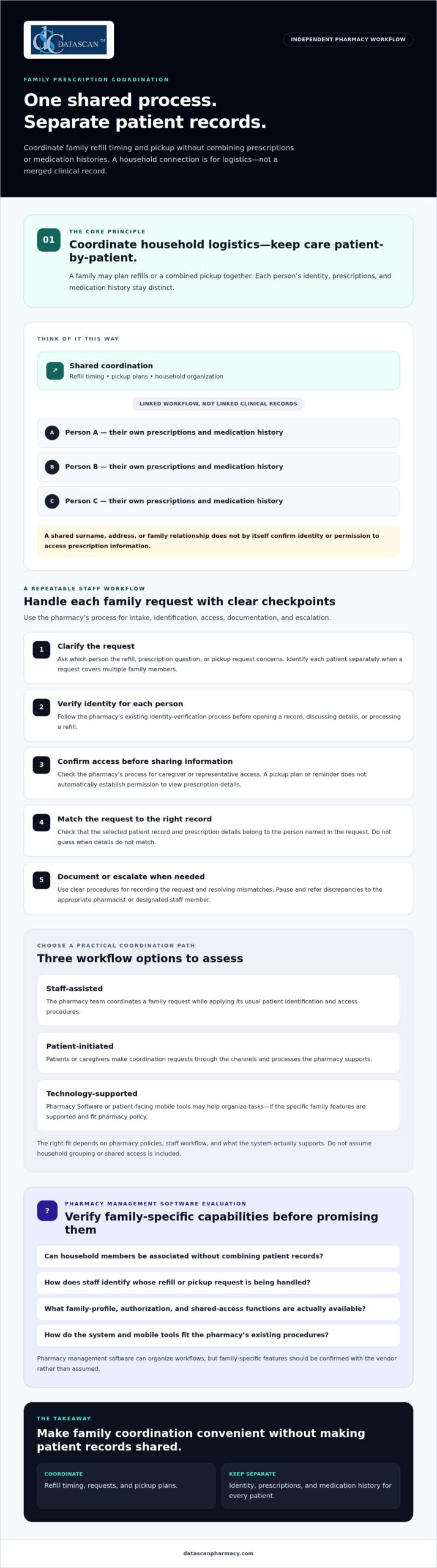
A pharmacy can coordinate family prescriptions through a shared process while keeping a distinct patient record for each person. “One profile” should mean an organized way to manage household logistics, such as refill timing or pickup plans. It should not mean a single clinical record that combines prescriptions and medication histories.
Families may ask for coordination when several prescriptions need attention around the same time or one caregiver is planning a pharmacy visit for more than one person. A clear process helps staff respond consistently and explain what can be coordinated. Because available options depend on pharmacy policies and Pharmacy Software, staff should check what the system supports rather than assume it offers household grouping or shared access.
What does one family prescription profile actually mean?
A coordination view may link household members for practical tasks while preserving a separate profile for each patient. For example, a caregiver might plan a combined pickup, but each person’s prescriptions and medication history remain tied to that individual. This keeps medication information from being confused with a relative’s and supports patient-specific work.
Think of it as a shared calendar, not a merged chart. Coordinating logistics is also different from reviewing a person’s full medication regimen. Pharmacists assessing an individual’s medicines may draw on principles of comprehensive medication management, which focus on that patient’s medication profile. A family coordination feature should not blur that patient-specific work.
Who benefits from coordinated family prescription management?
Parents may want to plan children’s refills together, following the pharmacy’s procedures and applicable requirements. An adult helping a relative may coordinate a pickup or send a reminder, but that alone doesn’t establish permission to access the relative’s prescription details. The pharmacy should explain what the person can do and what steps are needed before sharing information.
For community pharmacies, a defined coordination process makes requests easier to handle without relying on memory or informal assumptions. Pharmacy management software can organize workflows, but staff should verify any family-specific functions with the vendor. Ask whether the system can associate household members without combining records, and how staff identify whose refill or pickup request they’re handling. A pharmacy can review its pharmacy management software workflow options while confirming that any family-profile capability is supported.
How can pharmacies coordinate prescriptions without mixing patient records?
Use each patient’s identity as the organizing principle. Keep profiles, prescriptions, and medication histories separate, even when a family coordinates refill timing or pickup. A shared errand is a logistics arrangement, not automatic permission to view or discuss every family member’s prescription information.
This distinction matters at the counter and during routine phone calls. If a caregiver asks about several prescriptions, staff should identify the specific patient for each request and follow the pharmacy’s process before opening a record, discussing details, or processing a refill. Don’t infer identity or access from a shared surname, address, or family relationship.
How should staff verify each family member’s identity?
Apply the pharmacy’s existing identity-verification process to every patient and interaction. Before viewing or discussing a prescription, confirm which person the request concerns. Before processing it, check that the selected record and prescription details match that patient.
If names, dates, or other identifying details don’t match, pause and escalate the discrepancy to the appropriate pharmacist or designated staff member. Guessing can attach a request to the wrong record. A written procedure should clarify who resolves mismatches and when a request must wait for more information.
How should pharmacies handle caregiver access and consent?
Document how staff determine whether a caregiver or representative may receive information or act on a patient’s behalf. A family relationship alone shouldn’t be treated as universal access permission. Shared pickup plans and refill reminders also don’t, by themselves, establish authorization to access prescription records.
Privacy and consent requirements can depend on the circumstances and applicable guidance. Pharmacy leadership should review current authoritative sources and the pharmacy’s policies, then train staff on what to verify, what to document, and when to ask a pharmacist for direction. A software setting is not a substitute for a clear process.
Pharmacists can contribute to coordinated care while preserving patient-by-patient accountability. The American Academy of Family Physicians discusses pharmacists’ role in team-based care and collaborative practice agreements; that care-team role is distinct from permission to access a relative’s records. For independent pharmacies, thoughtful pharmacy workflow software may help staff follow consistent steps. Verify the system’s capabilities and align its use with approved procedures. That is the practical foundation for managing family prescriptions in one profile without merging patient records.
Which family prescription workflow works best for an independent pharmacy?
The best workflow fits your pharmacy’s staffing, patient preferences, and existing systems while keeping every patient’s record distinct. An independent pharmacy can start with staff-assisted coordination, invite patients to initiate requests, or use technology to support parts of the process. These approaches can also be combined.
Compare the options against your pharmacy’s needs. Whichever approach you choose, tie each request to the correct patient record.
Workflow
Convenience
Staff effort
Record accuracy
Software dependency
Staff-assisted
Helpful for families who prefer direct support from the pharmacy.
May require more manual follow-up.
Relies on consistent intake and patient identification.
Can begin with existing procedures.
Patient-initiated
Lets patients contact the pharmacy about their own prescriptions.
Staff still need to verify and process each request.
Supported by handling each request under the correct patient record.
Depends on the available request channels.
Technology-supported
May make refill steps or communication easier to organize.
Depends on how well the tool fits the pharmacy’s process.
Requires clear patient identification and separate records.
Requires software or an app with the needed functions.
When is staff-assisted coordination the right starting point?
Staff-assisted coordination is a practical option when families need help planning refills or pickups and the pharmacy wants to establish a clear process before adding technology. Staff can record coordination preferences according to pharmacy policy, then document and process each patient’s request separately.
Repeated calls to clarify status, pickup plans, or whose prescription a request concerns may indicate that the intake process needs review. Look for avoidable follow-ups and unclear handoffs, then adjust the steps before adding tools.
When can pharmacy software or a patient app help?
Pharmacy management software may help organize the workflow, but don’t assume it offers household profiles or shared access. Ask the vendor how the system handles separate patient records, refill requests, communication, and staff review. Medication synchronization may help coordinate refill timing when it fits patients’ needs and the pharmacy’s workflow. Confirm how it would work in practice.
A patient-facing app may offer another channel for refill communication, but verify its current functions before presenting it as a family coordination tool. Datascan offers the MobileScripts Patient Mobile App, though family-profile capabilities should be confirmed before making claims about them. Pharmacies can review this guide to pharmacy management software and assess which features support their intended process.
How do you set up a safe family prescription coordination process?
Set up a repeatable workflow that handles the family’s coordination request while verifying and documenting each patient’s needs separately. Clear steps help staff manage requests consistently, reduce avoidable follow-up, and know when to pause for a pharmacist or manager.
Receive the request. Ask which family members the caller or visitor wants to coordinate and what they’re requesting, such as refill planning or pickup coordination. Don’t assume the request includes access to prescription information.
Verify each patient. Follow the pharmacy’s established identity-check process before accessing or processing an individual’s prescription. If details conflict or identity is uncertain, stop and escalate rather than guessing.
Clarify the coordination requested. Confirm which logistics the pharmacy can coordinate under its procedures. Refer questions about caregiver access, consent, or unclear authority to the pharmacist or designated lead.
Document appropriately. Record the request, relevant communication preferences, and any permission details only as pharmacy policy allows. Keep each patient’s identity and prescription information distinguishable.
Coordinate and follow up. Handle each prescription through the appropriate patient record, explain the next steps, and route unresolved questions to the responsible staff member.
What should the pharmacy document when a family requests coordination?
Use the pharmacy’s established documentation process to record what the family wants coordinated and which patient each request concerns. Document communication preferences or permission details only when policy allows, and avoid notes that imply broader access than has been confirmed. Documentation should help the next staff member without replacing identity checks.
How can staff make the process repeatable?
Create a short checklist covering intake, identity verification, coordination, documentation, and patient communication. Train staff to pause and escalate uncertain identity, consent, or prescription details rather than merging or correcting records based on assumptions. Assign a pharmacist or designated lead to resolve exceptions and clarify the procedure.
Keep the process practical for a busy independent pharmacy. Ask staff which steps cause uncertainty, and note recurring patient questions, repeat calls, and handoff problems. Review those patterns with the team and adjust the checklist when pharmacy needs or software workflows change. Rather than setting an arbitrary performance target, focus on whether the process is clear, consistently followed, and preserves separate patient records.
For broader guidance on structuring pharmacy tasks, review this resource on pharmacy workflow optimization. A well-designed process can make managing family prescriptions in one profile more orderly, but confirm that software features fit the pharmacy’s approved procedures. To discuss workflow options for your pharmacy, contact Datascan.
Can pharmacy management software support family prescription coordination?
Yes, pharmacy management software may support parts of family prescription coordination, but pharmacies should confirm family-specific functions with the vendor. Software can help organize routine workflows while staff continue to follow procedures that keep each patient’s records distinct.
Technology can also help independent pharmacy teams organize day-to-day work amid PBM reimbursement pressures. A clearer refill workflow may free staff time for owners and managers to review reimbursement information and consider changing PBM requirements. Software doesn’t change a PBM’s payment terms, so evaluate workflow tools for the operational support they actually provide.
What should a pharmacy ask a software vendor?
Ask for a walkthrough using realistic scenarios, such as coordinating separate refill requests or planning a pickup for multiple household members. Confirm how the system handles:
Identity and records: How does it distinguish each patient?
Workflow and permissions: What coordination and communication functions are supported, and what staff steps are required?
Documentation and exceptions: How are actions recorded, and what happens when details don’t match?
Practical fit: What implementation, training, and support details should your pharmacy plan for?
Datascan serves independent and retail pharmacies with pharmacy management software. Its platform includes medication synchronization and e-care plans, and the MobileScripts Patient Mobile App may provide a patient communication channel. These offerings may be relevant to pharmacy workflows, but confirm current capabilities, including any family-specific functions, before relying on them. When reviewing Datascan’s pharmacy management software, assess how its demonstrated features fit your processes and operational priorities.
Start with the coordination problem your team wants to solve, then verify how the system supports it without merging individual patient records. Talk with Datascan about your pharmacy workflow and the capabilities your team should evaluate.
Build a family coordination workflow your team can trust
Managing family prescriptions in one profile works best when the workflow coordinates refill and pickup needs without combining individual patient records. Clear identity checks, documented procedures, and defined staff responsibilities help families stay organized while keeping each person’s prescription information distinct.
Choose a process your pharmacy can follow consistently, whether it’s staff-assisted, patient-initiated, or supported by technology. Pharmacy management software, medication synchronization, e-care plans, and patient apps may support parts of the workflow, but confirm specific family coordination and access features before relying on them. Tools should fit your procedures and help staff manage routine tasks without adding uncertainty.
Datascan has served independent and retail pharmacies as a family-owned business since 1981, with U.S.-based support for pharmacy clients. If you’re reviewing your processes or software fit, discuss your pharmacy workflow with Datascan. With a clear process and suitable technology, your team can make prescription coordination more convenient while protecting accurate individual records.
Frequently Asked Questions
Can a pharmacy put multiple family members’ prescriptions in one profile?
A pharmacy can coordinate a household’s prescription needs, but it should keep each person’s patient record, prescriptions, and medication history distinct. “One profile” may mean a household coordination view, if the pharmacy’s system supports one, rather than a merged clinical record. Ask what the pharmacy’s software and procedures allow, since family grouping and shared access aren’t available or handled the same way everywhere.
How can a pharmacy coordinate family refills without mixing up patients?
Have staff identify the specific patient for every refill request, verify the matching record, and process each prescription separately. A shared pickup plan can help coordinate logistics, but it shouldn’t replace patient identification or the pharmacy’s established procedures. If a name or other detail doesn’t match, staff should pause and ask a pharmacist or designated team member to resolve it rather than guess.
Can one family member manage another person’s prescriptions?
A family member may be able to help coordinate tasks such as pickup or refill reminders, but the relationship alone shouldn’t be treated as automatic permission to access prescription details. The pharmacy should follow its procedures for confirming what information can be shared and what actions the person can take. For online accounts, check the pharmacy’s current authorization process and applicable guidance before assuming access is available.
Does medication synchronization help families manage prescriptions together?
Medication synchronization may help coordinate the refill timing of a patient’s eligible prescriptions, which can make planning easier. It doesn’t combine family members’ records or automatically synchronize prescriptions across a household. The pharmacy should review each patient’s needs and determine whether the process fits their prescriptions and workflow. Ask how synchronization would affect refill requests, patient communication, and pickup planning before relying on it for family coordination.
What should an independent pharmacy look for in software for family prescription management?
Evaluate whether pharmacy management software supports the workflow you need while preserving separate patient records. Ask the vendor to demonstrate identity handling, refill processing, communication, documentation, permissions, and exception steps. Also consider staff usability, training, and support. Datascan Pharmacy Software serves independent and retail pharmacies; confirm directly whether its current capabilities fit your family coordination needs before making a decision.
Can a pharmacy mobile app manage prescriptions for an entire family?
Some patient apps may support refill communication, but family profiles, delegated access, and household-level prescription management depend on the app’s specific functions. Don’t assume one account can manage everyone’s prescriptions. Ask the pharmacy or app provider how individual patients are identified, what access options exist, and what authorization steps apply. Datascan offers the MobileScripts Patient Mobile App, but confirm its current family-related capabilities before relying on them.
How can pharmacies reduce staff time spent coordinating family prescriptions?
Use a consistent intake and follow-up process, assign responsibility for unclear requests, and document coordination according to pharmacy procedures. Clear patient identification and communication steps can help limit repeated questions and avoidable handoffs. Pharmacy management software may organize parts of the workflow, but confirm that its features match the pharmacy’s process. Review recurring patient questions and staff feedback to find practical improvements without assuming a particular tool will eliminate follow-up.
What if the problem isn’t that you need new pharmacy software, but that your current system no longer fits the way your pharmacy works? Switching from Computer-Rx is worth considering when specific workflow limitations, changing business needs, or support gaps affect daily operations, not simply because another vendor makes bigger promises.
It’s understandable to hesitate. A pharmacy management software change can affect dispensing, staff routines, and patient service, so the decision takes more than a polished demo. This guide will help you assess whether a switch is justified, compare options against your pharmacy’s needs, and prepare questions for a productive vendor conversation.
We’ll cover how to document workflow friction, evaluate tools that may help your team manage day-to-day work and review PBM reimbursement information, and ask vendors about conversion, training, and support before you commit. The goal isn’t to rush you away from Computer-Rx. It’s to help you choose pharmacy software based on fit for your independent pharmacy and the operations you need to support.
About the author: Datascan Pharmacy Software is a family-owned U.S. pharmacy software provider founded in 1981. Its offerings include pharmacy management software and related tools for pharmacy operations.
Key Takeaways
Consider switching from Computer-Rx when documented pharmacy needs no longer fit your current system, rather than reacting to sales claims alone.
Investigate recurring workflow problems by checking whether they stem from software, staffing, procedures, training, or third-party processes.
Compare pharmacy management software options against the same requirements for workflows, reporting, usability, support, training, and conversion.
Reduce transition uncertainty by confirming data scope, responsibilities, timing, staff training, and contingency plans with a prospective vendor.
Evaluate Datascan as one possible fit for your independent pharmacy, considering its pharmacy software suite, U.S.-based support, and family-owned history since 1981.
Why are independent pharmacies considering switching from Computer-Rx?
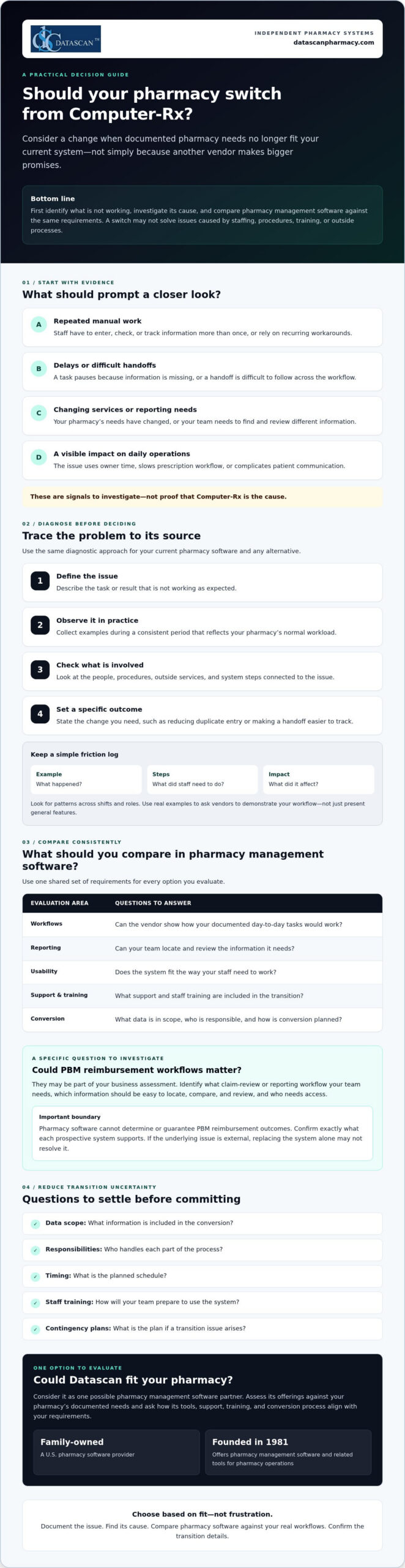
A switch is worth evaluating when your documented pharmacy needs no longer match your current system. That doesn’t mean Computer-Rx is necessarily causing a problem. First, ask whether your pharmacy management software supports the way your team works today and the services you may need to provide next.
For an independent pharmacy, the pressure points are often practical. Are staff repeating manual steps to complete routine tasks? Do workarounds take time away from prescription workflow or patient communication? Have your services or reporting needs changed? Is it difficult for your team to find and review information relevant to reimbursement? Treat these as questions to investigate, not assumptions about Computer-Rx.
A pharmacy software switch is a needs-and-fit decision, not a reaction to dissatisfaction alone. A pharmacy management system supports key pharmacy activities, but whether a different system can address a specific concern depends on its cause and the capabilities you need.
What problems should I document before changing pharmacy software?
Ask staff to record recurring friction when it happens. Note a specific example, the steps involved, and what the issue affects. A short log can help you distinguish a system limitation from a training gap, an unclear procedure, or an outside process your software doesn’t control.
Manual steps and workarounds: What does staff have to enter, check, or track more than once?
Delays: Where does a task pause, and what information or handoff is missing?
Impact: Does the issue use owner time, slow prescription workflow, or complicate patient communication?
Look for patterns across shifts and roles. A clear record makes it easier to ask vendors to demonstrate how they would handle your actual workflow, rather than relying on a general feature presentation.
Could PBM reimbursement challenges be part of the decision?
They may be part of your business assessment, but pharmacy software can’t determine or guarantee PBM reimbursement outcomes. Instead, identify the claim-review or reporting workflow your team needs. Which information must be easy to locate, compare, and review, and who needs access to it? Then confirm exactly what each prospective system supports. For broader financial context, consult a pharmacy gross profit guide alongside your software evaluation.
Keep the decision grounded in evidence. If the root cause is staffing, process design, or an external reimbursement issue, replacing the system alone may not resolve it. If your documented needs point to a genuine mismatch, you’ll be better prepared to compare alternatives based on fit, not frustration.
How do I tell whether my current pharmacy system is the real problem?
Use a simple diagnostic before deciding that changing pharmacy management software is the answer: define the issue, observe it, identify dependencies, and set a specific desired outcome. This helps separate a software constraint from problems caused by staffing, procedures, training, or third-party processes.
Define the issue: Describe the task or result that isn’t working as expected.
Observe it: Collect examples during a consistent period that reflects your pharmacy’s normal workload.
Identify dependencies: Check which people, procedures, external services, or system steps are involved.
Set an outcome: State what needs to change, such as reducing duplicate entry or making a handoff easier to track.
A recurring workaround is evidence to investigate, not proof a vendor is at fault. As you assess switching from Computer-Rx, use the same diagnostic criteria for your current system and any alternative. The Health IT Playbook also offers broader guidance on technology selection and implementation that can inform your planning.
Which pharmacy workflows should I review first?
Map prescription intake, dispensing, verification, pickup, and refill communication at a high level. Then examine reporting and front-end tasks, noting where information is re-entered, a handoff stalls, or staff need a workaround. Check whether each process fits your pharmacy’s service mix and daily workload. Review POS, delivery, or patient-app needs only if they’re relevant to your operations.
How can I measure whether a workflow needs to change?
Choose a defined observation period and track the same measures throughout it. Keep the measures practical and consistent:
How often staff repeat a task or enter the same information more than once.
Where handoffs occur and whether they require follow-up.
Which steps staff identify as sources of friction, with a brief example.
How often a task needs rework and what happened immediately before it.
Use your own baseline rather than a vendor’s generalized benchmark. Compare systems using the same definitions and workflow examples, and don’t attribute financial or clinical outcomes to software without evidence. If you want to explore whether another workflow approach fits your needs, you can discuss your pharmacy’s requirements with Datascan.
What should I compare before choosing a Computer-Rx alternative?
Compare each pharmacy management software option against the same written requirements, not the size of its feature list. The best-fit pharmacy software is the one that meets your documented operational requirements and supports the work your team needs to do.
Build a short scorecard from your pharmacy’s priorities, then ask each vendor to demonstrate the same real tasks. For broader system context, review this guide to pharmacy management software as part of your research.
Area to compare
Questions to ask
Required workflows
Can you show how the system handles the tasks we identified, including our service needs?
Usability
Can staff complete common tasks in a clear, repeatable way? Show us the steps, not just a feature overview.
Reporting and data
Which reports and data are included? Can we review examples relevant to our operations and claim-review process?
Support
When is support available, how do we contact the team, and what is the escalation process?
Training
Who provides training, what does it cover, and what responsibilities fall to our staff?
Conversion
What data can be transferred, who is responsible for each step, and what should we plan for?
Which questions should I ask a pharmacy software vendor?
Bring your workflow examples to the demonstration and ask the vendor to walk through them with you. Confirm which data, reports, and integrations are included, and request written clarification for anything that affects your requirements. Ask who handles implementation, staff training, and ongoing support. Before deciding, verify the proposed scope, responsibilities, and timing.
How should I compare support and workflow flexibility?
Support models differ, so confirm availability and escalation paths directly with each vendor rather than assuming they match your needs. Ask whether the system can accommodate your operating model and what changes, if any, that would involve. Don’t assume customization is available or included. Consider workflow software only if task coordination is a documented need, and ask the vendor to demonstrate how it would address that need.
To keep the comparison fair, score each vendor against your requirements using the same scale, such as whether a need is met, partly met, or not met. Add notes from demonstrations and written answers. If switching from Computer-Rx remains under consideration, this process gives your team a clear basis for comparing alternatives and discussing trade-offs before committing.
How can I reduce the risk of switching pharmacy software?
Changing a core pharmacy management system takes planning and should never be treated as risk-free. Before committing, agree with the selected vendor on what the conversion covers, who owns each task, when key steps are expected, how staff will prepare, and what the pharmacy will do if an issue arises.
Put the plan in writing and make sure it reflects your pharmacy’s actual workflow. Clarify how the vendor will communicate progress, who can answer questions, and how concerns will be escalated. A contingency plan should identify who makes decisions if a critical step is delayed or information needs additional review. These discussions won’t remove every uncertainty, but they can make responsibilities and next steps clearer.
What should I confirm about pharmacy software conversion?
Ask which patient, prescription, inventory, and historical records can be transferred, and which information may need separate handling. Confirm who is responsible for preparing, transferring, and reviewing data, as well as the review points and escalation path. Before relying on the new system, use a pharmacy-approved checklist to validate the information your team considers critical.
Don’t assume that “conversion included” means every record or workflow is covered. Ask the vendor to define the scope and identify any dependencies or decisions required from your pharmacy. Record the answers alongside the agreed timing so staff know what to expect and whom to contact with questions.
How should I prepare staff for a system change?
List the roles involved and the tasks each person will need to practice, such as intake, dispensing, verification, pickup, refill communication, or reporting. Agree with the vendor on the training scope and timing, then set a clear process for staff to raise questions and escalate problems. A dedicated implementation roadmap can help organize these responsibilities. Confirm its details with the vendor.
As you plan for switching from Computer-Rx, involve staff who perform the day-to-day work. They can flag role-specific needs and identify where a change may affect patient communication or routine handoffs. Set expectations for how updates will be shared, who will coordinate decisions, and how unresolved issues will be tracked during the transition.
Use the vendor conversation to test whether the proposed conversion, training, and support plan matches your pharmacy’s requirements. Datascan provides pharmacy management software and U.S.-based support. Ask its team to clarify the scope and responsibilities relevant to your situation. Review your conversion and training requirements with Datascan as part of your vendor evaluation.
Could Datascan be the right next pharmacy management software partner?
Datascan is one option for independent pharmacies to evaluate, not an automatic fit for every operation. The company has been family-owned and operated since 1981, provides U.S.-based support, and offers a pharmacy software suite. Whether it’s right for your pharmacy depends on how well its capabilities and proposed support meet your documented needs.
As you consider switching from Computer-Rx, compare Datascan using the same workflows and vendor questions you’re using for other options. Bring concrete examples from your pharmacy, such as how staff manage dispensing, communicate with patients, review reports, or coordinate front-end tasks. Ask the team to explain what the software supports and confirm any conversion, training, or support details directly rather than assuming they’re included.
What does Datascan offer independent pharmacies?
Pharmacy management software is Datascan’s core offering, with related tools available for pharmacy operations. Depending on your requirements, ask about its POS, MobileScripts patient mobile app, mobile delivery app, compounding pharmacy software, and customizable workflow capabilities. Start with the Datascan pharmacy management software overview, then discuss which offerings are relevant to your operation. If workflow coordination is a priority, review its workflow software and ask how it aligns with your specific tasks.
For example, a pharmacy that relies on delivery or patient refill communication may want to evaluate those tools, while a pharmacy with compounding needs can ask about the compounding software. The goal is to assess fit for your service mix, not to adopt features that don’t address an identified need.
What is a practical next step before deciding?
Prepare a concise vendor brief before a conversation. Include recurring pain points, priority workflows, relevant reporting needs, and questions about conversion responsibilities, training, and ongoing support. Ask Datascan to respond to those requirements and clarify the proposed scope. This gives you a practical basis for comparing its pharmacy management software with your other options.
Make Your Next Pharmacy Software Decision With Confidence
Switching from Computer-Rx is worth evaluating when documented operational needs no longer fit your current pharmacy management software. Before you decide, identify what’s causing workflow friction, compare vendors against the same pharmacy-defined requirements, and confirm conversion, training, and support responsibilities directly.
Technology can help organize pharmacy work and make key information easier for your team to review, but it can’t guarantee PBM reimbursement outcomes or resolve issues outside the system. Ground your decision in your pharmacy’s service needs, staff workflows, and patient care priorities.
Datascan is one option to assess. It’s family-owned and operated since 1981, provides U.S.-based support, and offers pharmacy management software and related operational tools. Ask how its capabilities align with your requirements, then verify the details that matter to your pharmacy.
To discuss your requirements and take the next step with a clear set of questions, contact Datascan about your pharmacy software needs. A careful evaluation can help you move forward with confidence, whether you switch or stay.
Frequently Asked Questions
Why are pharmacies switching from Computer-Rx?
Pharmacies may consider switching when their documented needs no longer fit their current system. Possible reasons to investigate include recurring workarounds, delays in daily tasks, changing service needs, or difficulty reviewing reports relevant to reimbursement. These are questions for each pharmacy to assess, not proof of a Computer-Rx shortcoming. Before deciding, check whether the cause is the software, staff training, procedures, or an external process.
Is switching from Computer-Rx difficult?
Switching can be complex because pharmacy management software supports core operations, and a change requires planning. The level of effort depends on the conversion scope, the pharmacy’s workflows, and the vendor’s process. Before committing, ask what data can be transferred, who handles each task, how staff training is planned, and how issues will be escalated. Build a contingency plan with the vendor rather than assuming the transition will be risk-free.
How do I compare Computer-Rx with another pharmacy system?
Compare both systems against the same written requirements from your pharmacy. Prioritize the workflows your team uses, usability, reporting, support availability, training, and conversion responsibilities. Ask each vendor to demonstrate the same real tasks, such as intake, dispensing, refill communication, or reporting. Confirm in writing which data, reports, and integrations are included. A shared scorecard helps your team focus on fit instead of counting features.
What data should I ask about before a pharmacy software conversion?
Ask which patient, prescription, inventory, and historical records can be transferred, and which information may need separate handling. Confirm who prepares, transfers, and reviews the data, what validation steps your pharmacy should complete, and how exceptions will be escalated. Request a written description of the conversion scope and responsibilities. Use a pharmacy-approved checklist to verify critical information before your team relies on the new system.
Will changing pharmacy software improve PBM reimbursements?
Changing software can’t determine or guarantee PBM reimbursement outcomes. It may be useful to assess whether a system supports the reporting or claim-review workflows your pharmacy needs to examine reimbursement. Identify the information your team needs to review, then ask vendors to demonstrate how their system handles that workflow. Also consider broader financial factors, since reimbursement challenges can involve processes and decisions outside the pharmacy software itself.
How long does it take to switch pharmacy management software?
There isn’t one timeline that applies to every pharmacy. The schedule depends on factors such as the agreed conversion scope, data handling, staff training, and the vendor’s implementation plan. Ask for proposed milestones, what your team must complete before each one, and how changes or delays will be communicated. Get the expected timing and responsibilities in writing, and avoid relying on a general estimate that doesn’t reflect your pharmacy’s needs.
What should I ask Datascan before switching from Computer-Rx?
Ask Datascan to explain how its pharmacy management software fits your required workflows, which related operational tools match your service needs, and what data conversion, training, and support would involve. Confirm responsibilities and proposed timing directly with the team. You can review Datascan’s pharmacy management software overview, then compare the information with your documented requirements and confirm any details relevant to your pharmacy directly with Datascan.
What should a pharmacy computer system do beyond moving prescriptions through the queue? For an independent pharmacy, it should support reliable dispensing, coordinate daily tasks, and give owners a clearer view of operations.
Disconnected tools can create duplicate work, while PBM reimbursement challenges make financial visibility important. When time is limited, choosing software means looking beyond feature lists and focusing on what fits your pharmacy’s workflows.
This guide explains which capabilities to assess, how technology may support workflow and reimbursement oversight, and what to ask when comparing systems and vendors. Use it to identify a solution that fits your team and operating needs.
About the author: Datascan Pharmacy Software is a family-owned company founded in 1981. It serves independent and retail pharmacies and provides U.S.-based technical support.
Key Takeaways
Understand what a pharmacy computer system coordinates and why the terms pharmacy system and pharmacy management software can overlap.
Prioritize functions according to daily needs, from dispensing and workflow coordination to point of sale, patient engagement, and delivery.
Use a comparison framework to distinguish must-have capabilities from features that may not fit your pharmacy’s operating model.
Prepare for vendor evaluations by documenting workflows, testing familiar scenarios, and confirming training and support arrangements.
Use Datascan’s pharmacy software offerings as one option to evaluate, and verify which capabilities fit your needs.
What should a pharmacy computer system do for an independent pharmacy?
A pharmacy computer system coordinates pharmacy-specific records, tasks, and operational tools. The terms “pharmacy computer system,” “pharmacy system,” and “pharmacy management software” often refer to overlapping solutions, although vendors may use them differently. Assess what a particular system and configuration actually support rather than relying on the label.
A pharmacy-specific system is built around pharmacy work, including prescription dispensing and related operational processes. General business or retail software may support other needs, such as sales, but it is not automatically designed to manage pharmacy records or dispensing workflows. Some pharmacies use additional tools alongside their pharmacy software. Integrations can connect parts of an operation, but available connections vary by product and configuration.
For a foundational overview of the purpose and common functions of a pharmacy management system, see Wikipedia’s summary. Use it as background, then confirm specific capabilities with each vendor. Do not assume every system includes the same clinical, administrative, reporting, or financial tools.
How is a pharmacy computer system different from general business software?
Pharmacy software is designed for workflows centered on dispensing and pharmacy operations. General business software supports broader tasks, such as retail sales or accounting. For organizations that need comprehensive support across their broader workplace technology and network infrastructure, it can also be beneficial to explore Managed IT Services alongside specialized operational platforms. The distinction matters when staff move between steps: separate tools can require repeated entry, while a connected setup may reduce it if the relevant functions are configured to share information. Ask vendors to demonstrate the workflow your team actually uses.
Who benefits most from pharmacy management software?
Independent and community pharmacy owners, managers, and teams may benefit when pharmacy management software brings everyday work into a clearer process. That can matter for owners balancing patient care with staffing, administration, and reimbursement oversight. The right setup depends on the pharmacy’s services, team, and operating model, so define your needs before treating any feature as essential.
Start by mapping the work your pharmacy handles and noting where staff switch between systems or re-enter information. Consider how dispensing, point of sale, patient tools, and delivery fit your operation. Then verify which functions are available and how they work together. For example, a pharmacy assessing delivery workflows can review Datascan’s electronic delivery system and confirm whether it fits its needs.
Connected processes may reduce duplicate steps, but the result depends on configuration and how your team uses the tools. A system should support the work your pharmacy performs, not add complexity through features you will not use.
Which pharmacy management software functions support daily pharmacy work?
Pharmacy management software supports prescription dispensing and the operational work of running a pharmacy. The right functions depend on your pharmacy’s services and setup. Evaluate how the tools handle everyday tasks, and verify specific capabilities with the vendor rather than assuming every system works the same way.
A pharmacy computer system may bring several kinds of work together. Assess whether the software supports the tasks your team needs in these areas:
Dispensing: Ask how pharmacy dispensing software supports prescription processing, and confirm which steps and records it handles.
Workflow coordination: Look for ways to organize tasks and handoffs that match your team’s actual process.
Point of sale: Assess whether POS tools fit the pharmacy’s retail operations and how they relate to other workflows.
Patient engagement: Consider whether a patient app supports services your patients use, such as refill requests.
Delivery: If your pharmacy provides delivery, ask how delivery tools fit into the work from prescription preparation through delivery management.
For computerized prescription records, review the FDA guidance on pharmacy records and ask vendors how their systems support your recordkeeping needs. Confirm the details that apply to your pharmacy with appropriate compliance resources.
Can a pharmacy system help manage PBM claims and reimbursements?
Pharmacy technology may help staff access claim information and payment records, but claim submission is not the same as reimbursement analysis or financial reconciliation. Ask whether the system shows the information your team needs to review claim outcomes, compare them with payment records, and identify items for follow-up. Do not assume it will explain reimbursement differences, reconcile payments, or recover revenue. Verify each capability and how it works in your configuration.
Which connected tools can reduce fragmented pharmacy workflows?
Connected tools may reduce duplicate entry when they share relevant information, but integration and setup matter. Datascan offers pharmacy management software, point-of-sale tools, a patient mobile app, delivery tools, and customizable workflows. These are distinct offerings, so confirm which products and functions fit your needs rather than assuming they are all included together. Explore the pharmacy management software overview and ask how available functions relate to your current process.
A customizable workflow may help align tasks with how your team operates. Delivery tools are relevant only if delivery is part of your service model. To discuss which Datascan offerings may fit your pharmacy’s workflow, contact the Datascan team.
How do you compare pharmacy computer systems for your pharmacy?
Compare each pharmacy computer system against your actual workflows, not just a vendor’s feature list. Classify each capability as essential, relevant, or not needed based on your services and operating model. Then ask the vendor to demonstrate it and confirm what is included in your configuration.
Capability
Starting priority
What to verify
Dispensing
Essential
Which prescription processing steps and records does the system support?
Workflow
Essential
Can staff coordinate the tasks and handoffs your pharmacy uses?
Point of sale
Relevant
Does it fit your retail process, and how does it work with other tools?
Patient tools
Relevant
Do the available tools match the patient services you provide?
Reporting
Relevant
What claim, payment, and business information can staff review?
Support
Essential
What support is available, and how do staff access it?
These priorities are starting points, not universal ratings. For example, delivery tools may be essential for a pharmacy with an active delivery service, but unnecessary for one that does not offer delivery. For broader context on the software category, see this pharmacy management software guide.
What questions should you ask a pharmacy software vendor?
Ask which workflows the system supports directly and which require separate tools or manual steps. Clarify how implementation, staff training, data handling, and ongoing support work. Then request a demonstration built around routine tasks your team recognizes. A realistic scenario can reveal extra steps or dependencies that a general product overview may not show.
How can technology support PBM reimbursement oversight?
Ask what claim and payment information the software makes available, and whether its reporting supports your pharmacy’s existing review and reconciliation process. Confirm the details in a demonstration or written product information. Claim submission, access to payment records, and financial analysis are different functions. Software may help organize information for review, but it does not change PBM contract terms or guarantee a particular payment or reimbursement outcome.
Separate demonstrated functionality from vendor promises. Record what you saw, what is documented for your configuration, and what still needs clarification. Ask who will confirm any unresolved capability before you decide. If you are assessing Datascan against your requirements, contact the team with your questions.
How can you assess implementation, support, and day-to-day fit?
Assess a pharmacy computer system by tracing the path from your current workflow to daily use. Document how work gets done, define requirements, test realistic scenarios, and confirm support and implementation responsibilities. A strong demonstration is useful, but it will not replace clear answers about data conversion, staff training, testing, timelines, or how dispensing operations will continue during the transition.
Document current workflows. Note routine steps, handoffs, and pain points, including where staff switch tools or repeat data entry.
Set requirements. Separate must-haves from optional capabilities based on your services, staffing, and operating model.
Test scenarios. Ask the vendor to demonstrate familiar tasks from start to finish, including the steps staff perform during a typical shift.
Confirm the plan. Clarify who handles data conversion, what your team must provide, how testing works, and what implementation timelines depend on before making commitments.
Planning for training and operational continuity gives the team time to learn key workflows and surface gaps before relying on the new setup in daily work. Ask how testing will verify that important records and routine processes are ready, and agree on how staff should handle work during the transition. For more migration-planning detail, the outlined pharmacy software implementation plan can help structure vendor discussions.
What should a pharmacy system demonstration include?
Use real pharmacy scenarios, not just a feature tour. Include team members who will use the system on shift, and ask them to follow routine dispensing and administrative tasks. Have someone record unanswered questions, unexpected steps, and any capability the vendor says is available. Request written confirmation of those points, including whether they apply to your proposed configuration.
How do you judge ongoing support and staff usability?
Ask who provides support, how staff reach them, and what the service arrangement covers. Have employees try key workflows during the demonstration and ask what training is available. Compare vendors using documented support details and observed usability, not assumptions based on a sales presentation. Datascan states that it provides U.S.-based technical support. Confirm the specific support arrangements relevant to your pharmacy.
Before selecting a system, keep a short decision record with required functions, demonstrated results, open questions, implementation responsibilities, and support terms. It helps owners compare options without relying on memory while managing daily operations. To discuss Datascan’s pharmacy management software and how it may fit your pharmacy’s needs, contact the Datascan team.
How can Datascan pharmacy management software fit your next steps?
Datascan serves independent and retail pharmacies with pharmacy management software and related tools. The family-owned business was founded in 1981 and provides U.S.-based technical support. Whether its offerings fit your pharmacy depends on your services, workflows, and required capabilities. Confirm what is available in the configuration you are considering.
Which Datascan tools may be relevant to your pharmacy?
Datascan’s offerings include pharmacy management software, point-of-sale tools, the MobileScripts Patient Mobile App, mobile delivery tools, compounding pharmacy software, 340B management tools, and customizable workflows. These are options to evaluate, not a promise that every tool is included in every configuration. For front-end operations, review Datascan’s point-of-sale tools and ask how they fit your pharmacy’s needs.
PBM reform also makes it useful to ask how your technology supports operational visibility. The Consolidated Appropriations Act, 2026 includes federal PBM changes, with key Medicare Part D compensation provisions beginning in 2028 and most provisions taking effect in 2029 for calendar-year plans. These changes do not mean software can alter contract terms or determine how a rule applies to your pharmacy. Instead, ask whether the information and workflows in your proposed setup can support your team’s review of claims, payments, and changing operational requirements.
Workflow fit: Which recurring tasks could the software support, and what would still require another tool or manual step?
Owner time: Which administrative processes take attention away from managing the business, and can the proposed setup make them easier to oversee?
PBM oversight: What claim, payment, or financial information is available for review? Confirm specific reporting and reconciliation functions directly.
What should you prepare before contacting a pharmacy software provider?
Bring a list of your current systems, recurring workflow bottlenecks, and key questions. Identify the capabilities you need for dispensing, reimbursement review, patient services, and staff workflows. Then ask the vendor to show how the proposed configuration addresses those priorities and what it does not cover.
Choose a system that supports the way your pharmacy works
The right pharmacy computer system should fit your daily operations, not just offer a long list of features. Compare systems against your dispensing and workflow needs, check what claim and payment information they provide for reimbursement oversight, and confirm implementation, training, and support details before deciding.
Keep your priorities clear. Choose capabilities that address real workflow friction, and verify each promised function in a demonstration or product documentation. Pharmacy management software can support coordinated work, but reimbursement review still depends on the information available and your pharmacy’s processes.
Datascan is a family-owned pharmacy software company founded in 1981, with U.S.-based technical support. Its offerings include pharmacy management software, POS, patient apps, and delivery tools. The right combination depends on your pharmacy’s needs, so use your requirements to guide the conversation.
Discuss your pharmacy’s needs with Datascan and take the next step toward a system that fits your team. A clear evaluation plan can help you make a considered choice and focus on running your pharmacy.
Frequently Asked Questions
What is a pharmacy computer system?
A pharmacy computer system is software that coordinates pharmacy-specific records, tasks, and operational tools. It commonly supports dispensing work and may connect with other pharmacy functions, depending on the product and configuration. The terms “pharmacy system” and “pharmacy management software” are often used for overlapping solutions. Check what a specific system does, since features and available tools can differ between vendors.
What is the difference between pharmacy software and pharmacy management software?
Pharmacy software is a broad term for software used in pharmacy operations, while pharmacy management software typically refers to systems focused on coordinating pharmacy work, including dispensing-related processes. In practice, vendors and pharmacy teams may use these terms interchangeably. Compare capabilities rather than relying on the name: ask which tasks the product supports, what requires another tool, and which functions apply to your proposed setup.
Can pharmacy management software help independent pharmacies review PBM reimbursements?
It may help staff access claim and payment information, but its value depends on the system’s functions and configuration. Ask whether it provides the details your team needs to review claim outcomes and compare them with payment records. Claim submission, reimbursement analysis, and financial reconciliation are different tasks. Software alone does not change PBM contract terms or guarantee a particular reimbursement outcome.
What features should I look for in a pharmacy computer system?
Start with the work your pharmacy needs the system to support. Common areas to evaluate include prescription dispensing, workflow coordination, point of sale, patient tools, delivery, reporting, and vendor support. Not every pharmacy needs every function. Classify each capability as essential, relevant, or not needed based on your services and operating model. Then ask the vendor to demonstrate essential tasks and confirm what is available in your configuration.
How do I choose pharmacy software for an independent pharmacy?
Choose pharmacy software by comparing systems against your team’s real workflows, service needs, and operational priorities. Document current tools and recurring bottlenecks, then test realistic tasks in vendor demonstrations. Ask about training, data handling, implementation responsibilities, and support. For reimbursement oversight, confirm what claim, payment, and reporting information the system provides. Treat unconfirmed features as questions to resolve, not promised outcomes.
Can a pharmacy system include point-of-sale and delivery tools?
Yes. Some pharmacy software providers offer point-of-sale and delivery tools alongside pharmacy management software, though available products and how they work together vary. Datascan offers point-of-sale tools and mobile delivery tools, as well as pharmacy management software. Ask which offerings fit your pharmacy and whether they are part of the configuration you are evaluating. A pharmacy that does not provide delivery may not need delivery tools.
What should I ask a pharmacy software vendor before choosing a system?
Ask the vendor to demonstrate your routine dispensing and administrative workflows, and clarify which tasks need separate tools or manual steps. Confirm how data handling, implementation, testing, staff training, and ongoing support work. For PBM oversight, ask what claim and payment information is available and whether it supports your review process. Request clear answers about any capability that has not been demonstrated or documented for your setup.
What if safer dispensing could also give your team more time to care for patients? The right technology to improve pharmacy safety can support consistent prescription workflows, help pharmacists spot potential issues, and reduce repetitive manual steps. The goal is to make accuracy part of an efficient process, not a trade-off against speed.
Independent pharmacy owners know what’s at stake: a missed detail can put a patient at risk, while manual verification and PBM paperwork can stretch a team thin. Pharmacy management software can bring key workflow steps together, helping staff follow a clearer process and giving owners better visibility into daily operations.
This 2026 guide explains how pharmacy software can strengthen safety while helping your business run more efficiently. You’ll learn how verification tools and customizable workflows support safer dispensing, how technology can ease administrative work, and what to consider when reviewing PBM reimbursement pressures.
About the author: Datascan Pharmacy Software is a family-owned pharmacy technology company founded in 1981. Its pharmacy management software and POS systems are designed for independent and retail pharmacies.
Key Takeaways
See how integrated pharmacy systems can replace fragmented manual records with clearer, more consistent dispensing workflows.
Learn how clinical decision support and medication synchronization can help teams identify potential risks and support patient adherence.
Understand how barcode verification can connect a stock bottle to a prescription as an additional dispensing safety check.
Explore how technology to improve pharmacy safety can support clinical documentation and reduce repetitive administrative work.
Use practical criteria to evaluate pharmacy software vendors, including support, workflow fit, and ongoing product development.
How does technology improve pharmacy safety for independent pharmacies?
Technology can improve pharmacy safety by helping independent pharmacies replace fragmented manual processes with connected, consistent workflows. It can give pharmacists a clearer view of the information and steps involved in a prescription while keeping clinical decisions in their hands. The World Health Organization reports that medication-related harm affects about 1 in 20 patients globally. That estimate covers healthcare broadly, not dispensing errors in community pharmacies alone, but it underscores why reliable safety processes matter.
Moving from paper notes and disconnected records to an integrated pharmacy system can make relevant information easier to find and routine steps easier to track. In a busy community pharmacy, interruptions can make informal handoffs and memory-dependent processes harder to manage. Technology to improve pharmacy safety should reinforce the team’s established checks, not promise to eliminate errors.
Why is pharmacy software the foundation of patient safety?
Pharmacy management software can organize prescription and patient information in a shared workflow. Staff can work from consistent records instead of piecing details together manually, making it easier to see what has been entered or reviewed and where a prescription stands. Datascan’s pharmacy management software is designed for independent and retail pharmacies. The right system should fit the pharmacy’s processes and help staff maintain clear, reviewable records.
How does automation reduce human error in dispensing?
Automation can reduce repeated data entry and make routine steps more consistent, while pharmacists remain responsible for professional review. E-prescribing, where available and integrated into the workflow, can limit the need to re-enter prescription details manually. Other pharmacy automation tools may support counting or label preparation, depending on the system and equipment. Ask vendors which tasks their software actually automates and which checks still require staff attention.
Clear records can also help a pharmacy review how a prescription moved through its process if a concern arises. They do not prevent every error or remove professional liability, but a well-designed system can make responsibilities and documented steps easier to follow. The World Health Organization’s Medication Without Harm initiative describes medication safety as a global priority.
What specific pharmacy management software features prevent medication errors?
Pharmacy management software can support safer dispensing by organizing patient information, flagging potential clinical concerns, coordinating refills, and guiding prescription steps. These features can help staff catch issues and follow a consistent process, but they do not replace pharmacist judgment or guarantee error-free dispensing. The best technology to improve pharmacy safety fits the pharmacy’s workflow and presents information the team can review and act on.
How do clinical alerts protect your patients?
Clinical decision support may flag a potential allergy, duplicate therapy, drug interaction, or contraindication for pharmacist review during prescription processing. Its usefulness depends on the quality of the patient information available and how relevant the alert is to the decision at hand. The Agency for Healthcare Research and Quality’s overview of clinical decision support systems explains how these tools provide patient-specific information to support clinical decisions.
Alert design matters. Too many low-priority warnings can make it harder for staff to focus on alerts that need attention. Ask vendors how alerts are prioritized, what information they use, and which settings the pharmacy can configure. Pharmacy system software can help staff review available patient history in context, though incomplete records may limit what the system can flag.
What is the role of medication synchronization in safety?
Medication synchronization, or Med Sync, coordinates eligible prescriptions around a planned refill schedule. Fewer separate pickup dates can make a medication routine easier for patients to manage and help staff plan refill work. Synchronization may support adherence, but it cannot ensure that a patient takes each dose. Pharmacists should review each patient’s regimen and circumstances before coordinating refills.
Coordinated refill dates can also help the pharmacy anticipate prescription workload and review inventory needs. Ask how the software tracks upcoming refills, exceptions, and staff follow-up, and whether those steps fit your current process. A well-fitted setup can reduce informal handoffs without adding unnecessary tasks.
How do care plans and workflow checks add another safety layer?
E-care plans can help document patient goals, care activities, and follow-up over time. Customizable workflow stages can make responsibilities clearer by identifying where a prescription needs review or an additional check. Ask vendors how completed steps are recorded and how exceptions are surfaced. The tools should support consistent practice without creating alerts or checkpoints staff cannot usefully act on.
How does barcode verification protect your dispensing process?
Barcode verification adds a scan-based check to dispensing by comparing a medication’s barcode with prescription information at defined workflow points. It can help a team catch a product mismatch, including a look-alike or sound-alike medication selected by mistake. It does not guarantee accuracy or replace a pharmacist’s final review.
Use scans at the checkpoints your pharmacy has established, then resolve any mismatch before the prescription moves forward. A barcode only helps when the product is correctly labeled, the system has reliable data to compare, and staff follow the process consistently. Barcode verification is one useful form of technology to improve pharmacy safety, not a substitute for sound procedures.
What are the steps for a secure barcode verification workflow?
Your pharmacy can review a workflow like this with its software and equipment vendors. Exact steps depend on the system and the pharmacy’s procedures:
Scan the stock bottle: At the filling station, scan the manufacturer bottle and compare the scanned product with the prescription being prepared.
Resolve mismatches: Confirm the drug and prescription details before proceeding. If the system flags a discrepancy, pause and investigate rather than overriding it automatically.
Complete the final check: Use the pharmacy’s designated final verification process before handoff. Include a point-of-sale scan only if the system supports that check and the pharmacy has configured it appropriately.
Barcode scanning can help distinguish products with similar names or packaging, but it cannot catch every error. Staff still need to verify the patient, medication, strength, directions, and label. For background on barcode use in medication workflows, see this barcode verification reference.
How can barcode verification support inventory accuracy?
If a pharmacy’s system connects dispensing scans with inventory records, those scans may help keep stock counts aligned with prescriptions filled. Ask whether the system supports updates at the point of dispensing, along with lot or expiration tracking if those functions matter to your procedures. Capabilities vary, so do not assume a barcode scan automatically provides batch tracking or prevents every dispense-to-stock discrepancy.
A customizable pharmacy workflow can help define where scanning and review belong in the dispensing process. Ask how the software handles exceptions and records completed checks. To discuss how workflow features may fit your pharmacy, contact Datascan Pharmacy Software.
How can safety technology help you overcome PBM challenges and free up time?
Technology can help independent pharmacies respond to PBM pressure by organizing claims and operational data, documenting patient care, and reducing repetitive work. It cannot guarantee better reimbursement or eliminate performance-based fees, but it can give owners clearer information for reviewing contract outcomes and deciding where staff time is best spent.
Can technology help with PBM reform and reimbursements?
Yes, if the pharmacy system captures useful information and the team reviews it consistently. Pharmacy management software may help organize claim details and document clinical interventions, creating a clearer record for internal review and conversations with PBMs or plan representatives. Ask vendors whether their system supports the reports and documentation your pharmacy needs. Do not assume it automatically identifies every underpayment or challenges claims on your behalf.
PBM reform is a transition, not an instant fix for pharmacy reimbursement. Major Medicare Part D changes, including a shift toward flat PBM service fees and an “any willing pharmacy” provision, take effect in 2028. In the meantime, pharmacies can use available claims and business data to assess plan performance and prepare informed questions about reimbursement terms.
Documented patient care can also help a pharmacy understand the work behind its services. Better visibility may support discussions about the value of independent pharmacy care, while streamlined processes can leave staff more capacity for appropriate clinical services. Improved adherence may relate to plan quality measures, but technology alone cannot promise higher star ratings or lower DIR-related fees. Review each PBM contract and applicable measure before making business decisions.
How does automation give pharmacy owners their time back?
Refill requests and routine patient communications can create a steady stream of interruptions. A patient app may give customers another way to request refills, while mobile delivery tools can help organize delivery workflows. For example, the MobileScripts Patient Mobile App supports patient engagement. Ask how its features fit your pharmacy’s refill process and what staff steps remain.
Well-designed workflow automation can route routine tasks consistently, so owners spend less time chasing handoffs and more time overseeing operations, supporting patients, or reviewing business performance. The benefit depends on how the pharmacy configures its processes, not simply on installing software. Operational efficiency can support financial resilience: fewer avoidable rework loops and clearer records can help protect staff capacity and support more informed decisions about profitability.
Why is choosing the right pharmacy software vendor critical for patient safety?
The vendor behind your pharmacy software affects more than system performance. Product updates, support, and workflow fit all influence whether staff can use safety features reliably during a busy day. Choose a partner that understands independent pharmacy operations and can explain how its tools and support help your team manage risk without adding unnecessary steps.
Support matters when a team encounters an alert, workflow issue, or system question that could affect prescription processing. Ask what support channels are available, who handles pharmacy-specific questions, and how urgent safety concerns are triaged. Datascan offers U.S.-based support. Confirm the support process and response expectations directly with any vendor you evaluate.
What questions should you ask a pharmacy software vendor about safety?
Ask for clear answers, demonstrations, and documentation. A vendor should be able to explain how its features work in your pharmacy, not just describe them in general terms.
How are clinical databases and safety alerts updated? Ask what information the alerts rely on and how updates are communicated.
Can we configure workflows for our dispensing process? Check whether required review steps fit your team’s roles and pharmacy layout.
What training is available? Find out how staff learn to use safety features and where they can turn with questions after implementation.
How are product updates handled? Ask how the vendor shares changes that may affect daily processes and staff training.
These questions help you assess whether technology to improve pharmacy safety will work in practice, rather than remain an underused feature. A polished demonstration matters less than a process your team can follow consistently.
Why does Datascan’s independent-pharmacy focus matter?
Independent pharmacies face distinct operational pressures, from patient care demands to PBM requirements and tight owner schedules. A vendor familiar with this environment can understand why workflow flexibility, useful updates, and responsive support matter. Family ownership alone does not guarantee a better experience, so evaluate the people, processes, and product direction behind the claim.
Datascan has been family-owned since 1981 and focuses on pharmacy management software for independent and retail pharmacies. Its customizable workflows and e-care plans support adaptable operations and patient engagement. As you compare vendors, ask how new features reflect pharmacy needs and whether the system can support efficiency without compromising your team’s safety checks. The right partnership should help your pharmacy protect patients and make day-to-day work more manageable.
Technology to Improve Pharmacy Safety: Build a Safer, Stronger Pharmacy Workflow
Patient safety and operational resilience go hand in hand. The right technology to improve pharmacy safety can help your team follow consistent dispensing checks, organize patient information, and reduce repetitive work. Barcode verification and clinical alerts can add useful safeguards, while pharmacy management software can help owners review workflows and make informed decisions about PBM pressures.
Choose tools that fit how your independent pharmacy works, and make sure your team understands how to use them. Support and flexibility matter as much as features. Datascan is family-owned and operated since 1981, offers U.S.-based support, and provides customizable workflows designed for independent pharmacies.
Ready to make your pharmacy workflow safer and more manageable?Connect with Datascan to discuss pharmacy software for your needs. With the right systems and a trusted partner, your team can spend less time wrestling with process and more time focused on patients and the future of your business.
Frequently Asked Questions
How much does pharmacy management software cost for an independent pharmacy?
Pharmacy management software costs vary by vendor, selected features, and the pharmacy’s needs, so request a tailored quote rather than relying on a generic estimate. Compare proposals carefully: ask what is included, which optional tools have separate fees, and whether ongoing support, updates, training, or mobile apps affect the total. A clear breakdown helps you weigh value alongside price, including how the system could support safer workflows and reduce manual work.
Can technology really reduce medication errors in a busy pharmacy?
Technology can reduce opportunities for error by supporting consistent workflows, surfacing potential clinical concerns, and checking prescription details at key steps. For example, an alert can prompt pharmacist review, while barcode scanning can help identify a product mismatch. These safeguards are not guarantees and depend on accurate patient information and proper use. Technology to improve pharmacy safety should assist, not replace, professional judgment and established checking procedures.
What is the most important technology for improving pharmacy safety?
There is no single feature that is most important for every pharmacy. A strong starting point is pharmacy management software that connects prescription processing, available patient information, and consistent workflow steps. Clinical alerts, barcode verification, and medication synchronization can add value when they fit the pharmacy’s processes and staff know how to use them. Evaluate how the tools work together, what information they rely on, and where pharmacist review remains essential.
How does barcode verification work in a retail pharmacy setting?
Barcode verification scans a medication package and compares its identifying information with prescription details in a compatible system. If the scanned product does not match, the discrepancy can be reviewed before dispensing continues. Pharmacies should confirm which products and workflow stages their system supports, then establish a process for resolving mismatches. Scanning is an additional check, not proof that every prescription detail is correct or a substitute for pharmacist verification.
Will new pharmacy software slow down my filling process?
New software may require staff to learn different steps, so the transition can affect workflow at first. Over time, a system that fits your pharmacy’s processes may help reduce duplicate entry and make checks more consistent. Before choosing, ask the vendor to demonstrate common tasks using realistic scenarios, explain training options, and show how workflows can be configured. Consider whether the system makes safety checks clear without adding unnecessary steps.
How can technology help my pharmacy with PBM reimbursements?
Pharmacy software may help organize claims information and document clinical interventions, giving owners a clearer basis for reviewing reimbursement patterns and discussing concerns. Ask what reports are available and whether the system flags potential discrepancies or simply provides data for your team to assess. Technology can support analysis and documentation, but it cannot guarantee a particular reimbursement, identify every underpayment, or replace reviewing PBM contracts and claim details.
Do I need special hardware to use modern pharmacy safety features?
Hardware needs depend on the safety feature and the software configuration. Barcode verification, for example, requires a compatible way to scan product barcodes, while other features may rely on information entered into the pharmacy system. Before purchasing equipment, ask the vendor which hardware is required, whether your existing equipment is compatible, and what setup or maintenance is involved. Do not assume every safety feature works with every pharmacy workstation or scanner.
Is U.S.-based support really better for pharmacy software?
U.S.-based support can make communication easier for pharmacies that value working with a support team familiar with their operating context, but support quality also depends on availability, expertise, and issue handling. Ask vendors how pharmacy-related questions are routed and what support channels they provide. Datascan offers U.S.-based support and has served the pharmacy industry as a family-owned business since 1981. Compare support arrangements as part of your vendor decision.