
A new pharmacy management system doesn’t have to mean starting your workflow over. Switching pharmacy management systems can preserve the steps that work while giving your team a clear plan to address bottlenecks, prepare staff, and move operations in phases. Start by mapping current routines before choosing or configuring a replacement.
It’s reasonable to worry about disrupting prescription processing, patient service, and the daily work your team knows by heart. A successful transition starts with those realities, not a generic feature list. Let your workflow guide the comparison, and involve the staff who use the system every day in shaping the plan.
This guide walks you through assessing readiness, comparing systems with your pharmacy’s needs, assigning transition roles, and training staff. You’ll also learn to organize a phased change, track what’s working, and adjust the rollout so your team can keep serving patients as it adapts to new routines.
Key Takeaways
- Map the tasks your team handles each day to identify which parts of the current workflow should carry forward.
- Compare systems against your pharmacy’s actual needs, including how they support patient service and daily operations.
- Bring staff into the transition early so their experience can shape training and help surface workflow concerns.
- Break the conversion into manageable phases, with clear checks for data, processes, and staff readiness at each stage.
- Assign an owner to each implementation task so decisions, communication, and follow-through don’t fall through the cracks.
Building staff buy-in and leadership support
Build buy-in by involving staff in workflow decisions, giving leaders visible ownership, and responding to concerns with specific actions. Start with tasks employees handle each shift, explain why the change is happening, and show how their feedback shapes preparation. This makes participation part of the transition from the start.
- Start with a concrete patient-care challenge. Ask staff which conversations or tasks feel difficult to manage in the current workflow. In one needs-assessment example, employees discussed medication non-adherence with patients and providers two to three times per week, while about one-third of patients did not adhere to their medications. Use that scenario to ask what information, handoff, or follow-up could help employees support patients.
- Bring employees into workflow decisions early. Invite a pharmacist and technicians who handle different parts of the workday to describe their routines. Ask them to identify steps that must remain familiar and workarounds that cause frustration. For example, have a technician explain how a prescription moves from intake to pharmacist review. Record the practical details before system demonstrations or training plans begin.
- Make leadership visibly accountable. Ask the owner or manager to explain the reason for the transition, the goals, and how decisions will be made. Share updates directly with each shift, rather than relying on informal handoffs. If leadership wants to reduce repeated entry, name the task and invite the employees who perform it to help define a useful improvement.
- Respond to concerns with an owner and next action. Staff may worry about slower processing, patient confusion, or losing a familiar shortcut. Record each concern, assign someone to address it, and share the response with the team. For example, if employees fear a pickup delay, rehearse that situation and clarify what staff should tell patients during the transition.
- Close the feedback loop. Schedule check-ins after practice sessions and workflow tests. Ask what confused staff, where a task took extra effort, and which instructions need clarification. Track open items with an owner and next step. When feedback changes a process or training guide, explain what changed and why. Employees can then see their input reflected in the transition plan.
Comparing service and system options?
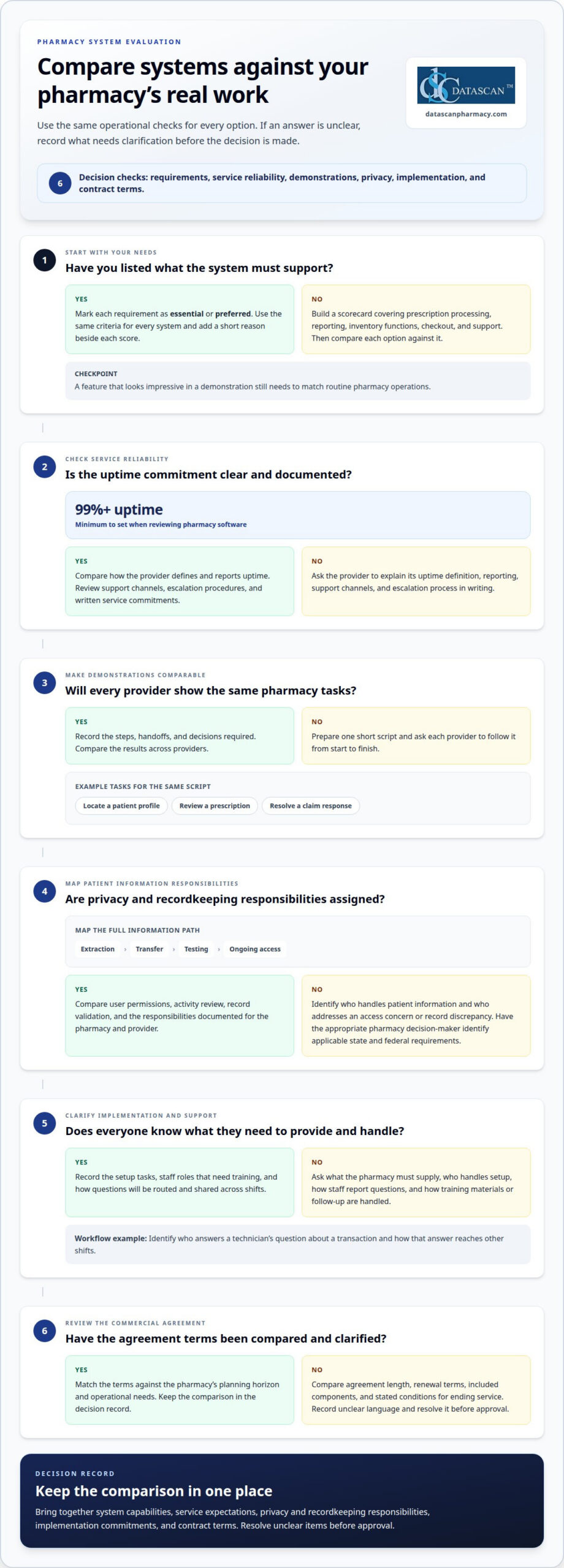
Compare pharmacy systems against defined operational needs, service terms, and migration responsibilities, rather than presentations alone. In the U.S., migrations must account for applicable privacy and recordkeeping requirements. Identify what patient information will move, who can access it, and how your pharmacy will validate and retain records under the rules that apply to its operations.
- Build a consistent comparison scorecard. List requirements such as prescription processing, reporting, inventory functions, checkout, and support. Mark each as essential or preferred, then score every option against the same criteria. Add a short reason beside each score. This helps distinguish a feature that looks impressive in a demonstration from one your staff will actually use in routine pharmacy operations.
- Evaluate service reliability and support. Set a minimum of 99%+ uptime when reviewing pharmacy software, then compare how providers define and report uptime. Examine support channels, escalation procedures, and how staff can report a problem. Ask each provider to explain its service commitments in writing, so your pharmacy can compare operational expectations instead of relying on general statements.
- Use identical scenarios in each demonstration. Prepare a short script based on tasks your pharmacy performs, such as locating a patient profile, reviewing a prescription, or resolving a claim response. Ask each provider to show the same scenario from start to finish. Record the steps, handoffs, and decisions required. Consistent demonstrations make differences easier to spot and discuss.
- Clarify privacy and recordkeeping responsibilities. Map who handles patient information during extraction, transfer, testing, and ongoing access. Compare how each option supports user permissions, activity review, and record validation. Have the appropriate pharmacy decision-maker identify applicable state and federal requirements. Document responsibilities for the pharmacy and system provider, including who addresses an access concern or a record discrepancy.
- Compare implementation and support commitments. Review what each provider expects the pharmacy to supply, who handles setup tasks, and how questions are routed. Note which staff roles need training and how training materials or follow-up are handled. For example, identify who answers a technician’s question about a transaction workflow and how that answer reaches other shifts.
- Review the full commercial agreement. Compare agreement length, renewal terms, included components, and any stated conditions for ending service. Match those terms against your pharmacy’s planning horizon and operational needs. Ask the decision team to record unclear language and resolve it before approval. A side-by-side review keeps service expectations, system capabilities, and contract terms in one decision record.
How do you plan a phased pharmacy software conversion process?
Break the conversion into clear stages, with criteria for what must be completed before moving forward. Begin with preparation, then test and review data, train staff, and schedule live use. Checkpoints help your pharmacy identify record errors, workflow gaps, and continuity risks before they affect routine patient service.
-
Plan the Phased Conversion
Set the sequence and approval criteria before moving records. Prepare the data, test a sample, migrate records in batches, train staff, and move into live use. Assign an owner to each phase and specify what they will review, such as sample-record accuracy or completion of a workflow test.
Plan for migrating at least 500 patient profiles daily during phased data migration. Use that recommendation to shape batches and review capacity, rather than treating the transfer itself as proof of readiness. Keep unresolved mismatches or unclear handoffs from rolling into the next phase. If medication synchronization is part of the change, a pharmacy manager described limiting enrollment for two months while technicians became comfortable with the new system and workflow.
-
Identify Data to Transfer
Inventory the information staff need for patient care and pharmacy operations. Include patient profiles, prescription histories, active prescriptions, refill details, prescriber information, allergies, medication lists, insurance and billing records, inventory, and reporting data. Also include workflow settings and reference information employees rely on for consistent processing.
For each category, record its source, destination, and reviewer. Compare sample records after transfer, checking for missing fields, duplicates, and mismatched prescription details. Log exceptions and how they are resolved. A file can transfer successfully yet contain information staff cannot use as expected, so validate records before approving a batch.
-
Address Downtime and Continuity Risks
Prepare a continuity plan for interruptions during data transfer, testing, or cutover. A system change can delay prescription processing, limit access to records, interrupt checkout, or leave employees unsure which system has current information. Identify affected tasks and assign an owner to coordinate each response.
Rehearse how staff will handle prescriptions in progress, patient questions, and transactions waiting at checkout. Set an escalation route and decide who can pause the rollout if a problem affects live work. After launch, compare unresolved transactions and records with the migration log. Send discrepancies to their assigned owners for resolution, so each shift knows which information and process to rely on.
Assessing pharmacy readiness for change
State pharmacy board rules can affect which records must remain accessible, how long they must be retained, and how prescription transfers are handled. Map your state’s requirements to the records and workflows involved, then document access and record-handling responsibilities before migration begins.
- Measure the work your pharmacy handles. Review a representative stretch of daily operations, including prescription volume, patient questions, refill activity, and recurring service delays. Note where work backs up and which roles are affected. For example, track whether the same patient makes multiple trips because prescriptions are ready at different times. A clear baseline helps you judge whether the proposed system supports actual demand.
- Check patient patterns against your service goals. In one needs-assessment example, about one-quarter of patients visited multiple times within a month to pick up prescriptions. About three-quarters were unaware of the pharmacy’s clinical service offerings. Compare those patterns with your own patient conversations. Identify whether a system change should support better coordination, clearer service communication, or another defined goal.
- Review data quality before planning conversion. Select representative patient profiles and compare key fields across current records, including contact details, medication lists, allergies, and prescription history. Record duplicate profiles, incomplete entries, and inconsistent naming. Assign a staff member to classify each issue as a correction, a migration decision, or a training need. Clean records make testing more useful and help surface problems before live operations depend on migrated data.
- Assess staff capacity for training and testing. List the people needed for practice sessions, data review, and workflow tests, then compare that list with scheduled duties. Identify shifts or roles that could miss training, such as a technician who handles pickup during busy periods. Set coverage and training arrangements before the conversion calendar is approved. A schedule that ignores daily responsibilities can leave key tasks untested.
- Set readiness gates before approving the change. Write down what must be true before the pharmacy advances, such as successful sample-record checks, completed role-based training, and documented procedures for unresolved issues. Name the person who signs off on each gate. If a test uncovers a mismatched patient record or an unclear handoff, assign an owner and resolution step before proceeding. Keep the criteria visible to the whole team.
- Confirm operational timing with a practical review. Compare the proposed cutover window with prescription demand, staffing coverage, and known schedule pressures. Identify which tasks need live observation, such as processing a refill or locating a patient’s history. Use those tasks in a rehearsal, then record where employees pause or need help. That evidence helps distinguish a readiness gap from a feature preference.
Assigning implementation roles
Assign a named owner, backup, and decision path to each conversion task. Clear roles help pharmacists, technicians, and managers keep routine work moving as the transition progresses.
- Name an implementation lead. Choose one person to maintain the timeline, track decisions, and coordinate work across pharmacy roles. Give this lead authority to flag missed tasks and bring unresolved issues to the owner or manager. For example, if a data test delays staff training, the lead should record the impact and agree on the next step with leadership.
- Assign a pharmacy workflow lead. Select a pharmacist who understands prescription review, counseling, and daily handoffs. Ask this person to map how work moves from intake through pickup, then identify where the new process needs testing. A pharmacist can also review whether proposed changes preserve the steps staff rely on to serve patients safely and consistently.
- Choose a technician representative for daily tasks. Assign a technician familiar with intake, refill processing, and pickup to represent frontline workflows. Have them test common scenarios and record where instructions or screen sequences cause confusion. If a refill requires an unexpected handoff, the representative can show the team exactly where it occurs and help shape practical training.
- Give data review to a detail-focused owner. Assign one person to coordinate sample-record checks and log migration questions. This role should compare selected profiles, prescription details, and other priority records against the agreed source. For each mismatch, record the issue, the person responsible for resolution, and whether the pharmacy can proceed with the next test.
- Appoint a trainer for each staff group. Name a trainer who can demonstrate role-specific tasks, then give employees time to practice those tasks directly. A technician might rehearse intake and refill steps, while a pharmacist tests review and counseling workflows. Keep a list of questions from each session and assign an owner to update instructions or arrange follow-up practice.
- Set an escalation and communication route. Decide who handles workflow questions, data concerns, and checkout problems during testing and launch. For example, direct a point-of-sale issue to its assigned lead, while the implementation lead tracks overall status. Share shift updates in one agreed location so evening and daytime staff see the same decisions and open tasks.
Planning a pharmacy system transition? Discuss your implementation needs with our team.
Datascan Pharmacy Software: Datascan Pharmacy Management Software
Datascan Pharmacy Software’s Datascan Pharmacy Management Software is a natural option to consider when your assessment points to a need for a system that supports pharmacy operations while keeping your workflow in view. The wider offering includes Datascan Point of Sale (POS), MobileScripts Patient Mobile App, and Datascan Mobile Delivery App, which address checkout, patient mobile access, and delivery workflows.
Use your requirements list to guide the conversation. Bring examples of current handoffs, staff responsibilities, and routines you want to preserve or improve. This gives you a practical basis for discussing how pharmacy management software can fit your day-to-day work and transition priorities.
Contact Datascan Pharmacy Software to discuss your pharmacy’s system needs and workflow goals.
Make Your Next System Choice With Confidence
Treat switching pharmacy management systems as a chance to make technology fit your day-to-day work, not the other way around. Keep your team’s priorities at the center of the decision, and use them to assess how a system supports patient service and pharmacy operations.
Datascan Pharmacy Software offers an Independence-First platform with Datascan Pharmacy Management Software, Datascan Point of Sale (POS), and the MobileScripts Patient Mobile App. The integrated platform brings together pharmacy management, checkout, and patient mobile access. Use your team’s identified needs to guide the conversation about which capabilities fit your transition priorities.
For a conversation about your pharmacy’s needs, contact Datascan Pharmacy Software. You can move forward with a plan grounded in the work your pharmacy does every day.
Frequently Asked Questions
Can I keep my existing workflow?
Yes. You can preserve the steps that fit your pharmacy by documenting them before selecting and configuring a replacement system. Note how prescriptions move through intake, pharmacist review, checkout, and patient communication. Flag steps that cause delays or duplicate entry. For example, if technicians use a particular handoff to alert the pharmacist, include it in system demonstrations and staff practice.
How long does the conversion process take?
The schedule depends on the amount and condition of your data, required connections, training needs, and time available for testing. Build a project calendar around dependencies instead of choosing a cutover date first. Mark when records can be reviewed, staff can practice, and workflows can be tested. If a test reveals errors, allow time to correct them before scheduling live operations.
What if my test data doesn’t match?
Pause the test and document the exact mismatch, such as missing refill details or conflicting information in a patient record. Compare the sample with its source and determine whether the issue began during extraction, transfer, or field mapping. Record who will resolve it and retest the corrected data. Do not approve the affected record until the discrepancy is understood.
What type of training is available?
Organize training around each employee’s daily responsibilities, with demonstrations followed by hands-on practice. A technician might rehearse intake and refill tasks, while a pharmacist practices prescription review and patient-facing steps. Use realistic examples from your pharmacy, then have each person complete tasks without prompts. Record questions and turn the answers into concise job aids for each shift.
Will I need new labels?
Not necessarily. Label needs depend on the new system’s print settings, your pharmacy’s formats, and the printer setup. Before conversion, print sample labels on existing stock and inspect the layout, patient and prescription details, and barcode readability. Test routine prescriptions and any special label types staff use. Resolve formatting or alignment problems before relying on labels during live processing.
Will my current POS hardware work?
Compatibility depends on the hardware model, connection method, and replacement POS system’s requirements. Inventory checkout devices, printers, scanners, cash drawers, and payment terminals. Record each model and how it connects. Then test the actual checkout sequence with the proposed setup, including a printed receipt, so staff can identify connection or workflow issues before cutover.
What are the steps to switch pharmacy management systems?
The steps for switching pharmacy management systems are to document workflows, define requirements, compare options, assign task owners, prepare and review data, train staff, test common scenarios, and schedule cutover. Keep a decision log throughout the project. For example, record who approved a tested prescription workflow and where staff can find the final procedure. This gives every shift a consistent reference.
How long does a pharmacy management system migration take?
Data migration timing depends on record volume, data quality, transfer format, and the review required after import. The full project also involves planning, staff practice, workflow validation, and cutover preparation. Keep the data-transfer schedule separate from the overall conversion calendar. Even after import is complete, check records and test staff access before relying on the new system.

Article by
Sarah Callioras
Sarah Callioras is Vice President at Datascan Pharmacy Software, bringing nearly 25 years of experience across independent pharmacy operations and pharmacy technology. Since joining Datascan in 2016, she has played a key role in driving business growth, strengthening client relationships, and supporting independent pharmacies through innovative software solutions. With a strong background in pharmacy operations, business development, and strategic leadership, Sarah is passionate about helping independent pharmacies succeed in an evolving healthcare landscape.
 Kevin Minassian is the President of Datascan Software. Under his leadership, the company rapidly expanded to provide pharmacy management software on a national level. Over the last 15+ years, he has ensured that Datascan has continuously evolved to offer innovative solutions for independent pharmacies while still offering world-class customer support. He is passionate about helping independent pharmacies to remain competitive, achieve success, and offer the very best service to their communities.