Imagine standing in your pharmacy after hours, staring at a decade of patient records and wondering if a single glitch during your pharmacy software data migration process could trigger a disastrous PBM audit. It’s a common nightmare for independent owners who feel chained to legacy systems because the fear of losing prescription history or missing PBM reimbursements feels too risky to ignore. You’ve worked too hard to build your legacy to let a technical transition jeopardize your compliance or your patient’s safety.
We agree that your pharmacy management software is the heartbeat of your operations, and switching should empower your growth rather than cause operational paralysis. This guide promises to transform that anxiety into a strategic advantage by providing a comprehensive, stress-free roadmap designed specifically for the modern independent pharmacy owner. We will preview the essential 2026 checklist, including how to navigate the Consolidated Appropriations Act’s transparency requirements and the latest NCPDP standards, while ensuring your new pharmacy software helps you reclaim your time and maximize profitability.
Key Takeaways
- Discover why upgrading your pharmacy management software is the most effective way to reclaim your time and combat shrinking PBM margins in 2026.
- Learn how to conduct a comprehensive pre-migration audit of your current pharmacy computer software to ensure data cleanliness and hardware compatibility.
- Master the 5-phase framework for a secure pharmacy software data migration process that eliminates the risk of missing prescription history or patient records.
- Protect your bottom line by implementing post-conversion validation steps that reconcile PBM reimbursements and verify your pharmacy POS system integration.
- Identify the critical criteria for selecting pharmacy software companies that offer US-based technical support and a stable, family-owned heritage.
What is the Pharmacy Software Data Migration Process?
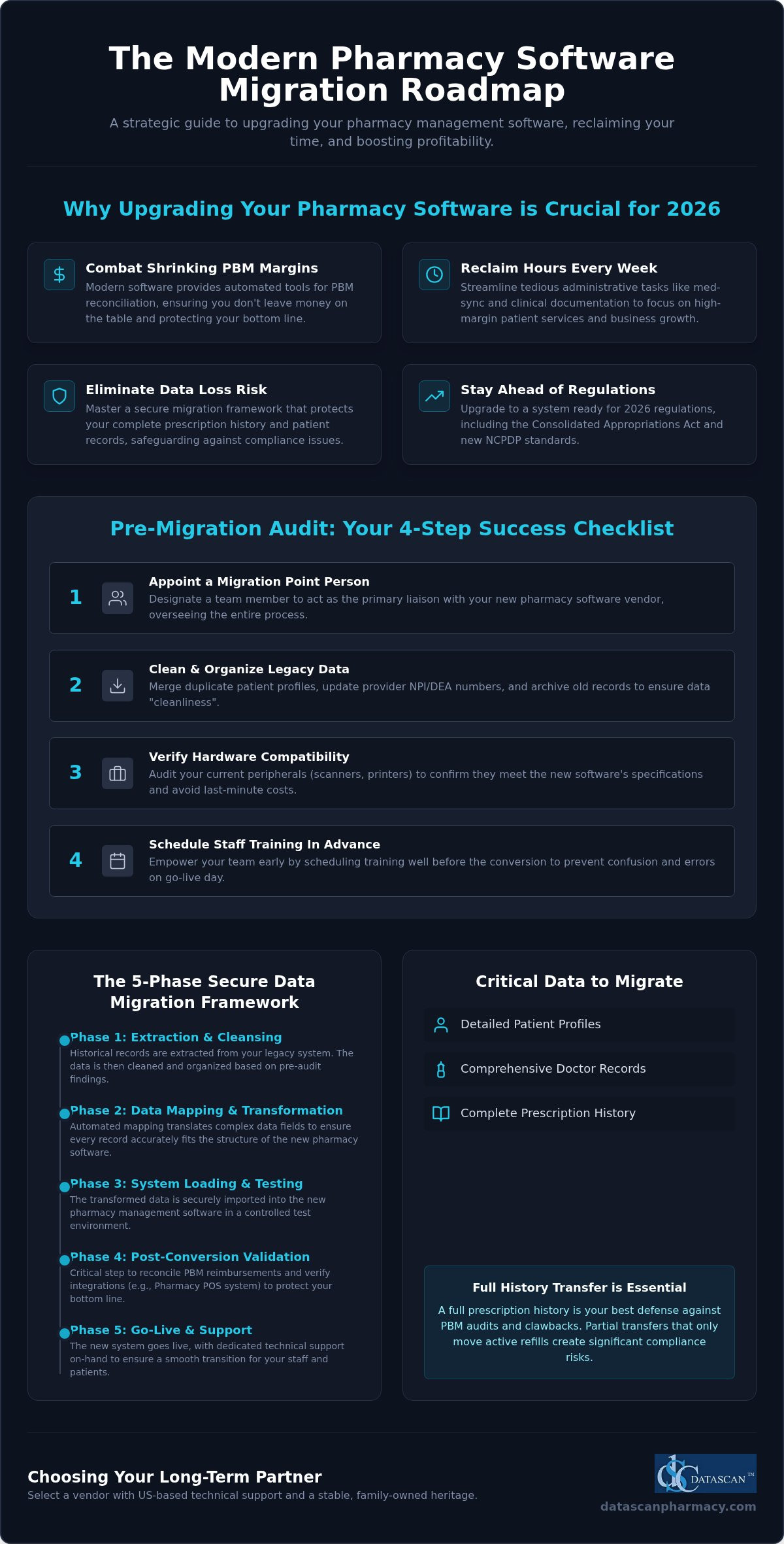
The data migration process in a pharmacy setting is a high stakes technical conversion where your historical records are extracted from a legacy system and imported into a new platform. It is far more than a simple file copy; it involves the sophisticated translation of complex medical and financial data to ensure your new pharmacy software functions perfectly from day one. In 2026, independent pharmacies are increasingly initiating this transition to stay ahead of federal PBM reforms, such as the Consolidated Appropriations Act, which requires more granular reporting than many older systems can provide.
During a typical migration, several critical data types are moved to the new system. These include detailed patient profiles, comprehensive doctor records, and your entire prescription history. You’ll need to decide between a partial transfer, which only moves active refills, or a full history transfer. For most independent owners, a full history is the only viable path. Audits from PBMs often require records dating back years, and having that data readily accessible in your Pharmacy management software is your best defense against clawbacks.
The Strategic Importance of Modern Rx Software
Your current system shouldn’t be a bottleneck that stifles your growth. Outdated technology often lacks the automated tools necessary for effective PBM reconciliation, meaning you could be leaving significant money on the table every month. Upgrading to modern pharmacy management software allows you to reclaim hours of your week by streamlining tedious administrative tasks. When your technology handles the heavy lifting of med-sync and clinical documentation, you can finally focus on the high margin services that keep your business competitive in a challenging market.
Manual vs. Automated Data Conversions
Don’t fall into the trap of thinking manual data entry is a safe way to save money during a switch. The human error associated with manual moves is a massive liability that can lead to dangerous medication errors or lost accounts receivable data. A professional pharmacy software data migration process uses automated mapping to ensure every data field translates accurately between systems. You need a vendor with a proven track record who understands the specific nuances of independent pharmacy workflows. Precision in mapping ensures that your patient’s history remains intact, protecting both their safety and your pharmacy’s professional reputation.
Pre-Migration Audit: Preparing Your Pharmacy Management Software
Before you begin the actual technical transfer, you must evaluate the state of your current records. A successful pharmacy software data migration process starts months before the first line of code is moved. You need to appoint a “point person” on your team who understands your current workflow and can act as the primary liaison with your new software vendor. This individual will oversee the auditing of your current pharmacy computer software to ensure data “cleanliness” while verifying that your existing hardware, such as thermal printers and barcode scanners, meets the specifications for your new Pharmacy management software. Don’t assume your legacy peripherals will work; a proactive hardware audit prevents costly last-minute purchases during your go-live week.
Training shouldn’t be an afterthought. Schedule your staff training sessions well in advance of the conversion. Confusion on Day 1 leads to frustrated patients and potential dispensing errors. By empowering your team early, you transform a stressful transition into an opportunity for operational growth. If you have questions about how to structure your team’s prep, it’s often helpful to speak with a migration specialist who understands independent workflows and the unique challenges of community pharmacy.
Cleaning and Organizing Your Legacy Data
“Garbage in, garbage out” is a reality in data science. Use the months leading up to your switch to merge duplicate patient profiles and update provider NPI and DEA numbers. This level of precision is vital for successful data migrations in the pharmaceutical space. For those interested in how data query hubs manage their pricing, you can explore Taxas de assinatura mensal e cobrança por volume de consultas via API. Archiving prescription history that is no longer needed for active dispensing or legal compliance will streamline the conversion and improve the speed of your new Pharmacy Software. Cleaning your database now prevents your new system from being bogged down by outdated, irrelevant information that could complicate future PBM audits.
A firm “Go-Live” date provides your team with a clear target. Avoid peak periods like the first of the month or flu season to minimize business disruption. Your Pharmacy Software Implementation Plan should also include a communication strategy for your patients and local providers. Transparency builds trust. Letting them know you’re upgrading to a better system ensures they understand any minor delays during the first few days of the transition. This proactive approach protects your pharmacy’s reputation while you optimize your technology for better profitability and patient care. Following this structured pharmacy software data migration process ensures that your focus remains on your patients, not on technical hurdles.
The 5-Phase Conversion Framework: How Your Data Moves Safely
Moving your life’s work into a new system requires a methodical approach that leaves zero room for error. A structured 5-phase framework ensures that your pharmacy software data migration process remains secure and transparent. This isn’t just about moving files; it’s about preserving the integrity of every clinical decision you’ve ever recorded. By following a disciplined path, you transform a technical hurdle into a seamless business upgrade.
- Phase 1: Extraction. Your vendor pulls the raw data from your legacy local database. This step requires precision to ensure no records are left behind in the old environment.
- Phase 2: Mapping. This involves translating data fields so the new Pharmacy management software understands the old data structure. It’s the “translation” layer of the conversion.
- Phase 3: Testing. You’ll perform a “mock conversion.” This is a dress rehearsal that allows you to identify and fix errors before they ever touch a live patient record.
- Phase 4: Validation. Your pharmacy team manually reviews patient and Rx records for accuracy. This aligns with the Health IT data migration policy regarding quality assurance.
- Phase 5: Final Cutover. The big day. This is the live transition where the most recent records are moved, and you officially begin dispensing on your new system.
Data Mapping and Integrity Standards
Mapping is the most technical part of the pharmacy software data migration process. It involves translating SIG codes and directions so your workflow remains uninterrupted. For pharmacies that specialize in custom medications, maintaining Datascan Compounding Solutions formulas and specialized patient notes is a top priority. A visionary ally ensures that your complex formulas and titration schedules translate perfectly. This prevents you from having to re-key data that took years to develop, protecting your time and your patients.
Security Architecture and HIPAA Compliance
Protecting patient privacy is non-negotiable. During the transfer, your data must be encrypted while moving between local servers to prevent unauthorized access. Maintaining a clear audit trail for every migrated prescription record is essential for future compliance and PBM transparency. This is why US-based technical support is so vital. You need a partner who understands domestic HIPAA regulations and can provide immediate, accountable assistance if a security question arises. By keeping your data local and your support domestic, you eliminate the risks associated with offshore corporate giants and ensure your records remain safe and accessible.
Post-Conversion Validation: Protecting Your PBM Reimbursements
The live cutover marks the end of the technical heavy lifting, but the success of your pharmacy software data migration process is truly measured in the 30 days that follow. You can’t afford to assume that every financial record and PBM contract link moved perfectly. This is the time to aggressively reconcile your open accounts receivable and verify that every pending PBM claim is accounted for in your new Pharmacy management software. If you don’t catch discrepancies now, they’ll become permanent losses that erode your margins. We advocate for a rigorous review period where every high-dollar claim is double-checked against your legacy records.
Testing your Datascan Point of Sale integration is equally vital. Your front-end transactions must sync flawlessly with your Rx records to maintain accurate inventory and financial reporting. Additionally, you must manually validate that your medication synchronization programs transferred correctly. Med-sync is the engine of your pharmacy’s efficiency; any break in the cycle can disrupt patient adherence and lead to a sudden drop in prescription volume. Monitoring your workflow efficiency during this first month allows you to tweak settings and ensure your team is maximizing the power of your new technology.
Optimizing Workflow with Your New System
For independent pharmacies looking to expand their front-end retail presence, adopting a commerce operations platform like Ommni can help manage complex product data and inventory at an enterprise scale, ensuring your business remains competitive across all sales channels.
Once the data is validated, your focus shifts to leveraging the superior technology at your fingertips. High-performance Datascan Workflow Software allows you to set up automated refill reminders and patient notifications that keep your pharmacy top-of-mind without adding to your staff’s workload. Use your new business intelligence tools to track profitability in real-time. By monitoring your gross margins daily during the first month, you can identify and correct any PBM reimbursement issues before they impact your cash flow. This proactive optimization is what separates stagnant pharmacies from those that thrive.
PBM Reconciliation and Financial Integrity
PBMs aren’t going to tell you if a claim is underpaid during a system switch. You must use your new Pharmacy Software to identify claims where the reimbursement doesn’t match your contracted rates. Verifying that patient charge accounts and historical balances are accurate protects your relationship with your most loyal customers. In 2026, financial validation is defined as the rigorous cross-referencing of legacy ledger data against real-time PBM remittance advice to ensure total fiscal transparency in an era of mandatory rebate reporting. This level of scrutiny ensures that your transition is a financial win, not just a technical one.
Don’t leave your pharmacy’s financial health to chance during a transition. If you’re concerned about how a switch might impact your bottom line, schedule a consultation with our team to see how our validation process protects your reimbursements.
Selecting a Pharmacy Software Vendor for Long-Term Success
Choosing your next Pharmacy management software is a high stakes decision that will define your pharmacy’s trajectory for the next decade. You aren’t just buying a tool; you’re selecting a partner to guide you through the complexities of the pharmacy software data migration process and beyond. In a market increasingly dominated by massive, impersonal corporations, independent owners must look for vendors that share their values of autonomy and resilience. Many pharmacies currently locked into a corporate wholesaler’s ecosystem are actively searching for the best McKesson pharmacy software alternative that prioritizes their independence over a shareholder’s bottom line. A family-owned provider with a legacy dating back to 1981 offers a level of accountability and personal touch that a publicly traded entity simply cannot replicate.
Longevity matters in this industry. When a software company has spent decades focusing solely on the independent market, their features reflect the actual needs of community pharmacists. This stability ensures that your system won’t be sunsetted after a corporate acquisition or left behind as technology evolves. You need a partner who views your success as their own, offering the sophisticated tools required to outmaneuver big chains while maintaining the heart of a local business. Before committing to any platform, evaluating pharmacy software vendors against a structured 2026 framework can help you avoid costly mistakes and identify the ally your independent pharmacy truly deserves.
The Critical Role of US-Based Support
On your live cutover day, every second counts. You don’t want to be routed to an offshore call center where the technicians don’t understand the nuances of the US pharmacy market or the intricacies of PBM reconciliation. Having US-Based Pharmacy Software Support means you’re speaking with experts who can troubleshoot issues in real time. This immediate access minimizes downtime and ensures your patients aren’t left waiting at the counter. Expert support teams understand that for an independent, your reputation is your most valuable asset, and they work with a sense of urgency to protect it during the final stages of your pharmacy software data migration process.
Future-Proofing Your Independent Pharmacy
The pharmacy industry moves fast. Your Pharmacy Software needs to evolve as quickly as the regulations and reimbursement models do. Look for a vendor that continuously integrates innovative features like med-sync, e-care plans, and patient-facing mobile applications that drive retention. By focusing on technology that frees up your time, you can shift your energy toward high-margin clinical services that bolster your bottom line. You already have the personal touch; now you need the cutting-edge tools to back it up. If you’re ready to see how a partner-focused approach can transform your business, Schedule a Demo of Datascan Pharmacy Management Software today.
Secure Your Legacy with a Future-Proof Transition
Mastering the pharmacy software data migration process is more than a technical necessity; it’s a strategic move to reclaim your time and protect your bottom line from shrinking PBM margins. By following a disciplined 5-phase framework and conducting a rigorous pre-migration audit, you ensure that every patient record and compounding formula remains a secure asset. Your technology should work as hard as you do, providing the business intelligence needed to thrive in a competitive market.
Don’t settle for corporate vendors that treat your independent pharmacy like just another number on a spreadsheet. Since 1981, our family-owned business has provided US-based expert technical support designed specifically for the unique pressures of community pharmacy. We understand that your data is your life’s work, and we’re committed to helping you transform operational burdens into streamlined successes.
Discover how Datascan makes pharmacy software conversion stress-free, Request a Demo today!
Your community relies on your expertise. Give them the best care possible by empowering your team with a system that prioritizes your independence and profitability.
Frequently Asked Questions
How long does the pharmacy software data migration process typically take?
The typical pharmacy software data migration process spans 60 to 90 days from the initial contract signing to your actual go-live date. This timeframe allows for a methodical extraction of legacy records and thorough testing of the new system. We dedicate the first month to data mapping and mock conversions; while the final weeks focus on staff training and hardware verification. This paced approach ensures that your transition is seamless and your records are perfectly synchronized.
Will my pharmacy experience downtime during the data conversion?
Most independent pharmacies experience virtually zero downtime during the actual conversion. We schedule the final data cutover after your normal business hours or over a weekend to ensure your dispensing workflow remains uninterrupted. Your team continues working on the legacy system until the moment of the switch; then you simply log into your new pharmacy software and begin processing. This strategy protects your patient care continuity and prevents any loss of revenue during the transition.
Is my patient data safe and HIPAA-compliant during the migration?
Your patient data remains completely secure and HIPAA-compliant because we utilize local server encryption and US-based technical support. Unlike corporate competitors that might offshore your sensitive records; we handle every byte of information within domestic borders. This rigorous security architecture maintains a clear audit trail for every migrated prescription. You can rest assured that your pharmacy’s professional reputation and your patients’ privacy are protected by a partner who understands US regulatory standards.
Can I migrate data from any pharmacy software vendor to Datascan?
You can migrate data to Datascan from virtually any legacy pharmacy software vendor in the market. Our team has decades of experience navigating the database structures of both large corporate systems and niche providers. We use automated mapping tools to translate your historical records accurately; ensuring that patient profiles and Rx history move without manual entry errors. This versatility makes the pharmacy software data migration process accessible for any independent pharmacy looking to upgrade their technology.
What happens to my old compounding formulas during a migration?
Your historical compounding formulas and specialized titration notes are treated as high priority data during the migration. We map these complex fields specifically to ensure that your custom recipes translate perfectly into your new pharmacy management software. This prevents your staff from having to re-key data manually; which saves countless hours and eliminates the risk of formulation errors. Maintaining this clinical continuity is essential for protecting your high margin specialty services and ensuring patient safety.
Should I keep my old hardware when switching pharmacy systems?
You don’t necessarily need to replace all your existing hardware when switching systems. We conduct a thorough compatibility audit of your current thermal printers; barcode scanners; and workstations during the pre-migration phase. While modern pharmacy software performs best on updated equipment; many legacy peripherals are compatible with our local server environment. This practical approach helps you manage your budget while ensuring that your new technology stack operates with maximum speed and reliability on Day 1.
Will the migration process affect my current PBM reimbursements?
A properly executed migration will not negatively impact your current PBM reimbursements; in fact; it often improves your financial tracking. Our post-conversion validation process specifically reconciles your open accounts receivable to ensure no claims are lost during the switch. By moving to a system with better business intelligence tools; you’ll actually find it easier to identify underpaid claims and track PBM reform transparency requirements. Your technology becomes a shield that protects your pharmacy’s hard earned profitability.
How much training is required for staff on the new pharmacy software?
We recommend a structured training period of two to four weeks for your pharmacy staff. This training focuses on your specific workflow; from initial intake to final point of sale transactions. By using a “train the trainer” model; your point person becomes an expert who can support the rest of the team. This investment in education pays off immediately through improved efficiency and reduced stress during the first 30 days of using your new pharmacy management software.
 Kevin Minassian is the President of Datascan Software. Under his leadership, the company rapidly expanded to provide pharmacy management software on a national level. Over the last 15+ years, he has ensured that Datascan has continuously evolved to offer innovative solutions for independent pharmacies while still offering world-class customer support. He is passionate about helping independent pharmacies to remain competitive, achieve success, and offer the very best service to their communities.