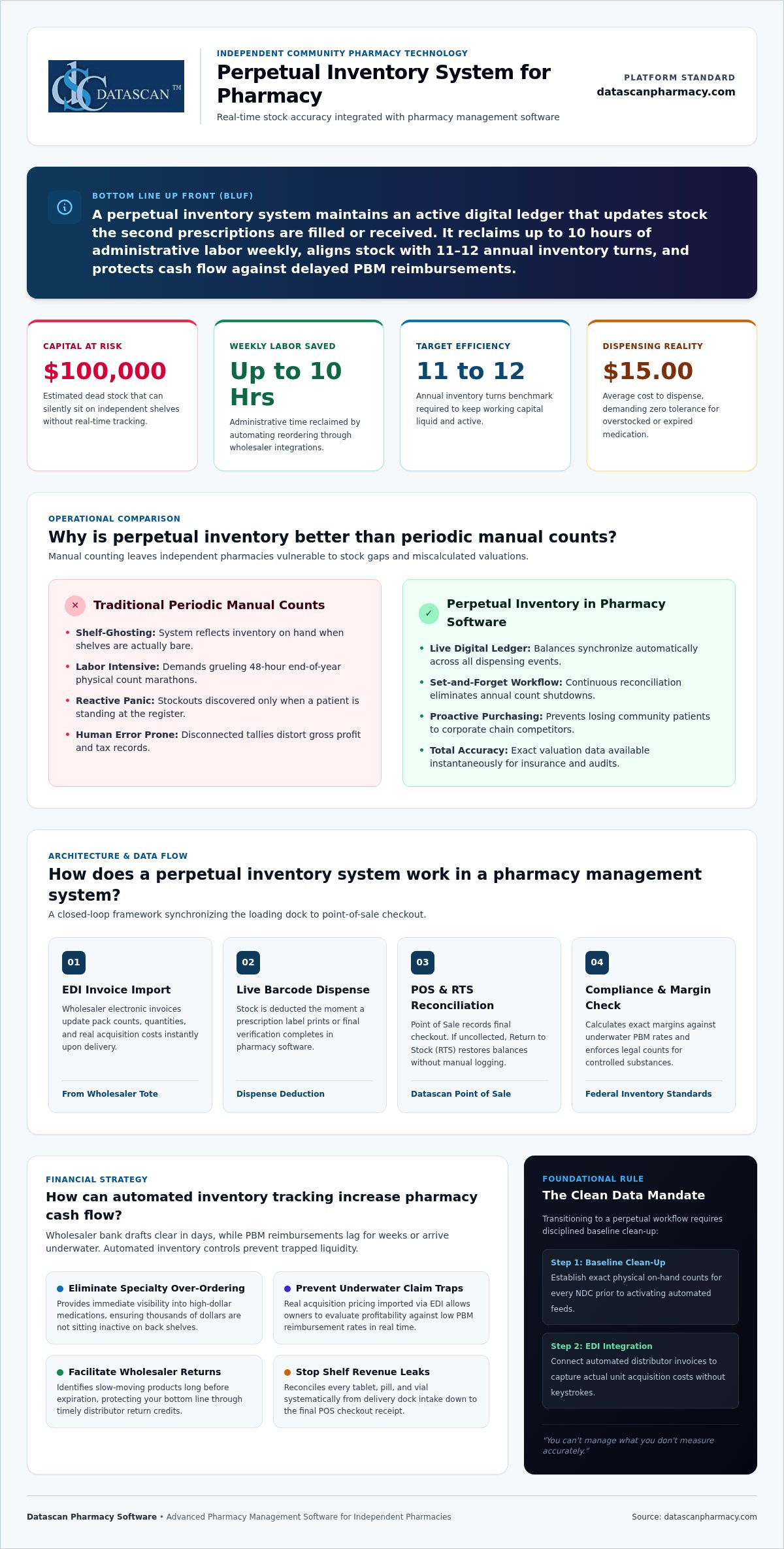
Could your pharmacy be hiding $100,000 in dead stock on its shelves right now? A perpetual inventory system for pharmacy solves this by providing real-time stock accuracy and automated reordering, which allows owners to reclaim up to 10 hours of weekly labor while boosting gross profit margins. By integrating these features into your pharmacy management software, you can align your inventory turns with the 11 to 12 annual benchmark. This ensures your capital isn’t trapped in slow-moving medications while wholesaler drafts clear faster than PBM reimbursements arrive.
We understand the burnout that comes from manual end-of-year inventory counts and the stress of seeing your hard-earned margins swallowed by predatory PBM fee models. You deserve a partner that champions your independence through smarter technology. This guide promises to show you how to transform your operations from reactive guesswork into a streamlined, profitable system. We’ll explore the essential steps to automate your workflow, reduce waste, and use your pharmacy software to fight back against the financial pressures of 2026.
Key Takeaways
Discover how a perpetual inventory system for pharmacy eliminates the need for grueling manual counts by providing real-time accuracy across your entire stock.
Learn to automate your ordering process through direct wholesaler integrations to reclaim up to 10 hours of administrative time every week.
Master the strategy of inventory turns to ensure your cash flow isn’t trapped in slow-moving medications while waiting for PBM reimbursements.
Identify how integrated pharmacy management software stops revenue leaks by reconciling every pill from the loading dock to the point of sale.
What is a perpetual inventory system for pharmacy?
A perpetual inventory system for pharmacy is a software-driven method that updates stock levels in real-time as prescriptions are dispensed and shipments are received. This continuous tracking ensures your on-hand balances are always current, allowing you to manage your largest expense with surgical precision without the need for periodic manual counts. By maintaining a live digital ledger, you gain immediate visibility into exactly what is sitting on your shelves at any given moment.
For the independent pharmacy owner, drug stock isn’t just medicine; it’s liquid capital. In an era where the average cost to dispense has risen to $15.00 and PBM reimbursements continue to lag, letting cash sit idle in overstocked medications is a direct threat to your solvency. A perpetual inventory system acts as the financial heartbeat of your business. It tracks every tablet and vial from the moment it leaves the wholesaler’s tote until it’s handed to the patient. This “always-on” nature means your pharmacy management software is constantly reconciling your physical shelf with your digital records, providing a level of financial clarity that manual systems simply cannot match.
How does it differ from traditional manual counting?
Traditional counting is a reactive nightmare that often results in “shelf-ghosting,” a situation where your system claims you have a drug in stock, but the shelf is actually bare. Manual counts are historically prone to human error and require massive labor investments that pull your staff away from patient care. By contrast, an automated system offers a “set it and forget it” workflow. You move away from the grueling 48-hour end-of-year counts and toward proactive stock management. This shift prevents the panic of realizing you’re out of a critical medication only when a patient is waiting, helping you maintain the high level of service that defines independent community pharmacies.
Why is real-time data critical for independent pharmacies?
Independent pharmacies must be leaner and faster than their corporate counterparts to survive PBM margin compression. Real-time data gives you immediate visibility into high-dollar specialty medications, ensuring you aren’t over-ordering products that tie up thousands of dollars in cash flow. This is especially vital as you aim for the industry benchmark of 11 to 12 inventory turns per year.
Prevent Stockouts: Avoid losing patients to big-box chains because of inaccurate inventory levels.
Financial Accuracy: Know the exact valuation of your inventory for tax and insurance purposes at any second.
Waste Reduction: Identify slow-moving stock before it expires to facilitate wholesaler returns and protect your bottom line.
How does a perpetual inventory system work in a pharmacy management system?
A perpetual inventory system for pharmacy functions as a real-time digital ledger that synchronizes your physical stock with your software records through automated data feeds. It eliminates manual entry by using Electronic Data Interchange (EDI) to import wholesaler invoices and barcode scanning to track every dispense. This creates a closed-loop system where your on-hand balances are adjusted the second a drug enters or leaves your building.
When your daily order arrives, you simply scan the wholesaler invoice or import the EDI file. The pharmacy software automatically updates your quantities and acquisition costs. This ensures your gross profit calculations are based on what you actually paid, helping you identify underwater PBM reimbursements immediately. Stock is then deducted the moment a label is printed or when the transaction is finalized at the Datascan Point of Sale. If a patient doesn’t pick up a medication, the Return to Stock (RTS) function reverses that deduction, keeping your counts precise without manual logs. This level of detail is essential for meeting federal inventory requirements for controlled substances, where accuracy is a legal mandate.
What are the steps to implement a perpetual workflow?
Transitioning to an automated workflow requires a methodical approach to ensure your data remains “clean” from day one. You can’t manage what you don’t measure accurately. Follow these steps to get started:
Baseline Count: Conduct a comprehensive clean-up phase to establish exact on-hand counts for every NDC in your pharmacy.
Define PAR Levels: Set minimum and maximum “periodic automatic replenishment” (PAR) levels to trigger automated reordering when stock hits a specific threshold.
System Integration: Ensure your pharmacy management software is fully synced with your POS to capture every depletion event.
How does barcode verification ensure inventory accuracy?
Barcode verification is the ultimate safeguard against “phantom inventory,” which is stock that exists in your system but isn’t actually on your shelf. By requiring a scan at the filling station, the software confirms the NDC and quantity match the prescription exactly. This prevents quantity errors that skew your financial reports and, more importantly, ensures patient safety. It creates an audit-ready environment where every pill is accounted for, protecting your pharmacy from PBM clawbacks and regulatory fines. If you’re ready to stop the manual guesswork, you can reach out to our team to see how these integrated tools work in a live environment.
Why is perpetual inventory better than periodic manual counts?
Perpetual inventory is superior to periodic counting because it provides a real-time valuation of your pharmacy’s largest asset while eliminating the grueling, 48-hour manual audits that lead to staff burnout. Unlike periodic counts that offer a “snapshot” of a single moment, a perpetual inventory system for pharmacy reflects the actual state of your shelves every second. This continuous accuracy is vital for tax reporting and insurance purposes, ensuring you aren’t overpaying premiums on inventory you don’t actually have. It also allows you to identify wholesaler short-ships or preventing internal theft in a pharmacy by flagging variances the moment they occur.
Relying on manual counts means you’re always working with outdated data. If a high-cost medication is stolen or lost on Monday, you might not realize it until the next scheduled count weeks or months later. With a live system, every pill is accounted for from the moment it’s received until it’s scanned at the point of sale. This creates a culture of accountability and precision that manual systems can’t replicate, protecting your bottom line from the “shrinkage” that often goes unnoticed in independent stores.
How much time can pharmacists save with automation?
Pharmacists often lose 5 to 10 hours every week to manual administrative burdens like shelf-scanning and order generation. By switching to automated par level triggers, you eliminate the need to “guess” what needs to be ordered. Your pharmacy software handles the replenishment logic for you, freeing up your time for higher-margin clinical services and Medication Therapy Management (MTM). Simplifying the “putting away the order” process also reduces staff stress, as the system already knows what’s in the tote, making reconciliation a matter of seconds rather than hours.
How does it reduce “dead stock” on your shelves?
Dead stock is essentially cash that’s been frozen on your shelves, and in 2026, no independent pharmacy can afford that. Research shows that roughly 10% of a retail pharmacy’s inventory value approaches expiration annually. Without proactive tracking, much of this becomes non-returnable, resulting in total financial write-offs. A perpetual system identifies medications that haven’t moved in 60 to 90 days, allowing you to return them for wholesaler credit before they expire. Moving toward an optimal turnover rate of 11 to 12 turns per year ensures your capital is working for you, not gathering dust in a bottle of slow-moving tablets.
How can automated inventory tracking increase pharmacy cash flow?
Automated inventory tracking increases cash flow by ensuring your most expensive assets, your medications, are turning over fast enough to cover wholesaler payments before PBM reimbursements arrive. By using a perpetual inventory system for pharmacy, you stop over-purchasing high-cost brands that sit idle, effectively “taking cash off the shelf” and putting it back into your operating account. This strategy is vital for maintaining an optimal turnover rate of 11 to 12 turns per year, which prevents your capital from being trapped in slow-moving stock.
Independent pharmacies currently face an economic paradox where sales grow while net profitability plummets due to underwater reimbursements and non-transparent fee models. A real-time system allows you to see your true acquisition cost via EDI feeds, which is a critical component for calculating pharmacy gross profit with precision. When you have immediate visibility into your margins, you can optimize your generic-to-brand mix to favor higher-margin items, protecting your business from the volatility of PBM clawbacks and DIR fee impacts.
Can inventory systems help overcome PBM reimbursement challenges?
Wholesaler payment cycles typically range from 7 to 14 days, while PBM claim remittances often take 14 to 30 days or longer. This timing gap creates a liquidity crunch that can sink an independent store. Automated tracking identifies underpaid claims by comparing the actual EDI invoice cost against the PBM remittance in real-time. This transparency lets you identify loss-leader drugs that are draining your resources. Better cash management also gives you the leverage to “buy right” from secondary wholesalers when prices are lower, further padding your bottom line. To see how real-time tracking can stabilize your bank balance, contact our team for a software walkthrough.
How does it help with front-end sales and retail profit?
Profitability isn’t limited to the back-end dispensing area. Your front-end retail space is a vital source of non-PBM revenue that isn’t subject to the same reimbursement delays. By using integrated pharmacy management software, you can track OTC trends and implement front-end sales strategies for pharmacies that drive higher basket totals. The system helps you identify which supplements or health products are moving, allowing for targeted patient engagement and cross-selling. This ensures your front end is just as optimized and profitable as your prescription department.
How does Datascan’s pharmacy software simplify inventory management?
Datascan simplifies inventory management by consolidating your dispensing, POS, and stock tracking into a single, cohesive ecosystem. This ensures that every pill counted at the filling station is instantly reflected at the register and in your reorder queue. As a family-owned company since 1981, we build our perpetual inventory system for pharmacy specifically to empower the independent owner who is fighting against corporate chains and PBM margin compression. We don’t just provide tools; we provide a financial defensive strategy that keeps your capital off the shelf and in your bank account.
Our pharmacy management software removes the technical friction often found in larger, generic vendor systems. We provide a customizable reporting suite that focuses on the metrics that actually matter for your bottom line: gross profit, inventory turns, and dead stock identification. By connecting your Datascan Point of Sale directly to your inventory ledger, we close the loop that often leads to revenue leaks. This integrated approach allows you to manage your business with precision, ensuring that your inventory investment is always optimized for maximum profitability.
What makes our US-based support different?
Independent pharmacy owners don’t have time to wait in a phone queue for a technician who doesn’t understand the nuances of their business. Our US-based support team provides direct access to experts who specialize in the specific pressures of community pharmacy. We handle the heavy lifting of wholesaler EDI setups and invoice mapping, ensuring your acquisition costs are accurate from the very first shipment. We also focus on training your staff to use our Workflow Software effectively, so your team can maintain stock accuracy without adding hours of manual labor to their daily shift.
Ready to take control of your pharmacy inventory?
We position ourselves as your Visionary Ally, offering the cutting-edge capabilities of a major corporation with the personal accountability of a family-run business. Transitioning from an error-prone manual count to a perpetual inventory system for pharmacy is the most impactful step you can take to reclaim your time in 2026. We help you navigate the implementation phase with minimal downtime, turning your complex operational burdens into streamlined successes. Request your personalized demo today to see how our technology can stop your revenue leaks and transform your pharmacy’s cash flow.
Secure Your Pharmacy’s Financial Future with Smarter Inventory
Implementing a perpetual inventory system for pharmacy is no longer just an operational upgrade; it’s a financial necessity in the face of 2026’s PBM pressures. By automating your stock levels and integrating your workflow with dedicated pharmacy management software, you reclaim thousands in “dead stock” capital and eliminate the burnout of manual counting. You’ve seen how real-time data allows you to turn inventory 11 to 12 times per year, ensuring your cash flow remains liquid even when reimbursements lag.
Datascan has been the champion of independent pharmacies since 1981, offering a 100% US-based support team and a fully integrated POS and inventory management ecosystem. We understand that your time is best spent with patients, not spreadsheets. It’s time to transform your pharmacy from a struggle for solvency into a streamlined, profitable success. Request a Datascan Demo to See Our Perpetual Inventory in Action and take the first step toward a more secure bottom line. Your independence is your greatest strength; let’s protect it together.
Frequently Asked Questions
How do I start a perpetual inventory system in my pharmacy?
Begin by conducting a thorough physical count to establish an accurate baseline, then configure your pharmacy software with EDI feeds from your wholesalers. This integration ensures every drug received is automatically added to your on-hand counts. Next, set your par levels for each NDC to allow the system to trigger automated reorders. This moves your team away from manual shelf-scanning and toward a proactive, software-driven workflow that saves hours every week.
Is a perpetual inventory system hard to maintain for a small staff?
No, it actually reduces the workload for small teams by automating the most time-consuming tasks like manual ordering and end-of-year audits. Once your par levels are established, the pharmacy management software handles the daily replenishment logic for you. Your staff simply needs to scan wholesaler invoices upon arrival and verify NDCs at the point of sale. This integrated approach frees up significant time, allowing a lean staff to focus on higher-margin clinical services.
Does perpetual inventory help with PBM audits and DIR fees?
Yes, it provides the precise, real-time documentation required to defend against PBM clawbacks and audit variances. By tracking every pill from receipt to dispense, you can prove exactly what was on your shelf at any given time. This transparency helps you identify underwater claims immediately by comparing acquisition costs from EDI feeds against reimbursements. While it doesn’t stop DIR fees directly, it gives you the data needed to optimize your drug mix and protect your margins.
What is the difference between perpetual and periodic inventory?
Perpetual inventory updates in real-time with every transaction, while periodic inventory relies on manual counts performed at set intervals. Periodic systems are often inaccurate because they only provide a snapshot that quickly becomes outdated as stock moves. A perpetual inventory system for pharmacy ensures your software records always match your physical shelf. This continuous accuracy allows you to manage your cash flow more effectively and identify shrinkage or wholesaler short-ships the moment they occur.
Can I track both Rx and OTC items in the same system?
Yes, Datascan’s integrated pharmacy management software and POS allow you to track both prescription medications and front-end OTC items in one loop. This unified approach provides a total view of your pharmacy’s profitability. You can set par levels for supplements and health products just as you do for Rx stock. Using POS data to track retail trends helps you identify high-margin front-end items, ensuring your retail space contributes significantly to your overall cash flow.
Do I need special hardware to run a perpetual inventory system?
You don’t need complex proprietary hardware; standard barcode scanners and a reliable local server are the primary requirements. Because Datascan is not cloud-based, your inventory data remains secure on your on-premise system, ensuring you can still process transactions and track stock even if your internet connection fluctuates. Most modern pharmacies already have the necessary scanners at the filling stations and the point of sale to facilitate the barcode verification needed for a perpetual workflow.
How does perpetual inventory improve my pharmacy gross profit?
It improves gross profit by maximizing your inventory turns and ensuring you aren’t overpaying for stock that sits idle on the shelf. When you turn your inventory 11 to 12 times per year, you’re effectively using your wholesaler’s money to fund your operations. The pharmacy management software also uses real-time EDI acquisition costs to help you identify and avoid loss-leader prescriptions. This data-driven approach is essential for overcoming the margin compression caused by predatory PBM reimbursement models.
Will this software help me identify expiring medications?
Yes, the pharmacy software identifies slow-moving medications that haven’t turned in 60 to 90 days, which are the items most likely to expire on your shelf. By flagging these NDCs early, the system allows you to return them for wholesaler credit while they are still within the return window. This proactive management prevents the 10% annual inventory shrinkage typically seen in stores that don’t use automated tracking, directly protecting your bottom line from unnecessary financial write-offs.
Did you know that while your prescription margins have bottomed out at a 10-year low of roughly 20%, your front-end retail items could be generating gross margins as high as 50% or more? It’s no secret that PBM reimbursements and upfront price concessions are squeezing the life out of independent pharmacies, leaving many owners wondering how to sustain their legacy in 2026. You’re likely feeling the weight of declining profits and high DIR fees that eat away at your hard-earned revenue every single day.
The good news is that you don’t have to be at the mercy of PBMs to thrive. By implementing data-driven front-end sales strategies for pharmacies, you can transform your retail floor into a high-margin revenue engine that offsets reimbursement cuts. This article will show you how to leverage your pharmacy management software and integrated pharmacy point of sale technology to automate inventory and boost gross profit per visit. We’ll preview the specific tools you need to reclaim your time and diversify your income streams, ensuring your independent pharmacy remains a cornerstone of your community for years to come.
Key Takeaways
Offset declining PBM reimbursement rates by reclaiming high-margin retail profits that can reach gross margins of 50% or higher.
Implement data-driven front-end sales strategies for pharmacies by using integrated software reports to identify “Top Movers” and cross-link patient needs with OTC products.
Learn how to build a high-margin OTC department through a perpetual inventory system that sets automated stocking levels and eliminates costly “dead stock.”
Discover the critical difference between a basic cash register and a sophisticated pharmacy point of sale system that communicates with your management software in real-time.
Free up hours of administrative time each week by automating retail management tasks, allowing you to focus on patient consultations and business growth.
Why are front-end sales strategies vital for independent pharmacies in 2026?
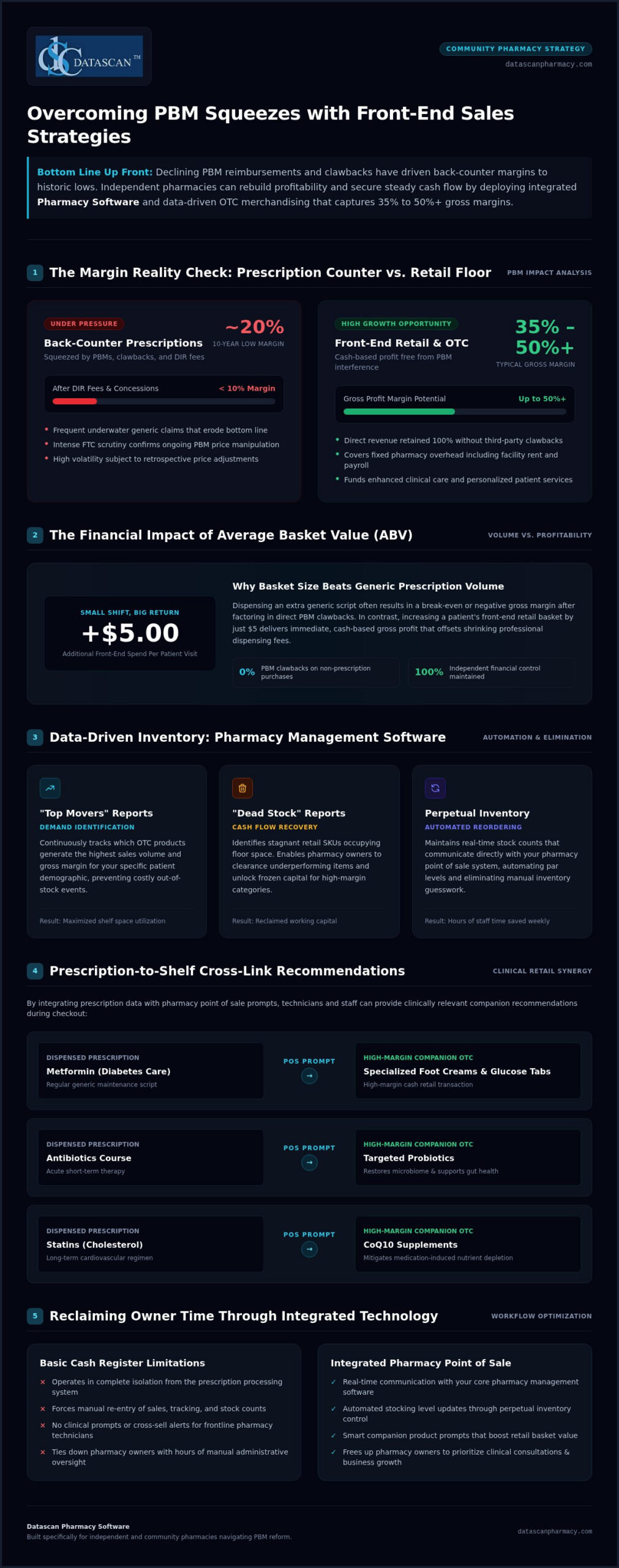
Front-end sales strategies for pharmacies are the retail tactics used to maximize non-prescription revenue, providing a critical high-margin buffer against declining PBM reimbursements. In 2026, relying solely on prescription volume is a dangerous gamble. With average overall gross margins hitting 10-year lows of around 20% and PBMs like Caremark and Express Scripts under intense FTC scrutiny for squeezing independents, the front-end is no longer optional. While your back-counter margins often dip below 10% after DIR fees and clawbacks, your front-end retail items consistently deliver 35% to 50% gross margins. Shifting your focus ensures you aren’t just “counting pills” but building a sustainable business. High-margin retail profit allows you to invest in the clinical services patients actually need, turning a struggle for survival into a streamlined success.
How do PBM reimbursements impact your retail focus?
Shrinking reimbursements make every square foot of your floor space more valuable than ever. When PBMs slash your professional fees, your front-end revenue must step up to cover fixed overhead like rent and staffing. By utilizing robust pharmacy management software, you can identify which aisles are actually paying the bills. By refining your front-end sales strategies for pharmacies, you can effectively insulate your business from the volatility of the insurance market. This strategic shift transforms your store from a simple dispensing hub into a community health and retail destination. It empowers you to spend more time on clinical care because you’ve secured the financial foundation of the business through high-margin OTC sales. When your front-end is optimized, you don’t have to chase volume just to break even on underwater generic claims.
The financial benefit of the “basket size” mentality
Success in 2026 requires a focus on Average Basket Value (ABV). Increasing a patient’s spend by just $5 in the front-end is often more profitable than dispensing a generic prescription with a negative margin. To manage this effectively, you need a perpetual inventory system integrated into your Datascan Point of Sale. This technology ensures you never miss a sale due to out-of-stocks. Our advanced Pharmacy Software allows you to track these trends in real-time, helping you stock the products your specific patient demographic demands. You can learn more about how these numbers impact your bottom line in our guide on how to calculate pharmacy gross profit. Every additional OTC item in the basket is a cash-based transaction free from PBM interference. This isn’t just about selling more; it’s about reclaiming the independence that PBMs have spent decades trying to erode.
How can data from your pharmacy management software drive retail growth?
Your pharmacy management software is more than a prescription processor; it’s a goldmine of consumer insights that identifies exactly what your patients need before they even leave the store. By analyzing purchasing patterns, you can eliminate the guesswork that leads to “dead stock” and instead focus on high-margin items that actually move. Data-driven front-end sales strategies for pharmacies rely on “Top Movers” reports to ensure your best-selling items are always in stock while using “Dead Stock” reports to clear out underperforming inventory, immediately freeing up vital cash flow for more profitable ventures.
Mining your Rx data for OTC opportunities
The most effective way to boost your bottom line is to link what happens at the script counter to what’s available on your shelves. Cross-link reporting allows you to see exactly what your diabetic patients are buying, or more importantly, what they aren’t. For example, a patient picking up metformin is a prime candidate for specialized foot creams or glucose tabs. You can set up automated prompts within your Datascan Point of Sale to remind staff to suggest clinically relevant companion products, such as probiotics with antibiotics or CoQ10 with statins. As highlighted in a recent FTC report on pharmacy reimbursement pressures, the financial squeeze on independents makes these cash-based companion sales essential for survival. This approach ensures you’re buying what sells rather than just buying what you like, protecting your margins from the unpredictability of PBMs.
Leveraging patient apps for front-end awareness
Modern Pharmacy Software extends your reach far beyond the four walls of your building. By utilizing the MobileScripts patient app, you can push retail-only coupons and monthly “front-end specials” directly to a patient’s smartphone. When a patient opens the app to request a refill, it’s the perfect opportunity to drive “in-app” browsing of your OTC departments. You’re not just providing a convenience; you’re creating a digital storefront that keeps your retail offerings top-of-mind. This level of engagement turns a routine refill into a personalized shopping experience, driving foot traffic and increasing the average basket value. If you’re ready to see how these integrated reports can work in your specific store, you can reach out to our team for a personalized walkthrough of our system’s capabilities.
What are the most effective examples of pharmacy front-end sales strategies?
Effective front-end sales strategies for pharmacies focus on transforming your retail floor into a solution-oriented environment that prioritizes high-margin products over low-profit commodities. By grouping items by ailment rather than brand, you create “Problem-Solution” endcaps that guide patients toward complete care. A patient suffering from a cold doesn’t just need medicine; they need tissues, vitamin C, and sanitizing wipes. Placing these items together increases your average basket value without requiring extra effort from your staff. Implementing private label programs is another powerful tactic. These allow independent pharmacies to compete with big-box pricing while maintaining gross margins of 50% to 70%, effectively insulating your cash flow from PBM volatility.
Strategic impulse buy zones and niche health services further diversify your revenue. You should optimize your checkout line with low-cost, high-margin items like professional-grade lip balms or healthy snacks that appeal to waiting patients. For stores looking to specialize, incorporating Durable Medical Equipment (DME) or utilizing compounding solutions can attract a loyal patient base that specifically seeks out your expertise. These specialized services are often cash-based or have better reimbursement rates than traditional retail scripts, making them essential for a modern, profitable pharmacy model.
Optimizing the OTC aisle layout
Your retail layout must follow the “Eye-Level is Buy-Level” rule to ensure your most profitable products are the first things patients see. Use professional signage to educate patients on the clinical benefits of premium supplements, as many shoppers are willing to pay more for quality when they understand the value. To keep the retail experience fresh for your regulars, dedicate a small section to “New Products” and rotate it monthly. For more detailed merchandising frameworks, you can explore NCPA’s Front-End Overhaul strategies, which provide actionable tips for independent community pharmacies looking to revitalize their floor space.
Implementing a loyalty program that actually works
A successful loyalty program goes beyond simple points; it should offer tiered rewards that encourage consistent front-end spending. By using your pharmacy management software to track participation, you can identify your most valuable customers and offer them exclusive benefits. For instance, creating a “Gold Member” tier that provides a 5% discount on all OTC items has been shown to significantly increase total annual spend per patient. This automated approach, managed through your Pharmacy Software, rewards loyalty while providing you with the data needed to refine your marketing efforts. When your technology handles the tracking, you save time and ensure no patient is overlooked in your quest for retail growth.
How do you build a high-margin OTC department with a perpetual inventory system?
Building a high-margin OTC department requires moving away from guesswork and implementing a perpetual inventory system for pharmacy that tracks every item in real-time. This technology ensures your shelves stay stocked with high-demand products while preventing “dead stock” from tying up your working capital. By integrating your retail floor with your Pharmacy Software, you can automate your replenishment cycle and focus your energy on patient care. These front-end sales strategies for pharmacies are essential for maintaining a healthy cash flow in a market where every dollar of retail profit counts.
To establish a truly efficient system, follow these five critical steps:
Step 1: Conduct a baseline inventory audit to clean up your pharmacy system software database, ensuring every SKU is accurately recorded.
Step 2: Set minimum and maximum (Min/Max) stocking levels for every retail SKU based on historical sales data.
Step 3: Enable automated ordering through your primary wholesaler so that your system triggers a purchase order the moment stock hits a minimum threshold.
Step 4: Use barcode scanning for every transaction at your Datascan Point of Sale to maintain real-time accuracy and prevent manual entry errors.
Step 5: Review “Shrinkage” reports weekly to identify discrepancies between your physical stock and your digital records.
The financial impact of perpetual inventory
Reducing “overstock” on slow-moving items can put thousands of dollars back into your bank account almost immediately. When your pharmacy management software alerts you to items that haven’t sold in 90 days, you can stop ordering them and repurpose that shelf space for higher-margin goods. This level of precision is also vital for retail compliance, particularly when managing FSA and HSA card processing for eligible OTC items. Manual inventory counts are the biggest time-waster for independent owners; automating this process through your POS saves hours of labor every week and eliminates the human error that leads to missed sales opportunities. To understand the full financial impact of implementing this approach, explore our comprehensive pharmacy perpetual inventory profitability guide for a detailed breakdown of how real-time stock accuracy translates directly to improved gross margins.
Preventing internal theft with smart POS security
A transparent, data-backed system is your best defense against preventing internal theft in a pharmacy and “sweethearting.” By using employee-specific logins, you can track every “No Sale,” “Voided” transaction, or price override in real-time. Your POS should be configured to set up alerts for suspicious front-end activity, ensuring that you’re notified of irregularities before they become a major financial drain. When your staff knows that every transaction is logged and audited within the Pharmacy Software, it creates a culture of accountability. This security doesn’t just protect your inventory; it protects your bottom line. If you’re ready to see how automated inventory can transform your store, you can contact our team for a personalized demonstration of our retail management tools.
Why is the right pharmacy point of sale system the key to retail success?
A true pharmacy POS system serves as the central nervous system of your retail operation, acting as the essential bridge between patient data and profitable transactions. Unlike a basic cash register that merely tallies totals, a sophisticated Datascan Point of Sale system integrates directly with your Pharmacy Software to ensure every retail decision is backed by real-time clinical and financial data. This integration is vital for independent pharmacies in 2026, as it allows for seamless inventory tracking, automated clinical prompts, and secure financial processing all within a single, unified platform. By choosing a system built specifically for the industry, you empower your staff to execute complex front-end sales strategies for pharmacies with total confidence.
When your POS “talks” to your pharmacy management software in real-time, you eliminate the manual entry errors that drain your time and profit. This synergy allows you to implement advanced retail tactics, such as automated loyalty rewards and targeted supplement recommendations, without adding to your staff’s administrative workload. Furthermore, the importance of US-based support cannot be overstated. When your retail system faces a technical hurdle during a busy holiday rush, you need immediate, expert assistance from a team that understands the unique pressures of the independent market. Reliable technology ensures your store remains operational and profitable, even during peak hours.
Streamlining the checkout experience
Speed and accuracy at the register are critical for maintaining patient satisfaction and protecting your margins. Integrated credit card processing speeds up your lines and significantly reduces the risk of manual entry errors that can lead to costly chargebacks. Your system should also capture digital signatures for HIPAA and delivery compliance directly at the point of sale, keeping you audit-ready without the burden of a paper trail. By leveraging workflow software, you can prevent bottlenecks at the register, ensuring that the transition from the script counter to the retail checkout is friction-free for every patient.
Extending the front-end with delivery and mobile tools
Your retail reach shouldn’t stop at your front door. By utilizing an electronic delivery system, your drivers can sell OTC items and capture secure payments right on the patient’s doorstep. This effectively transforms your delivery vehicle into a mobile storefront, allowing you to capture high-margin retail sales that might otherwise go to a big-box competitor. Additionally, offering Curbside Pickup for retail items via your patient app caters to the modern demand for convenience and speed. Technology doesn’t just manage your pharmacy; it actively grows it by meeting patients wherever they are. If you’re ready to modernize your retail operation, you can contact us today to see how our integrated solutions can drive your success.
Reclaim Your Pharmacy’s Independence and Profitability in 2026
The landscape for independent pharmacies is shifting rapidly, but the path to long-term success is clear. By prioritizing front-end sales strategies for pharmacies, you’re not just stocking shelves; you’re building a high-margin shield against declining PBM reimbursements. We’ve explored how leveraging integrated inventory management and real-time data allows you to reclaim hours of administrative time while maximizing every square foot of your retail space. It’s time to stop letting “dead stock” and inefficient manual counts drain your working capital.
Datascan has been family-owned since 1981, and we remain dedicated to providing the tools you need to thrive. Our integrated POS and pharmacy management software are backed by US-based technical support, ensuring you’re never alone in your quest for growth. You can transform your store into a streamlined, profit-driven destination that prioritizes both patient care and business health. See how Datascan POS can transform your front-end profitability today. We’re here to help you future-proof your legacy with precision and confidence.
Frequently Asked Questions
How can I increase front-end sales without hiring more staff?
You can increase front-end sales by automating your marketing and merchandising efforts through integrated technology. By setting up automated prompts in your pharmacy point of sale system, your current staff is reminded to suggest companion products during checkout without requiring extra training. Additionally, using a patient mobile app allows you to push digital coupons and specials directly to customers, driving retail traffic without manual outreach or additional payroll expenses.
What are the highest margin OTC categories for independent pharmacies?
Private label wellness products and professional grade supplements typically offer the highest margins, often reaching 50% to 70% gross profit. Unlike brand name commodities found in big box stores, these curated items allow you to leverage your clinical expertise to justify a premium price point. Other high margin categories include specialized wound care and durable medical equipment, which provide essential solutions for your local patient base while diversifying your non PBM revenue streams.
Does a pharmacy POS system really help with PBM reimbursements?
While a POS doesn’t change PBM contract rates, it acts as a critical financial shield by capturing the high margin cash revenue needed to offset reimbursement cuts. By using sophisticated front-end sales strategies for pharmacies, you can ensure that every patient visit contributes to your bottom line, even when prescription margins are underwater. The right system also provides the data needed to analyze which departments are effectively subsidizing your professional dispensing services.
How do I prevent internal theft in my pharmacy retail section?
Preventing internal theft requires a transparent system that tracks every retail action through employee specific logins. Your POS should provide detailed reports on No Sale instances, voided transactions, and price overrides to highlight suspicious patterns immediately. When your staff knows that the pharmacy management software logs every transaction and generates weekly shrinkage reports, it creates a culture of accountability that naturally discourages theft and sweethearting at the register. For a comprehensive breakdown of security protocols and common misconceptions, see our full guide on preventing internal theft in a pharmacy.
What is a perpetual inventory system and why does my pharmacy need one?
A perpetual inventory system is a continuous tracking method that updates your stock levels in real-time as items are scanned at the point of sale. Your pharmacy needs this to eliminate the manual labor of hand-counting and to prevent dead stock from tying up your cash. By setting automated min/max levels, your pharmacy system software ensures you never miss a high margin sale due to an out-of-stock item while keeping your inventory lean.
Can I sell front-end items through my pharmacy delivery service?
Yes, you can effectively extend your retail floor to the patient’s doorstep by utilizing a mobile delivery app. This technology allows your drivers to process OTC sales and capture secure payments remotely, turning every delivery into a potential retail transaction. Offering front-end items during the delivery process provides a high level of convenience for homebound patients while capturing revenue that would otherwise go to online retailers or big box chains.
How do I use my pharmacy software to find cross-selling opportunities?
You can identify cross-selling opportunities by using cross-link reports that analyze your prescription data to suggest relevant OTC products. For example, your pharmacy software can automatically prompt staff to recommend CoQ10 when a statin is dispensed or probiotics alongside an antibiotic. This data-driven approach ensures your recommendations are clinically sound and personalized, which builds patient trust while significantly increasing the average basket value of every visit.
What is the average gross profit margin for a pharmacy front-end?
The average gross profit margin for a pharmacy front-end typically ranges between 35% and 50%, which is significantly higher than the average prescription margin. Private label items and niche wellness categories can push these numbers even higher, sometimes exceeding 70%. In 2026, maintaining these healthy retail margins is essential for independent pharmacies to remain profitable and offset the financial pressure from PBM clawbacks and low reimbursement rates.
Imagine standing in your pharmacy after hours, staring at a decade of patient records and wondering if a single glitch during your pharmacy software data migration process could trigger a disastrous PBM audit. It’s a common nightmare for independent owners who feel chained to legacy systems because the fear of losing prescription history or missing PBM reimbursements feels too risky to ignore. You’ve worked too hard to build your legacy to let a technical transition jeopardize your compliance or your patient’s safety.
We agree that your pharmacy management software is the heartbeat of your operations, and switching should empower your growth rather than cause operational paralysis. This guide promises to transform that anxiety into a strategic advantage by providing a comprehensive, stress-free roadmap designed specifically for the modern independent pharmacy owner. We will preview the essential 2026 checklist, including how to navigate the Consolidated Appropriations Act’s transparency requirements and the latest NCPDP standards, while ensuring your new pharmacy software helps you reclaim your time and maximize profitability.
Key Takeaways
Discover why upgrading your pharmacy management software is the most effective way to reclaim your time and combat shrinking PBM margins in 2026.
Learn how to conduct a comprehensive pre-migration audit of your current pharmacy computer software to ensure data cleanliness and hardware compatibility.
Master the 5-phase framework for a secure pharmacy software data migration process that eliminates the risk of missing prescription history or patient records.
Protect your bottom line by implementing post-conversion validation steps that reconcile PBM reimbursements and verify your pharmacy POS system integration.
Identify the critical criteria for selecting pharmacy software companies that offer US-based technical support and a stable, family-owned heritage.
What is the Pharmacy Software Data Migration Process?
The data migration process in a pharmacy setting is a high stakes technical conversion where your historical records are extracted from a legacy system and imported into a new platform. It is far more than a simple file copy; it involves the sophisticated translation of complex medical and financial data to ensure your new pharmacy software functions perfectly from day one. In 2026, independent pharmacies are increasingly initiating this transition to stay ahead of federal PBM reforms, such as the Consolidated Appropriations Act, which requires more granular reporting than many older systems can provide.
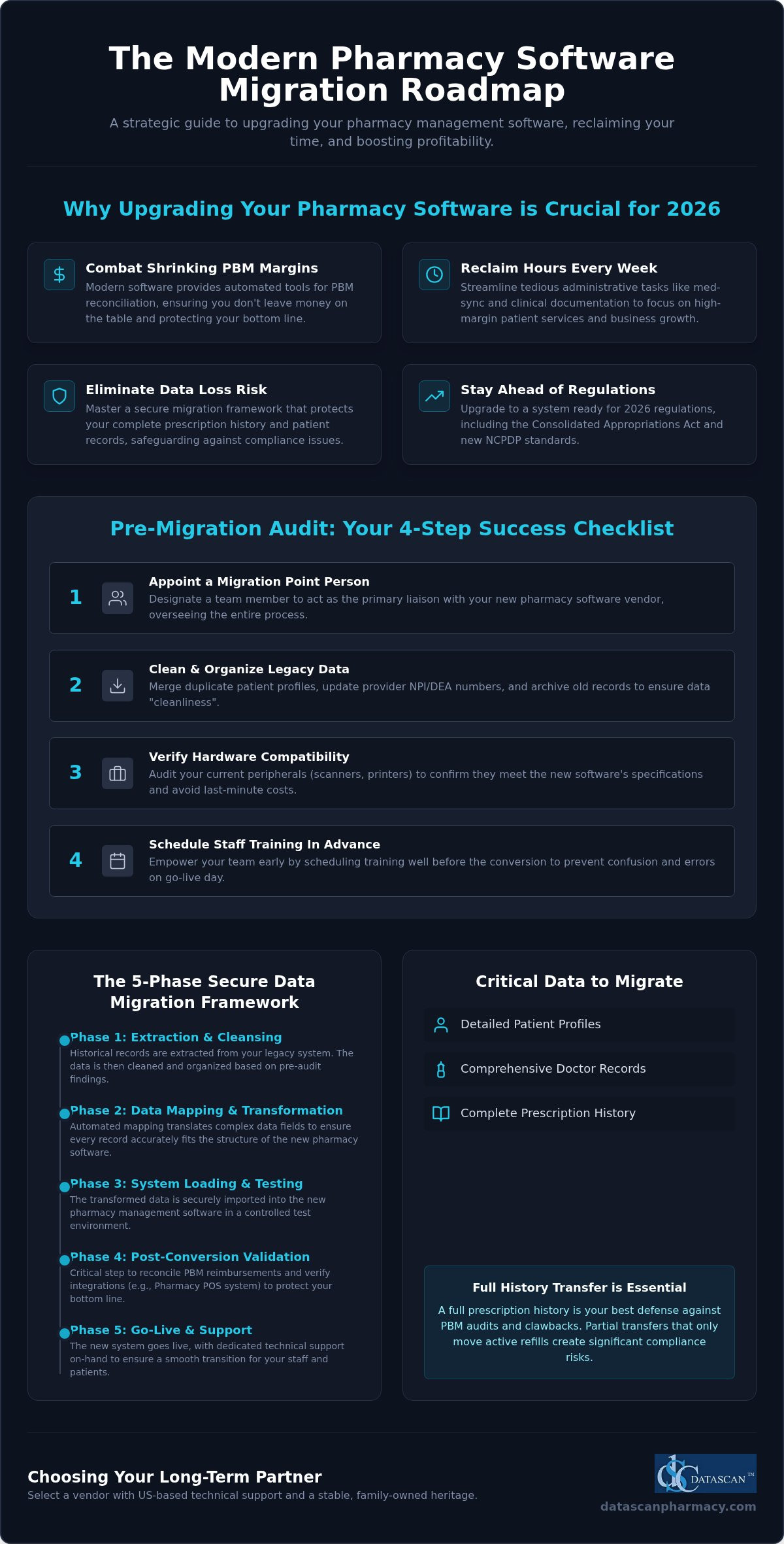
During a typical migration, several critical data types are moved to the new system. These include detailed patient profiles, comprehensive doctor records, and your entire prescription history. You’ll need to decide between a partial transfer, which only moves active refills, or a full history transfer. For most independent owners, a full history is the only viable path. Audits from PBMs often require records dating back years, and having that data readily accessible in your Pharmacy management software is your best defense against clawbacks.
The Strategic Importance of Modern Rx Software
Your current system shouldn’t be a bottleneck that stifles your growth. Outdated technology often lacks the automated tools necessary for effective PBM reconciliation, meaning you could be leaving significant money on the table every month. Upgrading to modern pharmacy management software allows you to reclaim hours of your week by streamlining tedious administrative tasks. When your technology handles the heavy lifting of med-sync and clinical documentation, you can finally focus on the high margin services that keep your business competitive in a challenging market.
Manual vs. Automated Data Conversions
Don’t fall into the trap of thinking manual data entry is a safe way to save money during a switch. The human error associated with manual moves is a massive liability that can lead to dangerous medication errors or lost accounts receivable data. A professional pharmacy software data migration process uses automated mapping to ensure every data field translates accurately between systems. You need a vendor with a proven track record who understands the specific nuances of independent pharmacy workflows. Precision in mapping ensures that your patient’s history remains intact, protecting both their safety and your pharmacy’s professional reputation.
Pre-Migration Audit: Preparing Your Pharmacy Management Software
Before you begin the actual technical transfer, you must evaluate the state of your current records. A successful pharmacy software data migration process starts months before the first line of code is moved. You need to appoint a “point person” on your team who understands your current workflow and can act as the primary liaison with your new software vendor. This individual will oversee the auditing of your current pharmacy computer software to ensure data “cleanliness” while verifying that your existing hardware, such as thermal printers and barcode scanners, meets the specifications for your new Pharmacy management software. Don’t assume your legacy peripherals will work; a proactive hardware audit prevents costly last-minute purchases during your go-live week.
Training shouldn’t be an afterthought. Schedule your staff training sessions well in advance of the conversion. Confusion on Day 1 leads to frustrated patients and potential dispensing errors. By empowering your team early, you transform a stressful transition into an opportunity for operational growth. If you have questions about how to structure your team’s prep, it’s often helpful to speak with a migration specialist who understands independent workflows and the unique challenges of community pharmacy.
Cleaning and Organizing Your Legacy Data
“Garbage in, garbage out” is a reality in data science. Use the months leading up to your switch to merge duplicate patient profiles and update provider NPI and DEA numbers. This level of precision is vital for successful data migrations in the pharmaceutical space. For those interested in how data query hubs manage their pricing, you can explore Taxas de assinatura mensal e cobrança por volume de consultas via API. Archiving prescription history that is no longer needed for active dispensing or legal compliance will streamline the conversion and improve the speed of your new Pharmacy Software. Cleaning your database now prevents your new system from being bogged down by outdated, irrelevant information that could complicate future PBM audits.
A firm “Go-Live” date provides your team with a clear target. Avoid peak periods like the first of the month or flu season to minimize business disruption. Your Pharmacy Software Implementation Plan should also include a communication strategy for your patients and local providers. Transparency builds trust. Letting them know you’re upgrading to a better system ensures they understand any minor delays during the first few days of the transition. This proactive approach protects your pharmacy’s reputation while you optimize your technology for better profitability and patient care. Following this structured pharmacy software data migration process ensures that your focus remains on your patients, not on technical hurdles.
The 5-Phase Conversion Framework: How Your Data Moves Safely
Moving your life’s work into a new system requires a methodical approach that leaves zero room for error. A structured 5-phase framework ensures that your pharmacy software data migration process remains secure and transparent. This isn’t just about moving files; it’s about preserving the integrity of every clinical decision you’ve ever recorded. By following a disciplined path, you transform a technical hurdle into a seamless business upgrade.
Phase 1: Extraction. Your vendor pulls the raw data from your legacy local database. This step requires precision to ensure no records are left behind in the old environment.
Phase 2: Mapping. This involves translating data fields so the new Pharmacy management software understands the old data structure. It’s the “translation” layer of the conversion.
Phase 3: Testing. You’ll perform a “mock conversion.” This is a dress rehearsal that allows you to identify and fix errors before they ever touch a live patient record.
Phase 4: Validation. Your pharmacy team manually reviews patient and Rx records for accuracy. This aligns with the Health IT data migration policy regarding quality assurance.
Phase 5: Final Cutover. The big day. This is the live transition where the most recent records are moved, and you officially begin dispensing on your new system.
Data Mapping and Integrity Standards
Mapping is the most technical part of the pharmacy software data migration process. It involves translating SIG codes and directions so your workflow remains uninterrupted. For pharmacies that specialize in custom medications, maintaining Datascan Compounding Solutions formulas and specialized patient notes is a top priority. A visionary ally ensures that your complex formulas and titration schedules translate perfectly. This prevents you from having to re-key data that took years to develop, protecting your time and your patients.
Security Architecture and HIPAA Compliance
Protecting patient privacy is non-negotiable. During the transfer, your data must be encrypted while moving between local servers to prevent unauthorized access. Maintaining a clear audit trail for every migrated prescription record is essential for future compliance and PBM transparency. This is why US-based technical support is so vital. You need a partner who understands domestic HIPAA regulations and can provide immediate, accountable assistance if a security question arises. By keeping your data local and your support domestic, you eliminate the risks associated with offshore corporate giants and ensure your records remain safe and accessible.
Post-Conversion Validation: Protecting Your PBM Reimbursements
The live cutover marks the end of the technical heavy lifting, but the success of your pharmacy software data migration process is truly measured in the 30 days that follow. You can’t afford to assume that every financial record and PBM contract link moved perfectly. This is the time to aggressively reconcile your open accounts receivable and verify that every pending PBM claim is accounted for in your new Pharmacy management software. If you don’t catch discrepancies now, they’ll become permanent losses that erode your margins. We advocate for a rigorous review period where every high-dollar claim is double-checked against your legacy records.
Testing your Datascan Point of Sale integration is equally vital. Your front-end transactions must sync flawlessly with your Rx records to maintain accurate inventory and financial reporting. Additionally, you must manually validate that your medication synchronization programs transferred correctly. Med-sync is the engine of your pharmacy’s efficiency; any break in the cycle can disrupt patient adherence and lead to a sudden drop in prescription volume. Monitoring your workflow efficiency during this first month allows you to tweak settings and ensure your team is maximizing the power of your new technology.
Optimizing Workflow with Your New System
For independent pharmacies looking to expand their front-end retail presence, adopting a commerce operations platform like Ommni can help manage complex product data and inventory at an enterprise scale, ensuring your business remains competitive across all sales channels.
Once the data is validated, your focus shifts to leveraging the superior technology at your fingertips. High-performance Datascan Workflow Software allows you to set up automated refill reminders and patient notifications that keep your pharmacy top-of-mind without adding to your staff’s workload. Use your new business intelligence tools to track profitability in real-time. By monitoring your gross margins daily during the first month, you can identify and correct any PBM reimbursement issues before they impact your cash flow. This proactive optimization is what separates stagnant pharmacies from those that thrive.
PBM Reconciliation and Financial Integrity
PBMs aren’t going to tell you if a claim is underpaid during a system switch. You must use your new Pharmacy Software to identify claims where the reimbursement doesn’t match your contracted rates. Verifying that patient charge accounts and historical balances are accurate protects your relationship with your most loyal customers. In 2026, financial validation is defined as the rigorous cross-referencing of legacy ledger data against real-time PBM remittance advice to ensure total fiscal transparency in an era of mandatory rebate reporting. This level of scrutiny ensures that your transition is a financial win, not just a technical one.
Don’t leave your pharmacy’s financial health to chance during a transition. If you’re concerned about how a switch might impact your bottom line, schedule a consultation with our team to see how our validation process protects your reimbursements.
Selecting a Pharmacy Software Vendor for Long-Term Success
Choosing your next Pharmacy management software is a high stakes decision that will define your pharmacy’s trajectory for the next decade. You aren’t just buying a tool; you’re selecting a partner to guide you through the complexities of the pharmacy software data migration process and beyond. In a market increasingly dominated by massive, impersonal corporations, independent owners must look for vendors that share their values of autonomy and resilience. Many pharmacies currently locked into a corporate wholesaler’s ecosystem are actively searching for the best McKesson pharmacy software alternative that prioritizes their independence over a shareholder’s bottom line. A family-owned provider with a legacy dating back to 1981 offers a level of accountability and personal touch that a publicly traded entity simply cannot replicate.
Longevity matters in this industry. When a software company has spent decades focusing solely on the independent market, their features reflect the actual needs of community pharmacists. This stability ensures that your system won’t be sunsetted after a corporate acquisition or left behind as technology evolves. You need a partner who views your success as their own, offering the sophisticated tools required to outmaneuver big chains while maintaining the heart of a local business. Before committing to any platform, evaluating pharmacy software vendors against a structured 2026 framework can help you avoid costly mistakes and identify the ally your independent pharmacy truly deserves.
The Critical Role of US-Based Support
On your live cutover day, every second counts. You don’t want to be routed to an offshore call center where the technicians don’t understand the nuances of the US pharmacy market or the intricacies of PBM reconciliation. Having US-Based Pharmacy Software Support means you’re speaking with experts who can troubleshoot issues in real time. This immediate access minimizes downtime and ensures your patients aren’t left waiting at the counter. Expert support teams understand that for an independent, your reputation is your most valuable asset, and they work with a sense of urgency to protect it during the final stages of your pharmacy software data migration process.
Future-Proofing Your Independent Pharmacy
The pharmacy industry moves fast. Your Pharmacy Software needs to evolve as quickly as the regulations and reimbursement models do. Look for a vendor that continuously integrates innovative features like med-sync, e-care plans, and patient-facing mobile applications that drive retention. By focusing on technology that frees up your time, you can shift your energy toward high-margin clinical services that bolster your bottom line. You already have the personal touch; now you need the cutting-edge tools to back it up. If you’re ready to see how a partner-focused approach can transform your business, Schedule a Demo of Datascan Pharmacy Management Software today.
Secure Your Legacy with a Future-Proof Transition
Mastering the pharmacy software data migration process is more than a technical necessity; it’s a strategic move to reclaim your time and protect your bottom line from shrinking PBM margins. By following a disciplined 5-phase framework and conducting a rigorous pre-migration audit, you ensure that every patient record and compounding formula remains a secure asset. Your technology should work as hard as you do, providing the business intelligence needed to thrive in a competitive market.
Don’t settle for corporate vendors that treat your independent pharmacy like just another number on a spreadsheet. Since 1981, our family-owned business has provided US-based expert technical support designed specifically for the unique pressures of community pharmacy. We understand that your data is your life’s work, and we’re committed to helping you transform operational burdens into streamlined successes.
Your community relies on your expertise. Give them the best care possible by empowering your team with a system that prioritizes your independence and profitability.
Frequently Asked Questions
How long does the pharmacy software data migration process typically take?
The typical pharmacy software data migration process spans 60 to 90 days from the initial contract signing to your actual go-live date. This timeframe allows for a methodical extraction of legacy records and thorough testing of the new system. We dedicate the first month to data mapping and mock conversions; while the final weeks focus on staff training and hardware verification. This paced approach ensures that your transition is seamless and your records are perfectly synchronized.
Will my pharmacy experience downtime during the data conversion?
Most independent pharmacies experience virtually zero downtime during the actual conversion. We schedule the final data cutover after your normal business hours or over a weekend to ensure your dispensing workflow remains uninterrupted. Your team continues working on the legacy system until the moment of the switch; then you simply log into your new pharmacy software and begin processing. This strategy protects your patient care continuity and prevents any loss of revenue during the transition.
Is my patient data safe and HIPAA-compliant during the migration?
Your patient data remains completely secure and HIPAA-compliant because we utilize local server encryption and US-based technical support. Unlike corporate competitors that might offshore your sensitive records; we handle every byte of information within domestic borders. This rigorous security architecture maintains a clear audit trail for every migrated prescription. You can rest assured that your pharmacy’s professional reputation and your patients’ privacy are protected by a partner who understands US regulatory standards.
Can I migrate data from any pharmacy software vendor to Datascan?
You can migrate data to Datascan from virtually any legacy pharmacy software vendor in the market. Our team has decades of experience navigating the database structures of both large corporate systems and niche providers. We use automated mapping tools to translate your historical records accurately; ensuring that patient profiles and Rx history move without manual entry errors. This versatility makes the pharmacy software data migration process accessible for any independent pharmacy looking to upgrade their technology.
What happens to my old compounding formulas during a migration?
Your historical compounding formulas and specialized titration notes are treated as high priority data during the migration. We map these complex fields specifically to ensure that your custom recipes translate perfectly into your new pharmacy management software. This prevents your staff from having to re-key data manually; which saves countless hours and eliminates the risk of formulation errors. Maintaining this clinical continuity is essential for protecting your high margin specialty services and ensuring patient safety.
Should I keep my old hardware when switching pharmacy systems?
You don’t necessarily need to replace all your existing hardware when switching systems. We conduct a thorough compatibility audit of your current thermal printers; barcode scanners; and workstations during the pre-migration phase. While modern pharmacy software performs best on updated equipment; many legacy peripherals are compatible with our local server environment. This practical approach helps you manage your budget while ensuring that your new technology stack operates with maximum speed and reliability on Day 1.
Will the migration process affect my current PBM reimbursements?
A properly executed migration will not negatively impact your current PBM reimbursements; in fact; it often improves your financial tracking. Our post-conversion validation process specifically reconciles your open accounts receivable to ensure no claims are lost during the switch. By moving to a system with better business intelligence tools; you’ll actually find it easier to identify underpaid claims and track PBM reform transparency requirements. Your technology becomes a shield that protects your pharmacy’s hard earned profitability.
How much training is required for staff on the new pharmacy software?
We recommend a structured training period of two to four weeks for your pharmacy staff. This training focuses on your specific workflow; from initial intake to final point of sale transactions. By using a “train the trainer” model; your point person becomes an expert who can support the rest of the team. This investment in education pays off immediately through improved efficiency and reduced stress during the first 30 days of using your new pharmacy management software.
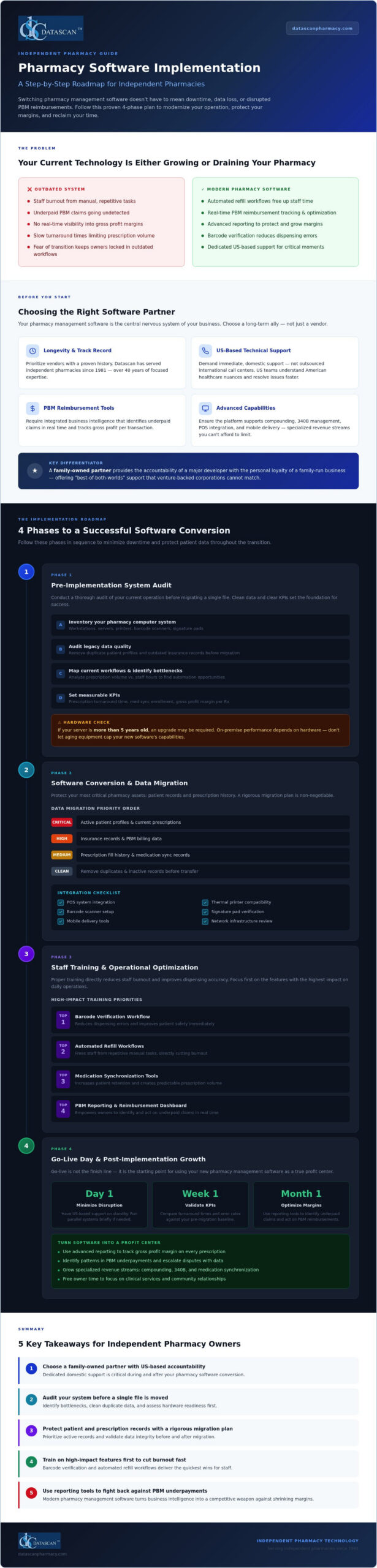
Your current technology is either a catalyst for growth or a silent drain on your pharmacy’s bottom line. For many independent owners, the fear of data loss or disrupted PBM reimbursements makes sticking with an outdated system feel like the safer choice, even as staff burnout climbs. However, executing a strategic pharmacy software implementation plan is the only way to reclaim your time and protect your margins in a competitive market. You don’t have to sacrifice operational stability to gain the competitive edge of modern pharmacy management software.
This guide provides a roadmap to master your next pharmacy software conversion with confidence. We’ll show you how to transition to a system that prioritizes your independence, offering a step-by-step approach to maximize profitability and minimize downtime. You’ll learn how to leverage advanced technology to overcome PBM challenges, backed by the reliability of a family-owned partner that provides dedicated, US-based technical support every step of the way.
Key Takeaways
Choose a family-owned partner that offers the accountability and US-based support needed to protect your independent pharmacy’s unique operational needs.
Identify and eliminate existing bottlenecks by conducting a comprehensive system audit before you begin the transition to a more modern workflow.
Protect your critical patient and prescription records by following a rigorous pharmacy software implementation plan during the data migration phase.
Reduce staff burnout and improve dispensing accuracy by prioritizing training on high-impact features like barcode verification and automated refill workflows.
Transform your pharmacy management software into a profit center by using advanced reporting tools to overcome PBM reimbursement challenges.
Selecting the Right Pharmacy Management Software Partner
Your pharmacy management software functions as the central nervous system of your independent business. It doesn’t just dispense prescriptions; it manages patient safety, financial health, and operational flow. Choosing the right partner is the most critical step in your pharmacy software implementation plan because you’re selecting a long-term ally rather than just a software vendor. While many venture-backed corporations prioritize short-term profits and shareholder returns, a family-owned partner offers a level of accountability that’s becoming rare in the industry.
Independent pharmacies need tools that handle more than just the basics. Whether you are managing complex compounding solutions or navigating the intricacies of 340B management, your software must be robust enough to support these specialized revenue streams. Evaluating software for pharmacies based on these advanced capabilities ensures you aren’t limited by your technology as your business evolves.
Prioritizing PBM Reimbursement and Profitability Tools
In an era of shrinking margins and aggressive PBM tactics, your technology should be your first line of defense. Don’t settle for a system that leaves money on the table. Your next system must include integrated business intelligence that identifies underpaid claims in real time. It’s not enough to simply process prescriptions. You need to track gross profit margins on every transaction. Understanding how to calculate pharmacy gross profit with precision is essential, as independent pharmacy gross profit margins have plummeted to a ten-year low in 2026. Modern pharmacy software empowers you to fight back against unfair PBM practices by providing the data needed to optimize reimbursements and protect your pharmacy’s financial future. Before committing to any platform, it’s worth reviewing a detailed cost of PioneerRx vs Datascan breakdown to understand the true total cost of ownership beyond base subscription pricing.
Assessing Vendor Support and Longevity
A successful pharmacy software conversion depends heavily on the quality of technical support you receive. You should prioritize vendors that offer immediate, US-based pharmacy software support rather than those that outsource their help desks to international call centers. Domestic support teams understand the specific nuances of the American healthcare landscape and can provide faster resolutions during critical moments. When you’re in the middle of a system switch, you can’t afford to wait on hold.
Ask potential partners about their ownership history. A company like Datascan has served the independent pharmacy community since 1981, providing a unique “best-of-both-worlds” experience. You get the cutting-edge capabilities of a major developer with the personal touch and loyalty of a family-run business. This longevity ensures that your pharmacy software implementation plan is backed by decades of industry expertise and a deep commitment to your success.
Phase 1: The Pre-Implementation System Audit
Success begins long before the first file is transferred. A robust pharmacy software implementation plan requires a transparent look at your current operation to ensure your new technology isn’t hindered by old problems. Before you transition to a modern pharmacy management software, you must conduct a thorough inventory of your existing pharmacy computer system. This isn’t just about counting workstations; it’s about identifying the specific bottlenecks that drain your staff’s energy and eat into your gross profit margins.
Reviewing your legacy data quality is equally vital. Migrating “junk” data, such as duplicate patient profiles or outdated insurance records, only complicates your new workflow. By cleaning your database now, you ensure that your new system operates at peak efficiency from day one. Setting clear Key Performance Indicators (KPIs), such as reducing prescription turnaround time or increasing medication synchronization enrollment, will help you measure the true ROI of your new technology.
Hardware and Infrastructure Evaluation
Your pharmacy software is only as reliable as the hardware it runs on. Since we prioritize stable, high-performance on-premise solutions rather than relying on an internet connection for core functions, your server and workstations must be up to the task. Assess the compatibility of your current thermal printers, barcode scanners, and signature pads. If your server is more than five years old, an upgrade may be necessary to guarantee the speed and security your patients expect.
Don’t forget to plan for peripheral integrations. If you intend to utilize a Datascan Point of Sale (POS) system or mobile delivery tools, your network infrastructure must support these devices seamlessly. Ensuring your hardware is ready now prevents frustrating delays during the go-live phase.
Workflow Mapping for Efficiency
For specialized medical environments that require more than standard office equipment, Synergy Medical Inc. offers high-performance surgical and radiology displays designed for clinical precision.
For pharmacies that also manage their own delivery vehicles or equipment maintenance, a field service tool like Repair-CRM can help digitize those external operations and keep them organized alongside your main system.
Analyze your current prescription volume against your staff hours to find where automation can take over. Many independent owners find that their team is bogged down by manual tasks that a modern system could handle in seconds. Implementing workflow software allows you to standardize the dispensing process, which significantly reduces the risk of errors and helps prevent pharmacist burnout.
This is also the ideal time to plan for medication synchronization. By aligning patient refills to a single date each month, you can stabilize your daily volume and free up your staff to focus on clinical services and PBM reimbursement recovery. If you’re unsure if your current hardware can support these advanced features, it’s a good idea to consult with a technical expert to review your specific needs.
Phase 2: Pharmacy Software Conversion and Data Migration
Moving your data is the most sensitive part of any pharmacy software implementation plan. Unlike generic IT migrations, a pharmacy software conversion involves high-stakes clinical information that directly impacts patient safety. You aren’t just moving files; you’re transferring the lifeblood of your practice. Most conversions follow a methodical timeline, starting with a test conversion to verify how your legacy records map to the new database. During this period, maintaining HIPAA compliance and data integrity is non-negotiable. You’ll often run dual systems briefly to ensure no prescription delays occur while your team gets acclimated to the new pharmacy management software interface.
Precision during this phase prevents the loss of critical patient history and ensures your PBM reimbursement cycles remain uninterrupted. By working with an experienced partner, you can avoid the common pitfalls that lead to “dirty data” or missing insurance profiles. It’s about ensuring a seamless transition where your staff feels confident that the information on their screen is accurate and actionable from the very first day.
Managing Historical Patient and Prescription Records
You don’t need to move every single record from the last twenty years. Focus on active prescriptions, detailed patient profiles, and current insurance information. Archiving old data keeps your new pharmacy software lean and fast. Our dedicated conversion team works closely with you to validate this data, ensuring that every sig code and allergy warning transfers accurately. This meticulous approach prevents dispensing errors and protects your reputation as a trusted community provider. To see how a community-focused pharmacy prioritizes patient education alongside safety, learn more about Sage Creek Pharmacy and their commitment to family health resources. Validating migrated data early allows you to catch mapping issues before they affect your live workflow.
A seamless transition also means ensuring your niche revenue streams remain uninterrupted. If your pharmacy specializes in custom medications, setting up compounding solutions within the new system should happen early in the migration phase. Similarly, pharmacies serving long-term care facilities must configure their nursing and assisted living modules to maintain strict medication administration schedules. Finally, verify that your Datascan Point of Sale is fully synced with your new inventory records to prevent discrepancies in your financial reporting. This integration ensures that every transaction, from a complex compound to a front-end sale, is captured accurately for your gross profit analysis.
Phase 3: Staff Training and Operational Optimization
Technology is only as effective as the people operating it. A successful pharmacy software implementation plan requires a tiered training approach that respects the high-pressure environment of a community pharmacy. Instead of a single, overwhelming session, you should break training down by role. Pharmacists need to master clinical reporting and PBM reconciliation, while technicians should focus on the speed and accuracy of the dispensing queue. This targeted strategy ensures that every team member feels empowered rather than overwhelmed by the transition.
Modern pharmacy management software should serve as an extra set of hands for your business. By automating repetitive, manual tasks, you’re not just improving your pharmacy’s efficiency; you’re actively reducing the mental load that leads to staff burnout. When your team isn’t bogged down by clunky workflows, they can spend more time on patient care and revenue-generating clinical services. For parents who want to apply this same principle of centralized organization to their children’s education, you can check out DormWay to see how a Student OS simplifies academic scheduling.
The first step to optimization is configuring barcode verification at every stage of the fill process. This isn’t just a safety feature. It’s a workflow optimizer that prevents the costly rework associated with dispensing errors. You should also set up automated refill workflows to ensure prescriptions are ready before the patient even reaches the counter, creating a smoother experience for both staff and customers.
Integrating MobileScripts into your daily routine is a game changer for operational flow. By moving refill requests and status inquiries to a mobile app, you drastically reduce the volume of incoming phone calls. This allows your technicians to stay focused on production and helps stabilize your daily prescription volume through better patient adherence.
Empowering Staff with Clinical Tools
Independent pharmacies are increasingly shifting toward clinical service models to offset the challenges of poor PBM reimbursements. You must train your pharmacists to utilize integrated e-care plans and MTM features within the pharmacy software. These tools turn your dispensing system into a clinical revenue generator, allowing you to document and bill for services that go beyond the vial.
Encourage staff buy-in by demonstrating how integrated task management software handles daily chores and compliance tracking. When your team sees that the new system eliminates manual logbooks and redundant paperwork, they’ll quickly embrace the change. If you’re ready to see how these automated tools can transform your daily operations and free up your time, schedule a workflow consultation with our US-based experts today.
Phase 4: Go-Live Day and Post-Implementation Growth
Go-live day represents the culmination of your pharmacy software implementation plan, where months of preparation meet the reality of daily operations. The goal is a transition so smooth that your patients don’t even notice a change occurred. To achieve this, follow a rigid checklist that covers hardware connectivity, label printing, and real-time claim adjudication before the first customer arrives. The first 48 hours are critical. You need the assurance that comes with dedicated, US-based pharmacy software support to handle any unforeseen troubleshooting without delay. You shouldn’t have to navigate technical hurdles alone while trying to serve your community.
Once the initial transition period passes, your focus should pivot from technical stability to financial optimization. Your new pharmacy management software is designed to do more than just fill bottles; it’s a tool for reclaiming your time and improving your bottom line. By transitioning your attention to PBM reconciliation and workflow efficiency, you transform a technical upgrade into a strategic business advantage. Maximizing every claim’s profitability becomes an achievable daily task rather than a monthly struggle.
Immediate Post-Go-Live Priorities
In the first few days, prioritize your pharmacy’s financial health by running your first PBM reimbursement reports. These tools are essential for identifying underpaid claims that often slip through the cracks in legacy systems. You should also ensure your electronic delivery system is fully operational for HIPAA-compliant signature capture and real-time tracking. Use your new system’s advanced dashboards to review the first week’s gross profit margins. This immediate feedback allows you to make data-driven decisions about your inventory and pricing strategies right away. For a deeper understanding of the formulas and benchmarks behind these numbers, review our comprehensive guide on calculating pharmacy gross profit in 2026 to ensure your reporting is as accurate as possible.
Long-Term Success with Your Pharmacy System
A modern pharmacy software system is an evolving asset. Establish a routine for regular software updates and stay engaged with new feature releases to ensure you’re always using the latest tools for efficiency. Building a long-term partnership with your US-based support team provides a layer of accountability that venture-backed vendors can’t match. As you evaluate your platform’s long-term value, a thorough cost of PioneerRx vs Datascan comparison for independent pharmacies can help you confirm you’re maximizing your return on investment. As you look toward the future, stay informed by reading The Ultimate Guide to Pharmacy Management Software in 2026 to ensure your business remains at the cutting edge of the industry. This proactive approach ensures your technology continues to serve as the “Champion of the Independent” for years to come.
Take Control of Your Pharmacy’s Future
A successful pharmacy software implementation plan is more than a technical upgrade; it’s a strategic pivot toward long-term independence and financial stability. By conducting a thorough system audit and executing a meticulous data migration, you protect your patient records while eliminating the bottlenecks that cause staff burnout. Modern pharmacy management software empowers you to fight back against unfair PBM reimbursements by providing the transparency and profitability tools you need to survive in a challenging market.
You don’t have to navigate this transition alone. Partnering with a family-owned and operated company that’s served the industry since 1981 ensures you have an advocate in your corner. With our US-based technical support team and decades of industry experience, we provide the expertise needed to transform your operational struggles into streamlined successes. It’s time to reclaim your time and maximize your gross profit margins with pharmacy software built specifically for the independent pharmacist. Your journey toward a more efficient, profitable pharmacy starts with the right partner by your side.
How long does a typical pharmacy software conversion take?
A typical pharmacy software conversion generally spans four to six weeks from the initial system audit to the final go-live day. This timeline allows for a thorough data migration test, staff training, and hardware configuration. By following a methodical pharmacy software implementation plan, you ensure that the actual transition happens in a single day, preventing extended operational downtime and protecting your patient care continuity.
Will I lose my historical patient data when switching pharmacy management systems?
You won’t lose your critical records when transitioning to a modern pharmacy management software if you follow a rigorous migration protocol. We prioritize the transfer of active prescriptions, patient profiles, and insurance information to ensure clinical safety. While some extremely old or “dirty” data might be archived to improve system speed, your essential historical records remain accessible and intact throughout the entire conversion process.
Do I need to buy all new hardware for a pharmacy software implementation?
You don’t necessarily need to replace all your existing equipment for a new pharmacy software implementation. During the pre-implementation audit, we assess your current thermal printers, barcode scanners, and workstations for compatibility. While older servers might require an upgrade to ensure on-premise stability and speed, many pharmacies can utilize their existing peripheral hardware, provided it meets the technical requirements for modern dispensing workflows and security standards.
How does modern pharmacy software help with PBM reimbursements?
Modern technology helps you fight back against unfair PBM practices by providing real-time visibility into claim profitability. Our software includes advanced reconciliation tools that automatically identify underpaid claims and track your gross profit margins on every transaction. Instead of waiting for monthly statements, you can use these integrated business intelligence features to optimize your reimbursements and protect your independent pharmacy’s financial health daily.
Is staff training included in the pharmacy software implementation plan?
Comprehensive staff training is a fundamental part of every pharmacy software implementation plan we design. We utilize a tiered approach that targets the specific needs of pharmacists, technicians, and front-end staff. This ensures that your team feels confident using high-impact features like barcode verification and automated refill workflows before the system goes live, which drastically reduces the stress and errors often associated with new technology.
Can I manage compounding and retail prescriptions in the same pharmacy system?
You can absolutely manage both retail and specialized prescriptions within a single, unified pharmacy system. Our platform includes dedicated modules for compounding and 340B management, allowing you to streamline diverse revenue streams without switching between different programs. This integration ensures that your inventory, patient records, and PBM billing are all centralized, providing a total solution for independent pharmacies that offer clinical or specialty services.
What kind of support can I expect during the go-live phase?
You can expect immediate, US-based technical support during the critical go-live phase of your transition. Our team provides real-time troubleshooting to resolve hardware or data issues within the first 48 hours of operation. Since we don’t outsource our help desk, you’ll speak with experienced professionals who understand the American pharmacy landscape, ensuring that your doors stay open and your patients remain well-served throughout the switch.
How does technology help reduce pharmacist burnout in independent pharmacies?
Technology reduces pharmacist burnout by automating the repetitive, manual tasks that drain your staff’s energy and time. Features like medication synchronization, automated refill workflows, and mobile patient engagement tools eliminate constant phone interruptions and stabilize daily prescription volume. By streamlining the dispensing process with pharmacy workflow optimization software, our pharmacy software allows you to spend less time on paperwork and more time on clinical services and growing your business profitably.