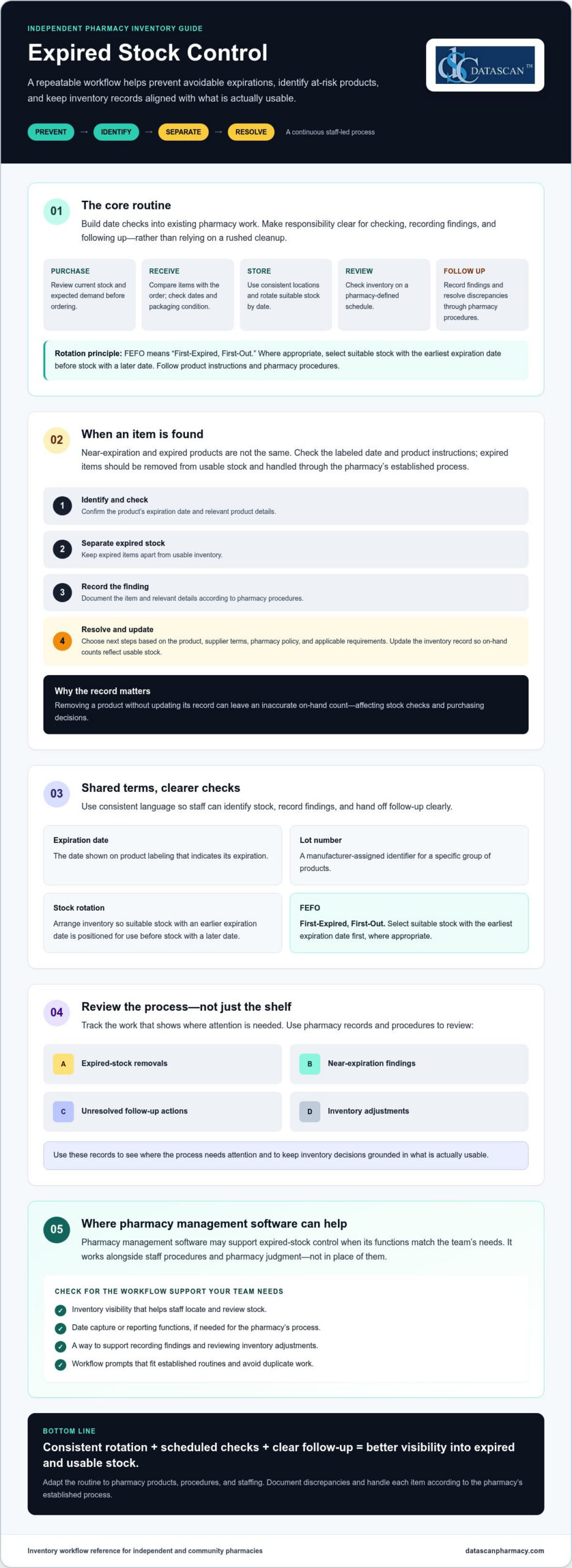
Expired stock is easier to control with a repeatable workflow than with a rushed cleanup. Managing expired pharmacy stock starts with consistent rotation and scheduled checks, so staff can spot approaching dates before products become a loss.
Independent pharmacies often have limited time for manual checks, and inconsistent routines can leave expired products on the shelf or tie up inventory. A clear process helps staff identify items nearing expiration, separate expired products from usable stock, and track follow-up.
This guide covers practical ways to prevent avoidable expirations, handle expired medicines consistently, and improve inventory visibility. It explains how to build stock rotation into everyday work, assign clear steps for expired products, and review inventory records. Pharmacy management software may support the process when it has the functions your team needs, but it works alongside staff procedures and pharmacy judgment.
Key Takeaways
Managing expired pharmacy stock works best as a repeatable process for preventing, identifying, separating, and resolving expired inventory.
Build expiration checks into purchasing, receiving, storage, and routine inventory reviews. Document discrepancies according to pharmacy procedures.
When staff find expired products, separate them from usable stock, record the finding, and choose next steps based on the product, supplier terms, pharmacy policy, and applicable requirements.
Track expired removals, near-expiration findings, unresolved actions, and inventory adjustments to see where the process needs attention.
When assessing pharmacy management software, confirm that it supports the inventory visibility and workflow your team needs, including any date capture or reporting functions.
What does managing expired pharmacy stock involve?
Managing expired pharmacy stock means identifying products that are nearing or past their expiration date, preventing avoidable expirations through routine stock control, separating expired items from usable inventory, and resolving them according to pharmacy procedures. Near-expiration and expired products are not the same. A product nearing expiration may still be usable if its date and product instructions allow, while an expired item should be removed from usable stock and handled through the pharmacy’s established process.
This work supports orderly shelves and reliable inventory records. If staff remove a product but don’t update its record, the on-hand count may remain inaccurate. That can lead to purchasing decisions based on stock that is no longer available for use, extra checks for the next staff member, and avoidable write-offs that weigh on pharmacy margins. A consistent process makes each item’s status and next step easier to see.
Why does expired pharmacy stock create an operational problem?
Expired products take up space and can distort inventory records until they’re identified, separated, and accounted for. For example, if staff find a package past its date during a shelf check but don’t adjust the inventory record, another team member may assume it is available when checking stock or placing an order. Searching shelves for date-sensitive items can also interrupt routine work. Clear roles for checking and recording findings help avoid repeated checks and keep inventory decisions grounded in what’s actually usable.
What do expiration date, lot number, and FEFO mean?
These terms help staff organize and review products consistently:
Expiration date: The date shown on a product’s labeling that indicates its expiration. For background on the topic, see this overview of drug expiration and disposal.
Lot number: A manufacturer-assigned identifier for a specific group of products. Recording it can help staff distinguish one group from another when reviewing stock or investigating a product-related issue.
Stock rotation: Arranging inventory so suitable stock with an earlier expiration date is positioned for use before stock with a later date.
FEFO: “First-Expired, First-Out.” Where appropriate, staff select suitable stock with the earliest expiration date first, rather than relying only on the order products arrived.
FEFO can help reduce avoidable expirations, but it doesn’t replace checking the product itself. Follow product-specific instructions and pharmacy procedures when deciding whether an item is suitable for use. These definitions give the team a shared starting point. The next step is to build them into purchasing, receiving, storage, and review routines.
How can a pharmacy prevent stock from expiring?
Preventing expirations takes a connected process across purchasing, receiving, storage, review, and follow-up. Set a pharmacy-defined review schedule and incorporate date checks into existing work. This helps staff spot approaching expirations without creating a duplicate inventory task. The FDA explains how expiration dates are established, which can help staff understand why checking the labeled date and following product instructions matter. See its FDA guidelines on expiration dates.
How should staff check stock when orders arrive?
At receiving, compare each product with the order and follow the pharmacy’s receiving procedures. Check dates and packaging condition before placing items into stock. Record product or lot details when the pharmacy’s process calls for them. If an item arrives short-dated, damaged, or inconsistent with the order, document the discrepancy and follow the pharmacy’s escalation process, including applicable wholesaler terms.
How can teams build expiration checks into daily work?
Make the routine clear enough for staff to complete consistently during an existing inventory task. Assign responsibility for checking, recording findings, and resolving follow-up items. Use consistent storage locations and rotate suitable products so earlier-expiring stock is easier to find. A checklist or completion prompt within an established routine can help prevent missed steps without asking staff to repeat the same work elsewhere.
Use this five-part workflow as a starting point, then adapt it to your pharmacy’s products, procedures, and staffing:
1. Purchase thoughtfully. Review current stock and expected demand before ordering. Consider whether the order quantity is realistic given the pharmacy’s ability to use the products before their expiration dates.
2. Check at receipt. Compare received items with the order, inspect dates and condition, and document discrepancies according to pharmacy procedures.
3. Store and rotate. Keep products in consistent locations and position suitable stock with the earliest expiration date so it will be selected first. Don’t rely only on delivery order.
4. Review on a set schedule. Choose a review frequency based on your pharmacy’s inventory and workflow. Check designated areas, flag approaching dates, and record findings so another team member can see what needs attention.
5. Follow through. Assign an owner to each finding and document the outcome, such as an inventory adjustment or another step under pharmacy policy. Close the loop instead of leaving flagged items unresolved.
Consistent routines make managing expired pharmacy stock less dependent on memory. If you’re assessing whether pharmacy management software could support your inventory workflow, confirm which relevant functions are available before relying on them. Staff procedures and pharmacy judgment remain essential.
What should staff do with expired pharmacy stock?
Staff should identify expired products, remove them from usable inventory, document the finding, and assign a clear next step. Return, disposal, and recordkeeping depend on the product, supplier terms, pharmacy policy, and applicable requirements. Follow the pharmacy’s procedures and verify current federal and state guidance rather than applying one disposal rule to every item.
General workflow: Identify the expired item, separate it from stock available for dispensing or sale, record and reconcile it according to pharmacy procedures, then confirm and complete the appropriate return or disposal process. This is an operational guide, not legal advice.
How should a pharmacy separate expired products from usable inventory?
Move expired items to a designated, clearly controlled area consistent with pharmacy procedures. Keep them physically apart from usable stock, and use the pharmacy’s established method to ensure they can’t be selected for dispensing or sale. Make the area and process clear to staff, including who may access the items and who is responsible for follow-up.
Record enough information for the team to identify and resolve each item. Depending on pharmacy procedures, that may include the product, quantity, expiration date, lot number, date found, and assigned action. Then reconcile the removal against inventory records. If an item leaves the shelf but the on-hand count stays unchanged, staff may continue to rely on an inaccurate count when checking availability or making purchasing decisions.
Can expired medicines be returned or must they be disposed of?
Some products may be eligible for return, but eligibility can vary with supplier terms and the product’s circumstances. Check those terms and document the decision according to pharmacy policy. If return isn’t an option, don’t assume one disposal method applies to every medicine. Confirm product-specific steps with current authoritative guidance and the appropriate federal or state source for your situation.
The Specialist Pharmacy Service offers a practical reference on best practices for expired stock, including stock-control considerations. It’s a UK resource, so use it for general workflow ideas, not as guidance on U.S. requirements. For U.S. handling decisions, verify current requirements with the relevant authorities and follow your pharmacy’s procedures.
Identify: Confirm the item is expired and note its location.
Separate: Remove it from usable inventory and place it in the designated controlled area.
Document: Record the details and reconcile the inventory record using pharmacy procedures.
Assign and close: Determine whether return or disposal is appropriate, assign an owner, and record the completed action.
Clear ownership keeps managing expired pharmacy stock from becoming a shelf-side reminder that no one follows up. Consistent records also help the team distinguish items awaiting action from inventory that remains available for use.
How can a pharmacy measure and improve its expired-stock process?
Measure the process with consistent records, clear definitions, and a regular review period. Track expired removals, near-expiration findings, unresolved follow-up, and inventory adjustments. Use the patterns to review purchasing and staff procedures. Accurate inventory records can add context to business decisions and stock write-offs, but they don’t replace analysis of other financial pressures.
Which indicators help reveal recurring expiration problems?
Review findings by product or category and compare them with available purchase, on-hand, and removal records. Repeated findings can prompt a closer look at order quantities, demand, storage, or review routines, but they don’t prove a single cause. Keep definitions consistent, such as what counts as a near-expiration finding, and compare the same types of records over the same review period.
Expired removals: Items taken out of usable inventory and recorded as expired.
Near-expiration findings: Products flagged for follow-up under the pharmacy’s own criteria.
Unresolved actions: Findings still awaiting review, return consideration, or another next step.
Inventory adjustments: Changes made to align recorded quantities with stock status.
Manual checks and software-supported visibility can both contribute to oversight. Manual logs may suit a simpler workflow, while a system may make records easier to review if it captures the right information. Compare options by asking whether staff can find relevant data, record findings consistently, assign follow-up, and review unresolved items. Keep inventory measures distinct from other financial figures unless your system and review process explicitly connect them.
What should pharmacy software do to support stock oversight?
Before relying on technology, confirm whether it can capture relevant dates, support the pharmacy’s review process, and report inventory exceptions in a useful format. Ask the vendor to demonstrate each function. Don’t assume expiration alerts, lot-level records, or automated rotation are included. Pharmacy management software may support inventory visibility when the needed functions are confirmed, but it doesn’t replace staff procedures or pharmacy judgment.
Use the findings to make a focused process change, then review the same indicators again using consistent definitions and periods. If a product category repeatedly appears in near-expiration checks, examine its purchasing and storage records before changing the routine. This gives the team a clearer basis for managing expired pharmacy stock without drawing unsupported conclusions about the cause of financial results.
To discuss how your pharmacy’s workflow and inventory records could be assessed, contact Datascan.
How can pharmacy management software support better expired-stock control?
Pharmacy management software may support expired-stock control by making relevant inventory information easier to record, review, and act on, but capabilities vary by system. Before relying on software, confirm that it can handle the dates, reports, and review steps your pharmacy needs. Better-organized inventory work may help staff spend less time searching through records and more time on day-to-day operations. Technology doesn’t replace staff procedures or pharmacy judgment.
What questions should owners ask about inventory features?
Ask a vendor to demonstrate tasks your team would actually perform rather than relying on a general feature description. Confirm whether staff can:
Record expiration dates and search for them later.
Include date information in inventory reports.
Identify items for review and document what staff did next.
Use the system in a way that fits the pharmacy’s existing procedures.
Also ask how implementation, staff training, and support work, and what responsibilities remain with the pharmacy team. Don’t assume alerts, lot-level tracking, or automated stock rotation are included. Datascan offers pharmacy management software and customizable workflows, but specific expiration-tracking functions should be verified directly before making them part of your process.
How can a pharmacy assess whether its current process is working?
Set a pharmacy-defined review interval and compare recurring expired removals, stock discrepancies, and staff feedback with the pharmacy’s written procedures and operational priorities. If staff repeatedly need to search for dates or resolve unclear records, identify where the process breaks down before changing it. Consistent definitions and review periods make comparisons more useful and help owners see whether a workflow change addresses the original issue.
Software fit is about more than a feature checklist. Consider whether staff can use the system consistently, whether its reports support the pharmacy’s review routine, and whether the workflow accommodates how the team assigns and closes follow-up. A system that matches your process may help organize work, while an awkward or unverified function can add steps. Learn more about pharmacy workflow optimization software as you consider where workflow flexibility may fit your broader operations.
Managing expired pharmacy stock remains a team responsibility. Use technology only for functions you’ve confirmed, and keep inventory reviews aligned with pharmacy procedures. Datascan can discuss how its software and customizable workflows may fit your pharmacy’s operations.
Make Expiration Control Part of the Routine
Managing expired pharmacy stock is easier to sustain when it’s built into everyday inventory work. Check dates as products arrive, rotate suitable stock so earlier-expiring items aren’t overlooked, and give staff a consistent process for separating, recording, and following up on expired items.
Then review recurring removals, near-expiration findings, unresolved actions, and inventory adjustments using consistent definitions. These records can help your team spot patterns and make more informed purchasing and workflow decisions. Pharmacy management software may support inventory visibility, but confirm that any date capture or reporting functions you need are available before relying on them.
Datascan is a family-owned company operating since 1981, with U.S.-based support, pharmacy management software, and customizable workflows. If you’re evaluating how technology could fit your pharmacy’s procedures, discuss your pharmacy’s workflow and software needs. A clear process, supported by suitable tools and team ownership, helps keep inventory decisions organized.
Frequently Asked Questions
How often should a pharmacy check for expired stock?
Set a repeatable review schedule that fits your pharmacy’s inventory volume, staffing, and written procedures. There is no universal frequency established here, so assign responsibility for completing and documenting checks rather than relying on memory. Review whether your process identifies products before they expire, then adjust the schedule based on what your records show. Confirm any applicable requirements with authoritative sources.
What should a pharmacy do when it finds expired medication?
Follow the pharmacy’s written process to identify and separate the product from usable stock, update relevant records, and assign a next step. Return eligibility and disposal instructions can depend on the product, supplier terms, and applicable requirements. Don’t assume one method applies to every medicine. For managing expired pharmacy stock, follow pharmacy policy and confirm current handling guidance with authoritative sources.
Can expired medications be returned to a wholesaler?
Sometimes, but return eligibility depends on the supplier’s terms and the product’s circumstances. Check the applicable return policy and document the decision according to pharmacy procedures. If a return isn’t available, confirm the appropriate next step using current authoritative guidance and your pharmacy’s policy. Avoid assuming all expired products follow the same return or disposal process.
How can a pharmacy prevent medication from expiring on the shelf?
Build expiration checks into receiving, storage, and routine inventory reviews. Check dates when orders arrive, rotate suitable products so earlier-expiring stock isn’t overlooked, and monitor items approaching their dates under a pharmacy-defined schedule. If the same products repeatedly appear in reviews, examine purchasing patterns and stock records. Assign staff responsibility and keep documentation consistent, while following product instructions and pharmacy policy.
What does FEFO mean in pharmacy inventory management?
FEFO means “first-expired, first-out.” Where appropriate, it guides staff to use suitable stock with the earliest expiration date before stock with later dates. Consistent storage and rotation make earlier-expiring products easier to identify and less likely to be overlooked. FEFO doesn’t override product instructions, pharmacy procedures, or other factors that affect whether a product is suitable for use.
Can pharmacy software track expiration dates?
Some pharmacy systems may offer inventory functions related to dates or reporting, but capabilities vary by product and configuration. Ask the vendor whether expiration dates can be recorded, searched, reviewed, and included in reports. Request a demonstration of how staff would flag an item and document follow-up. Don’t assume a specific feature is available until the vendor confirms it for the system you’re evaluating.
How does expired pharmacy stock affect profitability?
Products removed after expiration represent inventory that can’t be sold or dispensed, which can affect purchasing decisions and gross profit. The impact depends on the pharmacy’s products, purchasing practices, return eligibility, and records, so generic loss estimates may not reflect your situation. Track removals consistently, look for recurring patterns, and review purchasing and stock practices with the appropriate team to identify potential process changes.
About the Author
Author: Datascan Pharmacy Software. Family-owned and operating since 1981, Datascan Pharmacy Software serves independent and retail pharmacies with pharmacy management software and related tools, and provides U.S.-based support. The company’s experience serving pharmacies informs its perspective on pharmacy operations. This article offers general workflow information, not legal advice.
To discuss how Datascan’s pharmacy management software and customizable workflows could fit your pharmacy’s needs, contact Datascan.
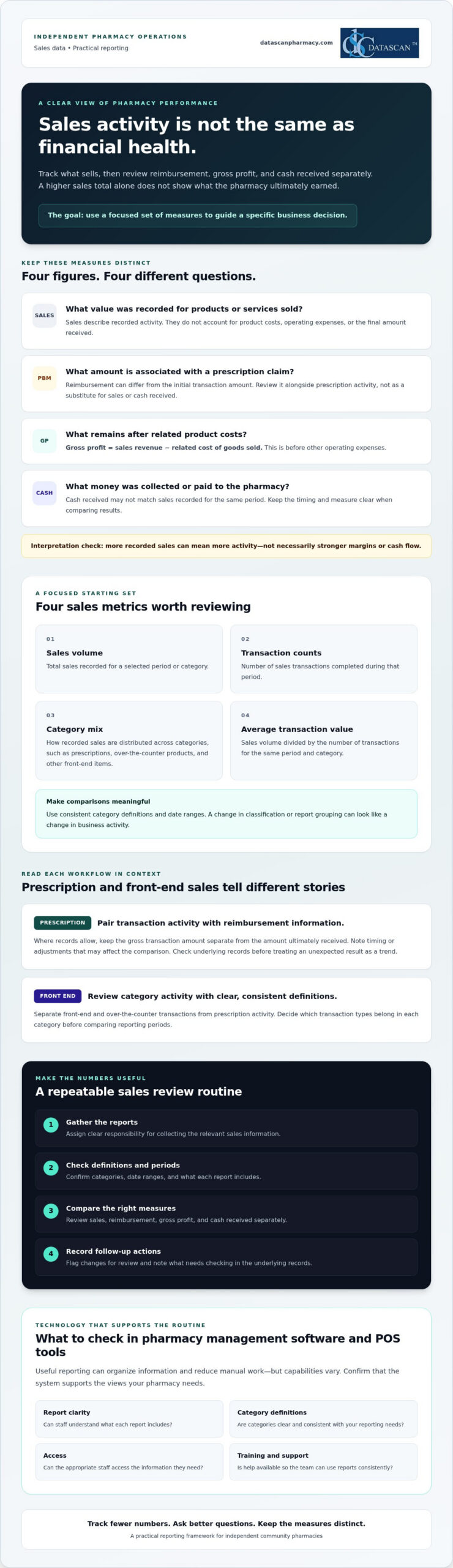
A higher sales total doesn’t always mean a healthier bottom line. Tracking pharmacy sales data accurately means looking beyond revenue to understand what prescriptions and front-end purchases contribute after costs and reimbursement adjustments. If details are spread across prescription, point-of-sale, and payment workflows, getting that picture can take time away from running the pharmacy and caring for patients.
It’s easy to mistake sales activity for profitability, especially when PBM reimbursements put pressure on prescription margins. The right metrics can show where revenue is coming from, flag changes that deserve attention, and support more informed operational decisions. You don’t need to track every number. You need a focused set that answers practical questions.
This guide covers which sales metrics independent pharmacies can monitor, how to interpret prescription and front-end results differently, and why revenue alone doesn’t tell the whole story. It also explains what to consider when evaluating pharmacy management software and POS tools for organizing reports and reducing manual work. Reporting capabilities vary, so confirm that a system supports the views your pharmacy needs.
Key Takeaways
Use tracking pharmacy sales data to guide specific business decisions, not just to collect numbers.
Start with a small set of measures, including sales volume, transaction counts, category mix, and average transaction value.
Compare sales, reimbursement, gross profit, and cash received separately to avoid mistaking higher revenue for stronger financial health.
Build a recurring review routine with clear responsibility for gathering reports, checking definitions, and recording follow-up actions.
When evaluating pharmacy management software and POS tools, check report clarity, category definitions, access, training, and support.
What does tracking pharmacy sales data actually tell you?
Tracking pharmacy sales data means consistently collecting and reviewing sales measures to guide business decisions. It shows what’s moving through prescription and front-end workflows, but recorded sales activity alone doesn’t tell you how much the pharmacy earned, how much cash it received, or how PBM reimbursement affected a prescription’s final economics.
Sales data records what was sold and for how much. Profit reflects what remains after relevant costs and expenses. That distinction matters. A rise in sales can mean more activity, but it doesn’t automatically mean stronger margins or cash flow. A useful measure, often called a key performance indicator (KPI), connects information to a decision. For a foundational explanation, see this overview of a performance indicator.
Independent pharmacies need a manageable view of prescription and front-end transactions because they represent different kinds of sales activity. Reviewing them with consistent definitions can help owners identify what changed and where a closer look is needed, without treating one sales total as the whole financial picture.
Which pharmacy sales categories should you track?
Start by separating prescription-related activity from front-end and over-the-counter transactions. Set clear category definitions, then use them consistently across staff and reporting periods. For example, decide which transaction types belong in each category before comparing one month with another. Consistent definitions make comparisons more meaningful and reduce the risk of mistaking a reporting change for a real change in sales.
Why can sales totals differ from pharmacy profitability?
A sales total doesn’t account for the cost of acquiring products or the pharmacy’s operating expenses. Prescription economics can also be affected by PBM reimbursement, which may differ from the initial transaction amount. Keep these measures distinct when reviewing results:
Sales: The value recorded for products or services sold.
Reimbursement: The amount associated with a prescription claim under the applicable payment arrangement.
Gross profit: Sales revenue minus the related cost of goods sold, before other operating expenses.
Cash received: Money collected or paid to the pharmacy, which may not match sales recorded for the same period.
These figures answer different questions, so don’t use one as a substitute for another. For a deeper look at margin calculations, consult a pharmacy gross profit guide and confirm that the method fits your accounting approach.
Which pharmacy sales metrics should you track first?
Start with a short list of measures that can inform a decision, rather than collecting every available data point. Tracking pharmacy sales data is most useful when each metric answers a practical question: Did transaction activity change? Which categories contributed to sales? Where does a shift need investigation?
A practical starting checklist: track sales volume, transaction counts, category mix, and average transaction value, then review each measure in the context of prescription or front-end activity.
Sales volume: The total sales recorded for a chosen period or category.
Transaction counts: The number of sales transactions completed during that period.
Category mix: How recorded sales are distributed among categories, such as prescriptions, over-the-counter products, and other front-end items.
Average transaction value: Sales volume divided by the number of transactions for the same period and category.
Keep definitions and date ranges consistent. Otherwise, a change in how staff classify transactions or a report groups categories can look like a real shift in business activity. These measures describe sales patterns. Pair them with relevant cost and reimbursement information before drawing conclusions about margins.
How should you track prescription sales?
Review prescription transaction activity alongside available reimbursement information for those claims. Where records allow, keep the gross transaction amount separate from the amount ultimately received, and note timing or adjustments that may affect the comparison. If a measure changes unexpectedly, flag it for follow-up and check the underlying records before treating a single result as a trend.
How should you track front-end pharmacy sales?
For front-end and over-the-counter sales, review transaction counts and sales by useful product categories. Compare equivalent periods and record context, such as a promotion or operating change, that could affect results. This helps distinguish a broad change in shopping activity from a shift limited to one category. For further POS considerations, explore Datascan’s pharmacy point-of-sale tools.
Prescription and front-end measures answer different questions, so avoid forcing them into one interpretation. A change in prescription activity calls for a look at claim and reimbursement context. A front-end category shift may prompt a closer review of product mix or transaction patterns. Choose a few measures your team can define consistently, review them regularly, and use unusual movements to guide the next investigation.
Can sales data alone show whether your pharmacy is doing well?
No. Higher sales don’t automatically mean higher profit or stronger cash flow. Sales show the value of recorded activity, while reimbursement, acquisition costs, expenses, and payment timing help explain what that activity means financially. Tracking pharmacy sales data alongside these related measures gives owners a more useful basis for investigating prescription performance.
What is the difference between sales, reimbursement, and profit?
Each measure answers a different business question. Keep them distinct in reports and conversations so a change in one isn’t mistaken for a change in another.
Measure
What it tells you
Question for the owner
Sales
Recorded value of transactions
What activity was recorded?
Reimbursement
Payment associated with prescription claims
What was paid or is expected for those claims?
Gross profit
Sales revenue minus related cost of goods sold
What remains before other operating expenses?
Cash received
Payments collected during a period
What money came in, and when?
For example, a prescription transaction can appear in sales records before its payment arrives. Its recorded amount also doesn’t show the related acquisition cost or final gross profit on its own. Comparing sales and reimbursement information can help you identify questions to investigate, but it doesn’t establish the reason for a difference. For detailed margin calculations, use a consistent gross profit method and confirm that it matches your accounting approach.
How can you spot a change that needs investigation?
Compare equivalent periods and confirm that report definitions haven’t changed. Then review the context before drawing a conclusion:
Check whether the transaction mix shifted between prescription and front-end activity.
Confirm that you’re comparing the same dates, categories, and reporting basis.
Note timing differences and known operational changes that could affect the comparison.
Refer possible reimbursement discrepancies to your pharmacy’s established review process.
A change is a prompt to ask questions, not proof of a trend or error. Pharmacy management software may help organize information for review, but verify which reports and fields are available in your configuration. If you’re assessing whether Datascan tools fit your reporting needs, you can discuss your requirements with the team.
How do you build a practical pharmacy sales review routine?
A practical review routine makes tracking pharmacy sales data repeatable without turning it into another major task. Choose a consistent review period, assign responsibility for gathering and checking reports, and end each review with a clear follow-up owner. Keep the process focused on a few measures tied to current business priorities.
What steps should a pharmacy take to review sales data?
Choose the measures. Select a short list that helps answer current questions, such as whether sales activity changed or which categories need a closer look.
Assign report gathering. Name a team member to collect relevant reports from pharmacy management and POS workflows. If information comes from separate sources, note where each figure came from rather than assuming the reports are combined.
Check the reporting basis. Confirm the dates, transaction categories, and definitions before comparing results. Make sure the current report uses the same basis as the prior period.
Review changes with context. Look for differences in transaction mix, workflow, product mix, or reporting setup that could explain a change. Record known operational events alongside the results.
Document the next step. For each meaningful finding, write down the finding, a question to resolve, and the person responsible for following up.
The routine works best when responsibilities are clear. The person gathering reports doesn’t need to make every business decision, but they should know who will validate definitions, review unusual results, and close the loop on questions. A brief written record helps the team see whether an issue is recurring or specific to one review period.
How can you avoid misleading comparisons?
Compare equivalent periods and transaction categories, and don’t treat a difference as a trend until you’ve checked the underlying records. If reporting definitions or workflow changed, document that before drawing conclusions. A change in transaction mix may also shift the total even when activity within a particular category is steady. Investigate incomplete or inconsistent records before acting, and route possible reimbursement discrepancies through the pharmacy’s established review process.
Pharmacy management software and POS tools may help organize information from their respective workflows, but confirm which reports, fields, and review options are available in your pharmacy’s configuration. A simple, consistent process can make reports easier to interpret and preserve time for daily operations. Discuss your pharmacy reporting needs to explore what information your current setup can support.
How can pharmacy management software make sales tracking easier?
Pharmacy management software and POS tools may make sales reviews easier by organizing information from prescription and front-end workflows. This can reduce the need to gather figures manually from separate sources. The practical value depends on the available reports and configuration, so verify specific capabilities rather than assuming every system combines data or automates reporting.
Use these criteria to evaluate whether a system will support your tracking process:
Report clarity: Can your team understand what each total includes and leaves out?
Category definitions: Are prescription, front-end, and other transaction categories clearly defined?
Access: Can the people responsible for reviewing the information find the reports they need?
Training: Is guidance available so staff can apply report definitions consistently?
Support: Can you get help with reporting questions, and what support is available?
Datascan offers pharmacy management software and Datascan Point of Sale. Review the pharmacy management software overview as you consider how software and POS tools might fit your operation. Treat technology as a way to assess and organize information, not as a guarantee of improved margins, reimbursement outcomes, or cash flow.
What should you ask a pharmacy software vendor about sales reporting?
Ask which prescription and front-end sales reports are available in the configuration you’re considering. Find out how each report defines totals, time periods, categories, and adjustments, and whether reports can be reviewed together or need to be compared separately. Confirm what training and U.S.-based support are available for reporting questions. Ask the vendor to walk through relevant workflows so your team can judge whether the reports answer its actual business questions.
When is it time to improve your current tracking process?
Repeated manual consolidation, unclear category definitions, or reports the team rarely uses can signal that the process needs attention. Before comparing alternatives, identify the decisions your current setup doesn’t support and the information needed to make them. Then verify specific product claims directly, including which reports and fields are available for your pharmacy’s configuration.
A focused review of those needs can help you evaluate Pharmacy Software against the work your team actually does, rather than choosing based on broad promises. Talk with Datascan about sales tracking and discuss the reports and workflows you need to assess.
Turn pharmacy sales reports into confident decisions
Tracking pharmacy sales data works best when you focus on a few consistent measures and connect each one to a decision. Review prescription and front-end activity in context, and keep sales separate from reimbursement, gross profit, and cash received. A simple, recurring review routine can help your team spot changes worth investigating without adding unnecessary reporting work.
Pharmacy management software and point-of-sale tools may help organize information across workflows, but confirm that the reports and definitions fit your pharmacy’s needs. Datascan is a family-owned pharmacy software company founded in 1981, offering pharmacy management software and point-of-sale tools for independent and retail pharmacies, along with U.S.-based technical support.
Ready to explore how your reporting process could better support day-to-day decisions? Talk with Datascan about tracking pharmacy sales data. With clear measures and a practical review process, you can build a stronger understanding of your pharmacy’s business and take the next step with confidence.
Frequently Asked Questions
What is the best way to track pharmacy sales data?
Choose a small set of measures, define them consistently, and review them on a regular schedule. Start with sales volume, transaction counts, category mix, and average transaction value. Separate prescription activity from front-end sales, then compare equivalent periods. Assign someone to gather the reports and record questions or follow-up actions so tracking pharmacy sales data supports decisions rather than creating work without a clear purpose.
Which sales metrics should an independent pharmacy monitor?
Independent pharmacies can begin with sales volume, transaction counts, category mix, and average transaction value. Review prescription and front-end results separately because they reflect different types of activity. For prescription transactions, consider reimbursement information where available. For front-end sales, category and transaction patterns can help show what is changing. Choose measures tied to real business questions, and keep definitions consistent across reports and review periods.
Can pharmacy sales data show whether the pharmacy is profitable?
Sales data alone can’t establish profitability. Sales show recorded transaction activity, but profit calculations also require related product costs and, for net profit, operating expenses. Reimbursement and cash received answer different questions: a recorded sale may not match the amount or timing of payment. Review these measures together using the appropriate records and accounting method before judging financial performance. Higher sales by themselves don’t prove higher profit or stronger cash flow.
How often should a pharmacy review sales data?
Review sales data on a recurring schedule your team can maintain and that fits the decisions you need to make. The right cadence depends on your operation and priorities. Use consistent periods for comparisons, assign responsibility for gathering and checking reports, and document unusual changes or follow-up actions. More frequent reviews may help with time-sensitive questions, while broader comparisons can provide context. Note schedule changes so reporting periods remain clear.
How do PBM reimbursements affect pharmacy sales tracking?
PBM reimbursement information adds context to prescription sales, but it shouldn’t be treated as interchangeable with recorded sales or cash received. A transaction amount, reimbursement amount, and payment timing may represent different views of the same prescription activity. Review these figures separately where records allow, and follow your pharmacy’s established process to investigate possible discrepancies. Sales reports can help identify questions, but may not explain the cause of a reimbursement difference on their own.
Can pharmacy management software track prescription and front-end sales together?
It depends on the software and the pharmacy’s configuration. Pharmacy management software and point-of-sale tools may organize information from prescription and front-end workflows, but don’t assume reports combine those figures or use matching definitions. Ask which reports are available, what each total includes, and whether the relevant results can be reviewed together. Confirm the answer for your specific setup before relying on a combined view for comparisons or business decisions.
What should I ask a pharmacy software vendor about sales reports?
Ask which prescription and front-end sales reports are available in your configuration and how each report defines totals, categories, dates, and adjustments. Find out whether figures can be compared across workflows and how staff can access the reports. Also ask what training and technical support are available for reporting questions. Request a walkthrough using workflows relevant to your pharmacy, then check whether the reports answer the decisions your team needs to make.
About the author: Datascan Pharmacy Software is a family-owned pharmacy software company founded in 1981. It provides pharmacy management software and point-of-sale tools for independent and retail pharmacies, along with U.S.-based technical support.
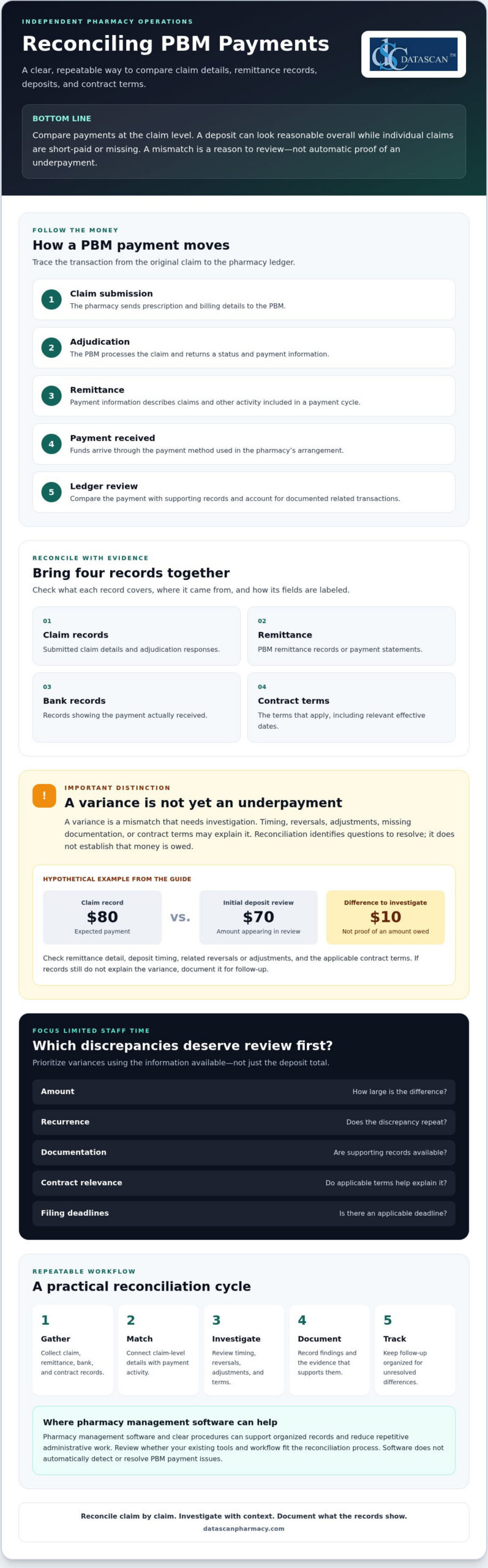
Reconciling PBM payments means checking claim-level payment details against remittance records, bank deposits, and the contract terms that apply. A deposit can look reasonable overall while individual claims are short-paid or missing, so comparing those records is more informative than relying on a lump-sum total.
That comparison can take time. Claim records and payment statements may use different references or cover different periods, and unexplained differences need investigation. A consistent method helps your team distinguish items that warrant follow-up from routine timing differences or documented adjustments.
This guide explains how to match claims to payments, check amounts against contract details, investigate common discrepancies, and document findings. It also covers how to prioritize variances so your team can focus its effort where it is most useful.
A repeatable workflow makes the work easier to manage. Pharmacy management software can support organized pharmacy operations, while clear procedures help reduce repetitive administrative work. The goal is a process that fits your pharmacy, not an assumption that software automatically detects or resolves PBM payment issues.
Author bio: The Datascan Pharmacy Software editorial team covers pharmacy operations and software for independent and retail pharmacies.
Key Takeaways
Compare claim records, remittance information, deposits, and the contract terms that apply to understand what was paid.
When reconciling PBM payments, treat differences as items to review, not automatic proof of recoverable underpayments.
Prioritize discrepancies by amount, recurrence, available documentation, contract relevance, and any applicable filing deadlines.
Use a repeatable process to gather records, match claims, investigate variances, document findings, and track follow-up.
Review whether your pharmacy management software and workflows can help organize reconciliation records and reduce repetitive administrative work.
What does reconciling PBM payments mean for a pharmacy?
Reconciling PBM payments means comparing the money received with claim-level records and the PBM contract terms that apply. The goal is to find differences that need review, not to assume every mismatch is an error or that every amount can be recovered.
Payment information develops across several stages. At adjudication, the pharmacy receives a response showing how the claim processed and the payment information calculated at that point. Remittance information later describes payment activity, while the bank deposit confirms the cash received. Reversals, adjustments, or other transactions may affect the amount ultimately deposited. For background on the role of a Pharmacy Benefit Manager (PBM), see the Federal Trade Commission’s interim staff report on prescription drug middlemen, which examines PBMs’ role in the prescription drug supply chain.
A deposit total alone may not show how individual claims contributed to the payment. Comparing the underlying records supports cash-flow monitoring, gross profit review, and reliable documentation for questions or follow-up. It also helps pharmacy owners direct limited staff time toward differences with a reasonable basis for investigation.
Which records should a pharmacy compare?
Gather the records available through your pharmacy and PBM arrangements. Formats and access vary, so confirm where each record comes from, what period it covers, and how its fields are labeled.
Submitted claim details and adjudication responses
PBM remittance records or payment statements
Bank records showing the payment received
Relevant contract terms, including the effective dates that apply to the claims under review
Keeping these sources organized through a defined process or with pharmacy management software can make it easier to trace a difference back to the supporting records.
What is the difference between a payment variance and an underpayment?
A variance is a mismatch that needs investigation. It becomes a potential underpayment only after the pharmacy checks whether timing, a reversal, an adjustment, missing documentation, or applicable contract terms explain the difference. Reconciliation identifies questions to resolve. It does not establish that money is owed.
Hypothetical example: A claim record shows an expected payment of $80, while an initial deposit review appears to show $70. Before treating the $10 difference as an underpayment, check the remittance detail, deposit timing, any related reversal or adjustment, and the contract terms that apply. If the records still do not explain the variance, document it for follow-up.
How does a PBM payment move from claim to pharmacy deposit?
A PBM payment generally moves through five stages: the pharmacy submits a claim, receives an adjudication response, gets remittance information, receives payment, and reviews the transaction in its ledger. Following that sequence helps staff connect the original claim to the money received instead of trying to explain a deposit total in isolation.
Claim submission: The pharmacy sends prescription and billing details to the PBM.
Adjudication: The PBM processes the claim and returns a status and payment information.
Remittance: The PBM provides details about claims and other payment activity included in a payment cycle.
Payment: Funds arrive through the payment method used in the pharmacy’s arrangement.
Ledger review: Staff compare the payment with supporting records and account for related transactions where documented.
The sequence can become less straightforward when a claim is reversed and rebilled, an adjustment appears later, or records cover different processing periods. A claim may appear in one report while its related transaction appears elsewhere. Files, timing, and terminology depend on the PBM and pharmacy arrangements, so use the pharmacy’s actual records rather than assuming every payer follows the same format.
What claim and remittance fields help with matching?
Use the strongest matching details available in both records. These may include a prescription or claim reference, service date, claim status, paid amount, and adjustment details. Compare claim-level activity rather than relying on the remittance total. Check the field names, file formats, and available information in your pharmacy’s PBM and payment records, since labels and data availability can differ.
Why may a remittance total differ from a bank deposit?
A mismatch between a remittance and a deposit is a signal to investigate, not a diagnosis. Payment timing, grouped transactions, reversals, adjustments, or incomplete records may explain the difference. Check whether the records cover the same payment period and whether a transaction is recorded separately before concluding that a claim-level variance remains unresolved.
For example, activity on a remittance may settle on a different banking date than expected. Compare the remittance date, payment reference, deposit record, and any associated claim changes. Track timing differences separately from unresolved variances to keep the follow-up list focused.
For Medicare Part D transactions, confirm current payment and price-concession interpretations against applicable CMS guidance before applying them to a reconciliation process. Policy details can affect how records are understood, so do not rely on an outdated summary.
A defined workflow can make these checks easier to repeat. If you’re reviewing whether your pharmacy software and processes support organized payment records, you can discuss your workflow with Datascan.
Which PBM payment discrepancies should a pharmacy investigate first?
Not every difference is an underpayment, and not every variance needs the same immediate effort. Prioritize items that are large, recurring, supported by clear records, connected to a specific contract term, or approaching an applicable filing or dispute deadline. This gives your team a consistent way to focus its review without treating an unexplained amount as proof that the PBM owes money.
For each item, compare the expected reimbursement with the contract terms that apply to the claim, including the relevant effective date, and check the documented claim facts. Do not apply one PBM’s reimbursement method to another. When reconciling PBM payments, keep unresolved items distinct from differences your records explain.
Potential issue
Possible explanation
Next verification step
Payment appears missing
It may be included in a different payment period or linked to another transaction record.
Search by available claim references and service date, then compare the related remittance and deposit records.
Repeated difference for similar claims
A contract term, fee schedule, or processing detail may affect the calculation.
Check the claim facts and applicable contract language, then compare other claims processed under the same terms.
Apparent MAC pricing mismatch
The applicable list, effective date, or claim details may not match the comparison being made.
Verify the relevant MAC terms, effective date, and claim information before treating the difference as an error.
Negative amount or adjustment
A reversal, rebill, or other adjustment may be recorded separately.
Look for a related transaction and confirm whether the records support the adjustment.
Could the difference come from a reversal, adjustment, or timing issue?
Check whether a related reversal, rebill, or adjustment appears under a separate reference or in another payment period. Match transaction references and service dates where your records allow. If the records explain the difference, document the reason and close the review item. If they do not, keep it open and note what information is missing.
How can contract terms help identify a potential underpayment?
Use the contract and applicable fee schedule to determine the reimbursement terms for the claim. Check the effective date and any relevant MAC provisions. A MAC comparison is a prompt to review, not proof of an error on its own. Confirm that the claim facts and contract terms support the comparison, and assess each PBM arrangement separately.
For efficient follow-up, record the amount or pattern being reviewed, the supporting documents, the contract provision checked, any applicable deadline, and the next action. This audit trail helps staff return to open questions without restarting the investigation.
How can a pharmacy reconcile PBM payments consistently?
Use the same sequence each cycle: gather records, match claims, flag variances, investigate, document findings, and follow up. Choose a review period your pharmacy can maintain with its available records and staff time. A steady process helps surface exceptions while keeping the workload manageable.
What should a PBM payment reconciliation checklist include?
Define the period under review, then collect the claim, remittance, deposit, and contract records that apply. Match transactions using identifiers available in your files, and set exceptions aside for review rather than manually rechecking every item. A checklist can help keep each cycle consistent:
Gather: Collect records for the chosen review period and confirm they cover the same activity.
Match: Compare claims with remittance details and payments received.
Flag: Separate unmatched transactions or unexplained variances from items that reconcile.
Investigate: Check supporting records and applicable contract terms.
Document and follow up: Record evidence, assign responsibility, and track each item to a documented outcome.
For each variance, maintain a log with the claim identifier, amount, evidence reviewed, assigned owner, current status, next action, and resolution. Pharmacy management software and a well-defined workflow may help organize operational records, but confirm what your system can support rather than assuming it performs PBM reconciliation automatically.
How should a pharmacy document and follow up on a discrepancy?
Retain relevant claim and remittance evidence according to your pharmacy’s recordkeeping procedures. Use the PBM’s documented inquiry or appeal process, and verify any applicable submission deadlines before sending a request. Track the submission date, supporting documents, responses, next steps, and final outcome. Do not mark an item resolved until the records support that conclusion.
Reviewing payment variances alongside gross profit calculations can give owners broader context for profitability decisions. Use your pharmacy’s established gross profit method and records to connect reimbursement review with the wider financial picture.
Can pharmacy management software make PBM payment reconciliation easier?
Pharmacy management software may support a more organized reconciliation workflow by helping staff keep relevant operational records and review steps in order. Capabilities vary by product and configuration. Before relying on software for reconciling PBM payments, confirm exactly what data it can access, display, or export. Do not assume it automatically matches PBM payments or identifies underpaid claims unless the vendor verifies that capability. Much like utilizing insurance discovery software for healthcare to streamline coverage verification in clinical billing, pharmacy platforms should be evaluated on the specific reimbursement and reporting tasks they actually support.
Evaluate how the software fits your existing process. Ask the vendor:
Which claim details, payment records, and adjustment information can users access or export?
Can staff document exceptions, assign follow-up responsibility, and track an item’s status?
Are reports or audit trails available for the information your pharmacy needs to review?
Can the vendor demonstrate the relevant functions using your pharmacy’s actual reconciliation workflow?
Bring representative records and explain how your team reviews a payment, flags a variance, and records its resolution. A demonstration can show where the software may support the process and where staff may still need separate records or steps.
How can Datascan fit into a pharmacy operations discussion?
Datascan Pharmacy Management Software is part of Datascan’s offerings for independent and retail pharmacies, alongside customizable workflows. These offerings can be discussed in the context of how your pharmacy organizes operations, but their availability alone does not confirm PBM reconciliation, claim matching, payment exports, or underpayment detection. Ask which specific functions are available for your needs and verify them directly.
For broader process ideas, consult a pharmacy workflow optimization guide and consider how clear responsibilities and consistent steps could fit your team. Then compare that process with the capabilities your current software vendor confirms, so expectations reflect what the system can actually do.
Make PBM payment review part of a stronger pharmacy workflow
Reliable reconciling PBM payments starts with a clear comparison: connect claim details to remittance records, deposits, and the contract terms that apply. Investigate variances based on their evidence and urgency, and document each finding and next step. A repeatable process keeps payment questions visible without treating every difference as an error.
Pharmacy management software and well-designed workflows can support organized operations, but confirm which records and functions your system actually provides. Datascan offers pharmacy management software and customizable workflows for independent and retail pharmacies. The company has been family-owned and operated since 1981, with U.S.-based technical support.
Your reconciliation process should fit the way your pharmacy works. Discuss your pharmacy workflow with Datascan and explore whether your current tools and processes support the organized review your team needs. Clear records and practical steps help you approach payment questions with greater confidence while keeping your focus on serving patients.
Frequently Asked Questions
What does reconciling PBM payments mean?
Reconciling PBM payments means comparing what the pharmacy received with claim-level records and the contract terms that apply. Staff review submitted claims, adjudication responses, remittance details, deposits, and related adjustments to identify differences that need attention. A variance is a prompt to investigate, not proof of an error or recoverable amount. The purpose is to understand payment activity, document findings, and follow up on unresolved questions.
How do pharmacies identify PBM underpayments?
Compare each claim’s documented facts and adjudication details with payment and remittance records, then check the contract terms and effective date that apply. Look for missing payments, unexplained shortfalls, or recurring differences, and rule out timing, reversals, and adjustments first. Prioritize items based on amount, recurrence, supporting evidence, contract relevance, and any applicable filing deadline. A mismatch alone does not establish that a PBM underpaid a claim.
How often should a pharmacy reconcile PBM payments?
Set a recurring review period that fits your pharmacy’s records, payment cycles, and available staff time. Consistency is key: a defined schedule helps prevent unreviewed transactions from accumulating and makes open items easier to track. Decide who owns the review, which records they will gather, and how they will document exceptions. Reassess the schedule if payment timing, record availability, or staffing changes make the process difficult to maintain.
Why does a PBM remittance amount differ from a pharmacy deposit?
A remittance total may differ from a bank deposit because the records reflect different timing or transaction groupings. Reversals, rebills, later adjustments, or incomplete records can also affect what appears in each source. First confirm that the remittance and bank records cover the same payment activity, then trace available references and dates. Keep a timing difference separate from an unresolved claim-level variance until supporting records explain the mismatch.
What records does a pharmacy need to reconcile PBM payments?
Gather submitted claim details, adjudication responses, PBM remittance records, bank deposits, and the relevant contract terms, including their effective dates. Keep related reversal, rebill, and adjustment details available when they apply. Files, labels, and data fields vary by PBM and pharmacy arrangement, so confirm which records your pharmacy can access. Matching identifiers, service dates, statuses, and amounts can help connect activity across sources.
Can pharmacy management software help with PBM payment reconciliation?
Pharmacy management software may support organized records and repeatable workflows, but capabilities depend on the specific system and configuration. Ask your vendor what claim, payment, and adjustment information users can access or export, and whether they can document exceptions and assign follow-up. Do not assume software automatically reconciles PBM payments or identifies underpaid claims unless the vendor confirms those functions. Verify capabilities with a demonstration based on your pharmacy’s process.
What should a pharmacy do when a PBM payment discrepancy remains unresolved?
Keep the discrepancy open and document the claim identifier, amount, records reviewed, contract terms checked, assigned owner, and next action. Follow the PBM’s documented inquiry or appeal process, and verify any applicable deadline before submitting supporting evidence. Track the submission, responses, and outcome under your pharmacy’s recordkeeping procedures. Do not assume a recovery is guaranteed. Close the item only when the records support a clear resolution.
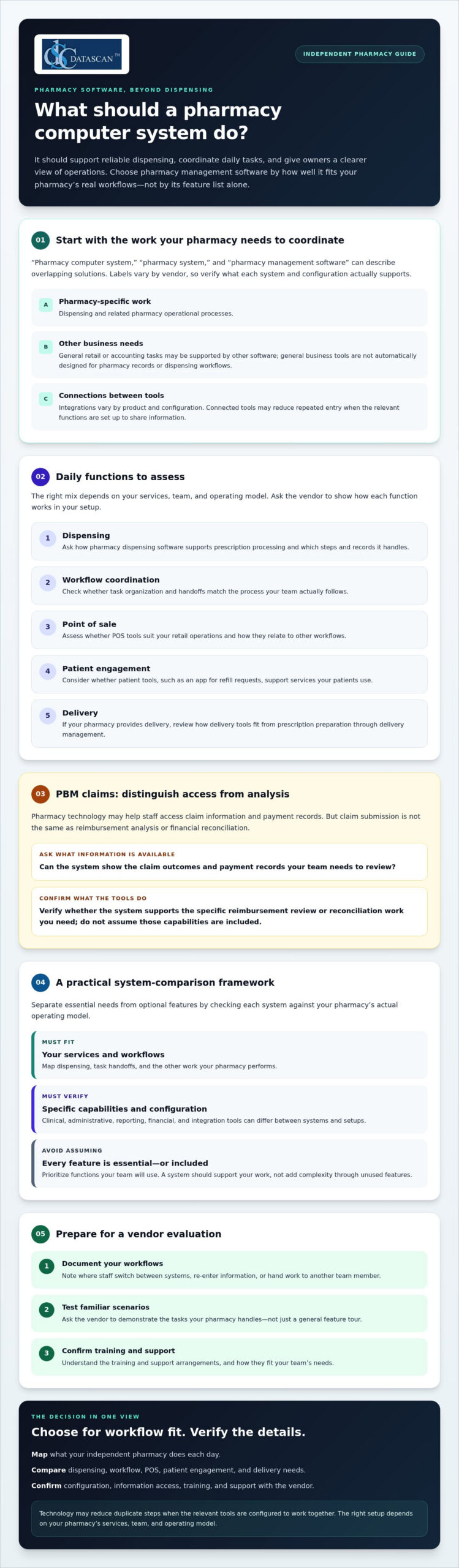
What should a pharmacy computer system do beyond moving prescriptions through the queue? For an independent pharmacy, it should support reliable dispensing, coordinate daily tasks, and give owners a clearer view of operations.
Disconnected tools can create duplicate work, while PBM reimbursement challenges make financial visibility important. When time is limited, choosing software means looking beyond feature lists and focusing on what fits your pharmacy’s workflows.
This guide explains which capabilities to assess, how technology may support workflow and reimbursement oversight, and what to ask when comparing systems and vendors. Use it to identify a solution that fits your team and operating needs.
About the author: Datascan Pharmacy Software is a family-owned company founded in 1981. It serves independent and retail pharmacies and provides U.S.-based technical support.
Key Takeaways
Understand what a pharmacy computer system coordinates and why the terms pharmacy system and pharmacy management software can overlap.
Prioritize functions according to daily needs, from dispensing and workflow coordination to point of sale, patient engagement, and delivery.
Use a comparison framework to distinguish must-have capabilities from features that may not fit your pharmacy’s operating model.
Prepare for vendor evaluations by documenting workflows, testing familiar scenarios, and confirming training and support arrangements.
Use Datascan’s pharmacy software offerings as one option to evaluate, and verify which capabilities fit your needs.
What should a pharmacy computer system do for an independent pharmacy?
A pharmacy computer system coordinates pharmacy-specific records, tasks, and operational tools. The terms “pharmacy computer system,” “pharmacy system,” and “pharmacy management software” often refer to overlapping solutions, although vendors may use them differently. Assess what a particular system and configuration actually support rather than relying on the label.
A pharmacy-specific system is built around pharmacy work, including prescription dispensing and related operational processes. General business or retail software may support other needs, such as sales, but it is not automatically designed to manage pharmacy records or dispensing workflows. Some pharmacies use additional tools alongside their pharmacy software. Integrations can connect parts of an operation, but available connections vary by product and configuration.
For a foundational overview of the purpose and common functions of a pharmacy management system, see Wikipedia’s summary. Use it as background, then confirm specific capabilities with each vendor. Do not assume every system includes the same clinical, administrative, reporting, or financial tools.
How is a pharmacy computer system different from general business software?
Pharmacy software is designed for workflows centered on dispensing and pharmacy operations. General business software supports broader tasks, such as retail sales or accounting. For organizations that need comprehensive support across their broader workplace technology and network infrastructure, it can also be beneficial to explore Managed IT Services alongside specialized operational platforms. The distinction matters when staff move between steps: separate tools can require repeated entry, while a connected setup may reduce it if the relevant functions are configured to share information. Ask vendors to demonstrate the workflow your team actually uses.
Who benefits most from pharmacy management software?
Independent and community pharmacy owners, managers, and teams may benefit when pharmacy management software brings everyday work into a clearer process. That can matter for owners balancing patient care with staffing, administration, and reimbursement oversight. The right setup depends on the pharmacy’s services, team, and operating model, so define your needs before treating any feature as essential.
Start by mapping the work your pharmacy handles and noting where staff switch between systems or re-enter information. Consider how dispensing, point of sale, patient tools, and delivery fit your operation. Then verify which functions are available and how they work together. For example, a pharmacy assessing delivery workflows can review Datascan’s electronic delivery system and confirm whether it fits its needs.
Connected processes may reduce duplicate steps, but the result depends on configuration and how your team uses the tools. A system should support the work your pharmacy performs, not add complexity through features you will not use.
Which pharmacy management software functions support daily pharmacy work?
Pharmacy management software supports prescription dispensing and the operational work of running a pharmacy. The right functions depend on your pharmacy’s services and setup. Evaluate how the tools handle everyday tasks, and verify specific capabilities with the vendor rather than assuming every system works the same way.
A pharmacy computer system may bring several kinds of work together. Assess whether the software supports the tasks your team needs in these areas:
Dispensing: Ask how pharmacy dispensing software supports prescription processing, and confirm which steps and records it handles.
Workflow coordination: Look for ways to organize tasks and handoffs that match your team’s actual process.
Point of sale: Assess whether POS tools fit the pharmacy’s retail operations and how they relate to other workflows.
Patient engagement: Consider whether a patient app supports services your patients use, such as refill requests.
Delivery: If your pharmacy provides delivery, ask how delivery tools fit into the work from prescription preparation through delivery management.
For computerized prescription records, review the FDA guidance on pharmacy records and ask vendors how their systems support your recordkeeping needs. Confirm the details that apply to your pharmacy with appropriate compliance resources.
Can a pharmacy system help manage PBM claims and reimbursements?
Pharmacy technology may help staff access claim information and payment records, but claim submission is not the same as reimbursement analysis or financial reconciliation. Ask whether the system shows the information your team needs to review claim outcomes, compare them with payment records, and identify items for follow-up. Do not assume it will explain reimbursement differences, reconcile payments, or recover revenue. Verify each capability and how it works in your configuration.
Which connected tools can reduce fragmented pharmacy workflows?
Connected tools may reduce duplicate entry when they share relevant information, but integration and setup matter. Datascan offers pharmacy management software, point-of-sale tools, a patient mobile app, delivery tools, and customizable workflows. These are distinct offerings, so confirm which products and functions fit your needs rather than assuming they are all included together. Explore the pharmacy management software overview and ask how available functions relate to your current process.
A customizable workflow may help align tasks with how your team operates. Delivery tools are relevant only if delivery is part of your service model. To discuss which Datascan offerings may fit your pharmacy’s workflow, contact the Datascan team.
How do you compare pharmacy computer systems for your pharmacy?
Compare each pharmacy computer system against your actual workflows, not just a vendor’s feature list. Classify each capability as essential, relevant, or not needed based on your services and operating model. Then ask the vendor to demonstrate it and confirm what is included in your configuration.
Capability
Starting priority
What to verify
Dispensing
Essential
Which prescription processing steps and records does the system support?
Workflow
Essential
Can staff coordinate the tasks and handoffs your pharmacy uses?
Point of sale
Relevant
Does it fit your retail process, and how does it work with other tools?
Patient tools
Relevant
Do the available tools match the patient services you provide?
Reporting
Relevant
What claim, payment, and business information can staff review?
Support
Essential
What support is available, and how do staff access it?
These priorities are starting points, not universal ratings. For example, delivery tools may be essential for a pharmacy with an active delivery service, but unnecessary for one that does not offer delivery. For broader context on the software category, see this pharmacy management software guide.
What questions should you ask a pharmacy software vendor?
Ask which workflows the system supports directly and which require separate tools or manual steps. Clarify how implementation, staff training, data handling, and ongoing support work. Then request a demonstration built around routine tasks your team recognizes. A realistic scenario can reveal extra steps or dependencies that a general product overview may not show.
How can technology support PBM reimbursement oversight?
Ask what claim and payment information the software makes available, and whether its reporting supports your pharmacy’s existing review and reconciliation process. Confirm the details in a demonstration or written product information. Claim submission, access to payment records, and financial analysis are different functions. Software may help organize information for review, but it does not change PBM contract terms or guarantee a particular payment or reimbursement outcome.
Separate demonstrated functionality from vendor promises. Record what you saw, what is documented for your configuration, and what still needs clarification. Ask who will confirm any unresolved capability before you decide. If you are assessing Datascan against your requirements, contact the team with your questions.
How can you assess implementation, support, and day-to-day fit?
Assess a pharmacy computer system by tracing the path from your current workflow to daily use. Document how work gets done, define requirements, test realistic scenarios, and confirm support and implementation responsibilities. A strong demonstration is useful, but it will not replace clear answers about data conversion, staff training, testing, timelines, or how dispensing operations will continue during the transition.
Document current workflows. Note routine steps, handoffs, and pain points, including where staff switch tools or repeat data entry.
Set requirements. Separate must-haves from optional capabilities based on your services, staffing, and operating model.
Test scenarios. Ask the vendor to demonstrate familiar tasks from start to finish, including the steps staff perform during a typical shift.
Confirm the plan. Clarify who handles data conversion, what your team must provide, how testing works, and what implementation timelines depend on before making commitments.
Planning for training and operational continuity gives the team time to learn key workflows and surface gaps before relying on the new setup in daily work. Ask how testing will verify that important records and routine processes are ready, and agree on how staff should handle work during the transition. For more migration-planning detail, the outlined pharmacy software implementation plan can help structure vendor discussions.
What should a pharmacy system demonstration include?
Use real pharmacy scenarios, not just a feature tour. Include team members who will use the system on shift, and ask them to follow routine dispensing and administrative tasks. Have someone record unanswered questions, unexpected steps, and any capability the vendor says is available. Request written confirmation of those points, including whether they apply to your proposed configuration.
How do you judge ongoing support and staff usability?
Ask who provides support, how staff reach them, and what the service arrangement covers. Have employees try key workflows during the demonstration and ask what training is available. Compare vendors using documented support details and observed usability, not assumptions based on a sales presentation. Datascan states that it provides U.S.-based technical support. Confirm the specific support arrangements relevant to your pharmacy.
Before selecting a system, keep a short decision record with required functions, demonstrated results, open questions, implementation responsibilities, and support terms. It helps owners compare options without relying on memory while managing daily operations. To discuss Datascan’s pharmacy management software and how it may fit your pharmacy’s needs, contact the Datascan team.
How can Datascan pharmacy management software fit your next steps?
Datascan serves independent and retail pharmacies with pharmacy management software and related tools. The family-owned business was founded in 1981 and provides U.S.-based technical support. Whether its offerings fit your pharmacy depends on your services, workflows, and required capabilities. Confirm what is available in the configuration you are considering.
Which Datascan tools may be relevant to your pharmacy?
Datascan’s offerings include pharmacy management software, point-of-sale tools, the MobileScripts Patient Mobile App, mobile delivery tools, compounding pharmacy software, 340B management tools, and customizable workflows. These are options to evaluate, not a promise that every tool is included in every configuration. For front-end operations, review Datascan’s point-of-sale tools and ask how they fit your pharmacy’s needs.
PBM reform also makes it useful to ask how your technology supports operational visibility. The Consolidated Appropriations Act, 2026 includes federal PBM changes, with key Medicare Part D compensation provisions beginning in 2028 and most provisions taking effect in 2029 for calendar-year plans. These changes do not mean software can alter contract terms or determine how a rule applies to your pharmacy. Instead, ask whether the information and workflows in your proposed setup can support your team’s review of claims, payments, and changing operational requirements.
Workflow fit: Which recurring tasks could the software support, and what would still require another tool or manual step?
Owner time: Which administrative processes take attention away from managing the business, and can the proposed setup make them easier to oversee?
PBM oversight: What claim, payment, or financial information is available for review? Confirm specific reporting and reconciliation functions directly.
What should you prepare before contacting a pharmacy software provider?
Bring a list of your current systems, recurring workflow bottlenecks, and key questions. Identify the capabilities you need for dispensing, reimbursement review, patient services, and staff workflows. Then ask the vendor to show how the proposed configuration addresses those priorities and what it does not cover.
Choose a system that supports the way your pharmacy works
The right pharmacy computer system should fit your daily operations, not just offer a long list of features. Compare systems against your dispensing and workflow needs, check what claim and payment information they provide for reimbursement oversight, and confirm implementation, training, and support details before deciding.
Keep your priorities clear. Choose capabilities that address real workflow friction, and verify each promised function in a demonstration or product documentation. Pharmacy management software can support coordinated work, but reimbursement review still depends on the information available and your pharmacy’s processes.
Datascan is a family-owned pharmacy software company founded in 1981, with U.S.-based technical support. Its offerings include pharmacy management software, POS, patient apps, and delivery tools. The right combination depends on your pharmacy’s needs, so use your requirements to guide the conversation.
Discuss your pharmacy’s needs with Datascan and take the next step toward a system that fits your team. A clear evaluation plan can help you make a considered choice and focus on running your pharmacy.
Frequently Asked Questions
What is a pharmacy computer system?
A pharmacy computer system is software that coordinates pharmacy-specific records, tasks, and operational tools. It commonly supports dispensing work and may connect with other pharmacy functions, depending on the product and configuration. The terms “pharmacy system” and “pharmacy management software” are often used for overlapping solutions. Check what a specific system does, since features and available tools can differ between vendors.
What is the difference between pharmacy software and pharmacy management software?
Pharmacy software is a broad term for software used in pharmacy operations, while pharmacy management software typically refers to systems focused on coordinating pharmacy work, including dispensing-related processes. In practice, vendors and pharmacy teams may use these terms interchangeably. Compare capabilities rather than relying on the name: ask which tasks the product supports, what requires another tool, and which functions apply to your proposed setup.
Can pharmacy management software help independent pharmacies review PBM reimbursements?
It may help staff access claim and payment information, but its value depends on the system’s functions and configuration. Ask whether it provides the details your team needs to review claim outcomes and compare them with payment records. Claim submission, reimbursement analysis, and financial reconciliation are different tasks. Software alone does not change PBM contract terms or guarantee a particular reimbursement outcome.
What features should I look for in a pharmacy computer system?
Start with the work your pharmacy needs the system to support. Common areas to evaluate include prescription dispensing, workflow coordination, point of sale, patient tools, delivery, reporting, and vendor support. Not every pharmacy needs every function. Classify each capability as essential, relevant, or not needed based on your services and operating model. Then ask the vendor to demonstrate essential tasks and confirm what is available in your configuration.
How do I choose pharmacy software for an independent pharmacy?
Choose pharmacy software by comparing systems against your team’s real workflows, service needs, and operational priorities. Document current tools and recurring bottlenecks, then test realistic tasks in vendor demonstrations. Ask about training, data handling, implementation responsibilities, and support. For reimbursement oversight, confirm what claim, payment, and reporting information the system provides. Treat unconfirmed features as questions to resolve, not promised outcomes.
Can a pharmacy system include point-of-sale and delivery tools?
Yes. Some pharmacy software providers offer point-of-sale and delivery tools alongside pharmacy management software, though available products and how they work together vary. Datascan offers point-of-sale tools and mobile delivery tools, as well as pharmacy management software. Ask which offerings fit your pharmacy and whether they are part of the configuration you are evaluating. A pharmacy that does not provide delivery may not need delivery tools.
What should I ask a pharmacy software vendor before choosing a system?
Ask the vendor to demonstrate your routine dispensing and administrative workflows, and clarify which tasks need separate tools or manual steps. Confirm how data handling, implementation, testing, staff training, and ongoing support work. For PBM oversight, ask what claim and payment information is available and whether it supports your review process. Request clear answers about any capability that has not been demonstrated or documented for your setup.
A comprehensive pharmacy self-inspection checklist isn’t just a routine regulatory formality. It’s your strongest operational shield against sudden license citations and aggressive PBM clawbacks, which routinely extract between $10,000 and $25,000 per audit over minor clerical technicalities. As an independent owner dispensing upwards of 200 prescriptions a day on razor-thin margins, you simply don’t have the spare hours to comb through endless regulatory paperwork or live in fear of an unexpected board inspection.
To keep your doors open and profitable, you need an exact roadmap that addresses precisely what state and federal inspectors look for before they arrive. This guide delivers a complete review of your compliance requirements, showing you how to safeguard your license, prevent recoupments, and eliminate audit anxiety. You’ll also learn how reliable pharmacy management software transforms manual inventory reconciliations and signature logging into automated workflows, freeing up valuable time so you can focus on patient care and business growth.
Key Takeaways
Implementing a proactive pharmacy self-inspection checklist pinpoints operational vulnerabilities early, protecting your business against surprise citations and aggressive PBM clawbacks.
Ensure full state board readiness by verifying active license postings, updating security protocols, and enforcing strict physical access controls for all scheduled medications.
Streamline recordkeeping by reconciling physical shelf inventory with your perpetual counts to eliminate dispensing discrepancies and simplify reverse distribution.
Establish a repeatable, low-stress audit routine by scheduling designated compliance hours and assigning checklist responsibilities to key staff members.
Leverage robust pharmacy management software to automate prescription signature capture and report generation, keeping your records audit-ready while freeing up time for patient care.
Why is a pharmacy self-inspection checklist essential for my business?
A pharmacy self-inspection checklist is a proactive tool used to identify regulatory gaps before a Board of Pharmacy inspector does, protecting your license and bottom line. State regulators enforce strict legal requirements, but treating a self-audit purely as a compliance chore misses its true commercial value. For an independent pharmacy, regular operational self-inspections serve as an economic shield against aggressive pharmacy benefit managers (PBMs). With the top three PBMs controlling roughly 80% of nationwide prescription volume, post-dispense desk audits are routinely weaponized to claw back reimbursements over clerical technicalities like missing signatures or miscalculated day-supply entries. When you routinely audit your operations, you eliminate these vulnerabilities, protect your margins, and prevent dispensing errors before prescriptions leave the counter.
Independent community pharmacies represent over 35% of all retail locations across the country, yet corporate pressure continues to mount. Acting as your own champion means using disciplined self-audits to insulate your enterprise from external scrutiny. Regular operational checks catch workflow bottlenecks, protect clinical integrity, and help you preserve independence in a fiercely competitive market. For a broader look at protecting your store’s long-term viability, explore this comprehensive guide on future-proofing your independent pharmacy against shrinking margins and aggressive PBM practices.
How often should I perform a pharmacy self-inspection?
Mandatory state filings establish the legal minimum, but your operational reality demands a tighter schedule. Many states, following regulatory frameworks promoted by the National Association of Boards of Pharmacy, require the Pharmacist-in-Charge to complete formal assessments annually or biennially. However, waiting twelve months between reviews invites oversight. Community pharmacies dispensing hundreds of prescriptions daily benefit significantly from quarterly internal check-ups and monthly spot-checks on high-risk operational areas. Establishing regular checkpoints builds accountability across your staff, turning complex regulations into daily operational habits.
What happens if I fail a state board pharmacy audit?
Failing an official inspection carries severe financial and administrative fallout. Regulatory agencies enforce escalating disciplinary actions that jeopardize your ability to operate:
Substantial Fines: Monetary penalties accumulate rapidly for repeated recordkeeping lapses, missing physical security protocols, or compounding documentation gaps.
Operational Probation: Put your business under disruptive, mandated monitoring schedules that drain staff productivity.
License Suspension or Revocation: State boards can temporarily shutter your doors or strip your pharmacy permit entirely, instantly halting revenue.
Contract Termination: PBMs frequently utilize official board citations as grounds to dispute in-network provider agreements, triggering massive reimbursement recoupments.
Surviving these audit crises requires complete technical readiness. Operating with proven on-premise pharmacy software supported by 100% U.S.-based technicians ensures your team can instantly generate required transaction histories, verify audit trails, and satisfy inspector inquiries with confidence.
What are the core requirements of a pharmacy board self-inspection?
The core requirements of a pharmacy board self-inspection focus on five critical operational areas: active personnel licensure display, physical security protocols, environmental cold-chain monitoring, prescription labeling precision, and documented patient counseling logs. State regulators do not just verify that you have policies in place; they inspect whether your daily operational records back them up. Standardized templates, such as the California State Board of Pharmacy self-assessment forms, illustrate how granular state reviews can be, demanding everything from the physical posting of your Pharmacist-in-Charge (PIC) permit to the calibration dates on your counting balances. Utilizing a robust, tech-enabled pharmacy self-inspection checklist ensures you systematically examine each compliance domain before an inspector steps behind your counter.
To avoid severe penalties, every independent pharmacy self-inspection checklist must rigorously cover these physical and operational standards:
Prominent Licensure Postings: Pharmacy permits, DEA registrations, and current state licenses for all pharmacists and registered technicians must be clearly visible to the public.
Physical Security and Controlled Access: Verify operational alarm systems, functional motion detectors, and restricted physical key or passcode access to Schedule II vaults.
Environmental and Cold-Chain Controls: Maintain continuous digital temperature logs for refrigerators (36°F to 46°F) and freezers (-13°F to 14°F), alongside clean compounding areas and calibrated scales.
Prescription Labeling and Counseling: Audit dispensed vials to confirm mandated warning labels, auxiliary instructions, expiration dates, and logged patient counseling offers.
Staying on top of these requirements can easily drain hours each week. Deploying reliable on-premise tools like Datascan Pharmacy Management Software simplifies reporting across every operational check, giving you centralized access to audit logs and system controls. If you want to streamline how your store handles compliance, you can always reach out to our U.S.-based team for personalized guidance.
What records must be included in my self-inspection?
Your documentation trail is the first thing a board inspector or PBM auditor investigates. Under 21 CFR § 1304.11, you must maintain a signed biennial controlled substance inventory on-site for at least two years, indicating whether counts took place at the open or close of business. Inspect your electronic DEA Form 222 tracking, verify that prescription records contain secure digital signatures, and review physical waste manifests to ensure full HIPAA compliance during document shredding.
How do I verify staff licensure and training compliance?
Failing to track employee qualifications can trigger immediate administrative citations. Review staff files to confirm that continuing education credits and board registrations are up to date for every technician and pharmacist on your schedule. You should also run monthly checks against the OIG and GSA exclusion lists to confirm clean billing credentials, while verifying that all personnel have documented their annual Fraud, Waste, and Abuse (FWA) training modules.
How do I inspect my pharmacy’s inventory and operational records?
Inspecting inventory and operational records requires matching your on-hand physical stock directly against system counts, reviewing wholesale purchase histories, and auditing third-party claim margins. By incorporating inventory audits into your regular pharmacy self-inspection checklist, you prevent DEA diversion flags while catching underpaid PBM claims that threaten your cash flow.
Start by clearing physical shelves of outdated stock. Pull products ninety days ahead of expiration, sequestering them in a secure holding area before transferring them to licensed reverse distributors for destruction. Concurrently, inspect your front-end regulatory logs. Verifying that your Datascan Point of Sale (POS) accurately records real-time pseudoephedrine purchase thresholds and archives customer signatures ensures full compliance with federal combat meth mandates. Aligning these internal checks with NABP Verified Pharmacy Program inspection standards provides a structured, repeatable framework that withstands rigorous scrutiny.
How do I audit my perpetual inventory for controlled substances?
Executing a controlled substance audit means comparing physical counts of Schedule II through V medications against perpetual logs recorded in your system. Regular variance tracking uncovers dispensing discrepancies early, stopping suspicious order monitoring (SOM) thresholds from choking off future wholesaler deliveries. Local, on-premise pharmacy software streamlines this routine by generating automated “zero-count” alerts and perpetual tracking reports, alerting staff immediately whenever a balance slips out of alignment.
Can self-inspections help identify PBM reimbursement errors?
Operational self-inspections do double duty by exposing predatory payer tactics. Auditing prescription billing logs against actual drug acquisition costs surfaces underwater claims where third-party payments fail to cover dispensing expenses. With the average cost to dispense hovering near $15 per fill, spot-checking claims through robust pharmacy management software lets you flag problematic adjudications, appeal below-cost payments, and protect operational margins. Evaluating claim profitability alongside inventory movement equips independent owners with the hard data necessary to fight unfair reimbursement cuts. Understanding the full scope of these financial pressures is essential to future-proofing your independent pharmacy against unpredictable clawbacks and shrinking gross margins in 2026 and beyond.
What are the steps to conduct a stress-free pharmacy self-audit?
Conducting a stress-free pharmacy self-audit requires transforming a massive compliance burden into an organized, five-step recurring process: scheduling dedicated evaluation windows, delegating responsibilities, generating digital validation reports, walking the floor, and executing rapid corrective plans. Treating internal reviews as an afterthought leads to rushed assessments and missed oversights. By utilizing a structured pharmacy self-inspection checklist alongside purposeful operational habits, independent owners protect their licenses without sacrificing hours of patient service.
Following these practical steps turns compliance into an achievable routine:
Schedule a Dedicated Compliance Window: Set aside a specific two-hour block during low-volume mid-week mornings or after closing. Auditing while juggling phone calls and dispensing queues guarantees missed details.
Assign Specific Sections to Key Staff: Distribute operational portions of your checklist to lead technicians or staff pharmacists. Give technicians ownership over cleanroom logs or refrigerator checks, fostering team-wide accountability.
Pull Audit Reports via Local Workstations: Use your pharmacy workflow optimization software to extract real-time dispensing audit trails, user access records, and inventory variance logs rather than sorting through paper receipts.
Execute a Physical “Mock Audit” Walkthrough: Walk your store through the eyes of an outside inspector. Verify that biohazard bins are secured, counting balances sit level, and patient-sensitive trash never lingers near public counters.
Formalize an Immediate Corrective Action Plan: Log non-compliant items immediately and set strict resolution deadlines instead of letting minor problems linger.
Never rely on loose paperwork or scattered clipboards. Keep a physical “Master Compliance Binder” directly behind the counter alongside an organized local directory on your primary workstation. State board officials expect readily available proof. Ensure every completed checklist, temperature deviation log, and reconciliation report is signed and dated by the Pharmacist-in-Charge (PIC) to establish an airtight documentation trail during unexpected visits.
How do I create a corrective action plan?
A corrective action plan establishes clear accountability with measurable timelines. Assign a 24- to 48-hour resolution deadline for immediate regulatory risks, such as missing alarm tests or physical lock issues. Treat operational gaps as valuable coaching opportunities; retrain staff on system-guided dispensing checks rather than issuing reprimands, ensuring your team actively works to stop repeat mistakes.
How can pharmacy management software automate my compliance workflow?
Pharmacy management software automates your compliance workflow by converting manual verification tasks into enforceable, system-guided hard stops and instant audit reporting. Rather than relying on vulnerable paper binders, a robust on-premise system validates dispensing data in real time, automates state Prescription Monitoring Program (PMP) submissions, and archives required records automatically. Integrating these capabilities directly into your daily routine ensures that maintaining a pharmacy self-inspection checklist isn’t an exhausting after-hours chore, but a seamless operational standard.
Manual paperwork invites clerical oversights that corporate payers and regulatory boards routinely penalize. Modern pharmacy software eliminates these liabilities at the point of interaction. By deploying an integrated electronic delivery system, staff can capture digital signatures for HIPAA privacy notices, prescription pickups, and home deliveries directly on mobile devices. Every signature links immediately to the corresponding patient profile and transaction record, giving you an unalterable digital paper trail that neutralizes audit disputes before clawbacks occur.
How does workflow automation reduce compliance risks?
Workflow automation removes human error by enforcing digital checkpoints at every station. Built-in barcode verification requires technicians to scan stock bottles against prescription data, ensuring the exact National Drug Code (NDC) and dosage form match before dispensing. By integrating the core tenets of your pharmacy self-inspection checklist into daily software queues, your workstations prevent staff from skipping critical steps like patient counseling documentation, prescription origin verification, and required third-party override approvals.
Why is U.S.-based support critical for pharmacy software compliance?
Surviving a surprise inspection or PBM desk audit requires immediate answers, not endless hold times with overseas call centers. Datascan backs its technology with 100% U.S.-based support, connecting you directly to technicians who understand domestic pharmacy laws and board requirements. As an independent, family-owned business since 1981, Datascan understands that downtime during an audit threatens your livelihood. Having knowledgeable partners ready to help you generate historical logs or resolve technical hurdles ensures you never face regulators alone. Strengthening your software environment with multi-factor authentication for pharmacy software adds a critical layer of protection that safeguards your audit trails and patient data against unauthorized access.
Transform Your Compliance Strategy Into an Operational Shield
Treating your pharmacy self-inspection checklist as an ongoing operational strategy does more than satisfy state board inspectors. It safeguards your clinical independence, prevents costly payer clawbacks, and protects your bottom line. By replacing stressful manual paper tracking with structured internal audits and system-guided controls, compliance shifts from an overwhelming distraction into your strongest business defense.
You don’t have to tackle regulatory oversight alone. Datascan has stood as a dedicated partner to community pharmacies since 1981. As a family-owned technology provider, we design our pharmacy management software specifically for independent pharmacies, backing every feature with an expert, 100% U.S.-based support team that understands your daily operational pressures. Schedule a demo with Datascan today to streamline your compliance workflows and reclaim the valuable time you need to serve your patients and expand your business.
Frequently Asked Questions
Is a pharmacy self-inspection required by law in every state?
No, not every state board explicitly mandates a written self-inspection, but conducting one remains an industry standard nationwide. Benchmark jurisdictions require mandatory periodic self-audits or specific filings whenever the Pharmacist-in-Charge changes. Even where unmandated, operating with an internal pharmacy self-inspection checklist is vital. It prepares your team for unannounced state board visits and protects your business from punitive PBM desk audits.
Can I use digital signatures for my pharmacy self-inspection records?
Yes, most state regulatory bodies accept digital signatures as long as your system satisfies strict audit verification criteria. Your platform must capture secure timestamps and unalterable user credentials for the reviewing Pharmacist-in-Charge. Utilizing modern on-premise pharmacy management software ensures digital logs remain fully tamper-evident and immediately exportable whenever inspectors ask to see historical records.
How long should I keep my completed self-inspection checklists on file?
You should retain completed inspection records on-site for a minimum of three years, though DEA inventory mandates require at least two years of retention under federal law. Because major PBM audit lookbacks routinely examine records spanning 12 to 24 months, keeping your documentation readily accessible prevents retroactive clawbacks over historical clerical inquiries.
What are the most common citations found during pharmacy board audits?
The most frequent citations stem from missing biennial controlled substance inventories, unlogged refrigerator temperature excursions, and unposted staff licenses. Regulators also routinely cite facilities for outdated standard operating procedures, gaps in technician ratio tracking, and improper waste disposal. Catching these clerical oversights internally prevents formal reprimands on your public permit.
Does my pharmacy software need specific certifications for compliance?
Yes, your technology platform must meet rigorous regulatory standards, including DEA electronic prescriptions for controlled substances (EPCS) certification and automated state PMP reporting integration. Operating reliable, locally installed pharmacy software ensures strict compliance with state transaction limits, prevents unauthorized dispensing, and automatically archives digital audit trails required by oversight agencies.
How do I handle discrepancies found during my controlled substance inventory?
Address discrepancies immediately by recounting physical stock, reviewing recent electronic invoices, and auditing dispensing logs for unrecorded fills. If an unexplained variance constitutes a theft or significant loss, federal regulations mandate initial written notification to your local DEA Diversion Field Office within one business day, followed by an online DEA Form 106 submission within 15 calendar days.
Can a self-inspection checklist help me prepare for a PBM audit?
Yes, using a comprehensive pharmacy self-inspection checklist directly targets the non-clinical clerical flaws that PBM auditors exploit. Checking electronic signature capture logs, validating days-supply calculations, and confirming correct DAW codes shields your revenue against aggressive post-dispense clawbacks, preserving cash flow that corporate payers routinely attempt to recover.
What is the role of the Pharmacist-in-Charge (PIC) in the self-inspection process?
The Pharmacist-in-Charge bears ultimate legal accountability for verifying regulatory compliance and maintaining operational integrity across the facility. While the PIC can assign routine checklist tasks to senior technicians, they must personally review findings, validate controlled substance counts, sign required annual filings, and enforce corrective action plans whenever operational gaps appear.