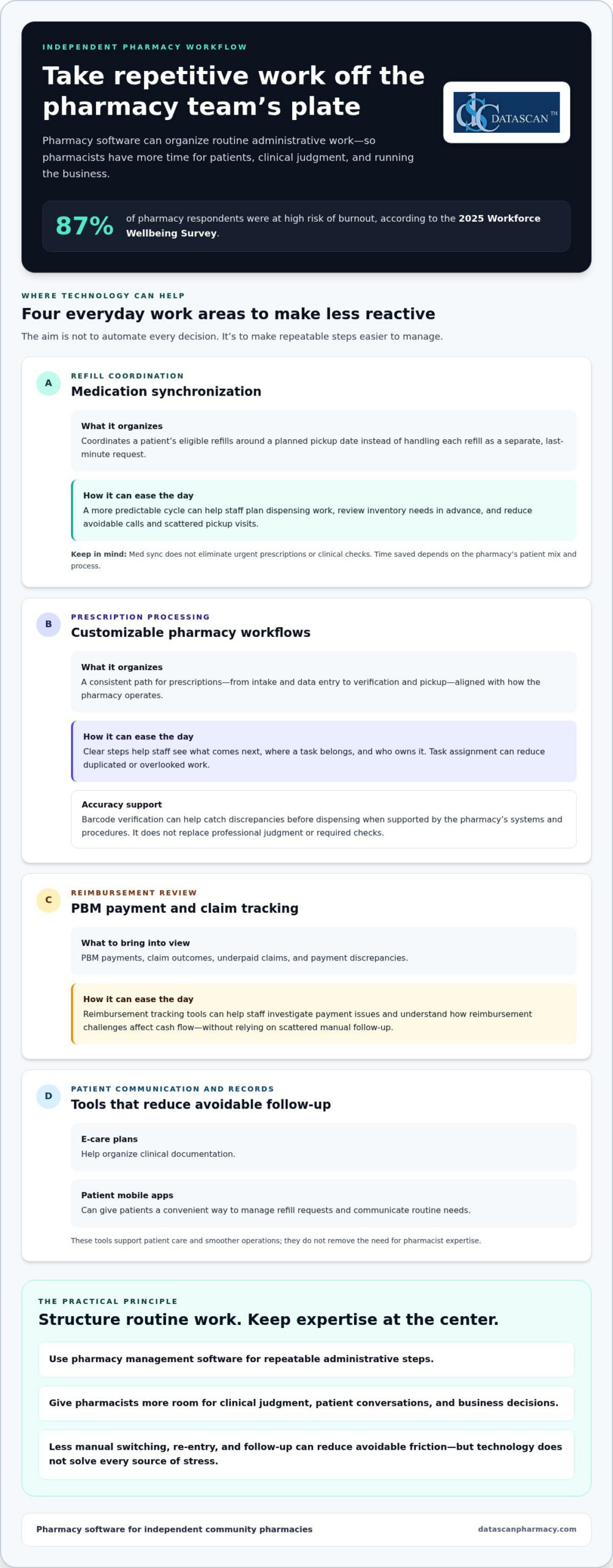
Pharmacist burnout isn’t solved by asking an already stretched team to move faster. Reducing pharmacist burnout with technology starts with taking repetitive administrative work off the team’s plate, from tracking PBM reimbursements and DIR fees to managing manual dispensing steps. The 2025 Workforce Wellbeing Survey found that 87% of pharmacy respondents were at high risk of burnout, underscoring the need for practical relief in independent pharmacies.
If claim issues, paperwork, and workflow bottlenecks keep interrupting your day, you’re not alone. These demands take time away from patient care and running a profitable business. Pharmacy management software can organize reimbursement tracking and support customized workflows, while pharmacy software can reduce avoidable manual tasks and help daily operations run more smoothly.
This guide explains how to use technology to ease administrative strain, get a clearer view of reimbursement challenges, and give your team more time to focus on patients. You’ll also learn how Datascan’s pharmacy management software and customizable workflows can support a more efficient operation and help independent pharmacy owners protect their margins and work-life balance.
Key Takeaways
Reducing pharmacist burnout with technology starts by identifying repetitive tasks that pharmacy management software can simplify or automate.
Medication synchronization and customizable workflows can help make daily operations more organized and less reactive.
Use reimbursement tracking tools to review PBM payments, investigate underpaid claims, and understand their effect on cash flow.
Introduce new technology in manageable steps, starting with the workflow pressure your pharmacy most needs to address.
A pharmacy software partner experienced in serving independent pharmacies can provide support tailored to workflow needs.
How can technology reduce pharmacist burnout in 2026?
Technology can reduce pharmacist burnout by streamlining repetitive administrative work, including prescription processing, inventory tasks, and PBM reimbursement tracking. Less manual follow-up and data entry can leave pharmacists more time for patient care and decisions that require their expertise.
The pressure is real. The 2025 Workforce Wellbeing Survey found that 87% of pharmacy respondents were at high risk of burnout. For independent pharmacies, frequent interruptions and financial uncertainty can make routine tasks feel relentless. Better operational efficiency won’t address every source of stress, but reducing avoidable friction can give the team more control over its day.
What are the main causes of pharmacist fatigue today?
Some of the biggest time drains are easy to overlook: re-entering information, checking claim status, handling dispensing clarifications, and switching between systems to answer routine questions. Each task may be small on its own, but repeated interruptions break concentration and make it harder to keep work moving accurately.
PBM reimbursement uncertainty adds another layer of strain. Reviewing claim outcomes and investigating payment discrepancies takes staff time away from patients and business management. Manual entry can also lead to mistakes that need correction. It isn’t the only source of technical errors, but reducing unnecessary rekeying can remove one avoidable point of friction.
How does modern pharmacy software provide immediate relief?
Pharmacy management software brings operational information and workflows together, helping a team spend less time switching tasks and searching for details. Depending on the system and its configuration, automation can support repeatable steps in prescription processing, inventory management, and claims workflows. Pharmacy automation covers technologies designed to handle medication-related processes, showing how routine work can be structured to rely less on manual effort.
Centralized workflows can also ease the mental load. Rather than keeping every pending task in mind, staff can follow a consistent process to see what needs attention and move work forward. Datascan’s pharmacy management software is designed for independent pharmacies and includes customizable workflows that can fit the way a pharmacy operates. U.S.-based support gives pharmacy teams a knowledgeable point of contact for technical questions.
In 2026, the practical goal isn’t to automate every decision. It’s to use pharmacy software for repeatable administrative steps so pharmacists can focus on clinical judgment, patient conversations, and running the business. That makes reducing pharmacist burnout with technology an operational priority, not just a technology project.
Which pharmacy software features automate the most time-consuming tasks?
The most useful pharmacy software features reduce repetitive work across refill coordination, prescription processing, patient communication, and clinical documentation. Medication synchronization can make refill timing more predictable, while customizable workflows help staff follow a process that fits the pharmacy’s needs.
These tools can support patient care as well as smoother operations. The National Consensus Conference on Pharmacist Well-Being recommends workflow and technology solutions that make patient-centered care more efficient and help decrease pharmacist burden. For independent pharmacies, reducing pharmacist burnout with technology means choosing features that remove friction from work the team already does.
How does medication synchronization save hours every week?
Medication synchronization, or med sync, coordinates a patient’s eligible refills around a planned pickup date. Instead of handling each refill as a separate, last-minute request, the pharmacy can prepare for a more organized cycle and communicate with patients ahead of time. This can make workload easier to anticipate and help reduce avoidable calls and scattered pickup visits. The time saved depends on the pharmacy’s patient mix and process.
Upcoming refill schedules can also help the team plan dispensing work and review inventory needs in advance. Med sync doesn’t eliminate urgent prescriptions or clinical checks, but it can make routine refills less reactive and help smooth busy periods.
Can customizable workflows really improve pharmacy efficiency?
Yes. A customizable workflow can reflect how prescriptions move through a specific pharmacy, from intake and data entry to verification and pickup. Clear, consistent steps help staff understand what comes next and where each task belongs. Datascan’s customizable pharmacy workflow software lets independent pharmacies align software processes with their operational needs.
Barcode verification and task assignment can also be useful workflow approaches when supported by a pharmacy’s systems and procedures. Verification steps can help staff catch discrepancies before dispensing, while clear task ownership reduces the chance that work is duplicated or overlooked. These tools support accuracy, but they don’t replace professional judgment or required checks.
Other features can reduce follow-up work. E-care plans help organize clinical documentation, while patient mobile apps can give patients a convenient way to manage refill requests and communicate routine needs. When these functions are part of a coordinated pharmacy management software workflow, staff can spend less time chasing information and more time assisting patients. Explore Datascan’s workflow software to see how customized processes can fit day-to-day pharmacy operations.
How does technology help pharmacists manage PBM reimbursements and DIR fees?
Pharmacy management software helps independent pharmacies organize claim and reimbursement information so staff can spot payment discrepancies, track trends, and spend less time on manual reconciliation. It won’t determine whether a PBM payment is correct or guarantee a successful dispute, but clear records make it easier to identify claims that need review and understand how reimbursement issues affect cash flow.
When reducing pharmacist burnout with technology, the financial workflow matters as much as the dispensing workflow. Switching repeatedly between claim details, payment records, and spreadsheets adds administrative work and makes it harder to see patterns. A consistent process can help owners review reimbursement performance without relying on memory or scattered notes.
How can you identify underpaid claims automatically?
Start by comparing claim-level payment information with the reimbursement you expected under the applicable terms. Pharmacy management software can organize reimbursement data, and Datascan provides tools for PBM reimbursement tracking. Where available, reports or alerts can flag claims that appear below cost or differ from expected amounts, giving the team a starting point for investigation instead of requiring a manual review of every claim.
Reviewing results alongside acquisition costs and other relevant expenses also gives owners a clearer view of prescription-level gross profit. Consistent calculations support better business decisions, but they depend on accurate, complete inputs.
What role does data play in PBM reform advocacy?
Well-organized records can help turn individual payment concerns into a clearer view of recurring patterns. Pharmacy owners can review reimbursement trends, DIR fee information, and claim documentation to understand financial pressures on the business and support conversations with PBMs or policymakers. Digital records can also make audit preparation more orderly by keeping relevant claim information easier to retrieve. They don’t guarantee an audit outcome, but consistent recordkeeping can reduce last-minute searching.
Track: Review reimbursement and fee data regularly instead of waiting until bookkeeping becomes urgent.
Compare: Identify claims that appear inconsistent with expected reimbursement and document details for follow-up.
Retain: Keep relevant claim records organized so staff can retrieve them when questions or audits arise.
Technology can also reduce operational strain beyond reimbursement work. An Agency for Healthcare Research and Quality summary reports that robotic dispensing improves staff satisfaction in the study it discusses, illustrating how automation may support efficiency and the work environment. For independent pharmacies, a practical next step is to make reimbursement data easier to review and act on with pharmacy software tools that fit the team’s processes.
What are the best strategies for implementing technology without adding more stress?
Introduce pharmacy technology in manageable phases. Start with a high-friction task and give staff time to learn the new process before adding another change. A clear purpose, practical training, and dependable support can make implementation a workflow improvement rather than another burden. This step-by-step approach makes reducing pharmacist burnout with technology more achievable for an independent pharmacy.
Start with a short implementation plan:
Choose one pain point: Identify a recurring task, such as handling refill requests or coordinating delivery.
Explain the benefit: Show staff how the change is intended to reduce interruptions or repetitive work.
Train with real tasks: Let team members practice the workflow they’ll use during a normal shift.
Review and adjust: Gather staff feedback, resolve snags, and decide what to introduce next.
Prioritize tools that address a visible source of workload. For example, the MobileScripts patient mobile app gives patients a way to request prescription refills through a mobile app, which can reduce reliance on phone calls for that task. Make sure staff understand how requests enter the pharmacy’s routine and who handles them.
How do you choose a pharmacy software vendor that supports your team?
Look for a partner that understands independent pharmacy operations and provides support your staff can use. Datascan is family-owned and has served pharmacies since 1981, with long-term U.S.-based support. During a pharmacy software conversion, plan how existing workflows will map to the new system, how staff will learn their roles, and how questions will be handled during the transition. Set clear internal points of contact so staff know where to raise issues.
Training should explain why the change is happening, not just which buttons to click. When staff understand how a tool fits their daily work, they can give useful feedback and build confidence using it.
How can mobile apps reduce the burden on your front-end staff?
Mobile refill requests can move routine requests into a structured process, freeing front-end staff to focus on in-person service and calls that need personal attention. Automated texts or push notifications may also reduce status-check calls when a pharmacy’s systems support those functions and the communication process is configured appropriately. Set expectations with patients about which requests the app handles and how the pharmacy follows up.
Delivery tools can help organize off-site patient needs by keeping delivery-related tasks within a defined workflow. Introduce these tools one at a time, monitor how they affect the team’s day, and refine the process before expanding their use. This keeps technology focused on practical relief, not change for its own sake.
Why is a family-owned pharmacy software vendor the best partner for reducing staff stress?
A family-owned pharmacy software vendor can offer a personal, accountable relationship alongside tools built for independent pharmacy operations. That matters because technology should fit the realities of your business, including how your team works, which reimbursement details you need to track, and the support you rely on when questions arise. Reducing pharmacist burnout with technology is easier when the system fits the pressures community pharmacies face.
Datascan has been family-owned since 1981 and provides long-term U.S.-based support. Its pharmacy management software is designed for independent pharmacies, with customizable workflows and tools that support PBM reimbursement tracking. Together, these capabilities can help owners address operational friction and the time-consuming work of understanding pharmacy finances.
What makes Datascan different from large corporate vendors?
Independent pharmacies need a technology partner that recognizes their business priorities, not just prescription volume. Datascan focuses on independent pharmacy operations with pharmacy management software that brings pharmacy workflows and business tools into the operational picture. U.S.-based support gives pharmacy teams a knowledgeable resource for system questions, while a family-owned approach emphasizes personal accountability and a lasting relationship.
Software can’t remove every source of stress or guarantee profitability. It can help owners organize workflows, track reimbursement information, and make better-informed decisions about how staff time is used. Those capabilities support a pharmacy’s work to serve patients while managing the business behind that care.
How do you get started with a less stressful pharmacy management system?
Begin with the problems that interrupt your team most often. Identify a workflow bottleneck, a recurring administrative task, or a reimbursement process that takes too much manual review. Then map how the task moves through the pharmacy, who handles each step, and what a better process should accomplish. This gives your team a practical basis for evaluating software and planning a transition.
Set priorities: Choose the first workflow to improve rather than changing every process at once.
Involve staff: Ask the people doing the work where delays, duplicate steps, or unclear handoffs occur.
Plan training: Give staff time to learn the updated process and raise questions.
Review the results: Check whether the change reduces friction before introducing another adjustment.
A good partnership connects technology decisions to the pharmacy’s actual needs. With a clear implementation plan, staff input, and support grounded in independent pharmacy operations, pharmacy software can become a practical tool for building a more manageable workday.
Give Your Pharmacy Team More Room to Thrive
Reducing pharmacist burnout with technology starts with practical changes: streamline repetitive workflows, make PBM reimbursement information easier to review, and introduce new tools in manageable steps. The right pharmacy management software can give staff more time while giving owners a clearer view of operations and profitability.
Technology works best when it fits the people using it. Datascan has been family-owned and operated since 1981, with long-term U.S.-based support and tools for independent pharmacies, including pharmacy management software, point-of-sale, mobile patient apps, and delivery tools. That combination gives pharmacy owners a knowledgeable partner as they improve workflows and reduce administrative strain.
You don’t have to overhaul every process at once. Start with one pressure point, involve your team, and build from there. Schedule a demo to explore Datascan Pharmacy Software for your workflow and see how the right tools can support a more efficient pharmacy. A less stressful workday is a practical goal, and your team can take the first step toward it.
Frequently Asked Questions
How does pharmacy management software specifically reduce daily stress?
Pharmacy management software can reduce daily stress by organizing routine tasks and limiting repeated manual steps. Depending on its features and configuration, it may support prescription processing, inventory tasks, refill coordination, and reimbursement tracking in a more consistent workflow. That can mean fewer interruptions to search for information or re-enter details. Reducing pharmacist burnout with technology works best when tools address specific pressure points without adding unnecessary steps.
Can automation help my pharmacy survive low PBM reimbursements?
Automation can’t change a PBM’s reimbursement terms or guarantee that a pharmacy will overcome low payments. It can help owners review claim and payment information, identify possible discrepancies, and keep reimbursement records organized for follow-up. Pharmacy management software with PBM reimbursement tracking can make it easier to see patterns and understand their effect on the business. Use those insights alongside accurate cost and financial records to guide decisions.
Is it difficult to switch to a new pharmacy software system?
A pharmacy software conversion takes planning, but a phased approach can make the transition more manageable. Identify essential workflows, involve staff who use them every day, and schedule time for training and questions. Before the transition, clarify how information and processes will be handled, what staff need to learn, and where they can get support. Introducing changes in stages helps the team adjust without trying to learn everything at once.
Do I need expensive hardware to reduce pharmacist burnout?
Not necessarily. Start by identifying whether the biggest time drain comes from software workflows, manual processes, or equipment needs. Pharmacy management software can support efficiencies such as organizing tasks and tracking reimbursements, but hardware requirements depend on the system and the pharmacy’s setup. Don’t assume buying new equipment is the first step. Define the workflow problem you want to solve, then determine what tools are needed to address it.
How does medication synchronization software work to save time?
Medication synchronization coordinates eligible prescription refills around a planned schedule for each patient. Instead of processing every routine refill as a separate, last-minute request, the pharmacy can prepare for upcoming fills and communicate with patients ahead of time. Pharmacy management software can help staff organize this work and anticipate routine dispensing needs. The process can make workloads more predictable, though urgent prescriptions and clinical checks still require attention as they arise.
What should I look for in a pharmacy software vendor to ensure long-term support?
Look for a vendor with experience serving independent pharmacies, clear support channels, and software that can accommodate your workflows. Consider how staff get help with technical questions and how feedback about daily operations informs improvements. Datascan Pharmacy Software is family-owned and operated since 1981, with long-term U.S.-based support. A continuing relationship with a knowledgeable support team can help your pharmacy address questions as its operational needs evolve.
Can technology help with pharmacy staff retention?
Technology can support staff retention by reducing avoidable administrative friction and making routine work more manageable, but it can’t guarantee that employees will stay. Consider tools that address frustrations your team identifies, such as repeated data entry, scattered workflows, or frequent refill-status calls. Involve staff in choosing what to improve and review whether the change helps. A more workable day can contribute to a supportive workplace alongside other retention efforts.
About the author: Datascan Pharmacy Software is a family-owned pharmacy management software provider founded in 1981. The company supports independent and retail pharmacies with pharmacy management software, point-of-sale tools, patient mobile apps, and delivery tools.
Building a high-efficiency automated prescription refill workflow in 2026 requires a strategic integration between your pharmacy management software and a dedicated pharmacy app for prescription refills that handles patient requests in real-time. By centralizing these communications, you eliminate the manual data entry that leads to pharmacist burnout and reclaim the hours necessary to drive business growth. You didn’t spend years earning your degree to act as a data entry clerk while PBMs aggressively squeeze your margins through complex DIR fees. We understand that even with the latest PBM reforms, the operational burden on independent owners remains immense. This article will show you how to implement a workflow that essentially runs itself, allowing you to act as the clinical authority your community deserves. We will preview the specific steps to optimize your pharmacy software, implement medication synchronization, and automate patient notifications to ensure your business remains profitable and relevant in a rapidly evolving market.
Key Takeaways
Discover how a software-driven automated refill workflow handles everything from requests to labeling, significantly reducing the manual labor that causes pharmacist burnout.
Learn how to combat shrinking PBM reimbursements and lower DIR fees by leveraging medication synchronization and automated adherence reminders.
Evaluate your pharmacy app for prescription refills to ensure it integrates directly with your pharmacy management software for real-time eligibility and insurance checks.
Follow a proven five-step implementation plan to audit your current bottlenecks and transition into a stabilized, automated filling schedule.
Reclaim your identity as a healthcare provider by automating data entry tasks, giving you the time needed to focus on high-margin clinical services and business expansion.
What is an automated prescription refill workflow?
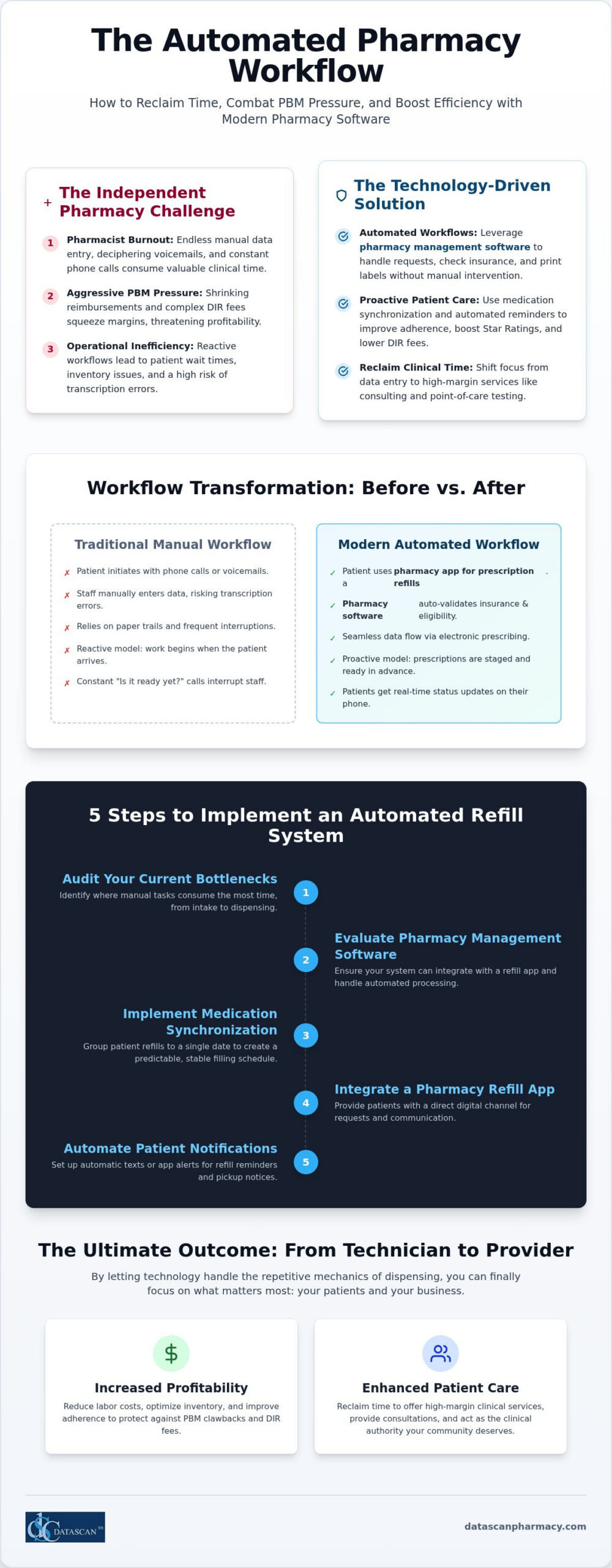
An automated prescription refill workflow is a software-driven process that handles everything from the initial patient request to inventory checks and label printing without manual pharmacist intervention. By leveraging advanced pharmacy management software, this system automatically validates insurance eligibility and checks drug-to-drug interactions before the medication ever hits the tray. It transforms the traditional, reactive pharmacy model into a proactive machine that anticipates patient needs, ensures accuracy, and protects your bottom line from shrinking PBM reimbursements.
In a manual environment, your staff spends hours answering phone calls, deciphering voicemails, and manually typing data into the system. An automated workflow replaces these bottlenecks with digital triggers. When a patient uses a pharmacy app for prescription refills, the request bypasses the front counter and moves directly into the processing queue. This integration allows your workflow software to “auto-fill” medications based on established medication synchronization schedules. Instead of reacting to a line of frustrated patients, your team walks into a pharmacy where the day’s work is already organized and prioritized.
How does automation differ from traditional pharmacy systems?
Traditional systems rely on paper trails and patient-initiated calls, which often lead to transcription errors and workflow interruptions. Modern automation utilizes electronic prescribing standards to ensure that data flows seamlessly from the provider to your dispensing queue. When you implement a pharmacy app for prescription refills, patients receive real-time status updates on their smartphones, which eliminates the “Is it ready yet?” phone calls that plague busy shops. Safety is bolstered through integrated barcode verification, creating a closed-loop system where the software confirms the NDC and patient identity at every critical juncture.
Why is automation critical for independent pharmacies in 2026?
Independent owners are currently facing a “perfect storm” of labor shortages and predatory PBM practices. You can’t afford to pay a pharmacist to perform the tasks of a data entry clerk. Automation allows you to do more with fewer staff members by shifting chronic medication management to a synchronized schedule. This stabilized filling cycle reduces human error in high-pressure retail environments and ensures you have the right inventory on hand. Most importantly, it reclaims the time you need to provide high-margin clinical services, such as point-of-care testing or long-term care consulting. By letting the technology handle the repetitive mechanics of dispensing, you can finally focus on acting as a healthcare provider rather than a technician.
How does automated refill technology improve pharmacy efficiency?
Automated refill technology transforms pharmacy efficiency by eliminating the “wait time” bottleneck and ensuring prescriptions are staged and ready before the patient arrives. This proactive approach relies on a high-performing pharmacy app for prescription refills to capture patient intent early, allowing the backend system to process claims during off-peak hours. By shifting the workload, you don’t just save time; you optimize your entire operational flow to fight back against the shrinking margins imposed by PBMs.
Efficiency gains extend directly to your bottom line through improved inventory management and lower DIR fees. When your system predicts refill dates in advance, you can maintain leaner inventory levels, ordering only what you need for the upcoming week. This precision reduces the capital tied up on your shelves. Additionally, automated reminders sent through your pharmacy app for prescription refills significantly boost patient adherence. In the 2026 regulatory environment, maintaining high adherence is the most effective way to protect your Star Ratings and mitigate the impact of predatory DIR fee structures.
Can technology help overcome PBM reimbursement challenges?
Modern pharmacy management software provides the transparency needed to survive PBM pressures. By integrating automation into your billing workflow, the software can automatically flag low-margin or “under-water” claims before the labels are even printed. This allows you to address reimbursement issues in real-time rather than discovering losses weeks later during reconciliation. Automation also enables more granular tracking of PBM payments, ensuring that every cent owed to your independent pharmacy is accounted for and collected. Pairing this with dedicated pharmacy compliance reporting software gives you the documentation power to defeat PBM audit clawbacks before they strip away your hard-earned revenue.
How does med sync reduce the daily workload?
Medication synchronization is the engine behind a truly efficient pharmacy. Instead of handling ten different phone calls for ten different medications, you bundle a patient’s entire profile into a single monthly pickup. This moves your team from a reactive, “firefighting” mode to a methodical, proactive filling model. You can schedule your heavy filling days during times when foot traffic is low, ensuring your staff remains calm and focused. Implementing a Pharmacy Workflow Optimization Software strategy ensures that your team isn’t just busy, but productive. If you’re ready to see how these tools can transform your daily operations, you can speak with our team about a custom workflow audit.
How do I evaluate pharmacy management software for automated workflows?
To evaluate pharmacy management software for automated workflows, you must prioritize a system that offers a natively integrated mobile patient app and highly customizable dispensing stages. This ensures the technology adapts to your physical store layout rather than forcing you into a rigid, one-size-fits-all model that hinders efficiency. When you evaluate pharmacy management software, start by looking for a system that offers a truly integrated mobile experience for your patients. A standalone pharmacy app for prescription refills that isn’t natively tied to your database often creates data silos. These silos lead to synchronization errors and manual reconciliation tasks that defeat the purpose of automation. You need a solution that allows you to customize the workflow stages to match your store’s unique layout, from the initial intake to the final bagging. If your pharmacy software forces you into a rigid model, it’ll eventually become a bottleneck as your volume grows.
What are the must-have features for refill automation?
Refill automation isn’t just about processing a request; it’s about managing the entire patient lifecycle. Your pharmacy software must include integrated medication synchronization (Med Sync) modules that allow you to align multiple prescriptions into a single monthly event. This proactive approach is supported by automated text and email notifications that keep patients engaged without requiring a phone call from your staff. Utilizing a high-performance pharmacy app for prescription refills like the MobileScripts Rx Refill Application ensures that these requests flow directly into your queue, pre-validated and ready for filling. These features work together to reduce the chaos of “walk-in” refill requests that disrupt your staff’s concentration and lead to errors.
Why is vendor support as important as the software itself?
The strength of your pharmacy management software is only as good as the team standing behind it. In a high-pressure retail environment, hitting a technical snag can halt your entire operation. This is why prioritizing US-based support is vital. You don’t have time for long hold times or scripted responses from people who don’t understand the nuances of independent pharmacy. A family-owned vendor provides a level of accountability and industry perspective that large corporations simply can’t match. When evaluating pharmacy software vendors, look for a partner that treats your success as their own. They should offer the agility needed to adjust technical workflow parameters quickly as PBM pressures and market demands evolve, ensuring your technology remains a tool for growth rather than a burden.
How to implement an automated refill system in 5 steps?
Implementing an automated refill system requires auditing your current manual bottlenecks, enrolling high-volume patients in medication synchronization, and deploying a native pharmacy app for prescription refills to capture requests digitally. By configuring your pharmacy management software to auto-populate the dispensing queue, you eliminate the friction of manual data entry and reclaim hours of staff time every week. This systematic transition ensures your pharmacy operates as a proactive healthcare hub rather than a reactive retail shop.
Step 1 & 2: Building the foundation for automation
The first step is identifying the “high-maintenance” 20% of your patient base that typically consumes 80% of your staff’s phone time. These are often chronic care patients with multiple prescriptions filled at different times throughout the month. Once identified, you must enroll these patients in a robust Med Sync program. When you talk to patients, focus on the convenience of a single monthly pickup and the peace of mind that comes with never running out of medication. This synchronization provides the predictable volume your pharmacy software needs to automate the “auto-fill” process effectively. For a deeper dive into streamlining these early stages, see our guide on automating pharmacy prescription intake.
Step 3, 4 & 5: Launching and refining the loop
Once your foundation is set, deploy a pharmacy app for prescription refills like MobileScripts to move patient communication away from the telephone. You can brand this app specifically for your pharmacy, giving your patients a modern, professional interface to manage their health. Configure your pharmacy management software to automatically move these app-based requests into the filling queue, where they can be checked for insurance eligibility and inventory availability without human intervention.
Safety remains the priority during this acceleration. Train your staff to utilize integrated barcode verification at the point of dispensing to maintain a closed-loop system that prevents errors. With the time saved from answering phones and typing in refills, your pharmacists can finally utilize clinical tools like Medication Therapy Management (MTM) to drive new revenue streams. This shift isn’t just about speed; it’s about repositioning your independent pharmacy as a high-value clinical provider in a competitive market. If you’re ready to transform your operational efficiency, schedule a workflow audit with our team today.
How can automation help me reclaim time to run my business?
Automation reclaims your time by shifting the operational burden from your staff to your pharmacy management software, allowing you to focus on high-level strategy rather than repetitive data entry. By deploying a pharmacy app for prescription refills, you stop the constant interruption of phone calls and start managing your pharmacy as a profitable healthcare enterprise. This transition is essential for survival in 2026, as it moves you away from the role of a technician and back into the role of an executive and healthcare provider.
Technology should work for the owner, not the other way around. When your pharmacy software handles the heavy lifting of insurance adjudication and inventory tracking, you finally have the mental space to negotiate better deals with your primary wholesaler. You can use these saved hours to analyze your gross profit and identify exactly which PBM contracts are costing you money. Additionally, automated systems create cleaner, more organized records, which significantly reduces the stress and preparation time required for board audits or PBM reconciliations. Implementing robust pharmacy compliance reporting software alongside your automated workflow ensures that this documentation is audit-ready at all times, protecting your margins from unexpected clawbacks.
Focusing on profitability and PBM reform
With the passage of the Consolidated Appropriations Act, 2026, the landscape of PBM compensation is shifting. More time in your day allows you to stay informed and advocate for PBM reform at the state level, ensuring your voice is heard as an independent owner. You can spend your afternoons reviewing dashboards to see where your pharmacy is losing money on low-margin reimbursements. Understanding your numbers is the only way to fight back against predatory practices. For a detailed breakdown of how to track these metrics, see our guide on calculating pharmacy gross profit.
The long-term value of a family-owned technology partner
The difference between a corporate vendor and a family-owned partner like Datascan is rooted in accountability. Large corporations often force you into a one-size-fits-all model, but a partner that understands the independent market will provide the flexibility you need to future-proof your business. We pride ourselves on being a visionary ally that helps you navigate the next decade of industry changes with US-based support and customizable tools. Don’t let manual workflows hold your business back from its full potential. You can schedule a demo of Datascan’s automated workflow tools today to see how we can help you reclaim your time and protect your margins.
Reclaim Your Future with Smarter Pharmacy Automation
The journey from a manual, reactive shop to a proactive healthcare hub depends on your ability to leverage the right technology. By integrating a high-performance pharmacy app for prescription refills with your core pharmacy management software, you eliminate the data entry bottlenecks that lead to staff burnout. This strategic shift doesn’t just save time; it provides the operational transparency needed to fight back against predatory PBM reimbursements and rising DIR fees.
Since 1981, our family-owned enterprise has stood as a visionary ally for independent owners. We understand that your success relies on 100% US-based technical support and pharmacy software that actually drives profitability. It’s time to stop acting as a technician and start acting as the executive your business requires. You can see how Datascan’s automated workflow reclaims your time and secures your pharmacy’s place in the 2026 market. The tools for transformation are ready when you are.
Frequently Asked Questions
Is automated prescription refill software safe for patients?
Automated systems actually improve patient safety by integrating barcode verification and real-time drug interaction checks into every dispensing stage. These digital safeguards eliminate the human fatigue and errors associated with manual data entry in high-pressure environments. By utilizing a closed-loop system within your pharmacy management software, you ensure every prescription matches the NDC and patient profile before a label is printed. This creates a more reliable and secure environment for your community.
How much time can a pharmacy owner really save with an automated workflow?
Pharmacy owners often reclaim several hours each day by automating their refill workflows. Instead of spending your morning answering repetitive phone calls or manually typing in refill requests, your staff can focus on high-margin clinical services. Automation handles the administrative heavy lifting, which essentially allows your pharmacy to run its daily dispensing tasks in the background. This newfound time is vital for analyzing gross profit and negotiating better wholesaler contracts to improve your bottom line.
Does automation require me to move my data to the cloud?
No, you don’t need to move your sensitive patient data to an external server to achieve full automation. Our system is designed to provide cutting-edge workflow capabilities without the risks associated with outside hosting. You maintain full control over your local database while still enjoying the benefits of a modern, automated refill system. This approach ensures your pharmacy remains fast, reliable, and secure without relying on a third-party connection for your core dispensing functions.
Can automated workflows help reduce PBM DIR fees?
Automated workflows are a powerful tool for reducing PBM DIR fees because they directly improve patient adherence. By using a pharmacy app for prescription refills to send automated reminders, you ensure patients pick up their chronic medications on time. Higher adherence rates lead to better Star Ratings and performance scores for your store. This proactive management helps protect your reimbursements and mitigates the financial impact of predatory PBM fee structures that penalize poor patient outcomes.
What happens if the insurance rejects an automated refill request?
If an insurance claim is rejected during the automated process, the system immediately flags the prescription and moves it into a manual review queue. This allows your staff to address the specific rejection reason, such as a prior authorization requirement or a refill too soon error, without disrupting the rest of the automated flow. Your pharmacy software ensures no claim is filled at a loss, protecting your margins while maintaining the speed of your daily operations.
Do I need a separate app for my patients to use automated refills?
You don’t need to manage a disconnected third-party tool; instead, you should use a natively integrated pharmacy app for prescription refills. A solution like MobileScripts connects directly to your database, allowing patients to request refills that populate your queue in real-time. This integration prevents data silos and ensures patient requests are accurately reflected in your workflow. It provides a seamless experience for your patients while significantly reducing the administrative burden on your pharmacy staff.
How does medication synchronization fit into an automated workflow?
Medication synchronization acts as the foundational engine for a truly automated workflow. By aligning all of a patient’s chronic medications to a single monthly pickup date, you create a predictable filling schedule. Your pharmacy management software can then auto-populate the queue for these synchronized patients, allowing you to fill prescriptions during off-peak hours. This proactive model eliminates the chaos of random walk-in requests and ensures your inventory is optimized for the specific needs of your patients.
Is it difficult to switch my current pharmacy software to an automated system?
Switching to an automated system is a streamlined process when you partner with an experienced vendor that understands independent pharmacy needs. We handle the complex data migration and training required to move your store from a manual environment to a modern workflow. Since our support is 100% US-based, you have direct access to experts who can troubleshoot technical adjustments quickly. This partnership ensures your transition is smooth and your business remains operational throughout the entire conversion.
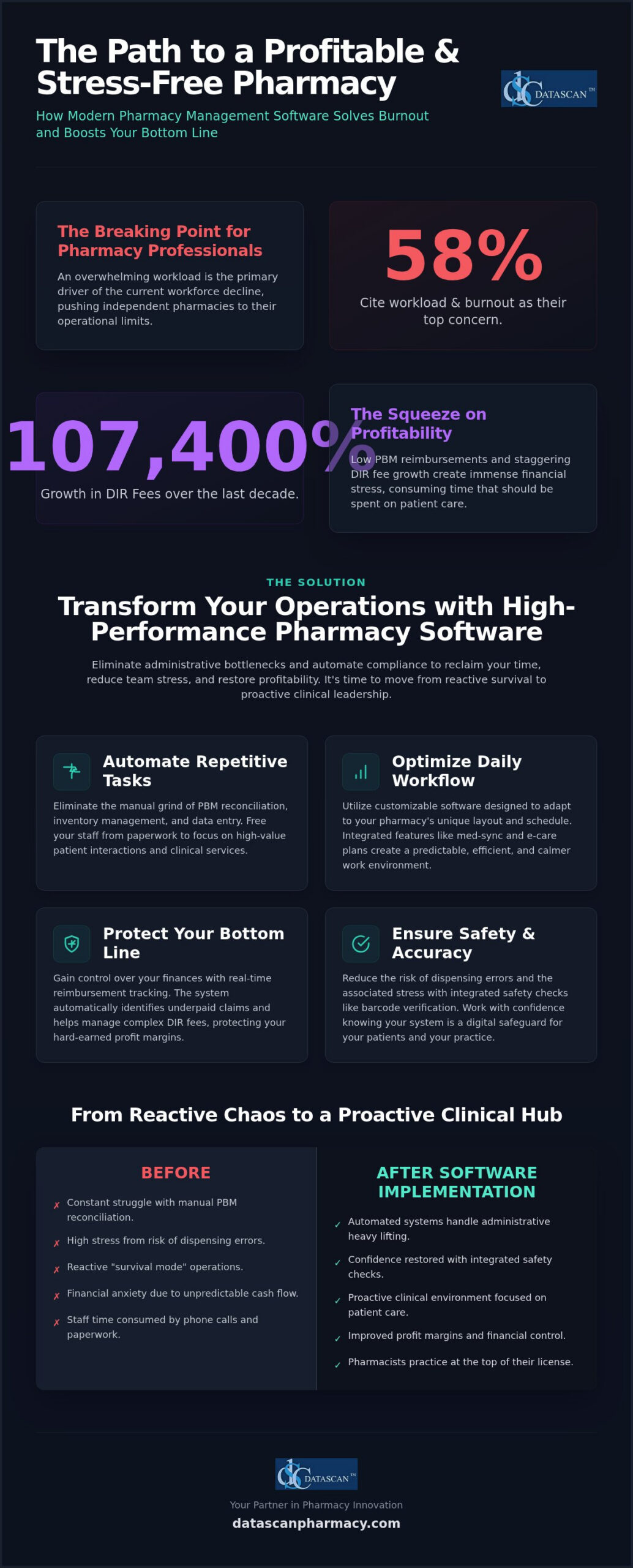
If 58% of pharmacy professionals are citing workload and burnout as the primary drivers of the current workforce decline, how much longer can your independent pharmacy operate on manual processes? Modern pharmacy workflow optimization software is the essential tool for owners who need to eliminate administrative bottlenecks, automate PBM compliance, and restore profitability in an increasingly complex 2026 market. You’ve likely spent too many nights worrying about low reimbursements and the financial stress of DIR fees that grew by a staggering 107,400% over the last decade.
We understand that your time is your most valuable asset, yet it’s often consumed by manual PBM reconciliation and inefficient dispensing workflows that invite errors. This guide reveals how the right pharmacy management software handles these operational burdens for you, allowing you to focus on patient care instead of paperwork. You’ll learn how to leverage advanced pharmacy software to reduce data entry, improve your profit margins through better reimbursement tracking, and finally create a calmer, more efficient environment for your team. It’s time to stop reacting to industry pressures and start leading with a system built for the future of community pharmacy.
Key Takeaways
Automate repetitive administrative tasks like PBM reconciliation to significantly reduce pharmacist burnout and prioritize patient outcomes.
Optimize your daily operations using customizable pharmacy workflow optimization software designed to adapt to your specific pharmacy layout and schedule.
Protect your bottom line with real-time reimbursement tracking and automated tools that identify underpaid claims and manage complex DIR fees.
Streamline your transition to modern pharmacy management software by conducting a workflow audit to pinpoint and eliminate operational bottlenecks.
Leverage the personalized support and industry expertise of a family-owned vendor to transform your independent pharmacy into a high-performance clinical hub.
How can pharmacy workflow optimization software reduce pharmacist burnout in 2026?
Pharmacy workflow optimization software reduces burnout by automating repetitive administrative tasks like PBM reconciliation and inventory management, allowing staff to focus on patient care. By eliminating the manual bottlenecks that clog daily operations, this technology restores a sense of control and professional purpose to the pharmacy team. High-performance pharmacy management software acts as a digital safeguard, ensuring that your staff isn’t buried under a mountain of paperwork while trying to serve their community.
There’s a direct, measurable link between operational efficiency and the mental well-being of independent pharmacy owners. When your team is stuck in a reactive “survival mode,” they’re constantly battling the cognitive overload of multitasking without centralized management. Modern Pharmacy Software transforms this environment into a proactive clinical space. It replaces the exhausting cycle of manual data entry, which is the leading cause of technical errors and staff frustration, with automated systems that handle the heavy lifting of PBM compliance and reimbursement tracking.
What are the main causes of pharmacy staff fatigue today?
Staff fatigue often stems from “hidden” time-wasters that accumulate throughout the dispensing process. In 2026, the emotional toll of navigating declining PBM reimbursements and the ongoing cash flow effects of previous DIR fee rules adds a layer of financial anxiety to an already heavy workload. A June 2026 poll found that 58% of pharmacy professionals attribute the declining workforce primarily to workload and burnout. Without a robust pharmacy management system, pharmacists spend more time fighting with spreadsheets than interacting with patients, leading to a profound sense of professional dissatisfaction.
How does modern pharmacy management software provide immediate relief?
Implementing a comprehensive workflow software solution provides immediate relief by automating task delegation and integrating safety checks. Barcode verification and automated inventory alerts reduce the constant fear of dispensing errors, allowing pharmacists to work with confidence rather than constant apprehension. Additionally, choosing a partner that provides US-based technical support minimizes the frustration of technical downtime. This localized accountability ensures that when issues arise, they’re resolved quickly by experts who understand the unique pressures of the independent market, rather than leaving your staff stranded with unresolved software glitches.
What are the essential features of high-performance pharmacy management software?
High-performance pharmacy management software provides the digital infrastructure required to move from reactive dispensing to proactive clinical management. While competitors often emphasize expensive robotics and hardware, the true drivers of efficiency are software-based logic like medication synchronization, integrated e-care plans, and automated patient notifications. These features eliminate the “invisible” administrative friction that slows down your team. By utilizing a robust pharmacy workflow optimization software, you can ensure that every step of the dispensing process is accounted for, from the moment a script arrives to the final point of sale.
Modern pharmacy workflow optimization software doesn’t just speed up filling; it creates a structured environment where pharmacists can practice at the top of their license. Integrated patient notifications reduce phone call volume and front-end congestion, giving your staff the quiet they need to focus on accuracy. When your system handles the routine communication, your team’s cognitive load drops significantly.
How does medication synchronization save hours every week?
Medication synchronization serves as the foundation of a predictable, stress-free pharmacy schedule by aligning patient refills to a single monthly date. This reduces repetitive administrative calls and stabilizes the daily workload, preventing the “rush hour” stress that leads to staff burnout. Advanced systems use predictive filling to forecast inventory needs, ensuring you have the right stock at the right time without overextending your cash flow. This proactive approach to pharmacy workflow automation allows your staff to manage their time effectively rather than constantly putting out fires.
Can customizable workflows really improve independent pharmacy efficiency?
Every independent pharmacy has a unique physical layout and staffing structure. A one-size-fits-all approach to software rarely works for community-focused businesses. Customizable workflow software allows you to tailor digital stages to match your staff’s specific roles and responsibilities. This ensures that clinical duties aren’t overlooked and that barcode verification is integrated at every critical juncture. By implementing “check twice, fill once” logic automatically, you reduce the risk of errors and the associated stress of potential liability. Integrated e-care plans further streamline this by allowing for clinical documentation without the burden of extra paperwork, and pairing these tools with medication therapy management software can transform those clinical workflows into a significant new revenue stream. If you’re ready to see how these features can transform your daily operations, you can reach out to our team for a personalized walkthrough.
How does technology help pharmacists manage PBM reimbursements and DIR fees?
Pharmacy workflow optimization software provides immediate financial relief by identifying underpaid claims in real-time and automating the complex reconciliation process that previously required hours of manual labor. This proactive technology allows independent owners to stop the “cash flow bleed” caused by PBM spread pricing and hidden fees. By integrating financial oversight directly into the dispensing queue, your team can catch loss-leading prescriptions before they’re ever handed to a patient, transforming your software from a simple filling tool into a profit-protection engine.
Manual bookkeeping and endless spreadsheets are no longer viable in a market where DIR fees grew by a staggering 107,400% between 2010 and 2020. High-performance pharmacy management software replaces these “hidden” time-wasters with automated reconciliation tools that verify every penny against your contracted rates. This level of precision is essential for calculating pharmacy gross profit accurately, ensuring you aren’t operating on guesswork while navigating the transitional period created by the Consolidated Appropriations Act, 2026. When your system handles the financial heavy lifting, you reclaim the mental energy needed to run your business effectively. Independent owners looking to diversify away from PBM-controlled revenue streams are also discovering that pharmacy software for veterinary prescriptions opens access to cash-based pet medication markets with profit margins far exceeding those of typical human claims.
How can you identify underpaid claims automatically?
Identifying underpaid claims shouldn’t be a post-mortem exercise conducted weeks after the sale. Advanced pharmacy workflow optimization software sets up automated alerts for prescriptions filled below cost, flagging them during the adjudication process. You can compare PBM payments against contracted rates instantly using your Pharmacy Software, eliminating the “financial guessing game” that leads to staff anxiety. Integrated profit-tracking dashboards provide a clear view of your margins on every dispense, allowing you to address reimbursement discrepancies the moment they occur rather than months later during a stressful audit.
What role does data play in PBM reform advocacy?
Data is your strongest weapon when fighting back against unfair PBM audits and hidden fees. With the federal ban on spread pricing for new contracts effective as of January 1, 2026, you need software reports that can demonstrate the localized impact of PBM practices on your specific business. Digital record-keeping streamlines the audit response process by providing instant document retrieval, which is critical for meeting new transparency requirements being implemented across the country. Independent pharmacies are using this technology to survive PBM pressures by transforming their internal data into actionable insights for both business survival and legislative advocacy.
What are the best strategies for implementing pharmacy workflow automation?
The most effective strategy for implementing pharmacy workflow automation is a phased approach that begins with a comprehensive operational audit and relies on a vendor with a proven, localized implementation roadmap. By identifying specific bottlenecks before introducing new technology, independent pharmacy owners can avoid the disruption and stress often associated with system changes. Transitioning to modern pharmacy workflow optimization software shouldn’t be a “rip and replace” event; it’s a strategic evolution that should prioritize staff buy-in and clinical continuity.
Successful implementation follows a methodical four-step process designed to minimize downtime and maximize adoption rates. First, conduct a workflow audit to identify your biggest time-wasters, such as manual phone calls or redundant data entry. Second, choose a partner that offers a clear implementation plan tailored to your specific volume and staffing levels. Third, introduce high-impact features like MobileScripts in phases to allow your team to adjust to new digital queues. Finally, train your staff on the “why” behind these systems, ensuring they understand that automation is a tool meant to protect their time and mental well-being.
How do you choose a pharmacy software vendor that supports your team?
Choosing the right partner is about more than just a list of features; it’s about localized accountability and advocacy. You should evaluate the response times and quality of US-based technical support, as a vendor who understands the unique pressures of the independent market will be far more effective than a faceless corporation. The “family-owned” model matters because it ensures you’re a partner rather than just a support ticket. During a pharmacy software conversion, ask detailed questions about data migration and staff training protocols to ensure a smooth transition that doesn’t overwhelm your team.
How can mobile apps reduce the burden on your front-end staff?
Mobile applications are powerful tools for reducing phone call volume and front-end congestion. By allowing patients to request refills via a mobile patient app, you eliminate the constant interruptions of manual script entry. Automated text and push notifications keep patients informed about their order status, which significantly lowers the number of “is it ready yet?” calls. Furthermore, integrating delivery tools allows your staff to manage off-site patient needs efficiently without leaving the pharmacy counter. These digital solutions work together to create a quieter, more focused work environment that also supports stronger pharmacy patient retention strategies by keeping patients engaged and satisfied between visits. If you’re ready to reclaim your time and modernize your workflow, contact our team today for a personalized demonstration of our implementation roadmap.
Why is a family-owned pharmacy software vendor the best partner for reducing staff stress?
A family-owned vendor offers a level of personalized accountability that large corporations can’t match, ensuring your independent pharmacy is treated as a partner rather than just a support ticket. High-performance pharmacy workflow optimization software is most effective when it’s backed by a team that understands the unique financial and operational struggles of community pharmacy owners. When you choose a vendor that prioritizes your success, you gain a visionary ally dedicated to reducing staff stress and maximizing your bottom line through specialized, expert-led design.
One of the most significant benefits of localized pharmacy management software is its inherent reliability. Unlike systems that rely on external servers and leave your business vulnerable to internet outages, localized, non-cloud systems ensure your workflow remains uninterrupted even when your connection fails. This stability eliminates the high-stress scenarios where staff are unable to process prescriptions or access patient records during peak hours. Continuous innovation in these systems is driven by real-world feedback from independent pharmacy owners, not by the demands of corporate shareholders focused on quarterly margins.
What makes Datascan Pharmacy Software different from large corporate pharmacy software companies?
Datascan Pharmacy Software has maintained a fierce advocacy for independent pharmacies since 1981, providing a personal touch that large corporate entities simply cannot replicate. You get direct access to decision-makers and high-level US-based support, ensuring that technical issues are resolved with urgency and expertise. Our suite of tools, including Pharmacy Software, is specifically designed to maximize your profitability and streamline operations, rather than just performing basic pill-counting functions. We focus on the features that matter to your bottom line, such as PBM reimbursement tracking and customizable workflow stages.
How do you get started with a less stressful pharmacy management system?
To transition to a less stressful environment, start by requesting a demo tailored to your specific workflow pains and business goals. You can review our comprehensive roadmap for a stress-free pharmacy software conversion to see exactly how we manage the data migration and staff training process. Taking the first step toward a more efficient, burnout-free pharmacy is simple and requires no long-term disruption to your patient care. Contact us today to reclaim your time, support your staff, and restore your pharmacy’s profitability.
Reclaim Your Time and Restore Your Pharmacy’s Profitability
Transitioning to high-performance pharmacy workflow optimization software is no longer a luxury; it’s a financial and operational necessity for independent owners facing the pressures of 2026. By automating the “hidden” time-wasters like manual PBM reconciliation and complex inventory forecasting, you empower your staff to focus on clinical excellence rather than administrative survival. This shift not only protects your profit margins against rising DIR fees but also fosters a calmer, more professional environment where your team can truly thrive. It’s about moving from a state of constant reaction to a position of strategic control.
As a family-owned and operated partner since 1981, Datascan understands that you need more than just a vendor. You need a visionary ally with a U.S.-based support team that offers decades of experience and localized reliability. Our comprehensive suite of profit-focused automation tools ensures you stay ahead of market trends while maintaining the personal touch your community expects. See how Datascan Pharmacy Software can transform your workflow and reduce burnout; contact us today. You don’t have to navigate these industry changes alone; let’s build a more efficient future for your pharmacy together.
Frequently Asked Questions
How does pharmacy workflow optimization software specifically reduce daily stress?
Pharmacy workflow optimization software reduces daily stress by automating the repetitive administrative tasks that cause cognitive overload. Instead of manually handling PBM reconciliation or inventory tracking, your staff can rely on automated digital queues. This system creates a predictable environment where pharmacists spend less time on paperwork and more time on clinical services. By centralizing management and providing real-time alerts, it eliminates the constant interruptions that typically lead to errors and staff frustration.
Can automation help my pharmacy survive low PBM reimbursements?
Automation is essential for surviving low PBM reimbursements because it identifies underpaid claims before you hand the prescription to the patient. High-performance pharmacy management software provides real-time reimbursement monitoring and profit-tracking dashboards. These tools allow independent owners to identify loss-leading scripts and manage complex DIR fees effectively. By automating the reconciliation process, you can reclaim hours of manual bookkeeping and use that data to advocate for fairer PBM contracts and transparency.
Is it difficult to switch to a new pharmacy software system?
Switching to a new pharmacy software system isn’t difficult when you choose a vendor with a structured implementation roadmap. A methodical, phased conversion process ensures that your data is migrated accurately and your staff is trained on new features without disrupting patient care. By conducting a workflow audit beforehand and introducing high-impact tools in stages, you can avoid the stress of a sudden change and ensure high adoption rates across your entire team.
Do I need expensive hardware to reduce pharmacist burnout?
You don’t need expensive robotics or hardware to significantly reduce pharmacist burnout. While hardware has its place, the primary drivers of efficiency are software-based logic like medication synchronization and automated patient notifications. Modern Pharmacy Software optimizes your existing layout by streamlining the digital dispensing process and reducing phone call volume. Investing in robust software features often provides a much higher return on investment and more immediate relief for staff than bulky hardware solutions.
How does medication synchronization software work to save time?
Medication synchronization software saves time by aligning a patient’s chronic refills to a single monthly date. This process stabilizes your daily workload and prevents the unpredictable “rush hour” that often leads to burnout. It reduces the number of administrative calls and foot traffic, allowing your team to fill prescriptions in batches. Predictive filling tools within the pharmacy management software further forecast inventory needs, ensuring you have the right stock on hand without constant manual checking.
What should I look for in a pharmacy software vendor to ensure long-term support?
Look for a pharmacy software vendor that offers US-based technical support and a history of advocacy for independent pharmacies. Personalized accountability is critical; you want a partner that treats you as a business owner rather than just a support ticket. A family-owned vendor often provides direct access to decision-makers and high-level technical expertise. This ensures that your system receives continuous innovation driven by real-world feedback from pharmacists rather than corporate shareholders focused only on profit.
Can technology help with pharmacy staff retention?
Technology helps with pharmacy staff retention by creating a more organized, less chaotic work environment. When staff have access to efficient Pharmacy Software, they feel empowered to practice at the top of their license rather than being buried in manual data entry. Reducing the risk of technical errors through barcode verification also lowers the anxiety associated with dispensing. A calmer workplace leads to higher job satisfaction, which is the most effective way to keep your talented team members. Learn how automating prescription intake workflow can further protect your margins and reduce staff stress at the front door of your dispensing process.