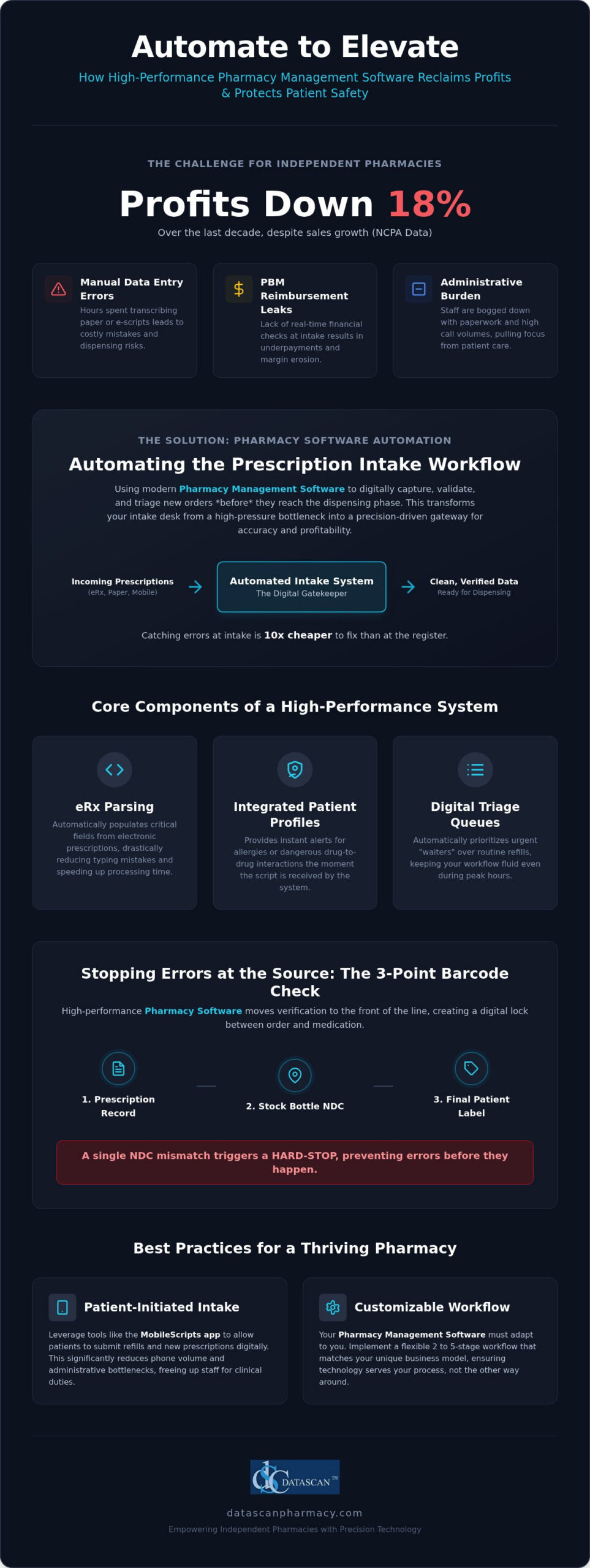
Did you know that while independent pharmacy sales have grown, actual profits plummeted by 18% over the last decade according to NCPA data? Automating prescription intake workflow is the most effective way to reverse this trend by stopping manual errors and PBM revenue leaks at the front door. By leveraging high-performance pharmacy management software, you can transform a high-pressure intake desk into a precision-driven gateway that protects your margins. This strategic shift isn’t just about technology; it’s about reclaiming your role as a clinical provider rather than an administrative clerk.
It’s exhausting to watch your staff drown in repetitive paperwork while the fear of dispensing errors during peak hours keeps you up at night. You believe your pharmacy should be a place for patient care, not a battleground for PBM administrative burdens. This guide promises to show you exactly how to streamline your intake process to eliminate errors and boost your bottom line. We’ll explore how customizable workflows and integrated mobile tools can free up your time for MTM services and clinical consultations, ensuring your business thrives in the 2026 landscape.
Key Takeaways
Discover how automating prescription intake workflow uses advanced pharmacy software to digitally capture and triage orders, eliminating the risks associated with manual data entry.
Learn why a 3-point barcode verification process at the intake stage is your best defense against dispensing errors before they reach the filling station.
Find out how to stop PBM reimbursement leaks by performing real-time financial checks at the start of your workflow using modern pharmacy management software.
See how patient-initiated intake tools like the MobileScripts app can significantly reduce phone volume and administrative bottlenecks.
Understand the importance of a customizable 2 to 5-stage workflow that allows your pharmacy software to adapt to your unique business model.
What is automating prescription intake workflow in a modern pharmacy?
Automating the prescription intake workflow is the process of using pharmacy management software to digitally capture, validate, and triage new orders before they reach the dispensing phase. It serves as the definitive foundation for a secure and profitable pharmacy operation. In the past, technicians spent hours manually transcribing data from paper or messy e-scripts, a process ripe for human error. Today, modern Pharmacy Automation technology acts as a sophisticated gatekeeper. By intelligently parsing incoming orders, the software filters out the administrative clutter of free-text notes and incomplete data that often causes bottlenecks. This ensures that your staff only interacts with clean, verified information, allowing them to focus on clinical patient care rather than tedious data entry.
Why is the intake stage the most critical part of the pharmacy workflow?
The intake stage is the single most important point in your pharmacy because it dictates the accuracy of everything that follows. Industry data suggests that errors caught during intake are 10x cheaper to fix than those identified at the register. When data is clean from the start, you eliminate the time-wasting cycle of insurance rejections and frustrated patients. Clean intake data also streamlines downstream tasks like automated delivery routing and PBM reimbursement tracking, which are vital for maintaining your margins. For a comprehensive look at how this impacts your entire business, see our guide on Pharmacy Workflow Optimization Software: The 2026 Efficiency Guide.
What are the components of an automated intake system?
An effective system relies on several integrated features within your Pharmacy Software to maintain high standards of precision. A high-performance system typically includes:
eRx Parsing: This feature auto-populates critical fields from electronic prescriptions, which drastically reduces the risk of typing mistakes and speeds up processing time.
Integrated Patient Profiles: These provide instant alerts for allergies or dangerous drug-to-drug interactions the moment the script is received into the system.
Digital Triage Queues: These help your team manage the “rush” by automatically prioritizing urgent “waiters” over routine refills, keeping your workflow fluid even during peak hours.
This level of organization ensures your independent pharmacy operates with the same technical prowess as the largest chains. By utilizing advanced pharmacy management software, you don’t just fill scripts faster; you build a more resilient business that is protected against the common pitfalls of manual processing.
How does barcode verification in dispensing process improve intake accuracy?
Barcode verification improves intake accuracy by creating a digital lock between the physician’s order and the physical medication pulled from your shelf. By integrating this technology into your automating prescription intake workflow, you ensure that “wrong drug” errors are stopped at the source rather than relying on a final check to catch mistakes. This proactive approach uses your pharmacy software to validate every movement, protecting your patients and reducing your liability.
Most legacy systems treat barcode scanning as a final safety net. However, high-performance Pharmacy management software shifts this verification to the front of the line. It utilizes a rigorous 3-point check that validates the prescription record, the manufacturer’s stock bottle, and the final patient label in real-time. If there is even a single digit mismatch in the NDC (National Drug Code), the system triggers a hard-stop. This prevents the technician from proceeding until the discrepancy is resolved. It stops errors early. This level of precision ensures that human fatigue or distractions don’t lead to a dangerous dispensing error during peak hours.
The step-by-step barcode verification workflow
A streamlined digital workflow replaces manual guesswork with a repeatable, high-velocity process. Your team should follow these three essential steps:
Step 1: Scan the incoming hard copy or the digital e-prescription record to lock in the required NDC within the system.
Step 2: Scan the manufacturer’s NDC barcode on the stock bottle during the pull to verify the physical product matches the digital order.
Step 3: Scan the final printed patient label before bagging to confirm the right medication is in the right container for the right patient.
Why manual verification is no longer sufficient in 2026
Human eyes are naturally susceptible to “look-alike, sound-alike” (LASA) drug errors. This is especially true when volume is high. A study published by the National Center for Biotechnology Information (NCBI) found that adopting automated barcode verification systems can reduce medication dispensing error rates from 3.87 to 0 per 100,000 dispensations. Manual checks aren’t enough. By removing the guesswork, you build a culture of safety that protects your pharmacy’s reputation.
Beyond safety, this level of automation is a major time saver. Some industry professionals report that barcode scanning at the intake level reduces manual verification time by up to 40% by eliminating the need for repetitive visual data re-checks. This allows your team to move through the queue with much higher velocity. If you are ready to modernize your safety protocols, reach out to our team to see how our software can safeguard your practice.
How can intake automation help independent pharmacies fight low PBM reimbursements?
Intake automation protects your margins by performing real-time financial audits on every prescription before it enters the filling process. By identifying underpaid claims with advanced pharmacy software, you stop financial losses at the point of entry rather than discovering them weeks later in a reconciliation report. This proactive approach is essential for survival in an era where PBM reimbursement cuts continue to eat into your bottom line.
Independent pharmacies are under siege. Data from the NCPA shows that while sales have increased, profits fell by 18% over the last decade. A major hidden cost in this equation is the labor spent processing prescriptions that result in a net loss. When you implement an automating prescription intake workflow, your system acts as a financial watchdog. It performs a “pre-edit” on every claim, flagging those where the reimbursement doesn’t cover the acquisition cost plus the cost to dispense. This allows you to address the issue immediately. Instead of wasting resources on loss-making scripts, your staff can pivot to high-margin clinical services like compounding or Medication Therapy Management (MTM) powered by integrated medication therapy management software.
Identifying underpaid claims before the label prints
Modern Pharmacy management software doesn’t just process orders; it analyzes them for profitability. The system can flag estimated DIR fees and low-reimbursement scripts at the intake stage. This gives your pharmacists the opportunity to suggest therapeutic alternatives that offer better margins while still meeting the patient’s clinical needs. By catching these issues before the label prints, you save on the costs of vials, labels, and, most importantly, your staff’s time. It’s about working smarter to ensure every dispensed medication contributes to your pharmacy’s financial health.
Automating the Prior Authorization (PA) process
Nothing kills pharmacy efficiency like the “PA bottleneck.” When a script requires prior authorization, patients often abandon the medication due to delays, which directly impacts your retention rates. Intake automation software detects the need for a PA instantly and can automatically initiate contact with the prescribing physician. Integrated doctor portals speed up this communication, ensuring the PA is handled quickly and documented accurately. This keeps the automating prescription intake workflow moving and ensures you don’t lose the sale to a PBM-owned mail-order competitor. By automating these administrative hurdles, you reclaim the time needed to run your business and care for your patients.
What are the best practices for automating your pharmacy workflow in 2026?
Success in automating prescription intake workflow starts with a comprehensive needs assessment to pinpoint exactly where your team loses the most time. Whether your pharmacy is struggling with high phone call volumes or long queues at the drop-off window, your software should be configured to target those specific friction points. Datascan offers customizable workflow options ranging from 2 to 5 stages, allowing you to build a process that mirrors your physical layout. By implementing this multi-stage verification, you can separate intake, filling, and clinical review into distinct, manageable steps. This structure allows you to train staff on an “Exception-Based Workflow” where they only intervene when the software flags a clinical or financial discrepancy, significantly increasing your overall throughput and reducing pharmacist burnout.
Moving patients to digital intake channels
The most efficient way to handle intake is to let the patient initiate the process. By encouraging your community to use the MobileScripts patient app, you move refill requests away from the telephone and directly into your Pharmacy management software. This digital transition reduces data entry errors because the patient’s own input populates the request. Additionally, you should prioritize Medication Synchronization (Med Sync). This practice bundles a patient’s intake tasks into one predictable monthly event, which helps you manage staff levels and reclaim time for high-value clinical services like those enabled by medication therapy management software that automates patient identification and e-care plan documentation. To take this further, learn how to pair these tools with a dedicated pharmacy app for prescription refills that handles patient requests in real-time and eliminates the manual data entry that leads to pharmacist burnout.
Setting up a ‘Paperless’ intake station
Eliminating physical clutter is a hallmark of a modern, efficient pharmacy. You should utilize high-speed scanners to digitize any paper prescriptions or hard copies the moment they arrive at the counter. This ensures that every document is instantly part of a secure, digital record that is easy to audit. Integrating an Electronic Delivery System and Signature Capture further streamlines this by removing the need for paper logs. These digital trails are essential for defending against PBM audits and ensuring your business remains compliant without sacrificing speed. If you want to see how these tools fit your specific business model, contact our team today to explore our customizable workflow options.
Why is a customizable pharmacy management system critical for your business?
A customizable pharmacy management system is critical because it ensures that your technology adapts to your specific physical layout and staffing levels rather than forcing your team into a rigid, one-size-fits-all process. Automating prescription intake workflow effectively requires this granular flexibility to maximize efficiency without creating new bottlenecks. By utilizing Pharmacy management software that offers adaptable configurations, you can build a defensive barrier against PBM reimbursement cuts while maintaining the high-energy environment of a growing community pharmacy. Unlike many modern systems, Datascan provides a locally hosted solution that ensures uninterrupted intake during internet outages, providing a level of reliability that off-site systems simply cannot match.
Every pharmacy has a unique “DNA” that dictates how scripts should flow from the drop-off window to the final bag. Our Datascan customizable workflow allows you to choose between 2, 3, 4, or 5-stage setups. This means you can design a process that mirrors your staff count and daily script volume. If you are running a high-volume location, a more complex stage setup provides the necessary checks and balances to prevent errors. Conversely, a smaller shop might benefit from a leaner approach. This adaptability ensures that your Pharmacy Software remains a tool for growth rather than an operational hurdle.
Tailoring the workflow to your staff’s expertise
The ability to scale your workflow is essential as your business evolves. A 2-stage workflow serves a small-staffed rural pharmacy perfectly by keeping the process fast and direct. As your volume grows, you can transition to a 5-stage workflow, which provides the rigorous check-and-balance system needed for high-volume retail locations. Our software allows you to “toggle” specific features on or off, giving you the power to refine your automating prescription intake workflow without needing to overhaul your entire system. This empowers your technicians to work at the top of their licenses while the software handles the heavy lifting of data validation.
The Datascan difference: Family-owned advocacy
We believe that independent pharmacies deserve an ally that understands their specific financial pressures. Unlike the generic call centers of larger vendors, Datascan provides US-based, award-winning technical support delivered by experts who know your business by name. We are fiercely loyal to our client base and remain a visionary ally in the fight for PBM reform and fair reimbursements. Our commitment to your profitability is woven into every feature we build, from real-time financial audits to patient-centric mobile tools. Don’t settle for a rigid system that limits your potential. Schedule a demo of Datascan’s customizable workflow software today and take the first step toward a more efficient, profitable future.
Take Control of Your Pharmacy’s Future
Success in 2026 requires more than just filling prescriptions; it demands a strategic defense against shrinking margins and administrative burnout. By automating prescription intake workflow, you transform your front-end operations into a high-precision filter that catches errors and stops underpaid PBM claims before they impact your bottom line. We’ve explored how customizable 2 to 5-stage workflows and integrated mobile tools empower your team to focus on clinical services that drive growth. This isn’t just about speed; it’s about building a resilient business that isn’t vulnerable to internet outages or generic support centers.
Datascan has been family-owned and operated since 1981, providing independent pharmacies with the visionary tools they need to thrive. Our award-winning US-based technical support is here to ensure your software works for you, not the other way around. With no cloud-based downtime risks, you can trust that your intake process remains uninterrupted even when the unexpected happens. It’s time to reclaim your time and protect your profits. Streamline your pharmacy today with Datascan’s customizable workflow software.
Frequently Asked Questions
How does automating prescription intake reduce dispensing errors?
It eliminates manual data entry risks by using eRx parsing and digital validation. By capturing clean data early, you prevent downstream errors that occur when technicians misread paper scripts. Using high-performance pharmacy management software ensures every order is triaged and checked against integrated patient profiles for interactions. This proactive approach stops mistakes before they reach the filling station, protecting patients and reducing your liability during peak hours.
Can automated pharmacy software help me identify underpaid PBM claims?
Yes, modern pharmacy software performs real-time financial audits during the intake process to flag claims that fall below your acquisition cost. It identifies estimated DIR fees and low reimbursements immediately, allowing your staff to address financial losses before the label prints. This advocacy tool is essential for independent pharmacies fighting PBM reform issues. By automating the pre-edit process, you protect your margins and ensure every dispensed script contributes to your bottom line.
Do I need expensive robots to automate my pharmacy workflow?
No, true automation is driven by your pharmacy management software, not just physical robotics. While robots handle the end-stage filling, automating prescription intake workflow focuses on the digital capture and triage of orders. You can achieve significant efficiency gains through software features like barcode verification, digital triage queues, and patient apps. These tools streamline your business without the massive floor space or capital investment required for high-cost mechanical dispensing hardware.
What is the difference between a 3-stage and 5-stage pharmacy workflow?
The difference lies in the number of verification checkpoints your prescriptions pass through before reaching the patient. A 3-stage setup typically covers intake, filling, and a final check, which is ideal for smaller pharmacies. A 5-stage workflow adds granular steps like clinical review and secondary verification, providing the rigorous oversight needed for high-volume retail locations. Datascan offers these customizable options so you can adapt your software to match your specific staffing levels and volume.
Is automated pharmacy software hard for staff to learn?
Modern pharmacy management software is designed with intuitive interfaces that mirror the natural flow of a community pharmacy. While any new system requires a transition period, an exception-based workflow actually simplifies daily tasks by only requiring staff intervention when the software flags a problem. This reduces the cognitive load on your team and prevents burnout. US-based technical support and professional training ensure your staff becomes proficient quickly, turning complex operations into streamlined successes.
How does barcode verification work during the intake process?
Barcode verification works by creating a digital link between the physician’s order and the physical stock bottle pulled from your shelf. During intake, the software locks in the required NDC from the eRx. When a technician pulls a medication, they must scan the manufacturer barcode to ensure an exact match. If there is a discrepancy, the pharmacy system triggers a hard-stop, preventing the error from moving forward to the filling or labeling stage.
Why is US-based support important for pharmacy management systems?
US-based support is critical because it connects you with experts who understand the specific regulatory and PBM pressures of the American healthcare market. When you encounter a technical issue or a billing bottleneck, you need a partner who can provide immediate, professional assistance without language barriers or time zone delays. Datascan is family-owned and operated, offering award-winning support that acts as a visionary ally for independent pharmacy owners who need reliable, expert guidance.
Can I automate the intake of veterinary or compounding prescriptions?
Yes, specialized pharmacy software includes modules specifically designed to handle the unique requirements of compounding and veterinary orders. These systems automate the intake of complex formulas and pet-specific data, ensuring that dosing and ingredient lists are captured accurately from the start. By digitizing these specialized scripts, you reduce the manual paperwork involved in specialty pharmacy services and free up your time to focus on high-margin clinical patient care.
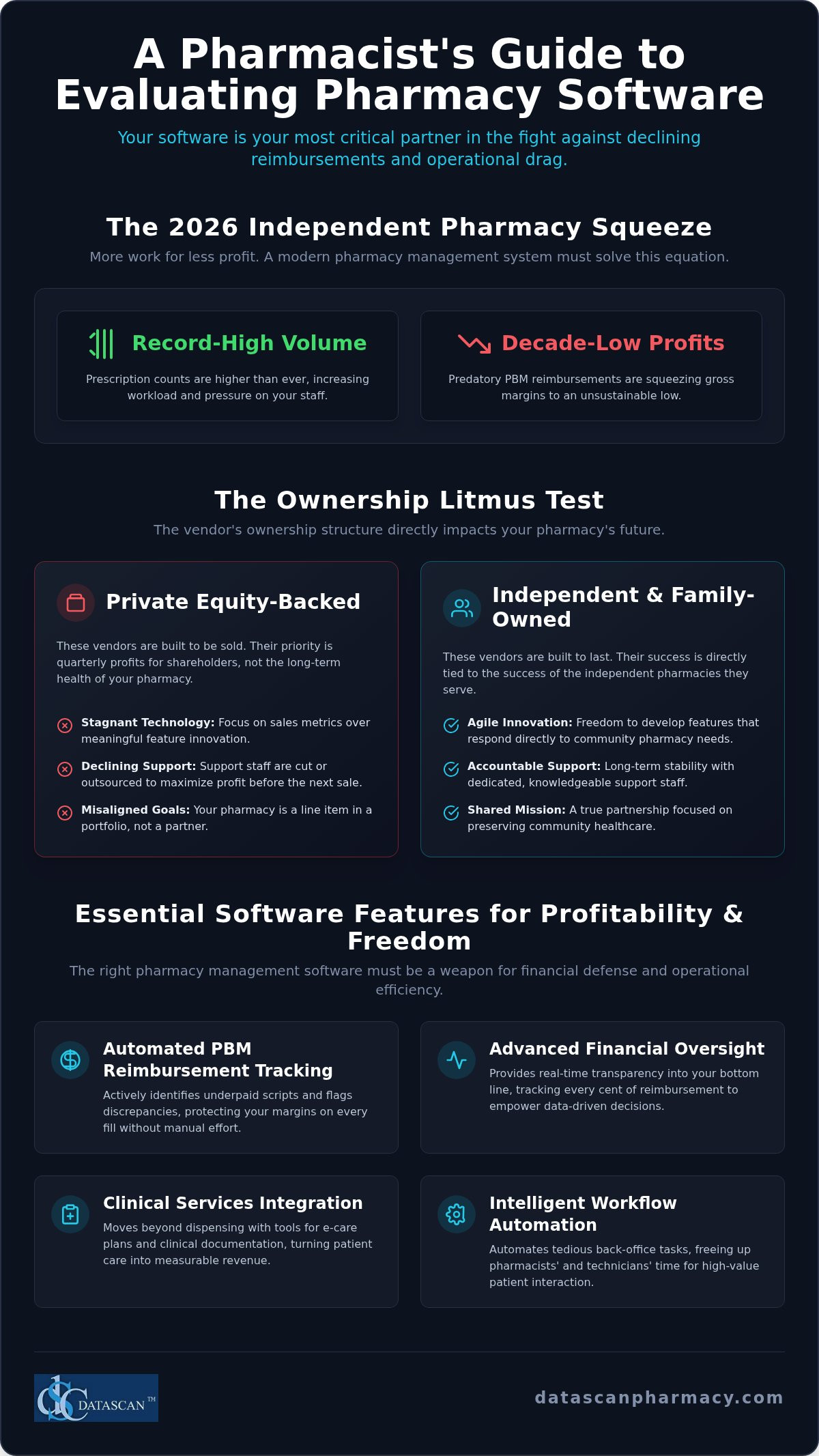
The Consolidated Appropriations Act of 2026 may have finally signed federal PBM reform into law, but for the independent pharmacist standing behind the counter today, those victories feel miles away. You are likely seeing record-high prescription volumes while your gross profits hit decade-long lows, leaving you with more work and less to show for it. When you’re evaluating pharmacy software vendors, you can’t afford to choose a mere utility provider that treats your business like a line item. You need a visionary ally that understands the financial squeeze of predatory reimbursements. The right pharmacy management software should be your strongest advocate, offering the tools you need to reclaim your time and protect your bottom line.
We know you’re tired of waiting on hold for outsourced support or discovering hidden costs buried in complex contracts. This 2026 guide is designed to cut through the noise and help you identify pharmacy software that prioritizes your operational freedom. You will discover how to find a partner that automates tedious reimbursement tracking and provides reliable, US-based support. We’ll explore the critical criteria for selecting a system that transforms your daily workflow from a struggle for survival into a streamlined, profitable success.
Key Takeaways
Understand why your pharmacy management software is your most vital business partnership and how technology requirements have shifted in response to 2026 legislative changes.
Learn why independent, family-owned vendors offer superior accountability and long-term stability compared to private equity-backed firms.
Discover the essential technical features needed to automate PBM reimbursement tracking and protect your pharmacy’s shrinking profit margins.
Simplify the process of evaluating pharmacy software vendors by using a weighted scorecard that prioritizes US-based support and reliable data migration.
Master the art of the live demo to look beyond the sales pitch and find tools that truly free up your time for high-value patient care.
Defining the Stakes: Why Evaluating Pharmacy Software Vendors Matters in 2026
Your choice of technology isn’t just an IT decision. It’s the most critical business relationship you’ll ever form. As we move through 2026, the landscape for community pharmacies has shifted from simple prescription fulfillment to a complex battle for financial survival. When you’re evaluating pharmacy software vendors, you aren’t just buying a tool. You’re choosing an ally. A “utility vendor” might help you print a label, but a “strategic partner” provides the weaponry needed to fight back against declining PBM reimbursements and operational bloat.
This year serves as a pivotal turning point because the industry has reached a breaking point. While federal PBM reforms are finally on the horizon, the immediate reality remains a struggle with record-low gross profits despite increasing prescription volumes. A modern pharmacy management system must do more than just process claims. It must actively protect your margins by identifying underpaid scripts and automating the tedious back-office tasks that steal your time. The right pharmacy management software empowers you to transition from a passive participant in the healthcare system to a proactive, profitable provider.
The Shift from Dispensing to Clinical and Financial Profitability
Survival in 2026 requires a pivot toward clinical services and rigorous financial oversight. Your software must go beyond “lick, stick, and pour” to facilitate e-care plans and clinical documentation that turn patient care into measurable revenue. If a vendor focuses more on their own user-growth metrics than on your pharmacy’s gross profit, they’re a liability. You need integrated tools that prioritize your bottom line by tracking every cent of reimbursement in real time. This level of transparency is essential for overcoming the financial pressure exerted by PBMs and reclaiming your professional autonomy.
Avoiding the Corporate Consolidation Trap
The pharmacy technology market is currently plagued by corporate consolidation. Many vendors have sold out to private equity firms or large wholesalers, which often leads to a sharp decline in support quality and a focus on shareholder returns over feature innovation. When evaluating pharmacy software vendors, prioritize those that maintain their independence to ensure your voice remains heard. Partnering with an independently owned pharmacy software company ensures that your feedback actually matters. You deserve a partner whose success is directly tied to the success of independent pharmacies, not one that views your data as a commodity or treats your support calls as a nuisance to be outsourced.
The Ownership Litmus Test: Why Independent Pharmacies Need Independent Software
Don’t just look at the feature list; look at the boardroom. When you’re evaluating pharmacy software vendors, the most telling metric isn’t the number of lines of code. It’s the ownership structure. Corporate-owned vendors often operate with a looming exit strategy. They’re built to be sold. This creates a culture where quarterly profits for shareholders take precedence over the long-term operational health of your pharmacy. You need a partner whose roadmap is dictated by your needs, not by a private equity firm’s desire to “flip” a tech asset for a quick return.
Ownership directly influences how a company prioritizes its development cycle. An independent vendor has the freedom to innovate rapidly for community needs without waiting for approval from a distant corporate parent. This agility is vital in 2026, as PBM tactics shift faster than ever. When your software provider is an independent entity, they share your “underdog” perspective. They don’t view your pharmacy as a data point or a commodity. They view you as a partner in a shared mission to preserve community healthcare.
Private Equity vs. Family-Owned Stability
Private equity is about the “flip.” These firms buy software companies, lean out the support staff, and inflate growth metrics to attract the next buyer. This cycle leaves you with stagnant technology and a support team that doesn’t know your name. Contrast this with the stability of a family-owned vendor that has served the industry since 1981. A long-term vision allows for continuous investment in pharmacy management software that evolves alongside your business. Stability isn’t just about how long a company has existed; it’s about the consistency of its commitment to your niche.
Advocacy and the Personal Touch
Independence breeds advocacy. A vendor that isn’t beholden to a corporate parent or a wholesaler can speak freely about PBM reform and reimbursement transparency. They become a “Champion of the Independent,” building tools that specifically target underpaid claims because they understand your survival is their survival. This personal touch means you can reach leadership when it matters. It ensures your vendor adheres to the latest health information technology standards for interoperability without charging predatory “integration fees” just to keep their investors happy. If you’re ready to partner with a team that shares your values and understands your daily pressures, it’s time to start a conversation with us to see how we can support your growth.
Choosing an independent software provider ensures that your technology remains a tool for your success rather than a vehicle for someone else’s profit margin. When evaluating pharmacy software vendors, ask about their five-year plan. If that plan involves a merger or acquisition, your pharmacy’s future might be at risk. Secure your operations with a partner that is as committed to independence as you are.
Evaluating Technical Capabilities for PBM Reimbursement and Profitability
When you’re evaluating pharmacy software vendors, the technical specifications shouldn’t just be about processing speed; they must be about financial defense. In 2026, where PBMs continue to squeeze margins despite legislative promises, your Pharmacy Software needs to act as a real-time auditor. It’s about identifying revenue leaks before they become permanent losses. Solving the pharmacy technology puzzle means finding a system that prioritizes your gross profit over mere transaction volume. You need a platform that exposes the spread pricing and underpayments that often hide in plain sight.
Tools to Combat PBM Reimbursement Squeezes
Your Pharmacy management software must flag low-reimbursement claims the moment they are adjudicated. Don’t settle for retrospective reports that tell you how much money you lost weeks ago. You need integrated PBM reconciliation features that track every penny from the initial claim to the final payment. These tools allow independent pharmacies to overcome PBM-driven financial hurdles by providing the granular data needed to challenge underpaid claims or adjust purchasing strategies. Automating medication synchronization is another critical lever. It drives consistent monthly revenue and stabilizes cash flow, ensuring your pharmacy remains a viable healthcare hub in your community.
Workflow Automation for Time-Starved Owners
Time is your most valuable asset, yet most owners are buried in back-office tasks that don’t generate revenue. Implementing high-performance workflow software is the only way to reclaim hours for high-value patient care. Automation should handle the heavy lifting of the dispensing process, reducing the risk of human error and the constant threat of pharmacist burnout. When the system handles routine refills and doctor communications, you’re free to focus on clinical outcomes.
Real-time margin tracking: Know your profit on every script at the point of adjudication.
Automated inventory management: Prevent overstocking and reduce carrying costs with predictive ordering.
Integrated patient engagement: Use technology to drive adherence without manual follow-up calls.
Every second saved by your technology is a second you can spend building patient relationships or exploring new clinical revenue streams. The efficiency of your dispensing process determines your ability to scale without adding expensive overhead. When you choose a partner that values your time, you’re investing in the longevity of your business. If your current system feels like a burden rather than a boost, it’s failing its most basic requirement.
The Service Difference: US-Based Support and the Migration Process
A high-performance system is only as effective as the team standing behind it. When you’re evaluating pharmacy software vendors, response time shouldn’t just be a bullet point on a sales sheet; it should be a binding promise. In the high-stakes environment of 2026, where every minute of downtime translates to lost revenue and frustrated patients, waiting hours for a callback from an offshore call center is unacceptable. You need immediate access to experts who understand the nuances of the American healthcare system and the specific pressures of independent pharmacy operations.
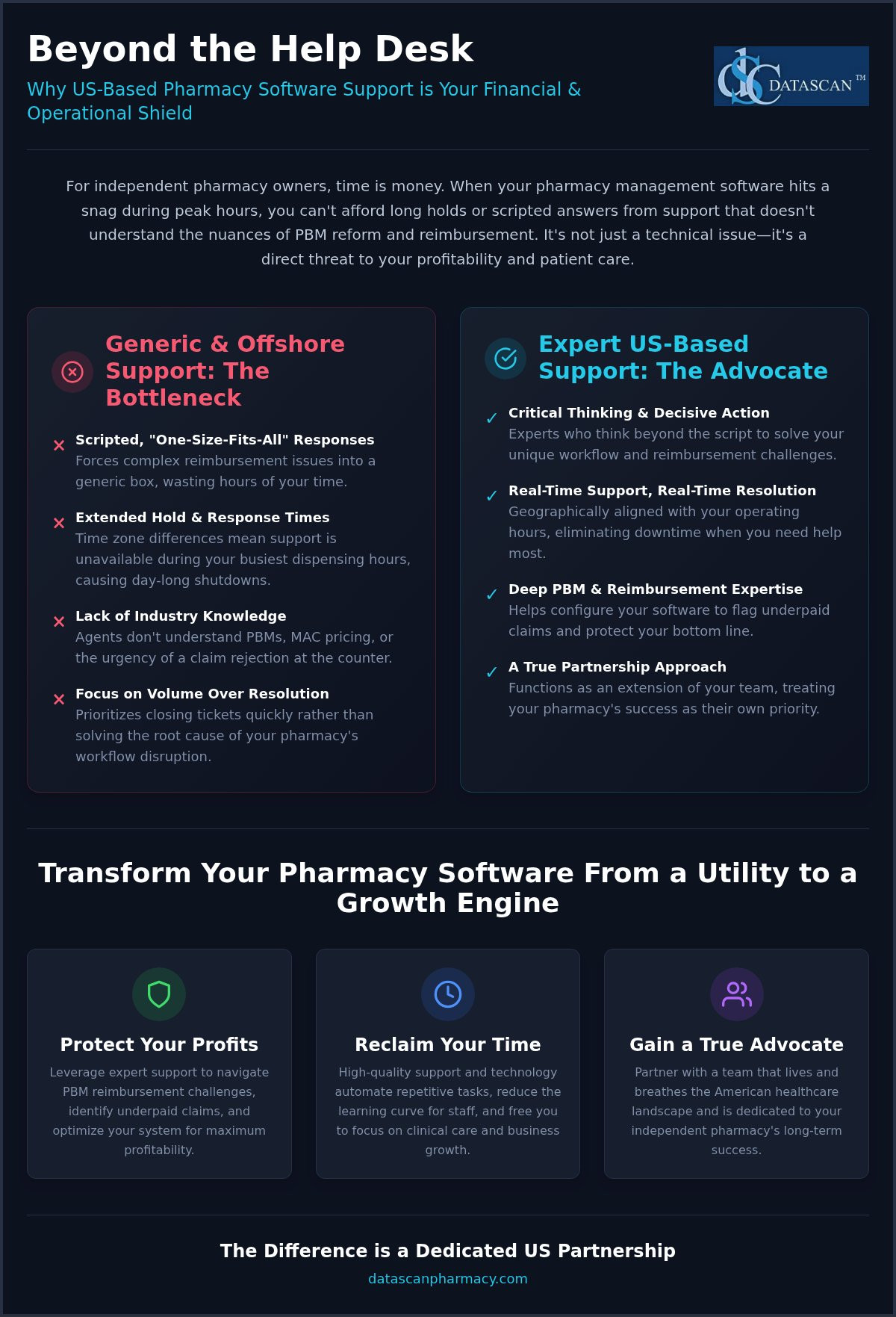
Offshore support often comes with hidden costs that aren’t visible in a contract. Language barriers and a lack of specialized US pharmacy knowledge can turn a simple technical question into a multi-day ordeal. When a vendor outsources their help desk, they’re distancing themselves from your daily struggles. True advocacy means providing a reliable, US-based support team that functions as an extension of your own staff, ensuring your Pharmacy management software remains an asset rather than a liability during peak hours.
The Value of US-Based Technical Support
Talking to a local expert who understands state-specific regulations and PBM complexities is non-negotiable for modern owners. Quality support reduces your daily stress levels and ensures operational continuity, allowing you to focus on patient outcomes rather than troubleshooting. We’ve seen how The Critical Role of US-Based Pharmacy Software Support can be the deciding factor in a pharmacy’s ability to navigate sudden industry shifts. Your vendor should be a partner you can call by name, not a ticket number in a global queue.
Ensuring a Stress-Free Pharmacy Software Conversion
The fear of a messy data migration keeps many pharmacists trapped in outdated systems. However, a structured conversion process can be seamless if your vendor prioritizes record integrity and data mapping. You should demand a clear roadmap that includes comprehensive training for your entire staff before the “go-live” date. To protect your business, always utilize a detailed Data Migration Checklist to ensure no patient records or insurance profiles are lost in transition.
Data Integrity: Verify how historical prescription data and patient notes are preserved.
Staff Training: Ensure your team is proficient with the new Pharmacy software workflow before switching.
Post-Migration Support: Confirm that support staff are on standby during your first week of operation.
Don’t let the threat of a difficult migration stop you from upgrading your technology. If you’re ready to experience a transition backed by decades of experience and a team that actually cares about your success, contact our team today to discuss your custom migration plan. A smooth conversion is the first step toward reclaiming your time and securing your pharmacy’s future.
Final Selection Framework: Choosing the Best Pharmacy Software for Your Future
The final stage of evaluating pharmacy software vendors requires a cold, analytical look at the data you’ve gathered. You shouldn’t just rely on a gut feeling; instead, build a weighted scorecard that ranks each vendor on the pillars of independent success: ownership stability, PBM advocacy tools, and support quality. The best Pharmacy Software isn’t just a product you buy today. It’s a platform that evolves alongside your business to meet the challenges of 2026 and beyond. By quantifying these metrics, you can strip away the marketing gloss and see which partner truly aligns with your long-term profitability goals.
Transparency is the bedrock of a healthy partnership. As you finalize your decision, scrutinize the contract for hidden fees that often plague corporate-owned systems. Look for “integration fees” for wholesalers or “maintenance surcharges” that aren’t clearly defined. A champion of the independent will offer a straightforward agreement that reflects their commitment to your growth rather than their own quarterly dividends. Your Pharmacy management software should be an investment in your freedom, not a financial trap that limits your operational flexibility.
Critical Questions to Ask During Your Demo
The live demo is your opportunity to look beyond the sales pitch and test the software’s real-world utility. Ask about the frequency and cost of future software updates to ensure you won’t be hit with unexpected bills just to keep your system current. Inquire about deep integrations with your existing wholesalers and IVR systems; these connections are vital for maintaining a streamlined workflow. Finally, request references from other independent pharmacies currently using the system. Speaking with a peer who uses the tools daily will provide a level of honesty that no brochure can match.
Calculating Long-Term ROI Beyond the Initial Price
Don’t be blinded by a low entry price that hides a high total cost of ownership. When comparing systems, look at the projected ROI over a 5 to 10-year horizon. Factor in the revenue gains you’ll achieve from improved PBM tracking and the time you’ll reclaim through better workflow automation. For example, a system that identifies just a few underpaid claims per week can pay for itself in months. This analysis helps you understand the true value of a family-owned partner that prioritizes your retention over corporate expansion.
Securing your pharmacy’s future means choosing a partner that understands the high-stakes environment of 2026. When you’re evaluating pharmacy software vendors, remember that you’re choosing the foundation of your business. Select the vendor that offers the best balance of innovative technology, assertive PBM advocacy, and the personal accountability that only an independent company can provide. Your success is the ultimate metric of their performance.
Securing Your Pharmacy’s Legacy in an Evolving Market
The landscape of 2026 demands more than just a software provider; it requires a strategic alliance with a partner that understands the high-stakes reality of independent pharmacy. By prioritizing vendors with an “independent first” mindset, you ensure your technology remains a weapon against PBM pressure rather than a corporate liability. Throughout this guide, we’ve explored how the right pharmacy management software automates reimbursement tracking and provides the US-based support you need to eliminate operational bottlenecks.
When you’re evaluating pharmacy software vendors, remember that your choice defines your pharmacy’s trajectory for the next decade. Datascan has been family-owned and operated since 1981, delivering industry-leading support and built-in tools designed specifically for PBM reimbursement advocacy. Don’t settle for a vendor that views your business as a data point. It’s time to empower your team with technology that prioritizes your gross profit and operational freedom.
Your commitment to your community deserves a technology partner that is just as dedicated to your survival. Take the next step toward a more profitable, streamlined future today.
Frequently Asked Questions
What are the most important features to look for in a pharmacy management software vendor?
Look for tools that prioritize profitability and time management. Essential features include real-time PBM reimbursement auditing, automated medication synchronization, and integrated point-of-sale systems. When evaluating pharmacy software vendors, ensure the platform offers robust reporting that flags underpaid claims at the point of adjudication. It is also vital to select a vendor that provides localized, expert support rather than outsourced call centers. This combination ensures your operations stay efficient while your bottom line remains protected.
How long does the pharmacy software conversion process typically take?
The timeline for a pharmacy software conversion depends on the complexity of your data and the readiness of your team. Typically, the process involves several weeks of preparation, including data mapping and staff training, before the actual “go-live” date. A structured transition ensures that historical prescription records and patient profiles transfer accurately. Working with an experienced vendor that provides a dedicated conversion specialist can significantly minimize downtime and prevent operational disruptions during the switch.
Why should I avoid pharmacy software vendors owned by private equity firms?
Private equity-backed firms often operate with a focus on short-term quarterly gains and eventual exit strategies. This mindset can lead to reduced investment in customer support and stagnant feature development as they look to cut costs to satisfy shareholders. In contrast, family-owned companies maintain a long-term commitment to the industry. They prioritize the success of their clients because their own reputation is tied to the longevity of the independent pharmacies they serve.
Can modern pharmacy software really help me improve my PBM reimbursements?
Yes, advanced pharmacy management software is designed to audit claims in real time. These systems flag underpaid scripts at the point of adjudication, allowing you to address issues before they become permanent losses. By providing granular data on spread pricing and DIR fees, the right technology acts as your strongest advocate against PBM pressure. This level of financial transparency is essential for identifying revenue leaks and protecting your pharmacy’s shrinking margins in a competitive market.
Is US-based support actually better than offshore support for pharmacies?
US-based support is superior because it provides access to experts who understand the specific regulatory and insurance landscape of the American healthcare system. Offshore call centers often struggle with language barriers and a lack of specialized pharmacy knowledge, leading to longer resolution times. When a critical issue arises during peak hours, you need a partner who can communicate clearly and solve technical problems immediately without the frustration of waiting in a global queue.
What should I ask during a pharmacy software demo to ensure it fits my workflow?
During a demo, ask the vendor to show you the exact steps for processing a complex claim or managing a refill request. Inquire about the frequency of software updates and whether there are hidden costs for wholesaler integrations. It is also wise to ask for references from other independent pharmacies. This allows you to verify how the pharmacy system handles real-world pressures and whether the support team is as responsive as the sales pitch suggests.
How does pharmacy software help in reducing pharmacist burnout?
Technology reduces burnout by automating repetitive, time-consuming tasks like medication synchronization and patient refill reminders. When your pharmacy system software handles these routine operations, your staff can focus on high-value clinical services and patient interactions. Streamlined workflows eliminate the click-heavy administrative burdens that lead to mental fatigue. This allows you to run a more efficient business with a smaller, more focused team that isn’t overwhelmed by back-office manual labor.
What is the average cost of switching to a new pharmacy software system?
The cost of switching varies based on your specific needs, including the volume of data being migrated and the number of workstations required. Rather than just looking at the initial licensing fee, evaluate the total cost of ownership over several years. Consider the revenue gains from better PBM tracking and the time saved through automation. A pharmacy software partner that offers transparent pricing without hidden maintenance surcharges often provides the best long-term return on investment.
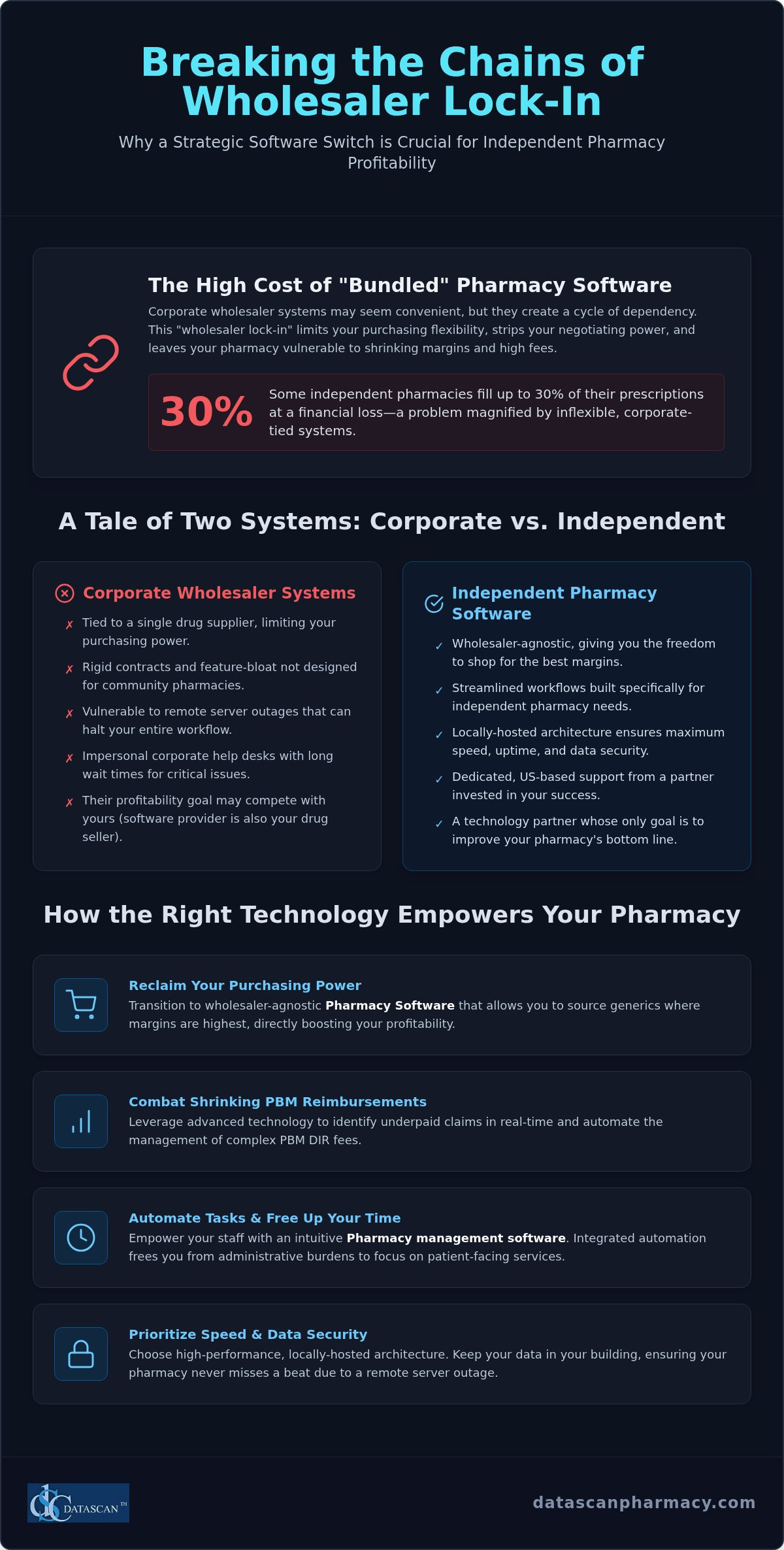
The “safe” choice of staying with a corporate wholesaler’s system might actually be the biggest risk to your pharmacy’s future in 2026. While these massive systems promise integration, they often create a cycle of wholesaler lock-in that limits your purchasing flexibility and leaves you vulnerable to high subscription fees. If you’re searching for the best McKesson pharmacy software alternative, you’re likely realizing that true independence requires a system built for your bottom line, not a corporate shareholder’s. You’re already fighting a battle where some independents fill 30% of prescriptions at a financial loss, so your pharmacy software must act as your strongest advocate rather than another monthly burden.
It’s frustrating to feel like a small fish in a corporate pond, especially when you’re facing the administrative weight of new PBM audit triggers and the complexities of the Consolidated Appropriations Act. We believe your pharmacy management software should protect your time rather than drain it. This article explores how switching to a dedicated, family-owned provider helps you bypass delayed corporate support, manage PBM reimbursements more effectively, and implement automation that frees you to focus on high-margin clinical services. Discover how the right technology can transform your operational struggles into streamlined, profitable success by decoupling your business from corporate constraints.
Key Takeaways
Reclaim your purchasing power by transitioning to wholesaler-agnostic pharmacy software that allows you to source generics where margins are highest.
Discover why high-performance, locally-hosted architecture is becoming the best McKesson pharmacy software alternative for owners who prioritize system speed and data security.
Streamline your transition with a structured conversion process that prioritizes data integrity and network optimization to ensure your pharmacy never misses a beat.
Leverage advanced technology to combat shrinking margins by identifying underpaid claims in real-time and automating the management of complex PBM DIR fees.
Empower your staff and free up your schedule for patient-facing services through integrated automation and dedicated US-based technical support.
Beyond Wholesaler Lock-in: Why Owners Seek a McKesson Alternative
Many independent pharmacy owners feel trapped by systems subsidized by their primary wholesaler. It looks like a great deal on the surface, but the hidden costs are often buried in your generic purchasing requirements. When your pharmacy management software is tied directly to your drug supplier, your negotiating power disappears. You aren’t just buying a tool; you’re signing away your ability to shop the market for better margins. Finding the best McKesson pharmacy software alternative is the first step toward breaking this cycle and reclaiming your pharmacy’s financial health in 2026.
The Limitations of EnterpriseRx for Small Pharmacies
EnterpriseRx is built for the scale of a corporate giant, but that complexity often translates to feature-bloat for a community pharmacy. Technicians shouldn’t have to click through ten screens to process a simple script. Rigid corporate contracts further strip away your business agility, making it difficult to pivot when market conditions change. Since these systems are often fully hosted, your local workflow is at the mercy of their remote servers. If their connection drops, your pharmacy stops. A locally-hosted system ensures you maintain control, keeping your data where it belongs: in your building. Corporate help desks often treat independent owners like a ticket number, leaving you waiting for days while your workflow suffers. You need a partner that offers accountability that a multi-billion dollar corporation simply cannot match.
Why Independence Matters in Pharmacy Management Software
True independence means choosing a vendor that doesn’t compete with you. When your software provider also sells pharmaceuticals, their primary goal isn’t always your profitability. Independent pharmacy software should empower you to use inventory cost-averaging to your advantage. By using a wholesaler-agnostic system, you can source generics from multiple secondary suppliers without technical friction. This flexibility is vital as you deal with every Pharmacy Benefit Manager (PBM) that tries to squeeze your reimbursements. You need a system that works for you, not your wholesaler.
2026 is the year to reclaim your data and your time. Waiting on a corporate help desk isn’t a viable business strategy. You need a “Visionary Ally” that understands the “underdog” mentality and provides the tools to fight back against shrinking margins. The best McKesson pharmacy software alternative isn’t just about changing the icons on your desktop. It’s about restoring your right to run your business on your own terms with technology that prioritizes your bottom line.
Best McKesson Pharmacy Software Alternative: A 2026 Comparison
Industry publications often claim that shifting to remote, off-site systems modernizes patient care, but many independent owners discover that these corporate models actually introduce latency and risk. When evaluating the best McKesson pharmacy software alternative, you must look beyond the marketing gloss of off-site tools and focus on system architecture that prioritizes uptime. A locally-managed Pharmacy management software provides the reliability your community depends on, ensuring that your dispensing workflow never stops because of a remote server outage. This stability is the foundation for driving revenue through clinical tools and medication synchronization rather than fighting your own technology.
Datascan vs. McKesson: Feature Breakdown
While EnterpriseRx focuses on centralized management for massive chains, our Pharmacy Management Software is built specifically for the high-touch environment of a community pharmacy. We prioritize dispensing workflows that require fewer clicks, allowing your technicians to process scripts with greater precision and speed. Unlike corporate systems that require expensive third-party add-ons, our suite includes fully integrated modules for compounding, 340B management, and nursing home services. This integration ensures that your data flows seamlessly between departments without the technical friction common in “bolted-on” software solutions. By keeping everything under one roof, you eliminate the hidden costs of multiple vendors and streamline your daily operations.
Switching from Computer-Rx or McKesson
Most owners decide to switch when they reach a breaking point with support fatigue or rising subscription fees that don’t reflect the value received. Switching from a legacy system or a corporate giant is a strategic move to reclaim your pharmacy’s identity. We have been family-owned and operated since 1981, providing a level of accountability and US-based support that large corporations simply cannot replicate. Implementing modern Workflow Software is the most effective way to reduce pharmacist burnout, as it automates the repetitive tasks that drain your energy. This transition isn’t just about new Pharmacy Software; it’s about partnering with an ally that understands the specific pressures of PBM reimbursements and staffing shortages. If you’re ready to see how a system designed for the independent underdog can transform your store, it might be time to schedule a personalized demo to explore your options.
Navigating the Pharmacy Software Conversion Process
The fear of a messy data migration often keeps pharmacy owners tethered to corporate systems that no longer serve them. We understand that your patient records and prescription history represent decades of hard work. Transitioning to the best McKesson pharmacy software alternative shouldn’t feel like a leap into the dark; it should be a methodical march toward operational freedom. Our process is designed to eliminate the anxiety of “go-live” day by focusing on precision and preparation long before the first script is filled on the new system.
A successful conversion follows five critical stages:
Step 1: Data extraction and pre-conversion cleanup. We scrub your existing data to ensure that only accurate, high-quality information enters your new system.
Step 2: Hardware evaluation and network optimization. We verify that your local infrastructure is primed for maximum speed and security.
Step 3: Staff training and workflow simulation. Your team practices in a risk-free environment to build confidence and proficiency.
Step 4: The go-live day. Our US-based support provides onsite or remote guidance to ensure a seamless transition.
Step 5: Post-conversion optimization and profit auditing. We help you use your new tools to identify underpaid claims and recover lost revenue immediately.
Ensuring Data Integrity During Migration
Corporate giants often make it difficult to export your own information, but we specialize in navigating these complex extractions. Protecting the continuity of care is our top priority. We align our migration standards with industry leaders like the Pharmacy Health Information Technology Collaborative to ensure interoperability and security. For a granular look at how we protect your pharmacy’s lifeblood, refer to our Pharmacy Software Data Migration Process for a full checklist.
Minimizing Downtime for Your Staff
A system is only as good as the people using it. We’ve developed an intuitive UI that mirrors the logic of a busy pharmacy, significantly reducing the learning curve for your technicians. Expert implementation support is non-negotiable because your pharmacy cannot afford to close its doors during a software switch. By following our Pharmacy Software Implementation Plan, you gain a clear roadmap that minimizes disruption to your daily workflow. This structured approach allows you to focus on patient care while we handle the technical heavy lifting, ensuring you reclaim your time and profitability without the typical headaches of a corporate transition.
Prioritizing Profitability: PBM Reimbursements and DIR Fees
Profitability in 2026 isn’t just about volume; it’s about precision. With some independent pharmacies reporting that they fill as many as 30% of prescriptions at a financial loss due to aggressive PBM practices, your Pharmacy management software must act as a financial watchdog. The best McKesson pharmacy software alternative doesn’t just process scripts. It provides real-time alerts when a claim is underpaid, allowing you to address the issue before the patient leaves the counter. By replacing generic data insights with profit-focused reporting, you can see exactly where your margins are being squeezed and take immediate corrective action.
Overcoming PBM Reimbursement Challenges
The landscape is shifting with the Consolidated Appropriations Act of 2026, which began banning spread pricing in new contracts on January 1, 2026. While this is a win for transparency, PBMs are responding with more aggressive audit triggers. You need Pharmacy Software that supports your advocacy by tracking gross profit at the point of dispensing. Our business intelligence dashboards transform raw data into actionable growth strategies, helping you navigate the transition as PBMs are forced to pass through 100% of rebates to plan sponsors. Instead of being blindsided by retroactive adjustments, you can use automated tools to manage and mitigate DIR fees, ensuring your bank account reflects your hard work. When evaluating pharmacy software vendors in this environment, it’s critical to prioritize platforms that offer proactive reimbursement tracking rather than reactive reporting.
Reclaiming Time for Community Pharmacy Owners
Technology should work for you, not the other way around. By automating mundane administrative tasks, you can finally shift your focus toward high-margin clinical services like Medication Therapy Management (MTM). Our MobileScripts patient mobile app significantly reduces phone call volume, freeing your technicians from the constant interruption of refill requests. This “Visionary Ally” approach saves hours of administrative labor every week, allowing you to engage more deeply with your patients. When your Point of Sale (POS) and dispensing systems are perfectly synced, you eliminate redundant data entry and reclaim your most valuable asset: your time. If you are ready to stop filling at a loss and start growing your bottom line, contact our team today to see our profit-recovery tools in action.
Why Datascan is the Logical Choice for Independent Pharmacies
Choosing the best McKesson pharmacy software alternative is a decision that defines your store’s trajectory for the next decade. While corporate entities prioritize shareholder returns and quarterly reports, we focus exclusively on the tools that keep independent pharmacies operational and profitable. We understand that you aren’t just looking for a vendor; you’re looking for a partner that shares your underdog spirit and provides the technical firepower to compete with massive retail chains. Our architecture provides the stability you need, while our continuous innovation cycle ensures you stay ahead of market trends without the drag of corporate bureaucracy.
The Human Element: US-Based Pharmacy Software Support
In a high-pressure environment, the last thing you need is a generic ticketing system that treats your emergency like a routine request. Calling a family-owned company means reaching experts who understand your workflow and share your values. We maintain a culture of accountability where every interaction is designed to solve problems, not just close tickets. This level of dedication is why many owners view us as their most reliable partner in an increasingly complex industry. You can read more on the Critical Role of US-Based Support to understand how localized expertise impacts your daily efficiency and peace of mind.
A Future-Proof Pharmacy Management System
As we navigate the shifts of 2026, from PBM transparency mandates to rising operational costs, your Pharmacy management software must be agile enough to adapt. We empower your pharmacy to thrive by providing advanced business intelligence and integrated tools that corporate systems often overlook. Our suite, including Compounding Pharmacy Software and the Datascan Mobile Delivery App, is designed to expand your revenue streams beyond traditional dispensing. This isn’t just about survival; it’s about building a future-proof enterprise that remains a pillar of your community.
The transition to a better system is the most impactful step you can take to reclaim your profitability and time. Don’t let corporate constraints dictate your success when a specialized solution is within reach. We invite you to schedule your Datascan demo today and see why we are the preferred choice for pharmacies reclaiming their independence. Our team is ready to show you how our Pharmacy Software can transform your operational burdens into streamlined successes.
Reclaim Your Independence and Profitability Today
The landscape for community pharmacies in 2026 demands more than just a dispensing tool; it requires a strategic partner that fights for your bottom line. By breaking free from wholesaler lock-in, you regain the flexibility to source generics at competitive prices and manage your inventory with total transparency. We’ve seen how specialized PBM reimbursement tools and automated workflow features can transform operational burdens into streamlined successes, allowing you to focus on high-margin clinical services. For owners searching for the best McKesson pharmacy software alternative, the logical path leads toward a system that prioritizes your store’s unique needs over corporate interests.
Datascan has been family-owned since 1981, providing the stability and heritage that corporate giants simply cannot match. Our 100% US-based support team understands the specific pressures you face, offering the personal accountability you deserve. You don’t have to settle for shrinking margins or delayed help desk tickets. It’s time to empower your pharmacy with technology that works as hard as you do. Discover the Datascan Difference: Schedule Your Demo and see how we can help you thrive in this evolving market. Your journey toward a more profitable and efficient future starts with a single conversation.
Frequently Asked Questions
What makes Datascan the best McKesson pharmacy software alternative?
Datascan stands out as the best McKesson pharmacy software alternative because it restores your independence from corporate wholesaler constraints. We offer a wholesaler-agnostic platform that prioritizes your store’s profitability rather than a corporate drug supplier’s bottom line. Our family-owned heritage since 1981 ensures you receive personalized, US-based support that understands the unique pressures of the independent underdog. You get a robust pharmacy software suite that includes integrated point-of-sale and clinical tools without corporate bureaucracy.
How difficult is the pharmacy software conversion from EnterpriseRx?
We’ve refined the pharmacy software conversion process into a methodical five-stage transition that prioritizes data integrity. While corporate giants often make data extraction difficult, our team specializes in navigating these complex migrations from systems like EnterpriseRx. We handle the heavy lifting of data cleanup and network optimization so your technicians stay focused on patients. With workflow simulations and onsite or remote go-live support, we ensure your pharmacy experiences minimal disruption during this essential upgrade.
Can Datascan help my pharmacy manage and reduce DIR fees?
Yes, our pharmacy management software acts as a financial watchdog by identifying underpaid claims and mitigating DIR fees in real-time. We provide profit-focused reporting that replaces generic data insights, allowing you to see exactly where PBMs are squeezing your margins. By tracking gross profit at the point of dispensing, you can address underpayments before the patient leaves. This proactive approach helps you reclaim revenue that often gets lost in the complexity of corporate systems.
Does Datascan offer US-based support for its pharmacy systems?
We provide a 100% US-based support team that shares your independent values and understands the urgency of your daily workflow. Unlike corporate help desks that treat you like a ticket number, our family-owned company offers direct accountability and expert guidance. When you call about your pharmacy systems, you speak with a professional who is dedicated to your success. This supportive partnership ensures that technical issues don’t stand in the way of providing excellent patient care.
Is Datascan compatible with all major wholesalers?
Our pharmacy software is completely wholesaler-agnostic, giving you the freedom to source generics from any supplier that offers the best margins. We believe independence is the key to survival in 2026, so we don’t lock you into rigid purchasing requirements. This flexibility allows you to use inventory cost-averaging to your advantage. By decoupling your software from your wholesaler, you reclaim the power to negotiate and shop the market for better pricing across the industry.
How does the cost of Datascan compare to corporate pharmacy software?
While corporate vendors often promise subsidized software, the hidden costs usually appear in restricted generic purchasing or high monthly subscription fees. Datascan provides a value-driven alternative that prioritizes your pharmacy’s long-term financial health. By using our pharmacy management software, you eliminate the indirect costs of wholesaler lock-in and gain tools that actively recover lost profits. The investment in a dedicated system often pays for itself through improved reimbursement tracking and reduced administrative labor.
What clinical features are included in Datascan pharmacy management software?
Our pharmacy management software includes a comprehensive suite of clinical tools designed to diversify your revenue streams. We offer integrated modules for medication synchronization, e-care plans, and MTM services that are less dependent on PBM reimbursements. You also gain access to specialized compounding and 340B management tools within the same platform. These features empower you to provide high-margin clinical care while our automation handles the repetitive tasks that typically cause pharmacist burnout and staffing stress.
Can I use my existing hardware when switching to Datascan?
We conduct a thorough hardware evaluation and network optimization as part of our implementation process to determine if your existing equipment is compatible. While we don’t sell hardware ourselves, we ensure your local infrastructure is primed for the speed and security our software requires. If your current machines meet the necessary specifications, we can often integrate them into your new pharmacy system. This approach helps minimize initial setup costs while ensuring your workflow remains fast and reliable.
Imagine standing in your pharmacy after hours, staring at a decade of patient records and wondering if a single glitch during your pharmacy software data migration process could trigger a disastrous PBM audit. It’s a common nightmare for independent owners who feel chained to legacy systems because the fear of losing prescription history or missing PBM reimbursements feels too risky to ignore. You’ve worked too hard to build your legacy to let a technical transition jeopardize your compliance or your patient’s safety.
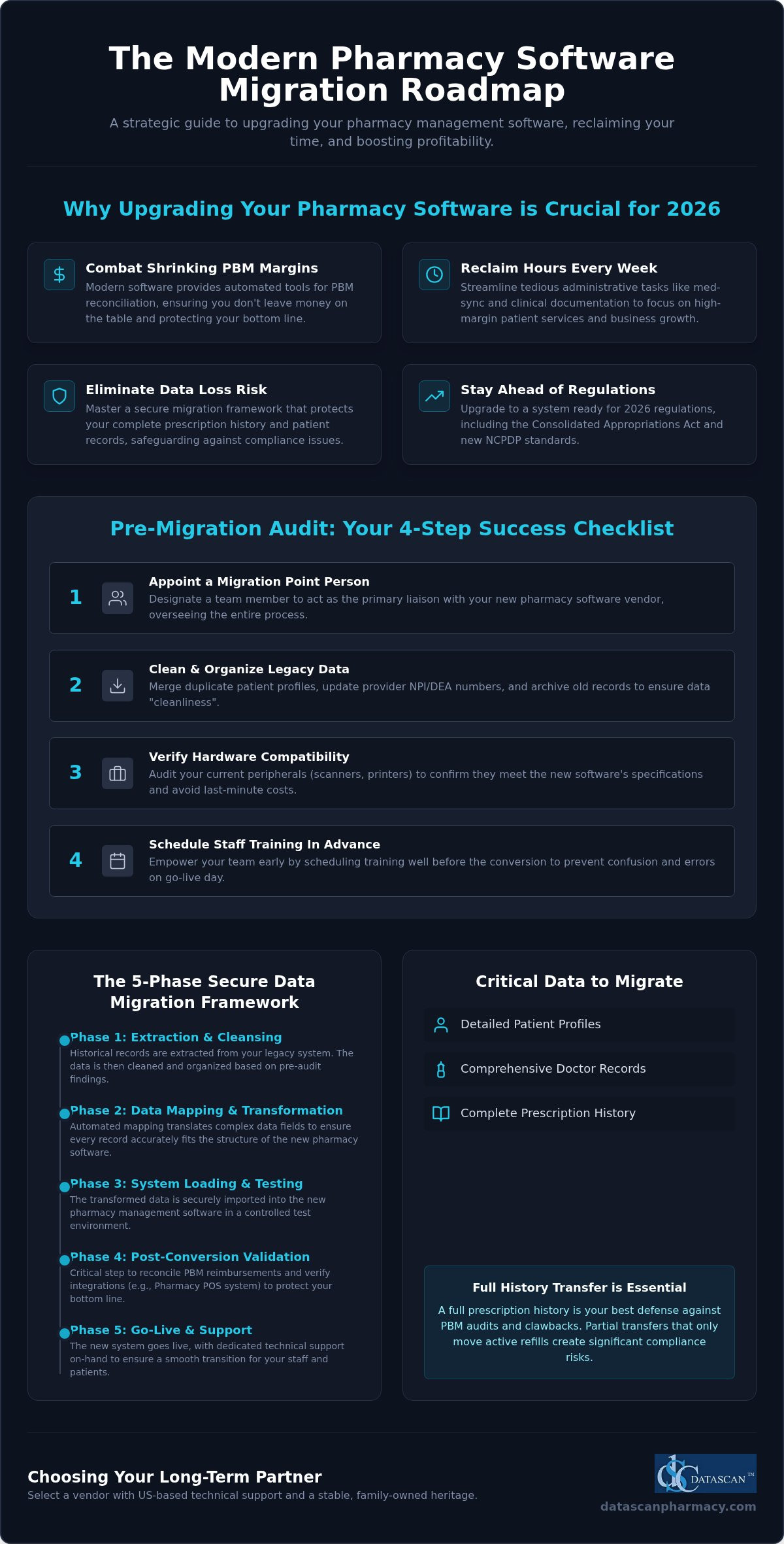
We agree that your pharmacy management software is the heartbeat of your operations, and switching should empower your growth rather than cause operational paralysis. This guide promises to transform that anxiety into a strategic advantage by providing a comprehensive, stress-free roadmap designed specifically for the modern independent pharmacy owner. We will preview the essential 2026 checklist, including how to navigate the Consolidated Appropriations Act’s transparency requirements and the latest NCPDP standards, while ensuring your new pharmacy software helps you reclaim your time and maximize profitability.
Key Takeaways
Discover why upgrading your pharmacy management software is the most effective way to reclaim your time and combat shrinking PBM margins in 2026.
Learn how to conduct a comprehensive pre-migration audit of your current pharmacy computer software to ensure data cleanliness and hardware compatibility.
Master the 5-phase framework for a secure pharmacy software data migration process that eliminates the risk of missing prescription history or patient records.
Protect your bottom line by implementing post-conversion validation steps that reconcile PBM reimbursements and verify your pharmacy POS system integration.
Identify the critical criteria for selecting pharmacy software companies that offer US-based technical support and a stable, family-owned heritage.
What is the Pharmacy Software Data Migration Process?
The data migration process in a pharmacy setting is a high stakes technical conversion where your historical records are extracted from a legacy system and imported into a new platform. It is far more than a simple file copy; it involves the sophisticated translation of complex medical and financial data to ensure your new pharmacy software functions perfectly from day one. In 2026, independent pharmacies are increasingly initiating this transition to stay ahead of federal PBM reforms, such as the Consolidated Appropriations Act, which requires more granular reporting than many older systems can provide.
During a typical migration, several critical data types are moved to the new system. These include detailed patient profiles, comprehensive doctor records, and your entire prescription history. You’ll need to decide between a partial transfer, which only moves active refills, or a full history transfer. For most independent owners, a full history is the only viable path. Audits from PBMs often require records dating back years, and having that data readily accessible in your Pharmacy management software is your best defense against clawbacks.
The Strategic Importance of Modern Rx Software
Your current system shouldn’t be a bottleneck that stifles your growth. Outdated technology often lacks the automated tools necessary for effective PBM reconciliation, meaning you could be leaving significant money on the table every month. Upgrading to modern pharmacy management software allows you to reclaim hours of your week by streamlining tedious administrative tasks. When your technology handles the heavy lifting of med-sync and clinical documentation, you can finally focus on the high margin services that keep your business competitive in a challenging market.
Manual vs. Automated Data Conversions
Don’t fall into the trap of thinking manual data entry is a safe way to save money during a switch. The human error associated with manual moves is a massive liability that can lead to dangerous medication errors or lost accounts receivable data. A professional pharmacy software data migration process uses automated mapping to ensure every data field translates accurately between systems. You need a vendor with a proven track record who understands the specific nuances of independent pharmacy workflows. Precision in mapping ensures that your patient’s history remains intact, protecting both their safety and your pharmacy’s professional reputation.
Pre-Migration Audit: Preparing Your Pharmacy Management Software
Before you begin the actual technical transfer, you must evaluate the state of your current records. A successful pharmacy software data migration process starts months before the first line of code is moved. You need to appoint a “point person” on your team who understands your current workflow and can act as the primary liaison with your new software vendor. This individual will oversee the auditing of your current pharmacy computer software to ensure data “cleanliness” while verifying that your existing hardware, such as thermal printers and barcode scanners, meets the specifications for your new Pharmacy management software. Don’t assume your legacy peripherals will work; a proactive hardware audit prevents costly last-minute purchases during your go-live week.
Training shouldn’t be an afterthought. Schedule your staff training sessions well in advance of the conversion. Confusion on Day 1 leads to frustrated patients and potential dispensing errors. By empowering your team early, you transform a stressful transition into an opportunity for operational growth. If you have questions about how to structure your team’s prep, it’s often helpful to speak with a migration specialist who understands independent workflows and the unique challenges of community pharmacy.
Cleaning and Organizing Your Legacy Data
“Garbage in, garbage out” is a reality in data science. Use the months leading up to your switch to merge duplicate patient profiles and update provider NPI and DEA numbers. This level of precision is vital for successful data migrations in the pharmaceutical space. For those interested in how data query hubs manage their pricing, you can explore Taxas de assinatura mensal e cobrança por volume de consultas via API. Archiving prescription history that is no longer needed for active dispensing or legal compliance will streamline the conversion and improve the speed of your new Pharmacy Software. Cleaning your database now prevents your new system from being bogged down by outdated, irrelevant information that could complicate future PBM audits.
A firm “Go-Live” date provides your team with a clear target. Avoid peak periods like the first of the month or flu season to minimize business disruption. Your Pharmacy Software Implementation Plan should also include a communication strategy for your patients and local providers. Transparency builds trust. Letting them know you’re upgrading to a better system ensures they understand any minor delays during the first few days of the transition. This proactive approach protects your pharmacy’s reputation while you optimize your technology for better profitability and patient care. Following this structured pharmacy software data migration process ensures that your focus remains on your patients, not on technical hurdles.
The 5-Phase Conversion Framework: How Your Data Moves Safely
Moving your life’s work into a new system requires a methodical approach that leaves zero room for error. A structured 5-phase framework ensures that your pharmacy software data migration process remains secure and transparent. This isn’t just about moving files; it’s about preserving the integrity of every clinical decision you’ve ever recorded. By following a disciplined path, you transform a technical hurdle into a seamless business upgrade.
Phase 1: Extraction. Your vendor pulls the raw data from your legacy local database. This step requires precision to ensure no records are left behind in the old environment.
Phase 2: Mapping. This involves translating data fields so the new Pharmacy management software understands the old data structure. It’s the “translation” layer of the conversion.
Phase 3: Testing. You’ll perform a “mock conversion.” This is a dress rehearsal that allows you to identify and fix errors before they ever touch a live patient record.
Phase 4: Validation. Your pharmacy team manually reviews patient and Rx records for accuracy. This aligns with the Health IT data migration policy regarding quality assurance.
Phase 5: Final Cutover. The big day. This is the live transition where the most recent records are moved, and you officially begin dispensing on your new system.
Data Mapping and Integrity Standards
Mapping is the most technical part of the pharmacy software data migration process. It involves translating SIG codes and directions so your workflow remains uninterrupted. For pharmacies that specialize in custom medications, maintaining Datascan Compounding Solutions formulas and specialized patient notes is a top priority. A visionary ally ensures that your complex formulas and titration schedules translate perfectly. This prevents you from having to re-key data that took years to develop, protecting your time and your patients.
Security Architecture and HIPAA Compliance
Protecting patient privacy is non-negotiable. During the transfer, your data must be encrypted while moving between local servers to prevent unauthorized access. Maintaining a clear audit trail for every migrated prescription record is essential for future compliance and PBM transparency. This is why US-based technical support is so vital. You need a partner who understands domestic HIPAA regulations and can provide immediate, accountable assistance if a security question arises. By keeping your data local and your support domestic, you eliminate the risks associated with offshore corporate giants and ensure your records remain safe and accessible.
Post-Conversion Validation: Protecting Your PBM Reimbursements
The live cutover marks the end of the technical heavy lifting, but the success of your pharmacy software data migration process is truly measured in the 30 days that follow. You can’t afford to assume that every financial record and PBM contract link moved perfectly. This is the time to aggressively reconcile your open accounts receivable and verify that every pending PBM claim is accounted for in your new Pharmacy management software. If you don’t catch discrepancies now, they’ll become permanent losses that erode your margins. We advocate for a rigorous review period where every high-dollar claim is double-checked against your legacy records.
Testing your Datascan Point of Sale integration is equally vital. Your front-end transactions must sync flawlessly with your Rx records to maintain accurate inventory and financial reporting. Additionally, you must manually validate that your medication synchronization programs transferred correctly. Med-sync is the engine of your pharmacy’s efficiency; any break in the cycle can disrupt patient adherence and lead to a sudden drop in prescription volume. Monitoring your workflow efficiency during this first month allows you to tweak settings and ensure your team is maximizing the power of your new technology.
Optimizing Workflow with Your New System
For independent pharmacies looking to expand their front-end retail presence, adopting a commerce operations platform like Ommni can help manage complex product data and inventory at an enterprise scale, ensuring your business remains competitive across all sales channels.
Once the data is validated, your focus shifts to leveraging the superior technology at your fingertips. High-performance Datascan Workflow Software allows you to set up automated refill reminders and patient notifications that keep your pharmacy top-of-mind without adding to your staff’s workload. Use your new business intelligence tools to track profitability in real-time. By monitoring your gross margins daily during the first month, you can identify and correct any PBM reimbursement issues before they impact your cash flow. This proactive optimization is what separates stagnant pharmacies from those that thrive.
PBM Reconciliation and Financial Integrity
PBMs aren’t going to tell you if a claim is underpaid during a system switch. You must use your new Pharmacy Software to identify claims where the reimbursement doesn’t match your contracted rates. Verifying that patient charge accounts and historical balances are accurate protects your relationship with your most loyal customers. In 2026, financial validation is defined as the rigorous cross-referencing of legacy ledger data against real-time PBM remittance advice to ensure total fiscal transparency in an era of mandatory rebate reporting. This level of scrutiny ensures that your transition is a financial win, not just a technical one.
Don’t leave your pharmacy’s financial health to chance during a transition. If you’re concerned about how a switch might impact your bottom line, schedule a consultation with our team to see how our validation process protects your reimbursements.
Selecting a Pharmacy Software Vendor for Long-Term Success
Choosing your next Pharmacy management software is a high stakes decision that will define your pharmacy’s trajectory for the next decade. You aren’t just buying a tool; you’re selecting a partner to guide you through the complexities of the pharmacy software data migration process and beyond. In a market increasingly dominated by massive, impersonal corporations, independent owners must look for vendors that share their values of autonomy and resilience. Many pharmacies currently locked into a corporate wholesaler’s ecosystem are actively searching for the best McKesson pharmacy software alternative that prioritizes their independence over a shareholder’s bottom line. A family-owned provider with a legacy dating back to 1981 offers a level of accountability and personal touch that a publicly traded entity simply cannot replicate.
Longevity matters in this industry. When a software company has spent decades focusing solely on the independent market, their features reflect the actual needs of community pharmacists. This stability ensures that your system won’t be sunsetted after a corporate acquisition or left behind as technology evolves. You need a partner who views your success as their own, offering the sophisticated tools required to outmaneuver big chains while maintaining the heart of a local business. Before committing to any platform, evaluating pharmacy software vendors against a structured 2026 framework can help you avoid costly mistakes and identify the ally your independent pharmacy truly deserves.
The Critical Role of US-Based Support
On your live cutover day, every second counts. You don’t want to be routed to an offshore call center where the technicians don’t understand the nuances of the US pharmacy market or the intricacies of PBM reconciliation. Having US-Based Pharmacy Software Support means you’re speaking with experts who can troubleshoot issues in real time. This immediate access minimizes downtime and ensures your patients aren’t left waiting at the counter. Expert support teams understand that for an independent, your reputation is your most valuable asset, and they work with a sense of urgency to protect it during the final stages of your pharmacy software data migration process.
Future-Proofing Your Independent Pharmacy
The pharmacy industry moves fast. Your Pharmacy Software needs to evolve as quickly as the regulations and reimbursement models do. Look for a vendor that continuously integrates innovative features like med-sync, e-care plans, and patient-facing mobile applications that drive retention. By focusing on technology that frees up your time, you can shift your energy toward high-margin clinical services that bolster your bottom line. You already have the personal touch; now you need the cutting-edge tools to back it up. If you’re ready to see how a partner-focused approach can transform your business, Schedule a Demo of Datascan Pharmacy Management Software today.
Secure Your Legacy with a Future-Proof Transition
Mastering the pharmacy software data migration process is more than a technical necessity; it’s a strategic move to reclaim your time and protect your bottom line from shrinking PBM margins. By following a disciplined 5-phase framework and conducting a rigorous pre-migration audit, you ensure that every patient record and compounding formula remains a secure asset. Your technology should work as hard as you do, providing the business intelligence needed to thrive in a competitive market.
Don’t settle for corporate vendors that treat your independent pharmacy like just another number on a spreadsheet. Since 1981, our family-owned business has provided US-based expert technical support designed specifically for the unique pressures of community pharmacy. We understand that your data is your life’s work, and we’re committed to helping you transform operational burdens into streamlined successes.
Your community relies on your expertise. Give them the best care possible by empowering your team with a system that prioritizes your independence and profitability.
Frequently Asked Questions
How long does the pharmacy software data migration process typically take?
The typical pharmacy software data migration process spans 60 to 90 days from the initial contract signing to your actual go-live date. This timeframe allows for a methodical extraction of legacy records and thorough testing of the new system. We dedicate the first month to data mapping and mock conversions; while the final weeks focus on staff training and hardware verification. This paced approach ensures that your transition is seamless and your records are perfectly synchronized.
Will my pharmacy experience downtime during the data conversion?
Most independent pharmacies experience virtually zero downtime during the actual conversion. We schedule the final data cutover after your normal business hours or over a weekend to ensure your dispensing workflow remains uninterrupted. Your team continues working on the legacy system until the moment of the switch; then you simply log into your new pharmacy software and begin processing. This strategy protects your patient care continuity and prevents any loss of revenue during the transition.
Is my patient data safe and HIPAA-compliant during the migration?
Your patient data remains completely secure and HIPAA-compliant because we utilize local server encryption and US-based technical support. Unlike corporate competitors that might offshore your sensitive records; we handle every byte of information within domestic borders. This rigorous security architecture maintains a clear audit trail for every migrated prescription. You can rest assured that your pharmacy’s professional reputation and your patients’ privacy are protected by a partner who understands US regulatory standards.
Can I migrate data from any pharmacy software vendor to Datascan?
You can migrate data to Datascan from virtually any legacy pharmacy software vendor in the market. Our team has decades of experience navigating the database structures of both large corporate systems and niche providers. We use automated mapping tools to translate your historical records accurately; ensuring that patient profiles and Rx history move without manual entry errors. This versatility makes the pharmacy software data migration process accessible for any independent pharmacy looking to upgrade their technology.
What happens to my old compounding formulas during a migration?
Your historical compounding formulas and specialized titration notes are treated as high priority data during the migration. We map these complex fields specifically to ensure that your custom recipes translate perfectly into your new pharmacy management software. This prevents your staff from having to re-key data manually; which saves countless hours and eliminates the risk of formulation errors. Maintaining this clinical continuity is essential for protecting your high margin specialty services and ensuring patient safety.
Should I keep my old hardware when switching pharmacy systems?
You don’t necessarily need to replace all your existing hardware when switching systems. We conduct a thorough compatibility audit of your current thermal printers; barcode scanners; and workstations during the pre-migration phase. While modern pharmacy software performs best on updated equipment; many legacy peripherals are compatible with our local server environment. This practical approach helps you manage your budget while ensuring that your new technology stack operates with maximum speed and reliability on Day 1.
Will the migration process affect my current PBM reimbursements?
A properly executed migration will not negatively impact your current PBM reimbursements; in fact; it often improves your financial tracking. Our post-conversion validation process specifically reconciles your open accounts receivable to ensure no claims are lost during the switch. By moving to a system with better business intelligence tools; you’ll actually find it easier to identify underpaid claims and track PBM reform transparency requirements. Your technology becomes a shield that protects your pharmacy’s hard earned profitability.
How much training is required for staff on the new pharmacy software?
We recommend a structured training period of two to four weeks for your pharmacy staff. This training focuses on your specific workflow; from initial intake to final point of sale transactions. By using a “train the trainer” model; your point person becomes an expert who can support the rest of the team. This investment in education pays off immediately through improved efficiency and reduced stress during the first 30 days of using your new pharmacy management software.
Imagine it’s 4:30 PM on a busy Tuesday, your waiting area is reaching capacity, and your pharmacy management software suddenly hits a snag with a complex reimbursement claim. Do you really have forty minutes to languish on hold for a scripted response from someone who doesn’t understand the nuances of current PBM reform? High-quality, US-based pharmacy software support is no longer a luxury; it’s a critical financial safeguard for owners who can’t afford to lose time to workflow disruptions. For many independent owners, scripted delays are a daily operational bottleneck that drains profitability. You deserve a technology partner that acts as a fierce advocate for your business rather than a distant utility provider.
We understand that every second spent troubleshooting technical glitches is a moment stolen from your patients and your community. This article reveals why expert-led, US-based pharmacy software support is the secret weapon for pharmacies navigating the volatile landscape of 2026. You’ll discover how localized expertise reduces hold times, ensures your pharmacy software stays ahead of PBM compliance, and ultimately frees you to focus on clinical care. We will break down the essential differences between a mere vendor and a dedicated support team that treats your independent pharmacy’s success as their own priority.
Key Takeaways
Understand the distinction between generic technical help and true industry advocacy that recognizes the unique operational pressures of the American healthcare landscape.
Discover how US-based pharmacy software support serves as a financial safeguard by helping you identify underpaid claims and navigate PBM reimbursement challenges.
Learn why a robust feature list in your pharmacy management software is only effective when backed by a team that offers family-owned accountability and expert-led implementation.
Identify specific ways to leverage technology to automate repetitive tasks, effectively reducing the learning curve for new staff and reclaiming your workday.
See how a dedicated, long-term partnership with a US-based provider ensures your pharmacy software remains a tool for growth rather than a source of technical friction.
Defining US-Based Pharmacy Software Support in 2026
In 2026, US-based pharmacy software support represents far more than a technical help desk located within domestic borders. It is a strategic partnership where the support staff functions as an extension of your pharmacy team. True domestic support means working with experts who live and breathe the same regulatory environment you do, from the intricacies of state Medicaid changes to the evolving pressures of PBM reform. While basic technical help fixes a printer connection, industry advocacy ensures your pharmacy management software is optimized to protect your bottom line against predatory reimbursement practices.
Offshore call centers often prioritize volume over resolution, leading to a disconnect that can be catastrophic during peak dispensing hours. When you call for help, you shouldn’t have to explain what a Payer Sheet is or why a specific rejection code is stalling your workflow. Localized support removes these cultural and professional barriers, providing a level of accountability that only comes from a team that shares your industry’s stakes. Choosing a partner with US-based pharmacy software support ensures that the person on the other end of the line understands the urgency of a patient waiting at your counter.
Why Scripted Support Fails Independent Pharmacies
Scripted support is the enemy of the independent pharmacist. These “one-size-fits-all” responses are designed for generic software issues, yet workflow software in a pharmacy setting is anything but generic. A script cannot account for the unique nuances of your community pharmacy’s specific patient care model or the way you handle local provider relationships. Relying on a predetermined flow chart often results in hours of wasted time as you try to force a complex reimbursement issue into a box that doesn’t fit. You need a partner who can think critically and act decisively without reading from a manual. This level of expertise is essential when dealing with high-stakes PBM structures that don’t follow a predictable script.
The Impact of Geographic Alignment on Response Times
Time is your most valuable resource. When your pharmacy software encounters a critical error at 10:00 AM on a Monday, you cannot wait for an offshore center to wake up or cycle through an overnight shift. Localized support creates a direct line to experts who resolve issues in real time, effectively eliminating the downtime that occurs when your peak hours don’t align with a vendor’s support schedule. Matching support availability to high-volume pharmacy operating times ensures that real-time remote assistance is available when your waiting room is full. This geographic synchronicity allows for immediate intervention during critical dispensing errors, preventing minor technical hitches from snowballing into day-long operational shutdowns.
The Technical Advantage: Navigating PBM Reform and Reimbursements
Independent pharmacies face a relentless squeeze from Pharmacy Benefit Managers (PBMs). Your pharmacy management software shouldn’t just be a tool for labeling bottles; it must be a financial shield. Technical support plays a pivotal role here. When your US-based pharmacy software support team understands the nuances of the American reimbursement landscape, they can help you configure your system to flag underpaid claims before they vanish into a ledger. This isn’t just about fixing bugs. It’s about optimizing your software to protect every cent of your gross profit margin.
Generic tech support often fails to grasp why a specific claim rejection or a low reimbursement rate is a crisis. In contrast, a domestic team acts as an advocate. They help you navigate the complexities of MAC (Maximum Allowable Cost) pricing and ensure your system is utilizing the most current data feeds. This specialized knowledge allows you to adjust your purchasing and dispensing strategies based on actual financial data rather than guesswork. By aligning your software settings with your specific business goals, you transform a standard utility into a high-performance engine for profitability.
Expert Guidance on PBM Reimbursement Recovery
Tracking every claim is impossible without automation. Expert support staff help you leverage your pharmacy management software to identify patterns in underpayment and interpret complex PBM financial reports that are often designed to be opaque. This level of assistance ensures you aren’t just reacting to losses but actively preventing them.
Identify DIR fee impacts and potential clawbacks in real-time to maintain cash flow.
Dispute underpaid claims using integrated reporting tools and historical data.
Automate reimbursement tracking to save hours of manual labor each week.
By working with a team that knows these financial pressures, you turn your technology into a recovery asset. This proactive approach ensures you aren’t leaving money on the table due to simple configuration errors or missed reporting deadlines.
Adapting to PBM Reform in Real-Time
PBM reform is moving fast. State and federal laws are shifting, and your technology must keep pace. A domestic vendor prioritizes updates that reflect these legislative changes because they’re directly impacted by them too. Your software vendor is your first line of defense against aggressive PBM audits. They ensure your documentation is compliant and your system is ready for scrutiny. If you have questions about how these changes affect your daily operations, you can reach out for expert guidance to stay ahead of the curve. This partnership empowers you to focus on patient outcomes while knowing your margins are protected by cutting-edge technical advocacy.
Evaluating Pharmacy Software Vendors: Support Quality vs. Feature Lists
Don’t be fooled by a shiny interface or an endless list of bells and whistles. A feature list is only as valuable as the team standing behind it. If your staff can’t navigate a new reimbursement tool during a busy afternoon, that feature provides zero return on investment. High-quality US-based pharmacy software support ensures you actually extract value from your pharmacy management software rather than letting expensive tools sit idle. Real-world functionality depends on having an expert just a phone call away who can guide you through complex setups in real time.
Many independent owners choose their technology based on a checklist of capabilities, only to realize later that the implementation phase is where most systems fail. Without a dedicated partner to help you configure your workflow software, you’ll likely struggle with the same bottlenecks you were trying to solve. To avoid these common pitfalls, it’s essential to follow a structured Pharmacy Software Implementation Plan that prioritizes support quality and staff training from day one.
Corporate Call Centers vs. Family-Owned Advocacy
Equity-backed “Big Tech” vendors often prioritize quarterly shareholder reports over the daily struggles of a community pharmacist. When a company is beholden to venture capital, support is usually the first department to see budget cuts or offshoring. This creates a massive disconnect between the software developers and the pharmacists using the tools. While developers in many high-tech industries rely on specialized behavioral research from companies like Ergoneers to optimize how users interact with complex systems, the pharmacy software world requires a more direct connection. In contrast, family-owned companies with a 45-year history in the industry maintain a legacy of direct accountability. There’s a profound difference in service when the people running the company have a vested interest in your long-term survival and treat your business like a partnership instead of a line item.
Low-cost or “free” software packages frequently hide their true expense in the form of operational friction. When you’re forced to wait hours for a response from an offshore agent who doesn’t understand US pharmacy law, you’re losing more than just time. You’re losing prescriptions. Patients won’t wait indefinitely at the counter while you struggle with a technical glitch. The Total Cost of Ownership for pharmacy software must include the financial impact of support downtime and the potential for lost revenue when technical issues prevent you from processing claims during peak hours. Poorly trained support staff lead to staff frustration and decreased productivity, which eventually erodes your pharmacy’s bottom line. Independent owners who feel trapped by a corporate system’s limitations often find that exploring the best McKesson pharmacy software alternative reveals how much purchasing flexibility and margin protection they’ve been missing.
How High-Quality Support Frees Up Time for Pharmacy Owners
Time is the one resource pharmacy owners can’t buy back. If you’re spending your day wrestling with software glitches or explaining American PBM structures to an offshore call center, you aren’t running your business; you’re just putting out fires. This is where US-based pharmacy software support becomes an operational game-changer. It’s about more than just fixing a bug. It’s about having a partner who helps you automate the tedious, repetitive tasks that eat away at your schedule, allowing you to transition from a technician to a true CEO of your enterprise.
When your technology works in harmony with your staff, the entire energy of the pharmacy shifts. You can process more scripts with fewer errors, and the constant hum of technical anxiety disappears. Reliable pharmacy management software, backed by an expert team, ensures that your staff spends less time staring at a computer screen and more time engaging with the patients who rely on your expertise. This efficiency isn’t just about speed; it’s about creating a sustainable business model that protects your mental health and your bottom line.
Streamlining Workflow with Expert-Led Implementation
Implementation isn’t a one-time event. It’s an ongoing process of refinement. When you work with a team that understands the community pharmacy model, they can help you customize your pharmacy management software to match the physical flow of your store. Whether it’s setting up MedSync protocols to bundle patient refills or integrating e-care plans into your daily routine, expert-led guidance ensures these tools actually save you time rather than creating more work. Support teams that know your industry can show you exactly how to automate inventory management, stopping the cycle of losing money on overstock.
This level of precision is also vital when optimizing the pharmacy POS system, ensuring that front-end sales and back-end reporting are perfectly synchronized. When your technology works as intended, the learning curve for new staff drops significantly. This allows you to scale your team and delegate tasks with confidence, knowing the system will guide them through the correct protocols without constant supervision.
Reducing Burnout Through Proactive Troubleshooting
Pharmacist burnout is often the result of “death by a thousand cuts,” those small, persistent technical frustrations that interrupt patient care. A reliable pharmacy computer system, backed by proactive support, provides the peace of mind necessary to focus on clinical excellence. Instead of waiting for a total system failure, a dedicated support team identifies potential issues before they disrupt the patient line. This proactive stance allows you to shift your focus from technical troubleshooting to high-value clinical services and business growth. If you’re ready to reclaim your workday and eliminate technical friction, contact our team today to see how a true partnership can transform your operations.
The Datascan Difference: 45+ Years of Dedicated US Partnership
Choosing a technology partner is one of the most consequential decisions an independent owner can make. Since 1981, Datascan has remained a family-owned and operated leader, providing a level of stability that equity-backed competitors simply cannot match. While other vendors consolidate or move their operations abroad, our commitment to US-based pharmacy software support remains absolute. We never use offshore call centers. This ensures that every time you call for assistance with your Datascan Pharmacy Management Software, you’re speaking with a local expert who understands the specific financial and operational pressures facing community pharmacies today.
Our long-term reliability stems from a deep-seated pride in our independence. We’ve seen the industry evolve over four decades, and we’ve used that experience to build a support structure that values accountability over scripted volume. When you partner with us, you aren’t just buying a license; you’re joining a family that has championed the independent pharmacist for generations. This longevity allows us to offer a “best-of-both-worlds” experience, delivering cutting-edge capabilities with the personal touch of a private enterprise that knows your name and your business goals.
A Legacy of Independent Pharmacy Advocacy
Our independence is your greatest advantage. Because we aren’t beholden to venture capital or corporate chain demands, we can prioritize the features that matter most to local pharmacists. This “Champion of the Independent” persona isn’t just a marketing slogan; it translates into our daily support interactions. We understand that your pharmacy is more than a business; it’s a vital part of your community. Our support staff is trained to act as your advocate, helping you navigate complex PBM reform and reimbursement issues with the same urgency you feel. We use our historical perspective to build future-proof solutions that keep you competitive in an increasingly difficult market.
Integrating the Entire Pharmacy Ecosystem
Efficiency happens when your tools talk to each other. Datascan provides a unified ecosystem where support is integrated across every touchpoint. Whether you’re troubleshooting the MobileScripts Patient App or coordinating routes with our Electronic Delivery System, you’re dealing with the same dedicated US-based team. This holistic approach eliminates the frustration of being bounced between different vendors for your Pharmacy POS and dispensing software. Having one point of accountability ensures that technical issues are resolved quickly, allowing you to focus on clinical care and patient outcomes. Don’t settle for fragmented support from a corporate giant. Experience the difference with a Datascan demo and see how a true partnership can empower your pharmacy’s success.
Empower Your Pharmacy with Strategic Advocacy
The landscape of community pharmacy in 2026 demands more than just functional tools; it requires a partnership built on accountability and deep industry expertise. We’ve explored how the right technology acts as a shield against PBM volatility, but that shield is only effective when backed by a team that understands the stakes. By prioritizing US-based pharmacy software support, you eliminate the operational bottlenecks that lead to staff burnout and lost revenue. You reclaim your time to focus on what matters most: your patients and your community.
As a family-owned leader since 1981, Datascan remains committed to the success of the independent owner. We provide 100% US-based technical support and specialized solutions for both compounding and retail sectors, ensuring your pharmacy management software is always optimized for growth. Don’t let scripted delays or offshore disconnects stall your progress. It’s time to empower your business with a technology partner that treats your success as their own.
Is US-based pharmacy software support included in my monthly fee?
Yes, at Datascan, our support is typically bundled into your monthly maintenance fee. We believe that independent owners shouldn’t be penalized for seeking help or optimizing their pharmacy management software. This approach ensures you have unlimited access to our domestic experts without worrying about per-call charges. It’s part of our commitment to acting as your partner rather than just a vendor, providing predictability for your overhead costs.
How do I know if a pharmacy software vendor uses offshore support?
You can often identify offshore support by asking direct questions about the physical location of their help desk during the sales process. Look for signs like delayed responses that don’t align with US time zones or support staff who seem unfamiliar with American PBM structures. A transparent vendor will proudly state that their US-based pharmacy software support team is in-house. If they use vague terms like global support network, they’re likely outsourcing.
Can high-quality support really help me with PBM reimbursements?
Absolutely, because expert support staff understand how to configure your system to flag low-reimbursing claims. They guide you through using advanced reporting tools to identify DIR fee impacts and MAC pricing discrepancies. Instead of just fixing technical bugs, our team helps you leverage your Pharmacy Software to protect your gross profit margins. This proactive advocacy is essential for navigating the complex and often predatory PBM landscape effectively.
What are the typical response times for US-based pharmacy support?
While industry averages can vary, domestic teams generally provide much faster resolution during your peak operating hours. At Datascan, we prioritize immediate accessibility to ensure your workflow isn’t stalled by technical friction. Because our US-based pharmacy software support team is geographically aligned with your pharmacy, we eliminate the overnight delays common with offshore models. Rapid response times are a critical safeguard that minimizes downtime when your waiting room is reaching capacity.
Does Datascan provide support for compounding and long-term care modules?
Yes, our support team is fully trained to assist with specialized modules, including compounding and nursing home or assisted living features. We recognize that these sectors have unique regulatory and workflow requirements that generic software support cannot address. Whether you’re managing complex formulas or multi-dose packaging, our experts provide the granular guidance necessary to keep your specialized operations running smoothly and profitably within our integrated ecosystem.
How does pharmacy software support help with staff training and turnover?
High-quality support reduces the learning curve for new employees by providing expert-led implementation and troubleshooting guidance. When your staff can get immediate answers from a domestic expert, they feel more confident and less frustrated during their shift. This proactive assistance helps maintain productivity even during periods of high turnover. By making your pharmacy management software easier to master, we help you reduce the operational stress that often leads to burnout.
What happens to my data during a pharmacy software conversion?
During a conversion, our dedicated team manages the secure transfer of your patient records, prescription history, and drug files into the new system. We focus on data integrity to ensure that your clinical and financial information remains accurate and accessible from day one. Our US-based team oversees every step of this transition, providing the accountability needed to minimize disruptions. For a comprehensive roadmap on this process, review our guide on the pharmacy software data migration process to ensure your records are protected at every stage. We treat your data with the same care and precision as you treat your patients.
Why should I choose a family-owned software vendor over a corporate one?
Choosing a family-owned vendor ensures long-term stability and direct accountability that corporate, equity-backed firms often lack. We prioritize your success over shareholder dividends, which allows us to maintain a domestic support team and consistent feature updates. Our heritage as a family business since 1981 means we’ve seen the industry’s challenges firsthand. We act as a champion of the independent, offering a personal touch and loyalty that corporate giants can’t replicate.