What if the problem isn’t that you need new pharmacy software, but that your current system no longer fits the way your pharmacy works? Switching from Computer-Rx is worth considering when specific workflow limitations, changing business needs, or support gaps affect daily operations, not simply because another vendor makes bigger promises.
It’s understandable to hesitate. A pharmacy management software change can affect dispensing, staff routines, and patient service, so the decision takes more than a polished demo. This guide will help you assess whether a switch is justified, compare options against your pharmacy’s needs, and prepare questions for a productive vendor conversation.
We’ll cover how to document workflow friction, evaluate tools that may help your team manage day-to-day work and review PBM reimbursement information, and ask vendors about conversion, training, and support before you commit. The goal isn’t to rush you away from Computer-Rx. It’s to help you choose pharmacy software based on fit for your independent pharmacy and the operations you need to support.
About the author: Datascan Pharmacy Software is a family-owned U.S. pharmacy software provider founded in 1981. Its offerings include pharmacy management software and related tools for pharmacy operations.
Key Takeaways
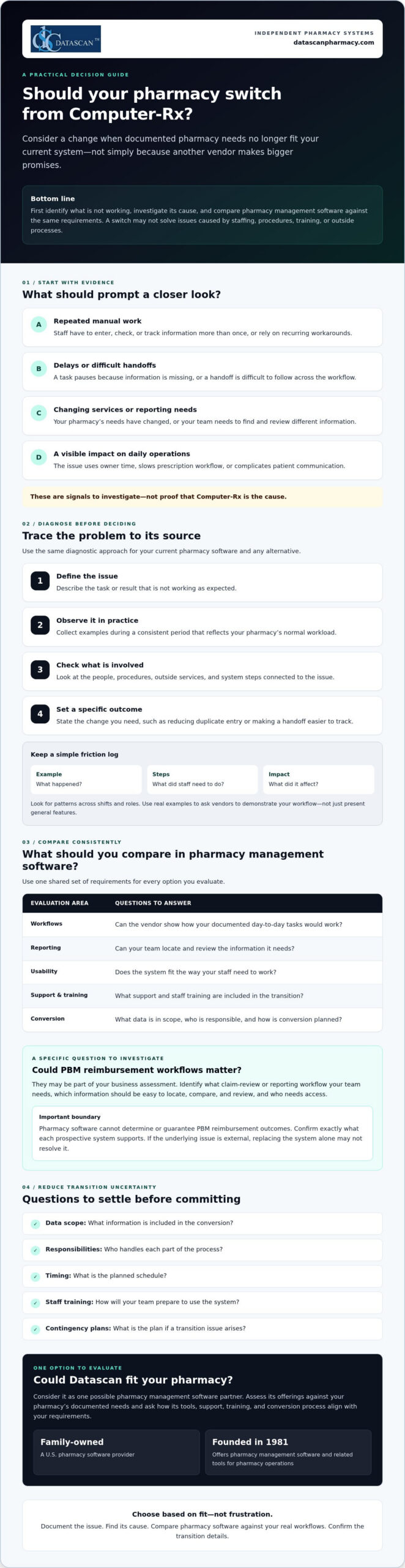
Consider switching from Computer-Rx when documented pharmacy needs no longer fit your current system, rather than reacting to sales claims alone.
Investigate recurring workflow problems by checking whether they stem from software, staffing, procedures, training, or third-party processes.
Compare pharmacy management software options against the same requirements for workflows, reporting, usability, support, training, and conversion.
Reduce transition uncertainty by confirming data scope, responsibilities, timing, staff training, and contingency plans with a prospective vendor.
Evaluate Datascan as one possible fit for your independent pharmacy, considering its pharmacy software suite, U.S.-based support, and family-owned history since 1981.
Why are independent pharmacies considering switching from Computer-Rx?
A switch is worth evaluating when your documented pharmacy needs no longer match your current system. That doesn’t mean Computer-Rx is necessarily causing a problem. First, ask whether your pharmacy management software supports the way your team works today and the services you may need to provide next.
For an independent pharmacy, the pressure points are often practical. Are staff repeating manual steps to complete routine tasks? Do workarounds take time away from prescription workflow or patient communication? Have your services or reporting needs changed? Is it difficult for your team to find and review information relevant to reimbursement? Treat these as questions to investigate, not assumptions about Computer-Rx.
A pharmacy software switch is a needs-and-fit decision, not a reaction to dissatisfaction alone. A pharmacy management system supports key pharmacy activities, but whether a different system can address a specific concern depends on its cause and the capabilities you need.
What problems should I document before changing pharmacy software?
Ask staff to record recurring friction when it happens. Note a specific example, the steps involved, and what the issue affects. A short log can help you distinguish a system limitation from a training gap, an unclear procedure, or an outside process your software doesn’t control.
Manual steps and workarounds: What does staff have to enter, check, or track more than once?
Delays: Where does a task pause, and what information or handoff is missing?
Impact: Does the issue use owner time, slow prescription workflow, or complicate patient communication?
Look for patterns across shifts and roles. A clear record makes it easier to ask vendors to demonstrate how they would handle your actual workflow, rather than relying on a general feature presentation.
Could PBM reimbursement challenges be part of the decision?
They may be part of your business assessment, but pharmacy software can’t determine or guarantee PBM reimbursement outcomes. Instead, identify the claim-review or reporting workflow your team needs. Which information must be easy to locate, compare, and review, and who needs access to it? Then confirm exactly what each prospective system supports. For broader financial context, consult a pharmacy gross profit guide alongside your software evaluation.
Keep the decision grounded in evidence. If the root cause is staffing, process design, or an external reimbursement issue, replacing the system alone may not resolve it. If your documented needs point to a genuine mismatch, you’ll be better prepared to compare alternatives based on fit, not frustration.
How do I tell whether my current pharmacy system is the real problem?
Use a simple diagnostic before deciding that changing pharmacy management software is the answer: define the issue, observe it, identify dependencies, and set a specific desired outcome. This helps separate a software constraint from problems caused by staffing, procedures, training, or third-party processes.
Define the issue: Describe the task or result that isn’t working as expected.
Observe it: Collect examples during a consistent period that reflects your pharmacy’s normal workload.
Identify dependencies: Check which people, procedures, external services, or system steps are involved.
Set an outcome: State what needs to change, such as reducing duplicate entry or making a handoff easier to track.
A recurring workaround is evidence to investigate, not proof a vendor is at fault. As you assess switching from Computer-Rx, use the same diagnostic criteria for your current system and any alternative. The Health IT Playbook also offers broader guidance on technology selection and implementation that can inform your planning.
Which pharmacy workflows should I review first?
Map prescription intake, dispensing, verification, pickup, and refill communication at a high level. Then examine reporting and front-end tasks, noting where information is re-entered, a handoff stalls, or staff need a workaround. Check whether each process fits your pharmacy’s service mix and daily workload. Review POS, delivery, or patient-app needs only if they’re relevant to your operations.
How can I measure whether a workflow needs to change?
Choose a defined observation period and track the same measures throughout it. Keep the measures practical and consistent:
How often staff repeat a task or enter the same information more than once.
Where handoffs occur and whether they require follow-up.
Which steps staff identify as sources of friction, with a brief example.
How often a task needs rework and what happened immediately before it.
Use your own baseline rather than a vendor’s generalized benchmark. Compare systems using the same definitions and workflow examples, and don’t attribute financial or clinical outcomes to software without evidence. If you want to explore whether another workflow approach fits your needs, you can discuss your pharmacy’s requirements with Datascan.
What should I compare before choosing a Computer-Rx alternative?
Compare each pharmacy management software option against the same written requirements, not the size of its feature list. The best-fit pharmacy software is the one that meets your documented operational requirements and supports the work your team needs to do.
Build a short scorecard from your pharmacy’s priorities, then ask each vendor to demonstrate the same real tasks. For broader system context, review this guide to pharmacy management software as part of your research.
Area to compare
Questions to ask
Required workflows
Can you show how the system handles the tasks we identified, including our service needs?
Usability
Can staff complete common tasks in a clear, repeatable way? Show us the steps, not just a feature overview.
Reporting and data
Which reports and data are included? Can we review examples relevant to our operations and claim-review process?
Support
When is support available, how do we contact the team, and what is the escalation process?
Training
Who provides training, what does it cover, and what responsibilities fall to our staff?
Conversion
What data can be transferred, who is responsible for each step, and what should we plan for?
Which questions should I ask a pharmacy software vendor?
Bring your workflow examples to the demonstration and ask the vendor to walk through them with you. Confirm which data, reports, and integrations are included, and request written clarification for anything that affects your requirements. Ask who handles implementation, staff training, and ongoing support. Before deciding, verify the proposed scope, responsibilities, and timing.
How should I compare support and workflow flexibility?
Support models differ, so confirm availability and escalation paths directly with each vendor rather than assuming they match your needs. Ask whether the system can accommodate your operating model and what changes, if any, that would involve. Don’t assume customization is available or included. Consider workflow software only if task coordination is a documented need, and ask the vendor to demonstrate how it would address that need.
To keep the comparison fair, score each vendor against your requirements using the same scale, such as whether a need is met, partly met, or not met. Add notes from demonstrations and written answers. If switching from Computer-Rx remains under consideration, this process gives your team a clear basis for comparing alternatives and discussing trade-offs before committing.
How can I reduce the risk of switching pharmacy software?
Changing a core pharmacy management system takes planning and should never be treated as risk-free. Before committing, agree with the selected vendor on what the conversion covers, who owns each task, when key steps are expected, how staff will prepare, and what the pharmacy will do if an issue arises.
Put the plan in writing and make sure it reflects your pharmacy’s actual workflow. Clarify how the vendor will communicate progress, who can answer questions, and how concerns will be escalated. A contingency plan should identify who makes decisions if a critical step is delayed or information needs additional review. These discussions won’t remove every uncertainty, but they can make responsibilities and next steps clearer.
What should I confirm about pharmacy software conversion?
Ask which patient, prescription, inventory, and historical records can be transferred, and which information may need separate handling. Confirm who is responsible for preparing, transferring, and reviewing data, as well as the review points and escalation path. Before relying on the new system, use a pharmacy-approved checklist to validate the information your team considers critical.
Don’t assume that “conversion included” means every record or workflow is covered. Ask the vendor to define the scope and identify any dependencies or decisions required from your pharmacy. Record the answers alongside the agreed timing so staff know what to expect and whom to contact with questions.
How should I prepare staff for a system change?
List the roles involved and the tasks each person will need to practice, such as intake, dispensing, verification, pickup, refill communication, or reporting. Agree with the vendor on the training scope and timing, then set a clear process for staff to raise questions and escalate problems. A dedicated implementation roadmap can help organize these responsibilities. Confirm its details with the vendor.
As you plan for switching from Computer-Rx, involve staff who perform the day-to-day work. They can flag role-specific needs and identify where a change may affect patient communication or routine handoffs. Set expectations for how updates will be shared, who will coordinate decisions, and how unresolved issues will be tracked during the transition.
Use the vendor conversation to test whether the proposed conversion, training, and support plan matches your pharmacy’s requirements. Datascan provides pharmacy management software and U.S.-based support. Ask its team to clarify the scope and responsibilities relevant to your situation. Review your conversion and training requirements with Datascan as part of your vendor evaluation.
Could Datascan be the right next pharmacy management software partner?
Datascan is one option for independent pharmacies to evaluate, not an automatic fit for every operation. The company has been family-owned and operated since 1981, provides U.S.-based support, and offers a pharmacy software suite. Whether it’s right for your pharmacy depends on how well its capabilities and proposed support meet your documented needs.
As you consider switching from Computer-Rx, compare Datascan using the same workflows and vendor questions you’re using for other options. Bring concrete examples from your pharmacy, such as how staff manage dispensing, communicate with patients, review reports, or coordinate front-end tasks. Ask the team to explain what the software supports and confirm any conversion, training, or support details directly rather than assuming they’re included.
What does Datascan offer independent pharmacies?
Pharmacy management software is Datascan’s core offering, with related tools available for pharmacy operations. Depending on your requirements, ask about its POS, MobileScripts patient mobile app, mobile delivery app, compounding pharmacy software, and customizable workflow capabilities. Start with the Datascan pharmacy management software overview, then discuss which offerings are relevant to your operation. If workflow coordination is a priority, review its workflow software and ask how it aligns with your specific tasks.
For example, a pharmacy that relies on delivery or patient refill communication may want to evaluate those tools, while a pharmacy with compounding needs can ask about the compounding software. The goal is to assess fit for your service mix, not to adopt features that don’t address an identified need.
What is a practical next step before deciding?
Prepare a concise vendor brief before a conversation. Include recurring pain points, priority workflows, relevant reporting needs, and questions about conversion responsibilities, training, and ongoing support. Ask Datascan to respond to those requirements and clarify the proposed scope. This gives you a practical basis for comparing its pharmacy management software with your other options.
Make Your Next Pharmacy Software Decision With Confidence
Switching from Computer-Rx is worth evaluating when documented operational needs no longer fit your current pharmacy management software. Before you decide, identify what’s causing workflow friction, compare vendors against the same pharmacy-defined requirements, and confirm conversion, training, and support responsibilities directly.
Technology can help organize pharmacy work and make key information easier for your team to review, but it can’t guarantee PBM reimbursement outcomes or resolve issues outside the system. Ground your decision in your pharmacy’s service needs, staff workflows, and patient care priorities.
Datascan is one option to assess. It’s family-owned and operated since 1981, provides U.S.-based support, and offers pharmacy management software and related operational tools. Ask how its capabilities align with your requirements, then verify the details that matter to your pharmacy.
To discuss your requirements and take the next step with a clear set of questions, contact Datascan about your pharmacy software needs. A careful evaluation can help you move forward with confidence, whether you switch or stay.
Frequently Asked Questions
Why are pharmacies switching from Computer-Rx?
Pharmacies may consider switching when their documented needs no longer fit their current system. Possible reasons to investigate include recurring workarounds, delays in daily tasks, changing service needs, or difficulty reviewing reports relevant to reimbursement. These are questions for each pharmacy to assess, not proof of a Computer-Rx shortcoming. Before deciding, check whether the cause is the software, staff training, procedures, or an external process.
Is switching from Computer-Rx difficult?
Switching can be complex because pharmacy management software supports core operations, and a change requires planning. The level of effort depends on the conversion scope, the pharmacy’s workflows, and the vendor’s process. Before committing, ask what data can be transferred, who handles each task, how staff training is planned, and how issues will be escalated. Build a contingency plan with the vendor rather than assuming the transition will be risk-free.
How do I compare Computer-Rx with another pharmacy system?
Compare both systems against the same written requirements from your pharmacy. Prioritize the workflows your team uses, usability, reporting, support availability, training, and conversion responsibilities. Ask each vendor to demonstrate the same real tasks, such as intake, dispensing, refill communication, or reporting. Confirm in writing which data, reports, and integrations are included. A shared scorecard helps your team focus on fit instead of counting features.
What data should I ask about before a pharmacy software conversion?
Ask which patient, prescription, inventory, and historical records can be transferred, and which information may need separate handling. Confirm who prepares, transfers, and reviews the data, what validation steps your pharmacy should complete, and how exceptions will be escalated. Request a written description of the conversion scope and responsibilities. Use a pharmacy-approved checklist to verify critical information before your team relies on the new system.
Will changing pharmacy software improve PBM reimbursements?
Changing software can’t determine or guarantee PBM reimbursement outcomes. It may be useful to assess whether a system supports the reporting or claim-review workflows your pharmacy needs to examine reimbursement. Identify the information your team needs to review, then ask vendors to demonstrate how their system handles that workflow. Also consider broader financial factors, since reimbursement challenges can involve processes and decisions outside the pharmacy software itself.
How long does it take to switch pharmacy management software?
There isn’t one timeline that applies to every pharmacy. The schedule depends on factors such as the agreed conversion scope, data handling, staff training, and the vendor’s implementation plan. Ask for proposed milestones, what your team must complete before each one, and how changes or delays will be communicated. Get the expected timing and responsibilities in writing, and avoid relying on a general estimate that doesn’t reflect your pharmacy’s needs.
What should I ask Datascan before switching from Computer-Rx?
Ask Datascan to explain how its pharmacy management software fits your required workflows, which related operational tools match your service needs, and what data conversion, training, and support would involve. Confirm responsibilities and proposed timing directly with the team. You can review Datascan’s pharmacy management software overview, then compare the information with your documented requirements and confirm any details relevant to your pharmacy directly with Datascan.
How many times today has a ringing phone interrupted a critical clinical review or a patient consultation? A secure messaging with patients app provides a direct, HIPAA-compliant channel that integrates with your pharmacy management software to eliminate up to half of your daily phone volume while driving higher prescription pickup rates. As we move through 2026, 71% of adults now rely on health apps to manage their care, making digital engagement a requirement for any independent pharmacy looking to protect its margins against predatory PBM practices.
We understand the pressure you’re under to maintain high adherence scores while managing a lean staff and navigating complex reimbursement models. It’s frustrating to watch your team lose hours to manual outreach when you know that interactive messaging can double the odds of patient medication adherence. You need a solution that empowers your staff rather than adding to their workload. This guide explores how to implement secure messaging that safeguards your data, satisfies the latest HIPAA Security Rule updates, and transforms your Pharmacy Software into a measurable profit driver for your pharmacy.
Key Takeaways
Protect your pharmacy from costly HIPAA violations by replacing unencrypted standard SMS with a platform that keeps PHI off public servers.
Discover how a secure messaging with patients app integrates directly into your pharmacy software to eliminate manual data entry and save hours of staff phone time.
Improve PBM reimbursements and Star Ratings by leveraging automated digital touchpoints to boost medication adherence and patient pickup rates.
Streamline your daily workflow by consolidating refill requests, two-way messaging, and co-pay prepayments into a single, locally-hosted interface.
Learn how to launch the MobileScripts app and effectively train your staff to drive patient adoption at the point of sale.
What is a secure messaging with patients app for pharmacies?
A secure messaging with patients app is a HIPAA-compliant platform that enables pharmacy staff to exchange encrypted text, images, and documents with patients via a dedicated mobile application. Unlike standard consumer messaging, these tools ensure that Protected Health Information (PHI) is never stored on unencrypted devices or public servers. By integrating this technology directly into your locally-hosted pharmacy management software, you bridge the gap between the dispensing counter and the patient’s smartphone; this reduces phone call volume without sacrificing the high-touch care that defines independent pharmacy.
The core concept of secure messaging relies on end-to-end encryption to protect sensitive data from unauthorized access. For a community pharmacy, this means you can discuss specific dosages or co-pay amounts with total confidence. Modern pharmacy software now includes these digital extensions because they provide a centralized hub for communication. This eliminates the need for staff to juggle multiple devices or worry about the security of a patient’s personal data in an unmanaged, unencrypted environment.
Is regular texting HIPAA compliant for pharmacies?
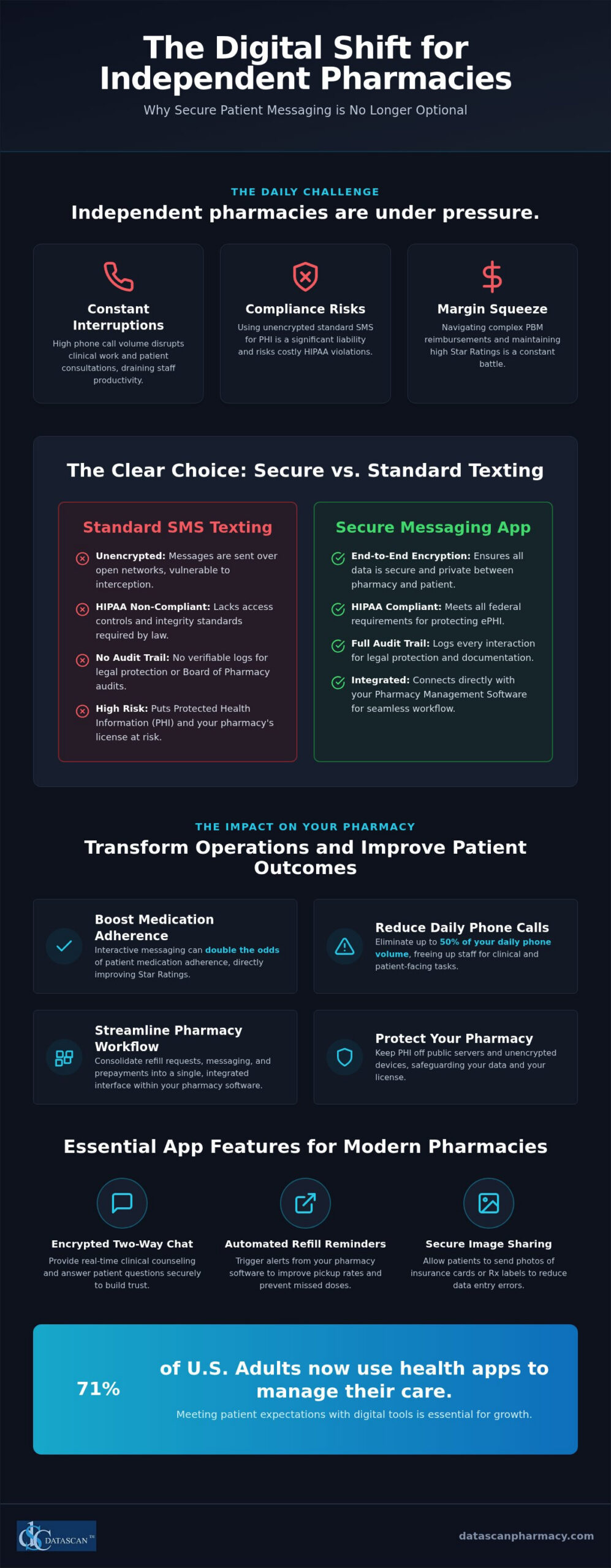
Standard SMS is fundamentally unencrypted, which makes it a significant liability for any independent pharmacy. Because basic text messages are sent over open cellular networks, they are vulnerable to interception and lack the necessary “access control” required by federal law. HIPAA mandates strict integrity and authentication standards that standard phone messaging simply cannot meet. With the 2026 updates to the HIPAA Security Rule requiring mandatory encryption and multi-factor authentication (MFA) for accessing ePHI, relying on standard SMS is no longer a viable option. When you use a dedicated secure messaging with patients app, every interaction is logged within a full audit trail. This documentation is critical for legal protection and during Board of Pharmacy audits, as it proves that your staff followed all privacy protocols.
What features should a pharmacy messaging app have?
The right tool must do more than just send text; it needs to enhance your operational efficiency and integrate with your existing workflow. Look for these essential features in your MobileScripts patient app:
Encrypted two-way chat: This allows your pharmacists to provide clinical counseling and answer medication questions in real-time, which builds immense patient trust.
Automated refill reminders: These should trigger directly from the patient profile in your pharmacy software, ensuring patients never miss a dose while improving your prescription pickup rates.
Secure image sharing: Staff can request photos of new insurance cards or prescription labels, which reduces errors and saves your team from making multiple follow-up phone calls.
Why should independent pharmacies use secure messaging instead of standard texting?
Independent pharmacies should use a secure messaging with patients app because it provides a verifiable audit trail and end-to-end encryption that standard SMS simply cannot offer. While basic texting is convenient, it leaves your business vulnerable to HIPAA violations and lacks the clinical documentation required by the Board of Pharmacy. Using a secure platform ensures that every communication is logged directly within your pharmacy management software, protecting your license while eliminating the “phone tag” that drains hours of staff productivity each day. Standard texting is a liability. By moving to an encrypted channel, you ensure that Protected Health Information (PHI) stays between you and your patient.
Beyond legal safety, integrated apps improve data accuracy by pulling patient information directly from your locally-hosted system. This prevents manual entry errors and ensures that staff are always messaging the correct individual. In 2026, 71% of U.S. adults are already using health-related apps; providing a professional, branded interface builds significant trust. It proves your pharmacy is a forward-thinking leader capable of delivering the digital convenience patients expect from national chains, but with the personal touch of a family-owned business. Modern patients don’t just want a text; they want a secure health partner.
How does messaging reduce pharmacist burnout?
Messaging allows your team to handle patient queries in batches during natural lulls in the workflow rather than being constantly interrupted by a ringing phone. As we’ve explored in our guide on reducing pharmacist burnout with technology, automation is the most effective way to reclaim your time when using high-performance pharmacy software. By using standardized templates for “Prescription Ready” or “Insurance Issue” notifications, your staff can clear a queue of notifications in minutes. This shift from reactive phone management to proactive digital communication significantly lowers stress levels across the pharmacy counter. It lets your pharmacists focus on patients, not phone lines.
Can messaging help with pharmacy patient retention?
Direct, secure communication is one of the most effective pharmacy patient retention strategies available today. Research on Medication Adherence with Pharmacist Apps shows that interactive digital tools can double the odds of adherence, creating better health outcomes that keep patients coming back. Automated “Thank You” messages or personalized health tips keep your brand top-of-mind without requiring extra manual effort. If you’re ready to modernize your patient engagement, it’s time to reach out to our support team to see how we can help your pharmacy thrive.
How does a pharmacy management system integrate with secure messaging?
True integration of a secure messaging with patients app means your team never has to leave their primary workspace to communicate with a patient. Instead of toggling between browser tabs or separate mobile devices, the messaging window lives directly inside your locally-hosted pharmacy management software. This seamless connection ensures that patient data, including contact details and medication history, syncs automatically; this eliminates the tedious task of manually typing phone numbers or names into a secondary application. When a patient submits a request through the app, it doesn’t just sit in an email inbox. It drops directly into your workflow software queue, allowing your technicians to process refills with the same speed and accuracy as a traditional call-in, but without the time-consuming phone conversation.
Why is a standalone messaging app a mistake?
Implementing a standalone messaging tool often creates “data silos” where critical patient communication is entirely disconnected from their clinical record. This fragmentation forces your staff into a cycle of double data entry, which significantly increases the risk of transcription errors and wastes precious minutes that should be spent on patient care. Beyond the safety risks, standalone apps are frequently neglected during peak hours. When a messaging platform isn’t part of the primary filling screen, staff often forget to check it, leading to delayed responses that frustrate patients and damage the trust you’ve worked hard to build as a community leader.
What does seamless workflow integration look like?
In a truly optimized environment, digital communication feels like a natural extension of the dispensing process. Here is how a fully integrated secure messaging with patients app functions on a daily basis:
Filling Screen Notifications: A subtle alert appears on the technician’s filling screen the moment a patient sends a message, ensuring no query goes unanswered.
Real-Time Verification Chat: The pharmacist can reply to a patient’s clinical question while simultaneously verifying their prescription, all within the same software window.
Automatic Archiving: Every exchange is automatically saved and timestamped within the patient’s permanent electronic record for future reference and audit compliance.
Direct Workflow Entry: Refill requests and insurance card images move instantly from the patient’s phone to the appropriate stage of your customizable workflow.
Can secure messaging improve PBM reimbursements and patient adherence?
A secure messaging with patients app directly improves PBM reimbursements by boosting Star Ratings and reducing abandoned prescriptions through proactive, documented clinical interventions. Pharmacy Benefit Managers (PBMs) increasingly tie reimbursement rates to Star Ratings, which are heavily influenced by Proportion of Days Covered (PDC) scores. By using an encrypted platform to conduct “medication synchronization” check-ins, your pharmacy ensures patients remain adherent to their therapy. This digital engagement allows you to resolve insurance “prior authorization” delays in minutes rather than days, preventing patients from walking away from the counter. Ultimately, maximizing filled scripts through better communication is the most effective way to drive higher pharmacy gross profit while protecting your business from predatory PBM contract terms.
How does messaging help fight back against PBMs?
Documenting every patient outreach provides your pharmacy with concrete proof of clinical intervention, which is essential for defending your revenue during aggressive PBM audits. Direct messaging reduces “abandoned at counter” rates; these are a major drain on independent pharmacy revenue that often goes unaddressed. When you have a secure, direct line to your patients, you can also promote high-margin clinical services like immunizations or point-of-care testing. This allows you to shift your profit model away from low-margin dispensing and toward the professional services that PBMs find harder to commoditize. It turns your pharmacy software into a weapon for financial independence.
Improving Star Ratings through digital engagement
Automated reminders ensure that patients never “forget” to request a refill, which is the single most common cause of poor adherence scores. Education delivered via a secure messaging with patients app helps patients understand their therapy and manage side effects, significantly reducing the likelihood of therapy discontinuation. In the regulatory environment of 2026, higher Star Ratings are often the only path to lower DIR fees and improved contract terms. Understanding how to leverage the right technology for improving star ratings is essential for protecting your reimbursements and staying competitive. By leveraging digital engagement, you prove your clinical value to the network while improving the health of your community. if you’re ready to protect your margins and reclaim your time, contact our team today to see how MobileScripts integrates with your daily workflow.
How do I set up the MobileScripts patient app for my pharmacy?
Setting up a secure messaging with patients app is a straightforward operational upgrade that starts with activating the integrated module in your existing system and training your team to invite patients at the counter. By following a structured implementation plan, you can transition from chaotic phone interruptions to a streamlined, digital-first workflow that protects your margins and patient data. Because our technology is locally hosted rather than cloud-based, you maintain total control over your database during the entire rollout process.
Step 1: Activate the MobileScripts patient mobile app module within your Datascan system to enable the secure communication bridge.
Step 2: Train your staff on how to send secure invitations to patients during the checkout process at the Datascan Point of Sale (POS) to drive immediate adoption.
Step 3: Use the provided marketing materials, including counter displays and bag stuffers, to let patients know they can now text the pharmacy securely.
Step 4: Monitor the incoming message queue as part of your standard daily workflow, treating digital queries with the same clinical priority as a walk-in consultation.
Promoting your new app to patients
To maximize adoption, include a QR code on every prescription label that links directly to the app store download. This ensures that the moment a patient looks at their medication, they have an immediate path to secure communication. You should also consult our pharmacy mobile app promotion guide for advanced strategies on patient acquisition and engagement. When patients are hesitant about digital health tools, explain the security benefits. Emphasize that unlike standard texting, this app is built for HIPAA compliance, ensuring their sensitive ePHI never touches a public server.
Managing the transition to digital messaging
Start with a “soft launch” to a small group of loyal patients to refine your internal response workflow before a full-scale rollout. This phase allows your team to get comfortable with the interface without being overwhelmed by a high volume of messages. It’s also vital to set clear expectations for response times by using automated “away” messages for after-hours queries. If you encounter any technical hurdles during the setup, leverage the U.S.-based support from your pharmacy software vendor. This personalized assistance is a hallmark of being a champion of the independent; we ensure your technology works for you, not the other way around.
Future-Proof Your Pharmacy with Integrated Digital Engagement
Independent pharmacies face immense pressure from PBMs and staffing shortages, but technology offers a clear path to operational freedom. By centralizing communication within your pharmacy management software, you eliminate the constant interruption of phone calls and protect your business from HIPAA liability. A secure messaging with patients app serves as a vital clinical bridge, ensuring that your interventions are documented and your patient adherence scores remain high. This isn’t just about sending texts; it’s about building a resilient foundation for your community pharmacy.
Datascan has been a family-owned leader in this industry since 1981, providing the U.S.-based support and specialized tools needed to drive independent pharmacy profitability. Our MobileScripts platform offers the seamless integration you need to streamline workflows and improve patient trust without the headaches of standalone systems. It’s time to stop letting phone tag dictate your day and start empowering your team with modern, secure tools that protect your time and your bottom line.
Is secure messaging with patients actually required by HIPAA?
While HIPAA doesn’t explicitly name specific apps, it mandates that any electronic transmission of Protected Health Information (PHI) must include encryption, access control, and integrity safeguards. A secure messaging with patients app fulfills these federal requirements by ensuring data is encrypted end to end and never stored on public servers. Standard SMS lacks these protections, making it nearly impossible to remain compliant with the strict 2026 HIPAA Security Rule updates without a dedicated, secure platform.
How much does a pharmacy messaging app typically cost?
Pricing for patient engagement tools varies based on the depth of integration with your pharmacy software and the specific feature set your business requires. Most vendors offer these digital tools as a monthly subscription or a bundled addition to your existing management system. Because these platforms are designed to reduce staff labor and improve reimbursements, most independent owners find that the operational savings and increased prescription volume quickly offset the recurring licensing and usage fees.
Can patients send pictures of their insurance cards through the app?
Patients can securely upload and send images of insurance cards, prescription labels, or medical documents directly through the MobileScripts interface. This feature is a massive time-saver for your staff, as it eliminates the need for manual data entry from blurry faxes or verbal phone descriptions. Once a patient sends an image, it is accessible within your Datascan system, allowing your team to update profiles and resolve billing issues before the patient ever arrives.
Does my pharmacy software need to be cloud-based for messaging to work?
Your pharmacy management software does not need to be cloud-based to support secure digital messaging. Datascan provides a locally-hosted system that maintains your database on-site while securely bridging to the MobileScripts app via encrypted communication channels. This hybrid approach gives you the best of both worlds; you get the security and control of a local server with the modern, mobile convenience patients expect from a high-tech pharmacy experience without relying on external cloud providers.
What happens if a patient doesn’t want to use an app for messaging?
While digital adoption is high, some patients will always prefer traditional communication methods like phone calls or in-person consultations. Your pharmacy can continue to serve these individuals manually while moving the majority of your volume to a digital channel. By shifting even a portion of your patients to a secure messaging with patients app, you free up significant time for your staff to provide more focused, high-touch care to those who aren’t comfortable using mobile technology.
Can I use secure messaging to handle compounding pharmacy questions?
Secure messaging is an ideal tool for the specialized needs of a compounding pharmacy because it allows for detailed, asynchronous communication. Patients often have complex questions about application methods, storage, or flavorings that are easier to address via text than a rushed phone call. The app allows your pharmacists to send detailed instructions or educational documents that the patient can reference later. All these clinical interactions are archived, ensuring your compounding practice remains fully documented.
How does secure messaging improve my pharmacy’s Star Ratings?
Your Star Ratings depend heavily on medication adherence metrics, specifically the Proportion of Days Covered (PDC). Secure messaging allows you to send automated refill reminders and conduct medication synchronization check-ins that keep patients on track with their therapy. By reducing the number of forgotten refills and addressing side-effect concerns through two-way chat, you improve patient outcomes. These clinical improvements lead directly to higher ratings, which can result in lower DIR fees and better PBM contracts.
Will secure messaging increase the amount of work for my pharmacy technicians?
Secure messaging actually reduces the total workload for technicians by replacing time-consuming phone calls with quick, digital exchanges. Instead of being interrupted by a ringing phone, your team can manage a queue of incoming messages during natural lulls in their workflow. This allows for better batch processing of refill requests and insurance updates. When communication is integrated into your pharmacy software, it becomes a streamlined task that helps your staff work more efficiently throughout the day. For pharmacies that also offer delivery services, pairing this digital communication strategy with a system for HIPAA compliant delivery signature capture ensures that every prescription handoff is fully documented and protected against PBM audit recoupments.
With an independent pharmacy generating up to $15,000 in annual revenue from just 50 MTM patients, medication therapy management software has become the primary engine for profitability in 2026. This technology streamlines clinical workflows by automating patient identification and integrating e-care plans directly into your pharmacy management software, effectively turning clinical burdens into efficient revenue streams. You’ve felt the weight of PBM reimbursement pressures and the burnout caused by manual documentation for far too long. It’s frustrating when your systems don’t talk to each other, leaving you to manage disjointed data while trying to care for your community.
Discover how modern medication therapy management software transforms these operational hurdles into profitable, automated workflows that protect your bottom line. We’ll explore how to use integrated tools to identify patients who meet the updated 2026 CMS eligibility criteria and how to sync clinical tasks with your dispensing routine. You’ll learn how to increase revenue from e-care plans while freeing up the time you need to actually run your business. This guide provides a clear roadmap for independent pharmacies to overcome PBM pressures and thrive through clinical innovation.
Key Takeaways
Combat PBM reimbursement pressures by diversifying revenue through clinical e-care plans that transform daily dispensing into high-margin service opportunities.
Optimize your workflow with medication therapy management software that integrates clinical tasks directly into your pharmacy software to eliminate the inefficiency of managing multiple disjointed portals.
Reduce staff burnout by automating the identification of eligible patients using the updated 2026 CMS criteria, ensuring no clinical revenue is left on the table.
Maintain complete data integrity and operational speed by choosing an integrated pharmacy management software solution that keeps dispensing and clinical records in a single, local database.
Empower your technicians to handle administrative MTM scheduling and documentation, which allows pharmacists to focus exclusively on high-value patient interventions.
Medication therapy management (MTM) software is a clinical tool used by pharmacists to optimize drug therapy, improve patient adherence, and document clinical interventions for reimbursement. As we move through 2026, the traditional model of high-volume dispensing is being replaced by a service-oriented clinical model that prioritizes patient outcomes over pill counts. Modern pharmacy management software now integrates these tools to automatically identify high-risk patients, helping you capture revenue that used to slip through the cracks. This transition isn’t just about clinical excellence; it’s about business survival. By utilizing Medication therapy management protocols, you can improve your Star Ratings and patient health outcomes while securing your pharmacy’s financial future.
Why is MTM software critical for independent pharmacies in 2026?
The landscape for independent owners has changed drastically with the shift from volume-based to value-based reimbursement models. You can’t rely on dispensing margins alone when PBMs continue to squeeze every cent out of your transactions. Clinical documentation provides the necessary proof to justify professional service fees, allowing you to fight back against reimbursement pressures. When your medication therapy management software generates real-time clinical alerts, it does more than just protect patient safety; it creates a documented trail of intervention that proves your value to the healthcare system. This data-driven approach is your best defense against arbitrary DIR fees and declining margins. It’s time to stop letting PBMs dictate your worth and start using your clinical expertise to drive profit.
What are the core components of an MTM platform?
A robust platform must go beyond basic alerts to provide a total solution for clinical care. Integrated clinical workflows ensure you aren’t jumping between disjointed systems to complete essential tasks. Core components include:
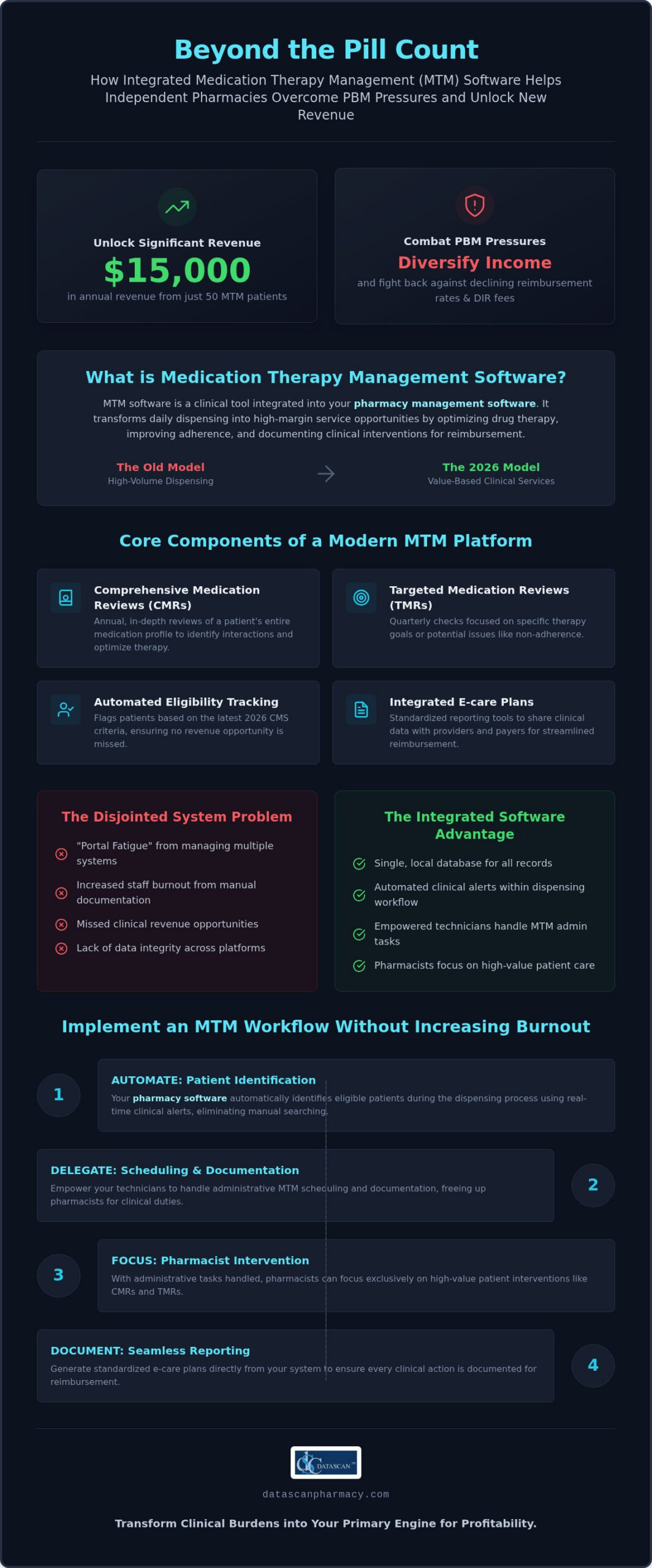
Comprehensive Medication Reviews (CMRs): Annual, in-depth reviews of a patient’s entire medication profile to identify drug interactions.
Targeted Medication Reviews (TMRs): Quarterly checks focused on specific therapy goals or potential issues like non-adherence.
Automated Eligibility Tracking: Systems that flag patients based on the latest 2026 CMS criteria, including those taking five or more chronic medications.
Integrated E-care Plans: Standardized reporting tools that allow you to share clinical data with other providers and payers easily.
Having these tools inside your pharmacy management software means your team can move from dispensing to clinical consultation without missing a beat. It’s about working smarter, not harder, to maximize the value of every patient interaction while building a sustainable, clinical-first business model.
What are the essential pharmacist clinical workflow tools for MTM?
Essential MTM workflow tools include automated medication synchronization, real-time clinical alerts within the dispensing queue, and integrated mobile outreach applications. These technologies allow independent pharmacies to fight PBM reimbursement pressures by maximizing clinical revenue through high-margin services without the need for additional staff. By embedding medication therapy management software directly into your daily operations, you transform clinical care from a secondary task into a primary profit center. High-performing pharmacies utilize these tools to ensure accuracy through integrated barcode verification and clinical check steps, ensuring that every intervention is documented and every opportunity for reimbursement is captured.
Effective pharmacy management software must serve as a total solution that eliminates the friction of disjointed systems. Relying on external portals often leads to “portal fatigue,” where valuable clinical opportunities are missed because the data isn’t visible during the fill process. Utilizing a mobile patient app further enhances this workflow by providing a secure channel for patient outreach and CMR scheduling. This digital connection reduces the time spent playing phone tag and allows your team to focus on delivering high-quality care that improves patient adherence and boosts your Star Ratings.
How do automated clinical alerts improve efficiency?
Automated clinical alerts function as actionable intelligence that appears exactly when you need it most. When your system flags a pending MTM opportunity “at-the-counter,” it identifies a prime moment for patient counseling that would otherwise be lost in the daily rush. This integration eliminates the need for pharmacists to log into multiple external websites just to check for eligibility. By catching CMRs and TMRs during the standard fill process, you reduce missed revenue and ensure your clinical documentation is as fast and precise as your dispensing. It’s about working smarter within your existing pharmacy software to capture every available clinical fee.
The importance of integrated medication synchronization
Medication synchronization serves as the foundation for any successful MTM program. By aligning a patient’s chronic medications to a single monthly pickup date, you create a predictable window for comprehensive clinical reviews. When these med sync tools are linked to your pharmacy workflow software, you gain superior inventory control and can plan your staffing needs with precision. This structured approach allows you to schedule MTM sessions when you know the patient will be in the store, turning a chaotic administrative burden into a repeatable, profitable clinical process. If you want to see how these features can transform your bottom line, reach out to our team for a closer look at our customizable clinical tools.
How does MTM software help independent pharmacies fight PBM reimbursement pressures?
Independent pharmacies use medication therapy management software to combat PBM reimbursement cuts by documenting value-based clinical services that generate non-dispensing revenue. This technology provides the clinical evidence and billing capabilities needed to offset predatory DIR fees and razor-thin dispensing margins. By shifting your focus from volume to high-value clinical interventions, you capture professional service fees that PBMs cannot easily claw back. High-performing pharmacy management software tracks your gross profit from clinical activities separately from dispensing, giving you a clear picture of where your business is actually growing. In a market where dispensing is often a race to the bottom, your clinical expertise is your most valuable, and most profitable, asset.
How can technology help overcome PBM underpayment?
Technology serves as your first line of defense against underpaid claims by identifying prescriptions that require clinical intervention or prior authorization before they impact your bottom line. As of January 2026, PBMs are prohibited from using spread pricing in many state Medicaid programs and California-regulated health plans. This shift toward pass-through pricing models makes clinical documentation even more vital. Your software should automate the documentation required for higher-tier reimbursement levels, ensuring you receive the maximum professional fee for every CMR or TMR you perform. Pairing your MTM tools with robust pharmacy compliance reporting software gives you the automated audit trail needed to defeat PBM clawbacks and protect every dollar you’ve earned. This business intelligence allows you to see which contracts are truly profitable and provides the data you need to drop those that consistently underpay for your services.
Building a ‘Clinical First’ business model
Transitioning your pharmacy from a “pill shop” to a local healthcare hub is the only way to remain sustainable in the current PBM landscape. Using MTM services allows you to build stronger, data-backed relationships with local physician networks by proving your role in improving patient outcomes. When you share e-care plans with prescribers, you demonstrate your value as a clinical partner rather than just a vendor. This shift creates a loyal patient base that values your expertise, which is essential for long-term retention. Learn how our pharmacy management software supports clinical growth by providing the tools you need to lead this transformation in your community. By prioritizing clinical care, you secure a revenue stream that is independent of PBM volatility and focused on the health of your patients.
How do you implement an MTM clinical workflow without increasing staff burnout?
Implementing a clinical workflow without increasing staff burnout requires delegating non-clinical tasks to technicians and using high-visibility dashboards to manage daily priorities. By leveraging medication therapy management software, you can automate the administrative heavy lifting that typically drains your team’s energy. Technicians can take the lead on scheduling, patient outreach, and basic data intake through integrated workflow tools, leaving pharmacists free to focus exclusively on high-value clinical interventions. This division of labor ensures that your pharmacy captures clinical revenue without overwhelming your staff or slowing down the dispensing queue. When your team sees their priorities at a glance on a “Bottom Line Up Front” dashboard, they spend less time searching for tasks and more time delivering profitable care.
Standardizing your documentation process is another critical step in protecting your staff from exhaustion. Modern pharmacy management software reduces the time spent on paperwork by using templates that auto-populate patient data into clinical reports. This efficiency is enhanced by mobile patient apps that eliminate the constant burden of phone tag. Instead of manually calling every eligible patient, your system can send automated reminders and secure messages, allowing patients to confirm appointments at their convenience. This digital outreach preserves your team’s mental bandwidth for the complex therapeutic reviews that drive your business forward. Pairing this approach with a dedicated pharmacy app for prescription refills further reduces manual data entry and frees your staff to concentrate on clinical priorities.
What are the best practices for MTM task management?
Successful MTM implementation often involves setting specific “clinical hours” or utilizing a rolling queue approach that fits your store’s natural rhythm. By using customizable workflow stages, you can track the progress of every CMR and TMR from identification to billing. It is vital to keep these tasks integrated within your primary pharmacy system rather than using separate logins. This unified approach prevents the cognitive load of switching between platforms and ensures that clinical opportunities are visible during every prescription fill. Optimize your team with advanced workflow software to ensure that every staff member knows exactly what needs to happen next in the clinical cycle.
Reducing the administrative burden of e-care plans
The transition to e-care plans doesn’t have to be a manual data entry nightmare. High-performing systems offer one-click submission of clinical interventions to national registries, ensuring your work is recognized and reimbursed quickly. Templates should do the majority of the work by pulling current medication lists and patient demographics directly from your database. This level of automation turns a potentially hour-long documentation task into a five-minute verification. If you’re ready to modernize your operations without burning out your best people, schedule a workflow consultation with our team today to see these tools in action.
Why choose an integrated pharmacy management system for MTM services?
Choosing an integrated pharmacy management system for MTM services is the most effective way to eliminate “portal fatigue” and maintain total data integrity across your clinical and dispensing workflows. When your medication therapy management software lives inside your primary database, you avoid the productivity drain of managing separate logins and disjointed patient records. This unified approach ensures that clinical checks happen in real-time during the prescription fill, allowing your team to identify revenue-generating opportunities without skipping a beat. For independent owners, this isn’t just a convenience; it’s a strategic necessity for protecting margins in a high-pressure PBM environment.
Working with a family-owned vendor like Datascan provides a level of accountability that massive corporations simply can’t match. Since 1981, we’ve served as a dedicated ally to the independent pharmacy, building tools that reflect the actual daily struggles of your business. Our US-based support team understands your workflow bottlenecks and resolves them quickly, ensuring your pharmacy management software remains an asset rather than a headache. You deserve a partner that treats your success as their own, offering the personal touch and specialized expertise needed to thrive in 2026.
Integrated vs. Standalone MTM: Which is better?
Integrated systems are superior because they prioritize operational speed and cost-efficiency over the fragmented approach of standalone portals. While standalone tools might offer basic functionality, they force your staff to duplicate data entry and manage multiple vendor contracts, which drives up your monthly overhead. An integrated solution offers a significantly shorter learning curve for your team because the clinical tools use the same interface they already use for dispensing. This synergy allows for more frequent clinical interventions, turning every patient interaction into a potential profit center while keeping your operational costs low.
Future-proofing your pharmacy for 2026 and beyond
Your pharmacy computer system must serve as the central brain of your operation to handle the evolving demands of clinical care and ongoing PBM reform. As reimbursement models shift further toward value-based outcomes, you need a vendor that rapidly adds innovative features to help you stay ahead of market trends. Choosing a local, non-SaaS solution ensures that your data remains secure and immediately accessible, providing the reliability you need to run a high-volume clinical hub without interruption. If you’re ready to secure your future and reclaim your time, request a demo of Datascan’s integrated MTM and pharmacy management solutions today to see how we empower the independent underdog.
Secure Your Pharmacy’s Clinical Future
The landscape of 2026 demands that independent pharmacies pivot from traditional dispensing to a clinical-first model to survive aggressive PBM reimbursement cuts. By implementing integrated medication therapy management software, you transition your business into a high-margin healthcare hub without the administrative headache of disjointed systems. You’ve seen how automated med sync and technician-led workflows protect your staff from burnout while capturing every clinical opportunity that meets the updated 2026 CMS eligibility criteria. This isn’t just about adding a feature; it’s about reclaiming your time and securing your bottom line.
Datascan has been a dedicated partner to the independent underdog since 1981. We provide 100% US-based support and innovative e-care plan integrations that keep your dispensing and clinical data in one secure, local database. This total solution approach ensures you never have to deal with the inefficiency of external portals again. You have the expertise to lead your community’s health, and we have the technology to make it profitable. Take the next step toward operational excellence and long-term sustainability. It’s time to transform your clinical burdens into streamlined successes.
How does MTM software improve pharmacy profitability?
MTM software improves pharmacy profitability by allowing you to bill for clinical services that are independent of traditional dispensing margins. By documenting Comprehensive Medication Reviews and Targeted Medication Reviews, you capture professional fees that directly offset the impact of PBM reimbursement cuts. This shift to a service-oriented model increases your gross profit while building a more loyal patient base, ensuring your independent pharmacy remains sustainable in a competitive market.
Can MTM software help reduce DIR fees?
Yes, medication therapy management software is a critical tool for reducing DIR fees by improving the performance metrics that PBMs use to calculate clawbacks. By utilizing integrated clinical alerts to boost medication adherence and identify drug therapy problems, you improve your pharmacy’s Star Ratings. Higher performance scores often lead to lower DIR fee categories, protecting your revenue from predatory PBM practices while simultaneously improving health outcomes for your community.
Do I need a separate software for MTM and dispensing?
You don’t need separate software; in fact, using an integrated pharmacy management system is much more efficient for your clinical workflow. Integrated systems eliminate “portal fatigue” by keeping all clinical and dispensing data in a single, local database. This allows your team to see MTM opportunities in real-time during the fill process without logging into external websites. A total solution approach ensures data integrity and saves your staff valuable time every day.
What is an e-care plan in pharmacy software?
An e-care plan is a standardized digital document used to record clinical interventions and share them with a patient’s broader healthcare team. Modern pharmacy software uses these plans to track medication changes, health goals, and patient outcomes in a format that payers recognize for reimbursement. By integrating e-care plans into your daily routine, you provide a professional level of care that justifies clinical fees and proves your value to local physician networks.
How much time does it take to implement MTM software?
Implementation time varies based on your current setup, but integrated clinical tools can typically be activated and ready for use within a few business days. The process involves configuring your workflow stages and training your staff on how to identify and document interventions. Because the tools are part of your existing pharmacy system, the learning curve is short, allowing your team to start capturing clinical revenue without a long transition period for your staff.
What are the CMS requirements for MTM programs in 2026?
As of January 2026, CMS has expanded MTM eligibility to include Medicare Part D patients taking five or more chronic medications, which is a decrease from the previous requirement of eight. Patients must also have at least one chronic condition and total medication costs exceeding $4,935 annually. Your medication therapy management software should automatically flag these eligible patients, ensuring you never miss an opportunity to provide a reimbursable Comprehensive Medication Review for your community.
Is US-based support important for pharmacy systems?
US-based support is vital because it ensures that the technicians helping you understand the specific regulatory and financial pressures of the domestic pharmacy market. When you face a workflow bottleneck or a clinical documentation issue, you need a partner who can provide immediate, expert assistance without language barriers or time zone delays. Datascan has provided this level of dedicated, family-oriented support since 1981, prioritizing the needs of independent pharmacy owners nationwide.
How does medication synchronization work with MTM?
Medication synchronization serves as the foundation for a successful MTM program by aligning a patient’s chronic prescriptions to a single monthly pickup date. This predictable schedule creates the perfect window for pharmacists to perform clinical reviews and consultations while the patient is already in the store. By linking med sync tools with your clinical workflow, you transform a chaotic administrative task into a repeatable and profitable clinical service that significantly improves patient adherence.
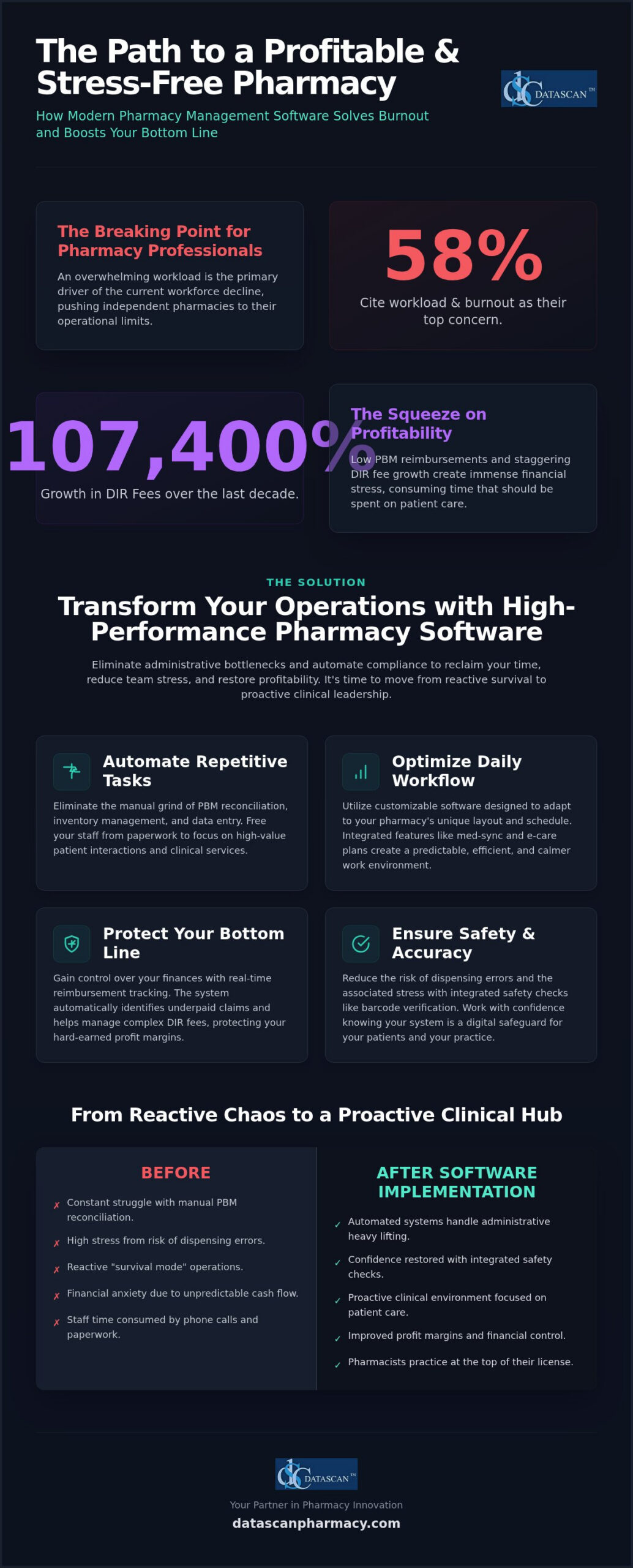
If 58% of pharmacy professionals are citing workload and burnout as the primary drivers of the current workforce decline, how much longer can your independent pharmacy operate on manual processes? Modern pharmacy workflow optimization software is the essential tool for owners who need to eliminate administrative bottlenecks, automate PBM compliance, and restore profitability in an increasingly complex 2026 market. You’ve likely spent too many nights worrying about low reimbursements and the financial stress of DIR fees that grew by a staggering 107,400% over the last decade.
We understand that your time is your most valuable asset, yet it’s often consumed by manual PBM reconciliation and inefficient dispensing workflows that invite errors. This guide reveals how the right pharmacy management software handles these operational burdens for you, allowing you to focus on patient care instead of paperwork. You’ll learn how to leverage advanced pharmacy software to reduce data entry, improve your profit margins through better reimbursement tracking, and finally create a calmer, more efficient environment for your team. It’s time to stop reacting to industry pressures and start leading with a system built for the future of community pharmacy.
Key Takeaways
Automate repetitive administrative tasks like PBM reconciliation to significantly reduce pharmacist burnout and prioritize patient outcomes.
Optimize your daily operations using customizable pharmacy workflow optimization software designed to adapt to your specific pharmacy layout and schedule.
Protect your bottom line with real-time reimbursement tracking and automated tools that identify underpaid claims and manage complex DIR fees.
Streamline your transition to modern pharmacy management software by conducting a workflow audit to pinpoint and eliminate operational bottlenecks.
Leverage the personalized support and industry expertise of a family-owned vendor to transform your independent pharmacy into a high-performance clinical hub.
How can pharmacy workflow optimization software reduce pharmacist burnout in 2026?
Pharmacy workflow optimization software reduces burnout by automating repetitive administrative tasks like PBM reconciliation and inventory management, allowing staff to focus on patient care. By eliminating the manual bottlenecks that clog daily operations, this technology restores a sense of control and professional purpose to the pharmacy team. High-performance pharmacy management software acts as a digital safeguard, ensuring that your staff isn’t buried under a mountain of paperwork while trying to serve their community.
There’s a direct, measurable link between operational efficiency and the mental well-being of independent pharmacy owners. When your team is stuck in a reactive “survival mode,” they’re constantly battling the cognitive overload of multitasking without centralized management. Modern Pharmacy Software transforms this environment into a proactive clinical space. It replaces the exhausting cycle of manual data entry, which is the leading cause of technical errors and staff frustration, with automated systems that handle the heavy lifting of PBM compliance and reimbursement tracking.
What are the main causes of pharmacy staff fatigue today?
Staff fatigue often stems from “hidden” time-wasters that accumulate throughout the dispensing process. In 2026, the emotional toll of navigating declining PBM reimbursements and the ongoing cash flow effects of previous DIR fee rules adds a layer of financial anxiety to an already heavy workload. A June 2026 poll found that 58% of pharmacy professionals attribute the declining workforce primarily to workload and burnout. Without a robust pharmacy management system, pharmacists spend more time fighting with spreadsheets than interacting with patients, leading to a profound sense of professional dissatisfaction.
How does modern pharmacy management software provide immediate relief?
Implementing a comprehensive workflow software solution provides immediate relief by automating task delegation and integrating safety checks. Barcode verification and automated inventory alerts reduce the constant fear of dispensing errors, allowing pharmacists to work with confidence rather than constant apprehension. Additionally, choosing a partner that provides US-based technical support minimizes the frustration of technical downtime. This localized accountability ensures that when issues arise, they’re resolved quickly by experts who understand the unique pressures of the independent market, rather than leaving your staff stranded with unresolved software glitches.
What are the essential features of high-performance pharmacy management software?
High-performance pharmacy management software provides the digital infrastructure required to move from reactive dispensing to proactive clinical management. While competitors often emphasize expensive robotics and hardware, the true drivers of efficiency are software-based logic like medication synchronization, integrated e-care plans, and automated patient notifications. These features eliminate the “invisible” administrative friction that slows down your team. By utilizing a robust pharmacy workflow optimization software, you can ensure that every step of the dispensing process is accounted for, from the moment a script arrives to the final point of sale.
Modern pharmacy workflow optimization software doesn’t just speed up filling; it creates a structured environment where pharmacists can practice at the top of their license. Integrated patient notifications reduce phone call volume and front-end congestion, giving your staff the quiet they need to focus on accuracy. When your system handles the routine communication, your team’s cognitive load drops significantly.
How does medication synchronization save hours every week?
Medication synchronization serves as the foundation of a predictable, stress-free pharmacy schedule by aligning patient refills to a single monthly date. This reduces repetitive administrative calls and stabilizes the daily workload, preventing the “rush hour” stress that leads to staff burnout. Advanced systems use predictive filling to forecast inventory needs, ensuring you have the right stock at the right time without overextending your cash flow. This proactive approach to pharmacy workflow automation allows your staff to manage their time effectively rather than constantly putting out fires.
Can customizable workflows really improve independent pharmacy efficiency?
Every independent pharmacy has a unique physical layout and staffing structure. A one-size-fits-all approach to software rarely works for community-focused businesses. Customizable workflow software allows you to tailor digital stages to match your staff’s specific roles and responsibilities. This ensures that clinical duties aren’t overlooked and that barcode verification is integrated at every critical juncture. By implementing “check twice, fill once” logic automatically, you reduce the risk of errors and the associated stress of potential liability. Integrated e-care plans further streamline this by allowing for clinical documentation without the burden of extra paperwork, and pairing these tools with medication therapy management software can transform those clinical workflows into a significant new revenue stream. If you’re ready to see how these features can transform your daily operations, you can reach out to our team for a personalized walkthrough.
How does technology help pharmacists manage PBM reimbursements and DIR fees?
Pharmacy workflow optimization software provides immediate financial relief by identifying underpaid claims in real-time and automating the complex reconciliation process that previously required hours of manual labor. This proactive technology allows independent owners to stop the “cash flow bleed” caused by PBM spread pricing and hidden fees. By integrating financial oversight directly into the dispensing queue, your team can catch loss-leading prescriptions before they’re ever handed to a patient, transforming your software from a simple filling tool into a profit-protection engine.
Manual bookkeeping and endless spreadsheets are no longer viable in a market where DIR fees grew by a staggering 107,400% between 2010 and 2020. High-performance pharmacy management software replaces these “hidden” time-wasters with automated reconciliation tools that verify every penny against your contracted rates. This level of precision is essential for calculating pharmacy gross profit accurately, ensuring you aren’t operating on guesswork while navigating the transitional period created by the Consolidated Appropriations Act, 2026. When your system handles the financial heavy lifting, you reclaim the mental energy needed to run your business effectively. Independent owners looking to diversify away from PBM-controlled revenue streams are also discovering that pharmacy software for veterinary prescriptions opens access to cash-based pet medication markets with profit margins far exceeding those of typical human claims.
How can you identify underpaid claims automatically?
Identifying underpaid claims shouldn’t be a post-mortem exercise conducted weeks after the sale. Advanced pharmacy workflow optimization software sets up automated alerts for prescriptions filled below cost, flagging them during the adjudication process. You can compare PBM payments against contracted rates instantly using your Pharmacy Software, eliminating the “financial guessing game” that leads to staff anxiety. Integrated profit-tracking dashboards provide a clear view of your margins on every dispense, allowing you to address reimbursement discrepancies the moment they occur rather than months later during a stressful audit.
What role does data play in PBM reform advocacy?
Data is your strongest weapon when fighting back against unfair PBM audits and hidden fees. With the federal ban on spread pricing for new contracts effective as of January 1, 2026, you need software reports that can demonstrate the localized impact of PBM practices on your specific business. Digital record-keeping streamlines the audit response process by providing instant document retrieval, which is critical for meeting new transparency requirements being implemented across the country. Independent pharmacies are using this technology to survive PBM pressures by transforming their internal data into actionable insights for both business survival and legislative advocacy.
What are the best strategies for implementing pharmacy workflow automation?
The most effective strategy for implementing pharmacy workflow automation is a phased approach that begins with a comprehensive operational audit and relies on a vendor with a proven, localized implementation roadmap. By identifying specific bottlenecks before introducing new technology, independent pharmacy owners can avoid the disruption and stress often associated with system changes. Transitioning to modern pharmacy workflow optimization software shouldn’t be a “rip and replace” event; it’s a strategic evolution that should prioritize staff buy-in and clinical continuity.
Successful implementation follows a methodical four-step process designed to minimize downtime and maximize adoption rates. First, conduct a workflow audit to identify your biggest time-wasters, such as manual phone calls or redundant data entry. Second, choose a partner that offers a clear implementation plan tailored to your specific volume and staffing levels. Third, introduce high-impact features like MobileScripts in phases to allow your team to adjust to new digital queues. Finally, train your staff on the “why” behind these systems, ensuring they understand that automation is a tool meant to protect their time and mental well-being.
How do you choose a pharmacy software vendor that supports your team?
Choosing the right partner is about more than just a list of features; it’s about localized accountability and advocacy. You should evaluate the response times and quality of US-based technical support, as a vendor who understands the unique pressures of the independent market will be far more effective than a faceless corporation. The “family-owned” model matters because it ensures you’re a partner rather than just a support ticket. During a pharmacy software conversion, ask detailed questions about data migration and staff training protocols to ensure a smooth transition that doesn’t overwhelm your team.
How can mobile apps reduce the burden on your front-end staff?
Mobile applications are powerful tools for reducing phone call volume and front-end congestion. By allowing patients to request refills via a mobile patient app, you eliminate the constant interruptions of manual script entry. Automated text and push notifications keep patients informed about their order status, which significantly lowers the number of “is it ready yet?” calls. Furthermore, integrating delivery tools allows your staff to manage off-site patient needs efficiently without leaving the pharmacy counter. These digital solutions work together to create a quieter, more focused work environment that also supports stronger pharmacy patient retention strategies by keeping patients engaged and satisfied between visits. If you’re ready to reclaim your time and modernize your workflow, contact our team today for a personalized demonstration of our implementation roadmap.
Why is a family-owned pharmacy software vendor the best partner for reducing staff stress?
A family-owned vendor offers a level of personalized accountability that large corporations can’t match, ensuring your independent pharmacy is treated as a partner rather than just a support ticket. High-performance pharmacy workflow optimization software is most effective when it’s backed by a team that understands the unique financial and operational struggles of community pharmacy owners. When you choose a vendor that prioritizes your success, you gain a visionary ally dedicated to reducing staff stress and maximizing your bottom line through specialized, expert-led design.
One of the most significant benefits of localized pharmacy management software is its inherent reliability. Unlike systems that rely on external servers and leave your business vulnerable to internet outages, localized, non-cloud systems ensure your workflow remains uninterrupted even when your connection fails. This stability eliminates the high-stress scenarios where staff are unable to process prescriptions or access patient records during peak hours. Continuous innovation in these systems is driven by real-world feedback from independent pharmacy owners, not by the demands of corporate shareholders focused on quarterly margins.
What makes Datascan Pharmacy Software different from large corporate pharmacy software companies?
Datascan Pharmacy Software has maintained a fierce advocacy for independent pharmacies since 1981, providing a personal touch that large corporate entities simply cannot replicate. You get direct access to decision-makers and high-level US-based support, ensuring that technical issues are resolved with urgency and expertise. Our suite of tools, including Pharmacy Software, is specifically designed to maximize your profitability and streamline operations, rather than just performing basic pill-counting functions. We focus on the features that matter to your bottom line, such as PBM reimbursement tracking and customizable workflow stages.
How do you get started with a less stressful pharmacy management system?
To transition to a less stressful environment, start by requesting a demo tailored to your specific workflow pains and business goals. You can review our comprehensive roadmap for a stress-free pharmacy software conversion to see exactly how we manage the data migration and staff training process. Taking the first step toward a more efficient, burnout-free pharmacy is simple and requires no long-term disruption to your patient care. Contact us today to reclaim your time, support your staff, and restore your pharmacy’s profitability.
Reclaim Your Time and Restore Your Pharmacy’s Profitability
Transitioning to high-performance pharmacy workflow optimization software is no longer a luxury; it’s a financial and operational necessity for independent owners facing the pressures of 2026. By automating the “hidden” time-wasters like manual PBM reconciliation and complex inventory forecasting, you empower your staff to focus on clinical excellence rather than administrative survival. This shift not only protects your profit margins against rising DIR fees but also fosters a calmer, more professional environment where your team can truly thrive. It’s about moving from a state of constant reaction to a position of strategic control.
As a family-owned and operated partner since 1981, Datascan understands that you need more than just a vendor. You need a visionary ally with a U.S.-based support team that offers decades of experience and localized reliability. Our comprehensive suite of profit-focused automation tools ensures you stay ahead of market trends while maintaining the personal touch your community expects. See how Datascan Pharmacy Software can transform your workflow and reduce burnout; contact us today. You don’t have to navigate these industry changes alone; let’s build a more efficient future for your pharmacy together.
Frequently Asked Questions
How does pharmacy workflow optimization software specifically reduce daily stress?
Pharmacy workflow optimization software reduces daily stress by automating the repetitive administrative tasks that cause cognitive overload. Instead of manually handling PBM reconciliation or inventory tracking, your staff can rely on automated digital queues. This system creates a predictable environment where pharmacists spend less time on paperwork and more time on clinical services. By centralizing management and providing real-time alerts, it eliminates the constant interruptions that typically lead to errors and staff frustration.
Can automation help my pharmacy survive low PBM reimbursements?
Automation is essential for surviving low PBM reimbursements because it identifies underpaid claims before you hand the prescription to the patient. High-performance pharmacy management software provides real-time reimbursement monitoring and profit-tracking dashboards. These tools allow independent owners to identify loss-leading scripts and manage complex DIR fees effectively. By automating the reconciliation process, you can reclaim hours of manual bookkeeping and use that data to advocate for fairer PBM contracts and transparency.
Is it difficult to switch to a new pharmacy software system?
Switching to a new pharmacy software system isn’t difficult when you choose a vendor with a structured implementation roadmap. A methodical, phased conversion process ensures that your data is migrated accurately and your staff is trained on new features without disrupting patient care. By conducting a workflow audit beforehand and introducing high-impact tools in stages, you can avoid the stress of a sudden change and ensure high adoption rates across your entire team.
Do I need expensive hardware to reduce pharmacist burnout?
You don’t need expensive robotics or hardware to significantly reduce pharmacist burnout. While hardware has its place, the primary drivers of efficiency are software-based logic like medication synchronization and automated patient notifications. Modern Pharmacy Software optimizes your existing layout by streamlining the digital dispensing process and reducing phone call volume. Investing in robust software features often provides a much higher return on investment and more immediate relief for staff than bulky hardware solutions.
How does medication synchronization software work to save time?
Medication synchronization software saves time by aligning a patient’s chronic refills to a single monthly date. This process stabilizes your daily workload and prevents the unpredictable “rush hour” that often leads to burnout. It reduces the number of administrative calls and foot traffic, allowing your team to fill prescriptions in batches. Predictive filling tools within the pharmacy management software further forecast inventory needs, ensuring you have the right stock on hand without constant manual checking.
What should I look for in a pharmacy software vendor to ensure long-term support?
Look for a pharmacy software vendor that offers US-based technical support and a history of advocacy for independent pharmacies. Personalized accountability is critical; you want a partner that treats you as a business owner rather than just a support ticket. A family-owned vendor often provides direct access to decision-makers and high-level technical expertise. This ensures that your system receives continuous innovation driven by real-world feedback from pharmacists rather than corporate shareholders focused only on profit.
Can technology help with pharmacy staff retention?
Technology helps with pharmacy staff retention by creating a more organized, less chaotic work environment. When staff have access to efficient Pharmacy Software, they feel empowered to practice at the top of their license rather than being buried in manual data entry. Reducing the risk of technical errors through barcode verification also lowers the anxiety associated with dispensing. A calmer workplace leads to higher job satisfaction, which is the most effective way to keep your talented team members. Learn how automating prescription intake workflow can further protect your margins and reduce staff stress at the front door of your dispensing process.
Effective pharmacy accounts receivable management is the most direct way to stabilize your cash flow and counteract the 21 to 45-day reimbursement delays typically forced by PBMs. By utilizing integrated pharmacy management software to automate your ledger, you can eliminate manual errors and reclaim the administrative hours previously spent on tedious bookkeeping. You’ve likely felt the pressure of managing a business where 30.3% of independent owners are considering closing due to financial strain, and it’s frustrating when the probability of collecting on a delinquent account drops to 51.3% after just six months. We understand that chasing small patient balances feels like a losing battle against your time and profitability.
This guide promises to give you the strategies and tools needed to transform your back office into a streamlined, automated engine for growth. We’ll preview how professional statement generation builds patient trust and how high-performance pharmacy software shares data in real-time to ensure your records are always accurate. By the end of this article, you’ll have a clear roadmap to modernizing your operations, automating your billing, and protecting your independent pharmacy’s bottom line.
Key Takeaways
Master the fundamentals of pharmacy accounts receivable management to clearly distinguish between third-party insurance reimbursements and private-pay house accounts.
Integrate your ledger directly within your pharmacy management software to ensure real-time data sharing between your POS and back-office systems.
Stabilize your operational cash flow and protect your bottom line by automating billing cycles, which allows for more predictable inventory and payroll management.
Improve collection rates and build patient trust by utilizing the MobileScripts patient app for instant balance notifications and convenient digital payment options.
Reclaim hours of administrative time by leveraging customizable statement generation and a unified patient record system that eliminates redundant manual data entry.
Pharmacy accounts receivable (AR) management is the systematic tracking and collection of money owed to the pharmacy by patients, facilities, and third-party payers for prescriptions and services already provided. To fully grasp what is pharmacy accounts receivable management?, you have to distinguish between third-party AR, which covers insurance reimbursements, and private-pay house accounts. Independent pharmacies often rely on charge accounts for long-term care (LTC) and assisted living facility billing. In these settings, medications are dispensed throughout the month, but the facility or patient is billed in a single cycle. Your Pharmacy management software serves as the definitive financial record, ensuring that every dispensed prescription is accurately logged and eventually paid.
Why is AR management critical for independent pharmacies?
Cash flow is the lifeblood of your business, yet PBM reimbursement delays typically force you to wait 21 to 45 days for payment. This delay creates a gap that can jeopardize your ability to manage inventory or meet payroll obligations. Professionalizing your pharmacy accounts receivable management through your Pharmacy Software helps you bridge this gap by ensuring patient and facility payments are collected on time. Beyond daily operations, a well-managed AR system provides the financial transparency required during rigorous PBM audits. It also increases your business value, as clear financial ledgers are a top priority for potential buyers or lenders during a valuation.
Why should you choose automated tracking over manual ledgers?
The “shoebox of receipts” method is a dangerous relic that has no place in a modern pharmacy. Manual tracking leads to double-entry errors, lost invoices, and an incredibly high cost-to-collect for small balances. When you integrate your ledger with a Datascan Point of Sale system, the software handles the heavy lifting. Data shares in real-time, meaning a payment made at the register instantly updates the patient’s balance in the back office. This automation prevents revenue leakage and frees your staff from hours of tedious manual reconciliation. By moving away from manual ledgers, you ensure that your local-server system remains a secure, accurate, and efficient tool for protecting your pharmacy’s profitability.
How do you set up an automated pharmacy AR system?
Setting up an automated system requires integrating your financial ledger directly into your pharmacy management software to ensure every charge is tracked in real-time. This creates a closed-loop environment between your dispensing and point-of-sale workflows, eliminating the need for manual data entry and reducing the risk of human error. By shifting to an automated local-server model, you ensure that pharmacy accounts receivable management becomes a background process rather than a weekend-long chore.
How do you define credit limits and eligibility?
Risk management begins with establishing customized credit limits based on the specific needs of your patient base. Retail patients may only require small limits for occasional co-pays, whereas long-term care (LTC) facilities need larger caps tailored to their total bed count and monthly volume. Your pharmacy management software should automatically flag any account that exceeds its limit, allowing your staff to address the balance before more prescriptions are dispensed. Establishing clear due dates and standard 15-day or 30-day grace periods helps you maintain a predictable cash flow that isn’t dependent on unpredictable PBM reimbursement schedules.
How do you link point-of-sale transactions?
Every pharmacy POS transaction must feed directly into your patient ledger to maintain financial accuracy. When a patient or facility representative chooses to “charge to account,” your system should require a verified signature at the register to ensure you are audit-ready. This real-time integration means that the moment a prescription is picked up, the balance is updated across your entire network. Handling complex scenarios like partial payments or split-tender transactions becomes effortless when your POS and back-office pharmacy software share a single patient record, ensuring your daily books always balance without manual reconciliation.
How do you batch process monthly statements?
Batch processing transforms a tedious administrative burden into a one-click task. Instead of manually printing individual invoices, you can generate hundreds of professional, itemized statements simultaneously. These documents must include Rx numbers, dispense dates, and specific costs to build patient trust and minimize the time your staff spends answering questions about individual charges. Professional branding on these financial communications reinforces your identity as a sophisticated, reliable community healthcare provider. If you’re ready to see how these automated features can transform your back office, you can reach out for a demonstration of our integrated technology.
How does AR management improve independent pharmacy profitability?
Effective pharmacy accounts receivable management improves profitability by capturing every dollar owed, reducing bad debt expenses, and creating a predictable cash flow cycle that offsets PBM reimbursement delays. When you automate your ledger, you stop revenue leakage from uncollected co-pays and facility balances while gaining the financial clarity needed to understand how to calculate pharmacy gross profit accurately. This systematic approach ensures that your pharmacy isn’t just dispensing prescriptions, but actually collecting the revenue those prescriptions generate.
Proactive monitoring of aging reports is essential because the probability of collecting on a delinquent account drops to 51.3% after six months. By identifying past-due balances early through your Pharmacy Software, you can prevent them from becoming bad debt expenses that eat into your margins. Additionally, offering flexible payment options for front-end retail items through your house account system encourages higher basket sizes. Patients are more likely to pick up OTC essentials when they can bundle those purchases with their prescriptions and pay in a single, professional monthly cycle.
How does AR management help combat PBM reimbursement challenges?
PBMs often use reimbursement delays and complex fee structures to squeeze independent margins. Efficient AR tracking provides the granular data required for managing pharmacy DIR fees and identifying underpaid claims before the window for appeals closes. With integrated financial reporting, you can spot trends in insurer behavior and reimbursement lags. This data empowers you to negotiate better terms with wholesalers or local facilities based on hard financial performance rather than guesswork, protecting your bottom line from external volatility.
How does automation free up time for clinical services?
Administrative burnout is a major threat to independent owners who have too little time to run their businesses. By utilizing workflow software to automate the billing cycle, you remove the burden of manual debt collection from your staff. This shift allows your team to focus on high-value clinical services, such as MTM or immunizations, which diversify your revenue streams. Real-time data dashboards let you monitor the health of your accounts in minutes, ensuring you stay in control of your finances without spending your entire weekend on tedious bookkeeping.
What are the best practices for pharmacy billing and collections?
Best practices for pharmacy billing and collections center on maintaining a rigid statement schedule and offering frictionless payment options through integrated digital tools. By reviewing aging reports weekly and automating balance notifications, you can significantly reduce the time spent on manual outreach while keeping your cash flow consistent. This proactive approach ensures that pharmacy accounts receivable management remains an organized business process rather than a reactive crisis.
Consistency is the foundation of any successful financial workflow. You should establish a fixed “statement run” schedule, such as the 1st or 15th of every month, to train your patients and facilities to expect their bills. Offering multiple payment methods, including in-store, mail-in, and digital app payments, ensures that you remove every possible barrier to collection. Reviewing your aging reports weekly allows you to identify accounts that are 30, 60, or 90 days past due before they become uncollectible bad debt.
Leveraging technology for faster payments
Modern pharmacies use the MobileScripts patient app to send push notifications the moment a statement is ready for review. This feature allows patients to view their ledger balance in real-time on their own devices, which often leads to faster payments compared to traditional mail. For nursing homes or assisted living facilities, “card on file” features within your Pharmacy management software allow for recurring, automated payments that eliminate the need for monthly check-chasing and manual reconciliation.
Handling delinquent accounts professionally
Managing debt is a sensitive but necessary component of pharmacy accounts receivable management. Your system should be configured to send automated “friendly reminders” for accounts that are 15 days past due to prompt action without staff intervention. It’s equally important to train your staff on how to have respectful financial conversations, ensuring they can explain itemized charges clearly to build trust. When an account reaches a critical delinquency threshold, you must have a clear, firm policy for stopping credit to protect your pharmacy from further revenue leakage. If you’re ready to modernize your collection process with these integrated tools, schedule a personalized demo with our team today.
How can Datascan software streamline your accounts receivable?
Datascan Pharmacy Software streamlines your pharmacy accounts receivable management by integrating your dispensing and point-of-sale systems into a single, local-server environment that shares one patient record. This total integration ensures that every “charge to account” transaction at the register is instantly reflected in the back-office ledger without manual intervention. By maintaining your data on a secure local-server system, you protect your sensitive financial records and ensure 100% uptime for your business operations. Owners gain immediate visibility into their cash flow through robust tracking tools that provide professional-grade reporting without requiring specialized accounting expertise. Our pharmacy management software also includes customizable statement formats designed specifically for the unique needs of community pharmacies, ensuring your billing is professional and easy for patients to understand.
What features are built specifically for independent pharmacies?
Efficiency in the back office translates directly to better patient care and reduced administrative burnout. Datascan Pharmacy Software allows for one-click statement generation for your entire patient base or specialized billing cycles for nursing and assisted living facilities. When a patient attempts to charge a prescription, real-time credit limit flagging at the POS prevents your staff from extending credit to delinquent accounts. If a patient questions a charge, the detailed transaction history allows for instant resolution by showing the exact date, time, and itemized cost of every dispense. This level of transparency builds long-term trust with your community and reduces the time your staff spends on the phone resolving billing disputes.
Why does US-based expertise matter for your financial stability?
Partnering with a family-owned and operated company since 1981 provides a level of stability and advocacy that large corporations simply cannot match. We’ve spent decades as a “champion of the independent,” evolving our technology to meet the specific challenges of PBM reform and declining reimbursements. Our US-based technical support team doesn’t just fix software; they understand the operational pressures you face every day and offer a grounded, reliable warmth in their service. We prioritize the security of your local-server system, protecting your financial data and ensuring your pharmacy stays operational even if external network connections fail. We continuously release software updates driven by the real-world needs of our clients, ensuring your technology remains a future-proof asset for your business. This commitment to supportive partnership ensures that as the industry changes, your pharmacy has the tools needed to remain profitable and independent.
Take Control of Your Pharmacy’s Financial Future
Mastering pharmacy accounts receivable management is no longer just a back-office task; it’s a vital survival strategy for independent owners facing PBM volatility. By automating your ledger and integrating your POS with your dispensing software, you eliminate manual errors and stop revenue leakage before it impacts your bottom line. You’ve seen how professional statement generation and real-time credit flagging can reclaim hours of your administrative time while building deeper trust with your patients and facilities.
Datascan has been a dedicated partner to the independent community since 1981, offering seamless software integration and expert, US-based technical support. We’re here to ensure your technology works as hard as you do, providing the security of local-server systems and the precision of automated billing. Don’t let administrative burnout or reimbursement delays dictate your success. Streamline your pharmacy’s billing with Datascan’s integrated AR tools today. We’re proud to stand as your visionary ally in building a more profitable, future-proof pharmacy.
Frequently Asked Questions
Is it legal for independent pharmacies to charge interest on patient accounts?
Charging interest on past-due balances is generally legal provided you comply with state-specific usury laws and federal Truth in Lending Act requirements. You must clearly disclose your interest rates and late fee policies in a signed credit agreement before applying any charges to a patient’s ledger. Using an integrated pharmacy management software allows you to automate these calculations based on your specific terms, ensuring consistency and transparency while protecting your business from potential legal disputes.
How do I handle charge accounts for nursing homes or assisted living facilities?
Managing facility accounts requires a specialized workflow where medications are dispensed daily but billed in a single monthly cycle. By using the Datascan nursing and assisted living module, you can group individual patient charges under a single facility master account for streamlined oversight. This setup allows you to generate consolidated statements and track facility-wide balances efficiently. Integrated pharmacy accounts receivable management ensures that high-volume facility billing remains accurate and professional without overwhelming your staff with manual data entry.
What is the difference between third-party AR and patient house accounts?
Third-party AR represents money owed to the pharmacy by insurance companies or PBMs for adjudicated claims, whereas patient house accounts are private-pay balances owed directly by individuals or facilities. Third-party collections are often delayed by PBM reimbursement cycles, while house accounts are managed according to your internal credit policies. Distinguishing between these two within your pharmacy management software is critical for maintaining an accurate financial ledger and understanding your true cash flow position at any given time.
Can I manage my pharmacy accounts receivable without separate accounting software?
You don’t need separate accounting software for daily ledger tracking when using a fully integrated pharmacy system. Datascan’s local-server platform includes built-in AR tools that handle credit limits, statement generation, and payment posting directly within your existing workflow. This integration eliminates the need for double-entry and prevents errors between your dispensing data and your financial records. For high-level tax preparation, you can simply export your clean, organized data for your CPA or external accounting package.
How often should I send out pharmacy charge account statements?
Sending out statements on a consistent monthly schedule, typically the 1st or the 15th, is the industry best practice for maintaining predictable cash flow. Regular billing cycles train your patients and facilities to expect and prepare for their payments, which significantly reduces the number of delinquent accounts. Your software should allow you to automate this process, enabling one-click batch printing or digital notifications through the MobileScripts app to ensure your billing is always delivered on time.
What is an aging report and why is it important for my pharmacy?
An aging report is a financial document that categorizes your outstanding receivables by the length of time they have been unpaid, usually in 30, 60, and 90-day increments. This report is vital because it highlights which accounts are becoming high-risk, allowing you to take action before the probability of collection drops. Monitoring these reports weekly helps you identify trends in revenue leakage and ensures you are proactively protecting your pharmacy’s operational profitability and long-term stability.
How does integrated POS software prevent internal theft on charge accounts?
Integrated POS software prevents internal theft by requiring verified signatures for every “charge to account” transaction and creating a permanent, unalterable audit trail for every ledger adjustment. Because the POS and Rx software share a single patient record, employees cannot manipulate balances in one system without it being reflected in the other. Detailed transaction history and automated credit limit flagging ensure that every charge is legitimate and authorized, providing owners with the oversight needed to secure their assets.
Can I set different credit limits for retail patients versus facility accounts?
You can and should set different credit limits for retail patients versus facility accounts based on their specific risk profiles and purchase volumes. Retail patients may only need a small limit for occasional co-pays, while LTC facilities require much higher thresholds to accommodate monthly billing cycles for dozens of residents. Datascan allows you to customize these limits at the individual or facility level, ensuring that your financial management remains flexible enough to support growth while minimizing your total exposure.