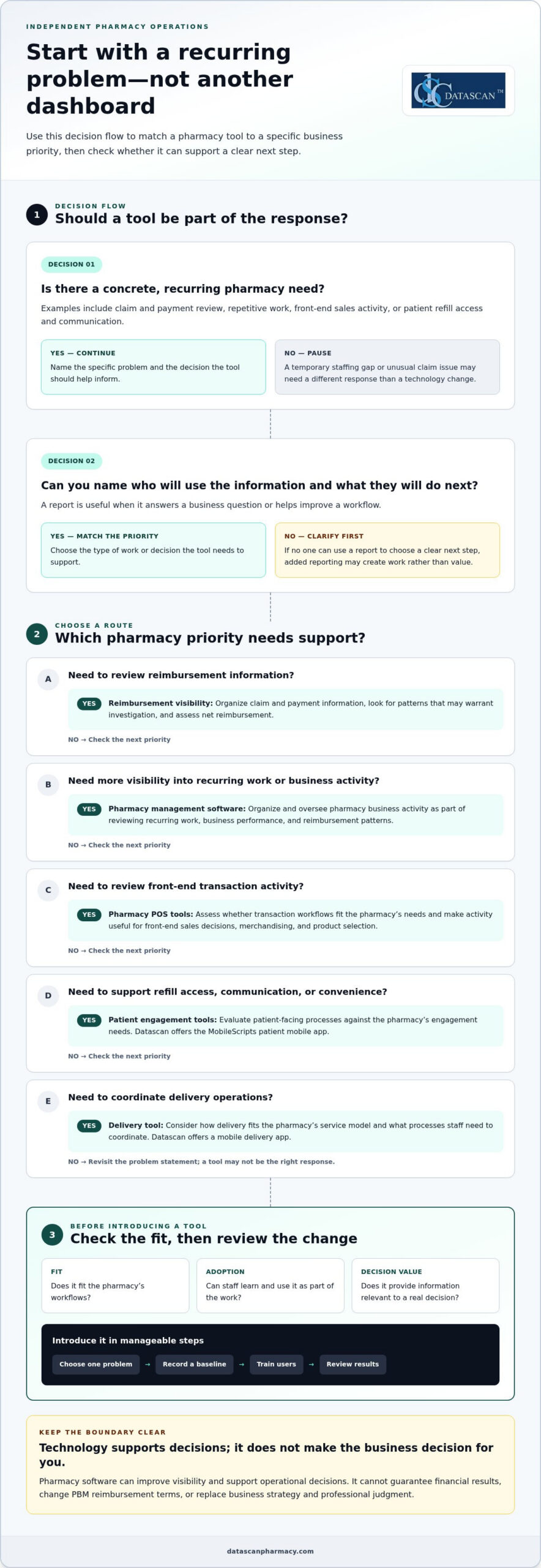
Pharmacy profit maximization tools help independent pharmacy owners organize business information, manage workflows, and make better-informed decisions. They can support operational improvements, but they cannot guarantee financial results or change payer terms.
Independent pharmacy owners face reimbursement changes while managing daily operations and patient care. When time is limited, choose technology that addresses a specific business priority rather than adding another system to oversee.
This guide explains how to evaluate pharmacy tools against your needs, improve visibility into business decisions, and assess how pharmacy management software, point-of-sale tools, and patient engagement technology can fit your workflows.
About the author: Datascan Pharmacy Software publishes practical guidance on pharmacy operations and technology for independent pharmacies.
Key Takeaways
Separate technology from business strategy and payer decisions: tools can improve visibility and support action, but they can’t change reimbursement terms.
Match pharmacy profit maximization tools to a specific priority, such as management visibility, transaction workflows, patient engagement, or delivery operations.
Compare options by how well they fit your workflows, support staff adoption, and provide information relevant to your decisions.
Introduce a tool in manageable steps: choose one problem, record a baseline, train users, and review results at a pace your team can sustain.
Assess pharmacy management software, POS, patient app, and delivery tools as parts of an operational toolkit aligned with your pharmacy’s priorities.
What tools can help an independent pharmacy protect profitability?
Profit maximization tools help pharmacy owners understand business activity and decide where to focus. For an independent pharmacy, that may involve using pharmacy software to organize business information and support decisions about reimbursement, staff workflows, inventory, front-end sales, and patient relationships. These tools provide operational support and information for review. They don’t replace business strategy, professional judgment, or changes to payer terms.
Think of profitability as a management discipline, not a software feature. Owners set priorities, assess trade-offs, and decide what action makes sense. A report is useful when it helps answer a business question or improve a workflow. For example, if staff repeatedly encounter delays in the same process, identify which step is causing the delay, who handles it, and what change could make the process easier to follow. That gives the team a specific issue to address instead of another dashboard to check without a next step.
Which pharmacy business problems should a profit tool address?
Start with a concrete, recurring need. Pharmacy profit maximization tools are most useful when they connect a known problem to a practical decision, such as:
Reimbursement visibility: Organize claim and payment information for review. Look for patterns that may warrant investigation and assess net reimbursement.
Time-consuming work: Identify repetitive tasks or workflow bottlenecks that may benefit from a more consistent process.
Front-end sales: Review transaction activity to inform decisions about merchandising and the products the pharmacy carries.
Patient retention: Assess whether refill access, communication, and other patient-facing processes support continuity and convenience.
Separate ongoing patterns from one-off disruptions. A recurring workflow bottleneck may call for a process or technology change, while a temporary staffing gap or unusual claim issue may require a different response. Before adopting a tool, define the decision it should support and who will act on the information. If no one can use a report to choose a clear next step, additional reporting may add work rather than value.
Can pharmacy software directly increase profit?
Pharmacy software can support visibility and operational decisions, but it can’t guarantee a financial result. A pharmacy can review processes, organize available business information, and decide how to manage inventory or staff workflows. Software alone can’t set PBM reimbursement terms, change a contract, or control every external factor affecting a claim.
Pharmacy profit tools help owners understand performance and guide controllable business decisions; they don’t guarantee profit or determine payer reimbursement. Keep that distinction in mind when evaluating pharmacy management software. A pharmacy management system supports core pharmacy operations. This pharmacy management system overview provides a general explanation of the category. The right tool should fit the pharmacy’s work and provide information owners can use, while leaving financial decisions and payer negotiations in human hands.
Which pharmacy profit maximization tools support each business priority?
The right tools depend on what the pharmacy needs to understand or improve. Group pharmacy profit maximization tools by business priority, then identify the information or workflow that would help the owner make a decision. For reimbursement concerns, the priority is to track and review claim and payment information, not to expect software to change a PBM’s terms or payment decisions.
Management visibility: Pharmacy management software helps organize and oversee pharmacy business activity. Use it as part of a review of recurring work, business performance, and reimbursement patterns.
Transaction workflows: Pharmacy POS tools support front-end transactions. Assess whether POS processes fit the pharmacy’s needs and make activity relevant to front-end sales decisions easier to review.
Patient engagement: Patient-facing tools can support goals for refill access, communication, and convenience. Datascan offers the MobileScripts patient mobile app; assess it against the pharmacy’s specific engagement needs.
Delivery operations: Datascan offers a mobile delivery app. Consider how delivery fits the pharmacy’s service model and what processes staff need to coordinate.
What can pharmacy management software help owners oversee?
Pharmacy management software is an operational system, not a substitute for the owner’s judgment. Use it as part of a broader review of the questions that matter to the business: Where is staff time going? Which recurring processes need attention? What reimbursement patterns should the pharmacy investigate? Datascan provides pharmacy management software for pharmacies evaluating these operational needs.
How can patient-facing and delivery tools support pharmacy priorities?
Patient engagement and delivery are separate priorities, so assess them separately. For patient-facing tools, define what the pharmacy wants to make easier for patients, such as accessing refill services. For delivery operations, identify the coordination needs involved. Datascan offers MobileScripts and a mobile delivery app. Evaluate each against a specific need, rather than assuming a particular financial result.
These categories can work together as an operational toolkit, but each should have a clear purpose. A pharmacy POS tool addresses transaction workflows, while a patient app supports a different part of the pharmacy experience. Focus reviews on information tied to a priority, so owners can spend less time collecting data without a defined use and more time making decisions.
How should you compare pharmacy profit tools, and what can’t they fix?
Compare pharmacy profit maximization tools by the business decision they support, how well they fit existing workflows, whether staff can use them consistently, and whether their reporting leads to action. No software can rewrite a PBM contract or guarantee higher reimbursement. A tool can help organize information for review, but the pharmacy still needs to interpret it and decide what to do.
Business need
Tool category
Decision supported
Limitation
Review reimbursement patterns
Pharmacy management software or a financial reporting process
Which claims or payment patterns warrant investigation or follow-up?
It cannot set payer terms or determine the final outcome of a reimbursement review.
Reduce time spent on recurring tasks
Workflow or pharmacy management software
Which processes need attention, clarification, or a more consistent approach?
Results depend on staff adoption and whether the workflow fits daily practice.
Understand front-end activity
Point-of-sale tools
What transaction activity should inform front-end business decisions?
Information alone doesn’t decide what to stock, promote, or change.
Support patient-facing or delivery operations
Patient engagement or delivery tools
Which patient services or operational processes should the pharmacy review?
A tool can support a process, but it can’t guarantee retention, revenue, or labor savings.
Which questions help determine whether a tool fits your pharmacy?
Start with the recurring task or decision you want to support. Identify who will use the tool, what information they need, and how the pharmacy will review and act on it. Then separate essential capabilities from features that don’t address the problem. A good fit should be apparent in the day-to-day workflow, not just in a product demonstration or a long list of reports.
For financial review, define the measure you want to understand before comparing systems. The guide to calculating pharmacy gross profit can help frame that measurement, but a software report is not a complete financial analysis. Useful reporting should answer a specific question, such as whether a recurring pattern merits further review, rather than create work with no clear next step.
Can software solve low PBM reimbursements?
No. Pharmacy software cannot set PBM reimbursement terms or promise that a payer will increase payment. It may help a pharmacy organize relevant information and identify items for review, but contract terms, payer decisions, and follow-up remain outside the software’s control. The Federal Trade Commission’s staff report on pharmacy benefit managers offers broader context on PBMs and their role in prescription drug markets.
Keep the evaluation grounded in decisions your team can make, workflows it can sustain, and information it can use. That gives owners a practical basis for comparing options and tracking financial performance, without confusing better visibility with control over reimbursement.
How can a pharmacy introduce profit tools without adding work?
Introduce pharmacy profit maximization tools in a focused sequence: choose one recurring problem, record a baseline, select a tool, train the people who will use it, and review whether it supports the original need. Starting with one issue helps protect staff time and gives the owner a clearer basis for deciding whether to continue, adjust, or expand the tool’s use.
Choose one problem. Define a specific issue, such as a recurring workflow delay or a reimbursement review task that takes time to complete.
Document a baseline. Record how the current process works and what measure reflects the problem before making a change.
Select a tool. Focus on capabilities tied to the stated need, not features that add complexity without supporting the intended decision.
Train the users. Explain the purpose of the tool and how it fits into the affected workflow.
Review the results. Set a manageable, consistent cadence to check whether the tool is being used and supports the original business question.
What should you measure before adopting a tool?
Choose measures that reflect the problem, such as time spent on a task, transaction patterns, or completion of a defined review process. Record the measurement period and information source so a later comparison is meaningful. Keep observations separate from conclusions: a change after implementation doesn’t, by itself, prove that the tool caused a financial result or improved profitability.
Keep the review cadence small enough to sustain. Set a recurring time to check the selected measure and note questions for follow-up, rather than adding a new daily reporting task. The right interval depends on the workflow and the pharmacy’s capacity. Consistency matters more than a complicated review routine. If the information isn’t helping the team decide what to do next, simplify the measure or revisit the use case.
How do you make adoption manageable for a busy pharmacy team?
Begin with the staff members and workflow directly affected by the selected use case. Set a practical training and feedback process before expanding: show users the intended task, give them a way to flag friction, and agree on who will review the feedback. This keeps adoption connected to daily work instead of making the entire team responsible for a new process at once.
Workflow planning should account for how a task moves through the pharmacy and where staff need clarity. Datascan’s customizable workflow is one option to evaluate as part of that planning. Keep the review focused on the original problem, such as whether the defined process is easier to follow, rather than assuming a tool has improved profit.
Use this measured approach to decide whether a tool fits your pharmacy’s priorities and capacity. Learn more about how Datascan’s pharmacy software can support your workflow needs by visiting the Datascan contact page.
How can Datascan pharmacy software fit into a profitability strategy?
Datascan pharmacy software fits into a broader profitability strategy when each offering is matched to a pharmacy’s priorities and implementation plan. The goal isn’t to expect software to guarantee financial results. It’s to choose operational tools that fit the work the pharmacy wants to support, from management processes to point-of-sale, patient engagement, and delivery.
Which Datascan tools align with common pharmacy priorities?
Start with the need the pharmacy has already identified. Datascan’s offerings address different categories of work, so choose based on the pharmacy’s workflows and priorities:
Front-end transactions: Datascan Point of Sale (POS) supports transaction workflows.
Patient engagement: MobileScripts Patient Mobile App supports patient-facing engagement needs.
Delivery operations: Datascan Mobile Delivery App supports delivery operations.
Workflow needs: Datascan customizable workflow can be configured around the pharmacy’s day-to-day processes.
These categories address different needs, so a pharmacy doesn’t have to treat them as one all-or-nothing decision. If the immediate priority is a particular workflow, start there. If the pharmacy is considering broader changes, map the affected processes and users before deciding which tools to introduce and in what order. This keeps implementation focused and helps owners assess whether a tool fits the work it is meant to support.
Datascan is a family-owned company that has operated since 1981 and provides U.S.-based technical support. These details describe the company and its support model; they aren’t evidence of a particular financial outcome. For an independent pharmacy managing time pressure and reimbursement concerns, technology decisions should still be grounded in specific operational needs, staff readiness, and a realistic plan for reviewing how the tools are used.
What is a practical next step for an independent pharmacy?
Before discussing software, write down three things: the priority you want to address, how the current process works, and what operational improvement you want to evaluate. For example, identify a recurring task that takes time, describe how staff handle it now, and define what a more manageable process would look like. This gives the conversation a practical starting point without assuming a particular financial result.
Bring those priorities to a conversation about fit and implementation. Datascan’s offerings can be matched to the pharmacy’s needs, with the focus on selecting an appropriate starting point rather than adding tools without a clear purpose. Discuss your pharmacy software needs with Datascan and take the next step with a clear view of the work you want to support.
Keep Your Pharmacy’s Priorities in Focus
Your next move doesn’t have to be a major technology overhaul. Choose the business question that matters most right now, then use it to guide how you assess pharmacy profit maximization tools. As reimbursement pressures, workflows, and patient needs shift, revisit whether your technology still supports the decisions your pharmacy needs to make.
Start with your priorities, not a promise of guaranteed results. Share the workflow or business need you want to address, and explore the pharmacy software options that fit that goal. Start a conversation about your pharmacy’s priorities with Datascan.
Independent pharmacies are strongest when their technology choices serve the people and work at the heart of the business. Take the next step with purpose, and keep building on what makes your pharmacy distinct.
Frequently Asked Questions
What are pharmacy profit maximization tools?
Pharmacy profit maximization tools are systems and resources that help owners understand business activity and decide where to focus attention. They can include pharmacy management software, point-of-sale systems, patient engagement tools, and delivery tools. A pharmacy reviewing front-end activity, for example, may need a different tool than one assessing a recurring operational task. These tools can inform decisions, but they can’t guarantee profit or control payer terms.
Can pharmacy management software improve profitability?
Pharmacy management software can support operational visibility and decision-making, depending on its capabilities and how the pharmacy uses it. Start by stating a measurable business question, such as whether a defined task is being completed as intended. Then assess whether the software offers relevant information or workflow support. Treat the result as evidence of support for that process, not proof that the software alone increased profitability.
Can technology help independent pharmacies respond to PBM reimbursement pressure?
Technology can’t set PBM contract terms or guarantee better reimbursement. It may help owners organize business information for review and decide what issues call for follow-up, but the pharmacy must assess the situation and determine next steps. For broader U.S. context on PBMs and pharmacy markets, see the Federal Trade Commission’s staff report on pharmacy benefit managers.
How do I know whether a pharmacy profit tool is working?
Define the problem and record a relevant baseline before putting a tool into use. Compare the same measure over a consistent period, using the same data source where possible. Note other changes that may affect the result, such as a workflow adjustment or staffing change. Then ask whether the tool helped the team make a useful decision or complete the process. A change alongside tool use doesn’t prove the tool caused it.
What should an independent pharmacy look for in pharmacy software?
Look for a fit with your actual workflows, the business questions you need to answer, staff adoption needs, and the support process. Separate essential capabilities from optional features by linking each requirement to a pharmacy task. Identify who will use a function and what decision it should inform. There’s no single feature set for every independent pharmacy, so assess the system in the context of your operations.
Can pharmacy software save owners time?
It can support more organized workflows, but whether that saves time depends on the task, implementation, and staff adoption. Pick a repetitive process and document how it currently works, including who handles each step and where delays or extra effort arise. Then assess whether the software’s capabilities address that process. Don’t assume a tool will reduce workload by a specific amount before your team evaluates it in practice.
Should a pharmacy choose one tool or an integrated software suite?
The better fit depends on your pharmacy’s priorities, existing processes, and how its operational needs relate to one another. A suite may bring related functions together, while separate tools may address narrower requirements. Compare both approaches by workflow fit, information needs, and usability for the staff involved. Consider the work required to introduce and maintain each option, and don’t assume either structure guarantees stronger financial results.
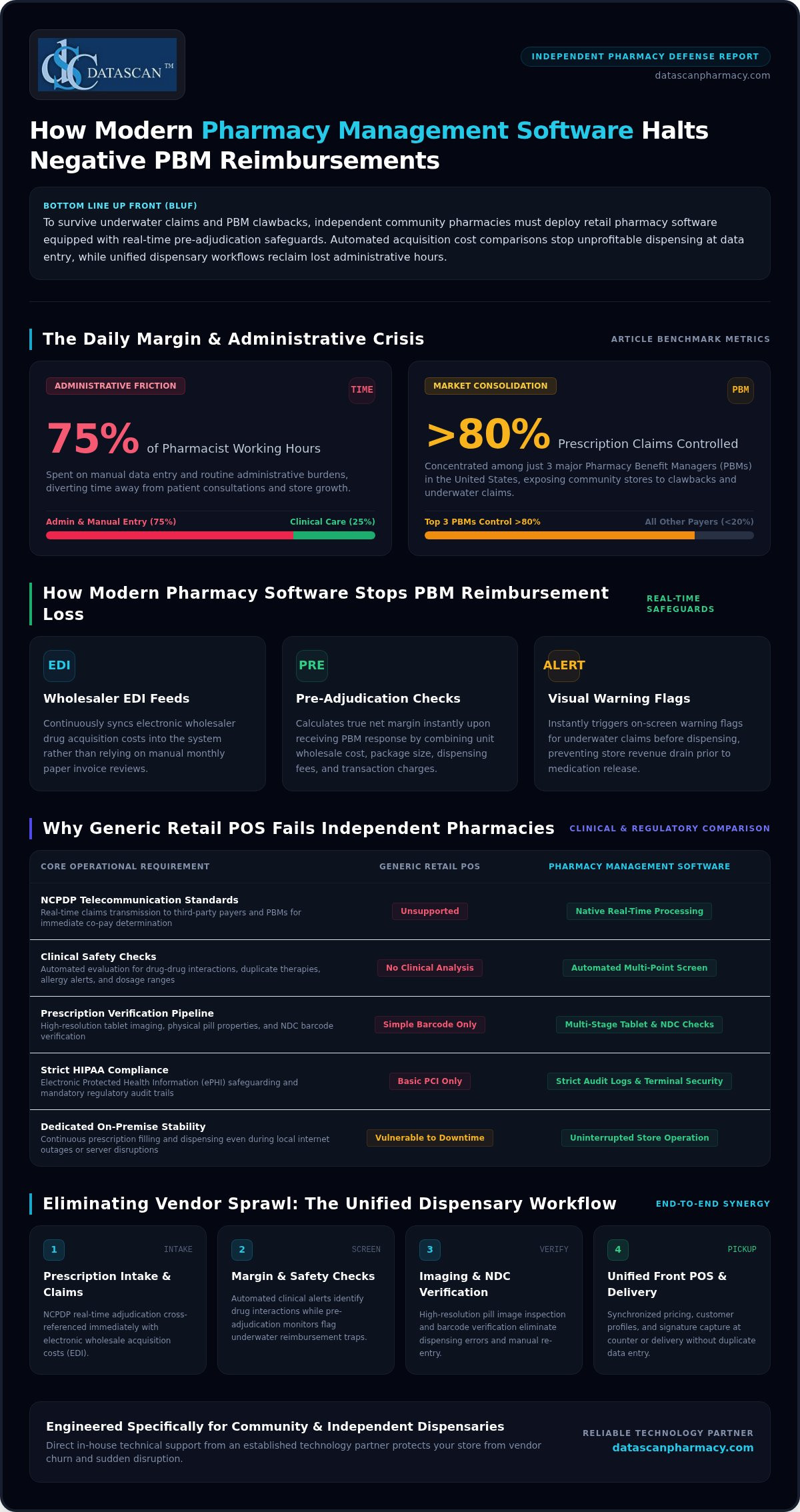
The best retail pharmacy software in 2026 must actively defend your profit margins, not just process claims. If you run an independent community pharmacy, you already know the daily frustration of underwater reimbursements, unexpected PBM clawbacks, and juggling separate vendors for dispensing and point-of-sale. Research shows that pharmacists spend up to 75% of their working hours on administrative tasks and manual data entry. That is valuable time stolen directly from patient consultations and business growth.
You deserve operational technology that works as your dedicated ally. In this guide, you will discover how modern pharmacy management software shields your prescription revenue with automated pre-adjudication safeguards, cuts dispensing bottlenecks with integrated verification tools, and eliminates vendor chaos. Here is our direct evaluation of the top pharmacy software solutions engineered to keep independent pharmacies profitable, efficient, and fully in control.
Key Takeaways
Learn how real-time pre-adjudication safeguards in modern pharmacy management software flag underwater claims before dispensing, shielding store revenue against aggressive PBM clawbacks.
Discover the essential features that separate modern retail pharmacy software from outdated legacy tools, including seamless integration between dispensary workflows, point-of-sale, and mobile communications.
Explore how customizable verification workflows eliminate repetitive manual data entry, giving community pharmacy owners the operational freedom to focus on clinical care and business growth.
Identify why choosing an established, family-owned technology partner with direct in-house technical support protects your dispensary from vendor churn and operational disruption.
What Is Retail Pharmacy Software and Why Does Your Dispensary Need It?
Retail pharmacy software is the operational engine of an independent dispensary, synchronizing prescription dispensing, real-time insurance billing, patient health profiles, and retail sales in a single system. It acts as an indispensable operational safeguard that prevents dangerous dispensing errors, shields store margins, and protects staff from administrative burnout. Because community dispensaries cannot afford downtime, dedicated on-premise stability ensures your staff continues filling prescriptions and serving patients without interruption, even during local internet outages or external server disruptions.
How Does Pharmacy Management Software Differ from General Retail POS?
Generic retail point-of-sale systems simply scan product barcodes, adjust inventory counts, and tally cash or card payments. They cannot navigate the clinical safety checks and regulatory requirements essential to community pharmacy practice. In contrast, a comprehensive Pharmacy management system manages complex, highly regulated clinical workflows that generic tools cannot touch:
NCPDP Telecommunication Standards: Transmits real-time claims directly to third-party payers and pharmacy benefit managers (PBMs) for instant co-pay calculation and claim approval.
Clinical Safety Checks: Automatically analyzes comprehensive patient records to flag drug-drug interactions, duplicate therapies, allergy alerts, and dosage ranges before filling.
Prescription Verification: Integrates high-resolution tablet imaging, physical pill properties, and National Drug Code (NDC) barcode scanning across every dispensing stage.
Strict HIPAA Compliance: Secures electronic protected health information (ePHI) across every terminal, preventing unauthorized access and maintaining strict audit logs.
Why Are Independent Pharmacies Moving Away from Fragmented Vendor Tools?
Running an independent pharmacy with fragmented, single-purpose software drains store resources. When your dispensing counter, front-end cash register, and patient messaging tools run on separate platforms, staff waste hours manually re-entering script numbers, patient details, and co-pays. This operational friction drives up overhead and exposes your pharmacy to costly verification mistakes.
Upgrading to unified pharmacy management software eliminates this vendor sprawl. By linking your dispensary directly to your front register and delivery operations, real-time retail pharmacy software synchronizes pricing, customer profiles, and prescription statuses instantly. Your team avoids double data entry, captures signatures cleanly at pickup, and gains the operational breathing room necessary to focus on high-value patient care.
How Does Pharmacy Management Software Combat Negative PBM Reimbursements?
Modern pharmacy management software acts as a direct financial shield against predatory pharmacy benefit manager (PBM) practices. With three major PBMs controlling more than 80% of prescription claims in the United States, independent dispensaries face aggressive audit penalties, unexpected post-fill adjustments, and underwater reimbursements on essential medications. Modern retail pharmacy software stops this cash drain by evaluating every claim against your true drug acquisition costs before a pill ever leaves the dispensary counter.
Instead of manually sorting through distributor invoices and remittance spreadsheets at the end of the month, automated software compares incoming electronic wholesaler acquisition costs (EDI feeds) against adjudicated co-pays and plan payments. If a claim reimburses below cost, the system immediately flags the transaction. This transparency is critical for calculating pharmacy gross profit accurately across every third-party payer contract.
How Can Prescribing Software Detect Underwater Claims Before Dispensing?
Pre-adjudication financial safeguards protect margins by stopping unprofitable fills in real time during intake and data entry:
Real-Time Margin Safeguards: The system calculates true net margins by factoring in wholesale unit cost, package size, dispensing fees, and transaction fees instantly upon receiving the PBM response.
Visual Warning Alerts: Bright on-screen visual banners alert pharmacy technicians immediately if an adjudication yields a negative margin, preventing the script from moving forward in the workflow.
Clinical and Sourcing Interventions: With immediate notice, pharmacists can source alternative package sizes, evaluate secondary suppliers, or contact prescribers to switch to profitable therapeutic equivalents before dispensing the drug.
What Role Does Medication Synchronization Play in Cash Flow Predictability?
Managing prescription volume reactively leaves community dispensaries vulnerable to sudden wholesale price spikes and unpredictable reimbursement cycles. Integrated medication synchronization aligns multiple maintenance refills to a single, recurring monthly pickup date. Industry research highlights that leveraging AI and automation streamlines operational processes, and med-sync technology creates predictable weekly purchasing orders that prevent costly over-stocking.
Beyond smoothing out the dispensary workflow rhythm, synchronized patients consistently achieve higher proportion of days covered (PDC) scores. Maintaining superior adherence performance safeguards your store against punitive payer quality deductions and lowers the risk of targeted audit scrutiny. If your dispensary struggles with erratic payer adjustments, taking a moment to connect with a pharmacy software specialist can reveal how real-time claim auditing defends your bottom line.
What Core Features Should Independent Pharmacies Look for in a Pharmacy System?
The right retail pharmacy software must unite dispensary verification, financial reporting, clinical care documentation, and front-of-store sales within a single interface. Legacy systems that merely count pills and transmit basic claims leave community pharmacies vulnerable to audit fines, margin loss, and customer checkout delays.
When evaluating a new pharmacy system, compare basic legacy dispensers against a modern unified platform:
Capability
Basic Legacy Dispensers
Modern All-in-One Pharmacy Software
Checkout Architecture
Standalone, unlinked third-party registers
Fully integrated point of sale with real-time script lookup
Clinical Services
Isolated paper notes or third-party portals
Integrated MTM logging, e-care plans, and immunization entry
Regulatory Tracking
Manual logs for pseudoephedrine (PSE) sales
Automated PSE tracking with digital signature capture
Card Compliance
Requires manual split-tenders at checkout
Certified SIGIS auto-routing for flexible spending accounts
Why Is an Integrated Pharmacy Point-of-Sale System Essential for Retail Success?
Relying on an unlinked cash register invites dangerous dispensing errors and slows checkout lines. Utilizing an integrated platform like Datascan point of sale connects your front counter directly to active dispensary queues. Clerks scan prescription bag barcodes to confirm patient identities instantly, preventing wrongful releases and verifying co-pays on the fly.
Integrated POS terminals also handle complex retail regulations automatically. The system routes approved OTC items through certified SIGIS IIAS processing for hassle-free FSA and HSA spending, while real-time pseudoephedrine tracking records state-mandated limits without manual paper ledgers. For detailed optimization tactics, explore our resource on optimizing the pharmacy POS system for retail success.
How Do Patient Mobile Apps and Delivery Tools Expand Community Reach?
Community pharmacies succeed by providing personalized care that large retail chains and mail-order giants cannot match. Integrated tools expand this relationship beyond your brick-and-mortar storefront:
Branded Mobile Refill Apps: Platforms like the MobileScripts patient mobile app empower customers to order refills, review med-sync schedules, and receive pickup alerts directly on their smartphones.
Electronic Delivery Verification: Drivers equipped with the Datascan mobile delivery app record turn-by-turn route updates and collect HIPAA-compliant digital signatures right at the patient doorstep.
Direct Patient Messaging: Two-way secure communications notify patients when scripts are ready, reducing will-call return-to-stock rates and building lasting community loyalty.
How Can Workflow Automation Software Free Up Valuable Time for Pharmacy Owners?
Customizable workflow automation frees independent pharmacy owners from the daily grind of manual paperwork, letting them redirect their energy toward clinical consultations and store revenue growth. When pharmacists spend up to 12 hours every week on manual data entry, their professional expertise is trapped behind a keyboard. Implementing specialized retail pharmacy software replaces chaotic paper bins with structured, rules-based queues that process scripts accurately with minimal technician intervention.
Effective retail pharmacy software divides dispensing into discrete operational stages: script intake, data entry, visual verification, dispensing, and final pharmacist sign-off. Implementing targeted workflow software allows stores to configure each checkpoint based on floor layout and staff credentials, eliminating counter bottlenecks. For actionable staffing models, review our guide on pharmacy workflow optimization software.
What Are the Critical Verification Checkpoints in a Modern Dispensing Workflow?
A structured workflow enforces patient safety and cuts verification liability through automated system checks:
Hard-Stop Barcode NDC Verification: Technicians must scan the stock bottle barcode before counting. If the NDC does not match the adjudicated prescription, the software blocks the label from printing.
High-Resolution Pill Imaging: The verification screen displays color photos of the front and back of the tablet, complete with physical imprint codes, so the checking pharmacist confirms contents at a glance.
Dynamic Queue Routing: The engine automatically routes high-volume maintenance fills to secondary workstations or automated counting robots, keeping counter lanes open for acute, waiting patients.
How Does Automated Inventory Replenishment Prevent Overstock and Dead Shelves?
Uncontrolled inventory ties up thousands of dollars in operating cash on dispensary shelves. Intelligent stock automation links real-time dispensing directly to your primary drug wholesalers via electronic data feeds. Instead of requiring a technician to walk the aisles with a handheld scanner at closing, the system calculates reorder points based on rolling 30-day usage trends, seasonal demands, and minimum shelf targets.
Perpetual inventory management also tracks uncollected scripts in will-call. When a prescription reaches your store threshold without patient pickup, the system prompts a reverse claim and guides the technician to restock the medication. This immediate turnaround returns salable units to active stock before expiration, avoiding inventory write-offs. Ready to cut hours of busywork from your dispensary day? Schedule a practical workflow consultation to see automated dispensary queues in action.
Why Do Independent Pharmacies Choose Datascan Over Other Software Companies?
Datascan stands apart from corporate competitors because it combines four decades of family-owned independence with purpose-built technology designed specifically for community pharmacies. Unlike venture-backed vendors that force costly system migrations and prioritize outside shareholders, Datascan has supported independent community dispensaries across the United States continuously since 1981. Over twenty percent of client pharmacies have remained partnered with Datascan for more than 20 years, proving the value of long-term stability and client-driven development.
Every software update reflects direct feedback from working community pharmacists rather than corporate committee decisions. By delivering integrated tools for dispensing, point of sale, delivery management, and mobile refills, Datascan shields independent owners from vendor fragmentation while protecting local profitability. When you invest in retail pharmacy software, you need a dependable partner that treats your store as a priority, not an account number.
What Should Owners Expect During a Pharmacy Software Conversion?
Switching systems often feels daunting, but a structured transition plan eliminates downtime and preserves critical operational data:
Complete Data Mapping: Experienced conversion specialists map your active patient files, historical prescription records, prescriber databases, and insurance profiles cleanly into the new environment.
Parallel Validation Testing: Rigorous pre-launch audits verify script counts and balance sheets against your existing platform to ensure complete data integrity before going live.
Role-Based Staff Training: Technicians and pharmacists complete interactive workflow training tailored to their daily duties, eliminating counter confusion on opening day.
How Does Dedicated US-Based Support Protect Daily Store Operations?
Dispensary issues require instant answers, not automated ticketing queues. When a processing snag stalls your fill queue or checkout counter, Datascan connects you directly to a dedicated, long-tenured technical support team located entirely in the United States. Without call center routing or offshore handoffs, experienced software specialists troubleshoot questions immediately, keeping your dispensing lines moving and maintaining steady patient service throughout the day.
Equip Your Independent Pharmacy for Long-Term Growth
Independent community pharmacies cannot afford passive systems in an era of aggressive PBM clawbacks and tightening margins. Investing in modern retail pharmacy software gives your dispensary the pre-adjudication safeguards needed to stop underwater claims before they hurt cash flow, while unified point-of-sale and mobile tools eliminate administrative drag. When your dispensing workflow runs with rules-based precision, your pharmacists regain the daily bandwidth needed to deliver high-touch clinical care.
Datascan has proudly championed independent community pharmacies across the nation as a family-owned partner since 1981. With over 20% of client pharmacies partnered for more than 20 years and a responsive, US-based support team answering directly without call centers, you gain an enduring ally invested in your store’s independence. Protect your margins and simplify your dispensary operations today. Connect with the Datascan team today to request a live demo and discover what true operational efficiency can do for your business.
Frequently Asked Questions
What is the primary difference between retail pharmacy software and hospital pharmacy systems?
Retail pharmacy software focuses on outpatient dispensing, real-time third-party PBM claims adjudication, and customer-facing point of sale, whereas hospital systems manage inpatient electronic medication administration records (eMAR) and institutional bedside distribution. Community systems require direct NCPDP telecommunication standards, front-store inventory tracking, patient co-pay collections, and adherence tools. Inpatient systems integrate directly with hospital medical records to coordinate nursing administration schedules rather than processing retail prescription sales.
Can modern retail pharmacy management software help identify underpaid PBM insurance claims?
Yes, modern retail pharmacy software automatically audits claims against electronic wholesaler acquisition costs before dispensing to identify underpaid and underwater prescriptions. The software calculates your net margin by comparing adjudicated plan reimbursements against actual acquisition costs in real time. When a payer offers an underwater payment, visual alerts notify staff immediately, allowing pharmacists to review alternative package sizes, dispense generic equivalents, or reject negative claims before filling.
How difficult is it to migrate data when switching pharmacy software vendors?
Migrating to a new pharmacy system is straightforward when guided by an experienced vendor team executing structured data mapping and parallel testing protocols. Conversion specialists transfer historical dispensing records, patient profiles, active insurance plans, and prescriber files with minimal operational disruption. Pre-launch validation checks verify that prescription counts and balances match your legacy platform exactly, while structured staff training ensures technicians and pharmacists dispense smoothly from opening day.
Does retail pharmacy software include integrated point-of-sale and delivery tracking?
Leading all-in-one pharmacy software platforms include native point of sale (POS) and electronic delivery tracking directly inside the core dispensing system. Unifying front registers and mobile delivery tools eliminates expensive third-party vendor subscriptions. Clerks scan prescription barcodes to confirm patient identities at checkout, while delivery drivers capture electronic, HIPAA-compliant signatures on mobile devices curbside or at doorsteps, updating your store inventory and sales records instantly.
Why do independent pharmacies prefer on-premise pharmacy systems over cloud-based setups?
Independent pharmacies often rely on on-premise systems because local servers guarantee uninterrupted dispensing operations even during internet outages or external network failures. When outside web connections drop, an on-premise workstation keeps filling prescriptions, scanning barcodes, and serving walk-in patients without freezing. Store owners maintain physical custody of their operational database, avoiding remote server downtime, unexpected connection latency during peak hours, and third-party data center vulnerabilities.
How does barcode verification in retail pharmacy software reduce dispensing medication errors?
Barcode verification prevents dispensing mistakes by enforcing hard system stops whenever a scanned National Drug Code (NDC) does not match the prescription entry. During technician filling, the software requires a direct scan of the stock bottle. If the NDC, drug strength, or package size differs from the adjudicated order, the system halts the transaction before printing a label. This automated check eliminates wrong-drug errors and protects dispensary safety.
Can independent community retail pharmacies run medication synchronization through their dispensing software?
Modern pharmacy management software includes native medication synchronization modules to align all maintenance refills to a single monthly pickup date. Built-in med-sync dashboards track patient refill cycles, coordinate short fills for schedule alignment, and generate automated processing queues each month. This structured workflow eliminates sporadic prescription runs, smooths daily technician staffing requirements, improves patient adherence scores, and creates predictable wholesale inventory purchasing schedules.
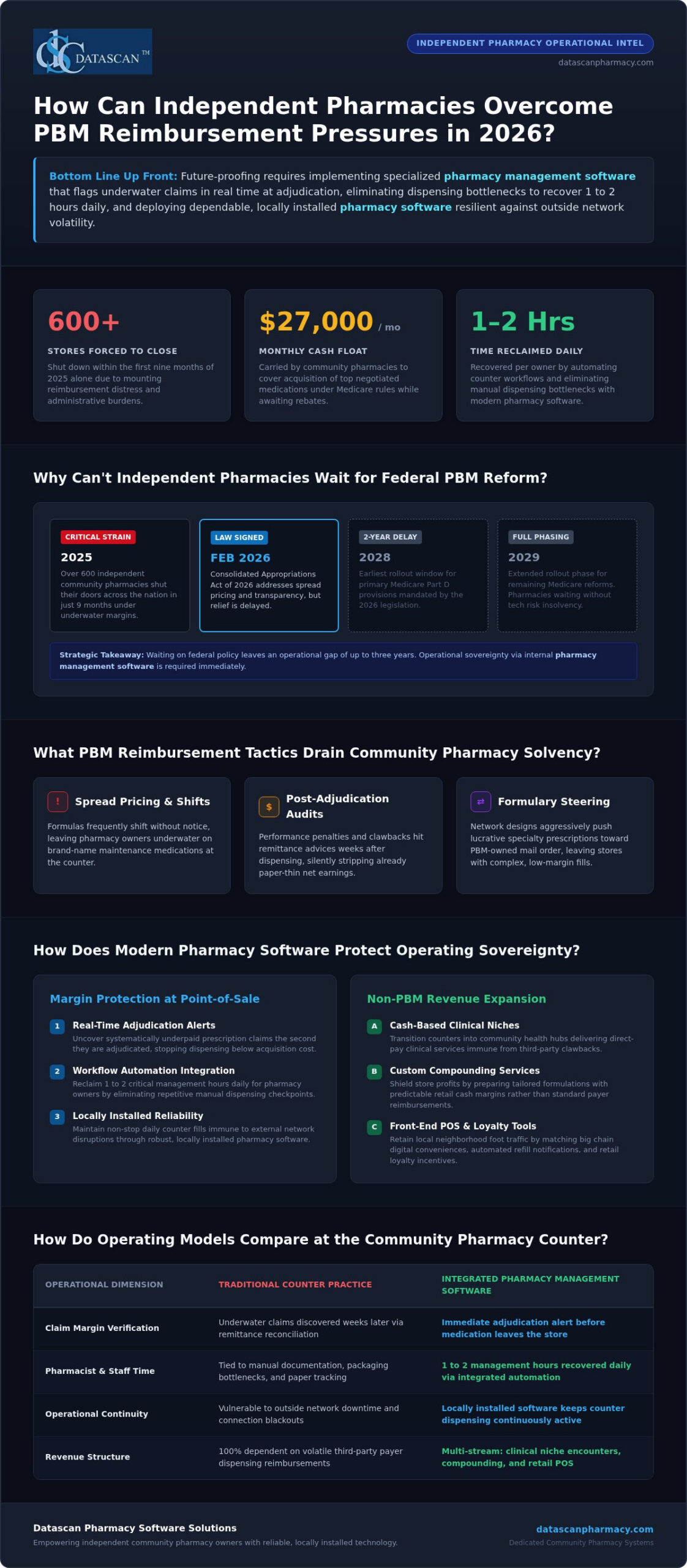
Future-proofing your independent pharmacy in 2026 requires stopping profit leaks at the counter and reclaiming critical business hours through dependable pharmacy management software. With more than 600 independent pharmacies forced to close in the first nine months of 2025 alone, waiting on federal PBM relief that won’t take effect until 2028 is a luxury independent owners don’t have.
You already feel the strain of unpredictable clawbacks, shrinking margins, and exhausting administrative bottlenecks that pull you away from your patients. In this guide, you’ll discover how to protect your store against aggressive PBM practices, spot underpaid prescription claims in real time, and streamline dispensing tasks with integrated pharmacy software. We’ll explore the practical technology and operational upgrades you need right now to safeguard your gross margins, retain loyal community patients, and run an enduring, profitable pharmacy on your own terms.
Key Takeaways
Achieve true independence by future-proofing your independent pharmacy with modern tools that neutralize predatory PBM clawbacks.
Uncover systematically underpaid prescription claims at the exact point of adjudication using advanced pharmacy management software.
Eliminate dispensing bottlenecks and reclaim 1 to 2 management hours daily through fully integrated workflow automation.
Shield your bottom line from insurance volatility by expanding into cash-based clinical niches, compounding, and retail point of sale loyalty.
Protect continuous daily operations against costly network disruptions by choosing dependable, locally installed pharmacy software.
What Does Future-Proofing Your Independent Pharmacy Mean in 2026?
Future-proofing your independent pharmacy means achieving operational sovereignty: securing predictable prescription margins, eliminating administrative chaos, and relying on dependable technology that keeps running regardless of outside network volatility. Buying groups and federal policy debates can’t protect your store tomorrow morning. Long-term viability requires taking total control over your internal counter workflows, verifying every insurance claim before filling, and serving community patients with modern digital conveniences.
Modern independent stores can’t survive on traditional dispensing alone. Surviving requires upgrading everyday operations with specialized tools designed specifically for community stores.
Margin Verification: Stopping underwater reimbursements at the exact moment of intake instead of absorbing clawbacks weeks later.
Workflow Autonomy: Automating repetitive dispensing steps to recover hours of pharmacist time every day.
Patient Convenience: Giving patients mobile refill tools and delivery transparency that match retail chains.
What Industry Pressures Are Threatening Community Pharmacies Today?
Independent stores are caught between aggressive payer models and lean staffing reality. While the Consolidated Appropriations Act of 2026 was signed into law in February 2026 to address spread pricing and rebate transparency, its primary Medicare Part D provisions don’t roll out until 2028 and 2029. Meanwhile, predatory pharmacy benefit manager (PBM) clawbacks, underwater reimbursements, and complex DIR fee evolutions threaten day-to-day solvency. Staffing shortages make it harder for technicians and pharmacists to keep up, turning daily fills into exhausting administrative marathons. Without robust pharmacy management software that automates documentation and monitors inventory costs, operating overhead quietly eats away your cash flow.
Why Is Relying Solely on Traditional Dispensing Margins No Longer Viable?
Dispensing commoditized medications at negative margins is a losing proposition. Modern community pharmacy practice has shifted, requiring independent owners to treat their counters as multifaceted healthcare hubs rather than simple prescription pickup counters. Independent businesses must generate non-PBM revenue by expanding clinical encounters, compounding, and retail front-end sales. Achieving this level of agility requires high-performance pharmacy software that flags underwater claims instantly, protecting your staff from dispensing high-cost drugs below acquisition value while freeing up the time needed to build profitable clinical programs.
How Are PBM Reimbursement Pressures Impacting Pharmacy Viability?
PBM reimbursement pressures threaten independent pharmacy viability by systematically slashing dispensing margins below acquisition costs, imposing opaque post-adjudication clawbacks, and creating severe cash flow deficits. Defending your balance sheet and future-proofing your independent pharmacy against these financial drains requires advanced pharmacy management software that flags underwater claims in real time before medications leave the building.
Buying groups and wholesaler rebates help, but they cannot prevent sudden negative margins at the dispensing counter. Many independent pharmacies now float upwards of $27,000 monthly just to cover the acquisition costs of top negotiated medications under Medicare transaction rules while waiting for delayed manufacturer refunds. When low reimbursements pair with aggressive audits, relying on old billing practices quickly drains working capital.
What PBM Reimbursement Tactics Drain Independent Pharmacy Profitability?
PBMs use intricate contractual mechanisms that strip revenue long after patient pickup:
Opaque Spread Pricing and Contract Revisions: Reimbursement formulas frequently shift without advance notice, leaving pharmacies underwater on brand-name Maintenance medications.
Post-Adjudication Adjustments: Performance-based adjustments and administrative penalties hit remittance advices weeks after dispensing, eroding already paper-thin net earnings.
Formulary Steering: Restrictive network designs push lucrative specialty patients toward PBM-owned mail-order operations, leaving community stores with complex, low-margin claims.
How Can Pharmacies Identify Underpaid Claims and Monitor Margin Erosion?
Waiting for monthly bank reconciliations guarantees margin loss. Modern independent operations require defensive technology embedded directly inside their primary pharmacy software. Real-time margin auditing compares your exact acquisition costs against adjudicated payer rates during label generation. If a claim yields a negative return, the system triggers an immediate alert so your staff can evaluate alternatives, request prior authorizations, or discuss therapeutic substitutions before dispensing.
Reviewing detailed metrics is essential for long-term survival. Understanding how your pharmacy performs across specific payer contracts starts with mastering the fundamentals of calculating pharmacy gross profit to stop invisible revenue leaks. While identifying external initiatives like NCPA’s Diversified Revenue Opportunities provides helpful pathways for future clinical income, intercepting negative-margin fills at the register keeps your business solvent today. If you want to see how modern claim verification protects everyday dispensary margins, you can contact our team for a practical demonstration.
Which Core Pharmacy Software Features Protect Margins and Patient Retention?
The core pharmacy software features that protect margins and drive patient retention include reliable local on-premise system architecture, integrated front-end point-of-sale management, and native mobile refill applications. Securing long-term stability and future-proofing your independent pharmacy means unifying these tools into one cohesive operational hub. When your prescription dispensing, customer checkout, and digital communications talk to each other without friction, your pharmacy captures higher front-end profits, eliminates redundant data entry, and gives patients the polished digital conveniences they expect from big-box chains.
A fragmented system slows down your staff and frustrates customers. Real operational resilience requires a unified technology ecosystem built on three pillars:
System Reliability: Independent on-premise architecture that keeps processing and dispensing prescriptions even when outside web connections fail.
Synchronized Front-End Checkout: Native point of sale integration tracking FSA and HSA eligibility, over-the-counter purchases, customer loyalty perks, and signed delivery confirmations.
Mobile Patient Access: Digital smartphone portals enabling self-service refills, delivery notifications, and direct communication.
Why Is Local On-Premise Pharmacy Management Software Crucial for Reliability?
Unstable web infrastructure shouldn’t bring your pharmacy to a dead stop. A local, on-premise pharmacy management software setup stores and runs your data directly on your in-house server, giving you complete stability. If a regional commercial internet outage knocks out external connections, your dispensary workflow keeps moving forward without frozen screens or dropped fill queues. Local database architecture eliminates the latency issues often caused by distant offsite hosting during peak 4:00 PM afternoon rushes. You keep total, uncompromised administrative ownership over patient records and transaction logs, sidestepping third-party service blackouts that disrupt prescription intake.
How Do Built-In Point of Sale and Mobile Refill Tools Retain Patients?
Big-box retail giants spend heavily to convince consumers that independent stores can’t match their convenience. You can beat them at their own game by uniting your dispensary system with front-of-house technology. Connecting your front-end registers using our dedicated Datascan Point of Sale platform gives your team real-time visibility into over-the-counter margins, tracks patient loyalty rewards, and handles electronic signatures at pickup or curbside. Integrating these register tools with the dispensing queue ensures non-prescription revenue helps offset slim prescription reimbursement spreads.
Convenience dictates where patients send their next fill. When you deploy the MobileScripts patient mobile app, you place your store’s brand directly on your patients’ smartphones. Customers can review medication profiles, set dosage reminders, and request refills in seconds without tying up your phone lines. Pairing simple mobile access with front-end rewards keeps community patients loyal to your business rather than drifting to corporate pharmacy apps.
How Can Independent Pharmacies Diversify Revenue Beyond Standard Dispensing?
Independent pharmacies diversify revenue beyond standard dispensing by expanding into specialized, high-margin cash niches like compounding and veterinary prescriptions while monetizing structured clinical consultations. Future-proofing your independent pharmacy requires breaking free from complete reliance on commoditized prescription fills. The average independent store already pulls approximately 20% of its total revenue from front-end over-the-counter sales; expanding this cash-based foundation shields your business from unpredictable payer clawbacks and strengthens net profitability.
Generating revenue outside traditional PBM structures stabilizes your bottom line through three proven channels:
Specialized Cash Dispensing: Compounded medications and veterinary therapies carry healthy margins and bypass third-party insurance adjudication entirely.
Clinical Service Billing: Medication Therapy Management (MTM) and expanding point-of-care consultations create recurring professional fee revenue. For instance, managing just 50 active MTM patients can produce $7,500 to $15,000 annually in non-PBM revenue.
Synchronized Care Models: Aligning patient refill schedules eliminates inventory guesswork and establishes predictable monthly cash inflows.
How Do Compounding and Veterinary Prescriptions Create Resilient Margins?
Compounding transforms standard dispensing into personalized care that commands dependable, direct-pay margins. Preparing custom pediatric dosages, bioidentical hormones, or allergen-free suspensions delivers immense clinical value while removing insurance clawback risk. Pairing human formulations with pet care unlocks an equally lucrative customer base. Pet owners routinely pay cash for customized veterinary medications. Utilizing dedicated compounding solutions integrated inside your core dispensary software lets you calculate ingredient formulas, track chemical lot numbers, and price custom mixtures accurately. To learn how to tap into animal healthcare, review our comprehensive veterinary prescription software guide.
What Role Do Medication Synchronization and Clinical Services Play in Consistent Cash Flow?
Chaotic refill requests create uneven inventory turns and frantic counter rushes. Medication synchronization aligns a patient’s entire maintenance regimen to a single, coordinated monthly pickup date. This synchronization stabilizes wholesale purchasing, cuts down on uncollected prescriptions, and drives higher medication adherence scores. Pharmacists can pair that scheduled monthly encounter with reimbursable clinical assessments. Billing for deprescribing and chronic care management turns routine consultations into structured income, provided your primary pharmacy software documents interventions cleanly.
Expanding your clinical service portfolio shouldn’t require complex, disconnected software platforms. If you’re ready to deploy integrated compounding tools and streamline clinical documentation across your counter, contact our team today to schedule a software demonstration.
How Does Integrated Workflow Automation Free Up Critical Time for Owners?
Eliminating operational drag behind the counter comes down to removing four primary friction points:
Intake Triage: Automatically sorting digital refills, doctor call-ins, and electronic prescriptions into discrete, prioritized processing buckets.
Filling Verification: Mandating physical barcode scanning before medications can be packaged, ending dispensing errors before they happen.
Release Coordination: Grouping completed orders by counter pickup, curbside delivery, or home transit routes.
Delivery Tracking: Arming couriers with mobile signature capture that updates the patient’s central profile automatically.
How Can Automating Prescription Dispensing Queues Eliminate Daily Bottlenecks?
Pharmacy owners waste countless weekly hours untangling dispensing bottlenecks and chasing misplaced orders. Implementing dedicated pharmacy workflow software creates clear division of labor across every workstation. Prescriptions enter customizable digital queues that filter routine refills away from complex prior authorizations, preventing order pile-ups during afternoon rushes. Integrated national drug code (NDC) barcode verification prevents staff from bottling the wrong strength or package size, ensuring total fill accuracy without slowing down your bench. Pair this with our integrated mobile delivery tools, and your drivers can capture electronic, HIPAA-compliant patient signatures curbside that sync back to the main register system in real time.
Why Is Dependable US-Based Software Support Critical for Long-Term Continuity?
Automation is only as strong as the technical support team standing behind it. When technical questions or claim transmission errors stall your dispensing line, waiting hours for an overseas call center or an automated email ticket system paralyzes your business. That is why independent stores require Datascan Pharmacy Management Software, supported by experienced, domestic personnel with rapid response times. Family-owned and operated since 1981, Datascan understands community dispensary pressures firsthand. Having knowledgeable U.S.-based technicians resolve questions quickly ensures continuous dispensing, protects your daily cash flow, and keeps your operational hours focused squarely on serving patients.
Take Control of Your Pharmacy’s Future Today
Successfully future-proofing your independent pharmacy requires decisive action right behind your own counter. You don’t have to stay trapped between predatory PBM reimbursement clawbacks and exhausting manual operations. By auditing underwater claims during adjudication, eliminating daily dispensing bottlenecks, and building cash-based revenue streams, you protect both your bottom line and your staff.
True operational freedom comes from partnering with technology built exclusively for community dispensary success. Datascan has stood as a family-owned champion for independent pharmacies across America since 1981. Our full-featured pharmacy management software combines native point of sale, mobile patient apps, and automated bench workflows, all supported by a dedicated, 100% U.S.-based client service team that answers when you call.
Your community relies on your doors staying open. Reclaim your operational hours and build an enduring, highly profitable dispensary on your own terms. Schedule a personalized demo of Datascan Pharmacy Software today to discover what purpose-built independence can do for your business.
Frequently Asked Questions
What does future-proofing your independent pharmacy mean in today’s healthcare market?
Future-proofing your independent pharmacy means building an operationally self-sufficient business that thrives despite restrictive PBM contracts and volatile drug pricing changes. This strategy combines reliable in-house dispensing technology, strict claim margin auditing, and automated daily bench routines. By reducing overhead expenses and launching high-margin clinical revenue programs, independent owners protect their cash flow and keep their business viable for decades to come.
How can independent pharmacies protect profit margins against ongoing PBM reimbursement cuts?
Pharmacies protect gross margins by deploying pharmacy management software that flags underwater claims in real time during the adjudication process. Catching underpaid prescriptions before dispensing stops margin loss immediately. Pairing live claim alerts with aggressive wholesaler acquisition tracking and non-PBM revenue channels, such as specialized compounding or expanded clinical services, shields working capital from post-adjudication surprises.
Why should an independent pharmacy choose on-premise software over other systems?
An on-premise pharmacy system ensures uninterrupted prescription filling by housing your database directly on local in-house hardware. If external internet connections experience regional outages, your dispensary workflow keeps moving without dropped screens or frozen queues. Independent owners maintain total administrative control over their operational records while eliminating the latency issues that often disrupt peak filling hours.
How does workflow automation software reduce pharmacist and technician burnout?
Workflow automation software eliminates repetitive manual tasks by routing prescription intake, data verification, NDC barcode scanning, and pickup coordination into specialized digital stages. Automating these bench steps eliminates dispensing errors before medications leave the pharmacy. Freeing staff from chaotic manual entry reclaims critical business hours daily, drastically reducing technician stress and owner exhaustion.
What alternative revenue opportunities offer the highest profit margins for retail pharmacies?
Specialized non-sterile compounding and customized veterinary prescriptions offer some of the strongest profit margins because they operate as cash transactions free from insurance claim clawbacks. Clinical initiatives like billable deprescribing consultations and comprehensive Medication Therapy Management also establish predictable professional service income, supplementing front-end retail point-of-sale sales to build financial stability.
Can an independent community pharmacy effectively compete with national chain store apps?
Independent stores compete directly with retail chains by deploying dedicated smartphone solutions like the MobileScripts patient mobile app. Branded mobile applications give community patients modern conveniences, including digital refill submissions, dosage tracking, and home delivery updates. Combining mobile convenience with personalized, community-focused patient relationships keeps neighborhood customers loyal to your dispensary.
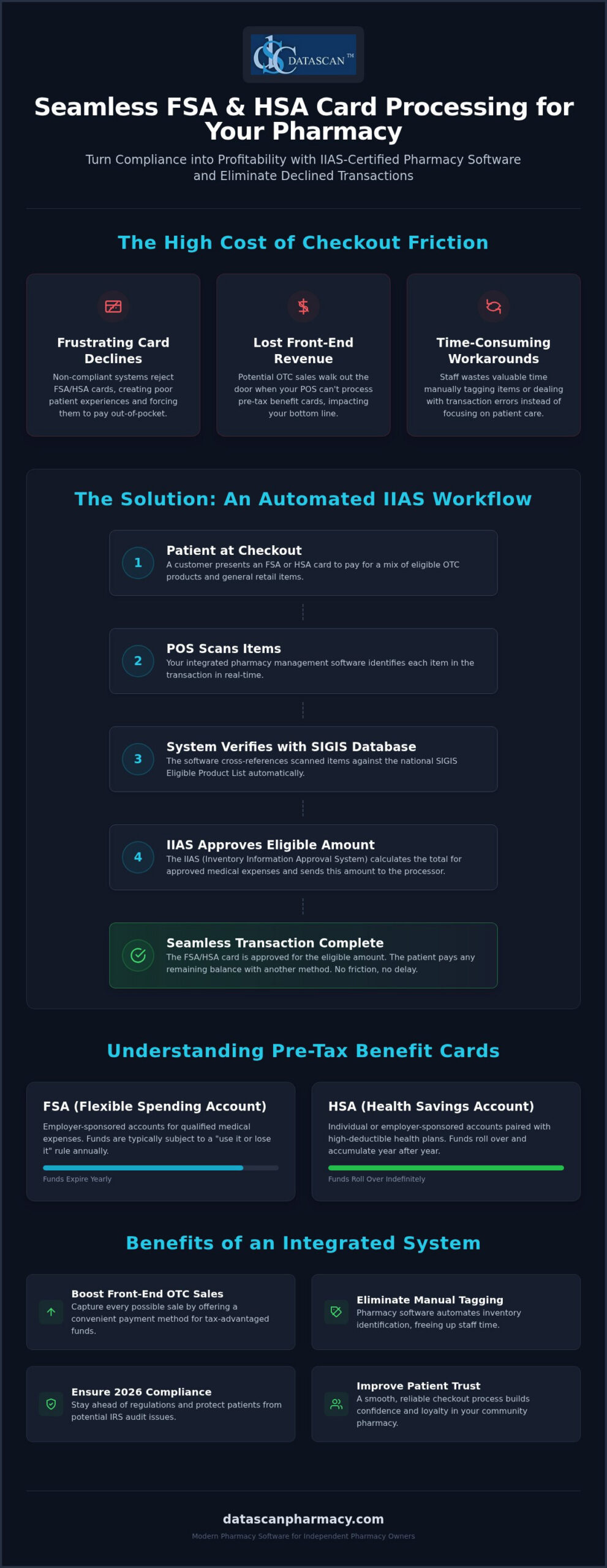
What if the biggest barrier to your front-end profitability isn’t your competition, but the “decline” message appearing on your credit card terminal? To maintain compliance and capture every possible sale, effective FSA and HSA card processing for pharmacy must be handled through an Inventory Information Approval System (IIAS) that’s built directly into your pharmacy management software. This integration ensures that eligible items are identified at the point of sale automatically, preventing the friction of manual tagging and the embarrassment of rejected transactions.
We know that independent pharmacy owners are already fighting uphill against PBM reimbursement pressures and administrative burnout. It’s frustrating to watch potential revenue walk out the door because your system isn’t communicating with SIGIS standards correctly. This guide will teach you how to implement a seamless, IIAS-compliant workflow that improves patient convenience while protecting your bottom line. We’ll break down the 2026 compliance landscape, show you how to automate your inventory identification, and demonstrate how modern technology can finally free up your time to focus on patient care instead of register errors.
Key Takeaways
Automate the identification of eligible medical expenses to eliminate time-consuming manual tagging and reduce frustrating checkout delays.
Ensure your pharmacy software and POS are IIAS-certified to prevent card declines and maintain strict regulatory compliance for 2026.
Streamline FSA and HSA card processing for pharmacy by integrating your inventory with a compliant SIGIS database to protect patients from IRS audits.
Follow a clear roadmap for auditing your current hardware and inventory systems to support seamless, pre-tax benefit card transactions.
Leverage specialized technology designed for independent pharmacies to reclaim lost time and drive higher profitability through increased front-end OTC sales.
FSA and HSA card processing for pharmacy allows independent pharmacies to accept pre-tax benefit cards for eligible medical expenses through an IIAS-certified point of sale system. This specialized technology ensures your pharmacy software automatically validates IRS-qualified items at checkout, which prevents transaction declines and eliminates the need for your staff to manually tag inventory. By implementing this system, you create a frictionless experience that protects your patients from tax penalties while driving higher front-end sales.
When you prioritize robust FSA and HSA card processing for pharmacy, you’re doing more than just adding a payment method; you’re investing in a tool that captures revenue and builds long-term patient trust. Success in the retail space depends heavily on your Merchant Category Code (MCC), which for pharmacies is 5912. This code signals to card issuers that your business is a legitimate healthcare provider. When your Datascan Point of Sale (POS) is correctly configured with this code and integrated with your pharmacy management software, you open the door to a seamless path to purchase that community members value.
What are FSA and HSA cards?
FSA (Flexible Spending Account) and HSA (Health Savings Account) cards are financial tools linked to employer-sponsored or individual tax-advantaged accounts. While FSAs generally operate on a “use it or lose it” basis within a plan year, HSAs allow funds to roll over and accumulate indefinitely. Both accounts are strictly reserved for IRS-qualified medical expenses, which means they can’t be used for non-medical retail items like snacks or greeting cards. Because these cards are restricted to specific healthcare-related merchants, the card issuer verifies your MCC to ensure the transaction is happening at a legitimate pharmacy.
Why do pharmacies need special processing for these cards?
Standard credit card processing falls short for benefit cards because the IRS mandates the use of an Inventory Information Approval System (IIAS). This requirement means your pharmacy software must verify the eligibility of every individual item in a transaction at the moment of sale. If your POS system cannot confirm that the patient is purchasing qualified products, the plan administrator will automatically decline the card to prevent tax non-compliance. Advanced pharmacy management software automates this complex verification by checking items against a national database, allowing your staff to process transactions quickly without manual intervention.
How does IIAS certification work in pharmacy management systems?
IIAS certification ensures that your pharmacy POS system automatically distinguishes between qualified medical expenses and standard retail items at the moment of checkout. This certification is essential for FSA and HSA card processing for pharmacy because it provides the technical validation that card administrators require to approve a transaction instantly. Without this certified system, benefit cards will simply decline at the register, forcing patients to pay out of pocket and file for reimbursement later.
The Datascan Point of Sale (POS) transforms this complex requirement into a background task by utilizing an integrated database that syncs directly with your core pharmacy software. Independent pharmacy owners often struggle with shrinking margins due to unfair PBM reimbursements; you can’t afford to lose additional front-end revenue because of technical checkout friction. By automating the identification of qualified items, you ensure that every OTC sale is captured efficiently. This high-level integration eliminates the need for your staff to manually override transactions, which not only saves time but also reduces the risk of human error during an audit.
What is the role of SIGIS in pharmacy processing?
SIGIS (Special Interest Group for IIAS Standards) functions as the central authority for benefit card compliance. They maintain an extensive “Eligible Product List” that serves as the industry standard for what counts as a medical expense. A robust pharmacy management software system will pull these updates automatically on a regular schedule. This means your inventory remains accurate even as regulations change or new products hit the market. It’s a “set it and forget it” solution that empowers you to compete with big-box chains while maintaining the personal touch of a community pharmacy.
How does the POS identify eligible items?
When a staff member scans a barcode, the system instantly cross-references the UPC against the SIGIS database. If the item is qualified, the POS flags it for benefit card payment. Modern systems utilize “dual-purse” technology to split a single transaction into two distinct totals: the amount covered by the FSA or HSA card and the remaining balance for non-eligible items. The patient can pay for their prescriptions and health supplies with their benefit card and then use a separate card or cash for everything else in one go. If you want to see how this workflow can benefit your store, connect with us today to learn more.
What are the requirements for accepting FSA and HSA cards?
To maintain compliance, an independent pharmacy must utilize an IIAS-certified POS, register with SIGIS, and maintain a Merchant Category Code (MCC) of 5912. These requirements ensure that FSA and HSA card processing for pharmacy remains secure and that every transaction stands up to IRS scrutiny. By meeting these standards, you protect your patients from potential tax penalties and ensure that their benefit cards work exactly as intended at the register.
Compliance isn’t a one-time setup; it’s an ongoing commitment to data accuracy and record-keeping. You must ensure your pharmacy software is properly configured to generate and store digital receipts for a minimum of 90 days, though many experts recommend retaining these records for several years to satisfy potential tax inquiries. Because the lists of eligible items are constantly shifting, your system must perform regular updates to stay current with SIGIS standards. This automation protects your patients from the headache of an IRS audit while keeping your checkout line moving quickly, allowing you to focus on clinical care rather than administrative hurdles.
How do I become SIGIS certified?
Becoming certified involves a few strategic steps that your pharmacy software vendor can help you navigate. First, you’ll need to join SIGIS as a merchant member to gain access to the national eligible product list. After joining, you complete a self-certification process that confirms your POS system meets the technical IIAS standards. Most payment processors won’t enable benefit card acceptance without this membership, so it’s a foundational piece of your technology stack that bridges the gap between your inventory and the card issuer’s requirements.
What items are generally eligible for FSA/HSA funds?
The scope of eligible items is broader than many realize, especially after the 2020 CARES Act expanded the list. Standard eligible categories include prescription drug copays, insulin supplies, and medical equipment like crutches or blood pressure monitors. The expansion also added menstrual care products and OTC medications, such as pain relievers and allergy pills, without the need for a prescription. While most health-related items are covered, “dual-purpose” products like certain vitamins or specialized supplements may still require a Letter of Medical Necessity (LMN). Your pharmacy management software should flag these nuances automatically, ensuring your staff doesn’t have to make judgment calls during a busy shift.
How do I set up FSA and HSA card processing at my pharmacy?
To set up FSA and HSA card processing for pharmacy, you must implement an IIAS-certified point of sale system that integrates directly with your pharmacy management software and a compliant SIGIS inventory database. This technical alignment ensures that every transaction is validated in real time, preventing the “card declined” messages that frustrate patients and slow down your checkout line. By following a methodical setup process, you can transform a complex compliance requirement into a streamlined workflow that protects your revenue and saves your staff valuable time.
Implementing this system involves five critical steps designed to ensure your pharmacy is ready for 2026 standards:
Step 1: Audit your current POS hardware to confirm it supports the data transmission protocols required for IIAS compliance.
Step 2: Ensure your pharmacy management software is linked to a compliant inventory database that receives regular updates.
Step 3: Register as a SIGIS member, which is a mandatory requirement for most independent pharmacies to access the national “Eligible Product List.”
Step 4: Train your staff on how to manage “mixed” baskets where some items are eligible and others require standard payment.
Step 5: Run test transactions with a specialized test card to verify that the system splits totals and processes approvals correctly before going live.
Why should I integrate my POS with my pharmacy management software?
A siloed POS system that doesn’t communicate with your core Rx software creates unnecessary manual work and increases the risk of accounting errors. When you use integrated workflow software, prescription copays are automatically flagged as eligible medical expenses, pulling data directly from the patient’s profile. This high-level integration provides centralized reporting that’s indispensable during tax season or a plan audit. It allows you to prove compliance with a few clicks, freeing you up to focus on clinical services rather than digging through disparate paper records. A fully integrated POS also plays a critical role in preventing internal theft in a pharmacy by creating an automated, auditable trail of every transaction that makes it far harder for discrepancies to go undetected.
How can I train my staff to handle benefit card transactions?
Staff training is the key to maintaining a professional environment when technical hurdles arise. Your team should be prepared to explain benefit card declines professionally, often pointing to plan-specific restrictions rather than system errors. You can also use this technology to drive front-end sales by training staff to remind patients they can use their remaining FSA funds on OTC essentials. If a patient’s plan requires additional verification, your team must know how to pull a detailed, IIAS-compliant receipt immediately to satisfy the request. If you’re ready to modernize your checkout experience, contact our team today to get started.
Why is the Datascan POS the best choice for independent pharmacies?
Datascan is the premier choice for independent pharmacies because it offers a fully integrated, IIAS-certified solution that transforms complex compliance into a competitive advantage. Our system is built to ensure that FSA and HSA card processing for pharmacy is automated and error-free, allowing you to capture every possible front-end sale without the administrative burden. As a family-owned company since 1981, we don’t answer to shareholders or private equity; we answer to the community pharmacists we’ve championed for decades.
When you encounter a payment processing issue, you need immediate answers, not a ticket in a global queue. Datascan provides 100% U.S.-based support, ensuring that you speak with experts who understand the nuances of your pharmacy management software and the specific pressures of the retail environment. This partnership is vital as independent pharmacies face aggressive PBM reform challenges and shrinking reimbursements. By driving profitable front-end OTC sales through seamless benefit card acceptance, we help you diversify your revenue streams and stay ahead of market trends.
Streamlining operations to free up time
Automated IIAS updates within our pharmacy software eliminate the need for manual inventory tagging, which is often a major time-sink for understaffed teams. This technical precision ensures your inventory is always current with SIGIS standards, freeing up your staff to focus on high-value clinical services and patient counseling. If you’re currently using a legacy system that feels like a burden, a pharmacy software conversion to Datascan is a direct investment in your store’s future efficiency.
Protecting your bottom line and profitability
In an era of low PBM reimbursements, every dollar of front-end revenue is critical for calculating pharmacy gross profit and maintaining a healthy business. Datascan empowers you to compete with big-box chains by offering the same sophisticated payment technology they use, delivered with the personal accountability of a private partner. Our Datascan Point of Sale (POS) doesn’t just process cards; it acts as a strategic tool to maximize your margins and improve patient retention. We invite you to see the difference for yourself. Connect with us today for a personalized demo of how our technology can transform your daily operations.
Future-Proof Your Front-End Revenue
Mastering FSA and HSA card processing for pharmacy is a strategic move that does more than just satisfy a compliance checklist; it transforms your register into a high-efficiency revenue engine. By automating IIAS and SIGIS updates within your pharmacy management software, you eliminate the friction of manual overrides and ensure your patients can use their pre-tax funds without the frustration of unexpected declines. This technical precision is essential for independent owners who need to reclaim their time and diversify their income in the face of evolving PBM reimbursement challenges.
Since 1981, Datascan has operated as a family-owned ally for independent pharmacies, providing the U.S.-based expert support you need to navigate complex operational shifts. Our seamless POS integration helps you capture every possible sale while maintaining the personal touch that defines community pharmacy. Don’t let technical barriers hold back your growth or patient loyalty. Take the next step toward a more profitable and streamlined operation by choosing a partner that’s fiercely loyal to your success. Request a Demo of Datascan Pharmacy POS Today and see how we can empower your business for 2026 and beyond.
Frequently Asked Questions
Do I need a special merchant account to process FSA and HSA cards?
You don’t necessarily need a brand-new merchant account, but your existing payment processor must be configured to recognize your pharmacy’s specific Merchant Category Code (MCC 5912). While some retailers choose to reduce standard transaction overhead by adopting a credit card processing with surcharge program for ordinary retail sales, benefit cards require strict compliance. Most importantly, your pharmacy software must be IIAS-certified to communicate effectively with the card issuer. Without this technical bridge, the processor cannot verify that the funds are being used for qualified medical expenses, leading to automatic declines at your register.
Why do some HSA cards work at my pharmacy but others get declined?
Declines typically occur because different plan administrators have varying levels of security and compliance requirements. Some cards utilize a “90% Rule” while others strictly require an IIAS-certified POS system to validate every item. If your pharmacy management software isn’t properly synced with the latest SIGIS eligible product list, the system may fail to vouch for an item’s eligibility, causing the transaction to fail even if the product is technically covered.
Is SIGIS membership mandatory for independent pharmacies?
While not a government law, SIGIS membership is effectively mandatory for independent pharmacies that want to automate their checkout workflow. Membership gives you access to the national “Eligible Product List,” which your POS uses to identify qualified items instantly. Without this membership, you’d have to manually identify and tag every eligible item in your store, which is an impossible task for a busy community pharmacy owner looking to save time.
How does the 2020 CARES Act affect what I can sell via FSA cards?
The 2020 CARES Act significantly expanded the range of items you can sell through FSA and HSA card processing for pharmacy. It permanently reinstated the eligibility of over-the-counter (OTC) medications without a doctor’s prescription and added menstrual care products to the list of qualified expenses. This expansion is a major opportunity for independent pharmacies to increase their front-end OTC sales by promoting these now-eligible everyday health essentials to their patients. To make the most of this opportunity, explore proven front-end sales strategies for pharmacies that can help you turn expanded FSA eligibility into measurable retail profit.
Can I process FSA cards for prescriptions only without an IIAS system?
You can technically use the “90% Rule” if 90% of your gross sales come from prescriptions and eligible medical items, but this requires a complex annual registration and manual record-keeping. It’s much more efficient to use an IIAS-certified pharmacy system software. This automation ensures that every transaction is compliant at the line-item level, which protects your patients from IRS audits and eliminates the administrative burden of manual reporting for your staff.
How long should a pharmacy keep records of FSA and HSA transactions?
You should maintain detailed digital records of all benefit card transactions for a minimum of 90 days to satisfy immediate plan administrator requests. However, for tax and audit protection, many experts recommend retaining these records for up to seven years. A robust pharmacy management software system will store these IIAS-compliant receipts automatically, ensuring you can pull them instantly if a patient or an auditor needs verification of a past healthcare purchase.
What happens if a patient tries to buy non-eligible items with an HSA card?
When a patient brings a “mixed” basket to the register, a modern POS system will utilize “dual-purse” technology to handle the transaction. The system automatically calculates the total for eligible medical items and charges that amount to the HSA card. It then prompts the clerk to collect a second form of payment, such as cash or a standard credit card, for the remaining non-eligible items like snacks or greeting cards in a single transaction.
Can I accept FSA cards through my pharmacy mobile app?
Yes, you can accept these cards through your mobile platform if your pharmacy software provider offers an integrated solution like the MobileScripts Patient Mobile App. The app must be linked to the same IIAS-certified inventory database as your in-store POS to ensure that only eligible prescription copays or OTC items are charged to the benefit card. This integration provides the same level of compliance and convenience for home delivery or mobile refills.
Did you know that after a recent spike in performance standards, there was a 35% decrease in health plans achieving a 4-Star Rating or better? For independent owners, this shift means the margin for error has vanished, making the right technology for improving star ratings your most critical asset. You can’t manually track every patient’s Proportion of Days Covered (PDC) while fighting complex PBM reimbursement models. To protect your bottom line, you need Datascan Pharmacy Management Software to automate clinical interventions and patient outreach before your scores slip.
We understand that the pressure of high DIR fees and the constant burden of paperwork can make you feel like you’re losing the “independent” in independent pharmacy. It’s frustrating to spend more time on spreadsheets than with the patients who rely on your care. This guide reveals how modern pharmacy software and tools like the MobileScripts Patient Mobile App directly influence Star Rating metrics to boost your performance and profitability. We’ll explore the specific 2026 adherence thresholds for diabetes and hypertension and show you how to reclaim your time through automated workflows that turn operational struggles into streamlined successes.
Key Takeaways
Learn how technology for improving star ratings automates patient outreach and real-time tracking to identify care gaps before they impact your performance scores.
Discover how medication synchronization and automated refill reminders within your pharmacy management software stabilize patient behavior to meet 2026 PDC thresholds.
Streamline clinical interventions by integrating MTM platforms directly into your workflow, transforming complex operational burdens into streamlined successes.
Empower your patients and strengthen the pharmacist-patient relationship through the MobileScripts Patient Mobile App and secure messaging tools.
Understand the financial advantage of partnering with a family-owned software vendor that prioritizes independent pharmacy profitability and provides dedicated U.S.-based support.
How does technology improve pharmacy Star Ratings?
Technology for improving star ratings automates patient outreach, tracks medication adherence in real-time, and identifies gaps in care before they impact your performance scores. By 2026, your pharmacy management software isn’t just a dispensing tool; it’s the central hub for protecting your revenue. PBMs use these ratings to determine your value in their network. If your scores aren’t competitive, you’ll face aggressive DIR fees that eat into your margins. Because Star Ratings are primarily used to evaluate Medicare Part D plans, your performance directly influences the quality bonus payments those plans receive, making you a vital partner or a financial liability.
What metrics do Star Ratings actually measure?
Performance is largely driven by the “Triple-A” clinical metrics, which focus on medication adherence for diabetes, hypertension, and cholesterol. For the 2026 Star Ratings, the thresholds are higher than ever. To help a plan achieve a 5-star rating, your patients must maintain a Proportion of Days Covered (PDC) of at least 92% for diabetes and 93% for hypertension and cholesterol. Beyond adherence, CMS measures Medication Therapy Management (MTM) completion rates and Comprehensive Medication Reviews (CMR). While patient experience and access measures were reduced to a 2x weight for 2026, they still account for a significant portion of the overall score. Using Datascan Pharmacy Management Software allows you to monitor these specific clinical outcomes through a single, integrated dashboard.
Why is manual tracking no longer viable in 2026?
Relying on manual tracking or monthly PBM reports is a recipe for financial disaster. PBM performance windows are complex. Waiting for trailing data means you’re reacting to problems that have already damaged your score. Manual tracking is prone to human error, and even a handful of missed adherence interventions can result in thousands of dollars in lost revenue. You need a system that updates your clinical metrics daily. Modern technology identifies at-risk patients immediately, allowing your staff to intervene when it actually matters. By automating the identification of care gaps, you free up your team to focus on clinical care instead of drowning in spreadsheets. High-performing pharmacies use automation to stay ahead of PBM reimbursement changes and ensure their independence remains profitable.
Pharmacy management software directly increases patient medication adherence by automating the repetitive tasks that keep patients on track with their chronic therapies. When you implement Datascan Pharmacy Management Software, you’re not just filling bottles; you’re deploying a proactive clinical engine. This technology for improving star ratings identifies at-risk patients who are late for refills, allowing your staff to intervene before a missed dose impacts your performance metrics. According to the 2025 Medicare Advantage and Part D Star Ratings data, adherence measures remain a cornerstone of plan evaluation, making these automated tools essential for your survival against aggressive PBM reimbursement models.
How does Medication Synchronization drive scores?
Medication synchronization, or Med Sync, is the most effective way to stabilize patient behavior and secure your pharmacy’s financial health. By aligning all chronic medications to a single monthly pickup date, you eliminate the friction of multiple trips to the pharmacy, which is a major barrier to adherence. This consistency naturally increases the Proportion of Days Covered (PDC). For the 2026 rating cycle, achieving an 80% PDC or higher is the standard for success. Beyond clinical scores, Med Sync improves your internal workflow efficiency by allowing you to prepare prescriptions during slow periods. It also optimizes inventory management, ensuring you aren’t tying up capital in stock that sits on the shelf for weeks. It transforms a chaotic dispensing schedule into a predictable, high-performing operation that frees up your time for clinical care.
What are automated adherence alerts?
Automated adherence alerts act as a safety net for your most vulnerable patients. Your pharmacy software can generate real-time notifications for your staff to call patients who have fallen behind on high-weighted drug classes, such as those for diabetes, hypertension, and cholesterol. These text and email reminders keep the patient engaged with their therapy without requiring hours of manual phone calls from your technicians. You can customize these alerts to prioritize patients with the lowest PDC scores, ensuring your interventions have the maximum impact on your Star Ratings. Integrating barcode verification into this process ensures that every refill is accurate and safe, further protecting your pharmacy’s reputation for quality care. If you want to see how these tools can transform your daily operations, it might be time to reach out for a workflow assessment.
Which software features are most effective for improving Star Ratings?
The most effective software features for improving Star Ratings include automated MTM prompts, integrated e-care plans, and real-time performance dashboards that allow you to document clinical interventions without leaving your dispensing screen. By utilizing Pharmacy Workflow Optimization Software, you ensure that every technician and pharmacist is working toward the same performance goals during their standard shifts. Investing in the right technology for improving star ratings means choosing tools that turn clinical care into a billable, documented reality rather than a manual administrative burden.
To maximize your scores in 2026, your pharmacy management software should prioritize these high-impact features:
Automated MTM triggers integrated with platforms like OutcomesMTM.
Real-time PDC tracking for diabetes, hypertension, and cholesterol medications.
Electronic Care Plan (e-care) documentation for audit-proof record keeping.
Performance dashboards with goal-setting and PBM reimbursement alignment.
Customizable clinical alerts that prompt staff for interventions at the point of sale.
How do I integrate MTM tasks into my daily dispensing workflow?
Managing Medication Therapy Management (MTM) tasks shouldn’t require your staff to log into multiple external portals or juggle separate spreadsheets. Your pharmacy software should serve as a bridge, surfacing Comprehensive Medication Review (CMR) and Targeted Medication Review (TMR) opportunities directly within the patient profile. For healthcare businesses needing specialized workflow integrations to connect external systems, custom software developers such as API Pilot can build tailored solutions that bridge these operational gaps. This technology for improving star ratings ensures that when a pharmacist is already reviewing a patient’s record, they’re prompted to complete the necessary clinical documentation in one seamless motion. By documenting these interventions in real-time, you maintain the high completion rates PBMs demand while freeing up your time to focus on complex patient consultations instead of redundant data entry.
Which metrics should my pharmacy performance dashboard show?
A performance dashboard is only valuable if it provides actionable data that links directly to your bottom line. Your dashboard should visualize your current standing in the Triple-A adherence categories, comparing your actual PDC scores against the 2026 5-star thresholds of 92% and 93%. It’s critical to have a system that identifies underperforming categories instantly, allowing you to prioritize outreach efforts where they’ll have the greatest impact on your overall score. High-performing independent pharmacies use these dashboards to link clinical success to PBM reimbursement reports, providing a clear view of how improved adherence reduces DIR fees. This level of transparency empowers you to act as a champion for your business, ensuring your independence is backed by data-driven precision.
How do mobile patient apps influence Star Rating performance?
Mobile patient apps influence Star Rating performance by directly improving medication adherence and patient experience scores through streamlined communication and automated refill reminders. As PBMs increasingly scrutinize patient engagement, deploying a dedicated app is a vital piece of technology for improving star ratings. By putting the pharmacy in the patient’s pocket, you remove the barriers that lead to therapy gaps and poor clinical outcomes. This digital connection ensures your pharmacy remains the primary healthcare hub for your community, especially as you look toward promoting a new pharmacy mobile app to patients to drive long-term growth.
How does the MobileScripts Patient Mobile App drive results?
The MobileScripts Patient Mobile App empowers your patients to take ownership of their health by providing a transparent view of their entire medication profile. Within the app, patients can set custom dose reminders and receive push notifications when it’s time to request a refill. This functionality is critical for maintaining a high Proportion of Days Covered (PDC), as it prevents the “out-of-sight, out-of-mind” mentality that often leads to non-adherence. Because the app integrates directly with your pharmacy management software, refill requests are processed instantly, reducing the administrative burden on your staff and ensuring that patients never face a gap in their chronic therapy. Reducing friction in the refill process is one of the fastest ways to stabilize your performance metrics.
How does secure messaging build patient trust?
Trust is a measurable component of the Medicare Star Rating system, particularly within the Consumer Assessment of Healthcare Providers and Systems (CAHPS) surveys that measure patient experience. Using secure messaging with patients app features allows you to answer clinical questions in real-time, providing the personalized care that big-box competitors simply can’t match. This two-way communication builds a stronger relationship between the pharmacist and the patient, which translates into higher satisfaction scores and better retention. When patients feel supported and informed, they’re more likely to stick with their prescribed regimens and provide positive feedback during PBM-mandated surveys. To see how these tools can strengthen your patient relationships while protecting your bottom line, schedule a demo of our patient engagement suite.
How can the right pharmacy software vendor help you manage PBM reimbursements and Star Ratings?
The right pharmacy software vendor helps you manage PBM reimbursements by providing transparent data auditing tools and automated reporting that identifies underpaid claims. This strategic partnership ensures your technology for improving star ratings isn’t just a clinical tool but a financial defense system against unfair DIR fees. Choosing a family owned partner like Datascan ensures your specific operational needs aren’t ignored by a massive corporation. When you have a vendor that understands the pressures of the independent market, you gain access to innovative features designed specifically for your profitability and long term success.
A high quality vendor provides several key advantages for independent owners:
Direct Advocacy: They act as a champion for the independent rather than answering to corporate shareholders.
U.S. Based Support: You receive help from experts who understand the American regulatory and PBM landscape.
Continuous Innovation: They frequently update features to combat evolving PBM reimbursement models.
How do I use my data to challenge unfair DIR fees and underpayments?
Independent pharmacies face a constant battle against complex PBM reimbursement models and unpredictable DIR fees. Your pharmacy management software should serve as a defensive shield, providing granular data that allows you to audit every claim for accuracy. By leveraging real-time performance data, you can identify discrepancies in how PBMs apply performance based fees and use that evidence to challenge unfair clawbacks. A vendor that focuses on independent pharmacy profitability will continuously update their system to keep pace with PBM reform, ensuring you have the reporting tools needed to negotiate better contract terms. This data driven approach is essential for any pharmacy patient retention strategies, as it ensures you remain financially viable enough to continue serving your community.
Operational Area
Impact of Modern Pharmacy Software
PBM Auditing
Real-time identification of underpaid claims
DIR Fees
Lower fees through optimized performance scores
Staff Burnout
Reduced workload through automated clinical prompts
Patient Care
More face-to-face time for clinical consultations
Can automated workflows really prevent pharmacist burnout?
One of the most significant benefits of sophisticated pharmacy software is its ability to reclaim your most valuable resource: time. Automating mundane tasks like refill reminders, inventory tracking, and clinical documentation allows you to step away from the computer and back to the counter. This shift is critical for preventing pharmacist burnout while maintaining the high standards required for 5 star performance. When your workflow is streamlined, you finally have the bandwidth to focus on PBM reform advocacy and high level business growth. U.S. based support from a family owned company means that when you do have questions about complex Star Rating data, you’re talking to experts who understand your business personally. Technology is the ultimate tool for the modern independent pharmacy champion, transforming operational struggles into a competitive advantage that protects your legacy and your bottom line.
Secure Your Pharmacy’s Financial Future in 2026
The strategic shift toward clinical outcomes in the 2026 CMS Star Ratings means your operational success is now inseparable from your digital capabilities. By automating medication adherence tracking and leveraging patient engagement tools like the MobileScripts Patient Mobile App, you protect your business from the revenue draining impact of poor performance scores. Implementing high performance technology for improving star ratings isn’t just about compliance; it’s about reclaiming your time and ensuring your independence remains profitable in a landscape dominated by PBM pressures.
Datascan has been a dedicated partner to independent pharmacies since 1981. As a family owned and operated company, we provide the built in Med Sync and MTM tools you need to excel, backed by industry leading U.S. based support. You don’t have to face complex reimbursement models alone when you have a visionary ally in your corner. Our pharmacy management software is designed to transform your operational burdens into streamlined successes.
Your commitment to patient care is your greatest strength. Let our technology handle the paperwork so you can stay focused on the clinical care that your community deserves.
Frequently Asked Questions
How do Star Ratings affect independent pharmacy profitability?
Star Ratings directly impact independent pharmacy profitability by determining the level of DIR fees and quality bonus payments you receive. High performance scores lead to lower clawbacks and better reimbursement rates, while poor scores result in aggressive financial penalties. For independent owners, these ratings are often the difference between a healthy margin and a loss. Utilizing specialized pharmacy management software helps you monitor these metrics to protect your bottom line against PBM pressures.
What is the most important technology for improving medication adherence?
Medication synchronization is the most critical tool for improving medication adherence and stabilizing patient behavior. By aligning all chronic prescriptions to a single pickup date, you ensure patients have a consistent supply of medication, which naturally raises their Proportion of Days Covered. This technology for improving star ratings is built into Datascan systems to help you meet the 2026 PDC thresholds for diabetes and hypertension without increasing your staff’s manual workload.
Can my pharmacy management software help reduce DIR fees?
Yes, your pharmacy software reduces DIR fees by identifying clinical care gaps and adherence issues before they negatively impact your performance scores. Since many DIR fees are tied to Star Rating metrics, using automated alerts and real-time dashboards allows you to intervene with at-risk patients immediately. This proactive approach ensures you maintain the high scores required to qualify for lower fee categories or performance incentives offered by many PBM networks.
How often should I check my pharmacy’s Star Rating performance?
You should check your performance metrics daily to ensure you aren’t missing critical intervention windows for your patients. Waiting for monthly PBM reports means you’re reacting to old data that’s already damaged your scores. Modern pharmacy system software provides real-time business intelligence dashboards that visualize your standing against 2026 goals. Frequent monitoring allows you to prioritize outreach for high-weighted drug classes like cholesterol and diabetes medications before the performance window closes.
Does a patient mobile app really improve my Star Rating?
A patient mobile app significantly improves Star Ratings by reducing friction in the refill process and enhancing communication scores in patient surveys. Tools like the MobileScripts Patient Mobile App represent vital technology for improving star ratings by empowering patients with dose reminders. These easy refill requests directly increase medication adherence. Additionally, secure messaging features build the trust measured in CAHPS surveys, helping your pharmacy outperform competitors who lack a personalized digital touchpoint.
What should I look for in a pharmacy software vendor regarding Star Ratings?
Look for a vendor that offers integrated clinical tools, real-time data dashboards, and reliable U.S. based support. You need a partner that understands the specific pressures of independent pharmacies and continuously adds features to combat PBM reimbursement challenges. A family owned vendor like Datascan, which has been operating since 1981, provides the historical perspective and personal accountability required to build future proof solutions. Don’t use vendors that treat clinical performance as an afterthought.
Is medication synchronization difficult to implement with current pharmacy software?
Implementation’s straightforward when you use a system with a built in, customizable workflow designed for Med Sync. Modern pharmacy management software automates the identification of eligible patients and simplifies the alignment of refill dates. This technology allows your team to move away from chaotic, reactive filling to a predictable, organized schedule. By streamlining this process, you reduce staff burnout while simultaneously boosting the adherence scores that PBMs use to calculate your reimbursements.
How does MTM integration impact my pharmacy’s performance scores?
MTM integration boosts performance scores by prompting pharmacists to perform Comprehensive Medication Reviews during the standard dispensing process. Instead of logging into external portals, your pharmacy software should surface these clinical opportunities automatically. This seamless workflow ensures high completion rates for PBM mandated interventions. Documenting these services within your e-care plans not only improves your clinical standing but also creates opportunities for billing for professional services, further diversifying your revenue streams.